%%{init: {"flowchart": {"diagramPadding": 40}}}%%
flowchart TD
  B1["B1 Starting from Zero<br/>Ch. 1-4"] --> B2["B2 Python Foundations<br/>Ch. 5-10"]
  B2 --> B3["B3 Small Programs<br/>Ch. 11-15"]
  B3 --> I1["I1 Tidy Code<br/>Ch. 16-20"]
  I1 --> I2["I2 Data and Internet<br/>Ch. 21-25"]
  I2 --> I3["I3 Statistics<br/>Ch. 26-29"]
  I3 --> I4["I4 Advanced Python<br/>Ch. 30-35"]
  I4 --> I5["I5 Web, Maps, Dashboards<br/>Ch. 36-43"]
  I5 --> A1["A1 Professional Engineering<br/>Ch. 44-49"]
  A1 --> A2["A2 Big Data, Geospatial<br/>Ch. 50-53"]
  A2 --> A3["A3 Machine Learning<br/>Ch. 54-59"]
  A3 --> A4["A4 Generative AI, Agents<br/>Ch. 60-63"]
  A4 --> A5["A5 Expert Level<br/>Ch. 64-68"]
  I5 -.-> A2
  I3 -.-> A3
Appendix E — Learning Path Map
This book has 68 chapters. Nobody needs to read all of them in the same order. Picture a big farm with many plots: the rice grower, the cattle keeper, and the forest ranger all come in through the same gate, then turn to their own plots. This appendix is the signpost at that gate.
This appendix contains no code, so there are no scripts to download. The figure and the tables are made from one single list of paths, so the numbers are always consistent everywhere.
The series map
The book is divided into three levels and 13 series:
| Level | Series | Title | Chapters |
|---|---|---|---|
| Basic | B1 | Starting From Zero | 1-4 |
| Basic | B2 | Python Language Foundations | 5-10 |
| Basic | B3 | Small Programs That Are Useful | 11-15 |
| Intermediate | I1 | Tidy and Maintainable Code | 16-20 |
| Intermediate | I2 | Data and the Internet | 21-25 |
| Intermediate | I3 | Statistics and Modelling | 26-29 |
| Intermediate | I4 | Advanced Python Language | 30-35 |
| Intermediate | I5 | A First Application: Web, Maps, and Dashboards | 36-43 |
| Advanced | A1 | Professional Software Engineering | 44-49 |
| Advanced | A2 | Large-Scale Data and Advanced Geospatial | 50-53 |
| Advanced | A3 | Machine Learning for Natural Resources | 54-59 |
| Advanced | A4 | Generative AI and AI Agents | 60-63 |
| Advanced | A5 | Expert Python | 64-68 |
Trace it from B1 downwards. Solid lines are the default reading order. Dotted lines mean the target series needs material from a series that is not its direct neighbour: A2 uses the basic GIS from I5, and A3 uses the statistics from I3.
Prerequisites of each series
According to the book’s outline, the official prerequisites of each series are:
| Series | Prerequisite |
|---|---|
| B1 | None; being able to use a computer to type and open files is enough |
| B2 | B1: Python 3.14 installed, able to run scripts from the terminal |
| B3 | B2: variables, branching, loops, lists/dicts, functions |
| I1 | Basic level finished (the B3 inventory project) |
| I2 | I1: OOP, environments, tests, git |
| I3 | I2: pandas, numpy, visualisation |
| I4 | I1 to I3 |
| I5 | I4 (Pydantic and async are used in FastAPI) |
| A1 | Intermediate level finished (the I5 applications) |
| A2 | A1 and I5 (basic GIS) |
| A3 | I3 (statistics and regression) and A2 (imagery data) |
| A4 | A3 (ML basics and GPU hardware) |
| A5 | A1 to A4 |
Those prerequisites are written per series. The five paths below pick some chapters from each series, so they sometimes skip a series that is a prerequisite for a full reader. To keep the paths safe, we checked the real cross-references in the manuscript: every sentence like “as in Chapter N” that points to an earlier chapter. The result is listed under each path as “what to open briefly”.
How to read the path map
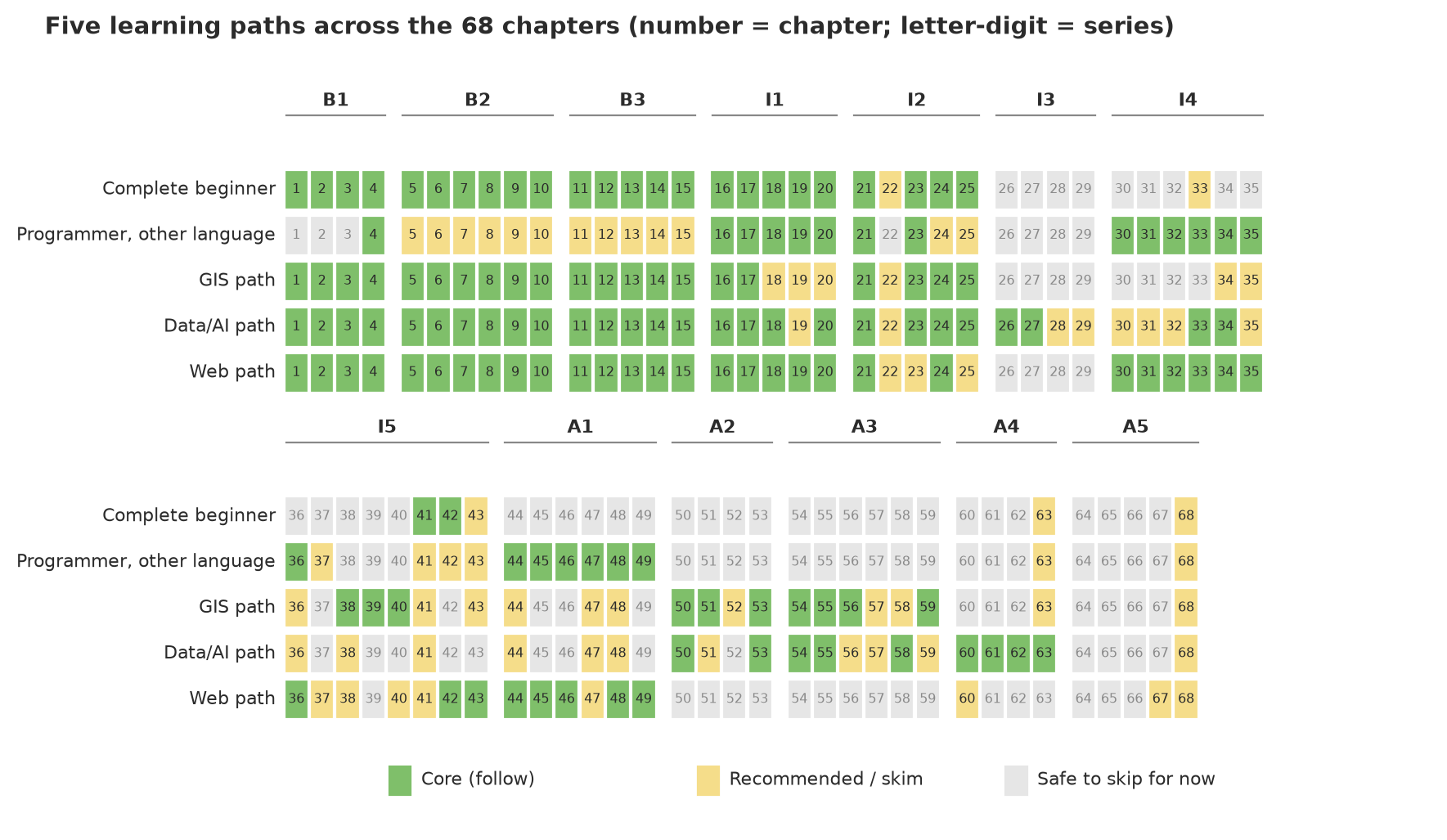
Each row is one path, each box is one chapter, grouped by series. Follow your path’s row from left to right, then on to the lower panel (Chapters 36 to 68). The three box colours mean:
- Core (green): follow it, and do the exercises. Later chapters on that path depend on it.
- Recommended or skim (yellow): helpful, but you can read it quickly or postpone it until you need it. For programmers from another language, this is also the colour of the basic chapters that are enough to skim.
- Safe to skip for now (grey): not needed by this path. “For now” means: the book waits for you if your interests change.
NoteREMEMBER
Colour is not a judgement of a chapter’s quality. A chapter that is grey on the GIS path may be the most important chapter on the web path. A path is only a suggested order so you reach your goal without detours.
The five paths at a glance
%%{init: {"flowchart": {"diagramPadding": 40}}}%%
flowchart LR
  subgraph awam ["Complete beginner"]
    direction LR
    a1["Ch. 1-15"] --> a2["Ch. 16-21, 23-25"] --> a3["Ch. 41-42"]
  end
  subgraph lain ["Programmer, other language"]
    direction LR
    l1["Ch. 4 (+ skim 5-15)"] --> l2["Ch. 16-21, 23"] --> l3["Ch. 30-36"] --> l4["Ch. 44-49"]
  end
  subgraph gis ["GIS path"]
    direction LR
    g1["Ch. 1-17, 21, 23-25"] --> g2["Ch. 38-40"] --> g3["Ch. 50, 51, 53"] --> g4["Ch. 54-56, 59"]
  end
  subgraph data ["Data/AI path"]
    direction LR
    d1["Ch. 1-18, 20-21, 23-25"] --> d2["Ch. 26-27, 33-34"] --> d3["Ch. 50, 53-55, 58"] --> d4["Ch. 60-63"]
  end
  subgraph web ["Web path"]
    direction LR
    w1["Ch. 1-21, 24"] --> w2["Ch. 30-36"] --> w3["Ch. 42-43"] --> w4["Ch. 44-46, 48-49"]
  end
  a3 --> PA(["Final Project"])
  l4 --> PA
  g4 --> PA
  d4 --> PA
  w4 --> PA
This figure is only a summary. The full chapter list, including recommended chapters, is in each path’s section. Look at the chapter groups in each box: numbers separated by commas are separate chapters, and a hyphen means a range.
The relative load of each path
This table compares the number of chapters on each path, not how long you will take to study. Study time depends on habits, background, and how often you do the exercises; we promise nothing about it. The last column counts words in the Indonesian manuscript, without code, as a rough measure of how much text you read.
| Path | Core chapters | Recommended chapters | Safe to skip | Share of core text |
|---|---|---|---|---|
| Complete beginner | 26 | 5 | 37 | about 31% |
| Programmer, other language | 21 | 19 | 28 | about 27% |
| GIS path | 31 | 17 | 20 | about 40% |
| Data/AI path | 36 | 19 | 13 | about 51% |
| Web path | 36 | 11 | 21 | about 42% |
“Share of text” is the words in the core chapters divided by the words in all 68 chapters (about 114 thousand words in the Indonesian manuscript, without code, when this table was made). A chapter with a lot of code and hard exercises takes more effort than its word count suggests.
Path 1: Complete beginner
For whom: you have never programmed and want to automate daily work, for example turning field data into an Excel or PDF report.
Suggested order:
- Foundations (Chapters 1 to 15). Follow them in order without jumping. Here you learn the terminal, variables, functions, files, CSV/JSON, and automatic office reports. Chapter 15 closes the Basic level.
- Tidy code (Chapters 16 to 20). OOP, virtual environments, tests, code quality, and git. You need them before your programs grow.
- Data and the internet (Chapters 21, 23, 24, 25). APIs, numpy and pandas, databases, and your first data analysis.
- Automation (Chapters 41 and 42). Automating repetitive tasks and building command-line tools.
- Final Project, then choose the series closest to your work from the other paths.
Recommended (yellow): Chapter 22 (regex, when you often clean text), Chapter 33 (type hints, because Chapter 42 uses the idea), Chapter 43 (dashboards), Chapter 63 (licences and ethics), and Chapter 68 (portfolio).
Safe to skip for now: advanced statistics (26-29), advanced Python language (30-35 except 33), web and GIS (36-40), and the Advanced level except Chapters 63 and 68.
What to open briefly: Chapter 41 mentions Chapters 36 to 40 only to remind full readers of earlier chapters (not new material), so reading them is not required. Chapter 42 mentions Chapter 33 for type hints.
Path 2: Programmer from another language
For whom: you already program in another language (for example Java, JavaScript, or R) and want to become productive in Python quickly.
Suggested order:
- Chapter 4 to install Python and read Python’s error messages. Appendix A is enough for installation matters.
- Chapters 5 to 15 skimmed (yellow). Skip the explanations and watch the differences from your language: indentation as blocks, built-in
dictandlist,with, andpathlib. The core chapters below refer back to these, so it is better to open them briefly than to skip them entirely. - Tidy code (Chapters 16 to 21). Pythonic OOP,
venvanduv,pytest,ruff, git, and APIs. - Advanced Python (Chapters 30 to 35). Generators, decorators, context managers, type hints, Pydantic, and async. These are what make Python code feel “Pythonic”.
- Web and engineering (Chapter 36, then 44 to 49). FastAPI, performance, packaging, design patterns, modern Python, deployment, and security.
- After that, pick the GIS, data/AI, or web path for specialised material.
Recommended (yellow): Chapters 5 to 15 (skimmed), Chapters 24 and 25 (databases and data analysis), Chapter 37 (Python in the browser), Chapters 41 to 43 (automation, interfaces, dashboards), Chapter 63 (licences and ethics), and Chapter 68.
Safe to skip: Chapters 1 to 3 (computers, algorithms, terminal), Chapter 22, statistics (26-29), GIS (38-40), and series A2 to A5 until you need them (except Chapters 63 and 68).
What to open briefly: Chapter 4 refers to Chapters 1 and 3; if the terminal is still unfamiliar, open Chapter 3 briefly. Chapter 47 mentions Chapter 40 only to compare how scripts are written. The references to the basic chapters (5 to 14) from Chapters 17, 18, 19, 21, 23, 30, 31, 32, 36, and 47 explain why the basic chapters are yellow, not grey.
Path 3: GIS
For whom: you work with maps, satellite images, or spatial data (forestry, agriculture, fisheries, environment) and want to automate or analyse them.
Suggested order:
- Foundations (Chapters 1 to 15, then 16 and 17). The virtual environments of Chapter 17 are almost mandatory, because GIS libraries (GDAL, PROJ) most often cause trouble when installing.
- Data (Chapters 21, 23, 24, 25). APIs, pandas, SQLite, and matplotlib. Chapter 24 prepares you for PostGIS in Chapter 40.
- GIS 1 to 3 (Chapters 38, 39, 40). Vector (GeoPandas), raster (Rasterio, NDVI), and interactive maps, PostGIS, and PyQGIS.
- Advanced geospatial (Chapters 50, 51, 53). Parquet, COG, and STAC formats; imagery from the cloud; data that does not fit in memory (Dask).
- Machine learning (Chapters 54, 55, 56, 59). Tree-based models, PyTorch and GPU basics, object detection in imagery, and applications in forestry, agriculture, fisheries, and livestock.
Recommended: Chapters 18 and 19 (tests and code quality), Chapter 20 (git), Chapter 22 (regex), Chapters 34 and 35 (Pydantic and async), Chapter 36 (web), Chapter 41 (scraping), Chapter 43 (dashboards with maps), Chapter 44 (performance), Chapters 47 and 48 (modern Python and Docker), Chapter 52 (drones and IoT), Chapters 57 and 58 (optimisation and XAI), Chapter 63 (data and imagery licences), Chapter 68.
Safe to skip for now: statistics (26-29; take 26 and 27 if you want to understand XAI in Chapter 58), Chapters 30 to 33, Chapters 37, 42, 45, 46, and 49, Chapters 60 to 62, and Chapters 64 to 67.
What to open briefly: Chapter 21 mentions Chapter 20 (git); Chapter 40 mentions Chapter 34 (Pydantic); Chapter 50 mentions Chapter 48 (Docker); Chapter 53 mentions Chapters 35 and 47; Chapter 59 mentions Chapters 57 and 58. All are recommendations, none blocks you.
Path 4: Data and AI
For whom: you want to use Python for data analysis, statistics, machine learning, and generative AI applications.
Suggested order:
- Foundations (Chapters 1 to 18, then 20). Including OOP, virtual environments, tests, and git. Chapter 20 (git) is referred to by Chapters 21, 33, and 34.
- Data (Chapters 21, 23, 24, 25). APIs, pandas, databases, and your first data analysis.
- Statistics and modelling (Chapters 26 and 27). Hypothesis tests and regression, which Chapter 58 needs.
- Advanced Python (Chapters 33 and 34). Type hints and Pydantic.
- Large-scale data (Chapters 50 and 53). Parquet, Polars, DuckDB, and Dask.
- Machine learning (Chapters 54, 55, 58). Classical models, PyTorch and GPUs, and model explanation and MLOps.
- Generative AI (Chapters 60 to 63). LLM applications and RAG, transformers, AI agents, and licences and ethics.
Recommended: Chapters 19, 22, 28 and 29 (qualitative methods and reproducible research), 30 to 32, 35, 36, 38, 41, 44, 47, 48, 51, 56 (computer vision), 57, 59, and 68.
Safe to skip for now: Python in the browser (37), raster GIS and maps (39, 40), interfaces and dashboards (42, 43), packaging and design patterns (45, 46), security (49), IoT (52), and Chapters 64 to 67.
What to open briefly: Chapter 20 (git) before 21, 33, and 34; Chapter 48 (Docker) before 50 and 60; Chapters 35, 47, 51 for 53; Chapter 36 for 60; Chapter 38 for 62; Chapters 22 and 41 for 63. All are recommendations.
WarningWARNING
This path follows the book’s outline: Chapter 54 (classical ML) refers to no other chapter, but Chapter 58 refers to Chapters 26 and 27. If you skip statistics, the model-explanation part of Chapter 58 will feel heavier.
Path 5: Web
For whom: you want to build APIs, sites, or dashboards with Python.
Suggested order:
- Foundations (Chapters 1 to 21). Including OOP, venv, tests, code quality, git, and APIs (Chapter 21).
- Databases (Chapter 24). SQLite, SQL, and SQLAlchemy.
- Advanced Python (Chapters 30 to 35). Pydantic (34) and async (35) are used directly by FastAPI.
- Web (Chapter 36). Flask, FastAPI, and REST.
- Interfaces and dashboards (Chapters 42 and 43). CLI, simple GUI, Streamlit, Gradio, and Dash.
- Engineering (Chapters 44, 45, 46, 48, 49). Performance, packaging, design patterns, deployment (Docker, CI/CD), and security.
Recommended: Chapters 22, 23, 25, 37 (Python in the browser), 38 and 40 (maps, because Chapter 43 builds interactive maps), 41 (scraping), 47 (modern Python), 60 (LLM applications served over the web), 67 (distributed systems), and 68.
Safe to skip for now: statistics (26-29), raster (39), large-scale data and machine learning (50-59), Chapters 61 to 63, and Chapters 64 to 66.
What to open briefly: Chapter 24 mentions Chapter 23 (pandas); Chapters 42 and 43 mention Chapter 41; Chapter 43 mentions Chapters 37, 38, and 40; Chapter 49 mentions Chapter 47. All are recommendations.
If you change path midway
The map above does not lock you in. A few handholds:
- Moving up a level: if you want to jump to a grey chapter, first look at its series’ prerequisites in the table. Then trace the “Chapter N” sentences in that chapter: the chapters it names are material it assumes you already have.
- Lost in an advanced chapter: step back one series. Almost always the cause is a single basic chapter that was skipped.
- Need a term: open Appendix C. Need extra sources: open Appendix F. Need installation help: Appendix A.
Method: how these paths were built
So the paths are not just guesses, three things were checked with a script rather than from memory alone:
- Series prerequisites were taken from the book’s outline (the table above).
- Cross-references between chapters were counted: a script read all Indonesian manuscripts and recorded every “Chapter N” mention that points to an earlier chapter (the “Next, in Chapter N” lines are not counted because they point forward). A chapter referred to by a core chapter but coloured grey was reported, and the path was fixed until none was missed. What remains are references with “recommended” status, and those are listed under each path.
- Relative load was computed from the number of chapters and words, not from time estimates.
What was not checked: which chapter counts as “core” for a given goal is the author’s judgement. If your work differs from these five pictures, treat this map as a starting point.
Next: after choosing a path, open Appendix A if you have not installed Python yet, or start straight at the first chapter of your path. Appendix F lists learning sources outside this book.