%%{init: {"flowchart": {"diagramPadding": 40}}}%%
flowchart LR
A["CSV file<br/>300,000 lines"] --> B["Generator<br/>read_records()"]
B --> C["Sum and count<br/>per sector"]
C --> D["Average<br/>per sector"]
Chapter 30 — Iterators and Generators: Reading One at a Time, Without Piling Up
Series I4 — Advanced Python Language
All scripts for this chapter are in the kode/ch30/ folder. On the web version, you can also download them all at once (zip).
Series I1 to I3 made your code tidy and your results defensible. In Series I4, we strengthen the Python language itself: features that make code thriftier, shorter, and tougher. We start with something you already use quietly all the time: loops.
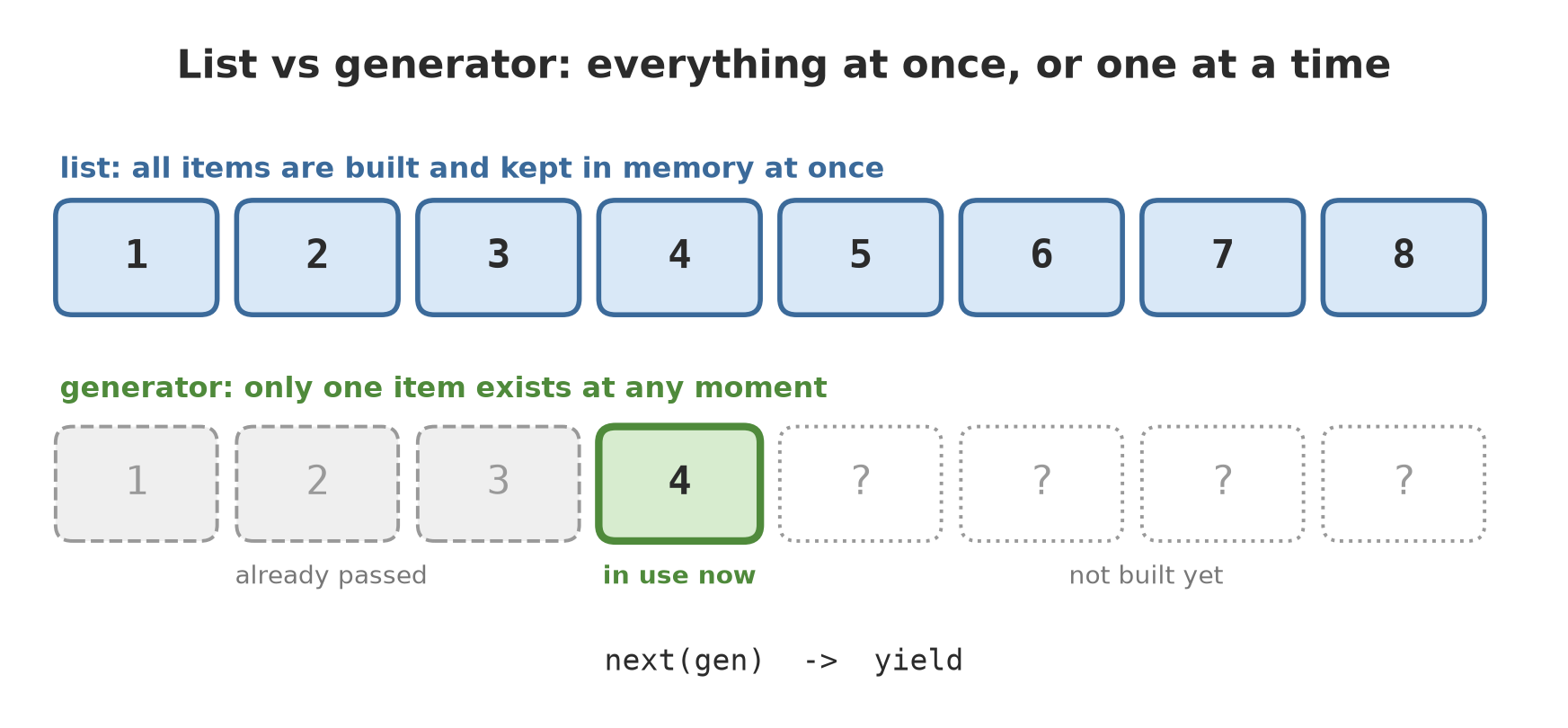
Picture a foreman recording a harvest. Way one: he waits until all sacks have been carried in, piles them in the warehouse, and only then starts recording. Way two: he records each sack as it arrives, then lets it go. Way one needs a big warehouse. Way two needs only a small desk. This chapter is about way two.
What for does: the iteration protocol
A for loop works on anything iterable: lists, tuples, dicts, strings, files. Behind the scenes there are two steps: Python asks for an iterator (a sort of bookmark) with iter(), then keeps asking for the next item with next() until the signal StopIteration appears.
01_iteration_protocol.py
# Chapter 30 - What a for loop really does
ponds = ["A", "B", "C"]

iterator = iter(ponds)        # ask the list for a "bookmark"
print(type(iterator).__name__)
print(next(iterator))
print(next(iterator))
print(next(iterator))

try:
    next(iterator)            # nothing left
except StopIteration:
    print("StopIteration: nothing left")

# for does the same thing, and catches StopIteration for you
for name in ponds:
    print("Pond", name)
list_iterator
A
B
C
StopIteration: nothing left
Pond A
Pond B
Pond Citer(ponds)gives an object of typelist_iterator, a bookmark on that list.- Three
next()calls giveA,B,C. The fourth call raisesStopIteration, meaning “all used up”. - A
forloop does exactly this, and catchesStopIterationfor you, so you never see it.
NoteREMEMBER
Iterable = something you can ask for an iterator (iter()). Iterator = something you can ask for the next item (next()). An iterator is single-use: once exhausted, it does not rewind.
Your own iterator with a class
For your own object to work in a for loop, its class only needs two methods: __iter__ (returns the iterator) and __next__ (gives the next item, or raises StopIteration).
02_iterator_class.py
# Chapter 30 - Making your own iterator with a class
class Countdown:
    """Counts down the days until harvest."""

    def __init__(self, days):
        self.days = days

    def __iter__(self):
        return self

    def __next__(self):
        if self.days <= 0:
            raise StopIteration
        self.days -= 1
        return self.days + 1


for left in Countdown(3):
    print("Days left:", left)

countdown = Countdown(2)
print(list(countdown))
print(list(countdown))   # used up: empty
Days left: 3
Days left: 2
Days left: 1
[2, 1]
[]Look at the end: the first list(countdown) gives [2, 1], but the second gives []. The iterator was already read to the end. This is the basic nature of iterators, and it returns as a trap below.
Generators: the short way to make an iterator
Writing a class just to count down is a chore. Python has a shortcut: an ordinary function that uses yield becomes a generator function. yield means “hand over this value, then pause here until asked again”.
03_generator_yield.py
# Chapter 30 - A generator function with yield
def countdown(days):
    print("  (start)")
    while days > 0:
        yield days
        print("  (resume after yield)")
        days -= 1
    print("  (finished)")


gen = countdown(2)
print("Generator created, nothing has run yet")
print("first value:", next(gen))
print("second value:", next(gen))
try:
    next(gen)
except StopIteration:
    print("StopIteration")
Generator created, nothing has run yet
(start)
first value: 2
(resume after yield)
second value: 1
(resume after yield)
(finished)
StopIterationFollow the order, because this is where the magic lies:
countdown(2)runs nothing yet. It merely creates a generator object. That is why “(start)” is not printed yet when “Generator created” appears.- The first
next(gen)runs the function from the start toyield 2, then stops. “(start)” is printed, then the value, 2. - The second
next(gen)continues right after thatyield: “(resume after yield)”,daysdrops to 1, thenyield 1. - The third
next(gen)continues, thewhileends, “(finished)” is printed, and the function ends, producingStopIteration.
A generator is a function that remembers its position. All its local variables stay alive between two yields.
Generator expressions and proof of saved memory
Like the list comprehension (Chapter 9), there is a generator version: swap square brackets for round ones. The result is not a list but a generator that computes each item when asked.
04_generator_expression.py
# Chapter 30 - Generator expressions and saving memory
import sys
import tracemalloc

squares_list = [n * n for n in range(1_000_000)]   # square brackets: all built now
squares_gen = (n * n for n in range(1_000_000))    # round brackets: built one by one

print("list sum     :", sum(squares_list))
print("generator sum:", sum(squares_gen))
del squares_list

# The generator object stays small, however many items it will produce
small = (n for n in range(10))
large = (n for n in range(10_000_000))
print("same size for 10 and 10 million items:", sys.getsizeof(small) == sys.getsizeof(large))


def peak_memory(builder):
    tracemalloc.start()
    result = sum(builder())
    _, peak = tracemalloc.get_traced_memory()
    tracemalloc.stop()
    return result, peak


_, peak_list = peak_memory(lambda: [n for n in range(500_000)])
_, peak_gen = peak_memory(lambda: (n for n in range(500_000)))
print("list peak memory is more than 100x the generator:", peak_list > 100 * peak_gen)
list sum : 333332833333500000
generator sum: 333332833333500000
same size for 10 and 10 million items: True
list peak memory is more than 100x the generator: True- Both ways give the same sum,
333332833333500000: the result does not change, only the way of working. - The generator object has the same size (
sys.getsizeofequal) for 10 items and for 10 million. It does not store the items, only the “recipe” for making them. tracemalloc(a built-in tool that records memory use) shows that the list’s peak memory is more than 100 times the generator’s for 500,000 numbers.
Note that this program does not print byte counts, only comparisons (True). Exact sizes change between Python versions and computers. The comparison “much larger” holds everywhere.
TipTIP
If you only need to pass over the data once (sum, find the largest, filter), do not build a list first. sum(x * x for x in data) is thriftier and needs no square brackets.
Generators further: itertools, yield from, and a trap
05_advanced_generators.py
# Chapter 30 - itertools, yield from, and the used-up generator trap
from itertools import islice


def endless_numbers():
    n = 1
    while True:          # never ends, yet safe because it is lazy
        yield n
        n += 1


print(list(islice(endless_numbers(), 5)))   # take just 5


def all_ponds():
    yield from ["A1", "A2"]
    yield from ["B1"]


print(list(all_ponds()))

# Trap: a generator can be read only ONCE
harvest = (kg for kg in [245.5, 310.0, 198.5])
print("first :", sum(harvest))
print("second:", sum(harvest))   # empty, not an error
[1, 2, 3, 4, 5]
['A1', 'A2', 'B1']
first : 754.0
second: 0- The generator
endless_numbers()never ends, yet it is safe: it works only when asked.itertools.islice(..., 5)takes the first five and then stops asking. yield frompasses along all items from another iterable, soall_ponds()joins two lists.- The trap: the first
sum(harvest)gives 754.0, but the second gives0. A generator can be read only once. There is no error, just an empty result, which makes this bug slippery. If data must be read twice, build a new generator or save it to a list.
Chaining generators into a pipeline
The biggest strength of generators: several can be joined like water pipes. Each stage does one small job, and data flows one item at a time.
06_generator_pipeline.py
# Chapter 30 - Chaining generators into a pipeline
records = ["pond,A,540.5", "pond,B,broken", "pond,C,498.0", "", "pond,D,610.0"]


def non_empty(lines):
    for line in lines:
        if line.strip():
            yield line


def split_fields(lines):
    for line in lines:
        yield line.split(",")


def numbers_only(rows):
    for sector, unit, value in rows:
        try:
            yield unit, float(value)
        except ValueError:
            print("  skipped:", unit, value)


pipeline = numbers_only(split_fields(non_empty(records)))
print("pipeline built, nothing processed yet")
for unit, weight in pipeline:
    print(unit, weight)
pipeline built, nothing processed yet
A 540.5
skipped: B broken
C 498.0
D 610.0When pipeline is built, nothing has been processed yet (that is why “pipeline built, nothing processed yet” appears first). The work happens in the for. The empty line is filtered by non_empty, the line pond,B,broken is skipped by numbers_only (with the message “skipped”), and the rest flows to the end. There is no intermediate list.
Running Project I4: reading a big data file
The Series I4 project strengthens your field code, chapter by chapter. Step one: reading a large field-record file. The script below makes a fake file (sample numbers, fictional) for five sectors (forest, orchard, ricefield, pond, barn) with 300,000 lines, larger than 5 MB, then reads it with a generator.
07_project_read_big.py
# Chapter 30 - Running project I4: reading a big file with a generator
import random
import tracemalloc
from pathlib import Path

folder = Path(__file__).parent / "_tmp"
folder.mkdir(exist_ok=True)
file = folder / "big_field_data.csv"

# 1) Make a fake file (sample numbers, fictional)
ranges = {"forest": (20, 60), "orchard": (150, 350), "ricefield": (3000, 7000),
          "pond": (400, 700), "barn": (300, 450)}
rng = random.Random(42)
with open(file, "w", encoding="utf-8") as f:
    f.write("sector,unit,day,value\n")
    for i in range(300_000):
        sector = list(ranges)[i % 5]
        low, high = ranges[sector]
        f.write(f"{sector},{sector[0].upper()}{i % 7 + 1},{i // 5 + 1},{rng.uniform(low, high):.1f}\n")
print("file is larger than 5 MB:", file.stat().st_size > 5_000_000)


# 2) A generator reads line by line
def read_records(path):
    with open(path, encoding="utf-8") as f:
        next(f)                      # skip the header
        for line in f:
            sector, unit, day, value = line.strip().split(",")
            yield sector, unit, int(day), float(value)


def average_per_sector(path):
    total, count = {}, {}
    for sector, _, _, value in read_records(path):
        total[sector] = total.get(sector, 0) + value
        count[sector] = count.get(sector, 0) + 1
    return {s: total[s] / count[s] for s in sorted(total)}, sum(count.values())


tracemalloc.start()
average, how_many = average_per_sector(file)
_, peak_gen = tracemalloc.get_traced_memory()
tracemalloc.stop()
print("records read:", how_many)
for sector, value in average.items():
    print(f"{sector:9} average {value:8.1f}")

# 3) For comparison: read everything into a list first
tracemalloc.start()
everything = list(read_records(file))
_, peak_list = tracemalloc.get_traced_memory()
tracemalloc.stop()
print("records in the list:", len(everything))
print("list approach peak memory is more than 20x the generator:", peak_list > 20 * peak_gen)
file is larger than 5 MB: True
records read: 300000
barn average 375.2
forest average 40.0
orchard average 250.1
pond average 550.2
ricefield average 4996.2
records in the list: 300000
list approach peak memory is more than 20x the generator: TrueFollow the result:
- The file is made with a fixed random seed (
random.Random(42)), so the numbers are the same every run. It is placed in_tmp/, not in the script folder. - Each sector gets 60,000 lines (300,000 divided by 5). The per-sector averages follow the ranges we set: ricefield around 5,000, pond around 550, and so on.
- The generator
read_recordsuseswith open(...)(Chapter 13): the file is closed automatically. The loopfor line in fitself already reads the file line by line, without loading everything. - For comparison:
list(read_records(file))keeps all 300,000 records, and its peak memory is more than 20 times higher. Because only the comparison is printed, the output is stable.
CautionTECHNICAL STUFF (feel free to skip)
sys.getsizeof measures only the object itself, not what it refers to. For a list, the size grows because a list really does hold a pointer to every item. For a generator, the size stays fixed because it keeps only its last state (the position in the function and its local variables). That is why this chapter uses tracemalloc to compare real memory use, and prints only the comparison.
Exercises
- Write a generator function
evens_up_to(n)that yields the even numbers from 2 ton. Printlist(evens_up_to(10)). - Change the generator expression in
04_generator_expression.pyso it sums only the squares of odd numbers. Does the sum change? Why? - Add one stage to the pipeline in
06_generator_pipeline.py: a generatorabove(rows, limit)that lets through only weights above 500. Attach it at the end of the pipeline. - Challenge: change
07_project_read_big.pyso it also finds the largest value per sector in a single pass, without keeping all the records.
Chapter Summary
foruses the iteration protocol:iter()to ask for an iterator,next()for the next item,StopIterationwhen done.- A generator is made with
yield; the function pauses and resumes from its last position. - A generator expression
(x for x in ...)computes on demand, stays small, and saves memory. - A generator can be read only once; an empty result on the second read is the classic trap.
- Several generators can be chained into a pipeline without intermediate lists.
- Project I4: the big file is read with a generator, and 300,000 records are summarised without piling up in memory.
Next, in Chapter 31: decorators and closures, a way to “wrap” a function with extras (logging, retrying) without changing what is inside.