Chapter 31 — Decorators and Closures: Wrapping Functions with Extras
Series I4 — Advanced Python Language
All scripts for this chapter are in the kode/ch31/ folder. On the web version, you can also download them all at once (zip).
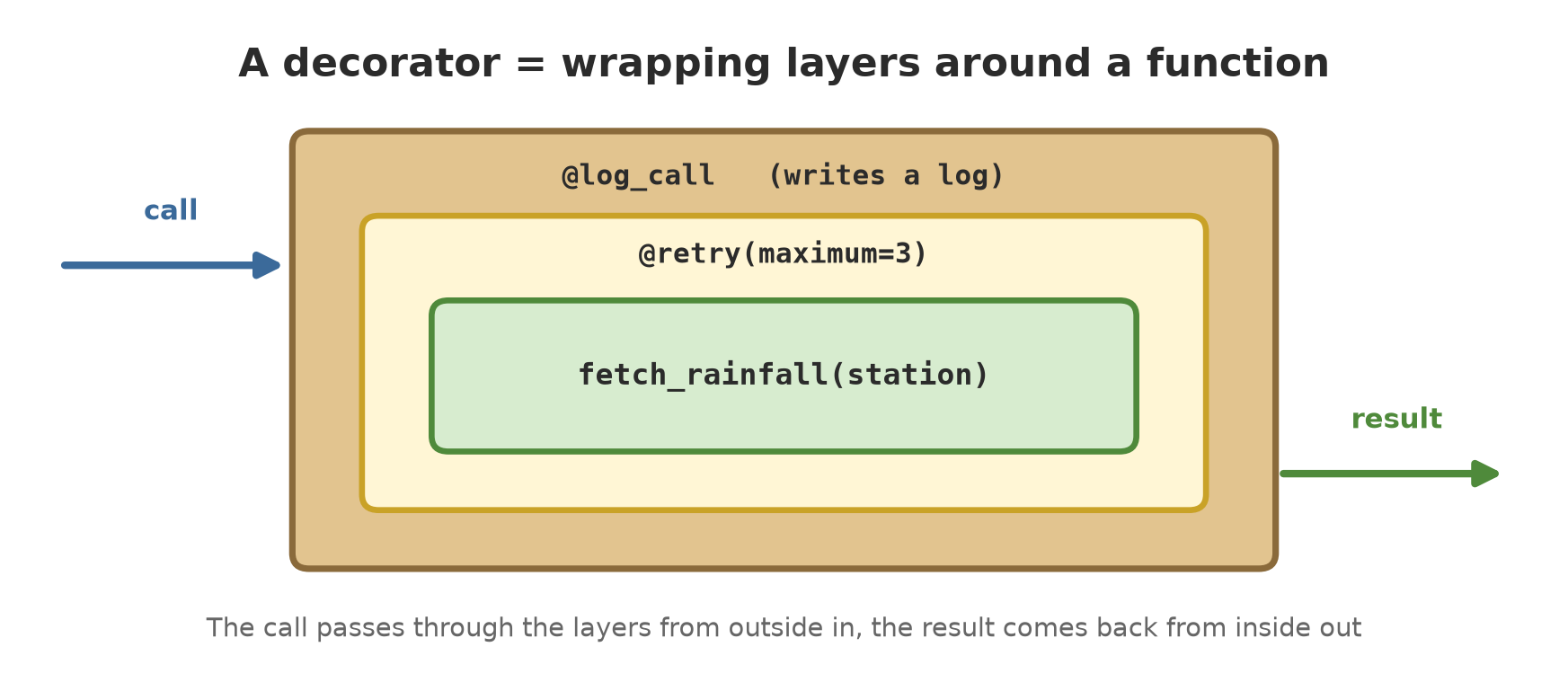
In Chapter 30, your project learned to read big files. Now imagine you have ten functions that fetch data from various places, and you want: (1) a log entry each time a function starts and finishes, (2) automatic repeating when the network drops. Copying the logging and repeating code into ten functions is boring and error-prone. Better to “wrap” each function in an extra layer, like wrapping a gift: the contents stay the same, but there is a layer on the outside. That is a decorator.
Functions are objects
The foundation of decorators: in Python, a function is just one kind of object, like a number or a piece of text. It can be given another name, stored in a dict, and passed to another function.
01_functions_are_objects.py
# Chapter 31 - Functions are objects
def biomass_kg(count, weight_g):
    return count * weight_g / 1000


tool = biomass_kg             # copies the "name", does not call it
print(tool(800, 540.5))
print(tool is biomass_kg)
print(type(biomass_kg).__name__)

# Functions can be stored in a dict and picked by name
formulas = {
    "biomass": biomass_kg,
    "area": lambda length, width: length * width,
}
print(formulas["area"](20, 15))


# Functions can be passed to other functions
def apply(function, *arguments):
    return function(*arguments)


print(apply(biomass_kg, 1000, 500))
432.4
True
function
300
500.0tool = biomass_kg(without brackets) does not call the function; it merely adds another name for the same object. Proof:tool is biomass_kgisTrue.- The object’s type is
function. - In the dict
formulas, a function is picked by name:formulas["area"](20, 15)gives 300. apply(biomass_kg, 1000, 500)passes a function as an ingredient.*argumentsgathers the remaining arguments, andfunction(*arguments)unpacks them again. The result is 500.0.
Closures: a function that remembers
A function may be made inside another function. The inner function can use variables owned by the outer function, even after the outer function has finished. The combination “function + the variables it remembers” is called a closure.
02_closure.py
# Chapter 31 - Closure: a function that remembers
def make_counter(start=0):
    total = start

    def add(amount):
        nonlocal total          # without this, total would be a new variable
        total += amount
        return total

    return add


orchard_harvest = make_counter()
pond_harvest = make_counter(100)
print(orchard_harvest(10))
print(orchard_harvest(5))
print(pond_harvest(1))          # another counter, separate memory

content = orchard_harvest.__closure__[0].cell_contents
print("memory of orchard_harvest:", content)
10
15
101
memory of orchard_harvest: 15make_counter()returns the functionadd. That function “carries” the variabletotal.orchard_harvestandpond_harvesthave separate memories: 10, then 15 for the orchard, while the pond starts from 100 and becomes 101.nonlocal totalis required when the inner function wants to change the outer variable. Without it,total += amountis treated as making a new local variable and raises an error (remember the scope discussion in Chapter 10).__closure__[0].cell_contentsshows that “memory” directly: 15.
Your first decorator
A decorator is a function that takes a function and returns a new function (the wrapper). The @ sign is only shorthand.
03_basic_decorator.py
# Chapter 31 - A first decorator (not perfect yet)
def log_call(function):
    def wrapper(*args, **kwargs):
        print(f"calling {function.__name__}")
        result = function(*args, **kwargs)
        print(f"done, result = {result}")
        return result
    return wrapper


@log_call
def biomass_kg(count, weight_g):
    """Pond biomass in kg."""
    return count * weight_g / 1000


biomass_kg(800, 540.5)

# @log_call is the same as: biomass_kg = log_call(biomass_kg)
print(biomass_kg.__name__)      # the real identity is lost
print(biomass_kg.__doc__)
calling biomass_kg
done, result = 432.4
wrapper
None@log_callabovedef biomass_kgmeans the same asbiomass_kg = log_call(biomass_kg).- Every call now goes through
wrapper: prints “calling”, runs the real function, prints the result, then returns it. *args, **kwargslets the wrapper accept any arguments and pass them along unchanged.- There is a flaw:
biomass_kg.__name__has becomewrapperand its docstring is gone (None). The function lost its identity.
functools.wraps: keeping the identity
The cure is one line: @wraps(function) on the wrapper.
04_wraps.py
# Chapter 31 - functools.wraps keeps the function's identity
from functools import wraps


def log_call(function):
    @wraps(function)
    def wrapper(*args, **kwargs):
        print(f"calling {function.__name__}")
        return function(*args, **kwargs)
    return wrapper


@log_call
def biomass_kg(count, weight_g):
    """Pond biomass in kg."""
    return count * weight_g / 1000


print(biomass_kg(800, 540.5))
print(biomass_kg.__name__)
print(biomass_kg.__doc__)
print(biomass_kg.__wrapped__ is not None)
calling biomass_kg
432.4
biomass_kg
Pond biomass in kg.
TrueNow __name__ and __doc__ are back to the original, and __wrapped__ keeps a reference to the function before wrapping. Make it a habit: every decorator always uses @wraps. This matters for error messages, documentation, and tools such as pytest.
A decorator that takes arguments
When a decorator needs settings (for example “repeat 3 times”), one more layer is needed: the outer function takes the settings and returns the real decorator.
05_decorator_arguments.py
# Chapter 31 - A decorator that takes arguments
from functools import wraps


def repeat(times):
    """Decorator factory: repeats the call `times` times."""
    def decorator(function):
        @wraps(function)
        def wrapper(*args, **kwargs):
            result = None
            for i in range(times):
                result = function(*args, **kwargs)
            return result
        return wrapper
    return decorator


@repeat(3)
def greet(name):
    print("Hello,", name)


greet("Farmer")


# Stacking decorators: the one closest to def is applied first
def bold(f):
    return lambda: "<b>" + f() + "</b>"


def italic(f):
    return lambda: "<i>" + f() + "</i>"


@bold
@italic
def title():
    return "Harvest"


print(title())
Hello, Farmer
Hello, Farmer
Hello, Farmer
<b><i>Harvest</i></b>Three levels: repeat(3) → returns decorator → which takes greet and returns wrapper. @repeat(3) runs the first level right away, and the result is applied as the decorator.
The bottom part shows stacked decorators: the one closest to def is applied first. @italic wraps title first, then @bold wraps that result, so the <b> tag ends up outside and <i> inside: <b><i>Harvest</i></b>.
A ready-made decorator and a trap
The standard library offers many decorators. One of the most useful is functools.cache, which remembers results so a call with the same arguments is not computed again.
06_built_in_cache.py
# Chapter 31 - A ready-made decorator: functools.cache
from functools import cache

calls = 0


@cache
def feed_price_per_kg(code):
    global calls
    calls += 1                 # counts how often the body really runs
    return {"P1": 8500, "P2": 9200}[code]


print(feed_price_per_kg("P1"))
print(feed_price_per_kg("P1"))   # taken from memory
print(feed_price_per_kg("P2"))
print("function body ran:", calls, "times")
8500
8500
9200
function body ran: 2 timesCalled three times, but the function body ran only 2 times: the second call for "P1" came from memory. This suits slow functions whose result is always the same for the same input. Do not use it for functions whose result changes (for example reading today’s price).
Now the most common trap: forgetting the brackets on a decorator with arguments.
07_forgot_brackets.py
# Chapter 31 - Trap: a decorator with arguments used without brackets
def repeat(times):
    def decorator(function):
        def wrapper(*args, **kwargs):
            for _ in range(times):
                function(*args, **kwargs)
        return wrapper
    return decorator


@repeat            # should be @repeat(3)
def greet():
    print("Hello")


greet()
Traceback (most recent call last):
File "07_forgot_brackets.py", line 16, in <module>
greet()
~~~~~^^
TypeError: repeat.<locals>.decorator() missing 1 required positional argument: 'function'@repeat without (3) means greet = repeat(greet). The argument times now holds the function greet, and what comes back is decorator, not a wrapper. When greet() is called, it is really decorator() that runs, and it lacks the argument function. The error message (repeat.<locals>.decorator() missing 1 required positional argument: 'function') is the telltale sign.
A decorator with arguments is always written with brackets, even if the arguments are empty or default. If the error reads <locals>.decorator() missing ... 'function', you almost certainly forgot the brackets.
Running Project I4: logging and retrying
Now combine them: two decorators, log_call (logging) and retry (repeating on ConnectionError), applied to a rainfall-fetching function. A fake network: it fails twice, then succeeds. The log uses the logging module (Chapter 19) with a format without a clock, so the output is stable. The pause between attempts is deliberately tiny (0.01 seconds).
08_project_log_retry.py
# Chapter 31 - Running project I4: decorators for logging and retrying
import logging
import sys
import time
from functools import wraps

logging.basicConfig(stream=sys.stdout, level=logging.INFO, format="%(levelname)s %(message)s")
log = logging.getLogger("field")


def log_call(function):
    @wraps(function)
    def wrapper(*args, **kwargs):
        log.info("start %s", function.__name__)
        result = function(*args, **kwargs)
        log.info("finish %s", function.__name__)
        return result
    return wrapper


def retry(maximum=3, pause=0.01, errors=(ConnectionError,)):
    def decorator(function):
        @wraps(function)
        def wrapper(*args, **kwargs):
            for attempt in range(1, maximum + 1):
                try:
                    return function(*args, **kwargs)
                except errors as e:
                    log.warning("attempt %d of %d failed: %s", attempt, maximum, e)
                    if attempt == maximum:
                        raise
                    time.sleep(pause)
        return wrapper
    return decorator


outage = {"left": 2}            # fake network: fails twice, then works


@log_call
@retry(maximum=3)
def fetch_rainfall(station):
    if outage["left"] > 0:
        outage["left"] -= 1
        raise ConnectionError("connection dropped")
    return {"station": station, "mm": 12.5}


print(fetch_rainfall("S1"))

outage["left"] = 5              # now the outage outlasts the retries
try:
    fetch_rainfall("S2")
except ConnectionError as e:
    print("giving up:", e)
INFO start fetch_rainfall
WARNING attempt 1 of 3 failed: connection dropped
WARNING attempt 2 of 3 failed: connection dropped
INFO finish fetch_rainfall
{'station': 'S1', 'mm': 12.5}
INFO start fetch_rainfall
WARNING attempt 1 of 3 failed: connection dropped
WARNING attempt 2 of 3 failed: connection dropped
WARNING attempt 3 of 3 failed: connection dropped
giving up: connection droppedFollow along:
- First call:
startis logged, attempts 1 and 2 fail (WARNING), attempt 3 succeeds, thenfinishis logged. The result is{'station': 'S1', 'mm': 12.5}. - The decorator order matters:
@log_calloutside,@retryinside. So thestartandfinishlogs appear only once per call, even though three attempts happen inside. - Second call: the outage is longer than three attempts, so the error is raised again (
raise). Notice: there is nofinish, because the function did not end well. The program catches it outside withtry/exceptand prints “giving up”.
Retrying suits only temporary errors (dropped network, busy server). Do not repeat errors that are certain to repeat (bad data): it just wastes time. That is why retry catches only the error types you name.
Exercises
- Write a closure
make_multiplier(factor)that returns a function multiplying a number byfactor. Maketimes_threeandtimes_ten, then try both. - Write a decorator
count_callsthat stores the number of calls in a function attribute (wrapper.count). Apply it to one function, call it four times, and printcount. - Change
05_decorator_arguments.py: add@repeat(2)to another function that prints a pond name, and make sure its__name__stays correct. - Challenge: write a decorator
at_least(limit)that raisesValueErrorif the function’s result is belowlimit. Apply it to the biomass function, and test with one input that passes and one that fails.
Chapter Summary
- A function is an object: it can get another name, be stored, and be passed to other functions.
- A closure = an inner function that remembers the outer function’s variables; change them with
nonlocal. - A decorator = a function that takes a function and returns its wrapper;
@nameis shorthand. - Always use
@wrapsso the original function’s name and docstring survive. - A decorator with arguments needs three levels and must have brackets when applied.
- Project I4: the data-fetching function now has logging and retrying without changing what is inside it.
Next, in Chapter 32: context managers, a way to make sure resources (files, connections) are always closed neatly.