Final Project: Information System for Forests, Plantations, Agriculture, Fisheries, and Livestock
All scripts for this chapter are in the folder kode/ch69/. In the web version you can also download them all at once (zip).
You have planted many seeds: from the “Hello, Land!” program in Chapter 4 to the distributed image processor in Chapter 67. Now it is time to harvest: to assemble everything into one complete garden. Picture the Final Project as building an integrated field station: data arrives from the field and from sensors, is tidied and stored, analysed, learned from by models, queried through an AI assistant, and finally served through an API and dashboard that are guarded by tests and neatly packaged.
An honest note. This chapter teaches nothing new; it connects old things. The “small skeleton” section below is really run and its output is real. But it is a starter skeleton for learning, not a production system: the data is mock (fictional), the database is SQLite, and there is no real security, monitoring, or scale. The other big parts (satellite imagery, ML models, AI agents, Docker, CI) are only pointed to their home chapters and are not run again here; Docker is not even installed on the author’s computer.
The big picture: architecture
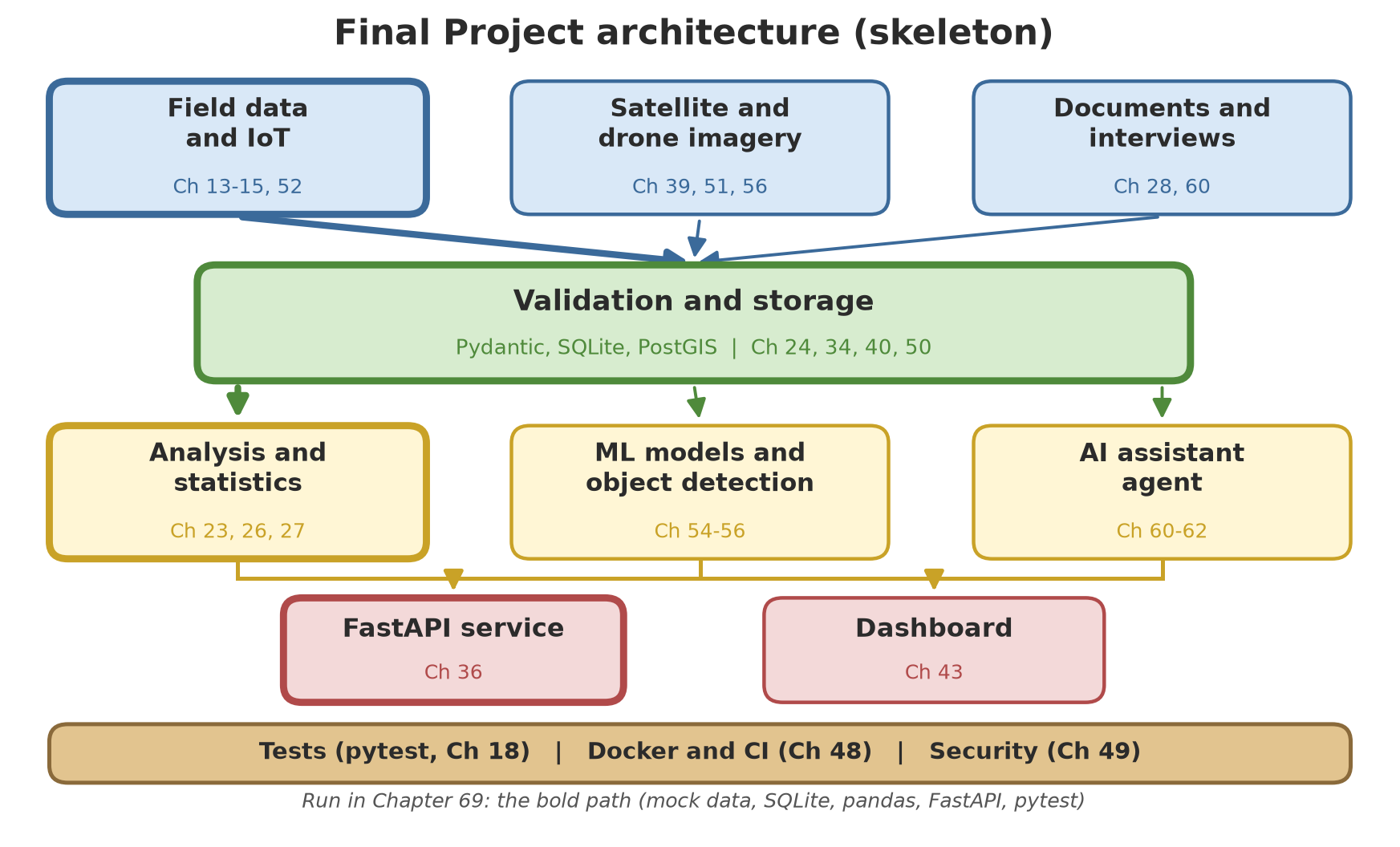
Read it from top to bottom. The sources (field, imagery, documents) enter a validation and storage layer where every piece of data is checked before it is stored, because bad data at the start ruins everything at the end. From storage, data flows to three processors: analysis, ML models, and AI agents. The results are served through the API and dashboard. Beneath it all runs the foundation band: tests, Docker, CI, and security.
Choose your focus track and sector
You do not have to do everything to the same depth. Choose one track as the backbone, then one sector as the material.
| Focus track | You go deeper into | Main chapters |
|---|---|---|
| Web | APIs, dashboards, applications, packaging, deployment | 21, 34, 36, 37, 42, 43, 45, 48, 49 |
| Data and statistics | cleaning, databases, statistics, regression, big data | 22–29, 50, 53 |
| GIS | vector and raster maps, imagery, advanced geospatial | 38–40, 51, 52 |
| ML and AI | classic models, deep learning, object detection, LLMs, agents | 54–62 |
| Focus sector | Example indicator in the skeleton | Sector-specific chapters |
|---|---|---|
| Forestry | tree diameter (cm) | 38, 39, 51, 56, 59 |
| Agriculture/plantations | harvest yield (kg) | 26, 27, 39, 54, 59 |
| Fisheries | average fish weight (g), water quality | 26, 52, 56, 59 |
| Livestock | animal weight (kg) | 27, 52, 57, 59 |
Your track and sector do not lock you in. You may start on the web track with the fisheries sector, then add the ML track next month. What matters: finish one end-to-end flow first, then widen it.
Project folder structure
Lay out your own project like this (the skeleton in this chapter follows most of it; Chapters 18, 19, and 45 explain the reasons):
field-information-system/
  README.md                 what this is, how to run it, status
  pyproject.toml            name, version, dependencies (Ch 17, 45)
  src/field_system/         main code in small modules
    schema.py               data rules (Pydantic)
    validation.py           read and check raw data
    database.py             save and read (SQLite, later PostGIS)
    analysis.py             pandas and statistics
    report.py               text, Excel, PDF reports
    api.py                  FastAPI
  tests/                    pytest (Ch 18)
  data/                     mock sample data, nothing secret
  notebook/                 exploration (Jupyter)
  docs/                     design notes and decisions
  Dockerfile                packaging (Ch 48)
  .github/workflows/        CI (Ch 20, 48)
  .gitignore                keep secrets and temporary output out (Ch 20, 49)
The stages and their source chapters
Work in order; every stage produces something you can check.
| Stage | What you build | Source chapters |
|---|---|---|
| 1. Design and set up | goal, indicators, folder structure, environment, git | 2, 17, 19, 20 |
| 2. Field data and IoT | CSV/JSON from surveys, sensor logger | 13, 14, 15, 52 |
| 3. Validation | data rules, rejecting wrong rows | 12, 22, 34 |
| 4. Storage | database and uniqueness rules | 24, 40, 50 |
| 5. Imagery pipeline | satellite/drone images into maps and indices | 38, 39, 51, 53 |
| 6. Analysis and statistics | summaries, tests, regression, reports | 23, 25, 26, 27, 29 |
| 7. ML models and object detection | classification, detecting trees/fish/livestock | 54, 55, 56, 58, 59 |
| 8. AI agent assistant | document Q&A, tool calling | 60, 61, 62, 63 |
| 9. API and dashboard | data service, per-sector views | 36, 42, 43 |
| 10. Package and protect | tests, quality, Docker, CI, security | 18, 19, 44, 45, 48, 49 |
| 11. Showcase | README, portfolio | 63, 68 |
A small skeleton you can run
Now the hands-on part. This skeleton cuts the end-to-end flow into eight scripts on top of one small package named field_system. The flow:
mock CSV → Pydantic validation → SQLite → pandas analysis → FastAPI API (tested with TestClient) → text report → pytest tests → flow check.
Each script uses the results of the previous one (files are kept in the _tmp/ subfolder), so run them in order from 01 to 08. Script 01 always starts from scratch, so the results are the same every time.
All data here is fictional: eight units (two per sector), five weekly observations per unit, plus a few deliberately dirty rows. The numbers (diameter, yield, weight) are practice examples only, not technical advice. Each sector uses one main indicator: forestry diameter_cm, agriculture yield_kg, fisheries avg_weight_g, livestock weight_kg.
The data rules: schema.py
This is the heart of the skeleton: one class that states what a valid observation is. Pydantic (Chapter 34) checks types, and a model_validator checks the relationship between columns (the indicator must fit the sector, and the value must fall in a plausible range).
schema.py
"""Data rules: one field observation and the plausible range of its value (example numbers, fictional)."""

import datetime
from typing import Literal

from pydantic import BaseModel, Field, model_validator

# Each sector has one main indicator.
INDICATOR = {
    "forestry": "diameter_cm",
    "agriculture": "yield_kg",
    "fisheries": "avg_weight_g",
    "livestock": "weight_kg",
}

# Plausible range (low, high) per indicator. Example numbers, not technical advice.
RANGE = {
    "diameter_cm": (1.0, 300.0),
    "yield_kg": (0.0, 5000.0),
    "avg_weight_g": (1.0, 3000.0),
    "weight_kg": (1.0, 1500.0),
}


class Observation(BaseModel):
    unit: str = Field(min_length=1, max_length=10)
    sector: Literal["forestry", "agriculture", "fisheries", "livestock"]
    date: datetime.date
    indicator: str
    value: float

    @model_validator(mode="after")
    def cross_check(self):
        required = INDICATOR[self.sector]
        if self.indicator != required:
            raise ValueError(f"sector {self.sector} uses indicator {required}, not {self.indicator}")
        low, high = RANGE[self.indicator]
        if not low <= self.value <= high:
            raise ValueError(f"{self.indicator} must be {low} to {high}, not {self.value}")
        return self
Stage 1: creating mock data
01_make_mock_data.py
# Chapter 69 - Final Project, stage 1: creating mock field data
from field_system import WORKDIR
from field_system.mock_data import write_csv

# Start from scratch: remove old results so every run produces the same thing.
for name in ("field.db", "report.txt"):
    (WORKDIR / name).unlink(missing_ok=True)

count = write_csv(WORKDIR / "field_raw.csv")
print("data rows (without the header):", count)
print("-- first five rows --")
with (WORKDIR / "field_raw.csv").open(encoding="utf-8") as f:
    for _ in range(6):
        print(f.readline().rstrip())
print("-- last six rows (deliberately dirty or duplicate) --")
content = (WORKDIR / "field_raw.csv").read_text(encoding="utf-8").splitlines()
for row in content[-6:]:
    print(row)
data rows (without the header): 46
-- first five rows --
unit,sector,date,indicator,value
F1,forestry,2026-01-05,diameter_cm,32.5
F1,forestry,2026-01-12,diameter_cm,32.8
F1,forestry,2026-01-19,diameter_cm,33.2
F1,forestry,2026-01-26,diameter_cm,33.6
F1,forestry,2026-02-02,diameter_cm,34.2
-- last six rows (deliberately dirty or duplicate) --
F1,forestry,2026-02-09,diameter_cm,-5
P1,fisheries,2026-02-09,weight_kg,540
A2,agriculture,31-02-2026,yield_kg,250
L1,pasture,2026-02-09,weight_kg,400
F2,forestry,2026-02-09,diameter_cm,900
F1,forestry,2026-01-05,diameter_cm,32.5There are 46 rows of data: 40 plausible rows (4 sectors × 2 units × 5 weeks), then 5 deliberately wrong rows (negative value, indicator that does not fit, a date that does not exist, an unknown sector, a value outside the range), then 1 duplicate (an exact copy of the first row). Real data is like this too: a jumble.
Stage 2: validation
02_validate_pydantic.py
# Chapter 69 - Final Project, stage 2: validation with Pydantic
from field_system import WORKDIR
from field_system.validation import validate_csv

valid, rejected = validate_csv(WORKDIR / "field_raw.csv")
print("valid:", len(valid), "| rejected:", len(rejected))
for number, reason in rejected:
    print(f"line {number} in the file: {reason}")
print("sample valid object:", valid[0])
valid: 41 | rejected: 5
line 42 in the file: row: Value error, diameter_cm must be 1.0 to 300.0, not -5.0
line 43 in the file: row: Value error, sector fisheries uses indicator avg_weight_g, not weight_kg
line 44 in the file: date: Input should be a valid date or datetime, invalid character in year
line 45 in the file: sector: Input should be 'forestry', 'agriculture', 'fisheries' or 'livestock'
line 46 in the file: row: Value error, diameter_cm must be 1.0 to 300.0, not 900.0
sample valid object: unit='F1' sector='forestry' date=datetime.date(2026, 1, 5) indicator='diameter_cm' value=32.5Of the 46 rows, 41 pass and 5 are rejected, each with a clear reason and its line number in the file (line 1 is the column header, so data starts on line 2). Notice that the duplicate row passes validation: that is fair, since its content is valid. Rejecting it is the job of the next stage.
Stage 3: storing in SQLite
database.py
"""SQLite storage: one observations table with a uniqueness rule."""

import sqlite3
from pathlib import Path

from .schema import Observation

SCHEMA_SQL = """
CREATE TABLE IF NOT EXISTS observation (
    id INTEGER PRIMARY KEY,
    unit TEXT NOT NULL,
    sector TEXT NOT NULL,
    date TEXT NOT NULL,
    indicator TEXT NOT NULL,
    value REAL NOT NULL CHECK (value >= 0),
    UNIQUE (unit, date, indicator)
)
"""


def connect(path: Path) -> sqlite3.Connection:
    path.parent.mkdir(parents=True, exist_ok=True)
    connection = sqlite3.connect(path)
    connection.row_factory = sqlite3.Row
    connection.execute(SCHEMA_SQL)
    return connection


def save(path: Path, items: list[Observation]) -> tuple[int, int]:
    """Returns (number of new rows, number of duplicates skipped)."""
    connection = connect(path)
    new = 0
    try:
        with connection:        # with = transaction: everything is saved or nothing is
            for o in items:
                cursor = connection.execute(
                    "INSERT OR IGNORE INTO observation (unit, sector, date, indicator, value) "
                    "VALUES (?, ?, ?, ?, ?)",
                    (o.unit, o.sector, o.date.isoformat(), o.indicator, o.value),
                )
                new += cursor.rowcount
    finally:
        connection.close()
    return new, len(items) - new


def read(path: Path, sector: str | None = None) -> list[dict]:
    sql = "SELECT unit, sector, date, indicator, value FROM observation"
    args: tuple = ()
    if sector:
        sql += " WHERE sector = ?"
        args = (sector,)
    sql += " ORDER BY sector, unit, date"
    connection = connect(path)
    try:
        return [dict(r) for r in connection.execute(sql, args)]
    finally:
        connection.close()
03_save_sqlite.py
# Chapter 69 - Final Project, stage 3: saving to SQLite
from field_system import WORKDIR
from field_system.database import read, save
from field_system.validation import validate_csv

valid, rejected = validate_csv(WORKDIR / "field_raw.csv")
new, duplicate = save(WORKDIR / "field.db", valid)
print(f"newly saved: {new} | skipped as duplicate: {duplicate}")

# Run twice, same result: no rows are added.
new2, duplicate2 = save(WORKDIR / "field.db", valid)
print(f"save again -> new: {new2} | duplicate: {duplicate2}")

everything = read(WORKDIR / "field.db")
print("rows in the database:", len(everything))
print("first row:", everything[0])
newly saved: 40 | skipped as duplicate: 1
save again -> new: 0 | duplicate: 41
rows in the database: 40
first row: {'unit': 'A1', 'sector': 'agriculture', 'date': '2026-01-05', 'indicator': 'yield_kg', 'value': 242.2}The rule UNIQUE (unit, date, indicator) makes the database refuse duplicates; INSERT OR IGNORE skips them without an error. The result: 40 new, 1 duplicate skipped. Saving a second time adds 0 rows: the operation is safe to repeat (idempotent). That is an important property for a pipeline that runs on a schedule.
Stage 4: analysis with pandas
04_analyze_pandas.py
# Chapter 69 - Final Project, stage 4: analysis with pandas
import pandas as pd

from field_system import WORKDIR
from field_system.analysis import flag_anomalies, load, rate_per_unit, sector_summary

FOCUS_SECTOR = "fisheries"      # change to your own choice: forestry, agriculture, fisheries, livestock

pd.set_option("display.width", 100)
df = load(WORKDIR / "field.db")
print("table shape (rows, columns):", df.shape)
print()
print(sector_summary(df).to_string(index=False))
print()
rate = rate_per_unit(df)
print(rate.to_string(index=False))
print()
print(f"-- focus: {FOCUS_SECTOR} --")
print(df[df["sector"] == FOCUS_SECTOR].pivot(index="date", columns="unit", values="value"))
print()
anomalies = flag_anomalies(df, z_limit=1.5)
print("values flagged (|z| > 1.5):", len(anomalies))
table shape (rows, columns): (40, 5)
sector indicator count mean smallest largest
agriculture yield_kg 10 256.53 242.2 270.5
fisheries avg_weight_g 10 597.15 539.4 659.8
forestry diameter_cm 10 34.03 32.5 35.5
livestock weight_kg 10 369.87 351.8 388.0
sector unit rise_per_week
agriculture A1 6.55
agriculture A2 5.53
fisheries P1 27.61
fisheries P2 30.07
forestry F1 0.42
forestry F2 0.35
livestock L1 8.64
livestock L2 9.06
-- focus: fisheries --
unit P1 P2
date
2026-01-05 545.4 539.4
2026-01-12 571.7 563.5
2026-01-19 593.9 591.5
2026-01-26 619.0 631.6
2026-02-02 659.8 655.7
values flagged (|z| > 1.5): 3The table has 40 rows and 5 columns. The per-sector summary shows, for example, a mean fish weight of 597.15 g from 10 observations. The second table is each unit’s rise per week (the slope of a straight line; in this mock data fish weight in pond P2 rises by about 30.07 g per week). The variable FOCUS_SECTOR at the top of the script can be changed to your own sector. Finally, 3 values are flagged because they deviate by more than 1.5 standard deviations from their own unit’s mean; this threshold is just an example.
Stage 5: the FastAPI service tested with TestClient
api.py
"""FastAPI service on top of the SQLite database."""

from pathlib import Path

from fastapi import FastAPI, HTTPException

from . import database
from .analysis import load, sector_summary
from .schema import Observation


def create_app(db_path: Path) -> FastAPI:
    app = FastAPI(title="Field Information System (mock)")

    @app.get("/health")
    def health():
        return {"status": "ok", "count": len(database.read(db_path))}

    @app.get("/observations", response_model=list[Observation])
    def list_all(sector: str | None = None):
        return database.read(db_path, sector)

    @app.post("/observations", response_model=Observation, status_code=201)
    def add(o: Observation):
        new, _ = database.save(db_path, [o])
        if not new:
            raise HTTPException(409, "that observation already exists")
        return o

    @app.get("/summary")
    def summary():
        return sector_summary(load(db_path)).to_dict(orient="records")

    return app
05_api_testclient.py
# Chapter 69 - Final Project, stage 5: FastAPI service tested with TestClient
from fastapi.testclient import TestClient

from field_system import WORKDIR
from field_system.api import create_app

client = TestClient(create_app(WORKDIR / "field.db"))

print("health:", client.get("/health").json())
fisheries = client.get("/observations", params={"sector": "fisheries"}).json()
print("fisheries observations:", len(fisheries), "| first:", fisheries[0])

new = {"unit": "P1", "sector": "fisheries", "date": "2026-03-02",
       "indicator": "avg_weight_g", "value": 700.0}
print("add new:", client.post("/observations", json=new).status_code)
print("add again (same):", client.post("/observations", json=new).status_code)

wrong = dict(new, date="2026-03-09", value=-1)
reply = client.post("/observations", json=wrong)
print("implausible value:", reply.status_code, "->", reply.json()["detail"][0]["msg"])

for row in client.get("/summary").json():
    print(row["sector"], row["indicator"], row["count"], row["mean"])
health: {'status': 'ok', 'count': 40}
fisheries observations: 10 | first: {'unit': 'P1', 'sector': 'fisheries', 'date': '2026-01-05', 'indicator': 'avg_weight_g', 'value': 545.4}
add new: 201
add again (same): 409
implausible value: 422 -> Value error, avg_weight_g must be 1.0 to 3000.0, not -1.0
agriculture yield_kg 10 256.53
fisheries avg_weight_g 11 606.5
forestry diameter_cm 10 34.03
livestock weight_kg 10 369.87TestClient calls the application without starting a server, so it is fast and usable in tests. Note the three status codes: 201 (created), 409 (conflict: already exists), and 422 (implausible data; the very same schema.py rules are reused by the API). After adding one row, fisheries has 11 observations and the mean becomes 606.5 g. The database now holds 41 rows, and that is what the next stage reads.
Stage 6: the report
report.py
"""Builds a text report from the analysis results."""

from pathlib import Path

import pandas as pd


def build(summary: pd.DataFrame, rate: pd.DataFrame, rejected_count: int) -> str:
    lines = ["FIELD INFORMATION SYSTEM REPORT (mock data)", "=" * 48]
    lines.append(f"Raw rows rejected during validation: {rejected_count}")
    lines.append("")
    lines.append("Summary per sector:")
    for _, r in summary.iterrows():
        lines.append(
            f"- {r['sector']:<11} {r['indicator']:<13} mean {r['mean']:>7.2f} "
            f"(from {r['count']} observations)"
        )
    lines.append("")
    lines.append("Fastest-rising unit per sector:")
    for sector, group in rate.groupby("sector"):
        top = group.sort_values("rise_per_week", ascending=False).iloc[0]
        lines.append(f"- {sector:<11} {top['unit']}: +{top['rise_per_week']} per week")
    lines.append("")
    lines.append("Note: all numbers are mock data for practice.")
    return "\n".join(lines) + "\n"


def write(path: Path, text: str) -> None:
    path.parent.mkdir(parents=True, exist_ok=True)
    path.write_text(text, encoding="utf-8")
06_report.py
# Chapter 69 - Final Project, stage 6: text report
from field_system import WORKDIR
from field_system.analysis import load, rate_per_unit, sector_summary
from field_system.report import build, write
from field_system.validation import validate_csv

_, rejected = validate_csv(WORKDIR / "field_raw.csv")
df = load(WORKDIR / "field.db")      # already includes the one extra row from stage 5
text = build(sector_summary(df), rate_per_unit(df), len(rejected))
write(WORKDIR / "report.txt", text)
print(text)
print("report written to report.txt in the _tmp folder")
FIELD INFORMATION SYSTEM REPORT (mock data)
================================================
Raw rows rejected during validation: 5
Summary per sector:
- agriculture yield_kg mean 256.53 (from 10 observations)
- fisheries avg_weight_g mean 606.50 (from 11 observations)
- forestry diameter_cm mean 34.03 (from 10 observations)
- livestock weight_kg mean 369.87 (from 10 observations)
Fastest-rising unit per sector:
- agriculture A1: +6.55 per week
- fisheries P2: +30.07 per week
- forestry F1: +0.42 per week
- livestock L2: +9.06 per week
Note: all numbers are mock data for practice.
report written to report.txt in the _tmp folderThe report turns the analysis into text a supervisor can read, including how many rows were rejected and a note that the numbers are mock. You can turn it into Excel or PDF with the techniques of Chapter 15.
Stage 7: pytest tests
test_system.py
"""Tests for the Field Information System skeleton. Uses a temporary folder, never touches _tmp."""

import pytest
from fastapi.testclient import TestClient

from field_system.api import create_app
from field_system.database import read, save
from field_system.mock_data import write_csv
from field_system.schema import Observation
from field_system.validation import validate_csv


@pytest.fixture
def ready(tmp_path):
    csv = tmp_path / "raw.csv"
    write_csv(csv)
    valid, rejected = validate_csv(csv)
    db = tmp_path / "field.db"
    save(db, valid)
    return db, valid, rejected


def test_validation_rejects_dirty_rows(ready):
    _, valid, rejected = ready
    assert len(valid) == 41      # 40 valid + 1 duplicate copy
    assert len(rejected) == 5


def test_negative_value_rejected():
    with pytest.raises(ValueError):
        Observation(unit="F1", sector="forestry", date="2026-01-05", indicator="diameter_cm", value=-5)


def test_indicator_must_fit_sector():
    with pytest.raises(ValueError, match="uses indicator"):
        Observation(unit="P1", sector="fisheries", date="2026-01-05", indicator="weight_kg", value=500)


def test_saving_twice_does_not_duplicate(ready):
    db, valid, _ = ready
    assert len(read(db)) == 40
    assert save(db, valid) == (0, 41)
    assert len(read(db)) == 40


def test_api_add_and_conflict(ready):
    db, _, _ = ready
    client = TestClient(create_app(db))
    new = {"unit": "L1", "sector": "livestock", "date": "2026-03-02",
           "indicator": "weight_kg", "value": 400.0}
    assert client.post("/observations", json=new).status_code == 201
    assert client.post("/observations", json=new).status_code == 409
    assert client.get("/health").json()["count"] == 41


def test_api_rejects_wrong_value(ready):
    db, _, _ = ready
    client = TestClient(create_app(db))
    wrong = {"unit": "F1", "sector": "forestry", "date": "2026-03-02",
             "indicator": "diameter_cm", "value": 900}
    assert client.post("/observations", json=wrong).status_code == 422
07_run_tests.py
# Chapter 69 - Final Project, stage 7: running the pytest tests
import os
import re
import subprocess
import sys
from pathlib import Path

folder = Path(__file__).resolve().parent
env = dict(os.environ, PYTHONPATH=str(folder), NO_COLOR="1")
result = subprocess.run(
    [sys.executable, "-m", "pytest", "tests", "-v", "-p", "no:cacheprovider", "--color=no"],
    cwd=folder, env=env, text=True, encoding="utf-8",
    stdout=subprocess.PIPE, stderr=subprocess.STDOUT,
)
for line in result.stdout.splitlines():
    if line.startswith(("platform ", "rootdir:", "configfile:", "plugins:", "cachedir:")):
        continue
    print(re.sub(r" in \d+\.\d+s( \(.*?\))?", "", line))
print("exit code:", result.returncode)
============================= test session starts =============================
collecting ... collected 6 items
tests/test_system.py::test_validation_rejects_dirty_rows PASSED [ 16%]
tests/test_system.py::test_negative_value_rejected PASSED [ 33%]
tests/test_system.py::test_indicator_must_fit_sector PASSED [ 50%]
tests/test_system.py::test_saving_twice_does_not_duplicate PASSED [ 66%]
tests/test_system.py::test_api_add_and_conflict PASSED [ 83%]
tests/test_system.py::test_api_rejects_wrong_value PASSED [100%]
============================== 6 passed ==============================
exit code: 0Six tests pass, and the tests use a temporary folder so they do not disturb the results of the earlier stages. Hold on to this principle: if something matters, write a test for it. The lines in the output come from a real pytest run; the script only removes the lines that vary (paths and timing).
Stage 8: checking the flow end to end
08_check_flow.py
# Chapter 69 - Final Project, stage 8: automatic end-to-end check
from field_system import WORKDIR
from field_system.database import read
from field_system.validation import validate_csv

valid, rejected = validate_csv(WORKDIR / "field_raw.csv")
in_database = len(read(WORKDIR / "field.db"))
report = (WORKDIR / "report.txt").read_text(encoding="utf-8")

checks = [
    ("raw CSV exists", (WORKDIR / "field_raw.csv").exists()),
    ("some rows were rejected by validation", len(rejected) == 5),
    ("rows in database = valid - duplicate + 1 added by the API", in_database == len(valid) - 1 + 1),
    ("report mentions all four sectors",
     all(s in report for s in ("forestry", "agriculture", "fisheries", "livestock"))),
    ("report carries the mock-data note", "mock data" in report),
]
for name, passed in checks:
    print(("PASS  " if passed else "FAIL  ") + name)
print(f"{sum(p for _, p in checks)} of {len(checks)} checks passed")
PASS raw CSV exists
PASS some rows were rejected by validation
PASS rows in database = valid - duplicate + 1 added by the API
PASS report mentions all four sectors
PASS report carries the mock-data note
5 of 5 checks passedThis last check matches the numbers across stages: the file exists, 5 rows were rejected, the database holds 41 rows, and the report mentions all four sectors. If one of them says “FAIL”, you know which stage to trace. The habit of proving instead of assuming is the mark of a system you can trust.
The skeleton uses SQLite so that it runs anywhere with no installation. For spatial data and many users, replace the database.py layer with PostgreSQL + PostGIS (Chapters 24 and 40). Because data access goes through one module only, that swap does not need to touch the schema, the analysis, or the tests. That is the point of separating modules.
From skeleton to full system
The skeleton above touches only stages 1 to 4, 6, 9 (the API), and 10 (tests). To complete it:
- Imagery and models (stages 5 and 7): add modules that read imagery (Chapters 39, 51), compute indices, and save the results to the database; then train a simple model (Chapter 54) and, if your sector fits, object detection (Chapters 56, 59). First check whether your computer has a GPU (Chapter 55).
- AI agent (stage 8): wrap the
summaryfunction and data search as tools for an agent (Chapter 62), with tight permission limits and no API keys in the code (Chapters 49, 60). - Dashboard (stage 9): show
/summaryand a map in Streamlit or Dash (Chapter 43). - Package and protect (stage 10): write a
Dockerfileand a CI workflow following Chapter 48, run a dependency audit (Chapter 49), and check the licences of data and libraries (Chapter 63).
Self-assessment rubric
Rate yourself honestly. Give 0 (not yet), 1 (partly), or 2 (yes, with proof) on each row. Proof means something you can show: command output, a test file, or a screenshot.
| Criterion | Proof to look for |
|---|---|
| The end-to-end flow runs | one command or a sequence of scripts from raw data to report |
| Data is validated | wrong rows are rejected with a clear reason, not silently |
| Storage is safe to repeat | running twice does not duplicate data |
| Analysis is correct and explainable | numbers match a manual calculation on a small example |
| The API has tests | tests for the success path and failure paths (201, 409, 422) |
| Code is tidy | passes ruff, with docstrings and type hints on important functions (Chapters 19, 33) |
| Secrets and personal data are safe | no keys in the repo; correct .gitignore (Chapters 20, 49) |
| Others can use it | a clear README, recorded dependencies, runnable from scratch (Chapters 17, 68) |
| Honest about limits | the README says whether data is mock/real, and what was tested and not |
| Licences and ethics checked | data and library licences recorded (Chapter 63) |
Add up: 0–7 = still a frame, get the flow working first; 8–14 = it runs, strengthen tests and documentation; 15–20 = ready for your portfolio. These bands are just the author’s suggestion, not an official standard.
Exercises
- Run the skeleton from
01to08. Then changeFOCUS_SECTORin04_analyze_pandas.pyto another sector and note what changes. - Add one new dirty row in
mock_data.py(for example an empty unit). Run again and confirm that the number of rejected rows becomes 6 in stage 2. Update the test that mentions the number 5. - Add a
GET /unit/{code}endpoint inapi.pythat returns the observations of one unit (and 404 if there are none), with two tests. - Challenge: change
database.pyto use SQLAlchemy (Chapter 24) without changing scripts01to08other than their imports. The tests must still pass.
Chapter Summary
- The Final Project assembles the whole book: data → validation → storage → analysis/models/agents → API and dashboard → tests, packaging, and CI.
- Choose one track (web, data/statistics, GIS, ML/AI) and one sector, and finish one end-to-end flow first.
- The small skeleton in this chapter is really run on mock data: 46 raw rows, 41 pass validation, 40 are stored, one is added through the API, and 6 tests pass.
- It is a learning skeleton, not a production system.
- Grade yourself with the rubric, which demands proof.
Next, in Part Ten: short lists of ten to reread any time: beginner mistakes, good habits, important libraries, free data sources, ideas for further projects, and ways to keep learning.