%%{init: {"flowchart": {"diagramPadding": 40}}}%%
flowchart LR
    A[1. Collect<br/>and clean data] --> B[2. Split: train,<br/>validation, test]
    B --> C[3. Choose a model<br/>and a loss function]
    C --> D[4. Train:<br/>repeat epochs]
    D --> E[5. Evaluate<br/>on test data]
    E -->|not good enough| C
    E -->|good enough| F[6. Use and monitor<br/>Chapter 58]
Chapter 55 — Machine Learning and AI: PyTorch and GPU Hardware
Series A3 — Machine Learning for Natural Resources
All scripts for this chapter are in the kode/ch55/ folder. On the web version, you can also download them all at once (zip).
Chapter 54 used tree-based models on tables of numbers. For images, sound, and complicated patterns, the best models are neural networks: stacks of tiny “neurons” that each only multiply and add numbers, but when there are millions of them, they can recognize a sick leaf from a photo. Training them takes billions of multiplications. That is why this chapter also covers hardware: with the right GPU, a job that takes days on a CPU finishes in minutes.
NoteREMEMBER
This chapter was written on one computer: an NVIDIA GeForce GTX 1660 SUPER GPU (6 GB VRAM), driver 616.92, CUDA Toolkit 13.4, PyTorch 2.14.1 built for CUDA 13.0. The “GPU name” and memory numbers in the book are the author’s computer output. Your computer will print different things, and that is normal.
The ML workflow
Whatever the model, the order of work is the same:
One full pass through the data is called an epoch. The data is cut into small pieces (batches) so it fits in memory.
PyTorch: tensors and autograd
PyTorch is the deep learning library most used in research. Its two core ideas are the tensor (an array of numbers like NumPy, but it can be moved to the GPU) and autograd (computing derivatives automatically).
01_tensor_autograd.py
# Chapter 55 - Tensors and autograd: PyTorch computes derivatives (gradients) automatically
import torch

# Tensor = an array of numbers (like NumPy) that can move to the GPU
rainfall = torch.tensor([[120.0, 95.0], [200.0, 150.0]])
print("Tensor:", rainfall.tolist(), "| shape:", tuple(rainfall.shape), "| type:", rainfall.dtype)
print("Times 2:", (rainfall * 2).tolist())

# The simplest model: harvest = w * rainfall. We look for w by lowering the error
w = torch.tensor(0.0, requires_grad=True)             # requires_grad: "please keep track of derivatives for me"
rainfall_x = torch.tensor([1.0, 2.0, 3.0])
harvest_y = torch.tensor([2.1, 3.9, 6.2])             # example numbers, roughly y = 2x

for step in range(60):
    guess = w * rainfall_x
    error = ((guess - harvest_y) ** 2).mean()          # mean squared error (MSE)
    error.backward()                                   # compute d(error)/dw automatically
    with torch.no_grad():
        w -= 0.05 * w.grad                             # nudge w in the direction that lowers the error
    w.grad.zero_()                                     # clear the derivative record for the next step
    if step in (0, 1, 2, 59):
        print(f"step {step:2d}: w = {w.item():.4f}, error = {error.item():.4f}")
Tensor: [[120.0, 95.0], [200.0, 150.0]] | shape: (2, 2) | type: torch.float32
Times 2: [[240.0, 190.0], [400.0, 300.0]]
step 0: w = 0.9500, error = 19.3533
step 1: w = 1.4567, error = 5.5150
step 2: w = 1.7269, error = 1.5788
step 59: w = 2.0357, error = 0.0140We look for the weight w in the model harvest = w x rainfall. The example data is roughly y = 2x. error.backward() computes how much the error changes if w is nudged a little (the gradient), and then w is moved in the direction that lowers the error. This is gradient descent, the heart of all neural network training. After 60 steps, w gets close to 2 (2.0357) and the error falls from 19.35 to 0.014.
The full workflow on tabular data (CPU)
Now all the stages come together: fictitious pond data (temperature, pH, oxygen) to guess whether the fish are healthy or stressed (example numbers).
02_ml_workflow_mlp.py
# Chapter 55 - ML workflow in PyTorch (CPU): data -> model -> loss -> train -> evaluate
import numpy as np
import torch
from torch import nn

torch.manual_seed(42)
rng = np.random.default_rng(42)

# 1) Fictitious tabular data: 3 pond features -> 1 = healthy fish, 0 = stressed (example numbers)
n = 600
temperature = rng.normal(28, 2, n)
ph = rng.normal(7.0, 0.5, n)
oxygen = rng.normal(5.5, 1.2, n)
healthy = ((oxygen > 5.0) & (temperature < 30) & (np.abs(ph - 7) < 0.7)).astype(np.float32)
X = np.column_stack([temperature, ph, oxygen]).astype(np.float32)
X = (X - X.mean(axis=0)) / X.std(axis=0)                   # scaling
X_t, y_t = torch.from_numpy(X), torch.from_numpy(healthy).unsqueeze(1)
train, test = slice(0, 450), slice(450, 600)

# 2) Model: a small neural network (MLP)
model = nn.Sequential(nn.Linear(3, 16), nn.ReLU(), nn.Linear(16, 1))
loss_fn = nn.BCEWithLogitsLoss()                           # for two-class classification
optimiser = torch.optim.Adam(model.parameters(), lr=0.02)

# 3) Training loop
for epoch in range(1, 151):
    model.train()
    optimiser.zero_grad()
    loss = loss_fn(model(X_t[train]), y_t[train])
    loss.backward()
    optimiser.step()
    if epoch in (1, 50, 100, 150):
        print(f"epoch {epoch:3d}: training loss = {loss.item():.3f}")

# 4) Evaluation on data that was not used for training
model.eval()
with torch.no_grad():
    predictions = (torch.sigmoid(model(X_t[test])) > 0.5).float()
print("Test accuracy:", round((predictions == y_t[test]).float().mean().item(), 3))
print("Number of parameters:", sum(p.numel() for p in model.parameters()))
epoch 1: training loss = 0.694
epoch 50: training loss = 0.235
epoch 100: training loss = 0.137
epoch 150: training loss = 0.086
Test accuracy: 0.947
Number of parameters: 81You will see this pattern in almost every piece of PyTorch code: optimiser.zero_grad(), loss.backward(), optimiser.step(). nn.Sequential stacks layers; ReLU is a “switch” that turns off negative numbers so the network can learn curved patterns. The loss falls from 0.694 to 0.086, and the test accuracy is 0.947. This tiny model has only 81 parameters.
Hardware for AI: CPU, GPU, TPU, and NPU
Training a neural network is dominated by one operation: matrix multiplication (a table of numbers times a table of numbers), repeated billions of times, and all of it can be done at the same time.
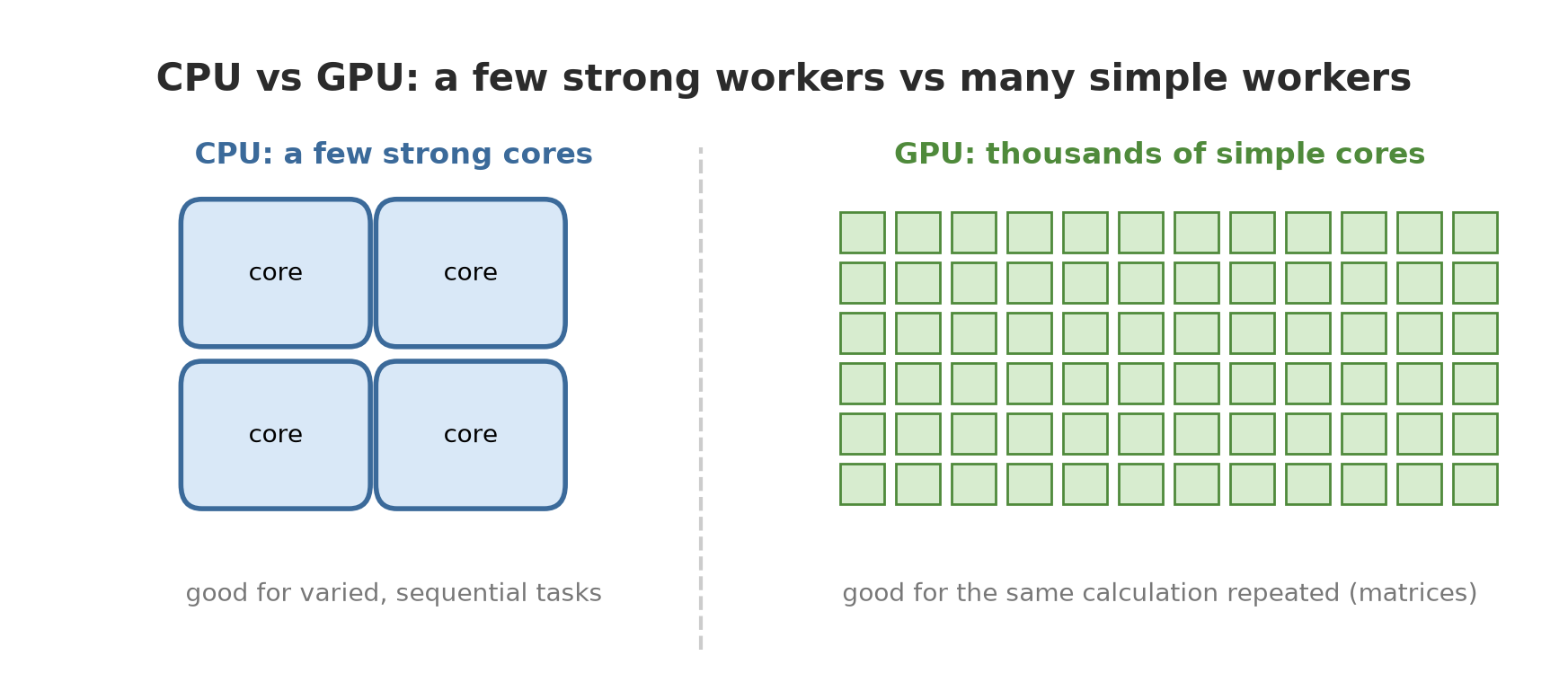
| Device | Picture | Good for |
|---|---|---|
| CPU | A few all-round cores | General programs, classical ML (Chapter 54), organizing data |
| GPU | Thousands of simple cores, its own memory (VRAM) | Training and running neural networks |
| TPU | A special chip made by Google (an ASIC) for matrix math | Large-scale training in Google’s cloud |
| NPU | A power-saving neural processor in new laptops and phones | Running small models (inference) on the device |
About the TPU: the Google Cloud documentation calls it an ASIC chip designed by Google to speed up ML workloads, good at large matrix operations and a poor fit for programs with many branches or custom operations inside the training loop (https://docs.cloud.google.com/tpu/docs/intro-to-tpu, read 2026-10-10). About the NPU: the description in the table above is a general picture; this book does not run or verify NPUs specifically.
Let us prove for ourselves that a GPU is faster. The following script multiplies two 4096 x 4096 matrices on the CPU and on the GPU. The times are not printed (they differ on every computer); only the comparison is printed.
04_cpu_vs_gpu.py
# Chapter 55 - CPU vs GPU: big matrix multiplication (comparison only, times are not printed)
import time

import torch

assert torch.cuda.is_available(), "this script needs an NVIDIA GPU"
size = 4096
a_cpu = torch.randn(size, size)
b_cpu = torch.randn(size, size)
a_gpu, b_gpu = a_cpu.cuda(), b_cpu.cuda()


def measure(func, repeats):
    func()                                                # warm-up (initialization, kernel compilation)
    if torch.cuda.is_available():
        torch.cuda.synchronize()
    start = time.perf_counter()
    for _ in range(repeats):
        func()
    torch.cuda.synchronize()                              # wait until the GPU has really finished
    return (time.perf_counter() - start) / repeats


t_cpu = measure(lambda: a_cpu @ b_cpu, 3)
t_gpu = measure(lambda: a_gpu @ b_gpu, 20)
result_cpu = a_cpu @ b_cpu
result_gpu = (a_gpu @ b_gpu).cpu()

print("Same result (small relative difference):", bool(torch.allclose(result_cpu, result_gpu, rtol=1e-2, atol=1e-2)))
print("GPU more than 3x faster                :", t_cpu / t_gpu > 3)
Same result (small relative difference): True
GPU more than 3x faster : TrueTwo important things in the code: (1) torch.cuda.synchronize() waits for the GPU to finish, because the GPU works asynchronously (commands are sent first and finish later); without it the measured time is wrong. (2) There is one warm-up run before measuring.
NVIDIA and CUDA: what must be there
CUDA is NVIDIA’s programming platform that lets programs use the GPU cores. Here are some terms that often cause confusion:
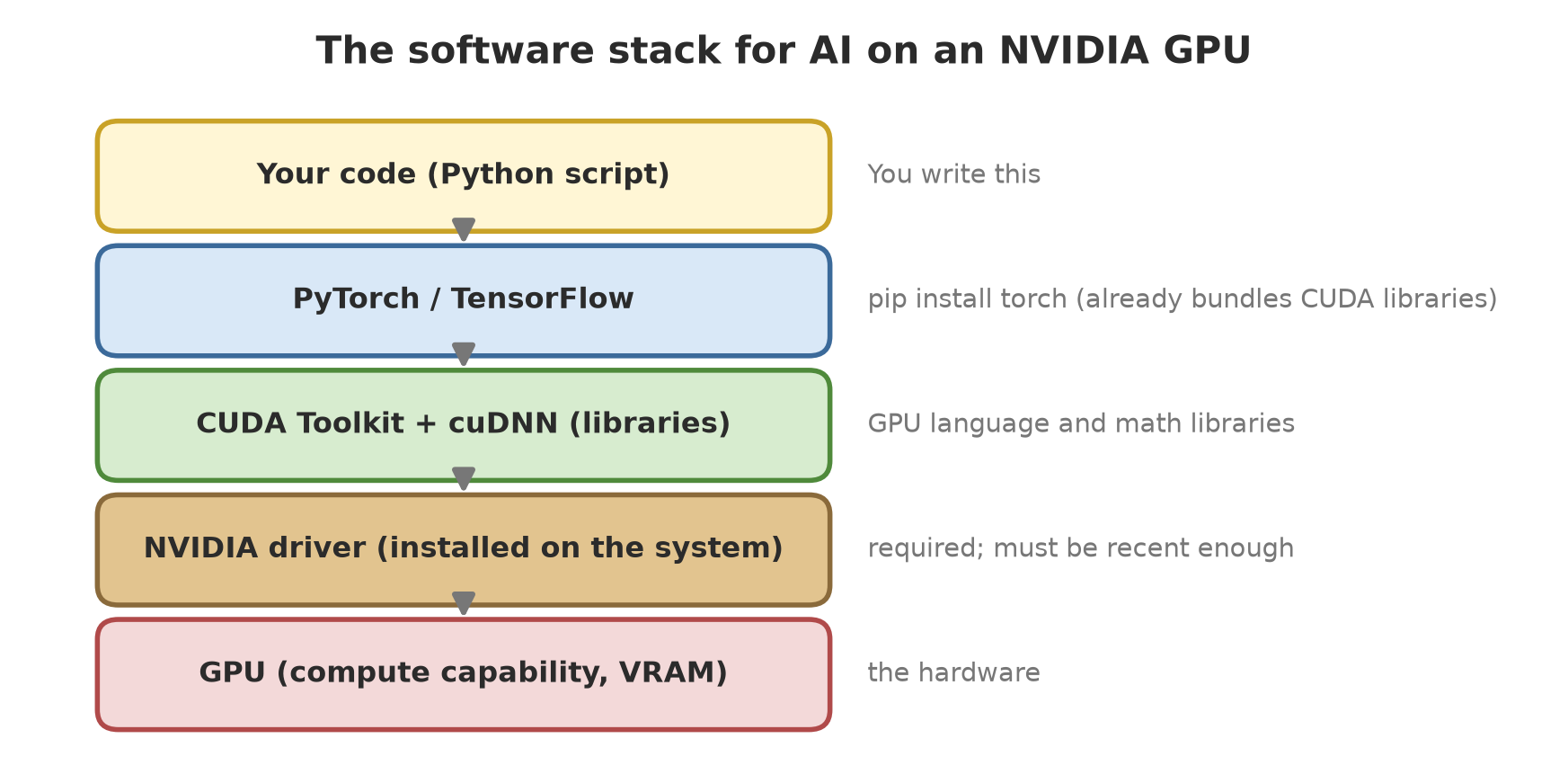
- NVIDIA driver: system software that lets the computer “talk” to the card. Required. Its version determines the highest CUDA version supported.
- CUDA Toolkit: the compiler (
nvcc), libraries, and tools for people who write or compile CUDA code. To use PyTorch throughpip, the Toolkit is not required: thetorchpackage already carries its own CUDA libraries. The proof is in the output of script 03 below. - cuDNN: an NVIDIA library of highly optimized neural network operations (convolution, attention, matrix multiplication, and so on; https://developer.nvidia.com/cudnn, read 2026-10-10). PyTorch uses it automatically.
- Compute capability: a version number for the “ability” of a GPU architecture, in the form major.minor. The NVIDIA documentation says a GPU’s abilities and features depend on this number (https://docs.nvidia.com/cuda/cuda-programming-guide/05-appendices/compute-capabilities.html, read 2026-10-10). The author’s card: 7.5. A PyTorch package only contains code for a certain list of architectures; a card that is too old may not be supported.
03_check_gpu.py
# Chapter 55 - Checking the GPU: does PyTorch see the NVIDIA graphics card?
import subprocess
from pathlib import Path

import torch

print("torch.cuda.is_available():", torch.cuda.is_available())
if not torch.cuda.is_available():
    print("GPU not detected; PyTorch is using the CPU.")
else:
    props = torch.cuda.get_device_properties(0)
    print("GPU name          :", props.name)
    print("Compute capability:", f"{props.major}.{props.minor}")
    print("Total VRAM (GB)   :", round(props.total_memory / 1024**3, 1))
    print("CUDA version used by PyTorch:", torch.version.cuda)
    print("cuDNN available   :", torch.backends.cudnn.is_available())
    x = torch.ones(3, device="cuda") * 2                  # the tensor is created directly on the GPU
    print("Tensor on GPU     :", x.tolist(), "| device:", x.device)

    # Does this PyTorch build carry code for our card's compute capability?
    print("Architectures supported by this build include sm_75:", "sm_75" in torch.cuda.get_arch_list())

    # PyTorch ships its own CUDA libraries in the torch/lib folder (that is why the CUDA Toolkit is optional)
    lib_folder = Path(torch.__file__).parent / "lib"
    names = sorted({p.name for pattern in ("cudart64*", "cublas64*", "cudnn64*") for p in lib_folder.glob(pattern + ".dll")})
    print("CUDA libraries inside the torch package:", names)

    # The driver version is read from the nvidia-smi tool (if available)
    try:
        output = subprocess.run(["nvidia-smi", "--query-gpu=driver_version", "--format=csv,noheader"],
                                capture_output=True, text=True, timeout=20).stdout.strip()
        print("NVIDIA driver version (on the author's computer):", output)
    except (OSError, subprocess.TimeoutExpired):
        print("nvidia-smi not found")
torch.cuda.is_available(): True
GPU name : NVIDIA GeForce GTX 1660 SUPER
Compute capability: 7.5
Total VRAM (GB) : 6.0
CUDA version used by PyTorch: 13.0
cuDNN available : True
Tensor on GPU : [2.0, 2.0, 2.0] | device: cuda:0
Architectures supported by this build include sm_75: True
CUDA libraries inside the torch package: ['cublas64_13.dll', 'cudart64_13.dll', 'cudnn64_9.dll']
NVIDIA driver version (on the author's computer): 616.92torch.cuda.is_available()is always the first test. If it isFalse: the driver is not installed, or the installed PyTorch is the CPU-only version.- The GPU name, VRAM, and driver version belong to the author’s computer. The CUDA libraries (
cudart,cublas,cudnn) can be seen inside thetorch/libfolder: that is why the CUDA Toolkit is not required. sm_75is in the architecture list of this build, so a 7.5 card is supported.
Installing PyTorch with CUDA
The install command depends on your system; always take it from the official page https://pytorch.org/get-started/locally/ (choose your operating system, pip, and CUDA version). On the author’s computer, the installation used the official PyTorch index for CUDA 13.0 (https://download.pytorch.org/whl/cu130, with pip install and the --index-url option). That official page is dynamic, so the exact command is not copied into the book; read it from the source when you install.
Non-NVIDIA alternatives
The following script picks the best device available, so the same code runs on any computer.
09_pick_device.py
# Chapter 55 - Code that runs anywhere: pick the best available device
import torch


def pick_device():
    """Order: NVIDIA/AMD (cuda) -> Apple (mps) -> Intel (xpu) -> CPU."""
    if torch.cuda.is_available():
        return torch.device("cuda")                  # ROCm (AMD) builds also use the name "cuda"
    if torch.backends.mps.is_available():
        return torch.device("mps")                   # Apple GPU
    if hasattr(torch, "xpu") and torch.xpu.is_available():
        return torch.device("xpu")                   # Intel GPU
    return torch.device("cpu")


device = pick_device()
print("Chosen device:", device)
print("CUDA build (NVIDIA)  :", torch.version.cuda is not None)
print("ROCm/HIP build (AMD) :", torch.version.hip is not None)
print("MPS (Apple) available:", torch.backends.mps.is_available())
x = torch.arange(5, dtype=torch.float32, device=device)
print("Tensor on that device:", x.tolist())
Chosen device: cuda
CUDA build (NVIDIA) : True
ROCm/HIP build (AMD) : False
MPS (Apple) available: False
Tensor on that device: [0.0, 1.0, 2.0, 3.0, 4.0]| Device | How PyTorch uses it | Notes from the documentation |
|---|---|---|
| AMD (ROCm) | Still uses the name cuda; tell them apart with torch.version.hip |
PyTorch for HIP “intentionally reuses the torch.cuda interface” (docs.pytorch.org, HIP notes, read 2026-10-10) |
| Apple (MPS) | torch.device("mps"), check torch.backends.mps.is_available() |
Needs a PyTorch build with MPS, macOS 14.0 or newer, and a Mac with a supported GPU (MPS notes, read 2026-10-10) |
| Intel | torch.device("xpu"), check torch.xpu.is_available() |
Available since PyTorch 2.5 as a prototype; supports Intel Arc and Core Ultra with Arc graphics, among others (Intel GPU notes, read 2026-10-10) |
All three are not run in this book because the author’s computer uses NVIDIA. The output of script 09 only proves that the selection function works correctly here.
Windows, WSL2, or Linux?
- Native Windows: PyTorch with CUDA runs (this book proves it). The easiest choice for beginners.
- WSL2 (Linux inside Windows): the NVIDIA guide says you only need to install the Windows driver and must not install a Linux display driver inside WSL; Windows 11 is fully supported (https://docs.nvidia.com/cuda/wsl-user-guide/index.html, read 2026-10-10).
- TensorFlow: the official documentation states that TensorFlow 2.10 is the last release to support GPUs on native Windows; for newer versions, a GPU on Windows is used through WSL2 (https://www.tensorflow.org/install/pip, read 2026-10-10).
- Linux directly: the most common route on servers and in the cloud.
VRAM: how much do you need?
VRAM is the memory of the graphics card. If the model and its data do not fit, the program stops with an out of memory (OOM) error. When training with the Adam optimiser, VRAM is filled by four things:
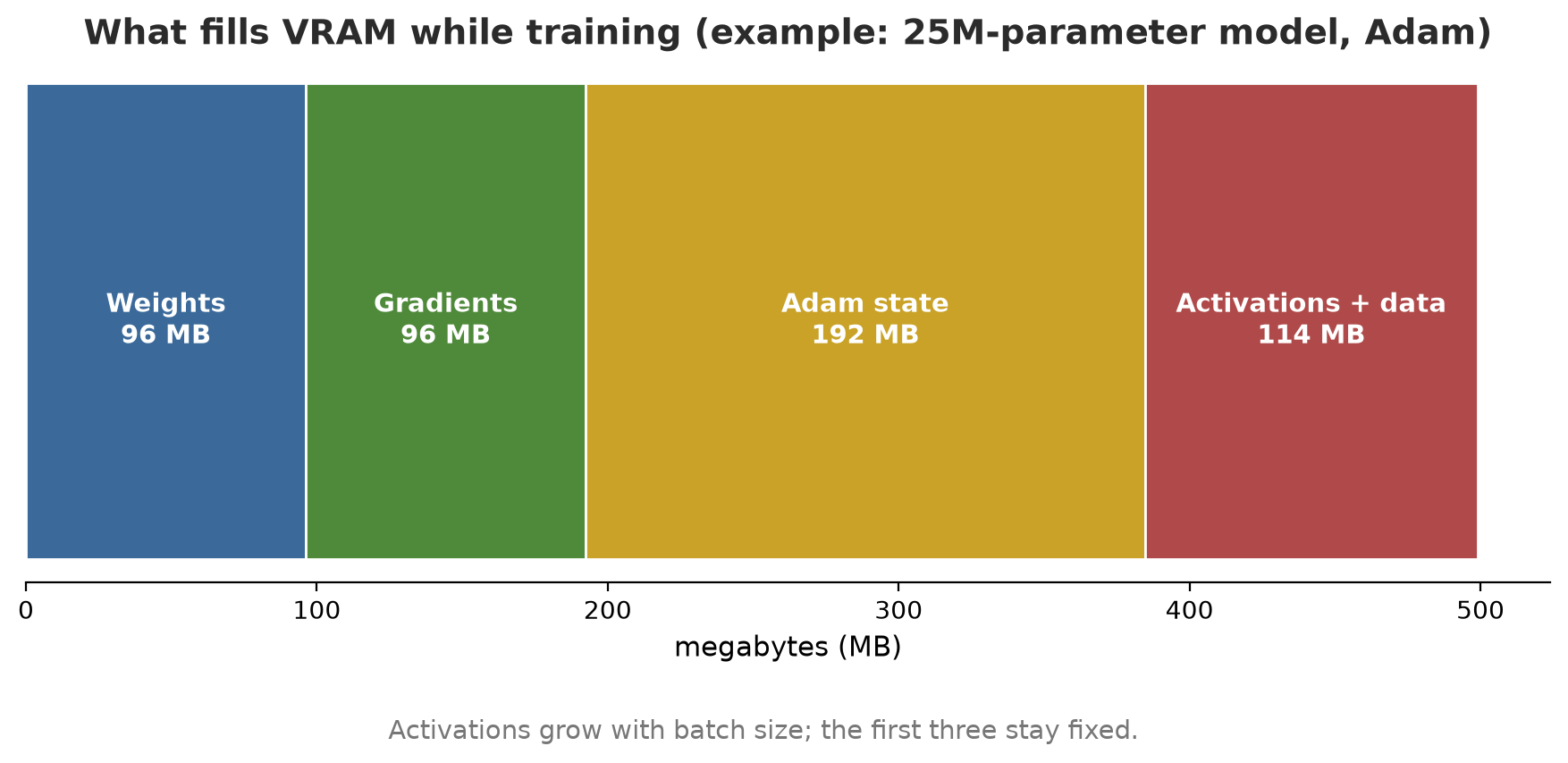
- Weights: number of parameters x size of a number (fp32 = 4 bytes, fp16 = 2 bytes).
- Gradients: one number per parameter.
- Optimiser state: Adam stores 2 numbers per parameter.
- Activations and data: the intermediate results of each layer, growing with the batch size.
A rough training formula: number of parameters x 16 bytes (fp32 + Adam) plus activations. For just running a model (no training): about parameters x 4 bytes (fp32) or x 2 bytes (fp16). We compute by hand and then measure for real:
05_estimate_vram.py
# Chapter 55 - Estimating VRAM: compute from the parameter count, then measure for real on the GPU
import torch
from torch import nn

assert torch.cuda.is_available(), "this script needs an NVIDIA GPU"
MILLION = 1_000_000


def params_memory_mb(count, bytes_per_number):
    return count * bytes_per_number / 1024**2


print("Estimated memory for parameters only (MB):")
for name, count in [("small model 1 million", 1 * MILLION), ("ResNet-50 (25.6 million)", 25_600_000),
                    ("model 1 billion", 1000 * MILLION)]:
    print(f"  {name:24s} fp32 = {params_memory_mb(count, 4):9.1f}   fp16 = {params_memory_mb(count, 2):9.1f}")

# Train one step with the Adam optimiser, then compare with the hand calculation
model = nn.Sequential(nn.Linear(2048, 4096), nn.ReLU(), nn.Linear(4096, 4096), nn.ReLU(),
                      nn.Linear(4096, 10)).cuda()
count = sum(p.numel() for p in model.parameters())
optimiser = torch.optim.Adam(model.parameters(), lr=1e-3)

torch.cuda.empty_cache()
torch.cuda.reset_peak_memory_stats()
x = torch.randn(256, 2048, device="cuda")
y = torch.randint(0, 10, (256,), device="cuda")
loss = nn.functional.cross_entropy(model(x), y)
loss.backward()
optimiser.step()                                       # Adam creates 2 extra copies per parameter

peak_mb = torch.cuda.max_memory_allocated() / 1024**2
weights = params_memory_mb(count, 4)
print(f"\nTest model: {count:,} parameters")
print(f"Weights          : {weights:7.1f} MB")
print(f"Gradients        : {weights:7.1f} MB   (one number per parameter)")
print(f"Adam state (x2)  : {2 * weights:7.1f} MB   (mean and variance)")
print(f"Fixed estimate   : {4 * weights:7.1f} MB   (not including activations and data)")
print(f"Measured (peak)  : {round(peak_mb):7d} MB   (rounded; includes activations and data)")
print("Measured >= fixed estimate:", peak_mb >= 4 * weights)
Estimated memory for parameters only (MB):
small model 1 million fp32 = 3.8 fp16 = 1.9
ResNet-50 (25.6 million) fp32 = 97.7 fp16 = 48.8
model 1 billion fp32 = 3814.7 fp16 = 1907.3
Test model: 25,214,986 parameters
Weights : 96.2 MB
Gradients : 96.2 MB (one number per parameter)
Adam state (x2) : 192.4 MB (mean and variance)
Fixed estimate : 384.8 MB (not including activations and data)
Measured (peak) : 499 MB (rounded; includes activations and data)
Measured >= fixed estimate: True- A 1-billion-parameter model alone needs 3,814.7 MB (about 3.7 GB) just for the fp32 weights, nearly the whole VRAM of a 6 GB card. Training it needs about 15 GB with Adam. This is why large models need big GPUs or special tricks (quantization, Chapter 61).
- Our test model: 25,214,986 parameters, weights 96.2 MB. The fixed estimate (weights + gradients + Adam) = 384.8 MB; the measured peak is 499 MB, and the difference of ~114 MB is activations and data.
torch.cuda.max_memory_allocated()is what measures it.
WarningWARNING
The estimate above is a lower bound. There are extras: memory reserved by PyTorch’s caching allocator, CUDA libraries (cuDNN and cuBLAS set aside workspace), and Windows itself uses VRAM for the display (on the author’s computer, with no program running, about 1.8 GB of VRAM was already in use according to nvidia-smi when this chapter was written). Always leave some room.
Mixed precision
Mixed precision runs part of the computation in float16 (half the size of float32) and the rest in float32, through torch.autocast. A gradient scaler (GradScaler) stops small gradients from “vanishing” to zero in float16. The PyTorch documentation says autocast on CUDA uses float16 by default, and operations such as mm, linear, and conv2d run in float16 (docs.pytorch.org/docs/2.14/amp.html, read 2026-10-10).
06_mixed_precision.py
# Chapter 55 - Mixed precision: part of the computation uses float16 to save memory
import torch
from torch import nn

assert torch.cuda.is_available(), "this script needs an NVIDIA GPU"
torch.manual_seed(0)


def step(use_amp):
    model = nn.Sequential(nn.Linear(1024, 4096), nn.ReLU(), nn.Linear(4096, 4096), nn.ReLU(),
                          nn.Linear(4096, 10)).cuda()
    optimiser = torch.optim.SGD(model.parameters(), lr=0.01)
    scaler = torch.amp.GradScaler("cuda", enabled=use_amp)   # stops float16 gradients from "running out" to zero
    x = torch.randn(8192, 1024, device="cuda")
    y = torch.randint(0, 10, (8192,), device="cuda")
    torch.cuda.empty_cache()
    torch.cuda.reset_peak_memory_stats()
    with torch.autocast(device_type="cuda", dtype=torch.float16, enabled=use_amp):
        loss = nn.functional.cross_entropy(model(x), y)
    scaler.scale(loss).backward()
    scaler.step(optimiser)
    scaler.update()
    return loss.item(), torch.cuda.max_memory_allocated() / 1024**2


loss32, mem32 = step(False)
loss16, mem16 = step(True)
print("Loss fp32 :", round(loss32, 2))
print("Loss amp  :", round(loss16, 2), "(almost the same)")
print("Mixed-precision peak memory is smaller:", mem16 < mem32)
print("Memory ratio amp / fp32 (rounded to 1 decimal):", round(mem16 / mem32, 1))
Loss fp32 : 2.31
Loss amp : 2.31 (almost the same)
Mixed-precision peak memory is smaller: True
Memory ratio amp / fp32 (rounded to 1 decimal): 0.7The loss is almost the same, but peak memory drops to about 70% in this experiment. On the GTX 1660 SUPER, the benefit is limited to memory: this card has no Tensor Cores (the TU116 chip was made without that unit, according to hardware reviews such as AnandTech), so the big speed-up from mixed precision that is often discussed on the internet applies to RTX cards and above. We did not measure speed here.
Batch size and OOM errors
A bigger batch: faster and steadier training, but activation memory grows. A smaller batch: saves memory, but is noisier. The experiment below also deliberately asks for far more memory than the VRAM so you can see a real OOM error.
07_batch_and_oom.py
# Chapter 55 - Batch size affects VRAM; if it is too big, an "out of memory" error occurs
import os
os.environ["TORCH_CPP_LOG_LEVEL"] = "ERROR"          # hide C++ warnings (they contain memory numbers that vary)
import torch
from torch import nn

assert torch.cuda.is_available(), "this script needs an NVIDIA GPU"
model = nn.Sequential(nn.Linear(1024, 2048), nn.ReLU(), nn.Linear(2048, 10)).cuda()

print("batch | peak memory (MB, rounded to 10)")
for batch in [64, 256, 1024, 4096, 16384]:
    torch.cuda.empty_cache()
    torch.cuda.reset_peak_memory_stats()
    x = torch.randn(batch, 1024, device="cuda")
    model(x).sum().backward()
    mb = torch.cuda.max_memory_allocated() / 1024**2
    print(f"{batch:5d} | {round(mb, -1):6.0f}")

# Deliberately ask for far more memory than the VRAM (this card has 6 GB): ask for 40 GB
try:
    torch.empty(10_000_000_000, dtype=torch.float32, device="cuda")
except torch.cuda.OutOfMemoryError as error:
    print("\nError caught:", type(error).__name__)
    print("Start of message:", str(error).split(".")[0][:45])
batch | peak memory (MB, rounded to 10)
64 | 30
256 | 40
1024 | 60
4096 | 140
16384 | 480
Error caught: OutOfMemoryError
Start of message: CUDA out of memoryPeak memory rises from 30 MB (batch 64) to 480 MB (batch 16,384). The 40 GB request produces an OutOfMemoryError, which can be caught with try/except. If OOM hits your training: reduce the batch, turn on mixed precision, use a smaller model, or use gradient accumulation (several small batches are summed before a single update step; not run in this book).
TipTIP
The symptom “Windows gets slow while training” is often because the VRAM is full. Close heavy programs (browser, games) and monitor with nvidia-smi.
Multi-GPU, cloud, and choosing hardware
- Multi-GPU: PyTorch provides
DistributedDataParallelfor training on several GPUs. Not run here because the author has only one card. - Cloud GPUs: renting a GPU by the hour when you need one only occasionally. Prices and card types change quickly, so this book gives no numbers; check the provider of your choice.
- Choosing hardware: first decide the largest model you will train, compute its VRAM the way shown above, and then buy enough VRAM. VRAM is usually the first limit you hit, not speed. For tabular data and classical ML (Chapter 54), a GPU is not needed.
TensorFlow
TensorFlow (with its Keras interface) is another library from Google. The idea is the same; what differs is the way you write it. The following script shows a model equivalent to script 02.
10_tensorflow_brief.py
# Chapter 55 - The same model written with TensorFlow/Keras (for comparison only)
import numpy as np
import tensorflow as tf

rng = np.random.default_rng(42)
X = rng.normal(size=(600, 3)).astype("float32")
y = ((X[:, 2] > 0) & (X[:, 0] < 0.5)).astype("float32")

model = tf.keras.Sequential([
    tf.keras.Input(shape=(3,)),
    tf.keras.layers.Dense(16, activation="relu"),
    tf.keras.layers.Dense(1, activation="sigmoid"),
])
model.compile(optimizer="adam", loss="binary_crossentropy", metrics=["accuracy"])
model.fit(X[:450], y[:450], epochs=50, verbose=0)
loss, accuracy = model.evaluate(X[450:], y[450:], verbose=0)
print("Test accuracy:", round(accuracy, 3))
This code was not run when the book was built because TensorFlow does not have a package for Python 3.14 yet (pip did not find the distribution in the book’s .venv) and GPU support on native Windows ended after TensorFlow 2.10, so no output is shown. The Keras syntax above was written from general knowledge and is untested on the author’s computer.
Running Project A3: a leaf disease CNN on the GPU
We train a CNN (convolutional neural network): a neural network for images that slides a “small filter” (a convolution) over the whole picture to detect edges, textures, and then shapes. The 32 x 32 pixel leaf images are made by a script (make_leaf_images.py): three classes, healthy (plain green), spotted (brown dots), and yellowing (pale to yellow), with random noise. This is fictitious data, not real photos.
08_cnn_gpu.py
# Chapter 55 - A small CNN on the GPU: recognizing healthy, spotted, and yellowing leaves (fictitious images)
import os
os.environ["CUBLAS_WORKSPACE_CONFIG"] = ":4096:8"             # required for deterministic computation on the GPU
import numpy as np
import torch
from sklearn.metrics import confusion_matrix
from torch import nn
from torchmetrics.classification import MulticlassF1Score

from make_leaf_images import CLASSES, make_leaves

torch.manual_seed(42)
torch.use_deterministic_algorithms(True)                      # raises an error if an operation cannot be deterministic
device = torch.device("cuda" if torch.cuda.is_available() else "cpu")
print("Using device:", device.type)

images, labels = make_leaves()
X = torch.from_numpy(images).to(device)
y = torch.from_numpy(labels).to(device)
train, test = slice(0, 960), slice(960, 1200)

model = nn.Sequential(
    nn.Conv2d(3, 16, 3, padding=1), nn.ReLU(), nn.MaxPool2d(2),     # 32 -> 16
    nn.Conv2d(16, 32, 3, padding=1), nn.ReLU(), nn.MaxPool2d(2),    # 16 -> 8
    nn.Flatten(), nn.Linear(32 * 8 * 8, 64), nn.ReLU(), nn.Linear(64, 3),
).to(device)
print("Number of parameters:", sum(p.numel() for p in model.parameters()))
optimiser = torch.optim.Adam(model.parameters(), lr=0.001)

for epoch in range(1, 41):
    model.train()
    order = torch.randperm(960, device=device)
    total = 0.0
    for first in range(0, 960, 64):                            # mini-batch 64
        idx = order[first:first + 64]
        optimiser.zero_grad()
        loss = nn.functional.cross_entropy(model(X[train][idx]), y[train][idx])
        loss.backward()
        optimiser.step()
        total += loss.item() * len(idx)
    if epoch == 1 or epoch % 10 == 0:
        print(f"epoch {epoch}: training loss = {total / 960:.3f}")

model.eval()
with torch.no_grad():
    guesses = model(X[test]).argmax(dim=1).cpu().numpy()
actual = y[test].cpu().numpy()
print("\nTest accuracy:", round(float((guesses == actual).mean()), 3))
print("Confusion matrix (row = actual):", CLASSES)
print(confusion_matrix(actual, guesses))

f1 = MulticlassF1Score(num_classes=3, average="macro")(torch.from_numpy(guesses), torch.from_numpy(actual))
print("Macro F1 (torchmetrics):", round(float(f1), 3))
Using device: cuda
Number of parameters: 136419
epoch 1: training loss = 1.030
epoch 10: training loss = 0.569
epoch 20: training loss = 0.469
epoch 30: training loss = 0.318
epoch 40: training loss = 0.236
Test accuracy: 0.858
Confusion matrix (row = actual): ['healthy', 'spotted', 'yellowing']
[[58 10 14]
[ 5 66 1]
[ 4 0 82]]
Macro F1 (torchmetrics): 0.856device = cuda: the model and data are moved to the GPU with.to(device). Both must be on the same device, or PyTorch complains.- The loss falls from 1.030 to 0.236 in 40 epochs. Test accuracy is 0.858 (an example number).
- Confusion matrix: the most frequent mistakes are
healthyguessed asyellowing(14) and asspotted(10).yellowingleaves are almost always right (82 out of 86). torch.use_deterministic_algorithms(True)and a fixed seed make the result the same on every run, even though a GPU can in principle be non-deterministic. On another card or PyTorch version, your numbers may differ a little.torchmetricsprovides ready-made metrics (here the macro F1).
Chapter 56 uses the same workflow for larger, real images, with YOLO.
Exercises
- In
01_tensor_autograd.py, change the learning rate 0.05 to 0.5 and to 0.001. What happens tow? - In
05_estimate_vram.py, replaceAdamwithSGD(without momentum) and measure again. Estimate first how many MB will be saved. - In
08_cnn_gpu.py, change the number of epochs to 10 and to 80. Does the test accuracy keep rising? (Hint: also watch the training loss.) - Challenge: change
08_cnn_gpu.pyto use mixed precision (torch.autocastandGradScaler, see script 06) and compare the peak memory before and after.
Chapter Summary
- The ML workflow: data, train/test split, model, repeated training (epochs), evaluation, use.
- PyTorch: tensors and autograd; one training step =
zero_grad,backward,step. - GPUs excel at simultaneous matrix multiplication; the only thing you must install yourself is the driver, because the
torchpackage already carries the CUDA and cuDNN libraries. - Training VRAM is roughly parameters x 16 bytes (fp32 + Adam) plus activations; measure it with
torch.cuda.max_memory_allocated(). - Mixed precision and small batches save memory; OOM can be caught.
- AMD, Apple, and Intel have their own routes in PyTorch (not run here); TensorFlow was not run.
Next, in Chapter 56: we use the GPU to see: computer vision, object detection with YOLO, and counting tree crowns in fictitious drone images.