Chapter 45 — Packaging: From a Code Folder to a Package
Series A1 — Professional Software Engineering
All scripts in this chapter are in the folder kode/ch45/. In the web version, you can also download everything at once (zip).
In Chapter 44, our timber value summary became fast. But the code is still a set of loose files. If a colleague wants to use it, you must send files one by one, and they get confused about which version is newest. Imagine selling seedlings: loose seedlings in a sack are a hassle, while seedlings in a labelled package (name, version, planting instructions) are easy to ship and trust. A Python package is that packaging: code plus a label (metadata) that tools like pip understand.
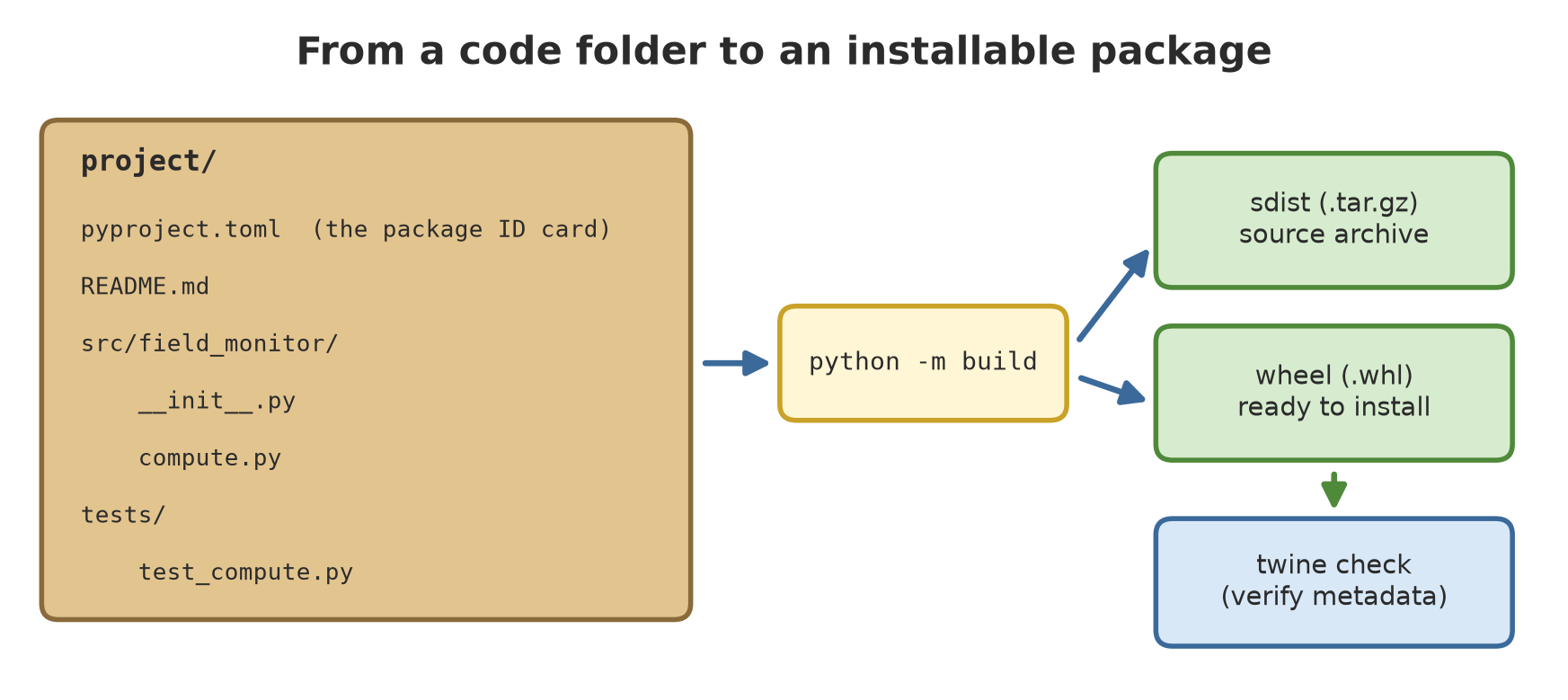
The folder structure of a package
01_structure.py
# Chapter 45 - Folder structure of a package (the "src" layout)
from pathlib import Path

root = Path(__file__).parent / "field_package"
print(root.name + "/")
for item in sorted(root.rglob("*"), key=lambda p: p.as_posix().lower()):
    if "__pycache__" in item.parts or "_tmp" in item.parts or item.suffix == ".egg-info":
        continue
    depth = len(item.relative_to(root).parts)
    mark = "/" if item.is_dir() else ""
    print("  " * depth + item.name + mark)
field_package/
pyproject.toml
README.md
src/
field_monitor/
__init__.py
cli.py
compute.py
tests/
test_compute.pyThis is called the src layout: the package code lives inside src/field_monitor/, separate from tests/. The advantage: when testing, you test the package imported exactly as a user would, not the working folder that happens to be nearby. Each part:
pyproject.toml: the ID card and the build instructions.README.md: the explanation for users; it also becomes the package’s front page.__init__.py: marks the folder as a package, and is where you choose what people may import.cli.py: the terminal command interface.
pyproject.toml: the package ID card
The pyproject.toml file uses the TOML format (simple text shaped like key = value). Its content:
[build-system]
requires = ["setuptools>=77"]
build-backend = "setuptools.build_meta"

[project]
name = "field-monitor-example"
version = "0.1.0"
description = "Example package from the book: timber value per plot and species"
readme = "README.md"
requires-python = ">=3.12"
license = "MIT"
dependencies = []

[project.optional-dependencies]
fast = ["numpy>=2"]
test = ["pytest>=8"]

[project.scripts]
field-monitor = "field_monitor.cli:main"
(The excerpt above is shortened; the real file is in the zip and also adds classifiers and the package search in src.) Python has a built-in TOML reader, tomllib:
02_pyproject.py
# Chapter 45 - Reading pyproject.toml with tomllib (built into Python 3.11+)
import tomllib
from pathlib import Path

content = tomllib.loads((Path(__file__).parent / "field_package" / "pyproject.toml").read_text(encoding="utf-8"))

project = content["project"]
print("package name    :", project["name"])
print("version         :", project["version"])
print("needs Python    :", project["requires-python"])
print("dependencies    :", project["dependencies"])
print("optional extras :", sorted(project["optional-dependencies"]))
print("terminal command:", project["scripts"])
print("build tool      :", content["build-system"]["requires"], "->", content["build-system"]["build-backend"])
package name : field-monitor-example
version : 0.1.0
needs Python : >=3.12
dependencies : []
optional extras : ['fast', 'test']
terminal command: {'field-monitor': 'field_monitor.cli:main'}
build tool : ['setuptools>=77'] -> setuptools.build_metaThe meaning of the important parts:
| Part | Purpose |
|---|---|
[build-system] |
the tool used to build the package (here setuptools) |
name, version |
the package name and version number |
requires-python |
the minimum Python version |
dependencies |
other packages that must be present (empty here) |
optional-dependencies |
optional extras, installed with pip install "package[fast]" |
[project.scripts] |
creates the terminal command field-monitor that calls the main function |
The package name above deliberately ends in -example so it does not clash with a real package. Before naming your own package, check whether the name is already taken on PyPI (the Python package index). Version numbers follow the pattern MAJOR.MINOR.PATCH: raise PATCH for small fixes, MINOR for compatible new features, MAJOR when a change may break users’ code.
Using the package straight from src
Before installing, the package can be tried by putting src on Python’s import path:
03_import_from_src.py
# Chapter 45 - Using the package straight from the src folder (not installed)
import sys
from pathlib import Path

sys.path.insert(0, str(Path(__file__).parent / "field_package" / "src"))

import field_monitor

trees = [
    {"species": "Teak", "plot": "A", "diameter_cm": 32.5, "height_m": 18.0},
    {"species": "Meranti", "plot": "A", "diameter_cm": 45.2, "height_m": 22.0},
    {"species": "Teak", "plot": "B", "diameter_cm": 28.0, "height_m": 15.0},
]
print("version (not installed):", field_monitor.__version__)
for key, value in field_monitor.value_per_group(trees).items():
    print(key, f"Rp {value:,.0f}")
version (not installed): not-installed
('A', 'Meranti') Rp 4,412,646
('A', 'Teak') Rp 2,986,474
('B', 'Teak') Rp 1,847,255Note the version: not-installed. In __init__.py, the version is read from the installed package’s metadata (importlib.metadata), so the only source of the version number is pyproject.toml. When not installed, we show a stand-in value instead of an error.
Building: sdist and wheel
The command python -m build produces two files in the dist/ folder:
- sdist (source distribution,
.tar.gz): an archive of the source code. - wheel (
.whl): a finished package thatpipcan install quickly.
We build in the temporary folder _tmp/ to keep the working folder clean:
04_build.py
# Chapter 45 - Building the package (python -m build) in the temporary folder _tmp/
import shutil
import subprocess
import sys
from pathlib import Path

here = Path(__file__).parent
source = here / "field_package"
work = here / "_tmp" / "project"

shutil.rmtree(here / "_tmp", ignore_errors=True)
shutil.copytree(source, work, ignore=shutil.ignore_patterns("__pycache__", "*.egg-info", "_tmp"))

# --no-isolation: use the setuptools that is already installed, so no internet is needed.
# Without that option (the usual way), "build" makes a separate environment and downloads the build tools.
result = subprocess.run(
    [sys.executable, "-m", "build", "--no-isolation", str(work)],
    capture_output=True, text=True, encoding="utf-8",
)
print("build exit code:", result.returncode)
for line in result.stdout.splitlines():
    if line.startswith("Successfully built"):
        print(line)
print("contents of the dist folder:")
for item in sorted((work / "dist").iterdir()):
    print(" ", item.name)
build exit code: 0
Successfully built field_monitor_example-0.1.0.tar.gz and field_monitor_example-0.1.0-py3-none-any.whl
contents of the dist folder:
field_monitor_example-0.1.0-py3-none-any.whl
field_monitor_example-0.1.0.tar.gzThe normal command is just python -m build. It creates an isolated environment and downloads the build tools from the internet. Our script uses --no-isolation so it runs without internet using the setuptools that is already installed. On your computer, plain python -m build is enough. (You must install the build tool first with pip install build.)
twine check and the wheel contents
twine check verifies that the package metadata is valid and that the README can be displayed correctly on PyPI. It only checks; it uploads nothing.
05_twine_check.py
# Chapter 45 - twine check: verifying the package metadata (does NOT upload anything)
import os
import re
import subprocess
import sys
from pathlib import Path

dist = Path(__file__).parent / "_tmp" / "project" / "dist"
files = sorted(str(p) for p in dist.iterdir())

# wide COLUMNS and NO_COLOR so twine output is neither cut off nor coloured
env = dict(os.environ, COLUMNS="400", NO_COLOR="1")
result = subprocess.run(
    [sys.executable, "-m", "twine", "check", *files],
    capture_output=True, text=True, encoding="utf-8", env=env,
)
text = re.sub(r"\s+", " ", result.stdout)
for name, status in re.findall(r"Checking \S*?([\w.\-]+\.(?:whl|tar\.gz)): (\w+)", text):
    print(f"{name}: {status}")
print("twine check exit code:", result.returncode)
field_monitor_example-0.1.0-py3-none-any.whl: PASSED
field_monitor_example-0.1.0.tar.gz: PASSED
twine check exit code: 0A wheel turns out to be just a zip file. Let us peek inside:
06_wheel_contents.py
# Chapter 45 - Peeking inside a wheel file (it is really a zip)
import zipfile
from pathlib import Path

dist = Path(__file__).parent / "_tmp" / "project" / "dist"
wheel = next(dist.glob("*.whl"))
print("wheel name:", wheel.name)

with zipfile.ZipFile(wheel) as z:
    for name in sorted(z.namelist()):
        print(" ", name)
    metadata = z.read(next(n for n in z.namelist() if n.endswith("METADATA"))).decode("utf-8")

print("--- part of METADATA ---")
for line in metadata.splitlines()[:8]:
    print(line)
wheel name: field_monitor_example-0.1.0-py3-none-any.whl
field_monitor/__init__.py
field_monitor/cli.py
field_monitor/compute.py
field_monitor_example-0.1.0.dist-info/METADATA
field_monitor_example-0.1.0.dist-info/RECORD
field_monitor_example-0.1.0.dist-info/WHEEL
field_monitor_example-0.1.0.dist-info/entry_points.txt
field_monitor_example-0.1.0.dist-info/top_level.txt
--- part of METADATA ---
Metadata-Version: 2.4
Name: field-monitor-example
Version: 0.1.0
Summary: Example package from the book: timber value per plot and species
License-Expression: MIT
Classifier: Programming Language :: Python :: 3
Classifier: Operating System :: OS Independent
Requires-Python: >=3.12Only the package code (field_monitor/) and a dist-info folder with metadata go in. The tests/ folder does not come along, because we only look for packages in src. The METADATA lines hold the name, version, summary, and Requires-Python that we wrote in pyproject.toml.
Installing and using it
The best proof that a package works is to install it in a clean place, as if you were another user. The following script creates a new virtual environment, installs the wheel, then runs its terminal command:
07_install_and_use.py
# Chapter 45 - Running project A1: install the wheel in a NEW virtual environment and use it
import subprocess
import sys
from pathlib import Path

root = Path(__file__).parent / "_tmp"
wheel = next((root / "project" / "dist").glob("*.whl"))
venv = root / "venv_test"
bin_dir = venv / ("Scripts" if sys.platform == "win32" else "bin")
exe = ".exe" if sys.platform == "win32" else ""

subprocess.run([sys.executable, "-m", "venv", str(venv)], check=True)
new_python = str(bin_dir / f"python{exe}")

# --no-index --no-deps: no internet, and our package has no dependencies anyway
install = subprocess.run(
    [new_python, "-m", "pip", "install", "--no-index", "--no-deps", "--quiet", str(wheel)],
    capture_output=True, text=True,
)
print("install succeeded:", install.returncode == 0)

version = subprocess.run(
    [new_python, "-c", "import field_monitor as p; print(p.__version__)"],
    capture_output=True, text=True,
)
print("installed version:", version.stdout.strip())

cli = subprocess.run([str(bin_dir / f"field-monitor{exe}"), "--count", "1000"],
                     capture_output=True, text=True, encoding="utf-8")
print("--- output of the command field-monitor --count 1000 ---")
print(cli.stdout.rstrip())
install succeeded: True
installed version: 0.1.0
--- output of the command field-monitor --count 1000 ---
12 groups from 1000 trees
plot A Mahogany Rp 191,426,619
plot A Meranti Rp 167,648,188
plot A Sengon Rp 71,666,209The field-monitor command exists because of the [project.scripts] section above. The installed version reads 0.1.0 from the metadata, no longer not-installed. We only use --no-index --no-deps so the script does not need internet.
Testing the package
08_test_package.py
# Chapter 45 - Running the package tests with pytest (against the code in the src folder)
import os
import re
import subprocess
import sys
from pathlib import Path

project = Path(__file__).parent / "field_package"
env = dict(os.environ, PYTHONPATH=str(project / "src"))

result = subprocess.run(
    [sys.executable, "-m", "pytest", "-q", "-p", "no:cacheprovider", str(project / "tests")],
    capture_output=True, text=True, encoding="utf-8", env=env, cwd=str(project),
)
summary = re.search(r"(\d+) passed", result.stdout)
print("tests passed:", summary.group(1) if summary else "none")
print("pytest exit code:", result.returncode)
tests passed: 2
pytest exit code: 0Two tests pass. We run pytest against the code in src through PYTHONPATH. In a real project, you usually install the package in editable mode (pip install -e .) and then run pytest.
The publishing flow: trusted publishing (not run)
To share a package with everyone, you upload it to PyPI. The official documentation (packaging.python.org, read 2026-10-10) recommends Trusted Publishing: instead of keeping a secret token, PyPI trusts one specific GitHub Actions workflow of yours. In short:
- On PyPI, register a “trusted publisher”: the GitHub repository and an environment named
pypi. - On GitHub, create a workflow that builds the package, then publishes it only when a release tag is pushed.
- The workflow is given the
id-token: writepermission so GitHub can prove its identity to PyPI.
A workflow excerpt from the official documentation (simplified; only the publishing part):
publish-to-pypi:
  if: startsWith(github.ref, 'refs/tags/')   # only on release tags
  needs:
    - build
  runs-on: ubuntu-latest
  environment:
    name: pypi
    url: https://pypi.org/p/<package-name>
  permissions:
    id-token: write   # mandatory for trusted publishing
  steps:
    - name: Download all the dists
      uses: actions/download-artifact@v6
      with:
        name: python-package-distributions
        path: dist/
    - name: Publish distribution to PyPI
      uses: pypa/gh-action-pypi-publish@release/v1
This code was not run when the book was built because uploading to PyPI changes the outside world and must not be done for a book example, so no output is shown. We did not upload this example package to PyPI or TestPyPI.
Running Project A1: the timber summary becomes a package
Scripts 04 to 08 above are also the project steps: the function value_per_group from Chapter 44 now lives in the package field-monitor-example version 0.1.0, passes twine check, installs in a clean environment, can be called through the field-monitor command, and is tested (2 tests pass). This package version deliberately does not use numpy (one pass over the data with a dict is enough), and numpy is placed as the optional extra fast. That is a design decision: a package with few dependencies is easier to install. In Chapter 46, we reorganize its architecture.
Exercises
- Change
versioninpyproject.toml(your copy) to0.1.1, rebuild, and look at the file names indist/. - Add a second terminal command in
[project.scripts]that calls another function. Reinstall and try it. - Delete
README.mdfrom your copy of the project and runpython -m build. What happens? - Challenge: add
[project.urls](for exampleHomepage) and run the CLI with an invalid option value (--count abc); observe the friendlyargparseerror message.
Chapter Summary
- A package = code + metadata. The
srclayout separates package code from tests. pyproject.tomlis one configuration file: build, name, version, dependencies, terminal commands.python -m buildproduces an sdist and a wheel;twine checkverifies metadata without uploading.- Prove the package by installing it in a clean environment.
- Official publishing uses Trusted Publishing from GitHub Actions; in this book it is only explained, not run.
Next, in Chapter 46: design patterns and architecture, keeping code tidy as an application grows.