%%{init: {"flowchart": {"diagramPadding": 40}}}%%
flowchart TD
A(["Send request"]) --> B{"Status?"}
B -->|"2xx / 4xx"| C(["Done: use it or report it"])
B -->|"5xx or network down"| D{"Tries used up?"}
D -->|"not yet"| E["Wait, then double the pause"]
E --> A
D -->|"yes"| F(["Give up with a clear message"])
Chapter 21 — Working with APIs: Asking Another Computer for Data
Series I2 — Data and the Internet
All scripts for this chapter are in the kode/ch21/ folder. On the web version, you can also download them all at once (zip).
Series I1 made your code tidy. Now that code needs ingredients, and many of them live on other computers: weather forecasts on a weather agency’s server, prices on a market’s server. Picture a restaurant. You (the program) sit at a table, the waiter (the API) takes your order, and the kitchen (the server) cooks. You never enter the kitchen; you just order in the agreed way and receive a plate with the answer on it. An API (Application Programming Interface) is that “menu and ordering rules”.
HTTP and JSON in five minutes
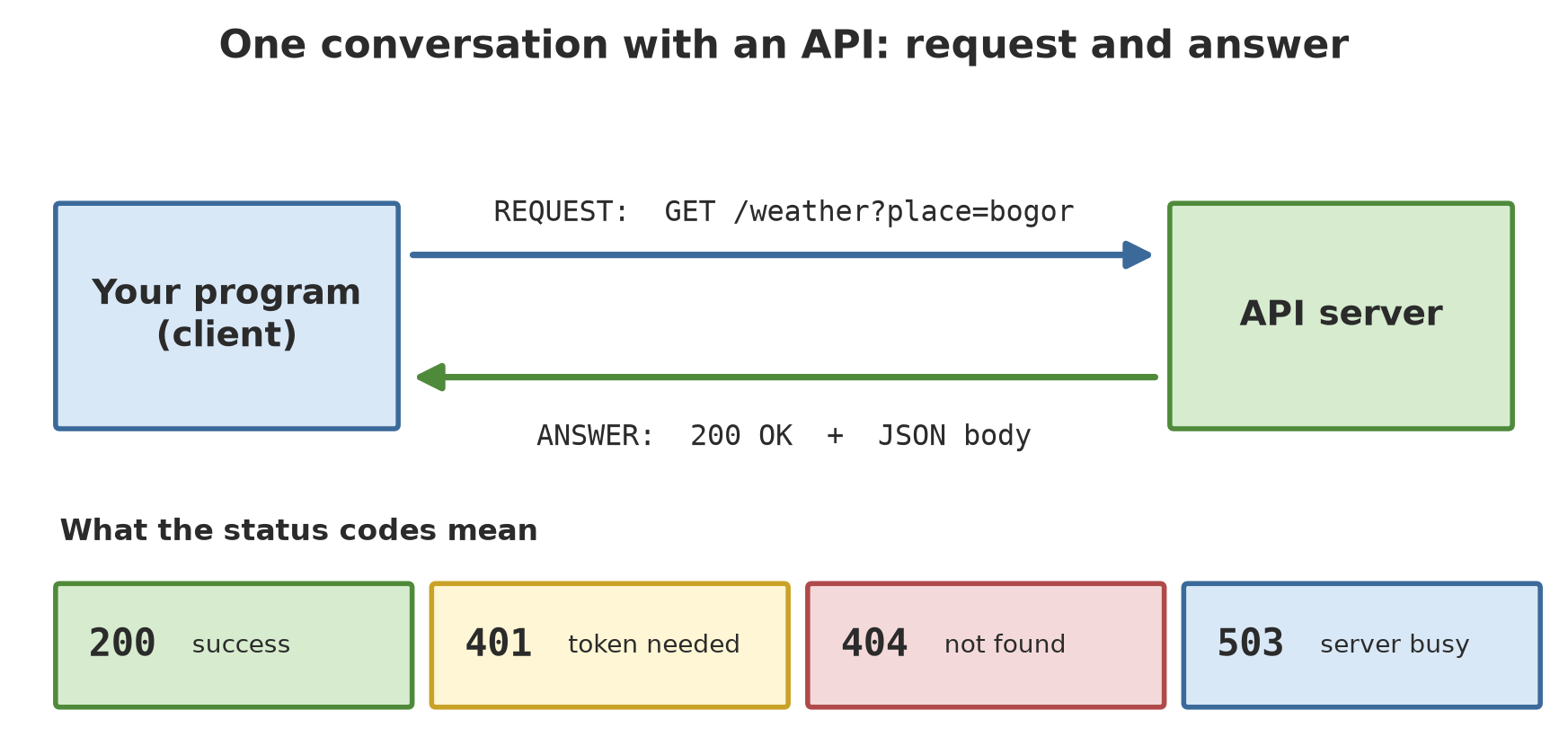
That conversation uses a language called HTTP. A request contains: a method (GET = “please give me”), an address, and sometimes extras such as parameters or a token. An answer contains: a status code (a three-digit number), headers (notes), and a body. The body from an API is usually JSON, text whose layout looks like Python dicts and lists (Chapter 9).
| Code | Meaning | Your action |
|---|---|---|
| 200 | Success | Read the body |
| 400 / 404 | Bad request / address does not exist | Check the address and parameters; repeating will not help |
| 401 | A correct token is needed | Check the token |
| 500s (e.g. 503) | Server trouble or busy | You may retry later |
A mock server: our own kitchen
To make the examples in this book always give the same output, and to avoid burdening other people’s servers, we build a mock API server on our own computer. Its helper file mock_server.py (in the chapter folder, not an example script) uses Python’s built-in http.server. It starts at the local address 127.0.0.1 on a random port, serves a few addresses with fictional data, and is switched off when the with block ends. To requests, it looks like a real API.
The first request with requests
requests is the best-known third-party library for HTTP (already in this project’s environment; on your computer: pip install requests).
01_basic_request.py
# Chapter 21 - Your first HTTP request with requests
import requests
from mock_server import MockServer

with MockServer() as server:            # starts the mock server on your own computer
    response = requests.get(f"{server.address}/weather?place=bogor&days=2", timeout=5)

    print("Status code :", response.status_code)
    print("Content type:", response.headers["Content-Type"])
    print("Raw text    :", response.text)
# leaving the `with` block: the server is switched off again
Status code : 200
Content type: application/json; charset=utf-8
Raw text : {"place": "bogor", "units": {"max_temp": "C", "rain_mm": "mm"}, "daily": {"date": ["2026-01-01", "2026-01-02"], "max_temp": [30.1, 31.4], "rain_mm": [12.5, 0.0]}}Code 200 means success. Content-Type tells us the body is JSON. The “raw text” was sent by the server as one long line; next we turn it into Python data.
JSON and parameters
02_json_and_params.py
# Chapter 21 - JSON and parameters (params)
import json
import requests
from mock_server import MockServer

with MockServer() as server:
    # params= builds the "?key=value" part correctly (including character encoding)
    response = requests.get(f"{server.address}/weather", params={"place": "bandung", "days": 3}, timeout=5)
    print("Full address:", response.url.replace(server.address, "<server>"))

    data = response.json()              # JSON -> Python dict/list
    print("Data type   :", type(data).__name__)
    print("Place       :", data["place"])
    print("Dates       :", data["daily"]["date"])
    print("Rain (mm)   :", data["daily"]["rain_mm"])
    print("Total rain  :", round(sum(data["daily"]["rain_mm"]), 1), "mm")

    # the other direction: Python -> JSON text
    print(json.dumps({"place": "bandung", "total_rain_mm": 19.2}, ensure_ascii=False, indent=2))
Full address: <server>/weather?place=bandung&days=3
Data type : dict
Place : bandung
Dates : ['2026-01-01', '2026-01-02', '2026-01-03']
Rain (mm) : [5.0, 0.0, 14.2]
Total rain : 19.2 mm
{
"place": "bandung",
"total_rain_mm": 19.2
}params={...}builds the?place=bandung&days=3part correctly. Do not assemble addresses by hand..json()turns the answer into a dict/list. Three days of Bandung rain: 5.0 + 0.0 + 14.2 = 19.2 mm.json.dumps(...)is the reverse direction: from Python to JSON text (indent=2tidies it up).
httpx: the sibling of requests
httpx is similar to requests but has a Client: an object that remembers the base address and settings so they are not repeated in every call (it also supports an asynchronous mode, covered in later series).
03_httpx.py
# Chapter 21 - httpx: a sibling of requests, with a reusable Client
import httpx
from mock_server import MockServer

with MockServer() as server:
    # A Client remembers the base address and settings, so you do not repeat them in every call
    with httpx.Client(base_url=server.address, timeout=5.0) as client:
        for place in ["bogor", "bandung", "malang"]:
            response = client.get("/weather", params={"place": place, "days": 5})
            data = response.json()
            rain = data["daily"]["rain_mm"]
            print(f"{place:8} status {response.status_code}  total rain {sum(rain):5.1f} mm")
bogor status 200 total rain 49.2 mm
bandung status 200 total rain 51.5 mm
malang status 200 total rain 28.7 mmThree places, five-day rain totals of 49.2, 51.5, and 28.7 mm (fictional data). As a beginner, pick one of the two first; the knowledge is nearly the same.
Authentication: showing your “membership card”
Many APIs serve only holders of a token (a kind of membership card). The most common way: send the token in the header Authorization: Bearer <token>. Other ways: an API key in a header or parameter, or Basic auth (a user name and password; in requests via auth=(name, password)).
04_authentication.py
# Chapter 21 - Basic authentication: a token in the Authorization header
import os
import requests
from mock_server import MockServer

with MockServer() as server:
    address = f"{server.address}/secret"

    without = requests.get(address, timeout=5)
    print("Without token:", without.status_code, without.json())

    # In the real world the token is read from an environment variable, NEVER written in code.
    # Here we park the random token of our mock server in a temporary environment variable.
    os.environ["SAMPLE_API_TOKEN"] = server.token
    token = os.environ["SAMPLE_API_TOKEN"]

    with_token = requests.get(address, headers={"Authorization": f"Bearer {token}"}, timeout=5)
    print("With token   :", with_token.status_code, with_token.json())
Without token: 401 {'error': 'token missing or wrong'}
With token : 200 {'message': 'you are in', 'officer': 'fictional'}Without a token the server answers 401; with one it answers 200. Notice how the token is treated: read from an environment variable (os.environ), not written in the code. Here the token is random and made by the mock server, so no real secret is involved.
WarningWARNING
Never write a token, API key, or password straight into code, least of all code that will be uploaded to GitHub (Chapter 20). Keep it in an environment variable or in an .env file listed in .gitignore.
When things do not go smoothly
Networks are unpredictable: wrong addresses, dead servers, dropped connections. A good program expects this.
Status codes and raise_for_status()
05_error_status.py
# Chapter 21 - Error status codes and raise_for_status()
import requests
from mock_server import MockServer

with MockServer() as server:
    for address in ["/weather?place=bogor&days=1", "/weather?place=atlantis", "/weather", "/secret"]:
        response = requests.get(server.address + address, timeout=5)
        print(f"{address:28} -> {response.status_code}")

    # raise_for_status() turns a 4xx/5xx code into an exception you can catch
    try:
        requests.get(f"{server.address}/weather?place=atlantis", timeout=5).raise_for_status()
    except requests.HTTPError as error:
        print("Caught HTTPError:", error.response.status_code, error.response.json())
/weather?place=bogor&days=1 -> 200
/weather?place=atlantis -> 404
/weather -> 400
/secret -> 401
Caught HTTPError: 404 {'error': 'unknown place'}requests does not treat 404 as an error; it is merely an answer with a different code. raise_for_status() turns 4xx/5xx codes into an HTTPError exception that you can try/except (Chapter 12).
Timeout: do not wait forever
06_timeout.py
# Chapter 21 - Timeout: do not wait forever
import requests
from mock_server import MockServer

with MockServer() as server:        # the /slow address deliberately answers after 1.5 seconds
    try:
        requests.get(f"{server.address}/slow", timeout=0.3)
    except requests.Timeout:
        print("The server took too long (> 0.3 seconds): request cancelled.")

    response = requests.get(f"{server.address}/slow", timeout=5)
    print("With a 5 second limit:", response.json()["message"])

# Without timeout=, requests waits without any time limit (see the official documentation).
The server took too long (> 0.3 seconds): request cancelled.
With a 5 second limit: finally done
NoteREMEMBER
According to the official requests documentation, if timeout= is not given, the request has no time limit and your program can hang. Make a habit of always setting it. In httpx, the default limit is 5 seconds.
Retry with a pause
5xx errors are often temporary. The strategy: try again with a growing pause (exponential backoff), but only for errors worth repeating, and stop after a few tries.
07_retry.py
# Chapter 21 - Retry with a growing pause
import time
import requests
from mock_server import MockServer


def fetch_with_retry(address, max_tries=4, first_pause=0.05):
    pause = first_pause
    for attempt in range(1, max_tries + 1):
        try:
            response = requests.get(address, timeout=5)
            if response.status_code < 500:       # 2xx/4xx: repeating is pointless
                return response
            print(f"  attempt {attempt}: status {response.status_code}, wait {pause:.2f} seconds")
        except (requests.ConnectionError, requests.Timeout):
            print(f"  attempt {attempt}: network trouble, wait {pause:.2f} seconds")
        time.sleep(pause)
        pause = pause * 2                        # doubling pause: 0.05 -> 0.10 -> 0.20 ...
    raise RuntimeError("giving up after several tries")


with MockServer() as server:        # /busy fails twice (503), then succeeds
    result = fetch_with_retry(f"{server.address}/busy")
    print("Success:", result.json())
attempt 1: status 503, wait 0.05 seconds
attempt 2: status 503, wait 0.10 seconds
Success: {'message': 'success', 'attempt': 3}The mock server deliberately fails twice (503), so the 3rd attempt succeeds. The pause doubles each time: 0.05 then 0.10 seconds (in the real world start at 1 second or more so you do not hammer the server).
One call to a real API: Open-Meteo
Open-Meteo offers weather forecasts through an open API. What I found when checking its terms on 2026-10-10 (open-meteo.com/en/terms):
- Free use is for non-commercial purposes only and needs no key; the limit is under 10,000 calls per day, 5,000 per hour, and 600 per minute.
- Using the free API means accepting the CC BY 4.0 licence, which requires attribution. That is why the script prints “Weather data by Open-Meteo.com”.
- This book is not a commercial application; readers building paid products must read those terms themselves.
08_real_api.py
# Chapter 21 - One call to a real API: Open-Meteo (no key)
import requests

address = "https://api.open-meteo.com/v1/forecast"
parameters = {
    "latitude": -6.6,                  # around Bogor
    "longitude": 106.8,
    "daily": "temperature_2m_max,precipitation_sum",
    "timezone": "Asia/Jakarta",
    "forecast_days": 3,
}
response = requests.get(address, params=parameters, timeout=10)
response.raise_for_status()
data = response.json()

print("Status        :", response.status_code)
print("Units         :", data["daily_units"])
for day, temp, rain in zip(data["daily"]["time"], data["daily"]["temperature_2m_max"],
                           data["daily"]["precipitation_sum"]):
    print(f"{day}  max temp {temp} C  rain {rain} mm")
print("Weather data by Open-Meteo.com (CC BY 4.0 licence)")
Status : 200
Units : {'time': 'iso8601', 'temperature_2m_max': '°C', 'precipitation_sum': 'mm'}
2026-10-10 max temp 33.8 C rain 1.0 mm
2026-10-11 max temp 32.9 C rain 5.2 mm
2026-10-12 max temp 32.4 C rain 6.6 mm
Weather data by Open-Meteo.com (CC BY 4.0 licence)This code was not re-run when the book was built because it needs the internet and its result changes every day. The output above was taken by me on 2026-10-10 and stored. When you run it, the dates and numbers will be different; that is normal.
TipTIP
About commodity prices: on 2026-10-10 I could not find a verified agricultural commodity price API that is free and needs no key. The list of 71 World Bank API data sources has no commodity price source, and the commodity price services that showed up in a web search mostly ask for registration or a key (I did not test their terms). So the prices in this book come from the mock server (fictional). For a real project, check official sources such as a ministry or a commodity exchange, and read their terms of use.
Running Project I2: fetching weather and price data
Step 1 of the Series I2 project: fetch the weather of three places and the prices of four commodities from our “API”, using a small function that stops clearly on any error, then save them as raw JSON in the _tmp folder.
09_project_fetch_data.py
# Chapter 21 - Running project I2, step 1: fetching weather and price data
import json
from pathlib import Path

import requests
from mock_server import MockServer

tmp = Path(__file__).parent / "_tmp"
tmp.mkdir(exist_ok=True)


def fetch_json(address, **param):
    """Fetches JSON; stops with a clear message on any error."""
    response = requests.get(address, params=param, timeout=5)
    response.raise_for_status()
    return response.json()


with MockServer() as server:
    weather = {}
    for place in ["bogor", "bandung", "malang"]:
        weather[place] = fetch_json(f"{server.address}/weather", place=place)["daily"]
    prices = fetch_json(f"{server.address}/prices")["data"]

(tmp / "raw_weather.json").write_text(json.dumps(weather, ensure_ascii=False, indent=1), encoding="utf-8")
(tmp / "raw_prices.json").write_text(json.dumps(prices, ensure_ascii=False, indent=1), encoding="utf-8")

print("Weather places :", list(weather))
print("Days per place :", len(weather["bogor"]["date"]))
print("Price rows     :", len(prices), "| example:", prices[0])
print("Saved in the _tmp folder: raw_weather.json, raw_prices.json")
Weather places : ['bogor', 'bandung', 'malang']
Days per place : 5
Price rows : 20 | example: {'date': '2026-01-01', 'commodity': 'rice', 'price_per_kg': 6200}
Saved in the _tmp folder: raw_weather.json, raw_prices.jsonWeather for three places, five days each, and 20 price rows (4 commodities x 5 days). This raw data will be cleaned (Chapter 22), merged (Chapter 23), stored (Chapter 24), and drawn (Chapter 25). So that every script stands on its own, the next chapters copy the same data directly into their code.
Exercises
- Change
02_json_and_params.pyto fetchmalangand print the day with the most rain. - In
05_error_status.py, add the address/no-such-page. Which status code appears? - Change the
timeoutin06_timeout.pyto 2 seconds. What changes, and why? - Challenge: write a function
fetch_safely(address)that retries on 5xx but stops immediately (no repeat) on404, and returnsNoneif it finally fails.
Chapter Summary
- API = the official way to ask another program for data; HTTP = its language; JSON = the shape of the content.
requests.get(address, params=..., timeout=...);.json()turns the answer into Python data.httpx.Clientis similar, with shared settings.- Status codes: 2xx success, 4xx our fault, 5xx the server’s fault.
raise_for_status()turns errors into exceptions. - Always use a timeout; retry only temporary errors, with a doubling pause.
- Tokens are read from environment variables, not written in code.
- Open-Meteo: free for non-commercial use, no key, attribution required (CC BY 4.0). A free, keyless commodity price API: not found (unverified).
Next, in Chapter 22: incoming data is not always tidy, for example field notes typed by humans. We learn regex to dig out and clean text.