%%{init: {"flowchart": {"diagramPadding": 40}}}%%
flowchart LR
A["STAC catalog<br/>(JSON)"] --> B["Search<br/>time, place, cloud"]
B --> C["Chosen items"]
C --> D["COG asset<br/>(href)"]
D --> E["Read the<br/>window you need"]
E --> F["xarray stack<br/>then Zarr"]
Chapter 51 — Advanced and Cloud-Native Geospatial: Reading a Piece of the Earth from Afar
Series A2 — Large-Scale Data and Advanced Geospatial
All scripts for this chapter are in the kode/ch51/ folder. On the web version, you can also download them all at once (zip).
In Chapter 39, you opened a small GeoTIFF on your own computer. Real satellite imagery is different: one Sentinel-2 scene can be hundreds of megabytes, and one area is photographed again and again every few days. Downloading everything just to look at one orchard is like buying a whole rice warehouse for one sack.
Cloud-native means data is stored in a way that makes partial reading over the internet cheap: a program asks only for the bytes it needs. This chapter shows three formats (COG, GeoParquet, Zarr), one catalog (STAC), and one new kind of data (LiDAR). Every example uses fictional data made by scripts; no big image or point cloud is downloaded.
COG: a GeoTIFF that can be read in part
A Cloud Optimized GeoTIFF (COG) is an ordinary GeoTIFF with a special layout. According to GDAL’s documentation, a COG is tiled, has overviews (summaries at coarser resolution), and is arranged so that a client can read parts of it with HTTP range requests: “send me only bytes 1,000 to 5,000”. The header and the list of tile locations are placed at the start of the file, followed by data from the smallest overview up to the full resolution.
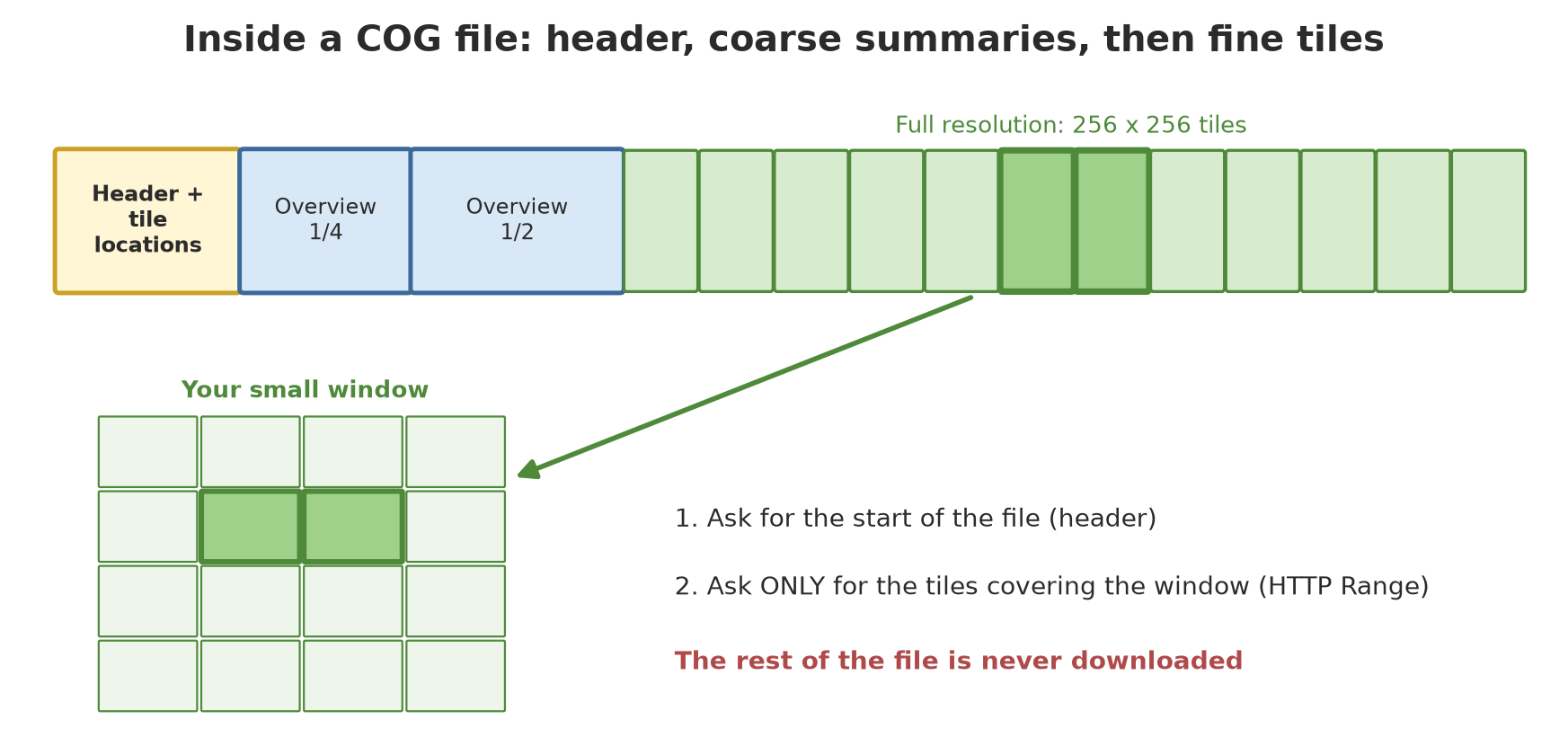
Rasterio can write COGs through GDAL’s COG driver. We make a fictional 1024 x 1024 pixel image, then compare a plain GeoTIFF with a COG.
01_write_cog.py
# Chapter 51 - Writing a Cloud Optimized GeoTIFF (COG) with rasterio and GDAL's COG driver
from pathlib import Path

import numpy as np
import rasterio
from rasterio.shutil import copy as copy_raster
from rasterio.transform import from_origin

tmp = Path(__file__).parent / "_tmp"
tmp.mkdir(exist_ok=True)

# Fictional image: a vegetation index of 1024 x 1024 pixels, 10 m resolution, UTM zone 48S (EPSG:32748)
rng = np.random.default_rng(42)
y, x = np.mgrid[0:1024, 0:1024]
ndvi = 0.5 + 0.3 * np.sin(x / 120) * np.cos(y / 160) + rng.normal(0, 0.03, (1024, 1024))
ndvi = ndvi.astype("float32")

plain = tmp / "ndvi_plain.tif"
transform = from_origin(700000, 9270000, 10, 10)     # top-left corner (x, y) and pixel size
with rasterio.open(plain, "w", driver="GTiff", height=1024, width=1024, count=1,
                   dtype="float32", crs="EPSG:32748", transform=transform) as dst:
    dst.write(ndvi, 1)

# Turn it into a COG: 256x256 tiles, plus coarser summaries (overviews)
cog = tmp / "ndvi_cog.tif"
copy_raster(plain, cog, driver="COG", compress="DEFLATE", blocksize=256, overview_resampling="average")

for name, path in [("Plain GeoTIFF", plain), ("COG", cog)]:
    with rasterio.open(path) as src:
        print(f"{name:14s} tile: {src.block_shapes[0]}  overviews: {src.overviews(1)}  "
              f"layout: {src.tags(ns='IMAGE_STRUCTURE').get('LAYOUT', '-')}")
Plain GeoTIFF tile: (2, 1024) overviews: [] layout: -
COG tile: (256, 256) overviews: [2, 4] layout: COG- The plain GeoTIFF is stored in strips as wide as the image (2 rows x 1024 columns per block), with no overviews. To read one corner, GDAL has to jump around the whole file.
- The COG has 256 x 256 tiles, overviews at levels 2 and 4 (half and a quarter of the resolution), and marks itself
LAYOUT=COG.
Now the exciting part: reading a small window.
02_cog_window.py
# Chapter 51 - Reading a small window from a COG: locally, then over HTTP with Range requests
import re
import threading
from http.server import BaseHTTPRequestHandler, HTTPServer
from pathlib import Path

import rasterio
from rasterio.windows import Window

tmp = Path(__file__).parent / "_tmp"
cog = tmp / "ndvi_cog.tif"
if not cog.exists():                                   # made by script 01
    raise SystemExit("run 01_write_cog.py first")

# --- Part 1: local file -------------------------------------------------------
with rasterio.open(cog) as src:
    window = Window(col_off=512, row_off=256, width=128, height=128)
    piece = src.read(1, window=window)
    print("128x128 pixel window:", piece.shape, " mean:", round(float(piece.mean()), 3))
    # Ask for a smaller output size: GDAL uses an overview instead of reading every pixel
    coarse = src.read(1, out_shape=(256, 256))
    print("Whole image at 256x256 (from an overview):", coarse.shape)

# --- Part 2: a tiny HTTP server that supports Range (for local testing only) -----
stats = {"requests": 0, "bytes": 0}
data = cog.read_bytes()


class Server(BaseHTTPRequestHandler):
    def log_message(self, *args):                       # silence the default log
        pass

    def _head(self, code, start, end):
        self.send_response(code)
        self.send_header("Accept-Ranges", "bytes")
        self.send_header("Content-Length", str(end - start + 1))
        if code == 206:
            self.send_header("Content-Range", f"bytes {start}-{end}/{len(data)}")
        self.end_headers()

    def do_HEAD(self):
        self._head(200, 0, len(data) - 1)

    def do_GET(self):
        found = re.match(r"bytes=(\d+)-(\d*)", self.headers.get("Range", ""))
        start = int(found.group(1)) if found else 0
        end = min(int(found.group(2) or len(data) - 1), len(data) - 1) if found else len(data) - 1
        self._head(206 if found else 200, start, end)
        self.wfile.write(data[start:end + 1])
        stats["requests"] += 1
        stats["bytes"] += end - start + 1


server = HTTPServer(("127.0.0.1", 0), Server)
threading.Thread(target=server.serve_forever, daemon=True).start()
address = f"http://127.0.0.1:{server.server_port}/ndvi_cog.tif"

with rasterio.Env(GDAL_DISABLE_READDIR_ON_OPEN="EMPTY_DIR", CPL_VSIL_CURL_ALLOWED_EXTENSIONS=".tif"):
    with rasterio.open(address) as src:
        piece_http = src.read(1, window=window)

server.shutdown()
print("Result over HTTP equals the local one:", bool((piece_http == piece).all()))
print("File size (KB):", len(data) // 1024)
print("Downloaded fewer bytes than the whole file:", stats["bytes"] < len(data))
print("Downloaded less than 10% of the file:", stats["bytes"] < 0.10 * len(data))
128x128 pixel window: (128, 128) mean: 0.615
Whole image at 256x256 (from an overview): (256, 256)
Result over HTTP equals the local one: True
File size (KB): 4609
Downloaded fewer bytes than the whole file: True
Downloaded less than 10% of the file: TruePart 1 reads a 128 x 128 pixel window from a local file; with out_shape=(256, 256) GDAL reads from an overview, not all pixels. Part 2 runs a small HTTP server on your own computer (127.0.0.1) that supports Range, then opens the COG through an http://... address. The result is exactly the same as the local read, yet less than 10% of the file size (4,609 KB) travelled through the “network”. With real satellite images of hundreds of megabytes, the saving is far greater.
WarningWARNING
The real example above uses only a local file and a localhost server. Reading a COG owned by a provider on the internet uses the same code (rasterio.open("https://...")), but it depends on your connection, the provider’s access rules, and its usage policy. That is not run in this book.
GeoParquet: columnar vector data
In Chapter 50 you learned Parquet for tables. GeoParquet adds a geometry column (in WKB form) and CRS metadata to a Parquet file. The result: big vector data (millions of points or polygons) that is fast to read in part and can be opened directly by DuckDB, Polars, or GeoPandas.
03_geoparquet.py
# Chapter 51 - GeoParquet: vector data in a columnar format, with GeoPandas and pyarrow
import json
from pathlib import Path

import geopandas as gpd
import numpy as np
import pyarrow.parquet as pq
from shapely.geometry import Point, box

tmp = Path(__file__).parent / "_tmp"
tmp.mkdir(exist_ok=True)

# Fictional data: 5,000 tree points around 107.0 E and 6.6 S, and a box to query
rng = np.random.default_rng(42)
n = 5_000
lon = rng.uniform(106.95, 107.05, n)
lat = rng.uniform(-6.65, -6.55, n)
trees = gpd.GeoDataFrame(
    {
        "id": np.arange(n),
        "species": rng.choice(["Teak", "Meranti", "Mahogany", "Sengon"], n),
        "height_m": rng.normal(18, 4, n).round(1),
    },
    geometry=[Point(x, y) for x, y in zip(lon, lat)],
    crs="EPSG:4326",
)

# write_covering_bbox=True adds a bbox column: readers can filter without opening the geometry
file = tmp / "trees.parquet"
trees.to_parquet(file, compression="zstd", write_covering_bbox=True, row_group_size=1000)

# GeoParquet metadata lives inside the file, under the key 'geo'
meta = pq.read_schema(file).metadata
geo = json.loads(meta[b"geo"])
column = geo["columns"]["geometry"]
print("GeoParquet version:", geo["version"])
print("Geometry types:", column["geometry_types"], "| encoding:", column["encoding"])
print("CRS stored:", "yes" if column.get("crs") else "no (assumed OGC:CRS84)")
print("Columns in the file:", pq.read_schema(file).names)

# Read only what lies inside a box (bbox): minx, miny, maxx, maxy
bounds = (106.98, -6.62, 107.00, -6.60)
part = gpd.read_parquet(file, bbox=bounds)
check = trees[trees.within(box(*bounds))]
print("Points inside the box (bbox):", len(part), "of", n)
print("Same as manual filtering:", len(check) == len(part))
GeoParquet version: 1.1.0
Geometry types: ['Point'] | encoding: WKB
CRS stored: yes
Columns in the file: ['id', 'species', 'height_m', 'geometry', 'bbox']
Points inside the box (bbox): 186 of 5000
Same as manual filtering: True- GeoParquet metadata lives inside the file under the key
geo: version 1.1.0, geometry typePoint, encodingWKB, and the CRS. write_covering_bbox=Trueadds abboxcolumn (the bounding box of each object). Readers can filter with that column without opening the geometry.gpd.read_parquet(file, bbox=...)fetches only 186 of 5,000 points inside the box. The result equals manual filtering with Shapely (True).
Zarr: a big array that is split up
A multi-date image is a three-dimensional array (time, y, x), sometimes four-dimensional with bands. Zarr stores such an array by splitting it into chunks: one small file per piece, plus JSON metadata. Because each chunk is its own file, many workers can write and read different pieces at the same time, and cloud storage suits that well.
04_zarr.py
# Chapter 51 - Zarr: a big array split into chunks, one file per chunk
import shutil
from pathlib import Path

import numpy as np
import zarr

tmp = Path(__file__).parent / "_tmp"
location = tmp / "temperature.zarr"
shutil.rmtree(location, ignore_errors=True)

# Fictional array: surface temperature, 12 months x 400 x 400 pixels
rng = np.random.default_rng(42)
data = (25 + 3 * rng.random((12, 400, 400))).astype("float32")

z = zarr.create_array(
    store=location,
    shape=data.shape,
    chunks=(1, 200, 200),            # one month, a quarter of the image
    dtype="float32",
    dimension_names=("month", "y", "x"),
)
z[:] = data

print("Shape:", z.shape, "| chunks:", z.chunks, "| type:", z.dtype)
print("Number of chunks:", z.nchunks)
print("Files holding real chunks:", sum(1 for p in (location / "c").rglob("*") if p.is_file()))

# Reading a slice: only the chunks that overlap it are opened
opened = zarr.open_array(location, mode="r")
piece = opened[3, 100:150, 250:300]
print("Slice of month 4:", piece.shape, "equals the original data:", bool(np.array_equal(piece, data[3, 100:150, 250:300])))
print("Chunks touched by that slice: 1 of", opened.nchunks)

# Zarr metadata is plain JSON a human can read
print("Metadata file:", (location / "zarr.json").name)
Shape: (12, 400, 400) | chunks: (1, 200, 200) | type: float32
Number of chunks: 48
Files holding real chunks: 48
Slice of month 4: (50, 50) equals the original data: True
Chunks touched by that slice: 1 of 48
Metadata file: zarr.jsonThe 12 x 400 x 400 array is split into chunks of (1, 200, 200): one month, a quarter of the image. The number of chunks = 12 x 2 x 2 = 48, and exactly 48 chunk files exist on disk. When we slice [3, 100:150, 250:300], the slice lies in month 4 and in one quarter of the image, so only one chunk is opened. The zarr.json file holds human-readable metadata. (The zarr package, version 3, was installed for this chapter.)
TipTIP
Chunk size decides speed. Too small: too many files and requests. Too large: reading a small slice still pulls a lot of data. Match it to your reading pattern: if you often take the time series of one point, do not make chunks of one month per file. Chapter 53 goes deeper into this.
STAC: a catalog for finding data
A good format is useless if you cannot find the data. STAC (SpatioTemporal Asset Catalog) is a JSON specification for describing geospatial data so it can be browsed and searched. Its main objects:
- Catalog: a parent that links collections and items.
- Collection: a set of similar items, with spatial and temporal extent.
- Item: one unit of data (one scene), a GeoJSON feature with a time and properties (for example cloud cover).
- Asset: a link to the real file (COG, JPEG, metadata), found inside an item.
The pystac library builds STAC objects, and pystac-client opens and searches them. We build a fictional catalog for one orchard: four scenes, each with one small COG.
05_stac_local.py
# Chapter 51 - A local STAC catalog: make items with COG assets, then search with pystac-client
import shutil
import warnings
from datetime import datetime, timezone
from pathlib import Path

import numpy as np
import pystac
import rasterio
from pystac_client import Client
from pystac_client.warnings import FallbackToPystac, NoConformsTo
from rasterio.shutil import copy as copy_raster
from rasterio.transform import from_origin

root = Path(__file__).parent / "_tmp" / "stac_orchard"
shutil.rmtree(root, ignore_errors=True)
(root / "images").mkdir(parents=True)

# Four fictional "scenes" of one orchard; each = one small COG + one STAC Item
dates = [datetime(2026, 1, 5, tzinfo=timezone.utc), datetime(2026, 2, 4, tzinfo=timezone.utc),
         datetime(2026, 3, 6, tzinfo=timezone.utc), datetime(2026, 4, 5, tzinfo=timezone.utc)]
cloud = [5.0, 62.0, 12.0, 3.0]                    # cloud cover in percent (example)
rng = np.random.default_rng(1)
transform = from_origin(700000, 9270000, 10, 10)
bbox = [106.0, -6.9, 106.1, -6.8]                 # rough box (E, S) for the Item
catalog = pystac.Catalog(id="orchard-fictional", description="A fictional STAC catalog for learning")
collection = pystac.Collection(
    id="orchard-images", description="Fictional orchard images",
    extent=pystac.Extent(pystac.SpatialExtent([bbox]),
                         pystac.TemporalExtent([[dates[0], dates[-1]]])),
)
catalog.add_child(collection)

for i, (when, covered) in enumerate(zip(dates, cloud)):
    raw = root / "images" / f"raw_{i}.tif"
    cog = root / "images" / f"scene_{when:%Y%m%d}.tif"
    values = (0.4 + 0.1 * i + rng.normal(0, 0.05, (256, 256))).astype("float32")
    with rasterio.open(raw, "w", driver="GTiff", height=256, width=256, count=1, dtype="float32",
                       crs="EPSG:32748", transform=transform) as dst:
        dst.write(values, 1)
    copy_raster(raw, cog, driver="COG", compress="DEFLATE", blocksize=128)
    raw.unlink()

    item = pystac.Item(id=f"scene-{when:%Y%m%d}", geometry=None, bbox=bbox, datetime=when,
                       properties={"eo:cloud_cover": covered, "proj:code": "EPSG:32748"})
    item.add_asset("ndvi", pystac.Asset(href=f"images/{cog.name}", media_type=pystac.MediaType.COG,
                                         roles=["data"], title="Fictional NDVI"))
    collection.add_item(item)

catalog.normalize_hrefs(str(root))
catalog.save(catalog_type=pystac.CatalogType.SELF_CONTAINED)
print("JSON files in the catalog:", sorted(p.name for p in root.rglob("*.json")))

# A file-based (static) catalog has no search service, so pystac-client warns that it "falls back"
# to pystac. That is normal here, so we silence the warnings.
warnings.simplefilter("ignore", NoConformsTo)
warnings.simplefilter("ignore", FallbackToPystac)

# Open the catalog through pystac-client, then filter items: cloud < 20% and after 1 February
client = Client.open(root / "catalog.json")
everything = list(client.get_collection("orchard-images").get_items())
chosen = [it for it in everything
          if it.properties["eo:cloud_cover"] < 20 and it.datetime >= datetime(2026, 2, 1, tzinfo=timezone.utc)]
print("Items in the catalog:", len(everything), "| passing the filter:", [it.id for it in chosen])
print("Assets of the first passing item:", list(chosen[0].assets), "->", chosen[0].assets["ndvi"].href.split("/")[-1])
JSON files in the catalog: ['catalog.json', 'collection.json', 'scene-20260105.json', 'scene-20260204.json', 'scene-20260306.json', 'scene-20260405.json']
Items in the catalog: 4 | passing the filter: ['scene-20260306', 'scene-20260405']
Assets of the first passing item: ['ndvi'] -> scene_20260306.tifThe catalog is saved as 6 JSON files: one catalog.json, one collection.json, and four items. After filtering (cloud under 20% and after 1 February), two items remain: scene-20260306 and scene-20260405 (the 4 February scene is 62% cloudy, the January scene is too early). Each item has an ndvi asset pointing to a COG file.
CautionTECHNICAL STUFF (feel free to skip)
A catalog made of JSON files (static) has no search service. The pystac-client library emits the warnings NoConformsTo and FallbackToPystac: it “falls back” to pystac and filters on the client side, which is slow for big catalogs. This script silences those warnings. For a catalog with a STAC API service (like the next one), you use client.search(...) and the filtering is done on the server.
One question to a public catalog
Now one small question to the public Earth Search catalog (no key, no account). We only read metadata: no image is downloaded.
06_stac_public.py
# Chapter 51 - One small question to a public STAC catalog (metadata only, no image download)
from pystac_client import Client

client = Client.open("https://earth-search.aws.element84.com/v1")      # no key needed
print("Catalog:", client.title or client.id)

search = client.search(
    collections=["sentinel-2-l2a"],
    bbox=[106.7, -6.7, 106.9, -6.5],                 # around Bogor
    datetime="2025-01-01/2025-03-31",                # first quarter of 2025 (rainy season)
)
print("Number of matching scenes:", search.matched())

# Fetch the metadata of all items (small JSON), then sort from least to most cloud
items = sorted(search.items(), key=lambda it: it.properties["eo:cloud_cover"])
for it in items[:3]:
    print(it.id, "| cloud:", round(it.properties["eo:cloud_cover"], 1), "% | date:", it.datetime.date())
print("Example asset names:", sorted(items[0].assets)[:8])
print("Address of asset 'red' starts with:", items[0].assets["red"].href[:8], "(not downloaded)")
Catalog: Earth Search by Element 84
Number of matching scenes: 36
S2C_48MXT_20250314_0_L2A | cloud: 30.6 % | date: 2025-03-14
S2B_48MXT_20250227_0_L2A | cloud: 37.5 % | date: 2025-02-27
S2B_48MYT_20250227_0_L2A | cloud: 43.7 % | date: 2025-02-27
Example asset names: ['aot', 'aot-jp2', 'blue', 'blue-jp2', 'cloud', 'coastal', 'coastal-jp2', 'granule_metadata']
Address of asset 'red' starts with: https:// (not downloaded)The output above is a real result captured once (the @statis directive), because the result depends on the internet and the catalog keeps growing. There are 36 Sentinel-2 scenes covering a box around Bogor in the first quarter of 2025. Notice: even the cleanest scene is still 30.6% cloudy. That is a real lesson about the rainy season in the tropics: optical images are often covered by clouds, so median composites (see the xarray section below) and radar images (Sentinel-1, in the same catalog) are very useful. Every item has many assets (blue, red, cloud, and others). We only print the beginning of the red asset address (https://) and do not download it.
If the internet fails when you try this yourself, use the local catalog from the previous script; the search code is almost the same.
xarray and rioxarray: multi-date images
xarray provides named arrays: axes are not “axis 0, 1, 2” but time, y, x, complete with coordinates. rioxarray adds geospatial functions (.rio) such as CRS, clipping, and reprojection.
07_xarray_time.py
# Chapter 51 - xarray and rioxarray: a multi-date image stack (time, y, x)
import numpy as np
import pandas as pd
import rioxarray  # noqa: F401  (registers the .rio accessor on xarray)
import xarray as xr

rng = np.random.default_rng(3)
time = pd.to_datetime(["2026-01-05", "2026-02-04", "2026-03-06", "2026-04-05"])
y = 9270000 - 10 * (np.arange(100) + 0.5)       # pixel-centre coordinates, 10 m resolution
x = 700000 + 10 * (np.arange(100) + 0.5)

# Fictional data: NDVI rises each month, with one cloudy patch (NaN) in February
values = np.stack([0.35 + 0.08 * i + rng.normal(0, 0.03, (100, 100)) for i in range(4)]).astype("float32")
values[1, 10:20, 10:20] = np.nan
ndvi = xr.DataArray(values, dims=("time", "y", "x"), coords={"time": time, "y": y, "x": x}, name="ndvi")
ndvi = ndvi.rio.write_crs("EPSG:32748")

print(dict(ndvi.sizes), "| CRS:", ndvi.rio.crs)

# Operations along named axes: no need to remember "axis 0"
mean_time = ndvi.mean(dim=("y", "x"))
print("Mean NDVI per date:")
print(mean_time.to_series().round(3).to_string())

composite = ndvi.median(dim="time", skipna=True)          # median composite: clouds (NaN) are skipped
print("Median composite:", composite.dims, "| still has NaN:", bool(composite.isnull().any()))

# Select by label, not by position
march = ndvi.sel(time="2026-03-06")
difference = (ndvi.sel(time="2026-04-05") - march).mean()
print("NDVI increase March -> April:", round(float(difference), 3))

# Mean over one orchard block (clip by coordinates)
block = ndvi.rio.clip_box(minx=700200, miny=9269200, maxx=700600, maxy=9269600)
print("Orchard block:", dict(block.sizes), "| mean:", round(float(block.mean()), 3))
{'time': 4, 'y': 100, 'x': 100} | CRS: EPSG:32748
Mean NDVI per date:
time
2026-01-05 0.35
2026-02-04 0.43
2026-03-06 0.51
2026-04-05 0.59
Median composite: ('y', 'x') | still has NaN: False
NDVI increase March -> April: 0.08
Orchard block: {'time': 4, 'y': 40, 'x': 40} | mean: 0.47ndvi.mean(dim=("y", "x"))gives one number per date: 0.35 to 0.59 (rising about 0.08 each month).- Part of the February pixels are
NaN(fictional cloud).median(dim="time", skipna=True)makes a median composite that skipsNaN; the result no longer containsNaN(False). sel(time="2026-03-06")selects by label, not by position.rio.clip_boxclips with UTM coordinates: an orchard block of 400 x 400 m is 40 x 40 pixels (10 m resolution).
LiDAR: point clouds and canopy height
LiDAR fires laser pulses from an aircraft or drone and measures the time they take to bounce back. The result is a point cloud: millions of points with (x, y, z) coordinates and attributes such as class (ground, vegetation, building). The usual format is LAS (and compressed LAZ). The laspy library reads and writes LAS from Python.
We make a fictional forest of 100 x 100 m with 12 dome-shaped trees on sloping ground, then save it as a LAS file.
08_lidar_las.py
# Chapter 51 - LiDAR point cloud: making and reading a small LAS file with laspy
from pathlib import Path

import laspy
import numpy as np

tmp = Path(__file__).parent / "_tmp"
tmp.mkdir(exist_ok=True)

# Fictional forest of 100 x 100 m: gently sloping ground + 12 dome-shaped trees
rng = np.random.default_rng(11)
x_ground = rng.uniform(0, 100, 6000)
y_ground = rng.uniform(0, 100, 6000)
z_ground = 200 + 0.05 * x_ground + 0.02 * y_ground                 # ground rises slowly (m a.s.l.)

centres = rng.uniform(10, 90, (12, 2))
heights = rng.uniform(15, 30, 12).round(1)                          # tree height 15-30 m (example)
xs, ys, zs = [], [], []
for (cx, cy), h in zip(centres, heights):
    px = rng.normal(cx, 2.0, 300)
    py = rng.normal(cy, 2.0, 300)
    dist2 = ((px - cx) ** 2 + (py - cy) ** 2)
    z_base = 200 + 0.05 * px + 0.02 * py
    xs.append(px)
    ys.append(py)
    zs.append(z_base + h * np.exp(-dist2 / 8))                      # dome: peak at the crown centre
x = np.concatenate([x_ground] + xs)
y = np.concatenate([y_ground] + ys)
z = np.concatenate([z_ground] + zs)
classes = np.concatenate([np.full(6000, 2), np.full(3600, 5)]).astype("uint8")   # 2 = ground, 5 = high vegetation

header = laspy.LasHeader(point_format=3, version="1.4")
header.offsets = [x.min(), y.min(), z.min()]
header.scales = [0.01, 0.01, 0.01]                                  # 1 cm precision
las = laspy.LasData(header)
las.x, las.y, las.z = x, y, z
las.classification = classes
las.write(tmp / "forest.las")

# Read it back
back = laspy.read(tmp / "forest.las")
print("Point format:", back.header.point_format.id, "| version:", back.header.version)
print("Number of points:", len(back.points))
print("Dimension names (some):", list(back.point_format.dimension_names)[:8])
print("Points per class:", {int(k): int((back.classification == k).sum()) for k in np.unique(back.classification)})
print("Height range (m):", round(float(back.z.min()), 2), "to", round(float(back.z.max()), 2))
print("Tallest example tree that was made:", float(heights.max()))
np.save(tmp / "true_trees.npy", np.column_stack([centres, heights]))   # x, y, height of each tree
Point format: 3 | version: 1.4
Number of points: 9600
Dimension names (some): ['X', 'Y', 'Z', 'intensity', 'return_number', 'number_of_returns', 'scan_direction_flag', 'edge_of_flight_line']
Points per class: {2: 6000, 5: 3600}
Height range (m): 200.03 to 233.47
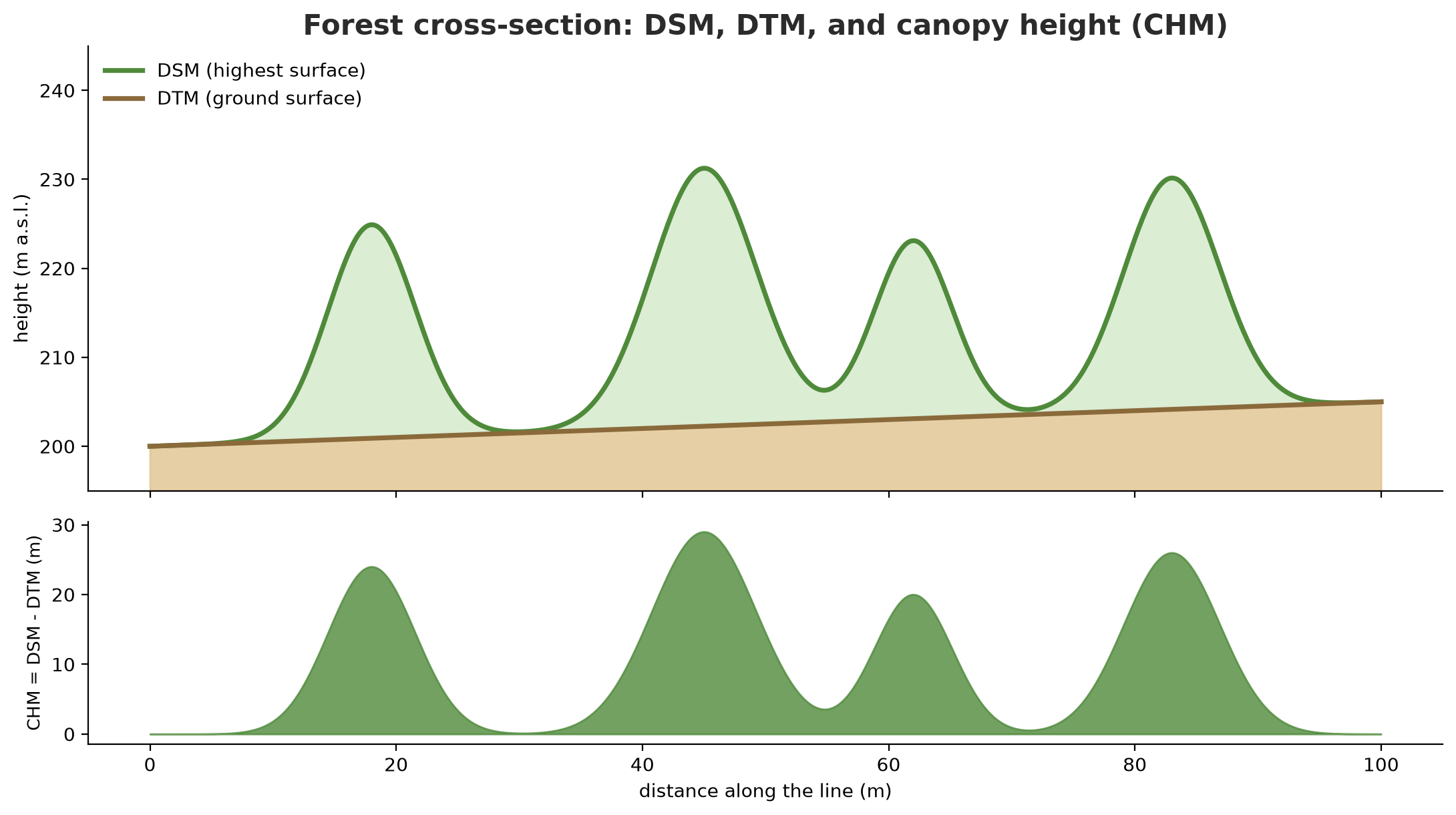
Tallest example tree that was made: 29.9The file holds 9,600 points: 6,000 ground points (class 2) and 3,600 high vegetation points (class 5), point format 3, LAS version 1.4. A scale of 0.01 means 1 cm coordinate precision. The z height ranges from 200.03 to 233.47 m above sea level (a.s.l.).
From the point cloud, a canopy height model (CHM) is made:
- DSM (digital surface model) = the highest surface (treetops, roofs).
- DTM (digital terrain model) = the ground surface, interpolated from ground-class points.
- CHM = DSM - DTM = canopy height above the ground.
09_canopy_height.py
# Chapter 51 - Canopy height model (CHM = DSM - DTM) from a fictional LiDAR point cloud
from pathlib import Path

import laspy
import numpy as np
from scipy import ndimage
from scipy.interpolate import griddata

tmp = Path(__file__).parent / "_tmp"
if not (tmp / "forest.las").exists():                 # made by script 08
    raise SystemExit("run 08_lidar_las.py first")

las = laspy.read(tmp / "forest.las")
x, y, z = np.asarray(las.x), np.asarray(las.y), np.asarray(las.z)
ground = np.asarray(las.classification) == 2
cell = 1.0                                            # grid cell size 1 m
col = np.floor((x - x.min()) / cell).astype(int).clip(0, 99)
row = np.floor((y - y.min()) / cell).astype(int).clip(0, 99)

# DSM = highest surface per cell (any point)
dsm = np.full((100, 100), np.nan)
for r, c, v in zip(row, col, z):
    if np.isnan(dsm[r, c]) or v > dsm[r, c]:
        dsm[r, c] = v

# DTM = ground surface: interpolate class-2 (ground) points over the whole grid
gy, gx = np.mgrid[0:100, 0:100]
dtm = griddata((col[ground], row[ground]), z[ground], (gx, gy), method="linear")
dtm = np.where(np.isnan(dtm), griddata((col[ground], row[ground]), z[ground], (gx, gy), method="nearest"), dtm)

dsm = np.where(np.isnan(dsm), dtm, dsm)               # cells without points are taken as ground level
chm = np.clip(dsm - dtm, 0, None)
chm_smooth = ndimage.gaussian_filter(chm, sigma=1.0)  # smooth so that one crown = one peak

print("Maximum CHM (m):", round(float(chm.max()), 1))
print("Percent of cells with canopy (>2 m):", round(100 * float((chm > 2).mean()), 1), "%")

# Tree detection: local peaks higher than 5 m
peaks = (chm_smooth == ndimage.maximum_filter(chm_smooth, size=7)) & (chm_smooth > 5)
detected_heights = np.sort(chm[peaks])[::-1]
print("Trees detected:", int(peaks.sum()), "of the 12 trees that were made")
print("Three tallest (m):", detected_heights[:3].round(1).tolist())
true = np.load(tmp / "true_trees.npy")                # columns: x, y, height
print("Three tallest in truth (m):", np.sort(true[:, 2])[::-1][:3].tolist())

# Why was one tree missed? Find the two true trees that are closest together
dist = np.hypot(*(true[:, None, :2] - true[None, :, :2]).transpose(2, 0, 1))
np.fill_diagonal(dist, np.inf)
print("Distance between the two closest trees (m):", round(float(dist.min()), 1))
np.save(tmp / "chm.npy", chm)
Maximum CHM (m): 29.9
Percent of cells with canopy (>2 m): 6.4 %
Trees detected: 11 of the 12 trees that were made
Three tallest (m): [29.9, 27.7, 26.8]
Three tallest in truth (m): [29.9, 27.9, 26.8]
Distance between the two closest trees (m): 3.8The maximum canopy height measured is 29.9 m, equal to the tallest tree we made. The three tallest detected trees (29.9, 27.7, 26.8) are close to the real ones (29.9, 27.9, 26.8). However, the algorithm finds 11 of 12 trees. Why is one missing? The script answers: the two closest trees are only 3.8 m apart, so their crowns merge into one peak. This is a real limit of local-peak detection in dense forest; more advanced methods (for example watershed segmentation) are used for such cases. The percentage of canopy cells (over 2 m) is 6.4%.
PDAL: a fuller point cloud tool
PDAL is a library and command-line tool for processing point clouds through JSON pipelines: read, filter, classify ground points, make rasters. Its documentation explains that the Python package pdal (via pip install PDAL) needs PDAL to be already installed; the easiest way to install both is conda install -c conda-forge python-pdal. On the author’s computer, PDAL is not installed.
11_pdal_concept.py
# Chapter 51 - PDAL: a point cloud processing pipeline written as JSON (read only, not run)
import json

import pdal

pipeline_steps = [
    "forest.las",
    {"type": "filters.smrf"},                                        # marks ground points (class 2)
    {"type": "filters.expression", "expression": "Classification == 2"},
    {"type": "writers.gdal", "filename": "dtm.tif", "resolution": 1.0, "output_type": "min"},
]

pipeline = pdal.Pipeline(json.dumps(pipeline_steps))
count = pipeline.execute()
print("Points processed:", count)
This code was not run when the book was built because PDAL is not installed (PDAL is usually installed through conda-forge and has not been tested on the author’s computer), so no output is shown. The filters.smrf stage marks ground points (the Simple Morphological Filter method), filters.expression keeps class 2, and writers.gdal writes a raster with the set resolution and output_type. This pattern was matched with the examples in the PDAL documentation; it has not been tested on real data here.
Tiles and web maps
A map in the browser does not load one giant image. The world is divided into square tiles with the XYZ scheme: at zoom z, the world consists of 2^z x 2^z tiles, and each tile is numbered (x, y) with y = 0 in the north. The browser only requests the tiles visible on screen. The projection is Web Mercator (EPSG:3857).
10_tiles_web_map.py
# Chapter 51 - Web map tiles: compute XYZ tile numbers and build a web map with folium
import math
from pathlib import Path

import folium
from pyproj import Transformer

tmp = Path(__file__).parent / "_tmp"
tmp.mkdir(exist_ok=True)


def tile_number(lon, lat, zoom):
    """XYZ scheme ('slippy map'): the world is split into 2^zoom x 2^zoom tiles; y=0 is in the north."""
    n = 2 ** zoom
    x = int((lon + 180) / 360 * n)
    y = int((1 - math.asinh(math.tan(math.radians(lat))) / math.pi) / 2 * n)
    return x, y


def tile_bounds(zoom, x, y):
    """Tile bounds in Web Mercator metres (EPSG:3857) -> back to longitude/latitude."""
    half = 20037508.342789244                        # half the world's circumference (m) in EPSG:3857
    width = 2 * half / 2 ** zoom
    left, top = -half + x * width, half - y * width
    to_degrees = Transformer.from_crs(3857, 4326, always_xy=True)
    west, north = to_degrees.transform(left, top)
    east, south = to_degrees.transform(left + width, top - width)
    return west, south, east, north


bogor = (106.8, -6.6)
for zoom in (0, 5, 10, 14):
    x, y = tile_number(*bogor, zoom)
    w, s, e, n = tile_bounds(zoom, x, y)
    inside = w <= bogor[0] <= e and s <= bogor[1] <= n
    print(f"zoom {zoom:2d}: tile ({x}, {y})  tiles in the world: {4 ** zoom:>10,}  point inside tile: {inside}")

# Web map: a tile layer + one plot (GeoJSON). The tile address is only a template; nothing is downloaded here.
web_map = folium.Map(location=[bogor[1], bogor[0]], zoom_start=14, tiles=None)
folium.TileLayer("https://tile.example.org/{z}/{x}/{y}.png", name="Example base map",
                 attr="Example tile provider").add_to(web_map)
plot = {"type": "Feature", "properties": {"name": "Block A"},
        "geometry": {"type": "Polygon", "coordinates": [[[106.79, -6.61], [106.81, -6.61],
                                                          [106.81, -6.59], [106.79, -6.59], [106.79, -6.61]]]}}
folium.GeoJson(plot, name="Orchard block", tooltip="Block A").add_to(web_map)
web_map.save(tmp / "map.html")
html = (tmp / "map.html").read_text(encoding="utf-8")
print("Tile template is in the HTML:", "{z}/{x}/{y}" in html)
print("Plot data is in the HTML:", "Block A" in html)
zoom 0: tile (0, 0) tiles in the world: 1 point inside tile: True
zoom 5: tile (25, 16) tiles in the world: 1,024 point inside tile: True
zoom 10: tile (815, 530) tiles in the world: 1,048,576 point inside tile: True
zoom 14: tile (13052, 8493) tiles in the world: 268,435,456 point inside tile: True
Tile template is in the HTML: True
Plot data is in the HTML: TrueThe point in Bogor falls in tile (25, 16) at zoom 5, and (13052, 8493) at zoom 14, where the world is already divided into 268,435,456 tiles. The function tile_bounds computes tile bounds from EPSG:3857 using pyproj and checks that the point really lies inside (True at every level), so our tile-number formula is verified independently. Then folium builds an HTML web map with a tile layer and one GeoJSON plot. The tile address tile.example.org is only an example template; no tile is downloaded. If you use a real tile provider, read its terms of use.
Geospatial foundation models: SAM
A foundation model is a large model trained on a huge amount of data and then used for many tasks. The Segment Anything Model (SAM) from Meta “segments” objects in an image: you give it an image (and, if you like, a hint such as a point or box), and it returns masks (the pixels of each object). Its official documentation says the model was trained on about 11 million images and 1.1 billion masks, is licensed under Apache 2.0, and comes in three backbone sizes: vit_h, vit_l, vit_b. On high-resolution drone or satellite images, it is useful for marking plots, roofs, or crowns.
12_sam_concept.py
# Chapter 51 - The SAM foundation model: automatic segmentation of an image (read only, not run)
import rasterio
from segment_anything import SamAutomaticMaskGenerator, sam_model_registry

# 1. Load model weights that you downloaded yourself from the official page
sam = sam_model_registry["vit_b"](checkpoint="sam_vit_b.pth")        # a weights file you own

# 2. SAM takes an 8-bit image of shape (height, width, channels): "HWC uint8" according to its code docs
with rasterio.open("orchard_rgb.tif") as src:
    image = src.read([1, 2, 3]).transpose(1, 2, 0)                   # (band, y, x) -> (y, x, band)

# 3. The result: a list of "masks", one per object found (plot, tree, roof, ...)
mask_generator = SamAutomaticMaskGenerator(sam)
masks = mask_generator.generate(image)
print("Objects found:", len(masks))
# Each mask has keys such as 'segmentation' (the object's pixels) and 'area' (size in pixels)
This code was not run when the book was built because it needs a large SAM model (a separate weights file), torch, and a real image, which are not installed here, so no output is shown. The calling pattern follows the official README (sam_model_registry, SamAutomaticMaskGenerator, generate). An honest note: SAM was not designed specifically for earth images (top-down view, tiny objects, many spectral bands); its results on satellite or drone images must be checked and may need adjusting. That has not been tested here.
Running Project A2: from a STAC catalog to Zarr
Time to join the pieces: pick scenes from the catalog, open their COGs, stack them into one time array, and save it as Zarr.
13_project_pipeline.py
# Chapter 51 - Running project A2: STAC catalog -> time stack -> Zarr
import shutil
import warnings
from pathlib import Path

import pystac
import rioxarray  # noqa: F401
import xarray as xr

root = Path(__file__).parent / "_tmp" / "stac_orchard"
if not (root / "catalog.json").exists():                 # made by script 05
    raise SystemExit("run 05_stac_local.py first")
warnings.simplefilter("ignore")

# 1. Choose items from the catalog: cloud under 20 percent
catalog = pystac.Catalog.from_file(str(root / "catalog.json"))
chosen = [it for it in catalog.get_items(recursive=True) if it.properties["eo:cloud_cover"] < 20]
chosen.sort(key=lambda it: it.datetime)
print("Scenes used:", [it.id for it in chosen])

# 2. Open each COG, give it a time axis, stack into one DataArray
layers = []
for it in chosen:
    path = root / it.assets["ndvi"].href
    da = rioxarray.open_rasterio(path).squeeze("band", drop=True)
    layers.append(da.expand_dims(time=[it.datetime.replace(tzinfo=None)]))
stack = xr.concat(layers, dim="time").rename("ndvi").chunk({"time": 1, "y": 128, "x": 128})
print("Stack:", dict(stack.sizes), "| chunks:", stack.chunksizes["y"])

# 3. Save as Zarr, read it back and compare
target = root.parent / "ndvi_orchard.zarr"
shutil.rmtree(target, ignore_errors=True)
stack.to_dataset().to_zarr(target, mode="w", consolidated=False)
back = xr.open_zarr(target, consolidated=False)
same = bool((back["ndvi"].compute() == stack.compute()).all())
print("Zarr read back is exactly the same:", same)
mean = back["ndvi"].mean(dim=("y", "x")).compute()
print("Mean NDVI per date:", [round(float(v), 3) for v in mean.values])
Scenes used: ['scene-20260105', 'scene-20260306', 'scene-20260405']
Stack: {'time': 3, 'y': 256, 'x': 256} | chunks: (128, 128)
Zarr read back is exactly the same: True
Mean NDVI per date: [0.4, 0.6, 0.7]Three scenes are chosen (cloud under 20%): 5 January, 6 March, and 5 April. The stack is 3 x 256 x 256 with 128 x 128 chunks. After saving as Zarr and reading back, the contents are exactly the same as the original. Mean NDVI per date: 0.4, 0.6, 0.7 (fictional data made to rise by 0.1 per scene). Together with the canopy height model from the fictional LiDAR above, two of the three parts of the Series A2 project exist; the third (sensor data) comes in Chapter 52.
Exercises
- Change
blocksizein01_write_cog.pyto 128. How many overviews does GDAL make now? - In
03_geoparquet.py, make theboundsbox twice as large. How many points are fetched, and does the result still equal manual filtering? - Add a fifth item (cloud 8%, date 5 May 2026) to the catalog in
05_stac_local.py, then make sure it passes the filter. - Challenge: in
09_canopy_height.py, change the smoothingsigmafrom 1.0 to 0.5 and 2.0. How many trees are detected at each value? Explain why the number changes.
Chapter Summary
- Cloud-native data is designed to be read in part over the internet (range requests).
- COG: a tiled GeoTIFF with overviews; GeoParquet: columnar vectors with CRS metadata; Zarr: a big array in chunks.
- STAC describes data through Catalog, Collection, Item, and Asset;
pystac-clientsearches, and on a public catalog it is enough to read metadata first. - xarray/rioxarray handle multi-date image stacks with named axes and a median composite to skip clouds.
- LiDAR produces point clouds; CHM = DSM - DTM. PDAL and SAM are explained from documentation and not run here.
- XYZ tiles and Web Mercator underlie web maps.
Next, in Chapter 52: data does not only come from the sky. Sensors in the orchard, pond, and barn also send data. We learn MicroPython, MQTT, GPS, and drone images.