%%{init: {"flowchart": {"diagramPadding": 40}}}%%
flowchart LR
S["Source<br/>logger, CSV, API"] --> E["Extract<br/>take"]
E --> T1["Transform<br/>in Python"]
T1 --> L1["Load<br/>store clean"]
E --> L2["Load<br/>store raw"]
L2 --> T2["Transform<br/>with SQL"]
Chapter 50 — Modern Data Engineering: From Messy Files to a Tidy Pipeline
Series A2 — Large-Scale Data and Advanced Geospatial
All scripts for this chapter are in the kode/ch50/ folder. On the web version, you can also download them all at once (zip). The script build_data.py is only a helper module that makes fictional sample data; the numbered scripts are the ones that run, in order.
In Series A1, your application became ready for production. But its data is still small: a few dozen rows that fit in one CSV file. Now imagine sensors in the orchard, pond, and barn sending one reading every minute for years. That is millions of rows. Opening them in a spreadsheet would make the computer give up, and reading them again and again with pandas.read_csv wastes time.
Data engineering is the work of building “water channels” for data: taking it from the source, cleaning it, storing it efficiently, then letting it flow to whoever needs it. It is like irrigating rice fields: not watering one plant, but arranging channels so that water reaches every plot, on time, without leaks.
Parquet and Arrow: storing by column
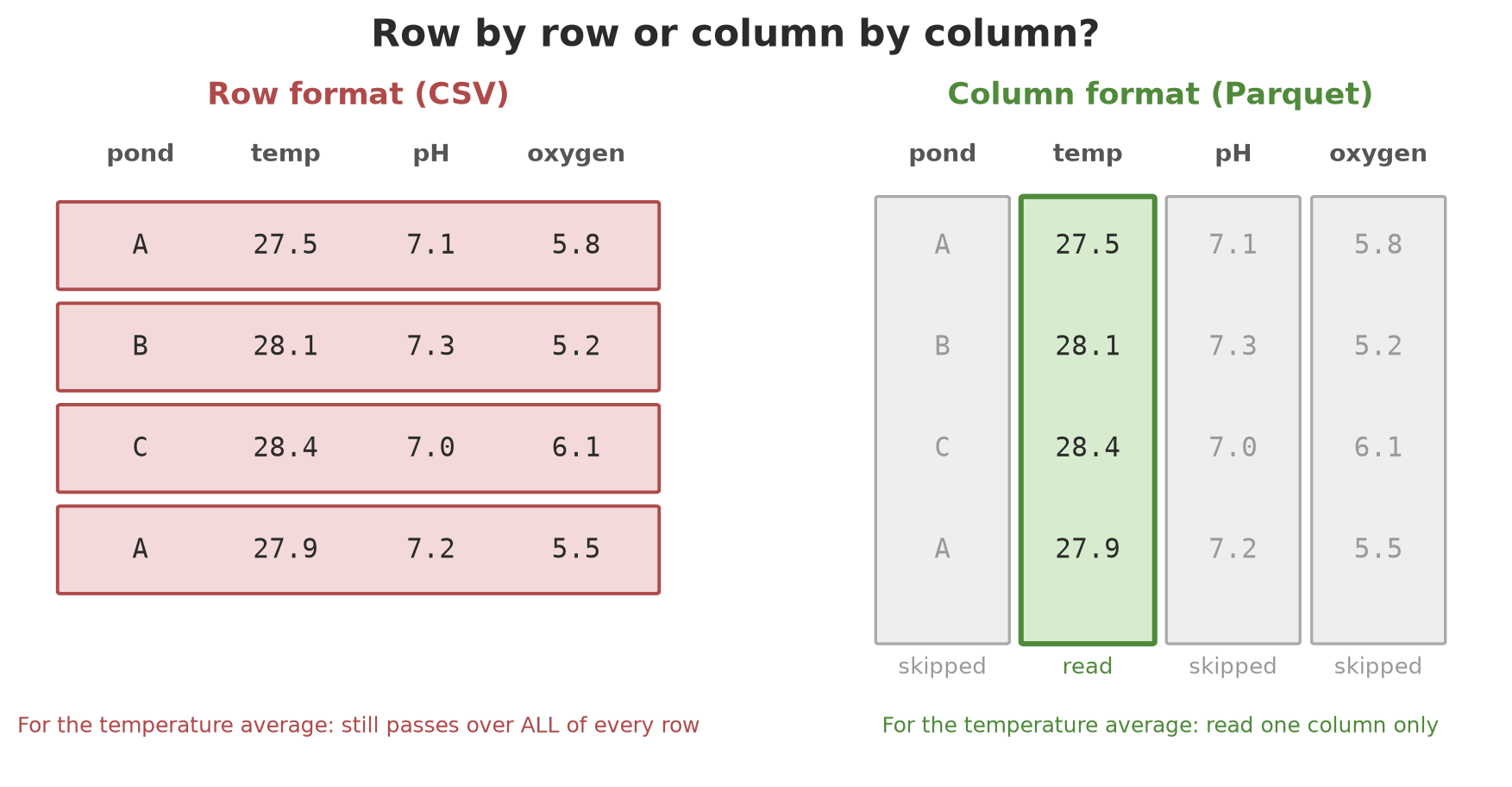
CSV stores data row by row as text. To calculate only the average temperature, a program still has to read all columns of every row. Parquet stores data column by column in compressed binary form. For the average temperature, it only needs to open one column.
Arrow is an in-memory table format that is columnar too. The pyarrow library has become a “common language”: Polars, DuckDB, pandas, and many other tools can exchange Arrow tables without copying the data.
01_parquet_arrow.py
# Chapter 50 - Arrow tables, Parquet files, and reading only some columns
from pathlib import Path

import numpy as np
import pyarrow as pa
import pyarrow.csv as pcsv
import pyarrow.parquet as pq

tmp = Path(__file__).parent / "_tmp"
tmp.mkdir(exist_ok=True)

# Fictional data: 20,000 pond sensor readings, three ponds
rng = np.random.default_rng(42)
n = 20_000
table = pa.table({
    "pond": pa.array(rng.choice(["A", "B", "C"], n)),
    "minute": pa.array(np.arange(n, dtype="int32")),
    "temp_c": pa.array(rng.normal(28.5, 1.2, n).round(2)),
    "ph": pa.array(rng.normal(7.2, 0.3, n).round(2)),
    "oxygen_mgl": pa.array(rng.normal(5.8, 0.8, n).round(2)),
})
print("Arrow schema:")
print(table.schema)
print("Number of rows:", table.num_rows)

# Write two formats: CSV (text, row by row) and Parquet (binary, column by column)
pcsv.write_csv(table, tmp / "pond.csv")
pq.write_table(table, tmp / "pond.parquet", compression="zstd", row_group_size=5_000)
size_csv = (tmp / "pond.csv").stat().st_size
size_pq = (tmp / "pond.parquet").stat().st_size
print("Parquet is smaller than CSV:", size_pq < size_csv)

# Parquet keeps the schema and statistics inside the file
meta = pq.ParquetFile(tmp / "pond.parquet").metadata
print("Row groups:", meta.num_row_groups)
col = meta.row_group(0).column(2)
print("Temperature statistics in group 0 -> min:", col.statistics.min, "max:", col.statistics.max)

# Read ONLY two columns: the other columns are not touched
part = pq.read_table(tmp / "pond.parquet", columns=["pond", "temp_c"])
print("Columns read:", part.column_names)
Arrow schema:
pond: string
minute: int32
temp_c: double
ph: double
oxygen_mgl: double
Number of rows: 20000
Parquet is smaller than CSV: True
Row groups: 4
Temperature statistics in group 0 -> min: 23.83 max: 33.48
Columns read: ['pond', 'temp_c']Walk through the result:
- The Arrow schema records the name and type of every column. Parquet stores the same schema inside its file, so data types are not lost the way they are with CSV.
- The Parquet file is smaller than the CSV (
True). Columns of similar values compress much more easily. - The file is split into row groups: 20,000 rows divided by 5,000 per group gives 4 groups. Each group keeps statistics (minimum and maximum). A smart reader can skip groups that surely hold nothing it is looking for.
columns=["pond", "temp_c"]reads only two columns; the other three are not touched.
NoteREMEMBER
Parquet is great for analysis (reading many rows, few columns). To append one row at a time, again and again, use a database, or write in groups (batches) and save each batch as a new Parquet file.
Polars: fast tables with lazy mode
Polars is a table library (similar to pandas) written in Rust, using many CPU cores, with a lazy mode: you first build a work plan, Polars optimizes it, and only runs it when collect() is called.
02_polars.py
# Chapter 50 - Polars: expressions, lazy mode, and aggregation
import re

import polars as pl

from build_data import prepare_parquet

path = prepare_parquet()

# scan_parquet reads nothing yet: it only builds a PLAN of the work
plan = (
    pl.scan_parquet(path)
    .filter(pl.col("oxygen_mgl") < 4.5)          # only low-oxygen readings
    .group_by("pond")
    .agg(
        pl.len().alias("low_count"),
        pl.col("temp_c").mean().round(2).alias("temp_avg"),
    )
    .sort("pond")
)
print("Work plan (before running):")
text = plan.explain()
print(re.sub(r"\[[^\]]*pond\.parquet\]", "[pond.parquet]", text))  # hide the local path

# collect() runs the plan
result = plan.collect()
print()
print(result)

# Eager mode for a table that is already in memory
df = pl.read_parquet(path, columns=["pond", "temp_c"])
print()
print("Highest temperature per pond:")
print(df.group_by("pond").agg(pl.col("temp_c").max()).sort("pond"))
Work plan (before running):
SORT BY [col("pond")]
AGGREGATE[maintain_order: false]
[len().alias("low_count"), col("temp_c").mean().round().alias("temp_avg")] BY [col("pond")]
FROM
simple π 2/2 ["pond", "temp_c"]
Parquet SCAN [pond.parquet]
PROJECT 3/5 COLUMNS
SELECTION: col("oxygen_mgl") < 4.5
ESTIMATED ROWS: 20000
shape: (3, 3)
┌──────┬───────────┬──────────┐
│ pond ┆ low_count ┆ temp_avg │
│ --- ┆ --- ┆ --- │
│ str ┆ u32 ┆ f64 │
╞══════╪═══════════╪══════════╡
│ A ┆ 342 ┆ 28.61 │
│ B ┆ 349 ┆ 28.39 │
│ C ┆ 344 ┆ 28.59 │
└──────┴───────────┴──────────┘
Highest temperature per pond:
shape: (3, 2)
┌──────┬────────┐
│ pond ┆ temp_c │
│ --- ┆ --- │
│ str ┆ f64 │
╞══════╪════════╡
│ A ┆ 33.48 │
│ B ┆ 32.77 │
│ C ┆ 32.47 │
└──────┴────────┘Look at the work plan. The line PROJECT 3/5 COLUMNS means that of the 5 columns in the file, only 3 are read (pond, temperature, oxygen). The line SELECTION means the filter oxygen_mgl < 4.5 is applied while reading, not afterwards. Polars rearranges your work to save effort, like a farmer who plans the harvest route before going down to the orchard.
The result: pond A has 342 low-oxygen readings, B has 349, C has 344. The second table uses eager mode (read_parquet) for a table that is already in memory.
DuckDB: SQL straight on files
If you already know SQL (Chapter 24), DuckDB feels like a gift: it runs SQL straight on Parquet and CSV files with no server and no “import” step.
03_duckdb.py
# Chapter 50 - DuckDB: SQL straight on Parquet and CSV files
import duckdb

from build_data import TMP, prepare_parquet

path = prepare_parquet()

# A small companion table (CSV): details of each pond
(TMP / "pond_info.csv").write_text(
    "pond,species,area_m2\nA,catfish,400\nB,tilapia,350\nC,tilapia,500\n", encoding="utf-8"
)

# No "import" step: FROM 'file' reads directly
sql = f"""
    SELECT r.pond, i.species, i.area_m2,
           COUNT(*)                     AS readings,
           ROUND(AVG(r.ph), 3)          AS ph_avg,
           ROUND(MIN(r.oxygen_mgl), 2)  AS oxygen_min
    FROM '{path.as_posix()}' AS r
    JOIN '{(TMP / "pond_info.csv").as_posix()}' AS i USING (pond)
    WHERE r.minute < 10000
    GROUP BY r.pond, i.species, i.area_m2
    ORDER BY r.pond
"""
print(duckdb.sql(sql))

# The result can be taken as an Arrow or Polars table
result = duckdb.sql(sql).pl()
print("Result type:", type(result).__module__)
print("Pond with the lowest minimum oxygen:",
      result.sort("oxygen_min").row(0, named=True)["pond"])

# EXPLAIN shows that columns and filter are pushed into the Parquet reader
plan = duckdb.sql(f"EXPLAIN SELECT pond FROM '{path.as_posix()}' WHERE minute < 100").fetchall()
print(plan[0][1])
┌─────────┬─────────┬─────────┬──────────┬────────┬────────────┐
│ pond │ species │ area_m2 │ readings │ ph_avg │ oxygen_min │
│ varchar │ varchar │ int64 │ int64 │ double │ double │
├─────────┼─────────┼─────────┼──────────┼────────┼────────────┤
│ A │ catfish │ 400 │ 3399 │ 7.194 │ 3.15 │
│ B │ tilapia │ 350 │ 3333 │ 7.208 │ 3.06 │
│ C │ tilapia │ 500 │ 3268 │ 7.191 │ 2.67 │
└─────────┴─────────┴─────────┴──────────┴────────┴────────────┘
Result type: polars.dataframe.frame
Pond with the lowest minimum oxygen: C
┌───────────────────────────┐
│ PARQUET_SCAN │
│ ──────────────────── │
│ Function: │
│ PARQUET_SCAN │
│ │
│ Projections: pond │
│ Filters: minute<100 │
│ │
│ ~4,000 rows │
└───────────────────────────┘FROM '.../pond.parquet'reads a Parquet file;JOIN '.../pond_info.csv'joins it with a small CSV. Two different formats, one SQL question.- Of the first 10,000 minutes, pond A has 3,399 readings, B has 3,333, and C has 3,268. The lowest oxygen is in pond C (2.67 mg/L).
.pl()turns the result into a Polars table (there are also.arrow()and.df()). That is the power of Arrow as a common language.- The
EXPLAINoutput showsProjections: pondandFilters: minute<100insidePARQUET_SCAN: the column and the filter are pushed down to the file reader, so only what is needed is read.
TipTIP
Polars or DuckDB? Both are great and can be used interchangeably. Pick DuckDB when the question is natural in SQL (joining many tables, aggregation). Pick Polars when you want chained transformation steps in Python. Because both understand Arrow, you do not have to pick one forever.
ETL and ELT: the order of work in a pipeline
Almost every data pipeline has three steps: Extract (take from the source), Transform (clean and change), Load (store at the destination). The order can be one of two kinds:
- ETL: transform first in Python (or another tool), then store the clean result.
- ELT: store the raw data as it is in a database, then transform it with SQL inside. The raw data stays, so if the cleaning rules change, you only repeat the T step.
The next example uses raw data from a barn logger that was made messy on purpose: a duplicated row, a broken reading (ERR), one temperature in Fahrenheit, and one missing humidity.
04_etl_elt.py
# Chapter 50 - ETL (transform first, then store) and ELT (store raw first, transform in the database)
from pathlib import Path

import duckdb
import polars as pl

tmp = Path(__file__).parent / "_tmp"
tmp.mkdir(exist_ok=True)

# Fictional raw data from a barn logger: broken values, a duplicate, and a Fahrenheit reading
raw = tmp / "barn_raw.csv"
raw.write_text(
    "barn,time,temp,unit,humidity\n"
    "K1,2026-03-01 06:00,27.5,C,78\n"
    "K1,2026-03-01 06:00,27.5,C,78\n"       # duplicate
    "K1,2026-03-01 07:00,ERR,C,80\n"        # broken reading
    "K2,2026-03-01 06:00,82.4,F,75\n"       # Fahrenheit
    "K2,2026-03-01 07:00,29.1,C,\n"         # humidity missing
    "K2,2026-03-01 08:00,30.2,C,71\n",
    encoding="utf-8",
)


def etl(path):
    """E-T-L: extract, transform in Python, load the clean result."""
    df = pl.read_csv(path, schema_overrides={"temp": pl.String, "humidity": pl.Float64})
    df = (
        df.unique(maintain_order=True)
        .with_columns(pl.col("temp").cast(pl.Float64, strict=False))     # 'ERR' -> null
        .drop_nulls("temp")
        .with_columns(
            pl.when(pl.col("unit") == "F")
            .then(((pl.col("temp") - 32) / 1.8).round(1))
            .otherwise(pl.col("temp"))
            .alias("temp_c"),
            pl.col("time").str.to_datetime("%Y-%m-%d %H:%M"),
        )
        .select("barn", "time", "temp_c", "humidity")
    )
    df.write_parquet(tmp / "barn_etl.parquet")
    return df


def elt(path):
    """E-L-T: load raw as is, then transform with SQL inside the database."""
    con = duckdb.connect()
    con.execute(f"CREATE TABLE raw AS SELECT * FROM read_csv('{path.as_posix()}', all_varchar=true)")
    con.execute("""
        CREATE TABLE clean AS
        SELECT DISTINCT barn,
               CAST(time AS TIMESTAMP) AS time,
               CASE WHEN unit = 'F' THEN ROUND((CAST(temp AS DOUBLE) - 32) / 1.8, 1)
                    ELSE CAST(temp AS DOUBLE) END AS temp_c,
               TRY_CAST(NULLIF(humidity, '') AS DOUBLE) AS humidity
        FROM raw
        WHERE TRY_CAST(temp AS DOUBLE) IS NOT NULL
    """)
    return con.sql("SELECT * FROM clean ORDER BY barn, time").pl()


etl_result = etl(raw)
print("ETL:")
print(etl_result)

elt_result = elt(raw)
print()
print("ELT equals ETL:", elt_result.equals(etl_result.sort("barn", "time")))
print("Raw rows:", pl.read_csv(raw).height, "-> clean rows:", elt_result.height)
ETL:
shape: (4, 4)
┌──────┬─────────────────────┬────────┬──────────┐
│ barn ┆ time ┆ temp_c ┆ humidity │
│ --- ┆ --- ┆ --- ┆ --- │
│ str ┆ datetime[μs] ┆ f64 ┆ f64 │
╞══════╪═════════════════════╪════════╪══════════╡
│ K1 ┆ 2026-03-01 06:00:00 ┆ 27.5 ┆ 78.0 │
│ K2 ┆ 2026-03-01 06:00:00 ┆ 28.0 ┆ 75.0 │
│ K2 ┆ 2026-03-01 07:00:00 ┆ 29.1 ┆ null │
│ K2 ┆ 2026-03-01 08:00:00 ┆ 30.2 ┆ 71.0 │
└──────┴─────────────────────┴────────┴──────────┘
ELT equals ETL: True
Raw rows: 6 -> clean rows: 4Of 6 raw rows, 4 clean rows remain: one duplicate is dropped, the ERR row is dropped, 82.4 °F becomes 28.0 °C, and the missing humidity stays null (we do not invent numbers). The ETL way (Polars) and the ELT way (DuckDB SQL) produce exactly the same table: True.
Data quality: do not trust data blindly
A diligent pipeline that swallows broken data is a dangerous pipeline: next month’s report will be wrong and nobody will know why. That is why pipelines need quality checks. There are two approaches.
1. A schema with the pandera library. You write a “contract”: which columns must exist, what types, what value ranges. Pandera supports Polars tables (pandera.polars) and can be installed for Python 3.14.
05_quality_pandera.py
# Chapter 50 - Data quality: a pandera schema for a Polars table
import pandera.polars as pa
import polars as pl

# A schema = a "contract" about the shape of data that may come in
schema = pa.DataFrameSchema({
    "pond": pa.Column(pl.String, pa.Check.isin(["A", "B", "C"])),
    "temp_c": pa.Column(pl.Float64, pa.Check.in_range(15, 40)),     # example numbers
    "ph": pa.Column(pl.Float64, pa.Check.in_range(4, 10), nullable=False),
})

# Three bad rows on purpose: pond 'Z', temperature 55, empty pH
readings = pl.DataFrame({
    "pond": ["A", "B", "Z"],
    "temp_c": [28.0, 55.0, 27.0],
    "ph": [7.1, None, 7.3],
})

try:
    schema.validate(readings, lazy=True)       # lazy=True: collect ALL problems first
except pa.errors.SchemaErrors as error:
    print("Validation failed. List of problems:")
    print(error.failure_cases.select("column", "check", "failure_case", "index"))

# Data that passes is returned as it is
print()
print("First row passes:", schema.validate(readings.head(1)).height, "row")
Validation failed. List of problems:
shape: (3, 4)
┌────────┬───────────────────────┬──────────────┬───────┐
│ column ┆ check ┆ failure_case ┆ index │
│ --- ┆ --- ┆ --- ┆ --- │
│ str ┆ str ┆ str ┆ i32 │
╞════════╪═══════════════════════╪══════════════╪═══════╡
│ pond ┆ isin(['A', 'B', 'C']) ┆ Z ┆ 2 │
│ temp_c ┆ in_range(15, 40) ┆ 55.0 ┆ 1 │
│ ph ┆ not_nullable ┆ null ┆ 1 │
└────────┴───────────────────────┴──────────────┴───────┘
First row passes: 1 rowWith lazy=True, pandera collects all problems at once: the unknown pond Z (row 2), the temperature 55 outside the range 15 to 40 (row 1), and the empty pH (row 1). The ranges 15-40 and 4-10 are example numbers, not farming advice. Data that passes is returned as it is.
2. Home-made checks. Sometimes no extra library is needed. A small function that returns a list of (name, passed, note) is enough, and anyone can read it.
06_quality_custom.py
# Chapter 50 - Home-made quality checks: no extra library needed
import polars as pl

from build_data import prepare_parquet


def check(df):
    """Returns a list of (check name, passed?, note)."""
    results = []
    n = df.height
    results.append(("not empty", n > 0, f"{n} rows"))

    nulls = df.null_count().row(0)
    results.append(("no empty values", sum(nulls) == 0, f"{sum(nulls)} empty cells"))

    dup = n - df.select("pond", "minute").unique().height
    results.append(("key (pond, minute) is unique", dup == 0, f"{dup} duplicates"))

    outside = df.filter(~pl.col("ph").is_between(6.0, 8.5)).height      # example limits
    percent = 100 * outside / n
    results.append(("pH outside 6.0-8.5 is under 1%", percent < 1, f"{percent:.2f}% outside"))
    return results


clean = pl.read_parquet(prepare_parquet())
print("Original data:")
for name, passed, note in check(clean):
    print(f"  [{'OK ' if passed else 'FAIL'}] {name}: {note}")

# Break it: one duplicated row and one empty pH
broken = pl.concat([clean, clean.head(1)]).with_columns(
    pl.when(pl.col("minute") == 5).then(None).otherwise(pl.col("ph")).alias("ph")
)
print("Damaged data:")
for name, passed, note in check(broken):
    print(f"  [{'OK ' if passed else 'FAIL'}] {name}: {note}")
Original data:
[OK ] not empty: 20000 rows
[OK ] no empty values: 0 empty cells
[OK ] key (pond, minute) is unique: 0 duplicates
[OK ] pH outside 6.0-8.5 is under 1%: 0.01% outside
Damaged data:
[OK ] not empty: 20001 rows
[FAIL] no empty values: 1 empty cells
[FAIL] key (pond, minute) is unique: 1 duplicates
[OK ] pH outside 6.0-8.5 is under 1%: 0.01% outsideThe original data passes every check (only 0.01% of pH values are outside 6.0-8.5, under the example limit of 1%). After we break it on purpose with one duplicated row and one empty pH, two checks FAIL and state the counts. In a real pipeline, such a failure stops the flow or sends an alert.
WarningWARNING
Quality checks must run inside the pipeline, before the data is used. Checking “when there is time” is the same as not checking.
Orchestration: who sets the order and retries when something fails?
A real pipeline consists of many tasks that depend on each other: fetch, check, summarize, store. An orchestrator runs them in order, retries failed tasks, records the history, and runs them on a schedule. There are three big names:
| Tool | Way of thinking | Notes for the author’s computer (Windows, Python 3.14) |
|---|---|---|
| Prefect | Ordinary Python functions decorated with @flow and @task |
Installed and run in this chapter |
| Dagster | Centered on the “data assets” it produces | Tried through an installation simulation (dry run) in a separate environment: can be installed for Python 3.14; not run in this chapter |
| Apache Airflow | Flows (DAGs) with its own scheduler and server | Its documentation mentions Windows only through WSL2 or Linux containers; not run in this chapter |
Why was Prefect chosen to run? Because it has the fewest requirements: your flow is an ordinary Python function, it runs directly on Windows with Python 3.14, and a small example needs no separately installed server. Dagster and Airflow are good, especially for large teams, but Airflow is designed for Linux environments, and Dagster is better learned through its full project layout. If you work in a team that already uses one of them, the concepts are similar: tasks, dependencies, retries, schedules, and monitoring.
07_prefect_flow.py
# Chapter 50 - Orchestration with Prefect: tasks, flows, automatic retries
import os
from pathlib import Path

# Prefect's home folder is pointed to _tmp and logs are silenced so the output stays clean
tmp = Path(__file__).parent / "_tmp"
os.environ["PREFECT_HOME"] = str(tmp / "prefect")
os.environ["PREFECT_LOGGING_LEVEL"] = "CRITICAL"
os.environ["PREFECT_SERVER_ANALYTICS_ENABLED"] = "false"

from prefect import flow, task  # noqa: E402  (imported after the environment variables are set)

attempts = {"fetch": 0, "summarize": 0}


@task(retries=2, retry_delay_seconds=0)
def fetch():
    """Fetches readings from a 'sensor'; the first two attempts fail (flaky field network)."""
    attempts["fetch"] += 1
    if attempts["fetch"] < 3:
        raise ConnectionError("sensor not answering yet")
    return [7.1, 7.3, 6.9, 7.2]


@task
def check(ph):
    if any(not 4 <= x <= 10 for x in ph):
        raise ValueError("a pH value is outside the range 4-10")
    return ph


@task
def summarize(ph):
    attempts["summarize"] += 1
    return {"count": len(ph), "average": round(sum(ph) / len(ph), 2)}


@flow
def ph_flow():
    return summarize(check(fetch()))


# Run 1: the first task is tried three times, then succeeds
state = ph_flow(return_state=True)
print("Flow finished:", state.is_completed(), "| result:", state.result())
print("Attempts of 'fetch':", attempts["fetch"])


# Run 2: bad data -> 'check' fails, 'summarize' never runs
@task
def fetch_bad():
    return [7.1, 99.0]


@flow
def bad_flow():
    return summarize(check(fetch_bad()))


state2 = bad_flow(return_state=True)
print("Flow with bad data failed:", state2.is_failed())
print("Task summarize ran (total):", attempts["summarize"])
Flow finished: True | result: {'count': 4, 'average': 7.12}
Attempts of 'fetch': 3
Flow with bad data failed: True
Task summarize ran (total): 1The explanation:
@task(retries=2, retry_delay_seconds=0): if the task raises an error, Prefect retries up to 2 more times. Thefetchtask fails twice on purpose; the third attempt succeeds (Attempts of 'fetch': 3). That is resilience against a flaky field network.@flowwraps the tasks into one flow. The result isCompletedand the average pH is 7.12.- In the second run, the data contains a pH of 99. The
checktask fails, the flow is in a failed state (True), and thesummarizetask never runs (the total stays at 1, from the first run). Broken data stops at the door and does not flow into the report.
CautionTECHNICAL STUFF (feel free to skip)
This script sets a few environment variables before importing Prefect: PREFECT_HOME is pointed to the _tmp folder (so Prefect’s small database does not clutter the user’s folder), PREFECT_LOGGING_LEVEL=CRITICAL (so the output is clean), and analytics are switched off. When a flow runs without a separate server, Prefect starts a temporary server on your computer, so this script needs about half a minute. Variable names and versions can change; check the documentation of your Prefect version.
Scheduling: running automatically every day
A pipeline is rarely run by hand. Prefect offers flow.serve(...), which creates a deployment with a cron schedule: five fields minute hour day-of-month month day-of-week. For example 0 6 * * * means “minute 0, hour 6, every day”.
08_prefect_schedule.py
# Chapter 50 - Scheduling a flow with Prefect (read only, not run)
from prefect import flow


@flow(log_prints=True)
def daily_report():
    print("running the sensor pipeline...")


if __name__ == "__main__":
    # Creates a 'deployment' named daily-06 and runs the flow every day at 06:00.
    # This process must stay alive for the schedule to be carried out.
    daily_report.serve(name="daily-06", cron="0 6 * * *")
This code was not run when the book was built because flow.serve() keeps running (waiting for the schedule) and needs a process left alive, so no output is shown. Prefect’s documentation says serve creates a deployment and starts a runner that watches for scheduled work. On a server, such a process is usually kept alive by a system service (for example systemd) or run in a container (Chapter 48).
An alternative without an orchestrator: cron on Linux or Task Scheduler on Windows. That is enough for one simple script; an orchestrator is useful when many dependent tasks need retries and monitoring.
Monitoring a pipeline
A pipeline that runs silently can also fail silently. Two things must be watched: did every run succeed and how fresh is the data. You do not always need a big tool; a small log table already starts the right habit.
09_monitoring.py
# Chapter 50 - Monitoring a pipeline: a run log and a data freshness check
from datetime import date

import duckdb

con = duckdb.connect()   # temporary in-memory database
con.execute("""
    CREATE TABLE run_log (
        number INTEGER, step VARCHAR, status VARCHAR, row_count INTEGER, data_date DATE
    )
""")
number = 0


def record(step, function, data_date):
    """Runs one step and records success/failure with its row count."""
    global number
    number += 1
    try:
        rows = function()
        con.execute("INSERT INTO run_log VALUES (?, ?, 'success', ?, ?)",
                    [number, step, rows, data_date])
    except Exception as error:
        con.execute("INSERT INTO run_log VALUES (?, ?, ?, 0, ?)",
                    [number, step, f"failed: {type(error).__name__}", data_date])


def normal_source():
    return 1440


def broken_source():
    raise TimeoutError("logger not answering")


record("fetch", normal_source, date(2026, 3, 1))
record("fetch", normal_source, date(2026, 3, 2))
record("fetch", broken_source, date(2026, 3, 3))
record("fetch", normal_source, date(2026, 3, 4))

print(con.sql("SELECT * FROM run_log ORDER BY number"))

# Freshness check: last SUCCESSFUL day vs 'today' (fixed so the output stays stable)
today = date(2026, 3, 6)
latest = con.sql("SELECT MAX(data_date) FROM run_log WHERE status = 'success'").fetchone()[0]
age = (today - latest).days
print(f"Last successful data: {latest}; age {age} days")
if age > 1:
    print("WARNING: data is stale, notify the officer")

failed = con.sql("SELECT COUNT(*) FROM run_log WHERE status LIKE 'failed%'").fetchone()[0]
print("Number of failed runs:", failed)
┌────────┬─────────┬──────────────────────┬───────────┬────────────┐
│ number │ step │ status │ row_count │ data_date │
│ int32 │ varchar │ varchar │ int32 │ date │
├────────┼─────────┼──────────────────────┼───────────┼────────────┤
│ 1 │ fetch │ success │ 1440 │ 2026-03-01 │
│ 2 │ fetch │ success │ 1440 │ 2026-03-02 │
│ 3 │ fetch │ failed: TimeoutError │ 0 │ 2026-03-03 │
│ 4 │ fetch │ success │ 1440 │ 2026-03-04 │
└────────┴─────────┴──────────────────────┴───────────┴────────────┘
Last successful data: 2026-03-04; age 2 days
WARNING: data is stale, notify the officer
Number of failed runs: 1Four runs are recorded; run 3 failed (TimeoutError) and is recorded with 0 rows. The freshness check compares the last day that succeeded (4 March) with “today” (6 March, fixed on purpose so the output stays stable): the age is 2 days, so the program prints a warning. In a real system, the warning is sent to an officer by message or email.
Running Project A2: a data warehouse of orchard, pond, and barn sensors
The Series A2 project collects data from all farm units. The first step: store sensor readings (later sent by devices in Chapter 52) in a partitioned Parquet warehouse, one subfolder per unit, then query it with DuckDB and Polars.
10_project_sensors.py
# Chapter 50 - Running project A2: orchard, pond, and barn sensor data -> Parquet -> Polars/DuckDB
import shutil
from datetime import datetime, timedelta
from pathlib import Path

import duckdb
import numpy as np
import polars as pl
import pyarrow.dataset as ds

tmp = Path(__file__).parent / "_tmp"
store = tmp / "sensor_store"
shutil.rmtree(store, ignore_errors=True)

# 1. Fictional data: 3 days, one reading per hour, three farm units
rng = np.random.default_rng(7)
hours = [datetime(2026, 3, 1) + timedelta(hours=h) for h in range(72)]
unit_quantities = {
    "orchard": [("temp_c", 26.0, 2.5), ("soil_moisture_pct", 38.0, 4.0)],
    "pond": [("temp_c", 28.5, 1.0), ("oxygen_mgl", 5.6, 0.9)],
    "barn": [("temp_c", 29.0, 1.8), ("humidity_pct", 72.0, 6.0)],
}
rows = []
for unit, items in unit_quantities.items():
    for quantity, mean, spread in items:
        values = rng.normal(mean, spread, len(hours)).round(2)
        rows += [(unit, quantity, t, float(v)) for t, v in zip(hours, values)]
df = pl.DataFrame(rows, schema=["unit", "quantity", "time", "value"], orient="row")
print("Data rows:", df.height)

# 2. Save as partitioned Parquet: one subfolder per unit (Hive style: unit=orchard/)
ds.write_dataset(df.to_arrow(), store, format="parquet",
                 partitioning=["unit"], partitioning_flavor="hive")
print("Partitions:", sorted(p.name for p in store.iterdir()))

# 3. DuckDB: daily summary per unit and quantity, straight from the folder
pattern = (store / "*" / "*.parquet").as_posix()
daily = duckdb.sql(f"""
    SELECT unit, quantity, CAST(time AS DATE) AS day,
           ROUND(AVG(value), 2) AS mean, ROUND(MIN(value), 2) AS minimum
    FROM read_parquet('{pattern}', hive_partitioning = true)
    WHERE unit = 'pond' AND quantity = 'oxygen_mgl'
    GROUP BY ALL ORDER BY day
""")
print(daily)

# 4. Polars: pond oxygen hours below the threshold (example number 4 mg/L, not advice)
low = (
    pl.scan_parquet(pattern, hive_partitioning=True)
    .filter((pl.col("unit") == "pond") & (pl.col("quantity") == "oxygen_mgl") & (pl.col("value") < 4.0))
    .sort("time")
    .collect()
)
print("Pond hours with oxygen below 4 mg/L:", low.height)
print(low.select("time", "value").head(3))
Data rows: 432
Partitions: ['unit=barn', 'unit=orchard', 'unit=pond']
┌─────────┬────────────┬────────────┬────────┬─────────┐
│ unit │ quantity │ day │ mean │ minimum │
│ varchar │ varchar │ date │ double │ double │
├─────────┼────────────┼────────────┼────────┼─────────┤
│ pond │ oxygen_mgl │ 2026-03-01 │ 5.3 │ 4.12 │
│ pond │ oxygen_mgl │ 2026-03-02 │ 5.4 │ 2.67 │
│ pond │ oxygen_mgl │ 2026-03-03 │ 5.61 │ 3.25 │
└─────────┴────────────┴────────────┴────────┴─────────┘
Pond hours with oxygen below 4 mg/L: 4
shape: (3, 2)
┌─────────────────────┬───────┐
│ time ┆ value │
│ --- ┆ --- │
│ datetime[μs] ┆ f64 │
╞═════════════════════╪═══════╡
│ 2026-03-02 07:00:00 ┆ 3.62 │
│ 2026-03-02 09:00:00 ┆ 3.83 │
│ 2026-03-02 10:00:00 ┆ 2.67 │
└─────────────────────┴───────┘- 3 units x 2 quantities x 72 hours = 432 rows, stored in three Hive-style partitions (
unit=barn/,unit=orchard/,unit=pond/). The folder name itself becomes theunitcolumn when read (hive_partitioning). - The DuckDB query only touches the
unit=pondfolder: the other partitions are skipped. That is the benefit of partitioning: it prunes data that is not needed. - Pond oxygen averages 5.3 to 5.61 mg/L per day, with a minimum of 2.67 mg/L on 2 March. Polars finds 4 hours below the example threshold of 4 mg/L. (This threshold is only an example, not farming advice.)
Exercises
- Change
02_polars.pyto filterph < 7.0and compute the average oxygen per pond. Read the work plan: how many columns are read now? - Write a DuckDB query that counts readings per pond per block of 5,000 minutes (hint:
minute // 5000). - Add one check to
06_quality_custom.py: “temperature between 15 and 40” (example numbers). Break the data on purpose and make sure that check FAILS. - Challenge: build a Prefect flow with three tasks (read the CSV from
04_etl_elt.py, clean it with theetlfunction, save Parquet). Give the read taskretries=1, then try deleting the CSV file and watch the flow fail neatly.
Chapter Summary
- Parquet stores data by column, compressed, with schema and statistics; reading some columns is cheap. Arrow is the “common language” between tools.
- Polars (lazy mode,
scan_thencollect()) and DuckDB (SQL straight on files) process big data on one computer. - ETL transforms before storing; ELT stores raw and then transforms in the database.
- Data quality is checked inside the pipeline: a pandera schema or your own check functions.
- An orchestrator (Prefect, Dagster, Airflow) handles order, automatic retries, schedules, and history. Prefect is run in this chapter; Dagster and Airflow are only discussed from their documentation.
- Monitor the success of each run and the freshness of the data.
Next, in Chapter 51: big earth data is not enough to store neatly; it must be possible to read just part of it from far away. We learn cloud-native formats (COG, GeoParquet, Zarr), the STAC catalog, and LiDAR.