%%{init: {"flowchart": {"diagramPadding": 40}}}%%
flowchart TD
A["Write to report.txt.tmp"] --> B{"Succeeded to the end?"}
B -- "yes" --> C["os.replace: swap with report.txt"]
B -- "no (error)" --> D["Discard the temporary file,<br/>old report stays intact"]
Chapter 32 — Context Managers: Open, Use, and Surely Close
Series I4 — Advanced Python Language
All scripts for this chapter are in the kode/ch32/ folder. On the web version, you can also download them all at once (zip).
Have you ever forgotten to switch off the pond pump after filling it with water? The pump keeps running, electricity is wasted, or the pond overflows. Programs have a similar problem: a file opened and never closed, a connection left hanging. Worse still, if an error strikes in the middle of the work, the close() line at the end is never reached.
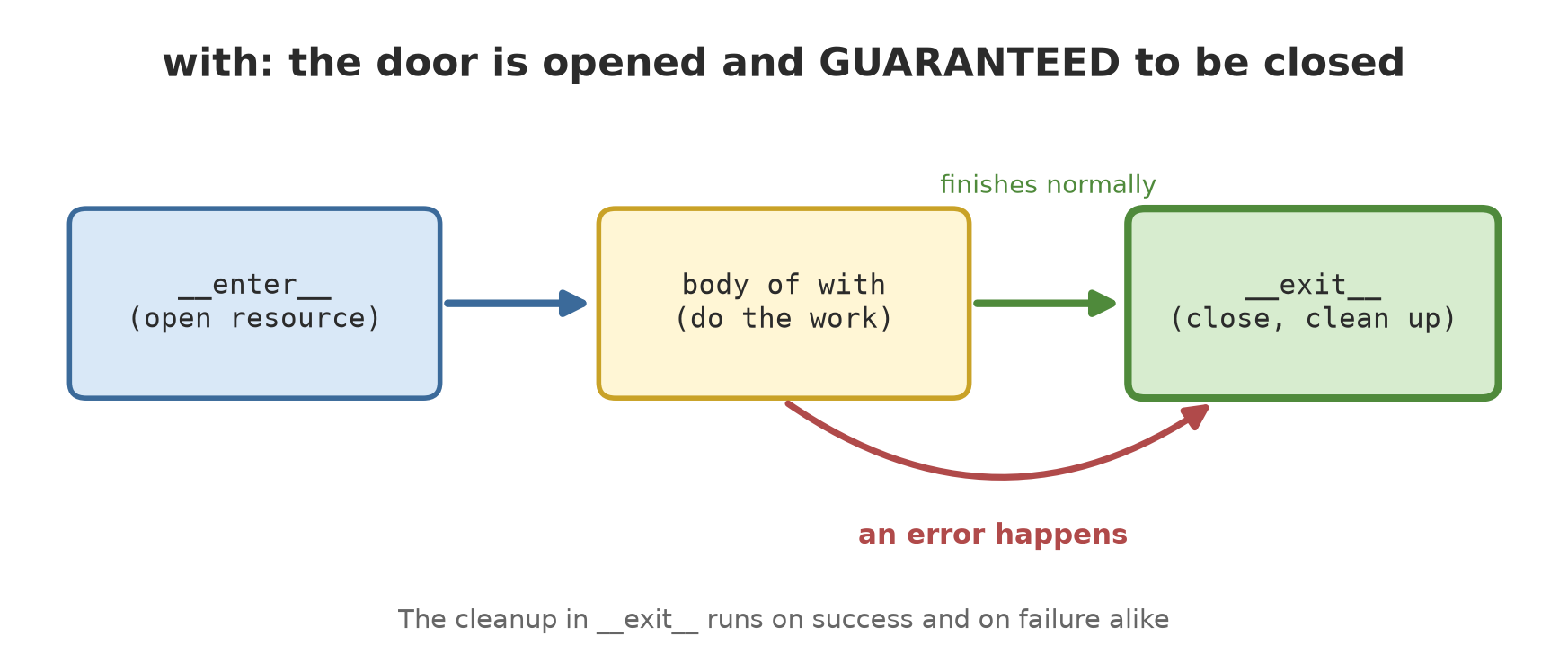
Python has a solution: the with statement. It promises that whatever happens inside the block, the “close and clean up” job will be done.
with on files
You have used with open(...) since Chapter 13. Compare it with the old way:
01_with_file.py
# Chapter 32 - with closes the file automatically
from pathlib import Path

folder = Path(__file__).parent / "_tmp"
folder.mkdir(exist_ok=True)
path = folder / "notes.txt"

# The old way: you must remember close()
f = open(path, "w", encoding="utf-8")
f.write("orchard A harvest: 245.5 kg\n")
print("before close, closed?", f.closed)
f.close()
print("after close, closed?", f.closed)

# The with way: closes itself, even when an error happens
with open(path, encoding="utf-8") as f:
    content = f.read()
    print("inside with, closed?", f.closed)
print("outside with, closed?", f.closed)
print(content.strip())
before close, closed? False
after close, closed? True
inside with, closed? False
outside with, closed? True
orchard A harvest: 245.5 kg- The old way:
f.closedisFalseuntil you yourself callf.close(). If an error occurs beforeclose(), the file stays open. - The
withway: inside the block, the file is open (False). As soon as the block ends, it is closed (True), without you writingclose(). - Note that the variable
fstill exists after the block, but the file is already closed.
Behind the scenes: __enter__ and __exit__
with works on any object that has two special methods: __enter__ (run when entering the block; its value goes into the variable after as) and __exit__ (run when leaving the block, always, even when an error occurs). Such an object is called a context manager.
02_enter_exit_class.py
# Chapter 32 - A context manager as a class: __enter__ and __exit__
class Door:
    def __init__(self, name):
        self.name = name

    def __enter__(self):
        print(f"open door {self.name}")
        return self                      # the value after the word "as"

    def __exit__(self, error_type, error, trace):
        print(f"close door {self.name}")
        return False                     # False: the error (if any) keeps travelling


with Door("barn") as d:
    print("working inside", d.name)

print("--- now with an error ---")
try:
    with Door("pond"):
        print("working...")
        raise ValueError("pump is off")
except ValueError as e:
    print("error caught outside:", e)
open door barn
working inside barn
close door barn
--- now with an error ---
open door pond
working...
close door pond
error caught outside: pump is off- In the first attempt the order is: open, work, close.
- In the second attempt, the error
ValueError("pump is off")happens inside the block. The door is still closed (“close door pond” is printed) before the error shows up outside and is caught byexcept. __exit__receives three pieces of error information (type, value, trace; they areNoneif there is no error). ReturningFalsemeans “let the error travel on”.
The short way: @contextmanager
Writing a class with two methods is long. contextlib.contextmanager turns a generator function (Chapter 30) into a context manager: the code before yield becomes __enter__, the code after it becomes __exit__.
03_contextmanager.py
# Chapter 32 - @contextmanager: a context manager from a generator function
from contextlib import contextmanager


@contextmanager
def work_session(name):
    print(f"[{name}] start")
    try:
        yield name.upper()               # the body of the with block runs here
    finally:
        print(f"[{name}] finished and cleaned up")


with work_session("fertilising") as code:
    print("working with code", code)

try:
    with work_session("harvesting"):
        print("working...")
        1 / 0
except ZeroDivisionError:
    print("error caught, but the cleanup still ran")
[fertilising] start
working with code FERTILISING
[fertilising] finished and cleaned up
[harvesting] start
working...
[harvesting] finished and cleaned up
error caught, but the cleanup still ranyield name.upper()hands control to thewithblock and gives the valueFERTILISINGto the variablecode.- The
try ... finallyaroundyieldguarantees the cleanup. In the second attempt1 / 0happens, yet “finished and cleaned up” is still printed, and then the error is caught outside.
TipTIP
Always wrap the yield in @contextmanager with try ... finally if there is cleanup. Without finally, if the with block raises an error, the cleanup lines after yield do not run.
__exit__ may swallow an error
If __exit__ returns True, the error counts as already handled and the program carries on as if nothing happened. This is powerful but dangerous.
04_swallowing_errors.py
# Chapter 32 - __exit__ may swallow an error (use with care)
from contextlib import suppress


class IgnoreZero:
    def __enter__(self):
        return self

    def __exit__(self, error_type, error, trace):
        if error_type is ZeroDivisionError:
            print("division by zero ignored")
            return True                  # True: the error counts as handled
        return False


with IgnoreZero():
    print(10 / 0)
print("program continues")

# The standard library already has a similar tool
with suppress(FileNotFoundError):
    open("does_not_exist.txt", encoding="utf-8")
print("continues again")
division by zero ignored
program continues
continues againIn the first block, 10 / 0 raises ZeroDivisionError, but __exit__ returns True, so “program continues” still appears. The standard library offers a tidier version: contextlib.suppress(FileNotFoundError), which swallows only the error type you name.
WarningWARNING
Swallowing errors can hide bugs. Swallow only error types you expect and that are truly harmless (for example a file that is allowed not to exist). Never swallow all errors.
Ready-made tools in contextlib
05_contextlib_tools.py
# Chapter 32 - Ready-made tools in contextlib and other modules
import io
from contextlib import ExitStack, redirect_stdout
from pathlib import Path

# redirect_stdout: capture what gets printed
capture = io.StringIO()
with redirect_stdout(capture):
    print("this does not show on screen")
print("captured:", repr(capture.getvalue()))

# ExitStack: the number of files is only known while running
folder = Path(__file__).parent / "_tmp"
folder.mkdir(exist_ok=True)
names = ["pond_a.txt", "pond_b.txt", "pond_c.txt"]
with ExitStack() as stack:
    files = [stack.enter_context(open(folder / n, "w", encoding="utf-8")) for n in names]
    for i, f in enumerate(files):
        f.write(f"data of pond number {i + 1}\n")
    print("open at the same time:", len(files))
print("all closed:", all(f.closed for f in files))
captured: 'this does not show on screen\n'
open at the same time: 3
all closed: Trueredirect_stdoutredirects whatprintwrites into anio.StringIOcontainer. The screen shows nothing, but the content can be read afterwards ('this does not show on screen\n'). Useful for testing functions that print.ExitStackis used when the number of resources is only known while the program runs. Here three files are opened throughenter_context, and all three are closed together when the block ends.
The trap: with on an object that is not a context manager
06_not_a_context_manager.py
# Chapter 32 - Wrong: with on an object that is not a context manager
class Warehouse:
    pass


with Warehouse() as w:
    print("we will never get here")
Traceback (most recent call last):
File "06_not_a_context_manager.py", line 6, in <module>
with Warehouse() as w:
~~~~~~~~~^^
TypeError: 'Warehouse' object does not support the context manager protocol (missed __exit__ method)The error message is clear: the class Warehouse has no __exit__ (and no __enter__), so it does not support the “context manager protocol”. The fix: add those two methods, or use @contextmanager.
Running Project I4: writing a report safely
A real scenario: you write a daily report to a file. In the middle of writing, the power goes out or the program errors. A half-written file overwrites the old, complete report. The common solution: write to a temporary file, and only if the whole write succeeds, swap it with the real file.
07_project_safe_write.py
# Chapter 32 - Running project I4: writing a report safely
import os
from contextlib import contextmanager
from pathlib import Path

folder = Path(__file__).parent / "_tmp"
folder.mkdir(exist_ok=True)


@contextmanager
def safe_write(target):
    """Writes to a temporary file; only on success does it replace the real one."""
    temporary = Path(str(target) + ".tmp")
    f = open(temporary, "w", encoding="utf-8")
    try:
        yield f
    except BaseException:
        f.close()
        temporary.unlink()               # failed: throw away the half-finished file
        print("failed, temporary file discarded")
        raise
    else:
        f.close()
        os.replace(temporary, target)    # success: swap in one step
        print("success, report saved")


report = folder / "report.txt"

with safe_write(report) as f:
    f.write("Orchard harvest: 1030.0 kg\n")

try:
    with safe_write(report) as f:
        f.write("Half-finished data...\n")
        raise RuntimeError("power cut")
except RuntimeError as e:
    print("error:", e)

print("report content still intact:", report.read_text(encoding="utf-8").strip())
print("temporary file left over:", Path(str(report) + ".tmp").exists())
success, report saved
failed, temporary file discarded
error: power cut
report content still intact: Orchard harvest: 1030.0 kg
temporary file left over: FalseFollow along:
- The first write succeeds: “success, report saved”, and the content
Orchard harvest: 1030.0 kgreplaces the file. - The second write simulates a power cut (
RuntimeError) after writing half the content. In theexcept BaseExceptionblock, the temporary file is closed and discarded, then the error is raised again (raise) so it is caught outside. - Final result: the report content stays intact as before the second write, and no
.tmpfile is left behind (False). os.replacereplaces the target file. According to the Python documentation, if successful this operation is atomic (it does not get split in the middle), but it can fail if the source and target are on different filesystems. That is why the temporary file is placed in the same folder as the target.
CautionTECHNICAL STUFF (feel free to skip)
BaseException is broader than Exception: it also covers KeyboardInterrupt (you press Ctrl+C) and SystemExit. For cleanup, we want to be caught in all those cases, and then raise again so the error still reaches the caller. To handle ordinary errors, Exception is enough.
Exercises
- Write a context manager class
Recorderthat prints “start” in__enter__and “finish” in__exit__. Use it withwithand add oneprintinside. - Change
03_contextmanager.py: add a thirdwork_session("watering")that suffers aValueError, and catch that error outside. Is “cleaned up” still printed? - Use
contextlib.suppress(FileNotFoundError)to delete the file_tmp/does_not_exist.txtwithPath.unlink()without an error if the file really is absent. - Challenge: write a context manager
log_step(name)using@contextmanagerthat prints “[name] start” and “[name] finish”; if an error occurs, print “[name] FAILED” and then raise the error again. Test it with one successful block and one failing block.
Chapter Summary
withguarantees cleanup (closing files, releasing resources) even when an error occurs.- A context manager = an object with
__enter__and__exit__;__exit__always runs. @contextmanagerturns a generator function into a context manager; wrap theyieldintry ... finally.- An
__exit__that returnsTrueswallows the error; usesuppressonly for expected error types. contextlibprovidessuppress,redirect_stdout, andExitStack(a dynamic number of resources).- Project I4: the report is written through a temporary file, so the old report stays intact if writing fails.
Next, in Chapter 33: type hints, a way to tell people and checking tools what kind of data is expected.