Chapter 61 — Transformers and Generative AI: A Peek Inside the Language Machine
Series A4 — Generative AI and AI Agents
All scripts in this chapter are in the folder kode/ch61/. In the web version you can also download them all at once (zip).
In Chapter 60, the language model was a black box: a question goes in, an answer comes out. Now we open the lid. Imagine a foreman reading the sentence “That teak tree is tall”. To understand “that”, he glances at the word “teak”; to understand “tall”, he looks at the word “tree”. Every word is understood by glancing at the other words. That is the core idea of the transformer, the architecture behind almost every large language model today.
As in Chapter 60, this chapter is honest about the limits of the author’s computer: a GTX 1660 SUPER GPU with 6 GB. Large models (7B parameters and up), diffusion models, and multimodal models are not run here; we cover them from the documentation and from arithmetic. What does run is a small home-made test model with random weights (39,168 parameters). That model is not smart and does not produce meaningful sentences; it exists so the mechanisms (loading, training LoRA, saving an adapter, 4-bit quantization) can be proven with real output.
Attention: every word glances at the others
How it works: from each word three vectors are made: a Query (what I am looking for), a Key (what I offer), and a Value (the content I carry). How well one word’s Query matches another word’s Key becomes a score; scores are turned into percentages with softmax (they add up to 1); then the Values are mixed according to those percentages. The short formula, from the paper “Attention Is All You Need” (Vaswani et al., June 2017, arXiv:1706.03762): softmax(Q·Kᵀ / √d) · V.
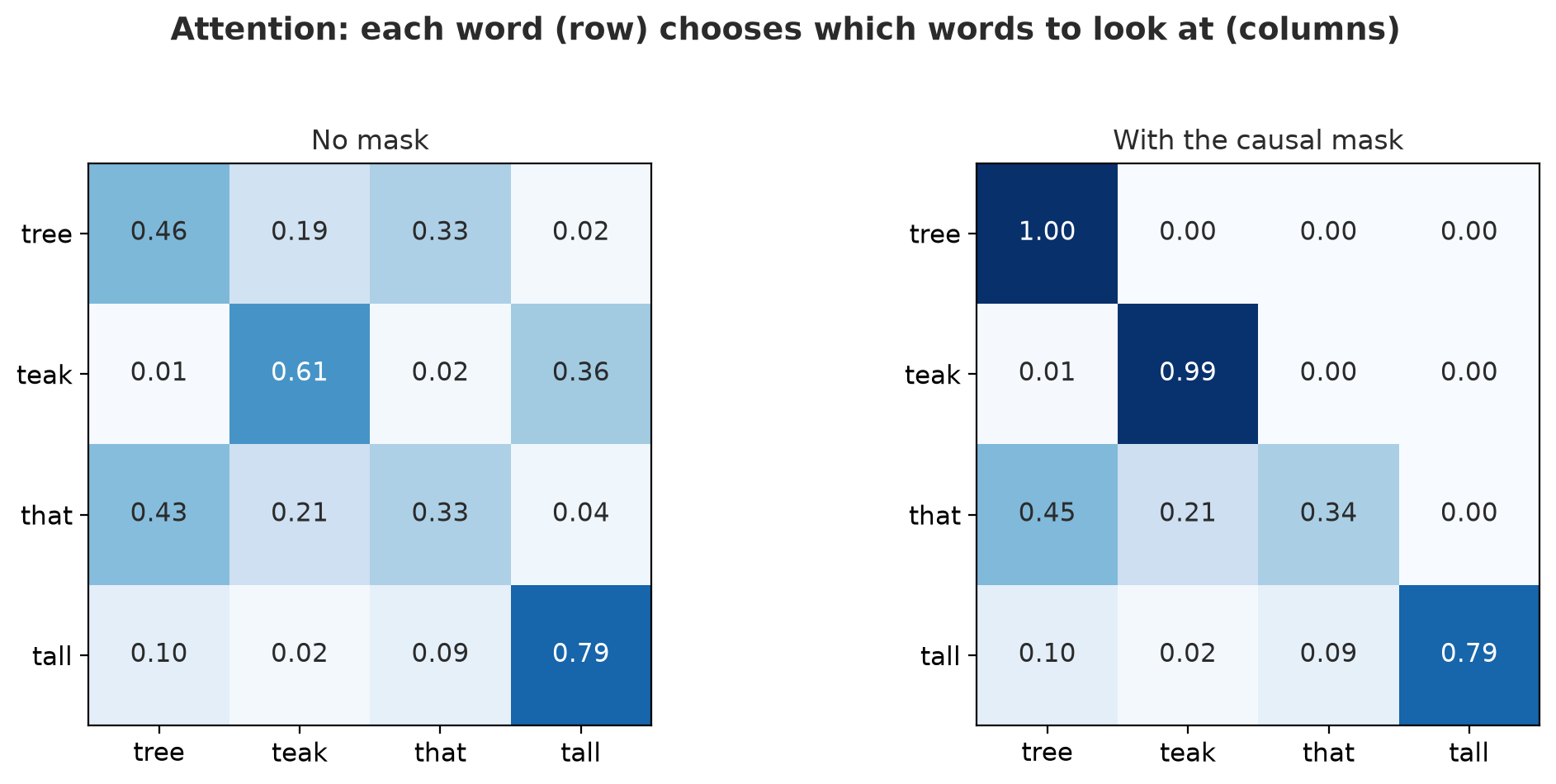
01_attention_numpy.py
# Chapter 61 - Attention from scratch with numpy
import numpy as np

rng = np.random.default_rng(42)
words = ["tree", "teak", "that", "tall"]
d = 4                                     # length of each word vector (dimensions)
X = rng.normal(size=(len(words), d))      # embedding of each word (random, for the demo only)

# Three weight matrices: each word makes a Query (what it looks for), a Key (what it offers), a Value (its content)
Wq, Wk, Wv = (rng.normal(size=(d, d)) for _ in range(3))
Q, K, V = X @ Wq, X @ Wk, X @ Wv


def softmax(a):
    e = np.exp(a - a.max(axis=-1, keepdims=True))
    return e / e.sum(axis=-1, keepdims=True)


scores = Q @ K.T / np.sqrt(d)             # how well each Query matches each Key
weights = softmax(scores)                 # turn them into percentages (each row sums to 1)
result = weights @ V                      # mix the Values according to the weights

print("Attention weights (row = the word asking):")
for name, row in zip(words, weights):
    print(f"  {name:<7}", np.round(row, 2))
print("Each row sums to 1:", np.allclose(weights.sum(axis=1), 1))
print("Result shape:", result.shape)

# A text-generating model must not peek at later words: block the upper triangle with a mask
mask = np.triu(np.ones((len(words), len(words)), dtype=bool), k=1)
causal_weights = softmax(np.where(mask, -np.inf, scores))
print("\nWith the causal mask:")
for name, row in zip(words, causal_weights):
    print(f"  {name:<7}", np.round(row, 2))
Attention weights (row = the word asking):
tree [0.46 0.19 0.33 0.02]
teak [0.01 0.61 0.02 0.36]
that [0.43 0.21 0.33 0.04]
tall [0.1 0.02 0.09 0.79]
Each row sums to 1: True
Result shape: (4, 4)
With the causal mask:
tree [1. 0. 0. 0.]
teak [0.01 0.99 0. 0. ]
that [0.45 0.21 0.34 0. ]
tall [0.1 0.02 0.09 0.79]Trace the result. Each row is one word “asking”, each column a word glanced at, and each row adds up to 1 (proven: True). The row tall gives 0.79 to itself; the row teak gives 0.61 to itself and 0.36 to tall. Because the embeddings and weights are random, these numbers have no linguistic meaning; the mechanism is what matters. In a trained model, these weights learn to highlight useful relations.
The lower part of the output uses the causal mask: a text-generating model must not peek at words not yet written. The scores in the upper triangle are replaced with -inf so they become 0 after softmax. Look at the row tree: it may only glance at itself (1.00). The row tall (the last word) does not change because it is allowed to see everything.
PyTorch already provides the same function, and real models use many heads (multi-head): several attention operations in parallel with different weights, whose results are then joined.
02_attention_torch.py
# Chapter 61 - Attention in PyTorch: written by hand vs the built-in function, with many heads
import math

from helpers import quiet  # noqa: F401
import torch
import torch.nn.functional as F

torch.manual_seed(0)
device = "cuda" if torch.cuda.is_available() else "cpu"
batch, heads, length, dim = 2, 4, 6, 8         # 2 sentences, 4 attention heads, 6 tokens, 8 dimensions per head

q, k, v = (torch.randn(batch, heads, length, dim, device=device) for _ in range(3))


def manual_attention(q, k, v):
    scores = q @ k.transpose(-2, -1) / math.sqrt(q.shape[-1])
    mask = torch.triu(torch.ones(q.shape[-2], k.shape[-2], dtype=torch.bool, device=q.device), diagonal=1)
    scores = scores.masked_fill(mask, float("-inf"))
    return torch.softmax(scores, dim=-1) @ v


by_hand = manual_attention(q, k, v)
built_in = F.scaled_dot_product_attention(q, k, v, is_causal=True)

print("Output shape:", tuple(built_in.shape))
print("Same result as PyTorch's built-in function:", torch.allclose(by_hand, built_in, atol=1e-5))
print("Ran on the GPU:", device == "cuda", "(on a computer without an NVIDIA GPU this is False and still correct)")

# Many heads = many "points of view" at once; the heads are joined back into one vector
joined = built_in.transpose(1, 2).reshape(batch, length, heads * dim)
print("After joining the heads:", tuple(joined.shape))
Output shape: (2, 4, 6, 8)
Same result as PyTorch's built-in function: True
Ran on the GPU: True (on a computer without an NVIDIA GPU this is False and still correct)
After joining the heads: (2, 6, 32)The hand-written function and F.scaled_dot_product_attention give the same result (True, with a tolerance of 1e-5 because of decimal numbers). The shape (2, 4, 6, 8) means 2 sentences, 4 heads, 6 tokens, 8 dimensions per head; after joining it becomes (2, 6, 32) (4 heads x 8 dimensions). The line “Ran on the GPU: True” shows the calculation really ran on the author’s GTX 1660 SUPER; on a computer without an NVIDIA GPU it is False and the result is still correct. A full transformer stacks dozens of attention blocks like this, each followed by an ordinary neural-network layer.
Tokenization: text is cut into tokens
A model does not read letters or words but tokens: pieces of text that are sometimes a whole word, sometimes part of a word. BPE (byte-pair encoding) builds a dictionary of pieces by merging pairs of letters that often appear side by side. The dictionary (vocabulary) is trained on large text.
Our test model has a tiny BPE tokenizer trained on 10 SOP sentences (see kode/ch61/helpers/test_model.py; its vocabulary has only 300 tokens).
03_tokenization.py
# Chapter 61 - Tokenization: text is split into tokens
from helpers.test_model import load

tokenizer, _ = load()          # a small BPE tokenizer trained on SOP text (see helpers/test_model.py)

print("Vocabulary size:", tokenizer.vocab_size)

for text in ["Teak forest", "Teak forest grows well in plot A", "tree"]:
    tokens = tokenizer.tokenize(text)
    numbers = tokenizer(text)["input_ids"]
    print(f"\n{text!r}")
    print("  tokens :", tokens)
    print("  numbers:", numbers)
    print("  back to text:", tokenizer.decode(numbers) == text)

print("\nNumber of tokens per sentence (same sentence, the longer it is, the more tokens):")
for text in ["teak", "teak grows", "teak grows well", "teak grows well in plot A"]:
    print(f"  {len(tokenizer(text)['input_ids']):>2} tokens  <-  {text}")
Vocabulary size: 300
'Teak forest'
tokens : ['T', 'eak', 'Ġf', 'o', 're', 's', 't']
numbers: [54, 297, 291, 81, 260, 85, 86]
back to text: True
'Teak forest grows well in plot A'
tokens : ['T', 'eak', 'Ġf', 'o', 're', 's', 't', 'Ġg', 'r', 'o', 'w', 's', 'Ġw', 'el', 'l', 'Ġ', 'in', 'Ġp', 'l', 'o', 't', 'Ġ', 'A']
numbers: [54, 297, 291, 81, 260, 85, 86, 292, 84, 81, 89, 85, 264, 275, 78, 223, 270, 272, 78, 81, 86, 223, 35]
back to text: True
'tree'
tokens : ['t', 're', 'e']
numbers: [86, 260, 71]
back to text: True
Number of tokens per sentence (same sentence, the longer it is, the more tokens):
2 tokens <- teak
7 tokens <- teak grows
10 tokens <- teak grows well
18 tokens <- teak grows well in plot A“Teak forest” becomes 7 tokens: T, eak, Ġf, o, re, s, t. The character Ġ is how the tokenizer writes a space before a word, so f (with a space) differs from f. Because this vocabulary has only 300 entries and each word appears only a few times in the training text, even words from that text are split into small pieces; the word “tree” becomes t, re, e. The table at the bottom shows “teak grows well in plot A” uses 18 tokens. A real tokenizer, trained on huge text, keeps common English words whole more often, but names, technical terms, and rare words are still split. This matters because API prices and length limits are measured in tokens, not words (see the cost calculation in Chapter 60).
Embeddings: tokens become vectors
Every token number has one row in an embedding table: a vector of learned numbers. There is also a position embedding table, so the model knows the order (without it, “cow eats grass” and “grass eats cow” would look the same).
04_embedding.py
# Chapter 61 - Embedding: words become vectors, similarity becomes an angle
import numpy as np

from helpers.test_model import load

# 1) A hand-made embedding, 3 dimensions: [plant, animal, water]. The numbers are made up by the author for learning.
words = {
    "teak": np.array([0.9, 0.0, 0.1]),
    "rice": np.array([0.8, 0.0, 0.5]),
    "cow": np.array([0.1, 0.9, 0.2]),
    "goat": np.array([0.1, 0.8, 0.1]),
    "tilapia": np.array([0.0, 0.3, 0.9]),
}


def cosine(a, b):
    return float(a @ b / (np.linalg.norm(a) * np.linalg.norm(b)))


pairs = [("teak", "rice"), ("cow", "goat"), ("teak", "cow"), ("rice", "tilapia")]
for a, b in pairs:
    print(f"similarity {a:<8}-{b:<8}: {cosine(words[a], words[b]):.2f}")

# 2) The real embedding tables in the test model (random contents, so only their shapes mean anything)
_, model = load()
word_table = model.get_input_embeddings().weight
position_table = model.transformer.wpe.weight
print("\nWord embedding table     :", tuple(word_table.shape), "(vocabulary x dimensions)")
print("Position embedding table :", tuple(position_table.shape), "(maximum positions x dimensions)")
print("Vector of token number 40:", tuple(word_table[40].shape), "-> one row of the table")
similarity teak -rice : 0.90
similarity cow -goat : 1.00
similarity teak -cow : 0.13
similarity rice -tilapia : 0.50
Word embedding table : (300, 32) (vocabulary x dimensions)
Position embedding table : (128, 32) (maximum positions x dimensions)
Vector of token number 40: (32,) -> one row of the tableThe first part uses a hand-made three-dimensional embedding [plant, animal, water] to show what “close” means: cosine similarity teak-rice 0.90 (both plants), cow-goat 1.00, teak-cow only 0.13. The numbers are made up by the author for learning. The second part shows the real tables in the test model: 300 rows (vocabulary) x 32 dimensions, and 128 positions x 32 dimensions. The contents are random, so only their shapes mean anything. In a trained model, the same kind of embedding is also what powers document search as in Chapter 60.
Loading an open model
The Hugging Face Hub is a warehouse of open models; the transformers library loads them with from_pretrained. Loading from the Hub works exactly like loading from a local folder:
# An example of the call shape (not run in this chapter)
from transformers import AutoModelForCausalLM, AutoTokenizer
tokenizer = AutoTokenizer.from_pretrained("organization-name/model-name")
model = AutoModelForCausalLM.from_pretrained("organization-name/model-name")
The code above was not run when the book was built because it downloads model weights from the internet (and real models are usually far above the 50 MB limit we set), so no output is shown. What we do run is the local test model, loaded with the same from_pretrained.
An honest story from writing this chapter. At first the author downloaded the random test model hf-internal-testing/tiny-random-gpt2 (about 0.45 MB). While reviewing licenses (Chapter 63), it turned out that the model’s page states no license. Because it was unclear whether it could be redistributed, the model was thrown away and replaced by a model built from a configuration. Always check a model’s license before using it, and above all before sharing it.
05_open_model.py
# Chapter 61 - Loading and running an open model (a very small random test model)
from helpers import quiet  # noqa: F401
import torch

from helpers.test_model import load

tokenizer, model = load()      # loaded with from_pretrained from a local folder, just like from the Hugging Face Hub
model.eval()

count = sum(p.numel() for p in model.parameters())
print("Number of parameters:", f"{count:,}")
print("Transformer layers:", model.config.n_layer, "| attention heads:", model.config.n_head,
      "| dimensions:", model.config.n_embd)

inputs = tokenizer("Teak forest", return_tensors="pt")
with torch.no_grad():
    output = model.generate(**inputs, max_new_tokens=8, do_sample=False, pad_token_id=tokenizer.eos_token_id)
print("\nResulting tokens (greedy, 8 new tokens):",tokenizer.convert_ids_to_tokens(output[0]))

with torch.no_grad():
    again = model.generate(**inputs, max_new_tokens=8, do_sample=False, pad_token_id=tokenizer.eos_token_id)
print("Repeated, exactly the same:", torch.equal(output, again))
print("Meaningful?  No: this model's weights are random, so the result is just a string of tokens with no meaning.")
Number of parameters: 39,168
Transformer layers: 2 | attention heads: 4 | dimensions: 32
Resulting tokens (greedy, 8 new tokens): ['T', 'eak', 'Ġf', 'o', 're', 's', 't', 't', 'İ', 'İ', 'İ', 'İ', 'İ', 'ā', 'ā']
Repeated, exactly the same: True
Meaningful? No: this model's weights are random, so the result is just a string of tokens with no meaning.The test model has 39,168 parameters, 2 transformer layers, 4 attention heads, and 32 dimensions. Compare that with real language models, which have billions of parameters. The result of generate with greedy decoding (always pick the most probable token) is “Teak forest” followed by meaningless tokens: typical of an untrained random model. Repeated, the result is exactly the same (True), because greedy decoding uses no random numbers. This model is meaningless and is not meant to be anything else.
VRAM: will it fit or not?
In Chapter 55 you learned that AI speed depends on the GPU and VRAM (GPU memory). Here we compute it. The basic rule:
weight memory = number of parameters x bytes per parameter
Bytes per parameter: fp32 = 4, fp16/bf16 = 2, int8 = 1, int4 = 0.5. For inference (using the model), we add roughly 20% for the attention cache and activations; the 20% figure is the author’s assumption, not a law, and can be much larger for long texts.
06_vram.py
# Chapter 61 - Estimating VRAM needs with arithmetic
from helpers.test_model import load

GIB = 1024 ** 3
BYTES_PER_PARAMETER = {"fp32": 4, "fp16/bf16": 2, "int8": 1, "int4": 0.5}
AUTHOR_VRAM_GIB = 6                       # GTX 1660 SUPER: 6 GB


def weights_gib(billion_parameters, bytes_per_parameter):
    """Formula: weight memory = number of parameters x bytes per parameter."""
    return billion_parameters * 1e9 * bytes_per_parameter / GIB


def inference_gib(billion_parameters, bytes_per_parameter, extra=0.20):
    """Rough estimate: weights + 20% for the attention cache and activations (the extra figure is the author's assumption)."""
    return weights_gib(billion_parameters, bytes_per_parameter) * (1 + extra)


def full_training_gib(billion_parameters):
    """Full training, mixed fp16 + Adam optimizer: roughly 16 bytes per parameter (see the chapter text)."""
    return billion_parameters * 1e9 * 16 / GIB


print(f"Inference (weights + 20%), author's VRAM = {AUTHOR_VRAM_GIB} GiB")
print(f"{'model':>6} " + " ".join(f"{k:>10}" for k in BYTES_PER_PARAMETER))
for n in [1, 3, 7, 13, 70]:
    cells = []
    for b in BYTES_PER_PARAMETER.values():
        gib = inference_gib(n, b)
        cells.append(f"{gib:>6.1f}{' yes' if gib <= AUTHOR_VRAM_GIB else '  no'}")
    print(f"{n:>5}B " + " ".join(cells))

print("\nFull training of a 1B model:", f"{full_training_gib(1):.1f} GiB", "-> does not fit in 6 GiB")
print("Full training of a 7B model:", f"{full_training_gib(7):.1f} GiB")

# Check the formula on a real model (the small test model): fp32 weights = parameters x 4 bytes
_, model = load()
count = sum(p.numel() for p in model.parameters())
print("\nTest model:", count, "parameters x 4 bytes =", count * 4, "bytes")
print("Reported by PyTorch:", model.get_memory_footprint(), "bytes")
print("Formula matches:", count * 4 == model.get_memory_footprint())
Inference (weights + 20%), author's VRAM = 6 GiB
model fp32 fp16/bf16 int8 int4
1B 4.5 yes 2.2 yes 1.1 yes 0.6 yes
3B 13.4 no 6.7 no 3.4 yes 1.7 yes
7B 31.3 no 15.6 no 7.8 no 3.9 yes
13B 58.1 no 29.1 no 14.5 no 7.3 no
70B 312.9 no 156.5 no 78.2 no 39.1 no
Full training of a 1B model: 14.9 GiB -> does not fit in 6 GiB
Full training of a 7B model: 104.3 GiB
Test model: 39168 parameters x 4 bytes = 156672 bytes
Reported by PyTorch: 156672 bytes
Formula matches: True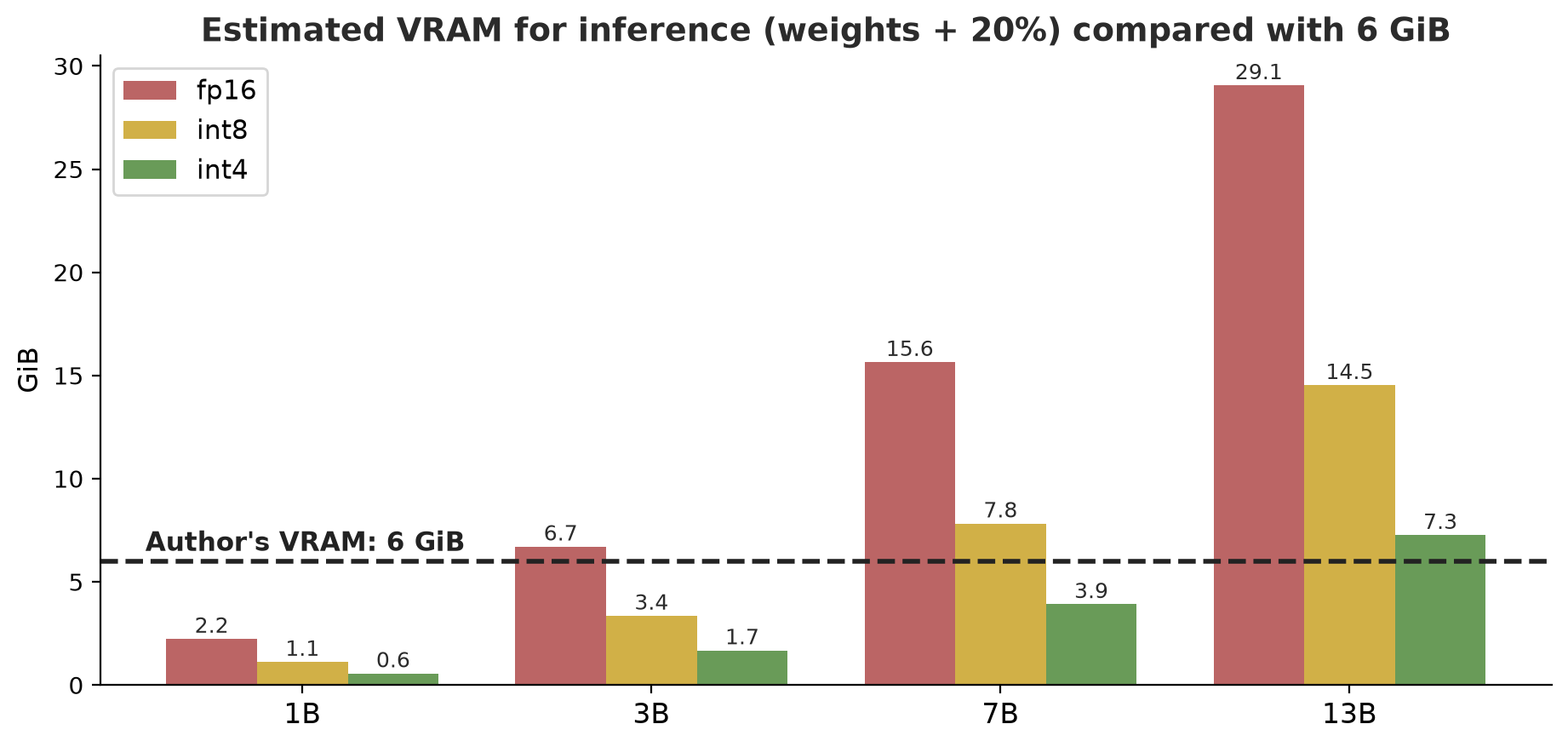
How to read the table (the author’s GPU has 6 GiB): a 1B model fits at every precision; a 3B model fits when quantized to int8 (3.4 GiB) or int4 (1.7 GiB) but not in fp16 (6.7 GiB, slightly above 6); a 7B model fits only in int4 (3.9 GiB), while int8 needs 7.8 GiB. A 13B model does not fit at any precision we computed, not even int4 (7.3 GiB). So with this GPU, a 4-bit 7B model is the realistic upper limit, and that is a calculation, not an experiment result: no 7B model is run here.
Training is far hungrier than using. For full training with mixed precision and the Adam optimizer, roughly 2 bytes (fp16 weights) + 2 (gradients) + 4 (fp32 copy of the weights) + 4 + 4 (two Adam statistics) = 16 bytes per parameter are needed. This breakdown is the author’s calculation from the components (not verified against specific documentation), but it is widely used as a rule of thumb. The result: fully training a 1B model needs about 14.9 GiB, far above 6 GiB, and a 7B model about 104.3 GiB. That is why full training of large models is impossible on the author’s computer, and we use LoRA.
The last lines of the output check the formula on our real model: 39,168 parameters x 4 bytes = 156,672 bytes, exactly what PyTorch reports (True).
LoRA: train a little, feel the effect
LoRA (Low-Rank Adaptation; Hu et al., June 2021, arXiv:2106.09685) freezes the original weights and trains only two small matrices per layer whose product has the same size as the original matrix. The size of the small matrices is set by the rank r; the smaller r, the fewer parameters are trained (peft documentation). After training, the adapter can be merged into the original model with merge_and_unload() so there are no extra layers at use time.
07_lora_peft.py
# Chapter 61 - LoRA: training a small fraction of the parameters with the peft library (on the GPU if present)
from helpers import quiet  # noqa: F401
import torch
from peft import LoraConfig, get_peft_model

from helpers.test_model import load

# 1) Work out the saving: one 4096 x 4096 weight matrix vs two LoRA matrices of rank 8
d, r = 4096, 8
full, lora = d * d, d * r + r * d
print(f"One {d}x{d} matrix: {full:,} parameters; LoRA r={r}: {lora:,} ({100 * lora / full:.2f}%)")

# 2) LoRA on the test model
torch.manual_seed(0)
device = "cuda" if torch.cuda.is_available() else "cpu"
tokenizer, base = load()
config = LoraConfig(r=4, lora_alpha=8, target_modules=["c_attn"], fan_in_fan_out=True, task_type="CAUSAL_LM")
model = get_peft_model(base, config).to(device)
trained = sum(p.numel() for p in model.parameters() if p.requires_grad)
total = sum(p.numel() for p in model.parameters())
print(f"Trained parameters: {trained:,} of {total:,} ({100 * trained / total:.1f}%)")

text = tokenizer("teak forest grows well in plot a", return_tensors="pt").to(device)
optimizer = torch.optim.AdamW([p for p in model.parameters() if p.requires_grad], lr=1e-2)
start = model(**text, labels=text["input_ids"]).loss.item()
for _ in range(40):
    loss = model(**text, labels=text["input_ids"]).loss
    loss.backward()
    optimizer.step()
    optimizer.zero_grad()
end = model(**text, labels=text["input_ids"]).loss.item()
print("The loss went down after 40 steps:", end < start)

# 3) Merge the adapter into the base model: same result, no extra layers when used
model.eval()
with torch.no_grad():
    before = model(**text).logits
    merged = model.merge_and_unload()
    after = merged(**text).logits
print("After merging, the output is the same:", torch.allclose(before, after, atol=1e-4))
One 4096x4096 matrix: 16,777,216 parameters; LoRA r=8: 65,536 (0.39%)
Trained parameters: 1,024 of 40,192 (2.5%)
The loss went down after 40 steps: True
After merging, the output is the same: TrueThe first part: one 4096 x 4096 matrix has 16,777,216 parameters, whereas LoRA with r=8 has only 65,536, which is 0.39%. The second part, on the test model: 1,024 parameters are trained out of 40,192 in total (2.5%), and the loss (a measure of error; smaller is better) goes down after 40 steps (True), done on the GPU. The third part proves that merging the adapter does not change the output (True).
Quantization and QLoRA
Quantization stores weights with fewer bits, for example from 32 bits down to 8 or 4. The price is a little precision.
08_quantization.py
# Chapter 61 - Quantization: storing the weights with fewer bits
import numpy as np

from helpers.test_model import FOLDER, load

# 1) A home-made int8 "absmax" quantization of one weight matrix
rng = np.random.default_rng(42)
weights = rng.normal(0, 0.05, size=(256, 256)).astype("float32")
scale = np.abs(weights).max() / 127               # 127 = the largest int8 value
quantized = np.round(weights / scale).astype("int8")   # stored as integers -127..127
restored = quantized.astype("float32") * scale    # converted back when used
print("float32 size:", weights.nbytes, "bytes | int8:", quantized.nbytes, "bytes (4x smaller)")
print("Mean absolute difference:", f"{np.abs(weights - restored).mean():.5f}", "(the weights are around 0.05)")

# 2) Loading in 4-bit (NF4) through bitsandbytes, tried on the test model
try:
    import torch
    from transformers import AutoModelForCausalLM, BitsAndBytesConfig

    _, original = load()
    config = BitsAndBytesConfig(load_in_4bit=True, bnb_4bit_quant_type="nf4",
                                bnb_4bit_compute_dtype=torch.float16)
    compact = AutoModelForCausalLM.from_pretrained(FOLDER, quantization_config=config, device_map={"": 0})
    print("\nTest model float32:", original.get_memory_footprint(), "bytes")
    print("Test model 4-bit  :", compact.get_memory_footprint(), "bytes")
except Exception as error:
    print("\n4-bit cannot be tried on this computer:", type(error).__name__)
float32 size: 262144 bytes | int8: 65536 bytes (4x smaller)
Mean absolute difference: 0.00049 (the weights are around 0.05)
Test model float32: 156672 bytes
Test model 4-bit : 70656 bytesIn the first part we write our own int8 absmax quantization: values are divided by scale = largest absolute value / 127, rounded, and stored as integers. The size drops from 262,144 to 65,536 bytes (4 times smaller), with an average difference of only 0.00049 for weights worth about 0.05.
The second part uses bitsandbytes: the test model is loaded in 4-bit (the NF4 format) and its memory drops from 156,672 to 70,656 bytes. The saving is not 8 times because in a model this small some parts (probably the embedding table and normalization layers) are not quantized; the author has not checked the details. What is proven: 4-bit loading works on Windows with a GTX 1660 SUPER. The bitsandbytes documentation (read 2026-10-10) says NF4/FP4 needs compute capability 6.0 or higher, LLM.int8() needs 7.5 or higher, and it provides packages for Windows x86-64. QLoRA (Dettmers et al., May 2023, arXiv:2305.14314) combines the two: the base model is frozen in 4-bit and LoRA is trained on top; its paper reports fine-tuning a 65B model on a single 48 GB GPU. Applying QLoRA to a 7B model on a 6 GB GPU is not attempted here; the VRAM calculation suggests the weights (3.9 GiB) might fit, but training needs extra memory for activations, so the result has to be tested yourself.
Diffusion and multimodal models (documentation only)
Diffusion models make images by reversing a process of adding noise. The DDPM paper (Ho et al., June 2020, arXiv:2006.11239) showed that images can be generated by learning to remove noise little by little. We do not train a diffusion model (it needs a strong GPU and big data), but we can demonstrate its forward process with numpy.
09_diffusion_forward.py
# Chapter 61 - Diffusion: the process of "dirtying" an image with noise, step by step
import numpy as np

rng = np.random.default_rng(42)

# A small 8 x 8 "image": a gradient from dark to bright, values -1..1 (like a plot that gets greener to the right)
x0 = np.tile(np.linspace(-1, 1, 8), (8, 1))

T = 1000
beta = np.linspace(1e-4, 0.02, T)          # linear noise schedule as in the DDPM paper (Ho et al., 2020)
alpha_bar = np.cumprod(1 - beta)          # how much of the original image is left after t steps

print(f"{'step t':>9} {'image weight':>13} {'noise weight':>13} {'corr. with original':>20}")
for t in [0, 100, 250, 500, 750, 999]:
    epsilon = rng.normal(size=x0.shape)
    xt = np.sqrt(alpha_bar[t]) * x0 + np.sqrt(1 - alpha_bar[t]) * epsilon     # one formula, jump straight to step t
    correlation = np.corrcoef(x0.ravel(), xt.ravel())[0, 1]
    print(f"{t:>9} {np.sqrt(alpha_bar[t]):>13.3f} {np.sqrt(1 - alpha_bar[t]):>13.3f} {correlation:>20.2f}")

print("\nA diffusion model is trained to guess the noise epsilon from xt, then remove it little by little.")
print("Making an image = start from pure noise (t=999) and run this process backwards.")
step t image weight noise weight corr. with original
0 1.000 0.010 1.00
100 0.946 0.324 0.93
250 0.722 0.692 0.51
500 0.279 0.960 -0.03
750 0.057 0.998 -0.05
999 0.006 1.000 -0.04
A diffusion model is trained to guess the noise epsilon from xt, then remove it little by little.
Making an image = start from pure noise (t=999) and run this process backwards.An 8 x 8 image (a dark-to-bright gradient) is dirtied with the one-step formula x_t = sqrt(ᾱ_t)·x_0 + sqrt(1-ᾱ_t)·noise, using the linear noise schedule from the DDPM paper. Look at the correlation column with the original image: 0.93 at step 100, 0.51 at step 250, and almost 0 (around -0.03 to -0.05) from step 500 on. So from step 500 on, the image is practically drowned in noise. A diffusion model is trained to guess the noise; making an image means starting from pure noise and running the process backwards. Because they are trained on many pictures, the issue of training-data copyright comes along (see Chapter 63). AI-made photos and pictures are not used in this book.
Multimodal models accept more than one kind of input (text and images, for example “how many trees are in this photo?”). The idea: the image is cut into patches, each patch is turned into a vector like a token, and the same transformer processes them together with the text. We do not run a multimodal model here; to use one, read the documentation of the model you choose, mind its license terms, and compute VRAM needs with the formula above.
Running models locally, and their limits
Running a model on your own computer means data does not leave the computer, there is no per-token bill, and it can work without internet. In return you carry the VRAM, the speed, and the maintenance. The practical order: (1) compute VRAM with the formula above; (2) pick a size and precision that fits; (3) test on a small example first; (4) measure quality on your own questions the way Chapter 60 does. Very small models can run on a CPU, but slowly.
Now the most important limit: a model only chooses the next token by probability. The following script demonstrates it with scores made up by the author for continuing the sentence “Teak spacing: …”.
10_sampling_hallucination.py
# Chapter 61 - Why a model can make things up: picking the next word by probability
import numpy as np

choices = ["3 x 3 m", "2 x 2 m", "4 x 4 m", "5 x 5 m", "rose flower"]
logit = np.array([3.0, 1.5, 1.0, 0.3, -2.0])      # raw scores made up by the author for "Teak spacing: ..."


def probability(logit, temperature):
    z = logit / temperature
    e = np.exp(z - z.max())
    return e / e.sum()


for temperature in [0.2, 1.0, 2.0]:
    p = probability(logit, temperature)
    print(f"temperature={temperature}: " + "  ".join(f"{name}={value:.2f}" for name, value in zip(choices, p)))

rng = np.random.default_rng(42)
print("\nDrawing 1000 times at temperature 1.0:")
draws = rng.choice(len(choices), size=1000, p=probability(logit, 1.0))
for i, name in enumerate(choices):
    print(f"  {name:<12} {int((draws == i).sum()):>4}")

# top-k: only the k best choices may be picked
k = 2
order = np.argsort(-logit)[:k]
p_topk = np.zeros(len(choices))
p_topk[order] = probability(logit[order], 1.0)
print(f"\nTop-{k}: only {[choices[i] for i in order]} may be chosen")
print("One of them is correct according to our document (3 x 3 m); the others sound plausible but are wrong.")
temperature=0.2: 3 x 3 m=1.00 2 x 2 m=0.00 4 x 4 m=0.00 5 x 5 m=0.00 rose flower=0.00
temperature=1.0: 3 x 3 m=0.70 2 x 2 m=0.16 4 x 4 m=0.09 5 x 5 m=0.05 rose flower=0.00
temperature=2.0: 3 x 3 m=0.46 2 x 2 m=0.22 4 x 4 m=0.17 5 x 5 m=0.12 rose flower=0.04
Drawing 1000 times at temperature 1.0:
3 x 3 m 693
2 x 2 m 167
4 x 4 m 89
5 x 5 m 46
rose flower 5
Top-2: only ['3 x 3 m', '2 x 2 m'] may be chosen
One of them is correct according to our document (3 x 3 m); the others sound plausible but are wrong.Temperature sets how sharp the probabilities are: at temperature 0.2 the top choice gets 1.00; at 1.0 it gets 0.70 and the rest share the remainder; at 2.0 it gets only 0.46, so even a strange choice such as “rose flower” has a probability of 0.04. When drawing 1000 times at temperature 1.0, “3 x 3 m” appears 693 times, but “5 x 5 m” still appears 46 times and “rose flower” 5 times. This is the root of hallucination: the model does not “know” which is right according to your document, it only weighs how plausible a sentence is. A wrong answer sounds just as convincing as a correct one. Top-k only limits choices to the top k; it reduces strange words but does not guarantee truth (here “2 x 2 m” still gets through). The remedies, as in Chapter 60: supply source documents (RAG), ask for citations, evaluate with a test set, and let humans check important decisions.
A language model is not a database and not a search engine. It is good at stringing together sentences that sound right. For anything that could cause harm (feed doses, pesticides, legal decisions), do not trust the answer without a source you can check.
Ethics and copyright
Two questions come up often. First, training data: models are trained on large amounts of text and images whose owners may never have been asked for permission; the legal status differs between countries and is still developing. Second, model output: who owns the copyright, and does it resemble existing works? Chapter 63 covers licenses, privacy, Indonesia’s PDP Law, and copyright with official sources. For now keep three habits: say so when you use AI, do not put personal data into services you do not trust, and check the license of models and data before sharing.
Running Project A4: fine-tuning a small model
We train LoRA on six SOP sentences, measure the loss on the training data and on two sentences that were not trained on, save the adapter, then reload it and prove that the result is the same.
11_project_finetuning.py
# Chapter 61 - Project A4: LoRA fine-tuning of a small model on SOP sentences, then save and load the adapter
import shutil
from pathlib import Path

from helpers import quiet  # noqa: F401
import torch
from peft import LoraConfig, PeftModel, get_peft_model
from transformers import AutoModelForCausalLM

from helpers.test_model import FOLDER, load

torch.manual_seed(0)
device = "cuda" if torch.cuda.is_available() else "cpu"
save_to = Path(__file__).parent / "_tmp" / "sop_adapter"
shutil.rmtree(save_to, ignore_errors=True)

tokenizer, base = load()
train = [
    "Teak planting is done at the start of the rainy season.",
    "Trees with a diameter below 10 centimeters are not recorded.",
    "Catfish ponds are stocked with fry and feed is given twice a day.",
    "Beef cattle are weighed every month.",
    "Tilapia pond water quality is monitored every day.",
    "Rice is planted at a spacing of 25 x 25 centimeters.",
]
test = ["Fish are harvested when the average weight reaches 500 grams.", "Coffee is harvested selectively."]


def average_loss(model, sentences):
    total = 0.0
    for s in sentences:
        x = tokenizer(s, return_tensors="pt").to(device)
        with torch.no_grad():
            total += model(**x, labels=x["input_ids"]).loss.item()
    return total / len(sentences)


config = LoraConfig(r=8, lora_alpha=16, target_modules=["c_attn", "c_proj"], fan_in_fan_out=True,
                    task_type="CAUSAL_LM")
model = get_peft_model(base, config).to(device)
model.print_trainable_parameters()

train_before, test_before = average_loss(model, train), average_loss(model, test)
optimizer = torch.optim.AdamW([p for p in model.parameters() if p.requires_grad], lr=3e-3)
model.train()
for epoch in range(150):
    for s in train:
        x = tokenizer(s, return_tensors="pt").to(device)
        model(**x, labels=x["input_ids"]).loss.backward()
        optimizer.step()
        optimizer.zero_grad()
model.eval()
train_after, test_after = average_loss(model, train), average_loss(model, test)

print(f"Training-data loss : {train_before:.2f} -> {train_after:.2f}")
print(f"Test-data loss     : {test_before:.2f} -> {test_after:.2f}  (sentences NOT trained on)")

model.save_pretrained(save_to)
size = sum(f.stat().st_size for f in save_to.iterdir() if f.suffix == ".safetensors")
base_bytes = (FOLDER / "model.safetensors").stat().st_size
print("Adapter file size:", size, "bytes | base model file:", base_bytes, "bytes")

# Load again: a fresh base model + the adapter from disk must give the same output
fresh = PeftModel.from_pretrained(AutoModelForCausalLM.from_pretrained(FOLDER).to(device), save_to).eval()
x = tokenizer(test[0], return_tensors="pt").to(device)
with torch.no_grad():
    same = torch.allclose(model(**x).logits, fresh(**x).logits, atol=1e-4)
print("The reloaded adapter gives the same result:", same)
trainable params: 5,632 || all params: 44,800 || trainable%: 12.5714
Training-data loss : 5.72 -> 5.30
Test-data loss : 5.68 -> 5.68 (sentences NOT trained on)
Adapter file size: 24008 bytes | base model file: 159272 bytes
The reloaded adapter gives the same result: TrueStudy the numbers. A random model with 300 tokens guesses almost uniformly, so the starting loss is about ln(300) ≈ 5.70 (result: 5.72 on training data and 5.68 on test data). After 150 rounds, the training loss drops to 5.30: the model memorizes the few training sentences. But the loss on sentences not trained on does not change at all (5.68 stays 5.68). That is overfitting (fitting the training data too closely) in its clearest form, and the reason test data must be kept separate. The saved adapter is only 24,008 bytes (compared with a 159,272-byte base model file), and after reloading onto a fresh base model, the output is the same (True). That is LoRA’s advantage: one base model, many small adapters for different tasks (forestry SOPs, fisheries SOPs).
In a real project you use a base model that is already smart (one that fits your GPU), hundreds to thousands of good examples, and strict evaluation. Fine-tuning is also not the only way: for knowledge that changes often, RAG (Chapter 60) is usually cheaper and easier to update.
Exercises
- Change
01_attention_numpy.pyto use a five-word sentence with seed 7. Does every row still add up to 1? - In
06_vram.py, add a row for a 30B model in int4. Does it fit in 6 GiB? Show the calculation. - In
07_lora_peft.py, changer=4tor=16. How many parameters are trained now? Is it proportional to the change in rank? - Challenge: in
11_project_finetuning.py, add 6 more SOP sentences to the training data. Does the test-data loss go down too? Explain the result using the term overfitting.
Chapter Summary
- Attention = every word glances at the others through Query, Key, and Value; the result is percentages that add up to 1. The causal mask prevents peeking at the next words.
- A token is a piece of text (BPE); rare words split into many tokens. An embedding turns a token into a vector.
- VRAM: weights = parameters x bytes; inference is about weights + 20% (assumption), full training about 16 bytes per parameter (author’s calculation). In 6 GiB, 7B fits only in int4 (calculation).
- LoRA trains a small fraction of the parameters (0.39% in the 4096 matrix example); the adapter can be saved, reloaded, and merged. Quantization shrinks the weights; QLoRA combines both.
- Diffusion and multimodal models are covered from documentation; the forward diffusion process is demonstrated with numpy.
- Hallucination comes from choosing tokens by probability; counter it with sources, evaluation, and human checks.
- The test model is home-made because the license of the downloaded model was unclear.
Next, in Chapter 62: models that do not only answer but act: AI agents, tools, MCP, LangGraph, and their security.