Chapter 68 — Portfolio, Career, and Learning On
Series A5 — Expert Python
All scripts for this chapter are in the kode/ch68/ folder. On the web version, you can also download them all at once (zip).
You have planted a great deal: from the “Hello” program to a distributed image processor. But harvest from a garden that never reaches the market is unknown to people. This closing chapter is about taking the harvest to market: arranging the stall (the portfolio), giving it a clear label (the README), choosing the right market (a career), and planting season after season (learning on).
An honest note. This chapter does not create GitHub repositories, post anything, or send data to any service; all examples run on your own computer. The Git and GitHub commands shown below were not run when the book was built; they are your decision, on your own account. The career part is a general picture that we composed from the contents of the book, not job market data or a guarantee of work.
The portfolio: a stall for your skills
A portfolio is a collection of work that people can see without having to know you. An employer or supervisor usually has only a few minutes; so a few tidy works are better than many half-finished ones.
Principles for building it:
- Choose 3 to 5 flagship projects, not everything. Choose different kinds (for example one web, one data/GIS, one model, one distributed system).
- Each project answers four questions: what problem, how it works, how to run it, and what the result is (numbers, a screenshot, or a map).
- Show the process, not only the result: a clear commit history, tests, and notes on decisions show how you think.
- Be honest about limits: write what it cannot do yet. That is a sign of maturity, not weakness.
- Protect data and secrets: use made-up data or data you may share, and make sure there is no password or key in the repo (Chapters 20 and 49).
According to the GitHub documentation (docs.github.com, read 2026-10-10), you can also make a profile README: a public repository whose name is exactly your username, containing README.md; its content appears on your profile page. That is a good place for a short introduction and links to your flagship projects. The steps (not run here; do them yourself):
git init
git add README.md
git commit -m "First README"
# then create a repository on GitHub under your name and push with: git push
A good README
The README is the front door of a repo. The GitHub documentation says a README should explain what the project does, why it is useful, how to get started, where to get help, and who maintains it; long documentation fits elsewhere (docs.github.com, read 2026-10-10). GitHub looks for this file in the .github folder, the root folder, then docs (in that order), and displays it automatically, with a table of contents built from its headings.
Here is a sample README for our running project, made by a script and then checked by an automatic checklist:
01_readme_example.py
# Chapter 68 - A good README: a real example, then checked automatically
import re

project = {
    "name": "forestinfo",
    "one_sentence": "A simple information system to record and summarise data of forests, gardens, ponds, and barns.",
    "features": [
        "Records trees, harvests, fish, and livestock (fictional example data)",
        "Summarises per plot and saves it as CSV",
        "Processes drone photos with many workers",
    ],
    "requirements": "Python 3.12 or newer",
    "code_example": 'from forestinfo import summarise\n\nprint(summarise("data/trees.csv"))',
    "license": "MIT",
}

README = f"""# {project['name']}

{project['one_sentence']}

## Features

{chr(10).join('- ' + f for f in project['features'])}

## Installation

Requirements: {project['requirements']}.

~~~bash
python -m venv .venv
.venv/Scripts/activate        # Windows; on Linux/macOS: source .venv/bin/activate
pip install -e .
~~~

## Quick usage

~~~python
{project['code_example']}
~~~

## Running the tests

~~~bash
pytest
~~~

## Contributing

Bug reports and improvement ideas are welcome through Issues.

## License

{project['license']} (see the LICENSE file). All example data is made up.
"""

print(README)
print("=" * 40)


def check_readme(text):
    """README checklist: a new reader must be able to answer four questions within a minute."""
    sections = re.findall(r"^## (.+)$", text, re.MULTILINE)
    return {
        "has a title (H1)": text.lstrip().startswith("# "),
        "has a one-sentence description": len(text.splitlines()[2]) > 20,
        "has an Installation section": "Installation" in sections,
        "has a usage example as code": "~~~python" in text,
        "says how to run the tests": "Running the tests" in sections,
        "has a license": "License" in sections,
        "no password or key": not re.search(r"(password|passwd|api[_-]?key|secret)\s*[:=]", text, re.I),
        "no TODO left over": "TODO" not in text,
    }


for item, passed in check_readme(README).items():
    print(f"[{'OK' if passed else '--'}] {item}")
# forestinfo
A simple information system to record and summarise data of forests, gardens, ponds, and barns.
## Features
- Records trees, harvests, fish, and livestock (fictional example data)
- Summarises per plot and saves it as CSV
- Processes drone photos with many workers
## Installation
Requirements: Python 3.12 or newer.
~~~bash
python -m venv .venv
.venv/Scripts/activate # Windows; on Linux/macOS: source .venv/bin/activate
pip install -e .
~~~
## Quick usage
~~~python
from forestinfo import summarise
print(summarise("data/trees.csv"))
~~~
## Running the tests
~~~bash
pytest
~~~
## Contributing
Bug reports and improvement ideas are welcome through Issues.
## License
MIT (see the LICENSE file). All example data is made up.
========================================
[OK] has a title (H1)
[OK] has a one-sentence description
[OK] has an Installation section
[OK] has a usage example as code
[OK] says how to run the tests
[OK] has a license
[OK] no password or key
[OK] no TODO left overNotice the order: title, one sentence that a layperson can understand, features, how to install, a usage example as code, how to run the tests, an invitation to contribute, and the licence. The last sentence states that the example data is made up, so it is not mistaken for real data. (The code fences in the sample README are written with ~~~ so that they do not clash with this book’s code fences.) The checklist is easy to copy for your own repo.
Test your README with someone who has never seen the project: ask them to install and run the example only by reading the README. Every time they get stuck, that is the line you must fix.
Checking the cleanliness of a repo
Before opening a repo to the public, check the basics. This script makes a sample repo that is deliberately imperfect and then checks it:
02_check_repo.py
# Chapter 68 - Checking the "cleanliness" of a repo before using it as a portfolio piece
import re
import shutil
from pathlib import Path

folder = Path(__file__).parent / "_tmp" / "sample_repo"
shutil.rmtree(folder, ignore_errors=True)
(folder / "src" / "forestinfo").mkdir(parents=True)
(folder / "tests").mkdir()

# The sample repo is NOT perfect: deliberate flaws so the checker has something to find
(folder / "README.md").write_text("# forestinfo\n\nA simple information system.\n", encoding="utf-8")
(folder / "pyproject.toml").write_text('[project]\nname = "forestinfo"\nversion = "0.1.0"\n', encoding="utf-8")
(folder / "src" / "forestinfo" / "__init__.py").write_text('"""Sample package."""\n', encoding="utf-8")
(folder / "tests" / "test_basic.py").write_text("def test_runs():\n    assert 1 + 1 == 2\n", encoding="utf-8")
(folder / "settings.py").write_text('SERVICE_TOKEN = "example-not-a-real-secret"\n', encoding="utf-8")

SECRET_PATTERN = re.compile(r"(token|password|passwd|api[_-]?key|secret)\w*\s*=\s*[\"'][^\"']+[\"']", re.I)


def check(folder):
    exists = lambda *names: any((folder / n).exists() for n in names)
    py_files = [p for p in folder.rglob("*.py")]
    secrets = [p.name for p in py_files if SECRET_PATTERN.search(p.read_text(encoding="utf-8"))]
    readme = (folder / "README.md").read_text(encoding="utf-8") if exists("README.md") else ""
    return [
        ("README.md exists", exists("README.md")),
        ("README explains how to install and use", "Installation" in readme and "Usage" in readme),
        ("LICENSE exists", exists("LICENSE", "LICENSE.md", "LICENSE.txt")),
        ("pyproject.toml exists", exists("pyproject.toml")),
        ("tests folder exists and holds tests", any((folder / "tests").glob("test_*.py"))),
        (".gitignore exists", exists(".gitignore")),
        (f"no secrets in the code (found: {secrets or 'none'})", not secrets),
    ]


results = check(folder)
for item, passed in results:
    print(f"[{'OK' if passed else '--'}] {item}")
print(f"\nScore: {sum(p for _, p in results)} of {len(results)}")
print("Fix the items marked [--] before publishing the repo.")
[OK] README.md exists
[--] README explains how to install and use
[--] LICENSE exists
[OK] pyproject.toml exists
[OK] tests folder exists and holds tests
[--] .gitignore exists
[--] no secrets in the code (found: ['settings.py'])
Score: 3 of 7
Fix the items marked [--] before publishing the repo.A score of 3 of 7: the sample repo has a README, pyproject.toml, and tests, but its README does not yet explain installation and usage, there is no LICENSE (without a licence, other people basically have no right to use your code; Chapter 63), no .gitignore, and a secret-like string in settings.py. That example only holds the text “not a real secret”, but this simple checker cannot tell the difference, just like real secret scanners: the best habit is to never write secrets in code, to use environment variables, and to install a scanner (for example in CI, Chapter 48).
If a secret (a password, an API key) was ever committed, deleting it from the file is not enough: the Git history still holds it. Treat the secret as leaked: revoke it and make a new one, and only then clean the history.
Contributing to open source
Contributing is the best way to learn to read other people’s code, and a good sign in a portfolio. Contributions are not only code: according to the Open Source Guide (opensource.guide, read 2026-10-10), documentation, translations, tutorials, answering questions, and triaging issue reports count too.
The order that guide recommends, in our summary:
- Start with a project you already use, and watch its issues and pull requests to learn its habits.
- Check the important files:
LICENSE(without a licence, the project is not open source),README,CONTRIBUTING(the rules for contributing), andCODE_OF_CONDUCT. Also see whether the maintainers respond actively. - Look for beginner-friendly issues, and comment if you work on one so there is no double work.
- Small fixes (typos, broken links) suit being sent straight as a pull request; big changes should be discussed through an issue first.
- Communication: give context, keep the discussion open (public), be patient; if there is no reply in a week, politely ask again in the same thread.
For Python itself there is the Python Developer’s Guide (devguide.python.org): paths for documentation, fixing bugs, and triaging issues, plus a mentoring group for new contributors; all interactions on PSF infrastructure fall under the PSF Code of Conduct (read 2026-10-10). The basic Git flow you already learned in Chapter 20: fork, branch, commit, pull request.
Python career paths
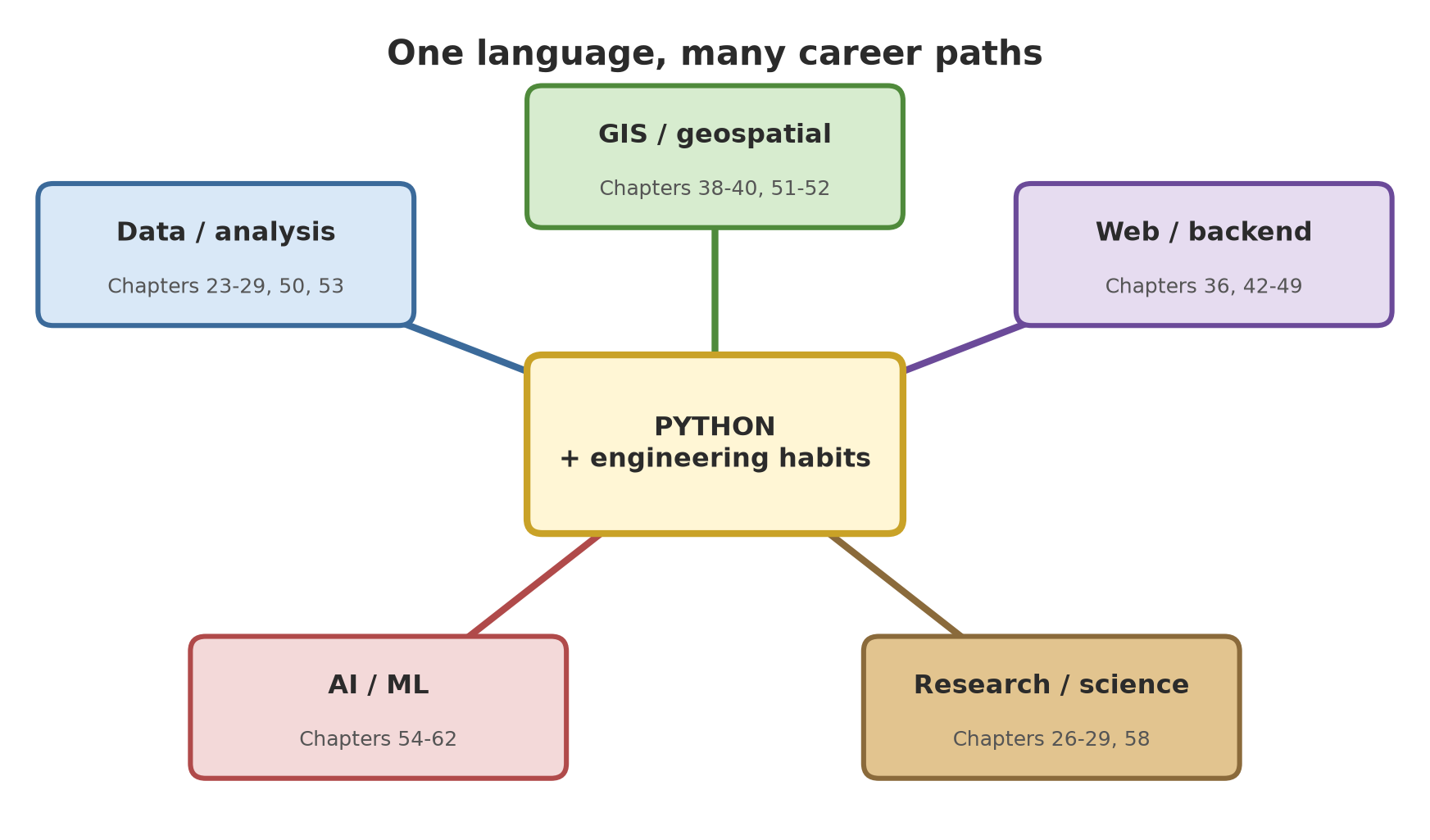
Python is used in many fields. The following table maps five paths to chapters and projects in this book. It is a general picture, not vacancy data; actual needs differ by city, company, and time, so read several real job descriptions before choosing your focus.
| Path | What is done | Chapters in this book | Portfolio project |
|---|---|---|---|
| Data / analysis | cleaning, analysing, and presenting data | 23-29, 50, 53 | an analysis report and dashboard |
| GIS / geospatial | maps, satellite images, spatial analysis | 38-40, 51-52 | an interactive map, an imagery pipeline |
| Web / backend | APIs, services, databases | 36, 42-43, 45-49 | a deployed API with tests and CI |
| AI / ML | models, evaluation, LLM apps, agents | 54-62 | a model with explanations, a document assistant |
| Research / science | reproducible analysis, publication | 26-29, 58 | a reproducible report with open data and code |
Two observations across paths: the basic skills (Chapters 1-35) are needed by all paths, and engineering habits (tests, Git, packaging, deployment) often matter more than any particular library, because libraries change while habits stay.
The technical interview: small code problems
A technical interview often asks you to write a small function while thinking aloud. What is judged is not only the answer but how you think: understanding the problem, checking edge cases, choosing a data structure, and explaining complexity. Helpful habits: restate the problem in your own words, start from a small example, write a simple solution first and then improve it, and test it yourself.
03_interview_arrays_text.py
# Chapter 68 - Technical interview practice (1): arrays, text, and dictionaries
from collections import defaultdict


# Problem 1: two numbers that add up to the target. Return the pair of indexes.
# Approach: one pass with a dictionary {value: index}  ->  O(n) time, not O(n^2)
def two_sum(numbers, target):
    seen = {}
    for i, a in enumerate(numbers):
        remainder = target - a
        if remainder in seen:
            return seen[remainder], i
        seen[a] = i
    return None


# Problem 2: group words that are anagrams (same letters, different order).
# Dictionary key: the letters of the word, sorted.
def group_anagrams(words):
    groups = defaultdict(list)
    for w in words:
        groups["".join(sorted(w))].append(w)
    return sorted(sorted(g) for g in groups.values())


# Problem 3: merge overlapping ranges, for example sensor coverage.
def merge_ranges(ranges):
    result = []
    for start, end in sorted(ranges):
        if result and start <= result[-1][1]:               # overlaps with the last one
            result[-1][1] = max(result[-1][1], end)
        else:
            result.append([start, end])
    return result


# Problem 4: is the sentence a palindrome (ignore spaces, capitals, and punctuation)?
def palindrome(sentence):
    clean = [c.lower() for c in sentence if c.isalnum()]
    return clean == clean[::-1]


print("1.", two_sum([2, 7, 11, 15], 9), two_sum([3, 3], 6), two_sum([1, 2], 10))
print("2.", group_anagrams(["teak", "kate", "meranti", "sengon", "nongse", "take"]))
print("3.", merge_ranges([(8, 10), (1, 3), (2, 6), (15, 18), (17, 20)]))
print("4.", palindrome("A man, a plan, a canal: Panama"), palindrome("Python"))

# A small automatic test: a good interview habit is to test the edge cases yourself
assert two_sum([], 5) is None
assert merge_ranges([]) == []
assert merge_ranges([(1, 4), (4, 5)]) == [[1, 5]]          # touching counts as merged
assert palindrome("") is True
print("edge cases pass")
1. (0, 1) (0, 1) None
2. [['kate', 'take', 'teak'], ['meranti'], ['nongse', 'sengon']]
3. [[1, 6], [8, 10], [15, 20]]
4. True False
edge cases pass- Problem 1 (two sum): one pass with a
{value: index}dictionary is O(n); the first approach that comes to mind (two nested loops) is O(n^2).(0, 1)for[2, 7, 11, 15]with target 9 (2 + 7), andNonewhen there is no pair. - Problem 2 (anagrams): the dictionary key is the sorted letters;
teak,kate,takeform one group. - Problem 3 (merge ranges): sort first, then only compare with the last range;
(2, 6)swallows(1, 3), and(17, 20)merges with(15, 18). - Problem 4 (palindrome): remove non-alphanumeric characters first, then compare with the reverse.
- The last three
asserts test edge cases (an empty list, touching ranges, empty text).
04_interview_data_structures.py
# Chapter 68 - Technical interview practice (2): data structures and choosing an algorithm
import bisect
from collections import OrderedDict, deque


# Problem 5: an LRU cache (Least Recently Used): throw out what has gone unused the longest.
class LRUCache:
    def __init__(self, capacity):
        self.capacity = capacity
        self.items = OrderedDict()

    def get(self, key):
        if key not in self.items:
            return None
        self.items.move_to_end(key)                  # marked as just used
        return self.items[key]

    def put(self, key, value):
        self.items[key] = value
        self.items.move_to_end(key)
        if len(self.items) > self.capacity:
            self.items.popitem(last=False)           # throw out the oldest


# Problem 6: balanced brackets, e.g. the formula "(a + [b * c])"
def balanced_brackets(text):
    pairs = {")": "(", "]": "[", "}": "{"}
    stack = []
    for c in text:
        if c in "([{":
            stack.append(c)
        elif c in pairs:
            if not stack or stack.pop() != pairs[c]:
                return False
    return not stack


# Problem 7: binary search in a sorted list (O(log n)); use bisect from the standard library
def find_index(sorted_list, value):
    i = bisect.bisect_left(sorted_list, value)
    return i if i < len(sorted_list) and sorted_list[i] == value else -1


# Problem 8: the shortest distance on a grid (BFS), e.g. a route over garden plots; '#' = fence
def shortest_distance(grid, start, goal):
    queue = deque([(start, 0)])
    seen = {start}
    while queue:
        (r, c), distance = queue.popleft()
        if (r, c) == goal:
            return distance
        for dr, dc in ((1, 0), (-1, 0), (0, 1), (0, -1)):
            rr, cc = r + dr, c + dc
            if 0 <= rr < len(grid) and 0 <= cc < len(grid[0]) and grid[rr][cc] != "#" and (rr, cc) not in seen:
                seen.add((rr, cc))
                queue.append(((rr, cc), distance + 1))
    return -1


cache = LRUCache(2)
cache.put("A", 1)
cache.put("B", 2)
cache.get("A")                                       # A was just used, so B is the oldest
cache.put("C", 3)                                    # capacity full: B is thrown out
print("5.", cache.get("A"), cache.get("B"), cache.get("C"))
print("6.", balanced_brackets("(a + [b * c])"), balanced_brackets("(a + [b * c)]"))
print("7.", find_index([10, 20, 30, 40], 30), find_index([10, 20, 30, 40], 35))
garden = ["..#.",
          "..#.",
          "....",
          "#..."]
print("8.", shortest_distance(garden, (0, 0), (0, 3)), shortest_distance(["..#", "###", "..."], (0, 0), (2, 2)))
5. 1 None 3
6. True False
7. 2 -1
8. 7 -1- Problem 5 (LRU cache):
OrderedDictkeeps the order of use; afterAis used, the one thrown out isB(result1 None 3). - Problem 6 (balanced brackets): a stack;
(a + [b * c)]is wrong because the closing order is swapped. - Problem 7 (binary search):
bisectfrom the standard library, O(log n);-1if absent. - Problem 8 (shortest distance on a grid): breadth-first search with a
dequequeue; a distance of 7 steps in the sample garden, and-1when the way is shut by fences.
Good interview practice is not memorising answers, but recognising patterns (a dictionary for fast lookup, a stack for nested pairs, a queue for widening search, sorting then one pass) and explaining your choice with its complexity.
Learning on: official sources and habits
Python and its libraries keep changing. How to follow them without being overwhelmed:
- Read “What’s New” for each release (docs.python.org/3/whatsnew/): the official summary of new and removed features. The annual Python releases follow a schedule written in a PEP (for example PEP 745 for 3.14: the final release 3.14.0 was scheduled for 7 October 2025, and security support continues until about October 2030, read 2026-10-10).
- Follow the official blog Python Insider (blog.python.org). When this chapter was written, that blog reported that Python 3.15.0 final was released on 9 October 2026; this book uses 3.14 as its reference, so reading “What’s New in Python 3.15” is a good exercise.
- Get to know PEPs (Python Enhancement Proposals, peps.python.org): documents proposing changes to the language. PEP 8 is the style guide; other PEPs explain why features are designed as they are.
- Official library documentation is more reliable than random articles; check the date and version.
- Join the community: the official discussion forum (discuss.python.org) and conferences (for example the site pycon.org).
- Habits: one small project a month; read the code of libraries you use; note what you learned.
All the links above are checked by the following script. Its output was captured once on 2026-10-10 (@statis): links can change, so check again if one fails.
05_check_links.py
# Chapter 68 - Checking that the learning resource links really exist
import requests

LINKS = {
    "Official Python site": "https://www.python.org/",
    "Download Python": "https://www.python.org/downloads/",
    "Python 3 documentation": "https://docs.python.org/3/",
    "What's New": "https://docs.python.org/3/whatsnew/",
    "What's New in 3.14": "https://docs.python.org/3/whatsnew/3.14.html",
    "PEP index": "https://peps.python.org/",
    "PEP 8 (style guide)": "https://peps.python.org/pep-0008/",
    "PEP 745 (3.14 release schedule)": "https://peps.python.org/pep-0745/",
    "Official blog Python Insider": "https://blog.python.org/",
    "Python Developer's Guide": "https://devguide.python.org/",
    "Python discussion forum": "https://discuss.python.org/",
    "Python Packaging Guide": "https://packaging.python.org/",
    "PyPI": "https://pypi.org/",
    "CPython source code": "https://github.com/python/cpython",
    "Open Source Guide (GitHub)": "https://opensource.guide/how-to-contribute/",
    "About READMEs (GitHub Docs)": "https://docs.github.com/en/repositories/managing-your-repositorys-settings-and-features/customizing-your-repository/about-readmes",
    "Choose a license": "https://choosealicense.com/",
    "Semantic Versioning": "https://semver.org/",
}

ok = 0
for name, url in LINKS.items():
    try:
        reply = requests.get(url, timeout=20, headers={"User-Agent": "buku-python-total (link checker)"}, stream=True)
        status = reply.status_code
        reply.close()
    except requests.RequestException as e:
        status = type(e).__name__
    ok += status == 200
    print(f"{str(status):>4}  {name}")
print(f"\n{ok} of {len(LINKS)} links answered 200 (exist)")
200 Official Python site
200 Download Python
200 Python 3 documentation
200 What's New
200 What's New in 3.14
200 PEP index
200 PEP 8 (style guide)
200 PEP 745 (3.14 release schedule)
200 Official blog Python Insider
200 Python Developer's Guide
200 Python discussion forum
200 Python Packaging Guide
200 PyPI
200 CPython source code
200 Open Source Guide (GitHub)
200 About READMEs (GitHub Docs)
200 Choose a license
200 Semantic Versioning
18 of 18 links answered 200 (exist)All eighteen links answered 200, meaning the pages existed when checked. That is proof that the links exist, not that their content suits your taste; read them yourself. We also did not include a link without checking it.
Running Project A5: the whole project as a portfolio
The last step of our running project: summarising the whole journey, 68 chapters in 13 series, into one portfolio page with a skills map.
06_project_portfolio.py
# Chapter 68 - Project A5: summarising the whole project as a portfolio page
SERIES = [
    # (level, series, first_chapter, last_chapter, core skills, evidence in the repo)
    ("Basic", "B1", 1, 4, "computer basics, algorithmic thinking, the terminal", "study notes"),
    ("Basic", "B2", 5, 10, "variables, control flow, data structures, functions", "field data recorder"),
    ("Basic", "B3", 11, 15, "modules, errors, files, CSV/JSON, office reports", "automatic Excel/PDF summary"),
    ("Intermediate", "I1", 16, 20, "OOP, venv, tests, code quality, Git", "package with tests and CI"),
    ("Intermediate", "I2", 21, 25, "APIs, regex, pandas, databases", "data pipeline + SQL"),
    ("Intermediate", "I3", 26, 29, "statistics, regression, qualitative, reproducible research", "analysis report"),
    ("Intermediate", "I4", 30, 35, "generators, decorators, types, Pydantic, async", "idiomatic typed code"),
    ("Intermediate", "I5", 36, 43, "web, GIS, automation, dashboards", "web app + map + dashboard"),
    ("Advanced", "A1", 44, 49, "performance, packaging, architecture, deployment, security", "production-ready service"),
    ("Advanced", "A2", 50, 53, "Polars/DuckDB, cloud-native imagery, IoT, Dask", "large-scale data pipeline"),
    ("Advanced", "A3", 54, 59, "ML, deep learning, computer vision, optimisation", "detection model + explanation"),
    ("Advanced", "A4", 60, 63, "LLMs, RAG, AI agents, licences and ethics", "document assistant + agent"),
    ("Advanced", "A5", 64, 68, "metaprogramming, internals, native/GPU speed, distributed", "distributed image processor"),
]

print("# Portfolio: Information System for Forest, Garden, Farm, Fishery, Livestock\n")
print("| Level | Series | Chapters | Core skills | Evidence in the repo |")
print("|---|---|---|---|---|")
total_chapters = 0
for level, series, first, last, skills, evidence in SERIES:
    total_chapters += last - first + 1
    print(f"| {level} | {series} | {first}-{last} | {skills} | {evidence} |")

print(f"\nNumber of series: {len(SERIES)}; number of chapters: {total_chapters}.")

# Consistency check: chapters must follow each other with no gap or overlap
in_order = all(SERIES[i][3] + 1 == SERIES[i + 1][2] for i in range(len(SERIES) - 1))
print("chapters follow without gaps:", in_order, "| start at chapter", SERIES[0][2], "| end at chapter", SERIES[-1][3])

print("\nThree flagship projects to highlight on a GitHub profile:")
for i, (title, reason) in enumerate([
    ("Distributed image processor (Chapter 67)", "shows queues, workers, retries, and cost"),
    ("Web app, map, and dashboard (Chapters 36-43)", "easy for people to see, can carry screenshots"),
    ("Detection model with explanation (Chapters 54-58)", "shows honest evaluation, not only accuracy"),
], 1):
    print(f"  {i}. {title}: {reason}")
# Portfolio: Information System for Forest, Garden, Farm, Fishery, Livestock
| Level | Series | Chapters | Core skills | Evidence in the repo |
|---|---|---|---|---|
| Basic | B1 | 1-4 | computer basics, algorithmic thinking, the terminal | study notes |
| Basic | B2 | 5-10 | variables, control flow, data structures, functions | field data recorder |
| Basic | B3 | 11-15 | modules, errors, files, CSV/JSON, office reports | automatic Excel/PDF summary |
| Intermediate | I1 | 16-20 | OOP, venv, tests, code quality, Git | package with tests and CI |
| Intermediate | I2 | 21-25 | APIs, regex, pandas, databases | data pipeline + SQL |
| Intermediate | I3 | 26-29 | statistics, regression, qualitative, reproducible research | analysis report |
| Intermediate | I4 | 30-35 | generators, decorators, types, Pydantic, async | idiomatic typed code |
| Intermediate | I5 | 36-43 | web, GIS, automation, dashboards | web app + map + dashboard |
| Advanced | A1 | 44-49 | performance, packaging, architecture, deployment, security | production-ready service |
| Advanced | A2 | 50-53 | Polars/DuckDB, cloud-native imagery, IoT, Dask | large-scale data pipeline |
| Advanced | A3 | 54-59 | ML, deep learning, computer vision, optimisation | detection model + explanation |
| Advanced | A4 | 60-63 | LLMs, RAG, AI agents, licences and ethics | document assistant + agent |
| Advanced | A5 | 64-68 | metaprogramming, internals, native/GPU speed, distributed | distributed image processor |
Number of series: 13; number of chapters: 68.
chapters follow without gaps: True | start at chapter 1 | end at chapter 68
Three flagship projects to highlight on a GitHub profile:
1. Distributed image processor (Chapter 67): shows queues, workers, retries, and cost
2. Web app, map, and dashboard (Chapters 36-43): easy for people to see, can carry screenshots
3. Detection model with explanation (Chapters 54-58): shows honest evaluation, not only accuracyThis table is the skeleton of your “About the project” page: each series has a core skill and one piece of evidence in the repo. The check shows the chapters follow each other without a gap from 1 to 68. The three flagship projects suggested below the table are examples; choose those you are proudest of and that others understand most easily.
Exercises
- Write a README for one of your projects from this book using the skeleton in script 01, then run its checklist. Ask one friend to install it from the README only and note where they get stuck.
- Run
02_check_repo.pyon your own project folder (change the variablefolder). Fix every[--]item. - Do problems 1 to 4 without looking at the answers, then compare. Add two edge cases of your own for each problem.
- Challenge: choose an open source project you use, read its
CONTRIBUTING, and write (without sending anything) one documentation improvement proposal with its reason. Send it only when you are ready and have followed that project’s rules.
Chapter Summary
- Portfolio: 3 to 5 tidy projects that answer the problem, how it works, how to run it, and the result; honest about limits.
- The README is the front door: a one-sentence explanation, installation, a usage example, tests, a licence.
- Check the cleanliness of the repo: LICENSE, tests,
.gitignore, and no secrets; a leaked secret must be revoked, not only deleted. - Open source: start with a project you use, read the LICENSE, README, CONTRIBUTING, and Code of Conduct; small fixes first; contributions are not only code.
- Careers: data, GIS, web, AI, and research each have an entrance in this book; basic skills and engineering habits are needed by all paths.
- Interviews: understand the problem, test edge cases, choose a data structure, explain complexity.
- Learning on: What’s New, PEPs, the official blog, library documentation, and a regular small project.
Closing Series A5
Congratulations! You have finished Series A5, and that means you have completed the whole Advanced level (Volume 3) and the whole journey of this book. In this series you learned to make code that controls code (descriptors, metaclasses, the AST), to peek into the CPython engine room (objects, references, bytecode, the GIL, the JIT, subinterpreters), to speed up critical parts with native code and the GPU, to divide work among many failure-tolerant workers, and to wrap it all as a portfolio you can show the world.
Look far back: you began by typing “Hello” in a terminal. Now you can record field data, build web apps and maps, train a tree detection model, make an AI assistant that reads forestry documents, and run all of it distributed. The garden that was once empty has become a big garden. It will never be “finished”: next season there are always new plants, and that is a large part of the pleasure.
Thank you for planting together up to here. Keep the habits you have built: measure before guessing, write tests, guard secrets, and be honest about what you do not yet know.
Next: read the Final Project (the complete information system with the focus path of your choice) and the Appendices (installation, cheat sheets, glossary, answer key, learning-path map, and further resources), which are written separately from these chapters. Happy learning, and happy making.