Chapter 47 — Modern Python (3.12 to 3.14): Writing “Latest Style” Code
Series A1 — Professional Software Engineering
All scripts in this chapter are in the folder kode/ch47/. In the web version, you can also download everything at once (zip).
Python is like a garden that keeps getting new varieties planted. Each yearly version brings new plants: some are immediately useful in the kitchen, some are still experiments in the trial bed. This chapter is the “field guide to the new plants” for Python 3.12, 3.13, and 3.14. All features below were read from the official “What’s New in Python” pages (docs.python.org, read 2026-10-10) and run on Python 3.14.8, except those marked as untested.
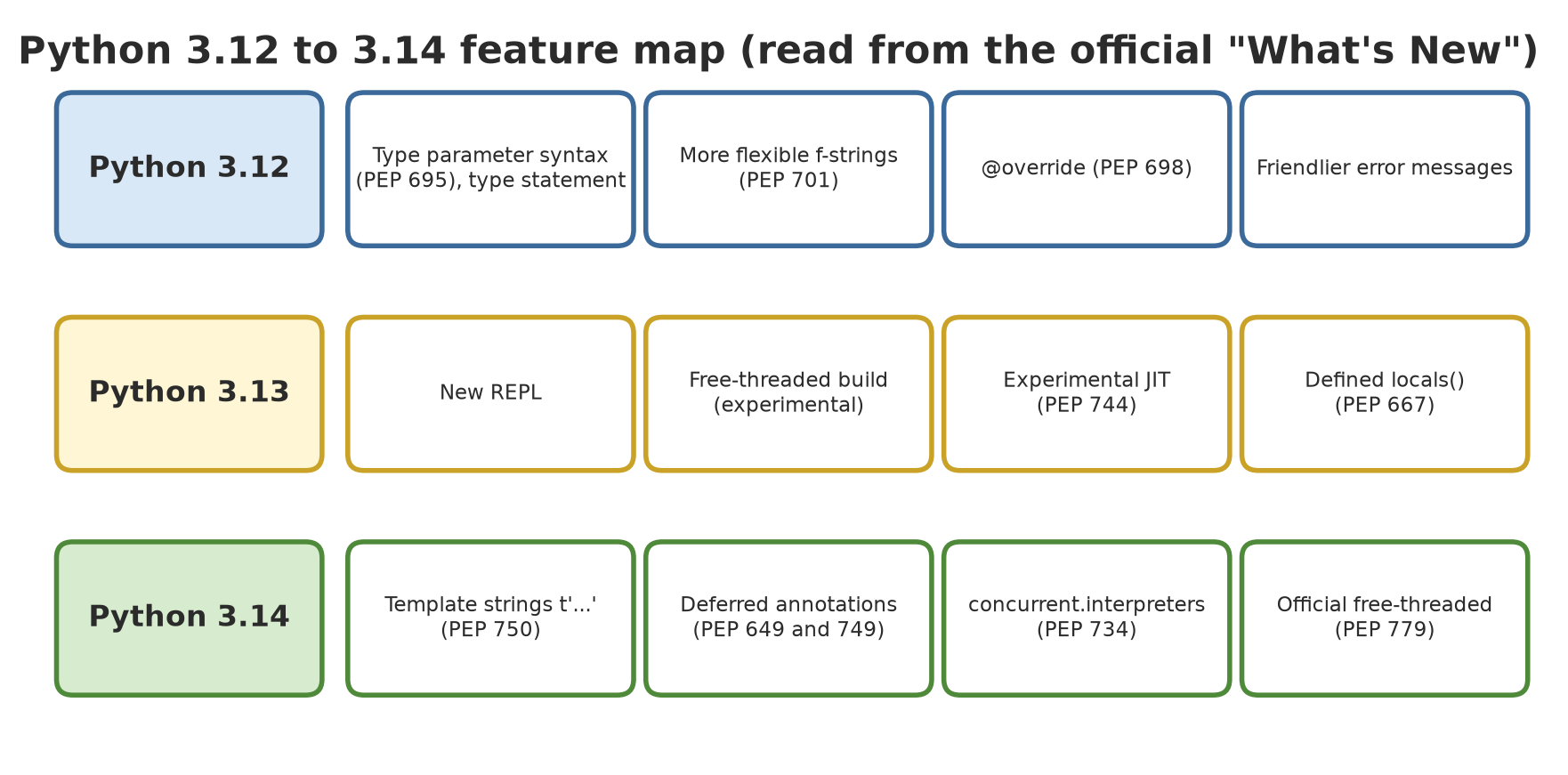
This chapter uses syntax that only exists in certain versions: t"..." and except A, B: need 3.14, class Box[T = int] needs 3.13, the [T] syntax needs 3.12. The scripts in this chapter will not run on Python 3.11 or older. Check your version first with python --version.
Python 3.12: more flexible types and f-strings
01_python_312.py
# Chapter 47 - Python 3.12 features: type parameters (PEP 695), type statement, flexible f-strings (PEP 701), @override, batched
from itertools import batched
from typing import override


# PEP 695: generic types without a separate TypeVar
def largest[T: (int, float)](numbers: list[T]) -> T:
    return max(numbers)


type Listing[T] = list[T]            # a type alias with the "type" keyword
type Coordinate = tuple[float, float]


class Animal:
    def sound(self) -> str:
        return "..."


class Chicken(Animal):
    @override                        # PEP 698: the type checker confirms this really overrides
    def sound(self) -> str:
        return "cock-a-doodle-doo"


diameter: Listing[float] = [32.5, 45.2, 28.0]
point: Coordinate = (-6.2, 106.8)
print("largest:", largest(diameter))
print("alias:", Listing, "|", Coordinate)
print(Chicken().sound())

# PEP 701: an f-string may reuse the same quotes inside, and span many lines
species = ["Teak", "Meranti", "Mahogany"]
print(f"Species: {", ".join(species)}")
print(f"Oldest: {
    max(diameter)
} cm")

# itertools.batched: cut into groups of a fixed size
for group in batched(range(1, 8), 3):
    print(group)
largest: 45.2
alias: Listing | Coordinate
cock-a-doodle-doo
Species: Teak, Meranti, Mahogany
Oldest: 45.2 cm
(1, 2, 3)
(4, 5, 6)
(7,)- Type parameter syntax (PEP 695):
def largest[T: (int, float)](...)declares a generic type right in the function name, without a separateTypeVar. Thetypestatement creates an alias (type Listing[T] = list[T]). @override(PEP 698): marks a method that overrides a parent method, so a type checker complains if the parent’s name changes.- New f-strings (PEP 701): you may reuse the same quote inside the curly braces, and span several lines (see the lines
Species:andOldest:). itertools.batched: cuts a sequence into groups of a fixed size; the last group may be shorter ((7,)).- Friendlier error messages, and the
distutilsmodule was removed (usesetuptools, as in Chapter 45).
Python 3.13: more precisely defined
02_python_313.py
# Chapter 47 - Python 3.13 features: defined locals() (PEP 667), copy.replace, warnings.deprecated, TypeVar defaults (PEP 696)
import copy
import warnings
from dataclasses import dataclass


# PEP 667: locals() inside a function is a standalone "photo" (snapshot)
def try_locals():
    x = 1
    photo = locals()
    photo["x"] = 99          # changing the photo does NOT change the real variable
    return x, locals()["x"]


print("x after changing locals():", try_locals())


# copy.replace: copy an object while replacing some fields
@dataclass(frozen=True)
class Tree:
    species: str
    diameter_cm: float


t1 = Tree("Teak", 32.5)
t2 = copy.replace(t1, diameter_cm=33.1)
print(t1, "->", t2)


# warnings.deprecated: mark an old function (also readable by type checkers)
@warnings.deprecated("use new_compute()")
def old_compute():
    return 1


with warnings.catch_warnings(record=True) as caught:
    warnings.simplefilter("always")
    old_compute()
print("warning:", caught[0].category.__name__, "-", caught[0].message)


# PEP 696: type parameters may have default values
class Box[T = int]:
    def __init__(self, content: T):
        self.content = content


print("Box default:", Box.__type_params__[0].has_default(), Box.__type_params__[0].__default__)
x after changing locals(): (1, 1)
Tree(species='Teak', diameter_cm=32.5) -> Tree(species='Teak', diameter_cm=33.1)
warning: DeprecationWarning - use new_compute()
Box default: True <class 'int'>- Defined
locals()(PEP 667): inside a function, it returns a photo of the variables. Changing the photo does not change the real variable, soxstays 1. copy.replace(): copies an object while replacing some fields (great forfrozendataclasses).warnings.deprecated()(PEP 702): marks an old function; type checkers know, and calling it raises aDeprecationWarning.- Defaults for type parameters (PEP 696):
class Box[T = int]. - Other features from the official page: the new REPL (multi-line editing), coloured tracebacks, the removal of 19 old modules (PEP 594), and two pioneers we discuss below: the free-threaded build and the JIT (both experimental in 3.13).
Python 3.14: template strings
A template string (PEP 750) is written like an f-string, but with the letter t. The difference is important: the result is not text, but a Template object that keeps the text parts and the interpolated parts separate, so your code can inspect or clean the interpolations before joining them.
03_template_string.py
# Chapter 47 - Python 3.14: template strings (PEP 750), the letter t before the quote
from html import escape
from string.templatelib import Interpolation, Template

name = "Teak <A>"
diameter = 32.5

t = t"Tree {name} has a diameter of {diameter:.1f} cm"
print("type of t-string :", type(t).__name__, "| is it a str?", isinstance(t, str))
print("text parts       :", t.strings)
print("interpolations   :", [(i.expression, i.value, i.format_spec) for i in t.interpolations])


def to_html(template: Template) -> str:
    """Joins the template, BUT each interpolation goes through escape() first (anti HTML injection)."""
    result = []
    for part in template:
        if isinstance(part, Interpolation):
            result.append(escape(str(format(part.value, part.format_spec))))
        else:
            result.append(part)
    return "".join(result)


print("f-string         :", f"<li>{name}</li>")
print("safe t-string    :", to_html(t"<li>{name}</li>"))
type of t-string : Template | is it a str? False
text parts : ('Tree ', ' has a diameter of ', ' cm')
interpolations : [('name', 'Teak <A>', ''), ('diameter', 32.5, '.1f')]
f-string : <li>Teak <A></li>
safe t-string : <li>Teak <A></li>isinstance(t, str) is False: this is not ordinary text. t.strings holds three fixed pieces of text, and t.interpolations holds two interpolations together with their source expression, value, and format (.1f). The function to_html passes each interpolation through escape(). The f-string result <li>Teak <A></li> leaves the < and > characters as they are (dangerous if the name comes from a user), while the safe t-string produces <A>. In the running project below, t-strings are used for safe SQL queries.
Python 3.14: deferred type annotations
Before 3.14, an annotation such as next_node: Node | None inside the class Node caused a NameError (the class was not finished yet), so people wrote "Node" in quotes or from __future__ import annotations. In 3.14 (PEP 649 and 749), annotations are not evaluated up front; they are computed when requested. The new module annotationlib reads them in three formats:
04_deferred_annotations.py
# Chapter 47 - Python 3.14: deferred type annotations (PEP 649 and 749) and the annotationlib module
from annotationlib import Format, get_annotations


# A forward reference without quotes: safe in 3.14
class Node:
    def __init__(self, value: int, next_node: Node | None = None):
        self.value = value
        self.next_node = next_node


print("annotations of Node.__init__:", get_annotations(Node.__init__, format=Format.STRING))


def function(arg: NameNotDefined) -> int:      # NameNotDefined is never defined
    return 1


print("STRING     :", get_annotations(function, format=Format.STRING))
parts = get_annotations(function, format=Format.FORWARDREF)
print("FORWARDREF :", type(parts["arg"]).__name__, "->", parts["arg"].__forward_arg__)
try:
    get_annotations(function, format=Format.VALUE)
except NameError as error:
    print("VALUE      : NameError:", error)
annotations of Node.__init__: {'value': 'int', 'next_node': 'Node | None'}
STRING : {'arg': 'NameNotDefined', 'return': 'int'}
FORWARDREF : ForwardRef -> NameNotDefined
VALUE : NameError: name 'NameNotDefined' is not defined- The class
Noderefers to itself without quotes and does not fail. Format.STRINGgives the annotation text as written.Format.FORWARDREFgives aForwardRefobject for a name that does not exist yet, so it does not fail.Format.VALUE(the old behaviour) raisesNameErrorbecauseNameNotDefinedwas indeed never defined.
Python 3.14: subinterpreters
One Python process can run several isolated interpreters, each with its own globals. PEP 734 brings them to the standard library as concurrent.interpreters. Its official documentation says the module gives isolation; running concurrently comes from combining it with threads, and interpreters do not share the GIL, so they can use several CPU cores.
05_subinterpreters.py
# Chapter 47 - Python 3.14: subinterpreters through concurrent.interpreters (PEP 734)
from concurrent import interpreters
from concurrent.futures import InterpreterPoolExecutor


def sum_of_squares(n):
    return sum(i * i for i in range(n))


interp = interpreters.create()
try:
    # call(): run a function in a separate interpreter and get the result
    print("call:", interp.call(sum_of_squares, 1000))

    # exec(): run source text; each interpreter has its own __main__
    interp.exec("secret_value = 42")
    interp.exec("print('inside the subinterpreter, secret_value =', secret_value)")
    print("does the main interpreter have 'secret_value'?", "secret_value" in globals())

    # a queue for exchanging data between interpreters
    queue = interpreters.create_queue()
    interp.prepare_main(queue=queue)
    interp.exec("queue.put('hello from the subinterpreter')")
    print("from the queue:", queue.get())
finally:
    interp.close()

# A worker pool based on interpreters, similar to ThreadPoolExecutor
if __name__ == "__main__":
    with InterpreterPoolExecutor(max_workers=2) as pool:
        results = list(pool.map(sum_of_squares, [10, 100, 1000]))
    print("interpreter pool:", results)
call: 332833500
inside the subinterpreter, secret_value = 42
does the main interpreter have 'secret_value'? False
from the queue: hello from the subinterpreter
interpreter pool: [285, 328350, 332833500]secret_value exists inside the subinterpreter but not in the main interpreter (the answer False): isolated. Data moves through a queue. InterpreterPoolExecutor is a ThreadPoolExecutor-style worker pool (Chapter 35), with the result [285, 328350, 332833500].
The documentation stresses that isolation between interpreters is “best effort”, not a security boundary, and not every PyPI package supports multiple interpreters yet. Do not use them to run code you do not trust.
Free-threaded and JIT: features you honestly do not have yet
Both features concern speed, and both depend on the installed Python build. That is why the output of the following scripts was captured once on the author’s computer (@statis).
Free-threaded mode (no GIL). In 3.13 it is experimental (PEP 703); in 3.14 it is officially supported but still optional (PEP 779). The documentation puts the speed penalty on single-threaded code at roughly 5 to 10 percent. If installed, on Windows you call it with py -V:3.14t, and install it with the Python install manager: py install 3.14t (Windows documentation, read 2026-10-10).
06_free_threaded.py
# Chapter 47 - Python 3.14: free-threaded mode (no GIL), is it installed on this computer?
import subprocess
import sys
import sysconfig

print("free-threaded build (Py_GIL_DISABLED):", sysconfig.get_config_var("Py_GIL_DISABLED"))
print("GIL enabled in this Python:", sys._is_gil_enabled())

# On Windows, the free-threaded build is called through "py -V:3.14t"
result = subprocess.run(
    ["py", "-V:3.14t", "-c", "import sys; print('GIL enabled:', sys._is_gil_enabled())"],
    capture_output=True, text=True,
)
print("exit code of py -V:3.14t:", result.returncode)
lines = (result.stdout or result.stderr).strip().splitlines()
print("message:", lines[0] if lines else "(empty)")
free-threaded build (Py_GIL_DISABLED): 0
GIL enabled in this Python: True
exit code of py -V:3.14t: 103
message: No suitable Python runtime foundSo on the author’s computer the free-threaded build is not installed: the Python in use has the GIL enabled, and py -V:3.14t answers “No suitable Python runtime found”. We did not test free-threaded behaviour; what is written about it here comes from the official documentation, not from our experiments. If you install it, rerun the script kode/ch35/06_gil_and_cpu.py with py -V:3.14t and compare.
Experimental JIT (PEP 744). A JIT (just-in-time compiler) translates hot parts of the code into machine code while the program runs. According to the 3.14 documentation, the official Windows and macOS binary releases now include it, it is not recommended for production, and it is switched on with the environment variable PYTHON_JIT=1; the effect on speed ranges from roughly 10 percent slower to 20 percent faster depending on the workload. The sys._jit functions help check it:
07_jit.py
# Chapter 47 - Experimental JIT (Python 3.13 and 3.14): available? active?
import os
import subprocess
import sys

print("JIT available in this Python:", sys._jit.is_available())
print("JIT enabled by default      :", sys._jit.is_enabled())

# The JIT is switched on with the environment variable PYTHON_JIT=1, so we check in a child process
child = subprocess.run(
    [sys.executable, "-c", "import sys; print(sys._jit.is_enabled())"],
    capture_output=True, text=True, env=dict(os.environ, PYTHON_JIT="1"),
)
print("enabled when PYTHON_JIT=1   :", child.stdout.strip())
JIT available in this Python: True
JIT enabled by default : False
enabled when PYTHON_JIT=1 : TrueOn the author’s computer the JIT is available but off by default, and turns on when PYTHON_JIT=1. We did not measure its speed because timing numbers are unstable (see Chapter 44).
Friendlier error messages
Each version improves error messages. Real results from Python 3.14:
08_error_messages.py
# Chapter 47 - Friendlier error messages (3.12 to 3.14), shown as-is from Python 3.14
import random
import traceback


def last_message(error):
    return traceback.format_exception_only(type(error), error)[-1].strip()


syntax_errors = {
    "misspelled keyword": "whille True:\n    pass\n",
    "elif after else": "if x:\n    pass\nelse:\n    pass\nelif y:\n    pass\n",
    "clashing string prefix": "x = ub'abc'\n",
}
for title, code in syntax_errors.items():
    try:
        compile(code, "<example>", "exec")
    except SyntaxError as error:
        print(f"{title:28} -> {last_message(error)}")

for title, expression in [("unhashable dict key", "{[1]: 2}"), ("unhashable set element", "{1, [2]}")]:
    try:
        eval(expression)
    except TypeError as error:
        print(f"{title:28} -> {last_message(error)}")

try:
    random.randit(1, 6)
except AttributeError as error:
    print(f"{'misspelled name':28} -> {last_message(error)}")

# Python 3.14 (PEP 758): except may omit the parentheses when there is no "as"
try:
    int("abc")
except ValueError, TypeError:
    print("except ValueError, TypeError: without parentheses is accepted in 3.14")
misspelled keyword -> SyntaxError: invalid syntax. Did you mean 'while'?
elif after else -> SyntaxError: 'elif' block follows an 'else' block
clashing string prefix -> SyntaxError: 'u' and 'b' prefixes are incompatible
unhashable dict key -> TypeError: cannot use 'list' as a dict key (unhashable type: 'list')
unhashable set element -> TypeError: cannot use 'list' as a set element (unhashable type: 'list')
misspelled name -> AttributeError: module 'random' has no attribute 'randit'. Did you mean: 'randint'?
except ValueError, TypeError: without parentheses is accepted in 3.14Python now guesses your intention (Did you mean 'while'?, Did you mean: 'randint'?), explains mistakes that used to be vague ('elif' block follows an 'else' block), and names the real type of a key that cannot be hashed. The last line shows PEP 758: except ValueError, TypeError: without parentheses is now valid in 3.14 (when as is not used).
From the official 3.14 page, other useful notes: the incremental garbage collector shipped in 3.14.0 to 3.14.4 and was reverted to the 3.13 generational collector in 3.14.5; there is a new module compression.zstd (PEP 784); and sys.remote_exec() and python -m pdb -p PID for debugging a running process (PEP 768).
Python 3.15
Python 3.15.0 was released on 9 October 2026. This book still uses Python 3.14 as its reference; every other chapter was written and tested on 3.14.8. This subsection is only a peek at the next version. The features come from the official What’s New in Python 3.15 page (docs.python.org/3.15/whatsnew/3.15.html, read 2026-10-10) and were run on Python 3.15.0, which we installed separately without touching the main Python of the author’s computer.
Scripts 10 to 14 use the @python directive with an absolute path to the author’s Python 3.15 (the same pattern as Chapter 40). That path does not exist on your computer. On Windows, just install 3.15 and run py -3.15 script_name.py. These scripts will not run on Python 3.14 or older because they use new syntax.
1. Lazy imports (PEP 810). The word lazy before import postpones loading a module until it is really used, like keeping seeds in the store and only opening the sack when it is time to plant. Programs that import many modules start faster.
10_lazy_import.py
# Chapter 47 - Python 3.15: lazy imports (PEP 810)
import sys

lazy import json
lazy from pathlib import Path

print("Python:", sys.version_info.major, sys.version_info.minor)
print("json loaded before use?", "json" in sys.modules)
text = json.dumps({"species": "Teak", "diameter_cm": 32.5})
print("json.dumps result:", text)
print("json loaded after use?", "json" in sys.modules)
Python: 3 15
json loaded before use? False
json.dumps result: {"species": "Teak", "diameter_cm": 32.5}
json loaded after use? TrueBefore json.dumps is called, json is not in sys.modules (answer False); after use it is loaded (True). The line lazy from pathlib import Path is never used, so pathlib is not loaded through that line. The documentation says lazy is only allowed at module level, and not for from x import *.
2. frozendict (PEP 814) and sentinel (PEP 661). frozendict is a dictionary that cannot be changed, so it is hashable and may be a dict key. sentinel makes a unique marker value, useful when None already has another meaning (for example “tree height deliberately left empty”).
11_frozendict_sentinel.py
# Chapter 47 - Python 3.15: frozendict (PEP 814) and sentinel (PEP 661)
import copy

# frozendict: a dictionary that cannot be changed
limits = frozendict(Teak=30.0, Meranti=40.0)
print(limits)
try:
    limits["Mahogany"] = 25.0
except TypeError as error:
    print("TypeError:", error)
print("key order does not affect the hash:",
      hash(limits) == hash(frozendict(Meranti=40.0, Teak=30.0)))
keyed = {limits: "rule of plot A"}  # hashable, so it may be a dict key
print("used as a key:", keyed[frozendict(Teak=30.0, Meranti=40.0)])

# sentinel: a unique marker value
NOT_MEASURED = sentinel("NOT_MEASURED")
print(repr(NOT_MEASURED))
print("a copy is still the same object:", copy.copy(NOT_MEASURED) is NOT_MEASURED)

def height(data, key, default=NOT_MEASURED):
    return data.get(key, default)

print(height({"teak": None}, "teak"))
print(height({}, "teak") is NOT_MEASURED)
frozendict({'Teak': 30.0, 'Meranti': 40.0})
TypeError: 'frozendict' object does not support item assignment
key order does not affect the hash: True
used as a key: rule of plot A
NOT_MEASURED
a copy is still the same object: True
None
TrueChanging a frozendict raises TypeError. In the last two lookups, a None stored in the data (result None) can still be told apart from “key missing” (NOT_MEASURED, result True).
3. Unpacking inside comprehensions (PEP 798). The * and ** signs may now be placed in front of the expression of a comprehension to flatten lists or merge dictionaries, without two nested loops.
12_unpack_comprehensions.py
# Chapter 47 - Python 3.15: unpacking (*, **) inside comprehensions (PEP 798)
harvest_per_block = [[245.5, 310.0], [198.5], [276.0, 120.0]]

# Old way (3.14 and earlier): two nested loops
old = [x for block in harvest_per_block for x in block]
# New way: one star
new = [*block for block in harvest_per_block]
print(old)
print(new)
print("same:", old == new)

settings = [{"plot": "A", "age": 5}, {"age": 7}, {"height": 12.5}]
merged = {**s for s in settings}
print(merged)
print("total:", sum(new))
[245.5, 310.0, 198.5, 276.0, 120.0]
[245.5, 310.0, 198.5, 276.0, 120.0]
same: True
{'plot': 'A', 'age': 7, 'height': 12.5}
total: 1150.0Both ways give the same list. In the dictionary merge, the key age appears twice and the last value (7) wins, just like an ordinary {**a, **b}.
4. UTF-8 becomes the default encoding (PEP 686). This is what Chapter 13 promised. When you call open() without encoding=, 3.15 uses UTF-8 on every system. The script below writes a UTF-8 file, then opens it without encoding= in two 3.15 processes: as is, and with PYTHONUTF8=0 (the documented way to switch the new behavior off).
13_utf8_default.py
# Chapter 47 - Python 3.15: UTF-8 becomes the default encoding (PEP 686)
import os
import subprocess
import sys
from pathlib import Path

tmp = Path(__file__).parent / "_tmp"
tmp.mkdir(exist_ok=True)
file = tmp / "temp315.txt"
file.write_text("Pond temperature 28°C ±2", encoding="utf-8")

child_code = (
    "import sys, locale\n"
    f"f = open(r'{file}')\n"  # deliberately WITHOUT encoding=
    "print('open() encoding:', f.encoding)\n"
    "print('UTF-8 mode (sys.flags.utf8_mode):', sys.flags.utf8_mode)\n"
    "print('locale.getencoding():', locale.getencoding())\n"
    "print('content:', f.read())\n"
)

def run(title, **extra):
    env = {k: v for k, v in os.environ.items() if k != "PYTHONUTF8"}
    env["PYTHONIOENCODING"] = "utf-8"
    env.update(extra)
    result = subprocess.run([sys.executable, "-c", child_code],
                            capture_output=True, env=env)
    print("==", title)
    print(result.stdout.decode("utf-8").rstrip())

run("Python 3.15 as is")
run("with PYTHONUTF8=0 (old behavior)", PYTHONUTF8="0")
== Python 3.15 as is
open() encoding: utf-8
UTF-8 mode (sys.flags.utf8_mode): 1
locale.getencoding(): cp1252
content: Pond temperature 28°C ±2
== with PYTHONUTF8=0 (old behavior)
open() encoding: cp1252
UTF-8 mode (sys.flags.utf8_mode): 0
locale.getencoding(): cp1252
content: Pond temperature 28°C ±2On plain 3.15, open() uses utf-8 even though locale.getencoding() on the author’s computer is still cp1252: the default rule no longer follows the Windows setting. With PYTHONUTF8=0 it goes back to cp1252 and the mojibake ° appears. On Linux or macOS the result may not differ because the locale is already UTF-8. Still write encoding="utf-8" so your code is right on every version.
5. Suggestions in error messages. Python 3.15 adds suggestions to common AttributeErrors:
14_error_messages_315.py
# Chapter 47 - Python 3.15: suggestions in error messages
import traceback

def show(attempt):
    try:
        attempt()
    except AttributeError as error:
        print("".join(traceback.format_exception_only(error)).strip())

show(lambda: [1, 2, 3].push(4))
show(lambda: {}.put("a", 1))
AttributeError: 'list' object has no attribute 'push'. Did you mean '.append'?
AttributeError: 'dict' object has no attribute 'put'. Use d[k] = v.People used to other languages often write push or put; Python now points to .append and d[k] = v.
Other 3.15 features from the official page that we did not run: the profiling package with the Tachyon sampling profiler (PEP 799), the improved JIT, re.prefixmatch(), tomllib for TOML 1.1, and additions in typing and the C API. Read the official page if you are interested.
Running Project A1: “latest style” code
We rewrite part of the project with what we learned: dataclass(slots=True), a generic class Repo[T] (3.12 syntax), the alias type Row, and t-strings for parameterized SQL queries:
09_project_latest_style.py
# Chapter 47 - Running project A1: "latest style" Python 3.14 code (generics, t-string, slots)
import sqlite3
from dataclasses import dataclass
from string.templatelib import Interpolation, Template


@dataclass(frozen=True, slots=True)
class Tree:
    species: str
    plot: str
    diameter_cm: float


type Row = tuple[str, str, float]


class Repo[T]:
    """A generic store: it can hold any type, written with the 3.12 syntax."""

    def __init__(self) -> None:
        self._items: list[T] = []

    def add(self, item: T) -> None:
        self._items.append(item)

    def all(self) -> list[T]:
        return list(self._items)


def query(template: Template) -> tuple[str, list]:
    """Turns a t-string into (parameterized SQL, values). Values are NEVER pasted into the SQL text."""
    sql, values = [], []
    for part in template:
        if isinstance(part, Interpolation):
            sql.append("?")
            values.append(part.value)
        else:
            sql.append(part)
    return "".join(sql), values


repo: Repo[Tree] = Repo()
for t in [Tree("Teak", "A", 32.5), Tree("Meranti", "A", 45.2), Tree("Mahogany", "B", 28.0), Tree("Teak", "B", 51.5)]:
    repo.add(t)

db = sqlite3.connect(":memory:")
db.execute("CREATE TABLE tree (species TEXT, plot TEXT, diameter_cm REAL)")
rows: list[Row] = [(t.species, t.plot, t.diameter_cm) for t in repo.all()]
db.executemany("INSERT INTO tree VALUES (?, ?, ?)", rows)

plot, minimum = "A", 30
sql, values = query(t"SELECT species, diameter_cm FROM tree WHERE plot = {plot} AND diameter_cm > {minimum} ORDER BY diameter_cm")
print("SQL     :", sql)
print("values  :", values)
print("result  :", db.execute(sql, values).fetchall())

# Malicious input still becomes only a VALUE, never part of the SQL command
evil_plot = "A' OR '1'='1"
sql, values = query(t"SELECT species FROM tree WHERE plot = {evil_plot}")
print("malicious input ->", db.execute(sql, values).fetchall())
SQL : SELECT species, diameter_cm FROM tree WHERE plot = ? AND diameter_cm > ? ORDER BY diameter_cm
values : ['A', 30]
result : [('Teak', 32.5), ('Meranti', 45.2)]
malicious input -> []The function query turns a t-string into SQL with question marks ? and a separate list of values. The first query returns the two plot A trees with a diameter above 30 cm. On the last line, the malicious input A' OR '1'='1 still becomes just a value matched against the plot column, so no row matches ([]) and the SQL was not hijacked. That is exactly the security use of t-strings, which we continue in Chapter 49.
Exercises
- Change
largestin01_python_312.pyto use atypealiasNumber = int | floatas the parameter type. Run it. - Change the t-string in script 03 so the diameter is written with
:.0f. Watch theformat_speccolumn in the output, then runto_htmlon that t-string. - In your own terminal, run
python -c "import sys; print(sys._jit.is_enabled())"once normally, then again with the variablePYTHON_JIT=1(in PowerShell:$env:PYTHON_JIT=1). Compare the answers with the output of script 07. - Challenge: write a function
html_list(template)that accepts a t-string containing a list of farmer names and produces<ul>...</ul>with every interpolation escaped, then test it with the name"Budi <script>".
Chapter Summary
- 3.12: type parameter syntax and
type, flexible f-strings,@override,itertools.batched. - 3.13: defined
locals(),copy.replace,warnings.deprecated, defaults for type parameters; the new REPL. - 3.14: template strings
t"...", deferred annotations (annotationlib), subinterpreters,except A, B:, friendlier error messages. - Free-threaded (officially supported in 3.14) and the JIT (experimental) depend on the build; on the author’s computer free-threaded is not installed and was not tested.
- 3.15 (released 9 October 2026; the book still uses 3.14 as reference):
lazy import,frozendict,sentinel,*and**in comprehensions, UTF-8 as the default encoding; run with a separate Python 3.15.
Next, in Chapter 48: deployment, taking the application to a server with Docker, CI/CD, and monitoring.