Chapter 24 — Databases: A Filing Cabinet That Never Forgets
Series I2 — Data and the Internet
All scripts for this chapter are in the kode/ch24/ folder. On the web version, you can also download them all at once (zip).
A CSV file (Chapter 23) is like a pile of note papers: easy to make, but hard to search, and it can turn into a mess when two people write at the same time. A database is a filing cabinet with drawers: each drawer (table) has fixed columns, each sheet (row) follows the rules, and the filing clerk (SQL, Structured Query Language) answers questions like “what is the total plantation harvest?” without you turning over every sheet. It also keeps storage safe: a change that is half done can be cancelled.
SQLite: a database in one file
SQLite is a database engine that lives as one file and comes with Python (the sqlite3 module), so there is nothing to install and no server. It suits learning, small applications, and data you can carry around.
01_sqlite_basics.py
# Chapter 24 - SQLite with the sqlite3 module (built into Python)
import sqlite3
from pathlib import Path

tmp = Path(__file__).parent / "_tmp"
tmp.mkdir(exist_ok=True)
db_file = tmp / "field.db"
db_file.unlink(missing_ok=True)                # start from an empty database so the result is the same

connection = sqlite3.connect(db_file)          # the file is created if it does not exist
connection.execute("""
    CREATE TABLE tree (
        id INTEGER PRIMARY KEY,
        species TEXT NOT NULL,
        plot TEXT NOT NULL,
        diameter_cm REAL
    )
""")
data = [("Teak", "A", 32.5), ("Meranti", "A", 45.2), ("Mahogany", "B", 28.0), ("Teak", "B", 36.1)]
connection.executemany("INSERT INTO tree (species, plot, diameter_cm) VALUES (?, ?, ?)", data)
connection.commit()                            # without commit, changes are not saved permanently

for row in connection.execute("SELECT id, species, plot, diameter_cm FROM tree ORDER BY diameter_cm DESC"):
    print(row)

count = connection.execute("SELECT COUNT(*) FROM tree").fetchone()[0]
print("Number of trees:", count)
connection.close()
(2, 'Meranti', 'A', 45.2)
(4, 'Teak', 'B', 36.1)
(1, 'Teak', 'A', 32.5)
(3, 'Mahogany', 'B', 28.0)
Number of trees: 4CREATE TABLEdefines the columns and their kinds;PRIMARY KEY= a unique number for each row;NOT NULL= must be filled.?is a value placeholder; the values are given separately.executemanyinserts many rows at once.commit()saves the changes permanently. Without a commit, changes may be lost.ORDER BY diameter_cm DESCsorts from large to small: Meranti 45.2 is on top.
Never paste user text into SQL
02_safe_parameters.py
# Chapter 24 - Parameters (?) against SQL injection
import sqlite3

connection = sqlite3.connect(":memory:")       # a temporary database in memory
connection.execute("CREATE TABLE officer (name TEXT, area TEXT)")
connection.executemany("INSERT INTO officer VALUES (?, ?)", [("Sari", "Plot A"), ("Budi", "Plot B")])

user_input = "x' OR '1'='1"                     # a mischievous entry from a user

# WRONG WAY: pasting user text straight into the SQL (f-string)
bad_sql = f"SELECT name FROM officer WHERE name = '{user_input}'"
print("SQL that was built:", bad_sql)
print("Wrong way result  :", connection.execute(bad_sql).fetchall())      # leak: every row comes out!

# RIGHT WAY: question mark + separate value; the text is treated as DATA, not as a command
print("Right way result  :", connection.execute("SELECT name FROM officer WHERE name = ?", (user_input,)).fetchall())
SQL that was built: SELECT name FROM officer WHERE name = 'x' OR '1'='1'
Wrong way result : [('Sari',), ('Budi',)]
Right way result : []In the wrong way, the mischievous entry x' OR '1'='1 becomes part of the SQL command and makes the condition always true, so every row leaks. This is called SQL injection, one of the most common attacks in the world. The right way: always use ? (or :name) and give the values separately; the text is treated as data, never as a command. The result: no row matches.
Update, delete, and transactions
03_update_delete_transaction.py
# Chapter 24 - UPDATE, DELETE, and transactions (commit / rollback)
import sqlite3

connection = sqlite3.connect(":memory:")
connection.execute("CREATE TABLE pond (name TEXT PRIMARY KEY, fish INTEGER CHECK (fish >= 0))")
connection.executemany("INSERT INTO pond VALUES (?, ?)", [("A", 800), ("B", 650), ("C", 400)])
connection.commit()

connection.execute("UPDATE pond SET fish = fish - 50 WHERE name = 'A'")     # 50 fish harvested
connection.execute("DELETE FROM pond WHERE name = 'C'")                     # pond C dismantled
print(connection.execute("SELECT * FROM pond ORDER BY name").fetchall())
connection.commit()                                 # save first: a safe point before the next attempt

# Transaction: all steps succeed together, or are cancelled together
try:
    with connection:                                # automatic commit; rollback on an error
        connection.execute("UPDATE pond SET fish = fish - 100 WHERE name = 'B'")
        connection.execute("UPDATE pond SET fish = fish - 900 WHERE name = 'A'")   # breaks the CHECK
except sqlite3.IntegrityError as error:
    print("Cancelled:", error)

print("After rollback:", connection.execute("SELECT * FROM pond ORDER BY name").fetchall())
[('A', 750), ('B', 650)]
Cancelled: CHECK constraint failed: fish >= 0
After rollback: [('A', 750), ('B', 650)]After harvesting 50 fish, pond A has 750 left; pond C is dismantled. Then comes a transaction: two changes that must succeed together. The second change (take 900 fish from A) breaks the rule CHECK (fish >= 0), so SQLite refuses with an IntegrityError, and the with connection: block cancels both changes (rollback): pond B stays at 650, not 550. That is the use of a transaction: no half-finished state.
A database can guard data rules for you through constraints (NOT NULL, UNIQUE, CHECK, PRIMARY KEY, FOREIGN KEY). Let the database refuse bad data; do not rely on Python code alone.
Two tables: JOIN and GROUP BY
04_join_aggregate.py
# Chapter 24 - Two tables: JOIN and GROUP BY
import sqlite3

connection = sqlite3.connect(":memory:")
connection.executescript("""
    CREATE TABLE sector (id INTEGER PRIMARY KEY, name TEXT);
    CREATE TABLE harvest (id INTEGER PRIMARY KEY, sector_id INTEGER REFERENCES sector(id),
                          commodity TEXT, yield_kg REAL);
    INSERT INTO sector VALUES (1, 'Plantation'), (2, 'Cropland'), (3, 'Fisheries');
    INSERT INTO harvest (sector_id, commodity, yield_kg) VALUES
        (1, 'coffee', 245.5), (1, 'cocoa', 198.5), (1, 'coffee', 310.0),
        (2, 'rice', 3100.0), (2, 'maize', 1850.0), (3, 'catfish', 432.4);
""")

sql = """
    SELECT sector.name AS sector, COUNT(*) AS harvest_count, ROUND(SUM(harvest.yield_kg), 1) AS total_kg
    FROM harvest
    JOIN sector ON sector.id = harvest.sector_id
    GROUP BY sector.name
    HAVING SUM(harvest.yield_kg) > 500
    ORDER BY total_kg DESC
"""
for row in connection.execute(sql):
    print(row)
('Cropland', 2, 4950.0)
('Plantation', 3, 754.0)JOIN connects the rows of two tables where sector_id equals the sector’s id, so the sector name is shown. GROUP BY groups and SUM/COUNT summarise, exactly like pandas groupby in Chapter 23. HAVING filters after grouping (only sectors with a total above 500 kg), whereas WHERE filters before. Cropland: 2 harvests, 4950.0 kg (3100 + 1850); Plantation: 3 harvests, 754.0 kg; Fisheries is dropped by HAVING because it has only 432.4 kg.
pandas and SQL
05_pandas_and_sql.py
# Chapter 24 - pandas and SQL exchange data
import sqlite3
import pandas as pd

connection = sqlite3.connect(":memory:")

ponds = pd.DataFrame({"pond": ["A", "B", "C"], "species": ["catfish", "tilapia", "catfish"],
                      "fish": [800, 650, 400], "weight_g": [540.5, 320.0, 480.0]})
ponds.to_sql("pond", connection, index=False)             # DataFrame -> SQL table

result = pd.read_sql_query(
    "SELECT species, SUM(fish) AS total_fish, ROUND(AVG(weight_g), 1) AS avg_weight_g FROM pond GROUP BY species",
    connection,
)                                                         # SQL result -> DataFrame
print(result)

heavy = pd.read_sql_query("SELECT * FROM pond WHERE weight_g > ?", connection, params=(450,))
print(heavy)
species total_fish avg_weight_g
0 catfish 1200 510.3
1 tilapia 650 320.0
pond species fish weight_g
0 A catfish 800 540.5
1 C catfish 400 480.0to_sql turns a DataFrame into a table; read_sql_query turns the result of a SELECT into a DataFrame. The two tools are friends: SQL is good for sifting large data inside the database, pandas is good for analysing the result.
SQLAlchemy: one way into many databases
Writing SQL directly ties you to one brand of database. SQLAlchemy is a library (pip install sqlalchemy) that acts as a translator: the same code can run on SQLite or PostgreSQL, you only change the connection address (URL) in create_engine. It has two layers.
Core: you still write SQL, but with safe named parameters :name and tidy connection handling (engine.begin() = automatic commit at the end of the block):
06_sqlalchemy_core.py
# Chapter 24 - SQLAlchemy: engine and text() (the "Core" layer)
from pathlib import Path
from sqlalchemy import create_engine, text

tmp = Path(__file__).parent / "_tmp"
tmp.mkdir(exist_ok=True)
db_file = tmp / "sqlalchemy_core.db"
db_file.unlink(missing_ok=True)

engine = create_engine(f"sqlite:///{db_file.as_posix()}")       # URL: database_kind:///path

with engine.begin() as connection:                               # begin(): automatic commit at the end of the block
    connection.execute(text("CREATE TABLE livestock (barn TEXT, species TEXT, weight_kg REAL)"))
    connection.execute(
        text("INSERT INTO livestock VALUES (:barn, :species, :weight)"),     # :name = named parameter
        [{"barn": "K1", "species": "cattle", "weight": 350.0},
         {"barn": "K1", "species": "cattle", "weight": 412.5},
         {"barn": "K2", "species": "cattle", "weight": 389.0}],
    )

with engine.connect() as connection:
    result = connection.execute(text("SELECT barn, AVG(weight_kg) AS mean FROM livestock GROUP BY barn"))
    for row in result:
        print(row.barn, round(row.mean, 2))

print("dialect:", engine.dialect.name)
engine.dispose()                                                  # release the file
K1 381.25
K2 389.0
dialect: sqliteORM (Object-Relational Mapper): tables are written as Python classes (remember OOP, Chapter 16), rows become objects, and relationships between tables become attributes:
07_sqlalchemy_orm.py
# Chapter 24 - SQLAlchemy ORM: tables as Python classes
from pathlib import Path
from sqlalchemy import ForeignKey, create_engine, func, select
from sqlalchemy.orm import DeclarativeBase, Mapped, Session, mapped_column, relationship

tmp = Path(__file__).parent / "_tmp"
tmp.mkdir(exist_ok=True)
db_file = tmp / "sqlalchemy_orm.db"
db_file.unlink(missing_ok=True)


class Base(DeclarativeBase):
    pass


class Sector(Base):
    __tablename__ = "sector"
    id: Mapped[int] = mapped_column(primary_key=True)
    name: Mapped[str]
    harvests: Mapped[list["Harvest"]] = relationship(back_populates="sector")


class Harvest(Base):
    __tablename__ = "harvest"
    id: Mapped[int] = mapped_column(primary_key=True)
    commodity: Mapped[str]
    yield_kg: Mapped[float]
    sector_id: Mapped[int] = mapped_column(ForeignKey("sector.id"))
    sector: Mapped[Sector] = relationship(back_populates="harvests")


engine = create_engine(f"sqlite:///{db_file.as_posix()}")
Base.metadata.create_all(engine)                    # creates the tables from the class definitions

with Session(engine) as session:
    plantation = Sector(name="Plantation", harvests=[Harvest(commodity="coffee", yield_kg=245.5),
                                                     Harvest(commodity="cocoa", yield_kg=198.5)])
    cropland = Sector(name="Cropland", harvests=[Harvest(commodity="rice", yield_kg=3100.0)])
    session.add_all([plantation, cropland])
    session.commit()

with Session(engine) as session:
    for sector in session.scalars(select(Sector).order_by(Sector.name)):
        print(sector.name, "->", [h.commodity for h in sector.harvests])        # relationship, automatically

    biggest = session.scalars(select(Harvest).order_by(Harvest.yield_kg.desc())).first()
    print("Biggest harvest:", biggest.commodity, biggest.yield_kg, "kg from", biggest.sector.name)
    print("Total kg:", session.scalar(select(func.sum(Harvest.yield_kg))))
engine.dispose()
Cropland -> ['rice']
Plantation -> ['coffee', 'cocoa']
Biggest harvest: rice 3100.0 kg from Cropland
Total kg: 3544.0Sector.harvests holds a list of Harvest objects without you writing a JOIN; in the other direction biggest.sector.name travels upward. The total 3544.0 kg = 245.5 + 198.5 + 3100.0.
PostgreSQL: a server-level database
PostgreSQL is a database that runs as a server used by many people at once, with far richer features (users and permissions, large capacity, extensions such as PostGIS for maps in Series A2). With SQLAlchemy, the biggest difference is simply the connection address, shaped like postgresql+psycopg://USER:PASSWORD@SERVER:5432/DATABASE_NAME, which uses the psycopg version 3 library (pip install "psycopg[binary]").
08_postgresql.py
# Chapter 24 - Connecting to PostgreSQL (a temporary server started by the book-building tool)
import os
from sqlalchemy import create_engine, text

# The connection address is read from an environment variable, so the password is not written in code.
# The shape of the address on your own server:
#   postgresql://USER:PASSWORD@SERVER:5432/DATABASE_NAME
# Example value of the variable (password masked):
#   DATABASE_URL = postgresql://officer:[disamarkan]@localhost:5432/forest_farm
address = os.environ["DATABASE_URL"]

# SQLAlchemy picks the driver from the start of the address; "+psycopg" asks for psycopg version 3.
address = address.replace("postgresql://", "postgresql+psycopg://", 1)
engine = create_engine(address)

with engine.begin() as connection:
    connection.execute(text("""
        CREATE TABLE IF NOT EXISTS harvest (
            id SERIAL PRIMARY KEY,
            commodity TEXT NOT NULL,
            yield_kg NUMERIC(10, 1)
        )
    """))
    connection.execute(text("INSERT INTO harvest (commodity, yield_kg) VALUES (:c, :y)"), {"c": "coffee", "y": 245.5})

with engine.connect() as connection:
    print(connection.execute(text("SELECT commodity, yield_kg FROM harvest")).fetchall())
[('coffee', Decimal('245.5'))]This code was really run when the book was built, on a temporary PostgreSQL 14.5 started by the book-building tool: that server lives only while the book is built, can only be reached from the author’s computer, has no password, and is then deleted. A reader’s or an office’s own server usually has a user name and password; that part was not tested here. Notice two things in the output. First, the NUMERIC column comes back as Decimal('245.5'), not a float as in SQLite. Second, the line address.replace(...) adds +psycopg to the start of the address so SQLAlchemy uses the psycopg 3 driver.
To try it on your own computer, set the environment variable first (a PowerShell example, password masked): $env:DATABASE_URL = "postgresql://officer:[disamarkan]@localhost:5432/forest_farm". Notice two safe habits: the address is read from the environment variable DATABASE_URL (no password in code), and the example value is written [disamarkan] (masked).
Differences between SQLite and PostgreSQL you will meet: PostgreSQL is strict about column types (a NUMERIC column comes back as Decimal, not float; this is proven by the output above), uses SERIAL or GENERATED ... AS IDENTITY for automatic numbers (SERIAL is used and works in the example), and a table created inside a transaction becomes visible to others after the commit. SQLite is looser about column types. That is why you test on the engine you will really use. (The points about GENERATED ... AS IDENTITY and transaction visibility are general knowledge that has not been tested in this book.)
Running Project I2: storing the merged data
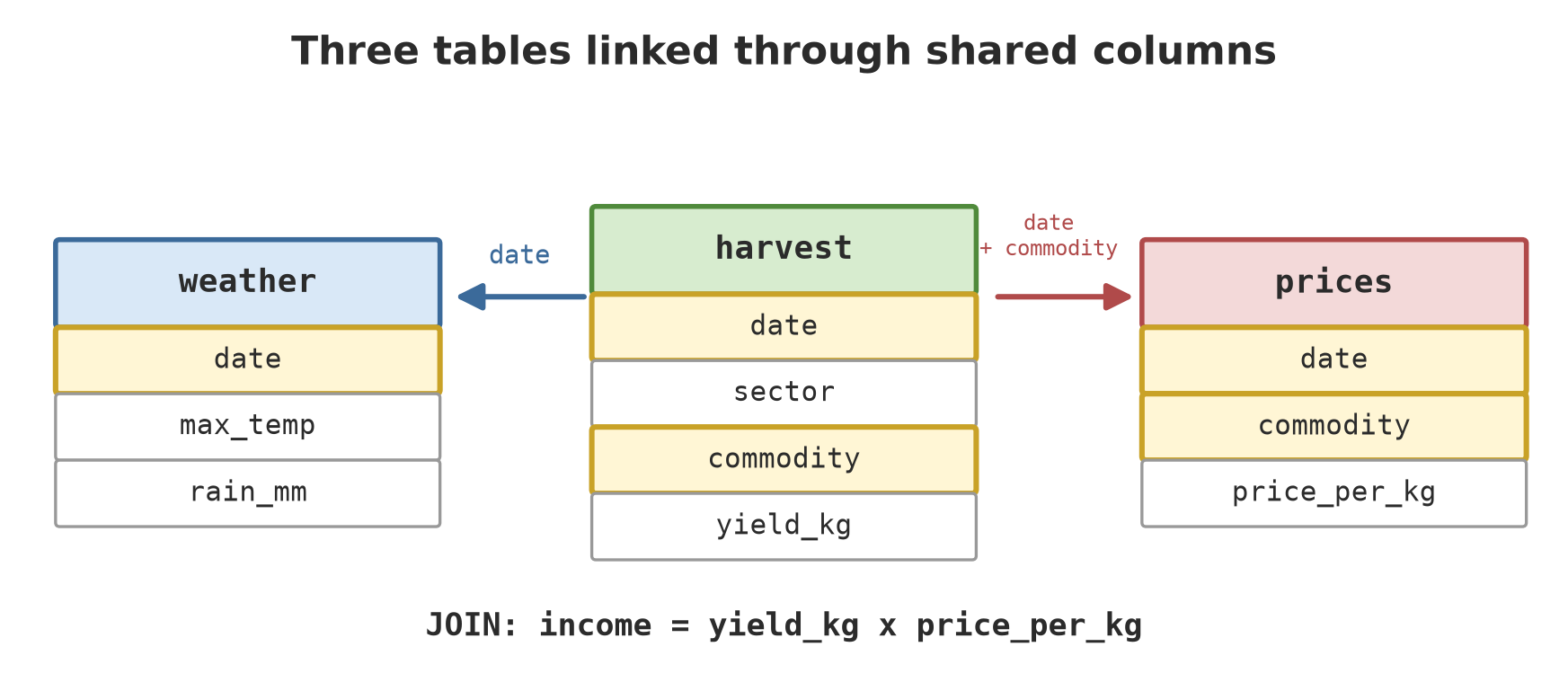
Step 4: the fictional data is stored as three separate tables (harvest, weather, prices) in an SQLite file, like a real database, then one SQL query with two LEFT JOINs computes the total yield, income, and mean rain per sector.
09_project_save_db.py
# Chapter 24 - Running project I2, step 4: saving the merged data in a database
from pathlib import Path
import pandas as pd
from sqlalchemy import create_engine, text

tmp = Path(__file__).parent / "_tmp"
tmp.mkdir(exist_ok=True)
db_file = tmp / "project_i2.db"
db_file.unlink(missing_ok=True)

# The (fictional) data is copied so the script stands on its own; same shape as Chapters 21 and 23.
harvest = pd.DataFrame(
    [("2026-01-01", "Forestry", "Plot A", "teak", 1200.0), ("2026-01-01", "Plantation", "Block A", "coffee", 245.5),
     ("2026-01-02", "Plantation", "Block B", "cocoa", 198.5), ("2026-01-02", "Cropland", "Paddy 1", "rice", 3100.0),
     ("2026-01-03", "Cropland", "Paddy 2", "maize", 1850.0), ("2026-01-03", "Fisheries", "Pond A", "catfish", 432.4),
     ("2026-01-04", "Livestock", "Barn 1", "cattle", 1151.5), ("2026-01-04", "Plantation", "Block C", "coffee", 310.0),
     ("2026-01-05", "Cropland", "Paddy 1", "rice", 2950.0), ("2026-01-05", "Plantation", "Block D", "cocoa", 276.0)],
    columns=["date", "sector", "unit", "commodity", "yield_kg"])
dates = ["2026-01-01", "2026-01-02", "2026-01-03", "2026-01-04", "2026-01-05"]
weather = pd.DataFrame({"date": dates, "max_temp": [30.1, 31.4, 29.8, 28.9, 30.6],
                        "rain_mm": [12.5, 0.0, 8.2, 25.4, 3.1]})
price_lists = {"rice": [6200, 6250, 6180, 6300, 6270], "maize": [5100, 5150, 5200, 5120, 5180],
               "coffee": [58000, 58500, 59000, 57500, 58200], "cocoa": [62000, 61500, 62500, 63000, 62800]}
prices = pd.DataFrame([(d, c, p) for c, v in price_lists.items() for d, p in zip(dates, v)],
                      columns=["date", "commodity", "price_per_kg"])

engine = create_engine(f"sqlite:///{db_file.as_posix()}")
harvest.to_sql("harvest", engine, index=False)     # three separate tables, like a real database
weather.to_sql("weather", engine, index=False)
prices.to_sql("prices", engine, index=False)

sql = text("""
    SELECT h.sector,
           ROUND(SUM(h.yield_kg), 1) AS yield_kg,
           ROUND(SUM(h.yield_kg * p.price_per_kg), 0) AS income_rp,
           ROUND(AVG(w.rain_mm), 1) AS mean_rain_mm
    FROM harvest h
    LEFT JOIN prices p ON p.date = h.date AND p.commodity = h.commodity
    LEFT JOIN weather w ON w.date = h.date
    GROUP BY h.sector
    ORDER BY h.sector
""")
with engine.connect() as connection:
    for table in ["harvest", "weather", "prices"]:
        n = connection.execute(text(f"SELECT COUNT(*) FROM {table}")).scalar()
        print(f"table {table:7}: {n} rows")
    print(pd.read_sql_query(sql, connection).to_string(index=False))
engine.dispose()
table harvest: 10 rows
table weather: 5 rows
table prices : 20 rows
sector yield_kg income_rp mean_rain_mm
Cropland 7900.0 47491500.0 3.8
Fisheries 432.4 NaN 8.2
Forestry 1200.0 NaN 12.5
Livestock 1151.5 NaN 25.4
Plantation 1030.0 61604550.0 10.3The result agrees with pandas in Chapter 23: Plantation 1030.0 kg and Rp 61,604,550; Cropland 7900.0 kg and Rp 47,491,500. Sectors without a price show NaN for income because a SUM over empty values stays empty. Unlike pandas, which sums empties to 0. Mean rain per sector is the mean of the rain on that sector’s harvest days (not rain for a month), so interpret it with care.
Exercises
- In
01_sqlite_basics.py, add one new tree, then print only the trees withplot = 'B'(useWHERE plot = ?). - In
03_update_delete_transaction.py, change the deduction from A to 100 so it does not break the rule. What happens to the whole transaction? - In
04_join_aggregate.py, remove theHAVINGand addORDER BY sector.name. Which sectors appear? - Challenge: in
07_sqlalchemy_orm.py, add the sector “Fisheries” with one harvest “catfish” 432.4 kg, then print the total yield per sector withfunc.sumandgroup_by.
Chapter Summary
- A database = a filing cabinet with drawers: tables, rows, columns; SQL = the language to ask and change.
- SQLite = one file, built into Python (
sqlite3); save changes withcommit(). - Always use parameters (
?,:name), never paste user text into SQL (SQL injection). - A transaction makes a group of changes succeed together or cancel together; constraints (
CHECK,NOT NULL, …) guard data quality. JOINconnects tables;GROUP BY+SUM/COUNTsummarise;WHEREfilters before,HAVINGafter grouping.- SQLAlchemy (Core and ORM) unifies access to many databases; PostgreSQL only needs a different connection address, and that part is run in this book on a temporary server (your own server still needs a user name and password).
Next, in Chapter 25: the data is stored neatly. Time to analyse it: advanced pandas, numpy, matplotlib, scikit-learn, and Jupyter Notebook, then closing Series I2.