Chapter 9 — Built-in Data Structures: Containers for Tree, Fish, and Livestock Data
Series B2 — Python Language Foundations
All scripts for this chapter are in the kode/ch09/ folder. On the web version, you can also download them all at once (zip).
Up to Chapter 8, we kept every value in one variable: weight_g = 520. But field data is plentiful: hundreds of trees, dozens of ponds. Making hundreds of variables is clearly impossible. Python offers data structures: containers that hold many values at once. Picture a filing cabinet with four different kinds of drawers.
| Container | Shape | Can it change? | Good for |
|---|---|---|---|
| list | [800, 1250, 640] |
yes | ordered lists: the fish count of each pond |
| tuple | (-6.6, 106.8) |
no | fixed data: coordinates |
| dict | {"species": "Teak"} |
yes | labelled data: one tree |
| set | {"catfish", "tilapia"} |
yes | collections without duplicates: fish species |
list: a list you can change
01_list.py
# Chapter 9 - list: a list you can change
fish_per_pond = [800, 1250, 640]

print(fish_per_pond)
print("First pond:", fish_per_pond[0])          # numbering starts at 0
print("Last pond:", fish_per_pond[-1])          # -1 = the very last one
print("Number of ponds:", len(fish_per_pond))
print("Total fish:", sum(fish_per_pond))
print("Most crowded pond:", max(fish_per_pond))
[800, 1250, 640]
First pond: 800
Last pond: 640
Number of ponds: 3
Total fish: 2690
Most crowded pond: 1250Three important points:
- A list is written in square brackets
[ ], with items separated by commas. - The position numbers (indexes) start at 0: the first item is at
[0]. Negative numbers count from the back:[-1]is the last one. - Useful built-in functions:
len()(how many),sum()(total),max()(largest),min()(smallest).
A list’s contents can be changed after it is made:
02_list_change.py
# Chapter 9 - Changing what is in a list
fish_per_pond = [800, 1250, 640]

fish_per_pond.append(900)           # add at the end
fish_per_pond[0] = 820              # replace item number 0
fish_per_pond.remove(640)           # remove the value 640
print(fish_per_pond)

print(1250 in fish_per_pond)        # is it there?
print(500 in fish_per_pond)

fish_per_pond.sort()                # sort from small to large
print(fish_per_pond)
[820, 1250, 900]
True
False
[820, 900, 1250]append(x)adds at the end;remove(x)removes the first matching value.list[0] = 820replaces item number 0.x in listanswersTrueorFalse: whether the value is there.sort()sorts the list in place (the original list changes).
Slicing: taking a piece
The formula is list[start:stop:step]. Like range(), the stop number is not included.
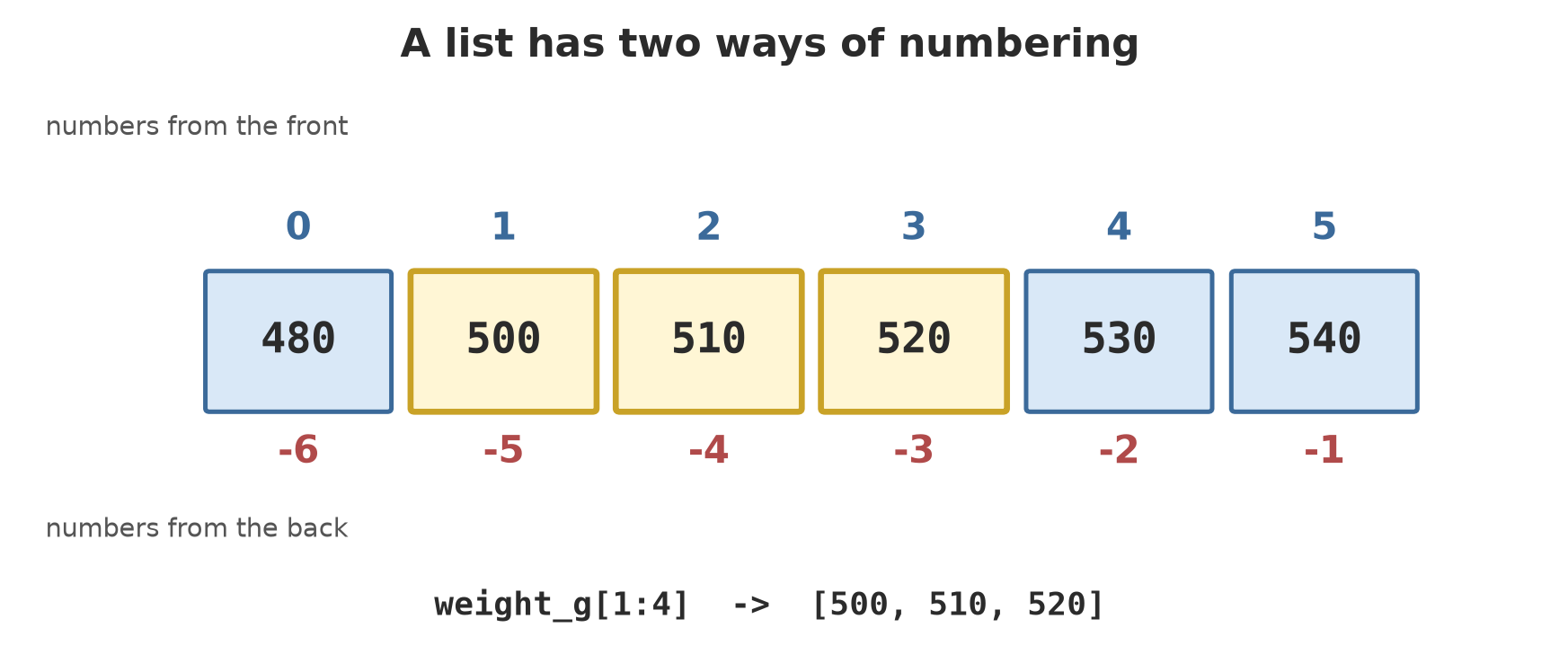
[1:4] takes items 1, 2, 3.03_slicing.py
# Chapter 9 - Slicing: taking a piece of a list [start:stop:step]
weight_g = [480, 500, 510, 520, 530, 540]

print(weight_g[1:4])     # items 1 to 3 (4 is not included)
print(weight_g[:3])      # the first three
print(weight_g[3:])      # from item 3 to the end
print(weight_g[::2])     # jump by 2
print(weight_g[::-1])    # reversed
[500, 510, 520]
[480, 500, 510]
[520, 530, 540]
[480, 510, 530]
[540, 530, 520, 510, 500, 480]A blank part means “from the start” or “to the end”. The [::-1] trick reverses the whole order.
tuple: a locked list
A tuple resembles a list, but is written with round brackets and cannot be changed after it is made. It suits data that really shouldn’t change, such as location coordinates.
04_tuple.py
# Chapter 9 - tuple: a list that may not be changed (good for coordinates)
pond_location = (-6.6, 106.8)      # (latitude, longitude): sample numbers

latitude, longitude = pond_location    # unpacking a tuple
print(f"Latitude: {latitude}")
print(f"Longitude: {longitude}")
print(pond_location[0])
Latitude: -6.6
Longitude: 106.8
-6.6The line latitude, longitude = pond_location is called unpacking: opening a tuple into several variables at once. Trying to change its contents fails:
08_tuple_wrong.py
# Chapter 9 - A mistake: trying to change what is inside a tuple
pond_location = (-6.6, 106.8)
pond_location[0] = -6.7
Traceback (most recent call last):
File "08_tuple_wrong.py", line 3, in <module>
pond_location[0] = -6.7
~~~~~~~~~~~~~^^^
TypeError: 'tuple' object does not support item assignmentThe message is clear: “‘tuple’ object does not support item assignment”. That is the whole point of a tuple: protecting data from accidental change.
dict: labelled data
While a list is reached by number, a dict is reached by label (called a key). Perfect for describing one tree:
05_dict.py
# Chapter 9 - dict: labelled data (key -> value)
tree = {"species": "Teak", "diameter_cm": 32.5, "height_m": 18}

print(tree["species"])
tree["height_m"] = 19               # change a value
tree["healthy"] = True              # add a new label
print(tree)
print(tree.get("colour", "not recorded"))    # safe when the label is missing

for label, content in tree.items():
    print(f"{label}: {content}")
Teak
{'species': 'Teak', 'diameter_cm': 32.5, 'height_m': 19, 'healthy': True}
not recorded
species: Teak
diameter_cm: 32.5
height_m: 19
healthy: True- Written in curly brackets
{ }, each item as a pair"key": value. tree["species"]fetches the value;tree["healthy"] = Trueadds or changes..get("colour", "not recorded")is safe: if the label is missing, it returns a fallback value..items()gives label-and-content pairs to use in afor.
If the label is missing and you use square brackets, Python complains:
09_missing_label.py
# Chapter 9 - A mistake: asking for a label that is not in the dict
tree = {"species": "Teak", "diameter_cm": 32.5}
print(tree["colour"])
Traceback (most recent call last):
File "09_missing_label.py", line 3, in <module>
print(tree["colour"])
~~~~^^^^^^^^^^
KeyError: 'colour'KeyError means “key not found”, and Python names the key that failed.
set: a collection without duplicates
A set automatically drops duplicates and has no order. Useful for questions like “which fish species are there?”
06_set.py
# Chapter 9 - set: a collection with no duplicates and no order
pond_a_fish = {"catfish", "tilapia", "gourami", "catfish"}
pond_b_fish = {"tilapia", "pangasius"}

print("Species in pond A:", len(pond_a_fish))   # catfish is counted once
print(sorted(pond_a_fish))
print("Tilapia in pond A?", "tilapia" in pond_a_fish)
print("In both ponds:", sorted(pond_a_fish & pond_b_fish))
print("In either pond:", sorted(pond_a_fish | pond_b_fish))
Species in pond A: 3
['catfish', 'gourami', 'tilapia']
Tilapia in pond A? True
In both ponds: ['tilapia']
In either pond: ['catfish', 'gourami', 'pangasius', 'tilapia']"catfish" was written twice but is counted only once. The & operator gives the intersection (in both ponds) and | gives the union. We use sorted() so the output is in order, because a set itself doesn’t promise any order.
Comprehension: a new list in one line
07_comprehension.py
# Chapter 9 - Comprehension: making a new list in one line
weight_g = [520, 480, 560, 495]

weight_kg = [g / 1000 for g in weight_g]
ready = [g for g in weight_g if g >= 500]

print(weight_kg)
print(ready)
[0.52, 0.48, 0.56, 0.495]
[520, 560]Read [g / 1000 for g in weight_g] like a sentence: “for every g in weight_g, calculate g / 1000.” Adding an if at the end filters: [g for g in weight_g if g >= 500] takes only those ≥ 500.
A comprehension is shorthand for a for loop that fills a list. If it feels confusing, write it with an ordinary for first. Once you understand, then condense it.
Running Project B2: tree data
Now combine: a list of dicts. Each tree is one dict, and the plantation is a list of those dicts.
10_tree_data_project.py
# Chapter 9 - Running project B2: tree data as a list of dicts
tree_data = [
    {"species": "Teak", "diameter_cm": 32.5, "height_m": 18, "healthy": True},
    {"species": "Meranti", "diameter_cm": 45.2, "height_m": 27, "healthy": True},
    {"species": "Mahogany", "diameter_cm": 28.0, "height_m": 15, "healthy": False},
]

for tree in tree_data:
    status = "healthy" if tree["healthy"] else "needs checking"
    print(f"{tree['species']:8} diameter {tree['diameter_cm']:5.1f} cm, {status}")

diameters = [tree["diameter_cm"] for tree in tree_data]
print(f"Average diameter: {sum(diameters) / len(diameters):.2f} cm")

healthy_only = [tree["species"] for tree in tree_data if tree["healthy"]]
print("Healthy trees:", healthy_only)
Teak diameter 32.5 cm, healthy
Meranti diameter 45.2 cm, healthy
Mahogany diameter 28.0 cm, needs checking
Average diameter: 35.23 cm
Healthy trees: ['Teak', 'Meranti']A few new things in the print line:
{tree['species']:8}means “show with a width of 8 characters”, so the columns line up. Single quotes are used inside because the f-string is already wrapped in double quotes.{tree['diameter_cm']:5.1f}means width 5, one digit after the point."healthy" if tree["healthy"] else "needs checking"is a one-lineif: the value is"healthy"when true, otherwise the other one.
Average diameter: (32.5 + 45.2 + 28.0) ÷ 3 = 35.23 cm. The Mahogany is not healthy, so it is left out of the “Healthy trees” list.
Exercises
- Make a list with the weights of five cows (any numbers). Print the heaviest, the lightest, and the average.
- From the list
[480, 500, 510, 520, 530, 540], use slicing to take: the last three, and the first three reversed. - Make a dict for one pond with the labels
name,fish_count,avg_weight_g, andready_to_harvest(the result of a comparison). Print everything withforand.items(). - Challenge: add one more tree to
10_tree_data_project.py, then write a list comprehension of the species whose height is more than 20 m.
Chapter Summary
- list
[...]: ordered, changeable; indexes start at 0, negative from the back. - Slicing
[start:stop:step]; the stop number isn’t included. - tuple
(...): unchangeable; dict{key: value}: labelled data; set{...}: no duplicates and no order. len(),sum(),max(),min()work on lists.- Comprehensions build and filter lists in one line.
- A list of dicts is the usual way to store many field records.
Next, in Chapter 10: we have data and ways to process it. Now we learn to wrap repeated work into functions, so it only needs writing once and can be used many times.