Chapter 40 — GIS 3: Maps and Integration: PostGIS and QGIS
Series I5 — A First Application: Web, Maps, and Dashboards
All scripts for this chapter are in the kode/ch40/ folder. On the web version, you can also download them all at once (zip).
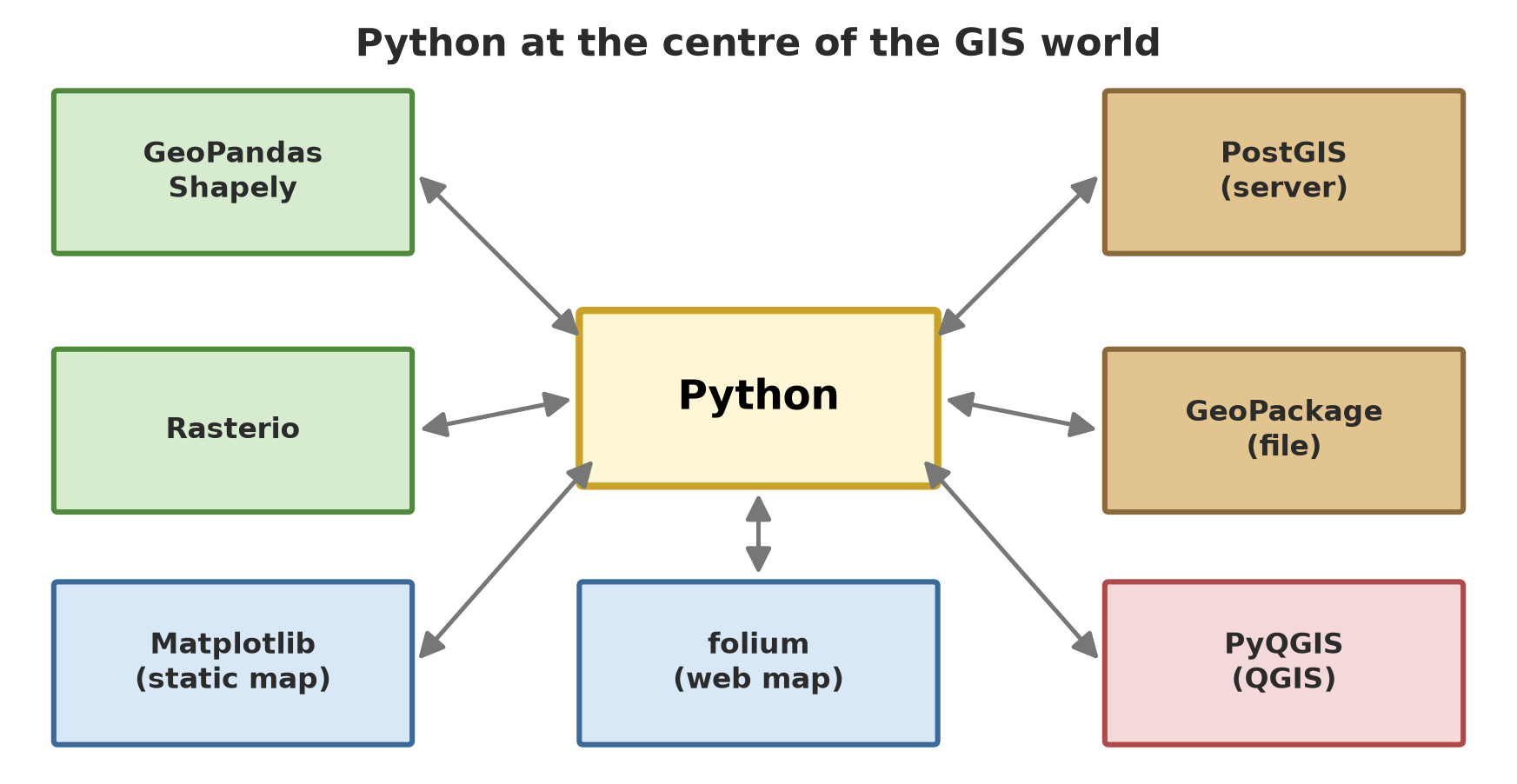
The two earlier GIS chapters let you calculate. Now we present and store. A map is how people read spatial data; a spatial database is a lasting warehouse; and QGIS is the “map kitchen” used by many organisations. Python can sit in the middle of all three.
Static maps with Matplotlib
A static map is an image (PNG, PDF) for reports and books. GeoPandas draws through Matplotlib (Chapter 25), so all of Matplotlib’s controls are available: titles, legends, labels.
01_static_map.py
# Chapter 40 - A static map with GeoPandas and Matplotlib
from pathlib import Path

import geopandas as gpd
import matplotlib.pyplot as plt
from matplotlib.lines import Line2D

tmp = Path(__file__).parent / "_tmp"
tmp.mkdir(exist_ok=True)
plots = gpd.read_file("data/plot.geojson").to_crs(32748)
ponds = gpd.read_file("data/pond.geojson").to_crs(32748)
pens = gpd.read_file("data/pen.geojson").to_crs(32748)
rivers = gpd.read_file("data/river.geojson").to_crs(32748)

colour = {"forest": "#4f8a3b", "orchard": "#d9a441", "ricefield": "#e8dc7a"}
fig, ax = plt.subplots(figsize=(7, 5.6), dpi=100)
for sector, group in plots.groupby("sector"):
    group.plot(ax=ax, color=colour[sector], edgecolor="black", linewidth=0.8)
rivers.plot(ax=ax, color="#3b6a9a", linewidth=2.5)
ponds.plot(ax=ax, color="#1f4e79")
pens.plot(ax=ax, color="#b04a4a", markersize=60, marker="s")
for _, p in plots.iterrows():                                  # plot code labels
    ax.annotate(p["code"], (p.geometry.centroid.x, p.geometry.centroid.y), ha="center", weight="bold")

ax.set_title("Farm location map (made-up data)")
ax.set_xlabel("Easting (m, UTM 48S)")
ax.set_ylabel("Northing (m, UTM 48S)")
ax.ticklabel_format(style="plain", useOffset=False)
ax.set_aspect("equal")                                         # 1 m on the X axis = 1 m on the Y axis
legend = [Line2D([0], [0], marker="s", color="w", markerfacecolor=c, markersize=12, label=s)
          for s, c in colour.items()]
legend += [Line2D([0], [0], color="#3b6a9a", lw=2.5, label="river"),
           Line2D([0], [0], marker="s", color="w", markerfacecolor="#1f4e79", markersize=9, label="pond"),
           Line2D([0], [0], marker="s", color="w", markerfacecolor="#b04a4a", markersize=9, label="pen")]
ax.legend(handles=legend, loc="upper left", fontsize=8)
fig.tight_layout()
fig.savefig(tmp / "static_map.png")
print("map saved:", "static_map.png", "| size in pixels:", fig.get_size_inches() * fig.dpi)
map saved: static_map.png | size in pixels: [700. 560.]What sets a map apart from an ordinary chart:
ax.set_aspect("equal"): 1 metre on the X axis is drawn as long as 1 metre on the Y axis. Without it, square plots look squashed.- The data is drawn in UTM (metres), so the axes can be labelled in metres and distances read correctly.
- Colours are chosen per sector with
groupby, then the legend is built by hand fromLine2D.
That 700 × 560 pixel image is saved in _tmp/static_map.png. You already saw a map of the same data with the 60 m zone in Chapter 38.
Interactive maps with folium
folium wraps the JavaScript library Leaflet and produces an HTML file that can be dragged and zoomed in a browser, complete with markers and popups.
02_folium_map.py
# Chapter 40 - An interactive map with folium (the result is an HTML file)
from pathlib import Path

import folium
import geopandas as gpd

tmp = Path(__file__).parent / "_tmp"
tmp.mkdir(exist_ok=True)
plots = gpd.read_file("data/plot.geojson")              # folium needs EPSG:4326 (degrees)
ponds = gpd.read_file("data/pond.geojson")
pens = gpd.read_file("data/pen.geojson")
rivers = gpd.read_file("data/river.geojson")

centre = plots.union_all().centroid
farm_map = folium.Map(location=[centre.y, centre.x], zoom_start=16, tiles="OpenStreetMap")  # order: latitude, longitude

folium.GeoJson(plots, name="plots",
               tooltip=folium.GeoJsonTooltip(fields=["code", "sector", "commodity"])).add_to(farm_map)
folium.GeoJson(rivers, name="river", style_function=lambda f: {"color": "#3b6a9a", "weight": 4}).add_to(farm_map)
for _, k in ponds.iterrows():
    folium.Marker([k.geometry.centroid.y, k.geometry.centroid.x],
                  popup=f"Pond {k['code']}: {k['fish_count']} {k['kind']}",
                  icon=folium.Icon(color="blue", icon="tint")).add_to(farm_map)
for _, k in pens.iterrows():
    folium.Marker([k.geometry.y, k.geometry.x], popup=f"Pen {k['code']}: {k['kind']}",
                  icon=folium.Icon(color="red")).add_to(farm_map)
folium.LayerControl().add_to(farm_map)

farm_map.save(tmp / "farm_map.html")
html = (tmp / "farm_map.html").read_text(encoding="utf-8")
print("HTML file saved:", "farm_map.html")
print("loads the Leaflet library:", "leaflet" in html.lower())
print("number of markers (Marker):", html.count("L.marker("))
print("contains the plot name 'Meranti':", "Meranti" in html)
HTML file saved: farm_map.html
loads the Leaflet library: True
number of markers (Marker): 7
contains the plot name 'Meranti': True- folium uses EPSG:4326 (degrees), and its location order is [latitude, longitude]: the opposite of (x, y). Mixing up this order makes the map “land” in the sea.
- The script adds a plots layer (with a tooltip that appears when the cursor is near), the river, seven markers (four ponds and three pens), and a layer control.
- Evidence we can print: the file contains Leaflet, contains seven
L.marker(, and contains the commodity nameMeranti.
I did not open farm_map.html in a browser while making this book; only the file’s contents were checked, as in the output above. Note also that the base map (OpenStreetMap) is loaded from the internet when the map is opened, so without signal you see only the plot shapes with no background. Copying sensitive data into an HTML file means that data travels to anyone who receives the file.
PostGIS: a database that understands maps
PostgreSQL is a relational database (Chapter 24); PostGIS is its extension that adds the geometry type, hundreds of spatial functions (ST_Area, ST_Distance, …), and spatial indexes. The advantages over files: many users at once, big data, and fast searching by location.
For this chapter, the book builder starts a temporary PostgreSQL cluster (random port, on this computer only, deleted afterwards) and gives its address through the DATABASE_URL variable. Scripts that use it are marked @pg. The author’s own PostgreSQL server is not touched. On your computer, the default value postgresql://postgres@localhost:5432/learn is only an example: replace it with the address of your own server (and never put a password in code; read it from an environment variable, Chapter 34).
Creating tables and loading data
03_postgis_load_data.py
# Chapter 40 - PostGIS: creating spatial tables and loading data with psycopg
import os

import geopandas as gpd
import psycopg

# On your computer, replace this default address with the address of your own PostgreSQL+PostGIS server
address = os.environ.get("DATABASE_URL", "postgresql://postgres@localhost:5432/learn")

plots = gpd.read_file("data/plot.geojson")
ponds = gpd.read_file("data/pond.geojson")
rivers = gpd.read_file("data/river.geojson")

with psycopg.connect(address) as conn:
    conn.execute("CREATE EXTENSION IF NOT EXISTS postgis")
    version = conn.execute("SELECT PostGIS_Lib_Version()").fetchone()[0]
    print("PostGIS is active, major version:", version.split(".")[0])

    conn.execute("DROP TABLE IF EXISTS plot, pond, river")
    conn.execute("""CREATE TABLE plot (
        code text PRIMARY KEY, sector text, commodity text,
        geom geometry(Polygon, 4326))""")                     # geometry type AND SRID are locked
    conn.execute("""CREATE TABLE pond (
        code text PRIMARY KEY, kind text, fish_count int,
        geom geometry(Polygon, 4326))""")

    conn.execute("""CREATE TABLE river (
        name text, geom geometry(LineString, 4326))""")

    for _, p in plots.iterrows():                              # WKT = geometry as text
        conn.execute("INSERT INTO plot VALUES (%s, %s, %s, ST_GeomFromText(%s, 4326))",
                     (p["code"], p["sector"], p["commodity"], p.geometry.wkt))
    for _, k in ponds.iterrows():
        conn.execute("INSERT INTO pond VALUES (%s, %s, %s, ST_GeomFromText(%s, 4326))",
                     (k["code"], k["kind"], int(k["fish_count"]), k.geometry.wkt))

    conn.execute("INSERT INTO river VALUES (%s, ST_GeomFromText(%s, 4326))",
                 (rivers["name"].iloc[0], rivers.geometry.iloc[0].wkt))

    # GiST spatial index: makes searches by location fast
    conn.execute("CREATE INDEX plot_geom_idx ON plot USING GIST (geom)")
    conn.execute("CREATE INDEX pond_geom_idx ON pond USING GIST (geom)")

    for table in ("plot", "pond", "river"):
        n = conn.execute(f"SELECT count(*) FROM {table}").fetchone()[0]
        print(f"rows in table {table}:", n)
    print("geometry type of table plot:",
          conn.execute("SELECT DISTINCT ST_GeometryType(geom) FROM plot").fetchone()[0])
PostGIS is active, major version: 3
rows in table plot: 6
rows in table pond: 4
rows in table river: 1
geometry type of table plot: ST_PolygonCREATE EXTENSION IF NOT EXISTS postgisactivates PostGIS in the database (it needs enough rights on your server).geometry(Polygon, 4326)locks the shape type and the SRID (the CRS number). Inserting another type is refused: a safeguard files do not have.- Shapes are sent as WKT (Well-Known Text), text like
POLYGON((...)), converted byST_GeomFromText. - A GiST index makes searching by location fast. Result: 6 plots, 4 ponds, 1 river.
Spatial queries
04_postgis_spatial_queries.py
# Chapter 40 - Spatial queries in PostGIS (uses the tables from script 03)
import os

import psycopg

address = os.environ.get("DATABASE_URL", "postgresql://postgres@localhost:5432/learn")

with psycopg.connect(address) as conn:
    # Area: the geography type computes on the round earth, the result is in square metres
    print("plot area (ha):")
    for code, ha in conn.execute(
            "SELECT code, round((ST_Area(geom::geography) / 10000)::numeric, 2) FROM plot ORDER BY code"):
        print(f"  {code}: {ha}")

    # Plots within 60 m of the river: ST_DWithin on geography (distance in metres)
    print("\nplots within 60 m of the river:")
    for (code,) in conn.execute(
            "SELECT p.code FROM plot p, river r "
            "WHERE ST_DWithin(p.geom::geography, r.geom::geography, 60) ORDER BY p.code"):
        print(" ", code)

    # Nearest ponds to the warehouse point (operator <-> = order by distance, uses the index)
    print("\nthree ponds nearest to the warehouse point:")
    warehouse = "ST_SetSRID(ST_MakePoint(106.8140, -6.9950), 4326)"
    for code, distance in conn.execute(
            f"SELECT code, round(ST_Distance(geom::geography, {warehouse}::geography)::numeric) "
            f"FROM pond ORDER BY geom <-> {warehouse} LIMIT 3"):
        print(f"  pond {code}: {distance} m")

    # Joining two tables by location: plots and ponds that touch each other
    n = conn.execute("SELECT count(*) FROM plot p JOIN pond k ON ST_Intersects(p.geom, k.geom)").fetchone()[0]
    print("\nplot-pond pairs that overlap:", n)
plot area (ha):
H1: 9.00
H2: 6.92
K1: 4.00
K2: 3.00
S1: 3.00
S2: 2.25
plots within 60 m of the river:
K2
S1
S2
three ponds nearest to the warehouse point:
pond B: 82 m
pond C: 172 m
pond A: 274 m
plot-pond pairs that overlap: 0Note:
- Using
::geographymakes PostGIS calculate on the round earth and answer in metres even though the data is in degrees. H2 shows 6.92 ha here while GeoPandas (UTM) calculated 6.93 ha: two different methods give a small difference because the UTM projection slightly changes sizes. For field purposes both are close enough; for legal purposes, follow the official rules. ST_DWithin(..., 60)finds plots within 60 m of the river: K2, S1, S2, the same as the Chapter 38 overlay.- The
<->operator sorts by distance and uses the index: the three ponds nearest to the warehouse point (an example point) are B (82 m), C (172 m), A (274 m). - No plot overlaps a pond (result 0).
Do not build SQL by pasting user text into a string (f"... {input} ..."): that opens the door to SQL injection. For values, always use %s parameters as in the INSERT of script 03. Script 04 pastes text only because the content is a fixed constant of our own, not from a user.
PostGIS and GeoPandas
05_postgis_geopandas.py
# Chapter 40 - PostGIS and GeoPandas: read a query, write a new table
import os

import geopandas as gpd
from sqlalchemy import create_engine, text

address = os.environ.get("DATABASE_URL", "postgresql://postgres@localhost:5432/learn")
engine = create_engine(address.replace("postgresql://", "postgresql+psycopg://"))

# Read a query result straight into a GeoDataFrame
sql = "SELECT code, sector, geom FROM plot WHERE sector <> 'forest'"
not_forest = gpd.read_postgis(sql, engine, geom_col="geom")
print(not_forest[["code", "sector"]].to_string(index=False))
print("CRS read:", not_forest.crs)

# Write a GeoDataFrame to a new table (geoalchemy2 is needed behind the scenes)
pens = gpd.read_file("data/pen.geojson")
pens.to_postgis("pen", engine, if_exists="replace", index=False)
with engine.connect() as c:
    print("rows in table pen:", c.execute(text("SELECT count(*) FROM pen")).scalar())
    print("geometry column type:", c.execute(text(
        "SELECT type || ' / SRID ' || srid FROM geometry_columns WHERE f_table_name = 'pen'")).scalar())
code sector
K1 orchard
K2 orchard
S1 ricefield
S2 ricefield
CRS read: EPSG:4326
rows in table pen: 3
geometry column type: POINT / SRID 4326read_postgis turns a query result into a GeoDataFrame, with the CRS read automatically (EPSG:4326). to_postgis writes a GeoDataFrame to a new table and creates a geometry-typed column (POINT / SRID 4326). Both need SQLAlchemy and, for writing, GeoAlchemy2 (I installed version 0.20.0 through alat/pasang.py).
PyQGIS: driving QGIS from Python
QGIS is a very popular free GIS program. It has its own Python and a module called PyQGIS (qgis.core, qgis.analysis) for automating work: loading layers, processing, styling, printing maps. How to use it: the script is run by QGIS’s own Python, not this project’s Python.
On the author’s computer, QGIS 4.0.2 is installed in C:\Program Files\QGIS 4.0.2 with its own Python 3.12. The command bin\python-qgis.bat prepares all the paths and then runs that Python. That is why the following scripts carry a @python: directive pointing at that file; on your computer the path will differ (or use the Python console inside QGIS).
The basic pattern of a script with no interface (following the official PyQGIS cookbook):
QgsApplication.setPrefixPath("<qgis folder>", True): tell it where it is installed.app = QgsApplication([], False):False= no GUI.app.initQgis(): load the data providers.- … your work …
app.exitQgis(): clean up.
Our addition: os.environ["QT_QPA_PLATFORM"] = "offscreen" before QgsApplication is created, so Qt does not look for a screen.
06_pyqgis_basics.py
# Chapter 40 - PyQGIS without an interface: load a layer, read attributes
import os

os.environ["QT_QPA_PLATFORM"] = "offscreen"        # no window (must be set before QgsApplication is created)

from qgis.core import Qgis, QgsApplication, QgsProject, QgsVectorLayer

QgsApplication.setPrefixPath("C:/Program Files/QGIS 4.0.2/apps/qgis", True)
app = QgsApplication([], False)                    # False = no GUI
app.initQgis()
print("QGIS major version:", Qgis.version().split(".")[0])

plots = QgsVectorLayer("data/plot.geojson", "plot", "ogr")
print("layer valid:", plots.isValid(), "| feature count:", plots.featureCount())
print("CRS:", plots.crs().authid(), "| geometry type:", plots.geometryType().name)
print("fields:", [f.name() for f in plots.fields()])

for feature in plots.getFeatures():
    if feature["sector"] == "ricefield":
        print("ricefield:", feature["code"], feature["commodity"])

QgsProject.instance().addMapLayer(plots)
print("layers in the project:", [l.name() for l in QgsProject.instance().mapLayers().values()])
app.exitQgis()
QGIS major version: 4
layer valid: True | feature count: 6
CRS: EPSG:4326 | geometry type: Polygon
fields: ['code', 'sector', 'commodity']
ricefield: S1 rice
ricefield: S2 rice
layers in the project: ['plot']The output proves the script ran on QGIS 4 (major version 4): six features read, CRS EPSG:4326, polygon geometry type, and the fields code, sector, commodity. Ricefields S1 and S2 were found by filtering the attributes.
Processing algorithms, styling, and drawing a map
QGIS has hundreds of processing algorithms (Processing), e.g. native:buffer and native:reprojectlayer. From a script, call them with processing.run(name, parameters).
07_pyqgis_process_and_render.py
# Chapter 40 - PyQGIS: Processing algorithms, styling, and drawing a map to PNG
import os

os.environ["QT_QPA_PLATFORM"] = "offscreen"

import sys
from pathlib import Path

from qgis.core import (QgsApplication, QgsCategorizedSymbolRenderer, QgsCoordinateReferenceSystem,
                       QgsMapRendererSequentialJob, QgsMapSettings, QgsProject, QgsRendererCategory,
                       QgsSymbol, QgsVectorLayer)
from qgis.PyQt.QtCore import QSize
from qgis.PyQt.QtGui import QColor

tmp = Path(__file__).parent / "_tmp"
tmp.mkdir(exist_ok=True)
QgsApplication.setPrefixPath("C:/Program Files/QGIS 4.0.2/apps/qgis", True)
app = QgsApplication([], False)
app.initQgis()

# Processing: the `processing` module lives in the QGIS plugins folder, so we add its path first
sys.path.append("C:/Program Files/QGIS 4.0.2/apps/qgis/python/plugins")
import processing
from processing.core.Processing import Processing
from qgis.analysis import QgsNativeAlgorithms

QgsApplication.processingRegistry().addProvider(QgsNativeAlgorithms())
Processing.initialize()

plots = QgsVectorLayer("data/plot.geojson", "plot", "ogr")
river = QgsVectorLayer("data/river.geojson", "river", "ogr")

flat = processing.run("native:reprojectlayer", {
    "INPUT": plots, "TARGET_CRS": QgsCoordinateReferenceSystem("EPSG:32748"), "OUTPUT": "memory:"})["OUTPUT"]
print("plot areas in UTM (m2):", [round(f.geometry().area()) for f in flat.getFeatures()])

river_utm = processing.run("native:reprojectlayer", {
    "INPUT": river, "TARGET_CRS": QgsCoordinateReferenceSystem("EPSG:32748"), "OUTPUT": "memory:"})["OUTPUT"]
zone = processing.run("native:buffer", {"INPUT": river_utm, "DISTANCE": 60, "SEGMENTS": 8, "OUTPUT": "memory:"})["OUTPUT"]
print("features in the buffer zone:", zone.featureCount(), "| area (ha):",
      round(next(zone.getFeatures()).geometry().area() / 10_000, 2))

# Style: colour by the sector column
categories = []
for value, colour in [("forest", "#4f8a3b"), ("orchard", "#d9a441"), ("ricefield", "#e8dc7a")]:
    symbol = QgsSymbol.defaultSymbol(flat.geometryType())
    symbol.setColor(QColor(colour))
    categories.append(QgsRendererCategory(value, symbol, value))
flat.setRenderer(QgsCategorizedSymbolRenderer("sector", categories))
zone.renderer().symbol().setColor(QColor(59, 106, 154, 90))     # transparent blue

# Draw the map into a PNG image
settings = QgsMapSettings()
settings.setLayers([zone, flat])
settings.setDestinationCrs(flat.crs())
settings.setExtent(zone.extent())
settings.setOutputSize(QSize(700, 450))
settings.setBackgroundColor(QColor("white"))
job = QgsMapRendererSequentialJob(settings)
job.start()
job.waitForFinished()
image = job.renderedImage()
print("image size:", image.width(), "x", image.height(), "| saved:", image.save(str(tmp / "qgis_map.png")))

project = QgsProject.instance()
project.setCrs(flat.crs())
project.addMapLayers([zone, flat])
print("QGIS project saved:", project.write(str(tmp / "farm.qgz")))
app.exitQgis()
plot areas in UTM (m2): [90001, 69252, 39999, 30000, 29999, 22500]
features in the buffer zone: 1 | area (ha): 13.23
image size: 700 x 450 | saved: True
QGIS project saved: TrueThe plot areas after conversion to UTM (90001, 69252, 39999, … m²) match the GeoPandas calculation. The 60 m buffer zone covers 13.23 ha (GeoPandas 13.24 ha: slightly different because of the number of segments at the buffer ends). After that the script gives a style per category (colour by the sector column), draws a 700 × 450 pixel map into a PNG, and saves a QGIS project (.qgz) that can be opened in real QGIS.
Because the processing module lives in QGIS’s plugins folder, the script adds .../apps/qgis/python/plugins to sys.path and registers QgsNativeAlgorithms before processing.run. Without those two steps the algorithms are not found.
QGIS 4 differs from QGIS 3
QGIS 4.0 (released March 2026) moved from Qt5/PyQt5 to Qt6/PyQt6. As a result, much old PyQGIS code needs adjusting. The two changes that trip people most:
- Qt enums must be written in full:
Qt.AlignLeftbecomesQt.AlignmentFlag.AlignLeft. - Field types use
QMetaType.Type(notQVariant) inQgsField.
09_pyqgis4_vs_qgis3.py
# Chapter 40 - QGIS 4 (Qt6): Qt enums must be fully scoped, field types use QMetaType
import os

os.environ["QT_QPA_PLATFORM"] = "offscreen"

from qgis.core import Qgis, QgsField
from qgis.PyQt.QtCore import QMetaType, Qt

# QGIS 3 (PyQt5) style: Qt.AlignLeft. In QGIS 4 (PyQt6) that short name no longer exists.
try:
    Qt.AlignLeft
except AttributeError as error:
    print("old style fails ->", error)
print("new style Qt.AlignmentFlag.AlignLeft ->", int(Qt.AlignmentFlag.AlignLeft))

# Field types: QMetaType.Type replaces QVariant in QgsField
field = QgsField("fish_count", QMetaType.Type.Int)
print("field name:", field.name(), "| type:", field.type())

# QGIS's own enums are also best written in full
print("polygon geometry type:", Qgis.GeometryType.Polygon.name)
old style fails -> type object 'Qt' has no attribute 'AlignLeft'
new style Qt.AlignmentFlag.AlignLeft -> 1
field name: fish_count | type: Type.Int
polygon geometry type: PolygonWhat I proved on QGIS 4.0.2 on this computer: the old style Qt.AlignLeft fails with AttributeError, the new style works, and QgsField with QMetaType.Type.Int works. Some old QGIS names still work through a compatibility layer (I tried QgsWkbTypes.PolygonGeometry and QgsLayoutExporter.Success, and both still answer), but the full form such as Qgis.GeometryType.Polygon is safer for the future. The full list of changes is in the Qt6 compatibility guide on the QGIS website; I did not read all of it, so consult that guide for your own code.
Two findings from experiments on the author’s computer: (1) a print layout (QgsPrintLayout) can be exported to PNG without an interface, but label text appears as black boxes in offscreen mode (probably because no fonts were loaded; I did not check the exact cause). That is why this chapter’s scripts use QgsMapRendererSequentialJob to draw the map, not a layout with text. (2) Exporting a layout prints a GDAL “ERROR 6” message in the output even though it succeeds; I did not use it so the output stays clean.
The Python and QGIS workflow
| Need | Fitting tool |
|---|---|
| Repeated calculation and analysis | GeoPandas / Rasterio (your project’s Python) |
| Shared storage, many users | PostGIS |
| Inspecting and editing maps by eye and mouse | QGIS (the interface) |
| Automating QGIS steps (print 20 similar maps) | PyQGIS |
| Maps for reports or books | Matplotlib |
| Maps to share on the web | folium |
A common working pattern: data enters PostGIS or GeoPackage; analysts inspect it in QGIS; GeoPandas scripts calculate the summaries; and PyQGIS or Matplotlib prints the weekly map.
Running Project I5: location data in two places
We save the five location layers (plots, ponds, pens, river, hamlets) to PostGIS (to be shared and later read by the API) and to GeoPackage (one file that can be sent by email and opened in QGIS), then check that both hold the same thing.
08_project_two_storages.py
# Chapter 40 - Running project I5: location data stored in PostGIS and GeoPackage
import os
from pathlib import Path

import geopandas as gpd
import pandas as pd
from sqlalchemy import create_engine

tmp = Path(__file__).parent / "_tmp"
tmp.mkdir(exist_ok=True)
address = os.environ.get("DATABASE_URL", "postgresql://postgres@localhost:5432/learn")
engine = create_engine(address.replace("postgresql://", "postgresql+psycopg://"))

layers = ["plot", "pond", "pen", "river", "hamlet"]
gpkg = tmp / "farm.gpkg"
gpkg.unlink(missing_ok=True)
for name in layers:
    gdf = gpd.read_file(f"data/{name}.geojson")
    gdf.to_postgis(f"farm_{name}", engine, if_exists="replace", index=False)       # server
    gdf.to_file(gpkg, layer=name, driver="GPKG")                                    # portable file

print("layer    PostGIS  GeoPackage")
for name in layers:
    a = len(gpd.read_postgis(f"SELECT * FROM farm_{name}", engine, geom_col="geometry"))
    b = len(gpd.read_file(gpkg, layer=name))
    print(f"{name:8s} {a:7d} {b:11d}")

# Area per sector: computed on the PostGIS server and in Python from the GeoPackage; they must agree
from_server = pd.read_sql(
    "SELECT sector, round((sum(ST_Area(geometry::geography)) / 10000)::numeric, 1) AS ha "
    "FROM farm_plot GROUP BY sector ORDER BY sector", engine)
print("\narea per sector (ha) from PostGIS:")
print(from_server.to_string(index=False))
plots = gpd.read_file(gpkg, layer="plot").to_crs(32748)
print("\narea per sector (ha) from GeoPackage:")
print(plots.assign(ha=plots.area / 10_000).groupby("sector")["ha"].sum().round(1).to_string())
layer PostGIS GeoPackage
plot 6 6
pond 4 4
pen 3 3
river 1 1
hamlet 2 2
area per sector (ha) from PostGIS:
sector ha
forest 15.9
orchard 7.0
ricefield 5.2
area per sector (ha) from GeoPackage:
sector
forest 15.9
orchard 7.0
ricefield 5.2Five layers, the same row counts in both places, and matching area per sector: forest 15.9 ha, orchard 7.0 ha, ricefield 5.2 ha (all rounded to one decimal; ricefield 5.25 becomes 5.2 through Python’s rounding). The PostGIS tables get the prefix farm_ so they do not clash with the tables of script 03. That ends the map part of the Series I5 project: the location data is tidy and stored.
Exercises
- In
01_static_map.py, add a simple scale bar (a 100 m line with the text “100 m”) at the bottom right of the map. - In
02_folium_map.py, changetiles="OpenStreetMap"totiles="CartoDB positron"and see how the file content differs. - In
04_postgis_spatial_queries.py, add a query that counts the fish per hamlet usingST_Withinbetween the pond centre point (ST_Centroid) and the hamlet polygon. (The hamlet table is not loaded yet: add it in script 03.) - Challenge: in
07_pyqgis_process_and_render.py, add the algorithmnative:intersectionbetween plots and the zone, then print the cut area of each plot, and compare with Chapter 38.
Chapter Summary
- Matplotlib for static maps (don’t forget
set_aspect("equal")); folium for interactive maps (HTML, order [latitude, longitude]). - PostGIS adds the
geometrytype,ST_*functions, and spatial indexes to PostgreSQL; send values through parameters, not pasted text. ::geographycalculates on the round earth in metres; the result can differ slightly from a UTM calculation.- PyQGIS runs in QGIS’s own Python; a script with no interface needs
setPrefixPath,QgsApplication([], False),initQgis, andexitQgis. - QGIS 4 uses Qt6: write Qt enums in full and use
QMetaType.Type. - Double storage: PostGIS for sharing, GeoPackage for portability.
Next, in Chapter 41: task automation and web scraping.