Chapter 19 — Code Quality: Tidy, Logged, and Documented
Series I1 — Tidy and Maintainable Code
All scripts for this chapter are in the kode/ch19/ folder. On the web version, you can also download them all at once (zip).
Code is read more often than it is written: by colleagues, and by you six months from now. Picture a field notebook. If each officer writes with a layout of their own, finding one number becomes torture. Uniform, tidy code is easy to read, and silly mistakes show up sooner. Chapter 18 keeps code correct; this chapter keeps it tidy, logged, and understandable.
PEP 8: the grammar of Python code
PEP 8 is the official Python style guide (PEP = Python Enhancement Proposal). A summary from its official document (peps.python.org/pep-0008, read 2026-10-10):
| Matter | PEP 8 rule |
|---|---|
| Indentation | 4 spaces per level |
| Line length | at most 79 characters (docstrings and comments 72) |
| Function and variable names | lowercase with underscores: calc_biomass |
| Class names | each word capitalised (CapWords): PondFish |
| Constants | all capitals: PH_LIMIT |
| Imports | at the top of the file, one per line; grouped: standard library, outside packages, your own code |
| Whitespace | one space around =, ==, and; two blank lines between functions and classes |
Remember the principle, not the numbers: consistent and easy to read. Luckily, you need not memorise anything. A tool checks it.
ruff: inspector and tidier in one
ruff is a Python tool (made by Astral, the maker of uv) that combines two jobs: a linter (an inspector that looks for mistakes and bad habits) and a formatter (a tidier that arranges the appearance). It is already installed in this book’s environment; on your computer: python -m pip install ruff. Let us feed ruff a file made messy on purpose:
01_ruff_check.py
# Chapter 19 - ruff check: finding problems in code (a linter)
from helpers import FOLDER, ruff

examples = FOLDER / "examples"
print((examples / "messy.py").read_text(encoding="utf-8"))
print("--- ruff check ---")
text, code = ruff("check", "--output-format", "concise", "messy.py", folder=examples)
print(text)
print("exit code:", code)
import os, sys
import json
def calc_biomass(count,weight_g,history=[]):
l = count*weight_g/1000
unused = 5
if count == True:
print( "odd count" )
history.append(l)
print("Biomass: %s kg" % l)
return l
class pond_fish:
def __init__(self,name): self.name=name
--- ruff check ---
messy.py:1:1: E401 [*] Multiple imports on one line
messy.py:1:1: I001 [*] Import block is un-sorted or un-formatted
messy.py:1:8: F401 [*] `os` imported but unused
messy.py:1:12: F401 [*] `sys` imported but unused
messy.py:2:8: F401 [*] `json` imported but unused
messy.py:4:41: B006 Do not use mutable data structures for argument defaults
messy.py:5:5: E741 Ambiguous variable name: `l`
messy.py:6:5: F841 Local variable `unused` is assigned to but never used
messy.py:7:8: E712 Avoid equality comparisons to `True`; use `count:` for truth checks
messy.py:10:11: UP031 Use format specifiers instead of percent format
messy.py:13:7: N801 Class name `pond_fish` should use CapWords convention
Found 11 errors.
[*] 5 fixable with `--fix` (4 unsafe fixes available with `--fix --unsafe-fixes`).
exit code: 1Each report line has the form file:line:column: CODE message. A few that appear:
| Code | Meaning |
|---|---|
E401 |
several imports on one line (import os, sys) |
I001 |
import order not tidy |
F401 |
an import that is never used |
F841 |
a variable assigned but never used |
E712 |
comparing with True using == |
E741 |
a confusing name: the letter l looks like the digit 1 |
B006 |
a parameter default that is an empty list (trap: that list is shared by every call) |
UP031 |
old-style % text formatting; the new style is the f-string |
N801 |
the class name pond_fish should be PondFish |
The mark [*] means ruff can fix it by itself. Exit code 1 signals a problem, so it suits automatic scripts.
Which rules are checked is decided in pyproject.toml. In our project: select = ["E", "F", "I", "UP", "B", "N"] (rule groups for pycodestyle, pyflakes, imports, syntax upgrades, common mistakes, and naming) with line-length = 88. Ruff’s default checks many rules, and that set changes between versions, so writing your own selection makes results stable.
ruff format: tidying the appearance
Now the tidier. The --diff option shows the changes it would make without changing the file:
02_ruff_format_diff.py
# Chapter 19 - ruff format --diff: see what would be tidied, without changing the file
from helpers import FOLDER, ruff

text, code = ruff("format", "--diff", "messy.py", folder=FOLDER / "examples")
print(text)
print("exit code:", code)
--- messy.py
+++ messy.py
@@ -1,14 +1,17 @@
import os, sys
import json
-def calc_biomass(count,weight_g,history=[]):
- l = count*weight_g/1000
+
+def calc_biomass(count, weight_g, history=[]):
+ l = count * weight_g / 1000
unused = 5
if count == True:
- print( "odd count" )
+ print("odd count")
history.append(l)
print("Biomass: %s kg" % l)
return l
+
class pond_fish:
- def __init__(self,name): self.name=name
+ def __init__(self, name):
+ self.name = name
1 file would be reformatted
exit code: 1A - is an old line, a + a new one. The changes are pure appearance: a space after commas, two blank lines between functions, the body of __init__ moved onto its own line. So the program does not change, only the way it is written. Exit code 1 here means “something would be changed”.
ruff check –fix: automatic repairs
03_ruff_autofix.py
# Chapter 19 - ruff check --fix then ruff format, on a copy of the file
import shutil

from helpers import FOLDER, ruff

work = FOLDER / "_tmp" / "fix"
shutil.rmtree(work, ignore_errors=True)
shutil.copytree(FOLDER / "examples", work)

text, _ = ruff("check", "--fix", "--output-format", "concise", "messy.py", folder=work)
print(text)
print("--- ruff format ---")
text, _ = ruff("format", "messy.py", folder=work)
print(text)
print("--- the file after tidying ---")
print((work / "messy.py").read_text(encoding="utf-8"))
messy.py:2:41: B006 Do not use mutable data structures for argument defaults
messy.py:3:5: E741 Ambiguous variable name: `l`
messy.py:4:5: F841 Local variable `unused` is assigned to but never used
messy.py:5:8: E712 Avoid equality comparisons to `True`; use `count:` for truth checks
messy.py:8:11: UP031 Use format specifiers instead of percent format
messy.py:11:7: N801 Class name `pond_fish` should use CapWords convention
Found 10 errors (4 fixed, 6 remaining).
4 unsafe fixes available with `--fix --unsafe-fixes`.
--- ruff format ---
1 file reformatted
--- the file after tidying ---
def calc_biomass(count, weight_g, history=[]):
l = count * weight_g / 1000
unused = 5
if count == True:
print("odd count")
history.append(l)
print("Biomass: %s kg" % l)
return l
class pond_fish:
def __init__(self, name):
self.name = nameNotice what happened. --fix runs only safe repairs: unused imports are removed, and the import order is tidied (in the resulting file, the import lines at the top are gone). Six problems remain, and ruff notes that four “unsafe fixes” exist which only run if you ask with --unsafe-fixes. The reason: changing history=[] or == True would change the program’s behaviour, and that decision is yours, not the tool’s. Then ruff format tidies the appearance.
The rest is fixed by hand. Here is the final result, checked again:
04_ruff_manual_fixes.py
# Chapter 19 - The remaining problems fixed by hand (tidy.py), then checked again
from helpers import FOLDER, ruff

examples = FOLDER / "examples"
print((examples / "tidy.py").read_text(encoding="utf-8"))
print("--- ruff check ---")
print(ruff("check", "tidy.py", folder=examples)[0])
print("--- ruff format --check ---")
print(ruff("format", "--check", "tidy.py", folder=examples)[0])
def calc_biomass(count, weight_g, history=None):
"""Calculate fish biomass (kg) and record it in history."""
if history is None:
history = []
biomass_kg = count * weight_g / 1000
if count <= 0:
print("count makes no sense")
history.append(biomass_kg)
print(f"Biomass: {biomass_kg} kg")
return biomass_kg
class PondFish:
def __init__(self, name):
self.name = name
--- ruff check ---
All checks passed!
--- ruff format --check ---
1 file already formattedWhat we decided ourselves: history=None (the list is made fresh inside the function), l became biomass_kg (a name that tells a story), the unused variable was removed, == True was replaced by a sensible check (count <= 0; the original code’s intent was unclear anyway), % became an f-string, and pond_fish became PondFish. All checks now pass (“All checks passed!”).
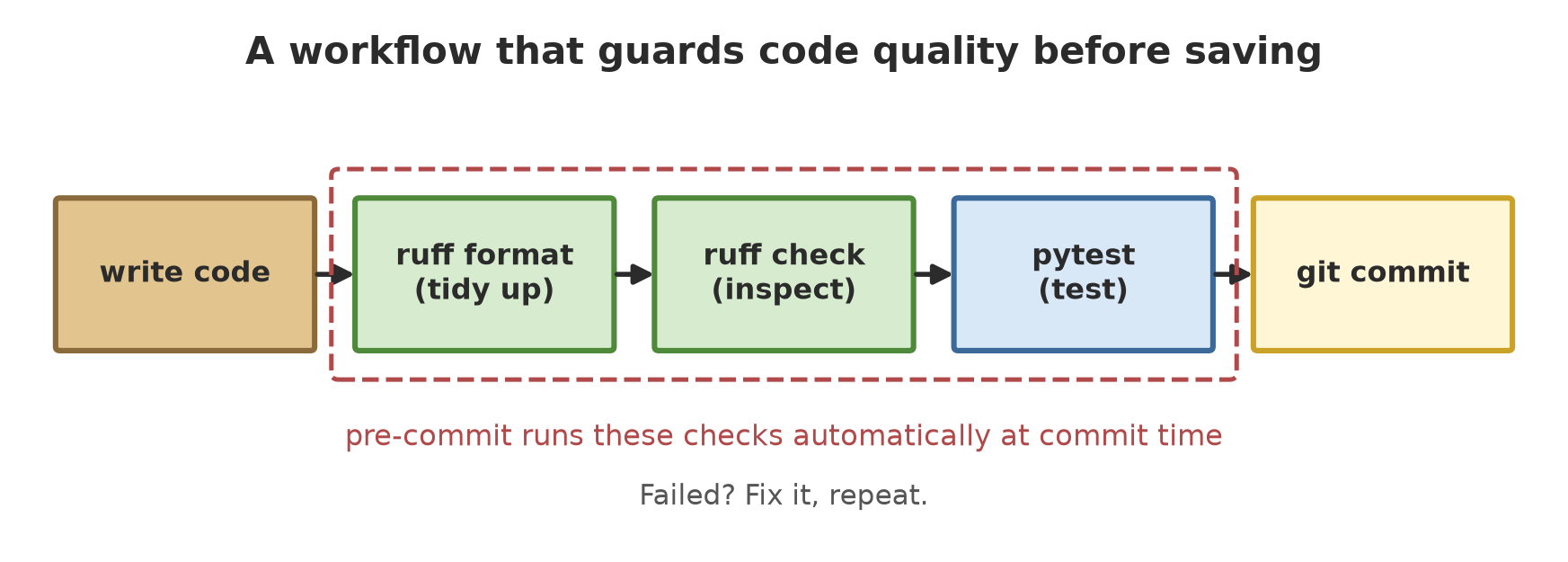
Make a habit of these two commands before saving your work: ruff check --fix . then ruff format ..
pre-commit: an automatic doorkeeper
You will certainly forget to run ruff someday. pre-commit is a tool that puts a “guard” on git: each time you git commit (save changes; covered in Chapter 20), a series of checks runs automatically. If any fails, the commit is cancelled. Install with python -m pip install pre-commit.
Its settings live in the file .pre-commit-config.yaml. In its official documentation (pre-commit.com, read 2026-10-10), most examples fetch hooks from repos on the internet (repo: https://... with rev:). So that our script does not depend on the internet, we use local hooks (repo: local) that run the ruff already on the computer. The script below makes a temporary git repo in _tmp/, installs the guard, and tries two commits.
07_pre_commit.py
# Chapter 19 - pre-commit: automatic checks at every git commit (in a temporary repo)
import os
import shutil
import subprocess
import sys
from pathlib import Path

from helpers import FOLDER, remove_folder

repo = FOLDER / "_tmp" / "repo_pre_commit"
remove_folder(repo)
repo.mkdir(parents=True)
empty_config = repo.parent / "empty_gitconfig"
empty_config.write_text("", encoding="utf-8")

# Temporary git: does not read the user's git configuration; identity via environment variables
python_folder = str(Path(sys.executable).parent)
env = dict(
    os.environ,
    GIT_CONFIG_GLOBAL=str(empty_config), GIT_CONFIG_NOSYSTEM="1",
    GIT_AUTHOR_NAME="Test", GIT_AUTHOR_EMAIL="test@example.invalid",
    GIT_COMMITTER_NAME="Test", GIT_COMMITTER_EMAIL="test@example.invalid",
    PATH=python_folder + os.pathsep + os.environ["PATH"],     # so the 'ruff' command is found
    PYTHONUTF8="1", NO_COLOR="1",
)


def run(*command):
    result = subprocess.run(command, cwd=repo, env=env, text=True, encoding="utf-8",
                            stdout=subprocess.PIPE, stderr=subprocess.STDOUT)
    return result.stdout.strip(), result.returncode


(repo / ".pre-commit-config.yaml").write_text("""\
repos:
  - repo: local
    hooks:
      - id: ruff-check
        name: ruff check
        entry: ruff check
        language: unsupported
        types: [python]
      - id: ruff-format
        name: ruff format
        entry: ruff format --check
        language: unsupported
        types: [python]
""", encoding="utf-8")
shutil.copy(FOLDER / "examples" / "messy.py", repo / "messy.py")
shutil.copy(FOLDER / "examples" / "pyproject.toml", repo / "pyproject.toml")

run("git", "init", "--quiet", "-b", "main")
print(run(sys.executable, "-m", "pre_commit", "install")[0].replace(str(repo), "<repo>"))

run("git", "add", ".")
text, code = run("git", "commit", "-m", "add messy.py")
print("--- first commit (messy code) ---")
print("\n".join(line for line in text.splitlines() if line.startswith(("ruff", "- hook id", "- exit code"))))
print("commit succeeded?", code == 0)

shutil.copy(FOLDER / "examples" / "tidy.py", repo / "messy.py")
run("git", "add", ".")
text, code = run("git", "commit", "-m", "fix messy.py")
print("--- second commit (code is tidy) ---")
print("\n".join(line for line in text.splitlines() if line.startswith("ruff")))
print("commit succeeded?", code == 0)
print("--- history ---")
print(run("git", "log", "--format=%s")[0])
pre-commit installed at .git\hooks\pre-commit
--- first commit (messy code) ---
ruff check...............................................................Failed
- hook id: ruff-check
- exit code: 1
ruff format..............................................................Failed
- hook id: ruff-format
- exit code: 1
commit succeeded? False
--- second commit (code is tidy) ---
ruff check...............................................................Passed
ruff format..............................................................Passed
commit succeeded? True
--- history ---
fix messy.pyThe storyline:
pre-commit installplaces the guard script at.git/hooks/pre-commit.- The first commit (messy code): both hooks answer
Failed, and the commit does not happen (False). - The file is replaced by the tidy version, then the second commit: both
Passed, the commit succeeds, and the git history holds one entry.
The pre-commit documentation notes that the value language: system is now only an alias for unsupported (since version 4.4.0) and will be removed; new configurations should use unsupported, as in this script. For older pre-commit versions, change it to system. This temporary repo uses a git kept apart from your git configuration (see Chapter 20).
Logging: a program’s diary
print() suits experiments, but in a real program you need something more orderly: logging, the built-in module for recording events with a level of importance. According to the Python documentation (Logging HOWTO, read 2026-10-10):
| Level | Value | Use |
|---|---|---|
DEBUG |
10 | technical detail for hunting bugs |
INFO |
20 | confirmation that things work as expected |
WARNING |
30 | something unexpected, the program still works |
ERROR |
40 | a function could not be carried out |
CRITICAL |
50 | a serious error |
A logger passes on only messages whose level is equal to or higher than its effective level. The default level of the root logger is WARNING, so without configuration INFO and DEBUG do not show.
05_logging_basics.py
# Chapter 19 - logging: a program's diary with levels of importance
import logging
import sys

logging.basicConfig(
    level=logging.INFO,
    format="%(levelname)-8s | %(name)s | %(message)s",
    stream=sys.stdout,
)
log = logging.getLogger("pond")

log.debug("technical detail (not shown at level INFO)")
log.info("pond A: 800 fish stocked")
log.warning("pH 5.9 is below the 6.5 limit")
log.error("temperature sensor is not responding")

try:
    average = 540.5 / 0
except ZeroDivisionError:
    log.exception("average calculation failed")      # also prints the traceback

print("effective level:", logging.getLevelName(log.getEffectiveLevel()))
INFO | pond | pond A: 800 fish stocked
WARNING | pond | pH 5.9 is below the 6.5 limit
ERROR | pond | temperature sensor is not responding
ERROR | pond | average calculation failed
Traceback (most recent call last):
File "05_logging_basics.py", line 18, in <module>
average = 540.5 / 0
~~~~~~^~~
ZeroDivisionError: division by zero
effective level: INFObasicConfig(level=..., format=..., stream=...)sets the level and the shape of the records. The form%(levelname)-8smeans the level name, left-aligned, 8 letters wide.- The
DEBUGmessage does not show because the level is set toINFO. The other three show. log.exception(...)is called inside anexcept: it records the message atERRORlevel together with the traceback. This is the most useful replacement forprint.getEffectiveLevel()shows the effective level:INFO.
Logging in the inventory package
The Python documentation suggests each module use logger = logging.getLogger(__name__). Logger names then follow the package hierarchy (inventory.unit is a child of inventory), and messages rise to the parent logger. It also advises that libraries not install their own output handlers: that is the business of the application using them. That is what we follow: the inventory package only records (logger.debug in Unit.add, logger.info in save_summary), and the script decides where the records go.
06_logging_project.py
# Chapter 19 - logging in the inventory package: the screen shows INFO, the file keeps DEBUG
import logging
import sys
from pathlib import Path

sys.path.insert(0, str(Path(__file__).parent / "project"))

from inventory.report import save_summary  # noqa: E402
from inventory.sample import make_sample  # noqa: E402

work = Path(__file__).parent / "_tmp"
work.mkdir(exist_ok=True)
log_file = work / "inventory.log"
log_file.unlink(missing_ok=True)

log_format = "%(levelname)s %(name)s: %(message)s"
screen = logging.StreamHandler(sys.stdout)
screen.setLevel(logging.INFO)
file_handler = logging.FileHandler(log_file, encoding="utf-8")
file_handler.setLevel(logging.DEBUG)
for handler in (screen, file_handler):
    handler.setFormatter(logging.Formatter(log_format))

root = logging.getLogger("inventory")      # parent of inventory.unit and inventory.report
root.setLevel(logging.DEBUG)
root.addHandler(screen)
root.addHandler(file_handler)

units = make_sample()
save_summary(units, work / "summary.txt")
file_handler.close()

lines = log_file.read_text(encoding="utf-8").splitlines()
print(f"Log file contents: {len(lines)} lines")
print("First line:", lines[0])
print("Last line :", lines[-1])
INFO inventory.report: writing 5 summaries to summary.txt
Log file contents: 11 lines
First line: DEBUG inventory.unit: Forest plot A received Tree
Last line : INFO inventory.report: writing 5 summaries to summary.txtTwo handlers are attached to the inventory logger: the screen takes level INFO and up, and the file takes everything down to DEBUG. The result: the screen shows just one line (writing 5 summaries ...), while the log file holds 11 lines: 10 DEBUG records (one for each call to add: 3 trees + 2 + 1 + 1 + 3 = 10) plus 1 INFO record.
Debugging: hunting bugs carefully
Debugging means running a program while stopping at a chosen point to look inside variables. The most basic way is already in Python: the built-in function breakpoint() stops the program and opens the pdb debugger in the terminal.
10_debug_example.py
# Chapter 19 - Where to place a breakpoint when hunting a bug
def biomass_kg(count, weight_g):
    total_g = count * weight_g
    breakpoint()                  # the program stops here; type "p total_g" then "c" to continue
    return total_g / 1000


print(biomass_kg(800, 540.5))
This code was not run when the book was built because breakpoint() stops the program and waits for input from the user, which does not suit an automatic build. The author tried it once with the input p total_g then c: the program stopped at the breakpoint() line, p total_g printed 432400.0 (grams), and c (continue) carried on until it printed 432.4.
In VS Code, a more comfortable way (described from the official VS Code documentation, read 2026-10-10; not run by the author):
- Install the Python extension (the Python Debugger extension comes with it).
- Click in the editor’s left margin to set a breakpoint. A breakpoint can have a condition or a hit count, for instance stopping only after five hits.
- Press F5 (Start Debugging) or choose Debug Python File. The program stops at the breakpoint, and you can inspect variables.
- Finer settings are kept in
.vscode/launch.json(name, theprogramto run,args, and so on).
In a Jupyter notebook inside VS Code (also from the official documentation, not run): Run by Line runs a cell one statement at a time, and Debug Cell gives the full debugger with breakpoints. Both need ipykernel version 6 or later.
The debugger answers “why is the value like this at this point?”. Do not use it as a replacement for tests. Tests (Chapter 18) stop the same bug from coming back; the debugger only helps find it once.
Project documentation: MkDocs and Sphinx
Code without usage notes is soon forgotten. Two popular tools turn text files into a documentation site:
- MkDocs (
mkdocs.org): write pages in Markdown, thenmkdocs buildproduces a static HTML site in thesite/folder.mkdocs serveopens a local preview. The only required setting inmkdocs.ymlissite_name;navsets the menu order (official documentation, read 2026-10-10). - Sphinx (
sphinx-doc.org): an older and richer tool, using reStructuredText.sphinx-quickstartmakes the skeleton (conf.py,index.rst),make htmlbuilds the site, and the autodoc extension pulls documentation straight from docstrings (official documentation, read 2026-10-10). Sphinx is not installed or run in this chapter.
The script below builds a real mini MkDocs site:
08_mkdocs.py
# Chapter 19 - MkDocs: documentation pages from Markdown files (builds a real site in _tmp)
import shutil
import sys

from helpers import FOLDER, run

site = FOLDER / "_tmp" / "docs_site"
shutil.rmtree(site, ignore_errors=True)
(site / "docs").mkdir(parents=True)

(site / "mkdocs.yml").write_text("""\
site_name: Inventory Documentation
nav:
  - Home: index.md
  - How to use: how-to-use.md
""", encoding="utf-8")
(site / "docs" / "index.md").write_text(
    "# Inventory\n\nSample package for recording forest, garden, rice field, pond, and pen.\n",
    encoding="utf-8")
(site / "docs" / "how-to-use.md").write_text(
    "# How to use\n\n```python\nfrom inventory.sample import make_sample\n```\n",
    encoding="utf-8")

text, code = run([sys.executable, "-m", "mkdocs", "build", "--quiet"], site)
print("exit code:", code, "| message:", text or "(none)")

pages = sorted(p.relative_to(site / "site").as_posix() for p in (site / "site").rglob("*.html"))
print("HTML pages produced:", pages)
html = (site / "site" / "index.html").read_text(encoding="utf-8")
print("Site title is on the page?", "Inventory Documentation" in html)
exit code: 0 | message: (none)
HTML pages produced: ['404.html', 'how-to-use/index.html', 'index.html']
Site title is on the page? TrueExit code 0 with no message means the build went fine. Three HTML pages were produced: index.html and how-to-use/index.html from our two Markdown files, plus 404.html, which MkDocs makes itself. The site title from mkdocs.yml is indeed on the page.
The docstrings you have been writing since Chapter 10 are the cheapest documentation: they are read by help(), by editors, and by tools such as Sphinx autodoc. A one-sentence docstring on every function and class already helps a lot.
Running Project I1: tidying inventory
Now all the tools are used on the inventory package, which now has logging and 14 tests (one new test checks the log record with the caplog fixture). The script copies the project into _tmp/, checks it, repairs it, and tests it again.
09_project_tidy.py
# Chapter 19 - Running project I1: tidying the inventory package with ruff, then testing again
import re
import shutil
import sys

from helpers import FOLDER, ruff, run

work = FOLDER / "_tmp" / "project_tidy"
shutil.rmtree(work, ignore_errors=True)
shutil.copytree(FOLDER / "project", work, ignore=shutil.ignore_patterns("__pycache__"))


def check(title):
    text, _ = ruff("check", "--output-format", "concise", ".", folder=work)
    print(f"--- {title} ---")
    print(text)


check("ruff check, before")

ruff("check", "--fix", "--quiet", ".", folder=work)     # safe automatic fixes (import order)
print("--- ruff format ---")
print(ruff("format", ".", folder=work)[0])
check("ruff check, after the automatic fixes")

# One docstring is too long: ruff will not guess your sentence, so shorten it by hand
fixes = {
    "inventory/__init__.py": (
        "Package inventory: information system for forest, garden, rice field, pond, and pen (fictional data).",
        "Package inventory: fictional data for forest, garden, rice field, pond, and pen.",
    ),
}
for path, (old, new) in fixes.items():
    file = work / path
    file.write_text(file.read_text(encoding="utf-8").replace(old, new), encoding="utf-8")
check("ruff check, after the manual fix")
print(ruff("format", "--check", ".", folder=work)[0])

text, code = run([sys.executable, "-m", "pytest", "-q", "-p", "no:cacheprovider"], work)
print("--- pytest ---")
print(re.sub(r" in \d+\.\d+s", "", text.splitlines()[-1]))
--- ruff check, before ---
inventory\__init__.py:1:89: E501 Line too long (107 > 88)
inventory\sample.py:3:1: I001 [*] Import block is un-sorted or un-formatted
inventory\sample.py:3:89: E501 Line too long (91 > 88)
Found 3 errors.
[*] 1 fixable with `--fix`.
--- ruff format ---
3 files reformatted, 6 files left unchanged
--- ruff check, after the automatic fixes ---
inventory\__init__.py:1:89: E501 Line too long (107 > 88)
Found 1 error.
--- ruff check, after the manual fix ---
All checks passed!
9 files already formatted
--- pytest ---
14 passedTrace it:
- Before: 3 findings: two
E501(lines over 88 characters) and oneI001(import order). --fixandformatsolved two findings (imports tidied, the long line wrapped). The remaining 1 is a docstring that is too long: ruff will not guess your sentence, so we shorten it by hand.- Afterwards all checks pass, 9 files are tidy, and all 14 tests still pass: tidying did not break behaviour. That is what the tests of Chapter 18 are for.
Exercises
- Run
ruff checkon an old script of yours (for instance from Chapter 10). How many findings? Pick one code and look up its meaning withpython -m ruff rule F841. - Change
05_logging_basics.pyso the level isDEBUG. Which message is added? - Add a
logger.warning(...)toPondwhenwater_phis outside 6.5 to 8.5, then watch it through06_logging_project.py. (These limits are only example numbers.) - Challenge: change
07_pre_commit.pyso the first file holds onlyimport osand one tidy function. Which hook fails, and which passes? Explain why.
Chapter Summary
- PEP 8 is the official Python style guide: consistent and easy to read.
- ruff check inspects (codes
E,F,I,B, …),--fixrepairs only what is safe, ruff format arranges the appearance without changing behaviour. - pre-commit runs automatic checks at every
git commitand cancels the commit if they fail. - logging records with levels DEBUG, INFO, WARNING, ERROR, CRITICAL; modules use
getLogger(__name__), and the application picks where records go. - Debugging:
breakpoint()(pdb) or the VS Code and Jupyter features; hunting bugs, not a replacement for tests. - MkDocs (Markdown) and Sphinx (reStructuredText) make documentation sites from text files and docstrings.
Next, in Chapter 20: git, GitHub, and the project workflow: saving history, branching, working together, and closing Series I1.