Chapter 53 — Big Data and Scientific Computing: When Data Does Not Fit in Memory
Series A2 — Large-Scale Data and Advanced Geospatial
All scripts for this chapter are in the kode/ch53/ folder. On the web version, you can also download them all at once (zip). build_data.py is only a helper module that makes fictional sample data.
In Chapter 50, you processed millions of rows with Polars and DuckDB; that is not repeated here. But there is a limit that one computer cannot pass: memory (RAM). Twenty years of satellite images, a pile of drone photos, or ten years of sensor data can be larger than the RAM. If you force it to load, the program stops with a MemoryError (or the computer slows to a crawl).
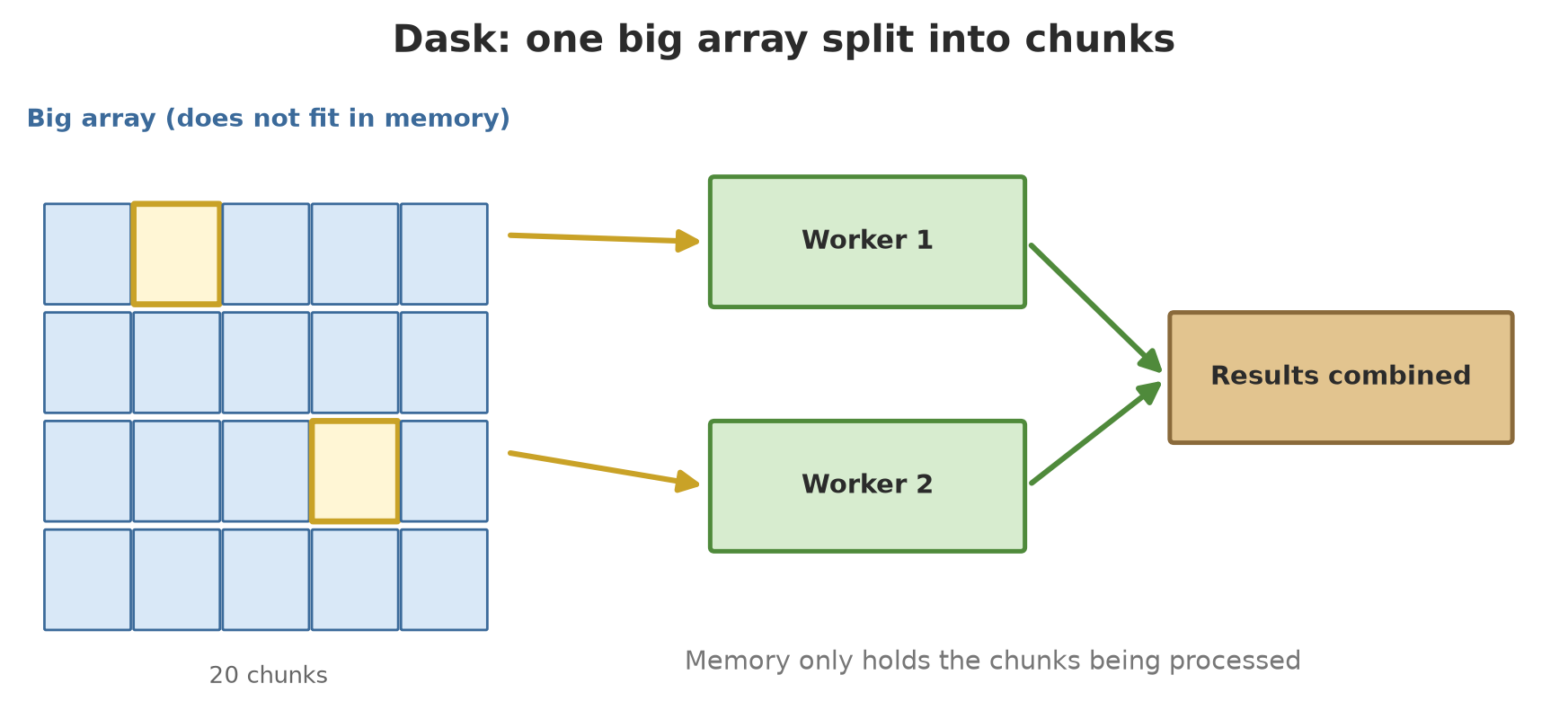
Imagine moving a truckload of rice into a barn. You do not lift the whole truck at once; you carry sack by sack. Processing piece by piece (chunk by chunk) is the principle of this chapter: read one sack, work on it, discard it, take the next. Dask automates this, and spreads the sacks over many CPU cores.
Dask DataFrame: many files, one table
Dask is a parallel computing library that imitates the pandas and NumPy interfaces. In a Dask DataFrame, one big table consists of many partitions (each a pandas table), and calculation is lazy: you build a plan, and only compute() really works.
We make 12 monthly Parquet files (600,000 rows in total) and read them as one table.
01_dask_dataframe.py
# Chapter 53 - Dask DataFrame: many Parquet files read as one big table, computed piece by piece
import dask
import dask.dataframe as dd

from build_data import make_monthly_parquet

folder = make_monthly_parquet()                      # 12 files x 50,000 rows = 600,000 rows

ddf = dd.read_parquet(folder)                        # LAZY: only the metadata is read
print("Type:", type(ddf).__name__)
print("Number of partitions (pieces):", ddf.npartitions)
print("Columns:", list(ddf.columns))

# Building a calculation does not calculate anything yet
mean = ddf.groupby("unit")["value"].mean()
print("Mean per unit (still a plan):", type(mean).__name__)

result = mean.compute()                               # ONLY here is the data read and calculated
print(result.round(3).sort_index())

# Several results at once: Dask shares the work (the data is read only once)
row_count, max_value = dask.compute(ddf.shape[0], ddf["value"].max())
print("Number of rows:", row_count, "| maximum value:", max_value)
Type: DataFrame
Number of partitions (pieces): 12
Columns: ['month', 'unit', 'value']
Mean per unit (still a plan): Series
unit
barn 26.484
orchard 26.493
pond 26.506
Name: value, dtype: float64
Number of rows: 600000 | maximum value: 44.938read_parquet(folder)finishes instantly: only the metadata is read. The table has 12 partitions, one per file.ddf.groupby("unit")["value"].mean()only produces a plan (a lazySeriesobject). No data has been read yet..compute()runs the plan: data is read per partition, summarized, then combined. The mean of all three units is about 26.5.dask.compute(a, b)calculates several results at once so the data is read only once: 600,000 rows, maximum value 44.938.
For data that still fits in RAM, Polars or DuckDB (Chapter 50) are usually faster and simpler than Dask. Use Dask when the data is larger than memory, when you need a pandas/NumPy-like interface on big data, or when the work must be split over many machines.
The task graph: how Dask thinks
Behind the scenes, Dask turns your plan into a task graph: nodes are small jobs, arrows mean “this one needs the result of that one”. Tasks that do not depend on each other can run at the same time. With dask.delayed, you build your own graph from ordinary Python functions.
02_task_graph.py
# Chapter 53 - Dask delayed: build a task graph, then run it (possibly in parallel)
import dask
from dask import delayed


def read_block(number):
    """Pretend to read one block of field data (example numbers)."""
    return [number * 10 + i for i in range(5)]


def add_up(block):
    return sum(block)


blocks = [delayed(read_block)(n) for n in range(4)]    # 4 read tasks, not running yet
block_sums = [delayed(add_up)(b) for b in blocks]      # 4 sum tasks, depending on the read tasks
total = delayed(sum)(block_sums)                       # one closing task

print("Type of total:", type(total).__name__)
graph = dict(total.__dask_graph__())
print("Number of tasks in the graph:", len(graph), "(4 read + 4 sum + 1 total)")

# The 'read' and 'sum' tasks of different blocks are independent, so they may run at the same time
print("Result (threads):", total.compute(scheduler="threads"))
print("Result (synchronous, one by one):", total.compute(scheduler="synchronous"))
print("Manual calculation:", sum(sum(read_block(n)) for n in range(4)))
Type of total: Delayed
Number of tasks in the graph: 9 (4 read + 4 sum + 1 total)
Result (threads): 340
Result (synchronous, one by one): 340
Manual calculation: 340There are 4 read tasks, 4 sum tasks, and 1 closing task: 9 nodes, exactly as printed. The result is 340, whether calculated with parallel threads, synchronously (one by one), or by manual formula. The result must be the same; only the way and the speed differ.
Dask Array: a giant array in chunks
Dask Array imitates NumPy. A 20,000 x 20,000 array of float32 numbers takes about 1.6 GB if whole, more than is comfortable for many computers. In Dask, that array is split into 100 chunks of 16 MB.
03_dask_array.py
# Chapter 53 - Dask Array: a huge array split into chunks; only a few chunks are in memory at a time
import dask.array as da
import numpy as np

# 20,000 x 20,000 float32 = about 1.6 GB if whole. Here it is only a PLAN; nothing has been made yet.
x = da.random.default_rng(42).random((20_000, 20_000), chunks=(2_000, 2_000), dtype="float32")
print("Shape:", x.shape, "| chunk:", x.chunksize, "| number of chunks:", x.npartitions)
print("Whole size (GB):", round(x.nbytes / 1e9, 2), "| size of one chunk (MB):", round(x.blocks[0, 0].nbytes / 1e6, 1))

# A reduction: every chunk is calculated on its own, then the small results are combined
mean = x.mean()
print("Mean:", round(float(mean.compute()), 4), "(expected about 0.5)")

# NumPy-style operations still work: mean per column, then take the first 3 values
per_column = x.mean(axis=0)
print("Mean per column (first 3):", [round(float(v), 3) for v in per_column[:3].compute()])

# Compare with NumPy on a small array: the results must be equal
small = np.arange(10_000, dtype="float64").reshape(100, 100)
dsmall = da.from_array(small, chunks=(25, 25))
print("Dask equals NumPy:", bool(np.allclose(dsmall.sum(axis=1).compute(), small.sum(axis=1))))
Shape: (20000, 20000) | chunk: (2000, 2000) | number of chunks: 100
Whole size (GB): 1.6 | size of one chunk (MB): 16.0
Mean: 0.5 (expected about 0.5)
Mean per column (first 3): [0.495, 0.499, 0.501]
Dask equals NumPy: Trueda.random...only makes a plan for 100 chunks (2,000 x 2,000 each). Memory is not used for 1.6 GB.x.mean()is calculated chunk by chunk: each chunk is made, averaged, then thrown away; only the small results are combined. The result is 0.5, as expected for uniform random numbers.- NumPy-style operations such as
mean(axis=0)still work. On a small array, Dask gives the same numbers as NumPy (True).
How do you choose a chunk size? The Dask documentation says sizes from 10 MB to 1 GB are common, depending on RAM and the duration of the computation; a chunk must be small enough that many of them fit in memory at once. It also advises that a task should run longer than about 100 ms, because scheduling costs about 1 ms per task: chunks that are too small make scheduling more expensive than the work itself. The automatic default size is 128 MiB.
Processing piece by piece without Dask
Dask only automates something you could write yourself. The next example reads a 4096 x 4096 pixel image (about 64 MB; small, so it can be compared with the whole-image way) block by block and keeps only three accumulators: the sum, the sum of squares, and the pixel count. That is enough for the mean and the standard deviation.
04_manual_chunks.py
# Chapter 53 - Processing piece by piece without a special library: read a block, summarize, discard, go on
import tracemalloc
from pathlib import Path

import numpy as np
import rasterio
from rasterio.transform import from_origin
from rasterio.windows import Window

tmp = Path(__file__).parent / "_tmp"
tmp.mkdir(exist_ok=True)
path = tmp / "big_image.tif"
SIZE, BLOCK = 4096, 512

# Write a fictional image block by block (so even the maker does not need much memory)
if not path.exists():
    with rasterio.open(path, "w", driver="GTiff", height=SIZE, width=SIZE, count=1, dtype="float32",
                       crs="EPSG:32748", transform=from_origin(700000, 9270000, 10, 10),
                       tiled=True, blockxsize=BLOCK, blockysize=BLOCK) as dst:
        for row in range(0, SIZE, BLOCK):
            for col in range(0, SIZE, BLOCK):
                rng = np.random.default_rng(row * SIZE + col)
                dst.write(rng.normal(0.5, 0.1, (BLOCK, BLOCK)).astype("float32"), 1,
                          window=Window(col, row, BLOCK, BLOCK))

# Way 1: block by block, keeping only the sum, the sum of squares, and the count (enough for mean and std)
tracemalloc.start()
n, s, s2, high = 0, 0.0, 0.0, 0
with rasterio.open(path) as src:
    for _, window in src.block_windows(1):
        block = src.read(1, window=window).astype("float64")
        n += block.size
        s += block.sum()
        s2 += (block ** 2).sum()
        high += int((block > 0.7).sum())
peak_block = tracemalloc.get_traced_memory()[1]
tracemalloc.stop()
mean = s / n
std = (s2 / n - mean ** 2) ** 0.5

# Way 2: read everything at once (here it still fits, so it can serve as a comparison)
tracemalloc.start()
with rasterio.open(path) as src:
    whole = src.read(1).astype("float64")
peak_whole = tracemalloc.get_traced_memory()[1]
tracemalloc.stop()

print("Number of pixels:", n, "| number of blocks:", (SIZE // BLOCK) ** 2)
print("Per block -> mean:", round(mean, 5), " std:", round(std, 5), " pixels > 0.7:", high)
print("Whole     -> mean:", round(float(whole.mean()), 5), " std:", round(float(whole.std()), 5),
      " pixels > 0.7:", int((whole > 0.7).sum()))
print("Peak memory of the per-block way is under 1/10 of the whole way:", peak_block < peak_whole / 10)
Number of pixels: 16777216 | number of blocks: 64
Per block -> mean: 0.50002 std: 0.10002 pixels > 0.7: 382303
Whole -> mean: 0.50002 std: 0.10002 pixels > 0.7: 382303
Peak memory of the per-block way is under 1/10 of the whole way: True- The image is made of 64 blocks of 512 x 512. Even its maker writes block by block.
- The per-block result and the whole result are identical: mean 0.50002, standard deviation 0.10002, and 382,303 pixels above 0.7.
- The peak memory of the per-block way is under one tenth of the whole way (measured with
tracemalloc). That is the point: the same result, but small memory, so the image size hardly matters any more.
The standard deviation formula s2/n - mean**2 is easy to write but can be numerically unstable with very large or very tight numbers (a difference of two nearly equal numbers). For real data, use a stable algorithm such as Welford’s, or combine per-block statistics with the known merging formula. Here the data is tame, so the results agree to five decimals.
xarray + Dask: multi-date image stacks
In Chapter 51 you used xarray for a small stack. When the stack is big, xarray uses Dask behind the scenes: the array keeps its names (time, y, x) but its data is lazy Dask chunks read from Zarr. Here are 24 dates x 1024 x 1024 pixels (about 100 MB); in the real world this could be hundreds of GB.
05_xarray_dask.py
# Chapter 53 - xarray + Dask: a fictional multi-date image stack processed piece by piece
import shutil
from pathlib import Path

import dask.array as da
import numpy as np
import pandas as pd
import xarray as xr

tmp = Path(__file__).parent / "_tmp"
tmp.mkdir(exist_ok=True)
zarr_path = tmp / "ndvi_24months.zarr"
shutil.rmtree(zarr_path, ignore_errors=True)

# 1. Make 24 dates x 1024 x 1024 pixels (about 100 MB) straight into Zarr, one chunk per date-tile
time = pd.date_range("2024-01-01", periods=24, freq="MS")
y, x = np.arange(1024), np.arange(1024)
noise = da.random.default_rng(5).normal(0, 0.02, (24, 1024, 1024), chunks=(1, 256, 256)).astype("float32")
month_no = np.arange(24, dtype="float32")[:, None, None]
dry_patch = ((y[:, None] < 256) & (x[None, :] < 256))[None, :, :]        # one 256x256 corner 'drying out'
trend = month_no * np.where(dry_patch, -0.02, 0.01).astype("float32")    # NDVI +0.01/month, the patch -0.02
base = (0.4 + 0.2 * np.sin(x / 150))[None, None, :].astype("float32")        # a simple spatial pattern
ndvi = xr.DataArray(noise + trend + base, dims=("time", "y", "x"),
                    coords={"time": time, "y": y, "x": x}, name="ndvi")
ndvi.to_dataset().to_zarr(zarr_path, mode="w", consolidated=False)

# 2. Open it again: INSTANT because only the metadata is read
ds = xr.open_zarr(zarr_path, consolidated=False)
da_ndvi = ds["ndvi"]
print("Shape:", dict(da_ndvi.sizes), "| chunks:", da_ndvi.data.chunksize)
print("Size if whole (MB):", round(da_ndvi.nbytes / 1e6), "| calculated in memory right now: none yet")

# 3. Spatial aggregation: mean per month, calculated chunk by chunk
per_month = da_ndvi.mean(dim=("y", "x")).compute()
print("Mean NDVI of month 1, 12, 24:", [round(float(per_month[i]), 3) for i in (0, 11, 23)])

# 4. Time aggregation: change per pixel (end - start), then the percentage of pixels that rose
rise = da_ndvi.isel(time=slice(-3, None)).mean("time") - da_ndvi.isel(time=slice(0, 3)).mean("time")
print("Pixels whose NDVI rose:", round(float((rise > 0).mean().compute()) * 100, 1), "%")

# 5. Rechunk: operations along time prefer the whole time series of a pixel in one chunk
for_time = da_ndvi.chunk({"time": -1, "y": 128, "x": 128})
print("Chunks after rechunking:", for_time.data.chunksize)
max_per_pixel = for_time.max("time")
print("Maximum NDVI over the whole period (mean of all pixels):", round(float(max_per_pixel.mean().compute()), 3))
Shape: {'time': 24, 'y': 1024, 'x': 1024} | chunks: (1, 256, 256)
Size if whole (MB): 101 | calculated in memory right now: none yet
Mean NDVI of month 1, 12, 24: [0.404, 0.494, 0.591]
Pixels whose NDVI rose: 93.8 %
Chunks after rechunking: (24, 128, 128)
Maximum NDVI over the whole period (mean of all pixels): 0.629- The array is made and written to Zarr chunk by chunk without ever being whole in memory. When opened again, it is instantly ready: only the metadata is read (chunks of
(1, 256, 256)). mean(dim=("y", "x"))is calculated per chunk: the mean NDVI of months 1, 12, and 24 is 0.404, 0.494, and 0.591.- The change per pixel (mean of the last three months minus the first three) is positive in 93.8% of the pixels. The rest, a 256 x 256 pixel corner (6.25%) made to “dry out” on purpose, goes down.
- Rechunk: for operations along time (such as
max("time")), it is more efficient if the whole time series of a pixel sits in one chunk, so the chunks are changed to(24, 128, 128). The ideal chunk pattern depends on the question you ask.
Schedulers and many cores
Dask has several schedulers: the part that decides how tasks are run.
| Scheduler | How it works | Suitable for |
|---|---|---|
synchronous |
one task at a time, in the main process | debugging and testing |
threads |
several threads in one process | work that releases the GIL (NumPy, file reading) |
processes |
several separate processes | heavy pure-Python work bound by the CPU |
In standard Python, the GIL stops threads from speeding up pure-Python loops; separate processes solve that. (Chapter 47 discusses the GIL-free mode.) The next example runs the same pure-Python calculation with all three schedulers.
06_dask_schedulers.py
# Chapter 53 - Dask schedulers: synchronous, threads, and processes
import dask
from dask import delayed


def heavy_work(n):
    """Pure-Python work bound by the CPU: an example of a 'heavy' calculation per block."""
    total = 0
    for i in range(300_000):
        total += (i * n) % 7
    return total


if __name__ == "__main__":              # required on Windows: child processes re-import this file
    tasks = [delayed(heavy_work)(n) for n in range(1, 9)]
    total = delayed(sum)(tasks)

    results = {}
    for name in ("synchronous", "threads", "processes"):
        results[name] = total.compute(scheduler=name)
        print(f"{name:12s} -> {results[name]}")
    print("All three are equal:", len(set(results.values())) == 1)

    # The default scheduler can be replaced for one block of code only
    with dask.config.set(scheduler="synchronous"):
        print("Inside the 'with' block (synchronous):", total.compute())
synchronous -> 6299979
threads -> 6299979
processes -> 6299979
All three are equal: True
Inside the 'with' block (synchronous): 6299979All three give the same result (6,299,979); only the way of running differs. Note if __name__ == "__main__":: on Windows, a child process re-imports your file; without that guard, every child process would run the whole script again. (The output shows no run times because they depend on your computer; measure them on your own computer.)
Without Dask, Python has ProcessPoolExecutor (Chapter 35). The next example splits 64 image blocks over 2 workers, then compares with the sequential way. Finally, Dask’s map_blocks applies an ordinary NumPy function to each chunk in parallel.
07_multicore.py
# Chapter 53 - Parallel on many cores for image pieces: ProcessPoolExecutor and dask.map_blocks
from concurrent.futures import ProcessPoolExecutor
from pathlib import Path

import dask.array as da
import numpy as np
import rasterio
import rioxarray

path = Path(__file__).parent / "_tmp" / "big_image.tif"       # made by script 04


def process_block(window):
    """Runs in another process: opens the file itself, reads one block, returns a small summary."""
    with rasterio.open(path) as src:
        block = src.read(1, window=window)
    return int((block > 0.7).sum()), block.size


if __name__ == "__main__":
    if not path.exists():
        raise SystemExit("run 04_manual_chunks.py first")
    with rasterio.open(path) as src:
        windows = [w for _, w in src.block_windows(1)]

    serial = [process_block(w) for w in windows]
    with ProcessPoolExecutor(max_workers=2) as pool:
        parallel = list(pool.map(process_block, windows, chunksize=8))
    print("Number of blocks:", len(windows))
    print("Parallel result equals serial:", serial == parallel)
    print("Pixels > 0.7:", sum(a for a, _ in parallel), "of", sum(b for _, b in parallel))

    # The Dask way: map_blocks applies an ordinary NumPy function to each chunk; the image is opened LAZILY
    with rioxarray.open_rasterio(path, chunks={"x": 512, "y": 512}) as image:   # 'with' closes the file cleanly
        big = image.squeeze("band").data
        classes = da.map_blocks(lambda b: np.digitize(b, [0.4, 0.6]).astype("uint8"), big, dtype="uint8")
        counts = da.bincount(classes.ravel(), minlength=3).compute()
    print("Class 0 (<0.4), 1 (0.4-0.6), 2 (>=0.6):", counts.tolist())
Number of blocks: 64
Parallel result equals serial: True
Pixels > 0.7: 382303 of 16777216
Class 0 (<0.4), 1 (0.4-0.6), 2 (>=0.6): [2662364, 11451060, 2663792]The parallel result is the same as the serial one (382,303 of 16,777,216 pixels above 0.7). Each process opens the file itself and only returns a small summary, not a block of pixels. The golden rule: send little, calculate much; moving big data between processes is slow. map_blocks groups values into three classes: 2,662,364 pixels below 0.4, 11,451,060 between 0.4 and 0.6, and 2,663,792 pixels of 0.6 and above.
Parallel is not always faster. There is a cost to starting processes, moving data, and combining results. Measure first on a small example, and make sure the parallel result equals the serial result before trusting it. When one machine is not enough, Dask can also run on many machines (the distributed package); that was not tried in this chapter.
Running Project A2: NDVI time series per orchard block
The project’s finale: from the 24-month Zarr, calculate the mean NDVI of four orchard blocks in one pass, find the slope of their trend, and save the resulting table as Parquet.
08_project_closing.py
# Chapter 53 - Running project A2 (closing): NDVI time series per orchard block from Zarr, saved as a Parquet table
from pathlib import Path

import dask
import numpy as np
import polars as pl
import xarray as xr

tmp = Path(__file__).parent / "_tmp"
zarr_path = tmp / "ndvi_24months.zarr"                  # made by script 05
if not zarr_path.exists():
    raise SystemExit("run 05_xarray_dask.py first")

ds = xr.open_zarr(zarr_path, consolidated=False)
ndvi = ds["ndvi"]

# Four orchard blocks of 256 x 256 pixels (row, column window). Block A is the patch that 'dries out'.
blocks = {"A": (0, 0), "B": (0, 512), "C": (512, 0), "D": (512, 512)}
series = {name: ndvi.isel(y=slice(r, r + 256), x=slice(c, c + 256)).mean(dim=("y", "x")) for name, (r, c) in blocks.items()}

# All the means are calculated in ONE pass: Dask reads each Zarr chunk only once
results = dict(zip(series, dask.compute(*series.values())))

rows = []
months = np.arange(24)
for name, values in results.items():
    v = values.values.astype("float64")
    slope = float(np.polyfit(months, v, 1)[0])          # NDVI change per month
    rows.append({"block": name, "ndvi_start": round(v[:3].mean(), 3), "ndvi_end": round(v[-3:].mean(), 3),
                 "slope_per_month": round(slope, 4), "declining": slope < 0})
table = pl.DataFrame(rows)
print(table)

table.write_parquet(tmp / "block_features.parquet")
print("Saved:", "block_features.parquet", "| declining blocks:", table.filter(pl.col("declining"))["block"].to_list())
shape: (4, 5)
┌───────┬────────────┬──────────┬─────────────────┬───────────┐
│ block ┆ ndvi_start ┆ ndvi_end ┆ slope_per_month ┆ declining │
│ --- ┆ --- ┆ --- ┆ --- ┆ --- │
│ str ┆ f64 ┆ f64 ┆ f64 ┆ bool │
╞═══════╪════════════╪══════════╪═════════════════╪═══════════╡
│ A ┆ 0.513 ┆ 0.093 ┆ -0.02 ┆ true │
│ B ┆ 0.251 ┆ 0.461 ┆ 0.01 ┆ false │
│ C ┆ 0.543 ┆ 0.753 ┆ 0.01 ┆ false │
│ D ┆ 0.251 ┆ 0.461 ┆ 0.01 ┆ false │
└───────┴────────────┴──────────┴─────────────────┴───────────┘
Saved: block_features.parquet | declining blocks: ['A']Block A, made to “dry out” on purpose, falls from NDVI 0.513 to 0.093 with a slope of -0.02 per month, and is marked declining. Blocks B, C, and D rise 0.01 per month (the differences in starting values between blocks come from the fictional spatial pattern). The final result is a small table (block_features.parquet) of ready-to-use summaries, far easier to manage than 100 MB of images.
Exercises
- In
03_dask_array.py, change the chunks to(500, 500)and(10000, 10000). How many chunks and what size per chunk result in each case? Which is too small or too large according to the documentation’s advice? - In
01_dask_dataframe.py, also calculate the mean value per month (groupby("month")). Does the mean rise each month as the data maker designed? - Change
08_project_closing.pyto mark a block “declining” when its slope is below -0.005 (not below 0). Does the result change? - Challenge: write a per-block function that finds the minimum and maximum of the
big_image.tifimage without loading the whole image, then compare withsrc.read(1).min()and.max().
Chapter Summary
- Data larger than memory is processed piece by piece (chunk): read, summarize, discard, repeat.
- Dask builds a lazy task graph;
compute()runs it. DataFrame (many partitions) and Array (many chunks) imitate pandas and NumPy. - Chunk size: small enough that many fit in memory, large enough that a task lasts longer than about 100 ms; the chunk pattern follows your question (rechunk when needed).
- xarray + Dask processes multi-date image stacks from Zarr without loading them whole.
- Schedulers:
synchronous(debugging),threads(release the GIL),processes(heavy CPU); the result must be the same. On Windows, useif __name__ == "__main__":. - Parallel costs something: send small data, calculate much, measure first, and match the serial result.
Closing Series A2
Congratulations! You have finished Series A2. You can now build a modern data flow (Parquet, Polars, DuckDB, Prefect), read the earth from afar through cloud-native formats (COG, GeoParquet, Zarr, STAC), turn LiDAR into a canopy height model, design a field sensor system that survives trouble, and process data that does not fit in memory with Dask.
The A2 running project now stands on three legs: a sensor warehouse for orchard, pond, and barn; images organized through a STAC catalog into COG and Zarr, plus a canopy height model from LiDAR; and a feature table per orchard block derived from NDVI time series.
Big data is now available and well organized. Series A3 trains models from that data: machine learning for natural resources, with features such as the block_features table above as practice material.
Next, in Chapter 54: classic machine learning and tree-based models: decision trees, random forests, and gradient boosting, trained on tabular data such as block_features.