Chapter 12 — Error Handling: Programs That Don’t Collapse Easily
Series B3 — Small Programs That Are Useful
All scripts for this chapter are in the kode/ch12/ folder. On the web version, you can also download them all at once (zip).
Imagine a field officer typing “thirty” when the computer is waiting for the number 30. Without preparation, the program stops abruptly with a scary red message. In earlier chapters, errors arrived as lessons. Now you learn to prepare for them, like a farmer putting a fence around a pond: not hoping nobody stumbles, but making sure nobody falls in.
In Python, an error is called an exception. When one happens and nobody catches it, the program stops. Our job: catch the ones that can be fixed, and let the truly fatal ones show up clearly.
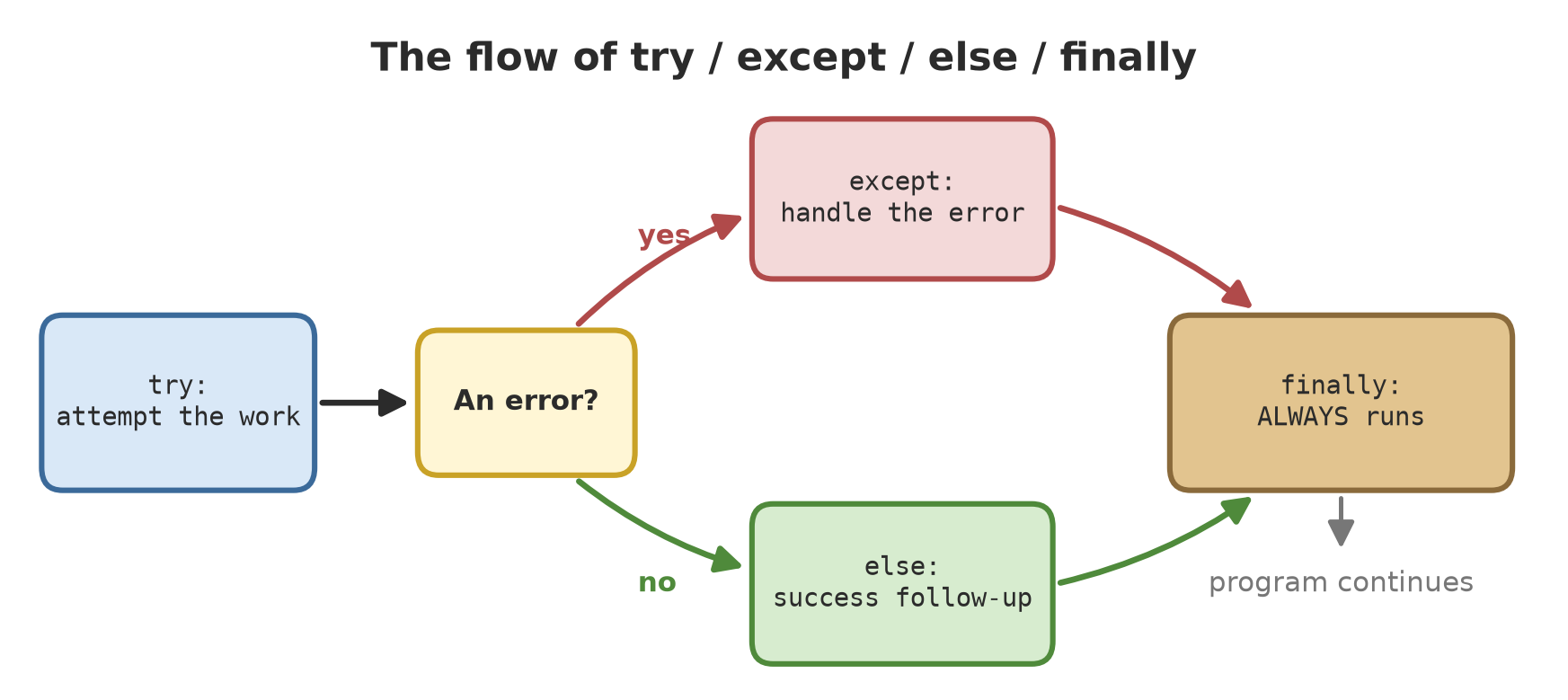
try and except
01_try_basics.py
# Chapter 12 - try and except: catching errors so the program does not collapse
diameter_text = "thirty"             # the officer typed a word, not a number

try:
    diameter = float(diameter_text)
    print("Diameter:", diameter)
except ValueError:
    print("Diameter must be a number, not:", diameter_text)

print("The program keeps running to the last line")
Diameter must be a number, not: thirty
The program keeps running to the last linePython tries the content of try. When float("thirty") fails with a ValueError, it jumps to except ValueError. The rest of the try body is skipped, but the program carries on: the last line is still printed.
Don’t write an empty except: or catch everything with except Exception: and then stay silent. Real errors get hidden and you won’t know why the result looks odd. Catch the error type you expect, and do something meaningful (give a message, log it, or use a fallback value).
Know your error types
Every error has a type and a message. The following script deliberately causes eight common errors and shows them:
02_error_types.py
# Chapter 12 - The error types that appear most often
def attempt(name, action):
    try:
        action()
    except Exception as e:
        print(f"{name:14} -> {type(e).__name__}: {e}")


items = [10, 20, 30]
data = {"species": "Teak"}

attempt("ValueError", lambda: int("three"))
attempt("ZeroDivision", lambda: 10 / 0)
attempt("IndexError", lambda: items[5])
attempt("KeyError", lambda: data["diameter"])
attempt("TypeError", lambda: "age: " + 5)
attempt("NameError", lambda: missing_name)
attempt("AttributeError", lambda: items.add(40))
attempt("FileNotFound", lambda: open("does_not_exist.txt"))
ValueError -> ValueError: invalid literal for int() with base 10: 'three'
ZeroDivision -> ZeroDivisionError: division by zero
IndexError -> IndexError: list index out of range
KeyError -> KeyError: 'diameter'
TypeError -> TypeError: can only concatenate str (not "int") to str
NameError -> NameError: name 'missing_name' is not defined
AttributeError -> AttributeError: 'list' object has no attribute 'add'
FileNotFound -> FileNotFoundError: [Errno 2] No such file or directory: 'does_not_exist.txt'| Type | Meaning | Field example |
|---|---|---|
ValueError |
wrong value for that type | turning “three” into a number |
ZeroDivisionError |
divided by zero | average of an empty list |
IndexError |
position outside the list | taking plot no. 6 when there are 3 |
KeyError |
dict key does not exist | asking for a “diameter” column that isn’t there |
TypeError |
mismatched types | joining text with a number |
NameError |
variable name does not exist yet | typo in a variable name |
AttributeError |
object lacks that feature | calling .add() on a list |
FileNotFoundError |
file not found | wrong file name (see Chapter 13) |
In that script, except Exception as e is used only as a demonstration tool, so all types can be displayed with type(e).__name__ (the type name) and e (the message).
else and finally
03_else_finally.py
# Chapter 12 - try / except / else / finally
def divide(a, b):
    try:
        result = a / b
    except ZeroDivisionError:
        print("  [except] divisor is zero")
        return None
    else:
        print("  [else] no error")
        return result
    finally:
        print("  [finally] always runs")


print("divide(10, 4):")
print("  result =", divide(10, 4))
print("divide(10, 0):")
print("  result =", divide(10, 0))
divide(10, 4):
[else] no error
[finally] always runs
result = 2.5
divide(10, 0):
[except] divisor is zero
[finally] always runs
result = Noneelseruns only when there was no error intry.finallyruns always, error or not, even when there is areturn. Good for “cleaning up”, such as closing files.
Look at divide(10, 4): the order is else then finally. With divide(10, 0): except then finally.
raise: raising your own error
Sometimes there is no built-in error, yet the data is clearly nonsense. Water pH can only be 0 to 14. We raise the error ourselves with raise:
04_raise.py
# Chapter 12 - raise: we raise the error ourselves
def check_ph(ph):
    if not 0 <= ph <= 14:
        raise ValueError(f"pH {ph} is outside the range 0-14")
    return ph


for value in [7.2, 15, -1]:
    try:
        print("Valid pH:", check_ph(value))
    except ValueError as e:
        print("Rejected:", e)
Valid pH: 7.2
Rejected: pH 15 is outside the range 0-14
Rejected: pH -1 is outside the range 0-14pH 7.2 passes; 15 and -1 are rejected with the message we wrote. A clear error message saves a lot of time: say what is wrong and its value.
Your own error types
In a larger project, make your own error types by inheriting from Exception (classes and inheritance are covered fully in Chapter 16; here just follow the pattern):
05_own_errors.py
# Chapter 12 - Making our own error types
class FieldDataError(Exception):
    """Parent of all our field data errors."""


class UnreasonableDiameter(FieldDataError):
    def __init__(self, value):
        super().__init__(f"diameter {value} cm is unreasonable (must be 1 to 300)")
        self.value = value


def check_diameter(cm):
    if not 1 <= cm <= 300:
        raise UnreasonableDiameter(cm)
    return cm


for cm in [32.5, 0.2, 450]:
    try:
        print("OK:", check_diameter(cm))
    except FieldDataError as e:              # catches every descendant of FieldDataError
        print(f"{type(e).__name__}: {e} (value={e.value})")
OK: 32.5
UnreasonableDiameter: diameter 0.2 cm is unreasonable (must be 1 to 300) (value=0.2)
UnreasonableDiameter: diameter 450 cm is unreasonable (must be 1 to 300) (value=450)UnreasonableDiameter is a child of FieldDataError, so except FieldDataError catches both. Handy: one except can handle the whole family of our project’s errors, while other built-in errors pass through.
Reading a traceback
When an error is not caught, Python prints a traceback: the trail of function calls leading to the error.
06_read_traceback.py
# Chapter 12 - Reading a traceback: an error three functions deep
def average(numbers):
    return sum(numbers) / len(numbers)


def summarize_plot(name, diameters):
    avg = average(diameters)
    print(f"Plot {name}: average {avg:.1f} cm")


def report():
    summarize_plot("A", [32.5, 45.2])
    summarize_plot("B", [])         # plot B has no data yet


report()
Plot A: average 38.9 cm
Traceback (most recent call last):
File "06_read_traceback.py", line 16, in <module>
report()
~~~~~~^^
File "06_read_traceback.py", line 13, in report
summarize_plot("B", []) # plot B has no data yet
~~~~~~~~~~~~~~^^^^^^^^^
File "06_read_traceback.py", line 7, in summarize_plot
avg = average(diameters)
File "06_read_traceback.py", line 3, in average
return sum(numbers) / len(numbers)
~~~~~~~~~~~~~^~~~~~~~~~~~~~
ZeroDivisionError: division by zeroRead it from the bottom up:
- The last line is the heart of it:
ZeroDivisionError: division by zero, the error type and message. - The line
File ... in averagejust above shows the scene of the incident: the divisionsum(numbers) / len(numbers)wherelen(numbers)is 0. - Further up,
summarize_plotcalled it, thenreport, then<module>(the outermost code). That is the chain of calls. - The
~~~^^^marks under a line of code point to the troubled part of the expression. - The real cause is in the data: plot B has an empty list. Plot A was printed before the error, so the trail also tells you how far the program got.
Line numbers in a traceback are counted from the first line of the file, including the comment line at the very top. That is why the numbers shown above match exactly the lines in the book’s code and in the downloadable file: count the opening comment as line 1.
Hunting bugs: print, assert, logging
A program mistake is called a bug. Hunting it is called debugging. Three basic tools:
1. print debugging: print the variables at each step. Use repr() so hidden quote marks and spaces become visible.
07_print_debug.py
# Chapter 12 - Debugging with print: look inside variables at every step
def total_weight_kg(ponds):
    total = 0
    for p in ponds:
        weight_kg = p["count"] * p["weight_g"] / 1000
        print("  [debug]", repr(p["name"]), "->", weight_kg)     # repr shows the quote marks
        total += weight_kg
    return total


ponds = [
    {"name": "A", "count": 800, "weight_g": 540.5},
    {"name": "B", "count": 1250, "weight_g": 300.0},
]
print("Total:", total_weight_kg(ponds), "kg")
[debug] 'A' -> 432.4
[debug] 'B' -> 375.0
Total: 807.4 kgPond A is 432.4 kg and pond B 375.0 kg, adding up to 807.4 kg. With the [debug] lines you see each term of the sum. Delete those lines once the bug is found.
2. assert: a safety rail that states “this is certainly true”. If it is false, the program stops with an AssertionError.
08_assert_passes.py
# Chapter 12 - assert: a safety rail saying "this is CERTAINLY true" (the passing version)
def survival_percent(start, alive):
    assert start > 0, "the starting count must be above 0"
    assert 0 <= alive <= start, "live fish cannot outnumber the start"
    return alive / start * 100


print(f"{survival_percent(1000, 940):.1f}%")94.0%09_assert_fails.py
# Chapter 12 - A failing assert: our assumption turned out to be wrong
def survival_percent(start, alive):
    assert start > 0, "the starting count must be above 0"
    assert 0 <= alive <= start, "live fish cannot outnumber the start"
    return alive / start * 100


print(f"{survival_percent(1000, 1040):.1f}%")
Traceback (most recent call last):
File "09_assert_fails.py", line 8, in <module>
print(f"{survival_percent(1000, 1040):.1f}%")
~~~~~~~~~~~~~~~~^^^^^^^^^^^^
File "09_assert_fails.py", line 4, in survival_percent
assert 0 <= alive <= start, "live fish cannot outnumber the start"
^^^^^^^^^^^^^^^^^^^
AssertionError: live fish cannot outnumber the startLive fish (1040) outnumber the starting fish (1000), which makes no sense, so the second assert stops the program with the message we wrote. Use assert to catch programmer mistakes, not mistakes in user input.
Python can be run with the -O option, which removes every assert. We tried it on the script above: with python -O, the result 104.0% is printed with no error. So never use assert as the only checker of user input; use if and raise.
3. logging: a tidier print, with importance levels (DEBUG, INFO, WARNING, ERROR, CRITICAL) that can be filtered.
10_logging_intro.py
# Chapter 12 - logging: a work diary of the program with levels of importance
import logging
import sys

logging.basicConfig(stream=sys.stdout, level=logging.DEBUG,
                    format="%(levelname)-8s %(message)s")

logging.debug("checking 3 data rows")
logging.info("pond A data was read")
logging.warning("pond B pH = 9.8, too high")
logging.error("pond C data was not found")

logging.getLogger().setLevel(logging.WARNING)       # now only WARNING and above
logging.info("this message does not appear")
logging.warning("this message appears")
DEBUG checking 3 data rows
INFO pond A data was read
WARNING pond B pH = 9.8, too high
ERROR pond C data was not found
WARNING this message appearsAfter the level is raised to WARNING, the info message no longer appears, but warning still does. With logging, you don’t need to delete debug messages when the program is finished; just raise the level. (More about logging is in Chapter 19.)
The fourth tool is Python’s built-in debugger pdb: the breakpoint() function stops the program at one line and opens a (Pdb) prompt where you can type p variable (see its content), n (next line), c (continue), and q (quit).
11_pdb_debugger.py
# Chapter 12 - The interactive debugger pdb: stop at one line and peek inside variables
def average(numbers):
    total = sum(numbers)
    breakpoint()                  # the program stops here and opens a (Pdb) prompt
    return total / len(numbers)


print(average([32.5, 45.2, 28.0]))
This code was not run when the book was built because pdb waits for the user to type, so no output is shown. Try it yourself in a terminal: run the file, then type p total and c.
Running Project B3: resistant to wrong input
Two project scripts. First, ask for input until it is right. The pretend input (supplied by a .input file) holds five answers: abc, -5, an empty line, 450, and finally 32,5.
12_safe_input.py
# Chapter 12 - Project B3: ask for a number until it is right (resistant to wrong input)
def ask_diameter():
    while True:
        text = input("Tree diameter (cm): ")
        try:
            value = float(text.replace(",", "."))      # accept "32,5" and "32.5"
        except ValueError:
            print("  Not a number, try again.")
            continue
        if not 1 <= value <= 300:
            print("  Must be between 1 and 300 cm, try again.")
            continue
        return value


result = ask_diameter()
print("Diameter recorded:", result)
Tree diameter (cm): abc
Not a number, try again.
Tree diameter (cm): -5
Must be between 1 and 300 cm, try again.
Tree diameter (cm):
Not a number, try again.
Tree diameter (cm): 450
Must be between 1 and 300 cm, try again.
Tree diameter (cm): 32,5
Diameter recorded: 32.5The first four answers are rejected for different reasons (not a number, out of range), and 32,5 is accepted after the comma is replaced with a dot. The pattern while True + try/except + continue + return is the standard recipe for “repeat until right”.
Second, cleaning a jumble of data rows that will later come from files (Chapters 13 and 14). There are six rows; three of them are broken:
13_project_error_proof.py
# Chapter 12 - Project B3: cleaning a jumble of data rows without collapsing
import logging
import sys

logging.basicConfig(stream=sys.stdout, level=logging.WARNING, format="%(levelname)s: %(message)s")


class BadRow(Exception):
    pass


def read_row(text):
    """Turns 'plot,species,diameter' into a dict, or raises BadRow."""
    parts = [p.strip() for p in text.split(",")]
    if len(parts) != 3:
        raise BadRow(f"needs 3 columns, got {len(parts)}: {text!r}")
    plot, species, diameter = parts
    try:
        diameter = float(diameter.replace(",", "."))
    except ValueError:
        raise BadRow(f"diameter is not a number: {diameter!r}") from None
    if not 1 <= diameter <= 300:
        raise BadRow(f"diameter outside 1-300: {diameter}")
    return {"plot": plot, "species": species, "diameter_cm": diameter}


raw = ["A,Teak,32.5", "A,Meranti,45.2", "B,Mahogany,twenty", "B,Sengon", "C,Teak,-3", "C,Teak,36.0"]
clean, rejected = [], 0
for row in raw:
    try:
        clean.append(read_row(row))
    except BadRow as e:
        logging.warning("row rejected: %s", e)
        rejected += 1

print(f"Accepted {len(clean)} rows, rejected {rejected}")
for c in clean:
    print(c)
WARNING: row rejected: diameter is not a number: 'twenty'
WARNING: row rejected: needs 3 columns, got 2: 'B,Sengon'
WARNING: row rejected: diameter outside 1-300: -3.0
Accepted 3 rows, rejected 3
{'plot': 'A', 'species': 'Teak', 'diameter_cm': 32.5}
{'plot': 'A', 'species': 'Meranti', 'diameter_cm': 45.2}
{'plot': 'C', 'species': 'Teak', 'diameter_cm': 36.0}The flow: read_row raises BadRow for each kind of damage; the loop catches it, logs a warning with logging, and moves on to the next row. End result: 3 rows accepted, 3 rejected, and the program never collapses. The from None part hides the original error (ValueError) so our own message is the one shown; without it, the traceback would hold two errors that confuse the reader.
Exercises
- Write a function
to_number(text)that returns afloatfrom the text, orNoneif the text is not a number. Test it with"12,5","abc", and"". - Change
13_project_error_proof.pyso that a diameter above 150 cm is not rejected, but only produceslogging.warning("very large tree"). - Add an
assertto a functionaverage(numbers)that makes sure the list is not empty. Compare its error message with theZeroDivisionErrorin the traceback earlier. - Challenge: make an error class
UnreasonablePh(FieldDataError)and a functioncheck_ponds(items)that collects all problem ponds (instead of stopping at the first), then prints a summary.
Chapter Summary
try/exceptcatches errors;elseruns when there is no error;finallyalways runs.- Catch specific error types; avoid an empty
except:. raiseraises your own error; a new error type is made by inheriting fromException.- A traceback is read from the bottom: type and message, scene of the incident, then the chain of calls.
- Debugging tools:
print(withrepr),assert(can be switched off with-O),logging, andpdb/breakpoint(). - Project B3: a program that asks for input until it is right and rejects broken data rows without collapsing.
Next, in Chapter 13: files and basic I/O, how a program saves and reads data so it isn’t lost when closed.