Chapter 37 — Python in the Browser: No Server, No Installing
Series I5 — A First Application: Web, Maps, and Dashboards
All scripts and demo pages for this chapter are in the kode/ch37/ folder. On the web version, you can also download them all at once (zip).
In Chapter 36, every calculation happened on the server: the browser asks, the server calculates, the browser displays. Imagine an extension officer in a village with patchy signal who needs a pond biomass calculator. Starting and maintaining a server for a formula this small feels excessive. What if Python were downloaded together with the page, and all the calculation happened on the user’s phone or laptop? That is Python in the browser.
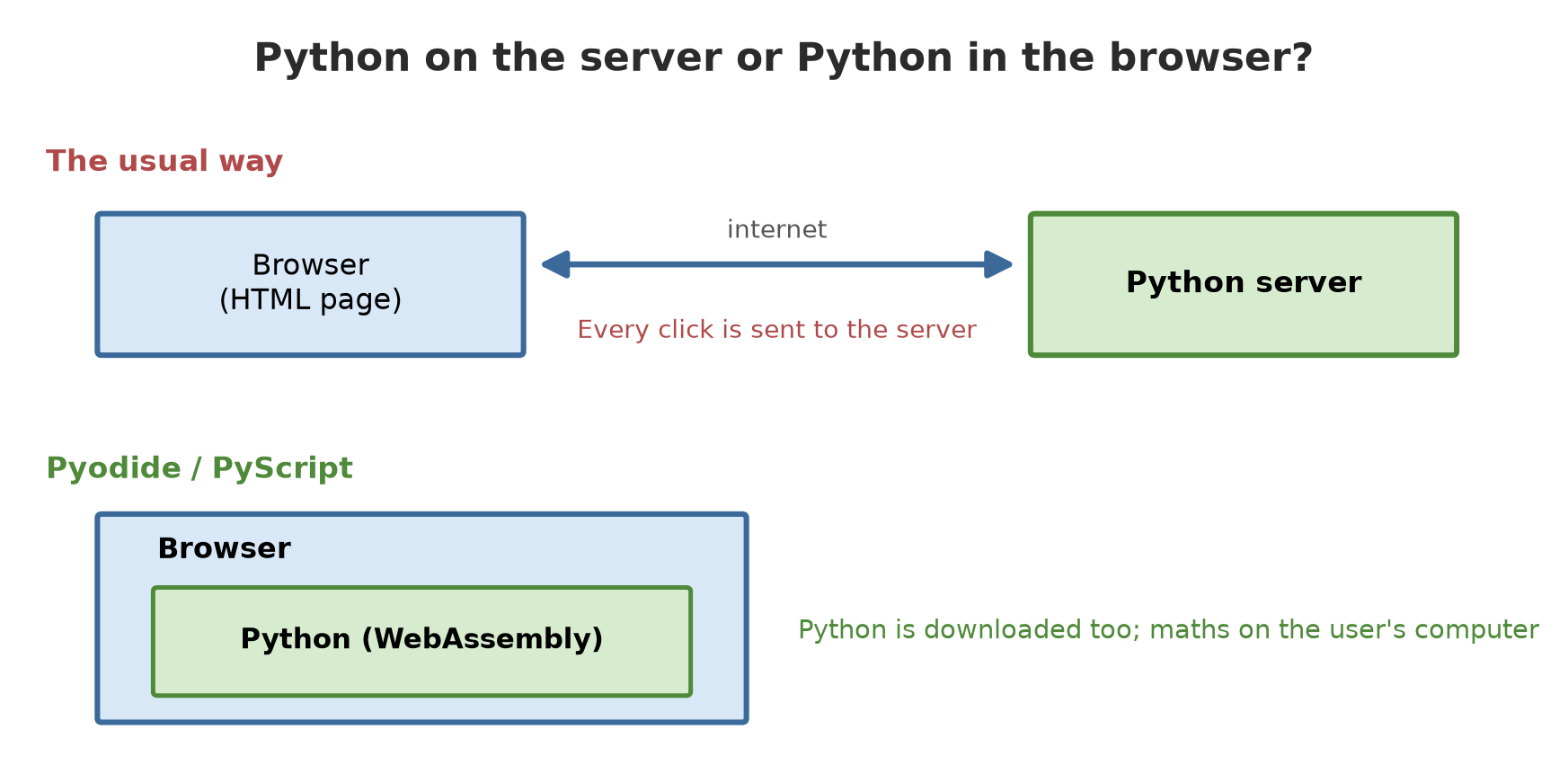
WebAssembly, in brief
A browser natively understands only JavaScript. But modern browsers can also run WebAssembly (WASM for short): small, safe, fast machine code. Developers compile the Python interpreter (CPython) into WebAssembly, and the browser runs it like any other program inside a safe “sandbox”. The results:
| Name | What it is |
|---|---|
| Pyodide | CPython compiled to WebAssembly, with many science libraries (NumPy and friends) |
| PyScript | A framework on top of Pyodide (or MicroPython): write Python right in the HTML page |
| JupyterLite | JupyterLab/notebooks running entirely in the browser, using the Pyodide kernel |
Pyodide: Python inside WebAssembly
Pyodide can run in the browser and also in Node.js. We use Node.js so we can capture real output for this book. The Python script below is run by Pyodide, not by the Python on your computer:
01_python_in_pyodide.py
# Chapter 37 - Python running inside Pyodide
import platform
import sys

print("system:", sys.platform)                       # 'emscripten' = the WebAssembly world
print("implementation:", platform.python_implementation(), "| Python", sys.version_info[0], sys.version_info[1])


def biomass_kg(fish_count, avg_weight_g):
    return fish_count * avg_weight_g / 1000


print("biomass of pond A (kg):", biomass_kg(800, 540.5))

# Calling JavaScript from Python
from js import Math

print("square root of 1600 via JavaScript:", Math.sqrt(1600))

# NumPy is available as a Pyodide package (loaded with loadPackage on the JavaScript side)
import numpy as np

weights = np.array([480, 520, 505, 495, 540.5])
print("mean weight:", weights.mean(), "| ready to harvest (>=500 g):", int((weights >= 500).sum()))

# A limit: no other processes and no ordinary network sockets
import subprocess

try:
    subprocess.run(["ls"])
except Exception as error:
    print("subprocess ->", type(error).__name__)
system: emscripten
implementation: CPython | Python 3 14
biomass of pond A (kg): 432.4
square root of 1600 via JavaScript: 40
mean weight: 508.1 | ready to harvest (>=500 g): 3
subprocess -> OSErrorThis output was captured for real, once, through the small wrapper kode/ch37/node/run.mjs (the pyodide library version 314.0.7 was installed with npm install, and NumPy was downloaded from Pyodide’s official CDN). That is why the script is marked @statis: the book build does not run it again.
Walk through the output:
system: emscriptenshows that Python runs in the WebAssembly world, not Windows or Linux.- The Python is CPython 3.14, the same language as this book. The
biomass_kgformula and NumPy work as usual (508.1 is the mean of the five weights). from js import Mathcalls JavaScript from Python: the two worlds can talk to each other.subprocessfails withOSError: the browser does not let a program start other processes. This is one limit of the sandbox.
For Pyodide, the version number follows the Python version: the 314 series means Python 3.14. We pin the version in the address (.../pyodide/v314.0.7/full/pyodide.js) so the page does not suddenly change behaviour when Pyodide is updated.
Pyodide straight in an HTML page
The page kode/ch37/demo/plot_map_pyodide.html loads Pyodide from a CDN (a network that delivers files), runs Python that draws a simple plot map as SVG (vector graphics for the web), and pastes it into the page. Python calculates the areas with the shoelace formula; there is no server and no GeoPandas. Here is the skeleton:
<script src="https://cdn.jsdelivr.net/pyodide/v314.0.7/full/pyodide.js"></script>
<script>
  const pyodide = await loadPyodide();            // download and prepare Python
  const result = pyodide.runPython("1 + 2");      // run Python code
  await pyodide.loadPackage("numpy");             // Pyodide packages are loaded when needed
</script>
I tried this demo in a real browser (the map and area table appeared, with H1 9.00 ha, K1 4.00 ha, S1 3.00 ha, S2 2.25 ha). To try it yourself, open demo/plot_map_pyodide.html through a simple local server (python -m http.server in the demo folder), because some browsers restrict pages opened directly from a file.
PyScript: Python inside HTML
With PyScript, Python is written right in the page using <script type="py">. The pond biomass calculator in demo/calculator_pyscript.html needs only two loading lines:
<link rel="stylesheet" href="https://pyscript.net/releases/2026.7.3/core.css">
<script type="module" src="https://pyscript.net/releases/2026.7.3/core.js"></script>
and then the Python:
from pyscript import document, when

@when("click", "#calc")
def calculate(event):
    count = float(document.querySelector("#count").value)
    weight = float(document.querySelector("#weight").value)
    document.querySelector("#result").innerText = f"Biomass: {count * weight / 1000:.1f} kg"
@when("click", "#calc") means: “when the button with id calc is clicked, run this function”. I tried that page in a real browser: clicking Calculate with the default entries (800 fish, 540.5 g) shows Biomass: 432.4 kg, the same as the calculations in Chapters 6 and 10. The type="mpy" option uses MicroPython (a mini Python, smaller download and faster start) instead of Pyodide; in this chapter we only tried type="py" (Pyodide).
Script 02 checks both demo pages: all their CDN addresses carry a version number.
02_check_demo_pages.py
# Chapter 37 - Checking the demo pages: CDN versions are pinned, no server needed
import re
from pathlib import Path

demo = Path(__file__).parent / "demo"
for page in sorted(demo.glob("*.html")):
    html = page.read_text(encoding="utf-8")
    addresses = sorted(set(re.findall(r'(?:src|href)="(https://[^"]+)"', html)))
    print(page.name)
    for a in addresses:
        print("  loads:", a)
    print("  versions pinned (a version number in the address):", all(re.search(r"\d+\.\d+\.\d+", a) for a in addresses))
calculator_pyscript.html
loads: https://pyscript.net/releases/2026.7.3/core.css
loads: https://pyscript.net/releases/2026.7.3/core.js
versions pinned (a version number in the address): True
plot_map_pyodide.html
loads: https://cdn.jsdelivr.net/pyodide/v314.0.7/full/pyodide.js
versions pinned (a version number in the address): TrueJupyterLite
JupyterLite is a Jupyter distribution that runs entirely in the browser with a Pyodide kernel. It is built with two packages: jupyterlite-core (the jupyter lite build command) and jupyterlite-pyodide-kernel (the Python kernel). The build result is a static site that can sit on ordinary file hosting, so it suits teaching: students just open a link, with nothing to install. According to the official documentation, the server that serves it must send .wasm files with the type application/wasm.
I did not run this part: jupyter lite build downloads many kernel files and I did not build it on the author’s computer. The package versions listed on PyPI when this chapter was written: jupyterlite-core and jupyterlite-pyodide-kernel are both 0.8.6. The usage above comes from the JupyterLite documentation (the standalone quickstart page).
When it fits, when it does not
| Fits | Fits poorly |
|---|---|
| Calculators and small helper tools | Big data (hundreds of MB) |
| Demos and teaching material with no installing | Heavy computing that needs a GPU |
| Tools that must work without signal once downloaded | Programs that need other processes, network sockets, or system files |
| Prototypes that need no server | Secrets: all code and data are downloaded by the user |
Two important notes. First, start-up time: the core Pyodide files are some ten-odd megabytes; in my demo the page waited a few seconds before Python was ready. Second, no secrets: anything you put in the page (API keys, passwords, personal data) can be read by anyone who opens it.
Not every library is available in Pyodide. Pure-Python libraries can usually be installed, but libraries with C code must already be compiled for WebAssembly. Check the Pyodide package list before planning an app.
Running Project I5: a plot area summary shown in the browser
A sensible pattern: prepare the data on the author’s computer with GeoPandas (heavy), then show the result in the browser with PyScript (light). The script below calculates plot areas, then writes main.py (with the data embedded) and index.html to _tmp/web/:
03_project_plot_area_page.py
# Chapter 37 - Running project I5: GeoPandas prepares the data, the browser shows it with PyScript
import json
from pathlib import Path

import geopandas as gpd

web = Path(__file__).parent / "_tmp" / "web"
web.mkdir(parents=True, exist_ok=True)

# Step 1 (on the author's computer, ordinary Python): compute plot areas with GeoPandas
plots = gpd.read_file("data/plot.geojson").to_crs(32748)
plots["area_ha"] = (plots.area / 10_000).round(2)
data = plots[["code", "sector", "area_ha"]].to_dict("records")

# Step 2: write the program that will run in the browser (main.py) and its page
(web / "main.py").write_text(f'''from pyscript import document

DATA = {json.dumps(data)}

total = {{}}
for row in DATA:
    total[row["sector"]] = total.get(row["sector"], 0) + row["area_ha"]

text = "\\n".join(f"{{s:9s}} {{ha:6.2f}} ha" for s, ha in sorted(total.items()))
document.querySelector("#result").innerText = text
''', encoding="utf-8")

(web / "index.html").write_text("""<!doctype html>
<html lang="en"><head><meta charset="utf-8"><title>Area per sector</title>
<link rel="stylesheet" href="https://pyscript.net/releases/2026.7.3/core.css">
<script type="module" src="https://pyscript.net/releases/2026.7.3/core.js"></script></head>
<body><h1>Area per sector</h1><pre id="result">calculating...</pre>
<script type="py" src="./main.py"></script></body></html>
""", encoding="utf-8")

for file in sorted(web.iterdir()):
    print(file.name, "-", file.stat().st_size, "bytes")
print("\ncontents of main.py (first 3 lines):")
print("\n".join((web / "main.py").read_text(encoding="utf-8").splitlines()[:3])[:140])
index.html - 394 bytes
main.py - 600 bytes
contents of main.py (first 3 lines):
from pyscript import document
DATA = [{"code": "H1", "sector": "forest", "area_ha": 9.0}, {"code": "H2", "sector": "forest", "area_ha": 6.9I opened the resulting page through a local server and a browser: it showed forest 15.93 ha, orchard 7.00 ha, ricefield 5.25 ha, the same as the GeoPandas calculation in Chapter 38. Notice that main.py uses only plain Python: it does not need GeoPandas.
Exercises
- Open
demo/calculator_pyscript.htmlthrough a local server, change the fish count to 1250, and check the result against a hand calculation. - Change
calculator_pyscript.htmlso it also shows an “estimated harvest (kg)” if 85 percent of the fish survive (an example figure). - Add one more plot to the
plotsdict inplot_map_pyodide.htmland watch the map change. - Challenge: build a PyScript page that calculates the average weight from several numbers the user types, separated by commas.
Chapter Summary
- WebAssembly lets Python run inside the browser, in a safe sandbox.
- Pyodide = CPython on WebAssembly; PyScript = Python inside HTML; JupyterLite = notebooks in the browser.
- It fits demos, teaching, and small tools without a server; it does not fit big data, secrets, or programs that need other processes.
- Pin version numbers in CDN addresses. Code and data are downloaded by the user.
Next, in Chapter 38: your first map data: points, lines, and polygons with GeoPandas.