Chapter 38 — GIS 1: Vector Data: Maps You Can Calculate With
Series I5 — A First Application: Web, Maps, and Dashboards
All scripts for this chapter are in the kode/ch38/ folder. On the web version, you can also download them all at once (zip).
So far, “location” in this book has been just a name: pond A, plot H1. Yet field questions often concern place: How many hectares of ricefield do we have? Which pond is closest to the river? Which plots fall inside the buffer zone? GIS (Geographic Information System) answers them by storing the shape and position of things on earth as data, then calculating with it. This chapter covers vector data, things drawn with coordinates. (Raster data, grids of pixels like satellite photos, is in Chapter 39.)
All the data in this chapter is made up by scripts and the place is fictional, so the numbers are only for learning. It holds six plots (forest, orchard, ricefield), four ponds, three pens, one river, and two hamlets, stored in kode/ch38/data/ as GeoJSON files.
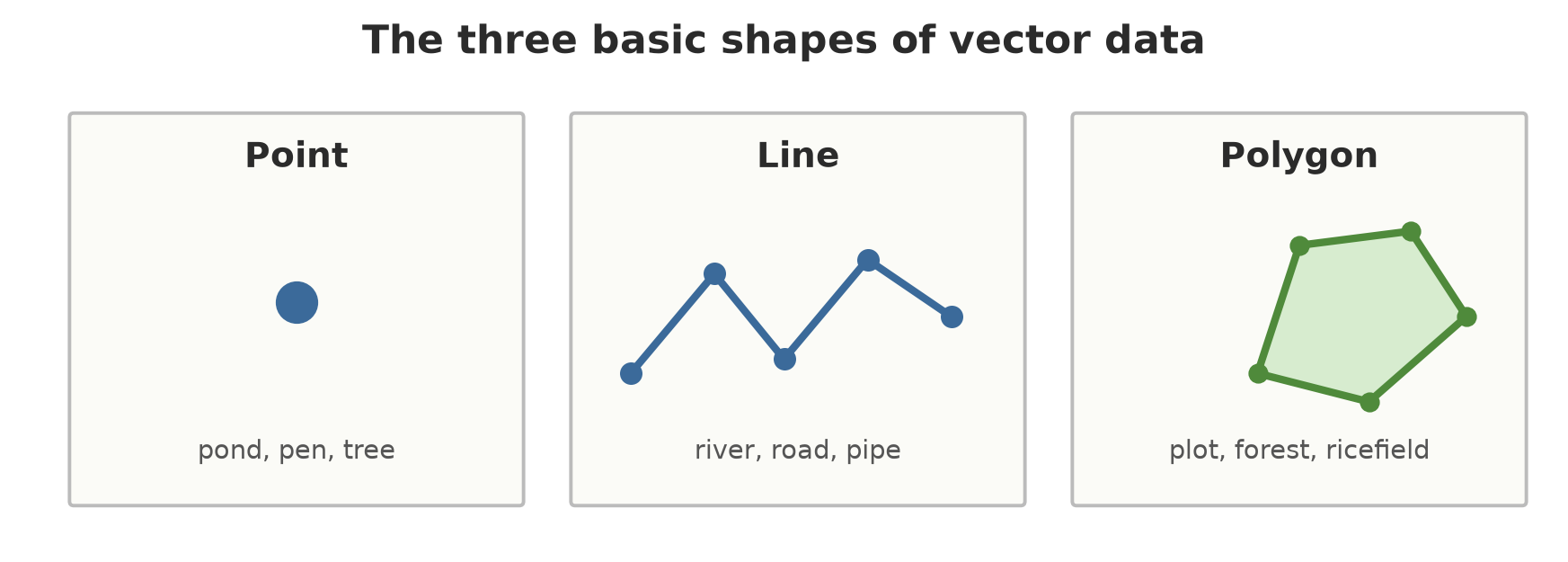
Points, lines, polygons: Shapely
Shapely is a library for creating and calculating geometric shapes. It knows nothing about the earth: it only sees numbers on a flat plane.
01_shapely_geometry.py
# Chapter 38 - Points, lines, and polygons with Shapely
from shapely.geometry import LineString, Point, Polygon

# The coordinates below are in metres (a flat plane, same unit on both axes)
pond = Point(120, 285)                                   # point: one location
river = LineString([(0, 330), (200, 310), (400, 290)])    # line: a sequence of points
plot = Polygon([(50, 100), (250, 100), (250, 250), (50, 250)])  # polygon: a closed area

print(pond.geom_type, river.geom_type, plot.geom_type)
print("river length (m):", round(river.length, 1))
print("plot area (m2)  :", plot.area)
print("plot perimeter (m):", plot.length)
print("plot centre point:", plot.centroid)

print("pond inside the plot?   ", plot.contains(pond))
print("river crosses the plot? ", river.intersects(plot))
print("pond-to-river distance (m):", round(pond.distance(river), 1))
print("bounding box (minx, miny, maxx, maxy):", plot.bounds)
Point LineString Polygon
river length (m): 402.0
plot area (m2) : 30000.0
plot perimeter (m): 700.0
plot centre point: POINT (150 175)
pond inside the plot? False
river crosses the plot? False
pond-to-river distance (m): 32.8
bounding box (minx, miny, maxx, maxy): (50.0, 100.0, 250.0, 250.0)Pointfor one location (pond, pen, tree),LineStringfor a sequence of points (river, road),Polygonfor a closed area (plot).- The plot area is 30000 m² (200 m times 150 m) and its perimeter 700 m. The river (from three points) is 402 m long.
contains,intersects,distanceanswer questions of place: the pond is not inside the plot, the river does not cross the plot, and the pond-to-river distance is 32.8 m.
Shapely calculates in the unit of the coordinate numbers. If the coordinates are in metres, areas are in square metres. If they are in degrees, the “area” is in square degrees, which is useless. That is a CRS matter, covered shortly.
GeoPandas: a table that has shapes
GeoPandas adds one special column, geometry, to a pandas DataFrame (Chapter 23). Everything you know about pandas (filtering, groupby, merging) still applies. The engine that reads and writes map files behind the scenes is pyogrio (a replacement for fiona, which was not yet available for Python 3.14 when this chapter was written).
02_geodataframe_formats.py
# Chapter 38 - GeoDataFrame and three file formats: GeoJSON, GeoPackage, Shapefile
import warnings
from pathlib import Path

import geopandas as gpd
from shapely.geometry import Point

tmp = Path(__file__).parent / "_tmp"
tmp.mkdir(exist_ok=True)

# GeoDataFrame = a pandas table + one column named geometry + a CRS
pens = gpd.GeoDataFrame(
    {"code": ["D1", "D2"], "kind": ["cattle", "chicken"], "head_count_today_total": [12, 200]},
    geometry=[Point(106.8168, -6.9955), Point(106.8118, -6.9945)],   # (longitude, latitude)
    crs="EPSG:4326",
)
print(pens)
print("CRS:", pens.crs)

pens.to_file(tmp / "pens.geojson", driver="GeoJSON")
pens.to_file(tmp / "pens.gpkg", layer="pens", driver="GPKG")
with warnings.catch_warnings(record=True) as w:
    warnings.simplefilter("always")
    pens.to_file(tmp / "pens.shp")                                # Shapefile
    print("Shapefile warning:", str(w[0].message))

print("Shapefile files:", sorted(p.name for p in tmp.glob("pens.*") if p.suffix not in (".geojson", ".gpkg")))
print("columns from Shapefile  :", list(gpd.read_file(tmp / "pens.shp").columns))
print("columns from GeoPackage :", list(gpd.read_file(tmp / "pens.gpkg").columns))
code kind head_count_today_total geometry
0 D1 cattle 12 POINT (106.8168 -6.9955)
1 D2 chicken 200 POINT (106.8118 -6.9945)
CRS: EPSG:4326
Shapefile warning: Column names longer than 10 characters will be truncated when saved to ESRI Shapefile.
Shapefile files: ['pens.cpg', 'pens.dbf', 'pens.prj', 'pens.shp', 'pens.shx']
columns from Shapefile : ['code', 'kind', 'head_count', 'geometry']
columns from GeoPackage : ['code', 'kind', 'head_count_today_total', 'geometry']The three formats you meet most often:
| Format | Files | Strengths | Weaknesses |
|---|---|---|---|
| GeoJSON | one .geojson (text) |
Easy for people and the web to read; generally EPSG:4326 | Wasteful of space; slow for big data |
| GeoPackage | one .gpkg (SQLite) |
One file, many layers, free column names, open standard | Not human-readable |
| Shapefile | five or more files (.shp, .shx, .dbf, .prj, .cpg) |
Read by almost all older software | Column names limited to 10 letters |
The output shows the Shapefile limit: the column head_count_today_total was cut to head_count (and you got a warning), while GeoPackage stored it whole. For new data, choose GeoPackage.
CRS: degrees or metres?
The earth is round, the map is flat. A CRS (Coordinate Reference System) explains what coordinate numbers mean. The two most important kinds:
- EPSG:4326 (WGS 84): coordinates as longitude and latitude in degrees. Used by GPS and the web.
- UTM projections, for example EPSG:32748 (UTM zone 48 South): coordinates in metres on a flat plane. Good for areas and distances within one region. Indonesia is divided into several UTM zones.
03_crs_projection.py
# Chapter 38 - Coordinate reference systems (CRS): degrees or metres?
import geopandas as gpd
from pyproj import CRS, Transformer

plots = gpd.read_file("data/plot.geojson")
print("file CRS:", plots.crs)
print("axis units:", [s.unit_name for s in plots.crs.axis_info])
print("corner of plot H1 (lon, lat):", [round(v, 5) for v in plots.geometry.iloc[0].exterior.coords[0]])
print("'area' of H1 in square degrees:", plots.geometry.iloc[0].area)   # meaningless!

utm = plots.estimate_utm_crs()                        # guesses the UTM zone from where the data lies
print("matching UTM zone:", utm.to_string(), "|", utm.name)
flat = plots.to_crs(utm)
print("UTM axis units:", [s.unit_name for s in flat.crs.axis_info])
print("area of H1 (m2):", round(flat.geometry.iloc[0].area))

# Pyproj: move one point from 4326 to UTM. always_xy=True = order (longitude, latitude).
move = Transformer.from_crs(CRS.from_epsg(4326), CRS.from_epsg(32748), always_xy=True)
east, north = move.transform(106.8125, -6.9950)
print("point in UTM 48S: easting =", round(east, 1), "| northing =", round(north, 1))
file CRS: EPSG:4326
axis units: ['degree', 'degree']
corner of plot H1 (lon, lat): [106.81361, -6.99516]
'area' of H1 in square degrees: 7.363732839988365e-06
matching UTM zone: EPSG:32748 | WGS 84 / UTM zone 48S
UTM axis units: ['metre', 'metre']
area of H1 (m2): 90001
point in UTM 48S: easting = 700227.2 | northing = 9226418.1- Our file comes in EPSG:4326, with axes in degrees. The “area” of H1 there is
7.36e-06square degrees: a number with no practical meaning. estimate_utm_crs()guesses the matching UTM zone from where the data lies: EPSG:32748.- After
to_crs(...), the axes become metres and the area of H1 becomes 90001 m² (about 9 hectares; the 1 m² difference comes from rounding the GeoJSON coordinates to 7 decimals, about 1 cm). pyprojcan move a single point by itself.always_xy=Truemakes sure the order is (longitude, latitude), because EPSG:4326 officially has the order (latitude, longitude), which often causes confusion.
Never calculate areas or distances directly from data in degrees. Convert it first to a CRS with metre units using to_crs. This is the most common mistake in GIS. Every file carries its own CRS (gdf.crs): check it before combining data.
Plot areas and pond-to-river distances
04_area_distance.py
# Chapter 38 - Plot area and pond-to-river distance
import geopandas as gpd

plots = gpd.read_file("data/plot.geojson").to_crs(32748)    # metres
ponds = gpd.read_file("data/pond.geojson").to_crs(32748)
rivers = gpd.read_file("data/river.geojson").to_crs(32748)

plots["area_ha"] = (plots.area / 10_000).round(2)
print(plots[["code", "sector", "commodity", "area_ha"]].to_string(index=False))
print()
print("area per sector (ha):")
print(plots.groupby("sector")["area_ha"].sum().to_string())

river_line = rivers.geometry.iloc[0]
ponds["river_distance_m"] = ponds.distance(river_line).round(1)
print()
print(ponds[["code", "kind", "fish_count", "river_distance_m"]].to_string(index=False))
near = ponds[ponds["river_distance_m"] < 25]
print("ponds less than 25 m from the river:", list(near["code"]))
code sector commodity area_ha
H1 forest Teak 9.00
H2 forest Meranti 6.93
K1 orchard coffee 4.00
K2 orchard cocoa 3.00
S1 ricefield rice 3.00
S2 ricefield rice 2.25
area per sector (ha):
sector
forest 15.93
orchard 7.00
ricefield 5.25
code kind fish_count river_distance_m
A catfish 800 15.4
B tilapia 500 29.8
C catfish 650 20.0
D tilapia 300 116.4
ponds less than 25 m from the river: ['A', 'C']Forest is 15.93 ha (9.00 + 6.93), orchard 7.00 ha, ricefield 5.25 ha. ponds.distance(line) calculates the nearest distance from each pond to the river: A and C are under 25 m away, pond D is far (116.4 m). In a real case, a pond near a river is handy for water but at risk of flooding; the 25 m limit here is only an example.
Buffer and overlay
A buffer makes an area around a shape at a set distance. An overlay stacks two layers and calculates the pieces: intersection (the overlapping part) or difference (the non-overlapping part).
05_buffer_overlay.py
# Chapter 38 - Buffer (a protective zone) and overlay (stacking layers)
import geopandas as gpd

plots = gpd.read_file("data/plot.geojson").to_crs(32748)
rivers = gpd.read_file("data/river.geojson").to_crs(32748)

# Buffer: the area within 60 m of the river (60 is only a learning example)
zone = gpd.GeoDataFrame({"zone": ["buffer"]}, geometry=rivers.buffer(60), crs=rivers.crs)
print("buffer zone area (ha):", round(zone.area.iloc[0] / 10_000, 2))

# Overlay intersection: the pieces of plots that fall inside the zone
inside = gpd.overlay(plots, zone, how="intersection")
inside["area_inside_m2"] = inside.area.round(0)
print("\nplots that enter the buffer zone:")
print(inside[["code", "sector", "area_inside_m2"]].to_string(index=False))

# Overlay difference: the part of each plot outside the zone
outside = gpd.overlay(plots, zone, how="difference")
outside["area_outside_ha"] = (outside.area / 10_000).round(2)
print("\nplot area outside the zone (ha):")
print(outside[["code", "area_outside_ha"]].to_string(index=False))
buffer zone area (ha): 13.24
plots that enter the buffer zone:
code sector area_inside_m2
K2 orchard 4.0
S1 ricefield 141.0
S2 ricefield 2333.0
plot area outside the zone (ha):
code area_outside_ha
H1 9.00
H2 6.93
K1 4.00
K2 3.00
S1 2.99
S2 2.02The 60 m zone on both sides of the river covers 13.24 ha. Three plots poke into it: S2 the most (2333 m²), S1 only 141 m², and K2 just 4 m². The last block shows what remains: S2 is left with 2.02 ha (from 2.25) and S1 with 2.99 ha. The 60 m figure is just an example; real river setback rules are set by local regulations.
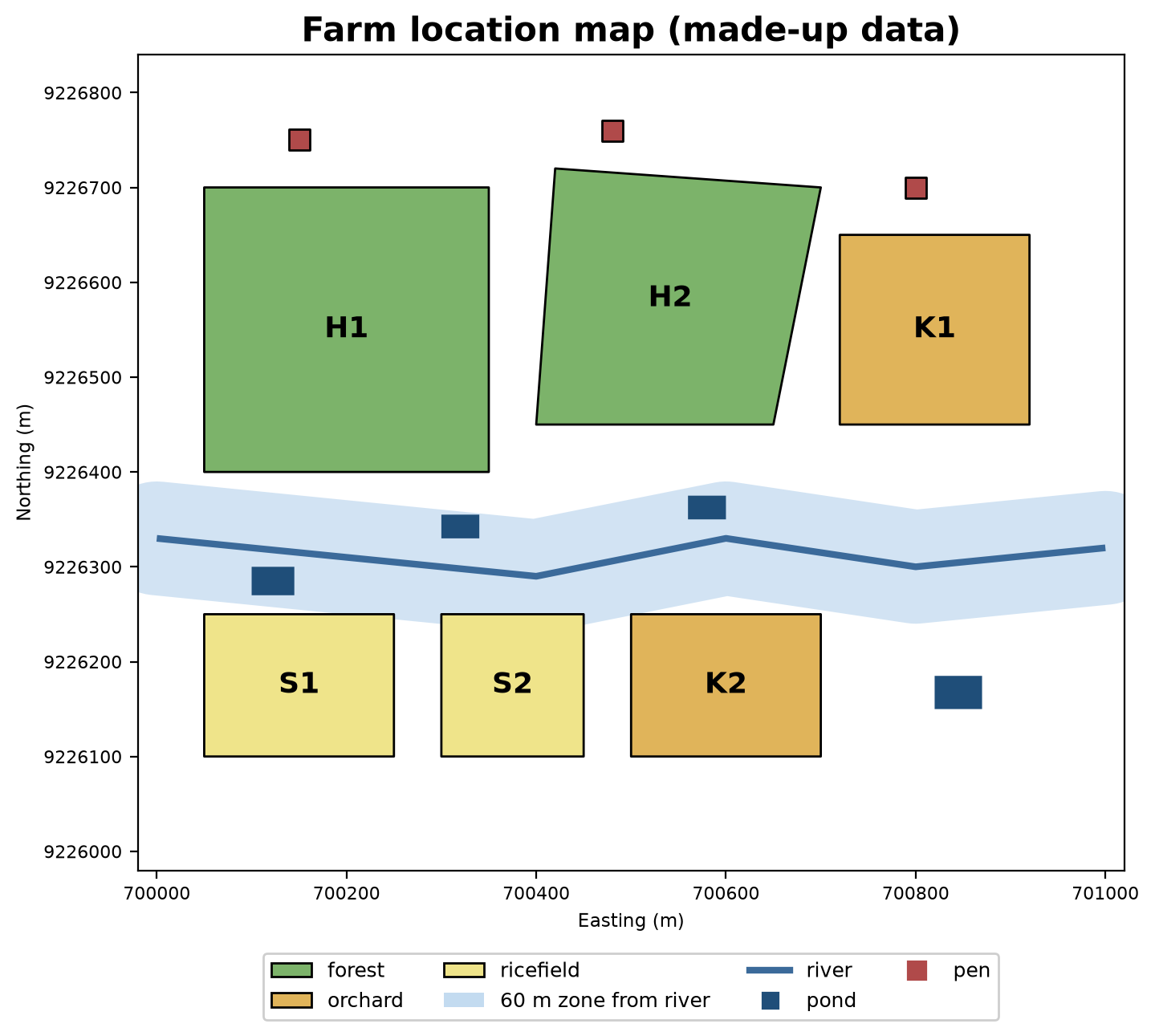
Spatial join: combining by location
In pandas, merge combines two tables by matching column values. In GeoPandas, a spatial join (sjoin) combines by location relationship: “which polygon is this point inside?”.
06_spatial_join.py
# Chapter 38 - Spatial join: combining tables by location
import warnings

import geopandas as gpd

hamlets = gpd.read_file("data/hamlet.geojson").to_crs(32748)
ponds = gpd.read_file("data/pond.geojson").to_crs(32748)
pens = gpd.read_file("data/pen.geojson").to_crs(32748)

# In which hamlet does the centre of each pond fall? (predicate="within": inside)
pond_points = ponds.copy()
pond_points["geometry"] = ponds.centroid
joined = gpd.sjoin(pond_points, hamlets[["name", "geometry"]], predicate="within")
print(joined[["code", "fish_count", "name"]].to_string(index=False))
print("\nfish per hamlet:")
print(joined.groupby("name")["fish_count"].sum().to_string())

# Nearest pen to each pond (sjoin_nearest) with the distance
nearest = gpd.sjoin_nearest(pond_points, pens[["code", "geometry"]], distance_col="distance_m",
                            lsuffix="pond", rsuffix="pen")
print("\nnearest pen to each pond:")
print(nearest[["code_pond", "code_pen", "distance_m"]].round(0).to_string(index=False))

# Trap: different CRS -> only a warning, and the result is EMPTY
with warnings.catch_warnings(record=True) as w:
    warnings.simplefilter("always")
    wrong = gpd.sjoin(gpd.read_file("data/pond.geojson"), hamlets)    # left 4326, right UTM
print("\ndifferent CRS ->", str(w[0].message).splitlines()[0])
print("number of result rows:", len(wrong))
code fish_count name
A 800 Upper
B 500 Upper
C 650 Lower
D 300 Lower
fish per hamlet:
name
Lower 950
Upper 1300
nearest pen to each pond:
code_pond code_pen distance_m
A D2 466.0
B D2 442.0
C D1 403.0
D D1 534.0
different CRS -> CRS mismatch between the CRS of left geometries and the CRS of right geometries.
number of result rows: 0- Ponds A and B fall in the Upper hamlet, C and D in the Lower, so fish per hamlet: Upper 1300, Lower 950.
sjoin_nearestlooks for the nearest one; pen D2 is nearest to ponds A and B, while D1 is nearest to C and D.- The trap at the end: joining data with different CRSs raises no error, only a warning, and the result is empty (0 rows). Always
to_crsfirst, and read warnings.
Installing GIS: pip or conda-forge?
On the author’s computer, all GIS libraries installed with pip because they come as wheels (ready-made packages) that already carry the C libraries inside. That is not always so. The base libraries, GDAL, GEOS, and PROJ, are written in C/C++, and on some systems pip finds no matching wheel, so installation fails. conda-forge (a community package channel for conda or mamba) installs those C libraries together with the Python packages, so it is often smoother:
| pip | conda-forge | |
|---|---|---|
| Command | pip install geopandas rasterio |
conda install -c conda-forge geopandas rasterio |
| C libraries (GDAL, PROJ) | Inside the wheel, if one exists for your system | Installed as separate packages, with matching versions |
| Strength | Light, same way as other packages | Most reliable for GDAL, many other GIS tools |
| Weakness | Can fail if no wheel exists | Needs conda/mamba installed; environment separate from venv |
I did not run the conda commands above: conda is not installed on the author’s computer, so the conda-forge part has not been tested here. This comparison rests on how both tools generally work. If pip install geopandas works on your computer, you do not need conda.
Running Project I5: the farm location map
We bring it all together: read five layers, convert them to UTM, save them as one GeoPackage with five layers, summarise the area per sector, and make a quick map with .plot(). This GeoPackage is material for Chapter 40 (PostGIS and QGIS).
07_project_location_map.py
# Chapter 38 - Running project I5: the farm location map, saved to GeoPackage
from pathlib import Path

import geopandas as gpd
import matplotlib.pyplot as plt

tmp = Path(__file__).parent / "_tmp"
tmp.mkdir(exist_ok=True)
layers = ["plot", "pond", "pen", "river", "hamlet"]
data = {name: gpd.read_file(f"data/{name}.geojson").to_crs(32748) for name in layers}

# One GeoPackage file holding many layers
gpkg = tmp / "farm_locations.gpkg"
gpkg.unlink(missing_ok=True)
for name, gdf in data.items():
    gdf.to_file(gpkg, layer=name, driver="GPKG")
print("layers inside the GeoPackage:", gpd.list_layers(gpkg)["name"].tolist())

# Summary per sector: plot area and number of points
plots = data["plot"]
print("\narea per sector (ha):")
area_ha = plots.assign(area_ha=plots.area / 10_000)
print(area_ha.groupby("sector")["area_ha"].sum().round(2).to_string())
print("number of ponds:", len(data["pond"]), "| number of pens:", len(data["pen"]))

# A quick map with .plot()
fig, ax = plt.subplots(figsize=(7, 5.6))
plots.plot(ax=ax, column="sector", legend=True, alpha=0.6, edgecolor="black")
data["river"].plot(ax=ax, color="tab:blue", linewidth=2)
data["pond"].plot(ax=ax, color="navy")
data["pen"].plot(ax=ax, color="red", markersize=40)
ax.set_title("Farm location map (made-up data)")
fig.savefig(tmp / "quick_map.png", dpi=100)
print("map saved:", (tmp / "quick_map.png").name)
layers inside the GeoPackage: ['plot', 'pond', 'pen', 'river', 'hamlet']
area per sector (ha):
sector
forest 15.93
orchard 7.00
ricefield 5.25
number of ponds: 4 | number of pens: 3
map saved: quick_map.pnggpd.list_layers proves that one file holds five layers. The quick map is saved in _tmp/quick_map.png (we make a tidier map in Chapter 40).
Exercises
- In
01_shapely_geometry.py, make a triangle polygon with points (0,0), (100,0), (0,60) and print its area. (Check it against half base times height.) - In
04_area_distance.py, add ariver_distance_mcolumn for the pens and print the pen farthest from the river. - In
05_buffer_overlay.py, change 60 m to 100 m. Which plots enter, and how much area enters in S2? - Challenge: for each hamlet, calculate the total plot area inside it using
overlay(plots, hamlets, how="intersection")andgroupby. Plot H2 crosses the hamlet border: check that its areas still add up to 6.93 ha.
Chapter Summary
- Vector data = points, lines, polygons. Shapely calculates the shapes; GeoPandas puts them in a table.
- Choose GeoPackage for new data; Shapefile cuts column names and needs many files.
- The CRS decides what coordinates mean. For areas and distances, convert to a CRS in metres (e.g. UTM) with
to_crs. area,distance,buffer,overlay,sjoin, andsjoin_nearestanswer field questions about place.- A different CRS in
sjoinoroverlaygives only a warning and a wrong result: be careful. - pip is enough when a wheel exists; conda-forge is more reliable for GDAL (not tested here).
Next, in Chapter 39: raster data: made-up satellite photos, pixels, and NDVI.