Chapter 65 — CPython Internals: A Peek into the Engine Room
Series A5 — Expert Python
All scripts for this chapter are in the kode/ch65/ folder. On the web version, you can also download them all at once (zip).
In Chapter 64 we opened the hood of Python through descriptors and the AST. Now we look at the engine: CPython, the official Python implementation, written in C, which you almost certainly use (there are also PyPy, MicroPython, and others). Think of opening a harvest warehouse: you want to know how sacks are stacked (objects and memory), who notes the empty sacks and throws them away (the reference counter and the cleaner), and how the foreman reads orders (bytecode). The facts in this chapter were run on Python 3.14.8 and checked against the 3.14 documentation (docs.python.org: “What’s New in Python 3.14”, gc, dis, concurrent.interpreters, and “Python support for free threading”; all read on 2026-10-10). A version note: the official blog Python Insider reports that Python 3.15.0 final was released on 9 October 2026 (blog.python.org, read 2026-10-10). This book still uses 3.14 as its reference; for the differences in 3.15, read the page “What’s new in Python 3.15” on docs.python.org.
Almost everything discussed here is a CPython implementation detail, not a promise of the Python language. Memory sizes, the shape of bytecode, and gc thresholds can change between versions. Use them to understand and to measure, and do not make a program depend on these numbers.
Everything is an object
In CPython every value, even the number 3 and the function len, is an object in memory. Each object has an identity (address), a type, and a value. A variable name is only a label stuck on an object.
01_objects_and_identity.py
# Chapter 65 - Everything is an object: identity, type, and value
import sys

# Every object has three things: identity (id), type, and value
a = [1, 2, 3]
b = a                     # b points to the SAME object, not a copy
c = [1, 2, 3]             # another object with the same contents
print(a is b, a is c, a == c)
b.append(4)
print(a)                  # a changed too, because a and b are one object

# A name is only a label stuck on an object
print(type(a).__name__, type(len).__name__, type(Exception).__name__)

# Small integers are shared (in CPython: -5 to 256)
for n in (255, 256, 257):
    x, y = int(str(n)), int(str(n))     # made while running, not constants
    print(n, "same object" if x is y else "different object")

# "Interned" strings are shared too
s1 = "".join(["tree", "_teak"])
s2 = "".join(["tree", "_teak"])
print(s1 == s2, s1 is s2, sys.intern(s1) is sys.intern(s2))

# Object sizes (bytes). These numbers are specific to CPython 3.14 on 64-bit Windows
for sample in (0, 2**64, 1.5, "a", "a" * 100, (), [], {}):
    print(f"{type(sample).__name__:>5} {sys.getsizeof(sample):>4}")
True False True
[1, 2, 3, 4]
list builtin_function_or_method type
255 same object
256 same object
257 different object
True False True
int 28
int 36
float 24
str 42
str 141
tuple 48
list 56
dict 64b = adoes not copy:a is bisTrueand anappendthroughbchangesa.chas equal contents (==) but is another object (isisFalse).- The integers 255 and 256 are shared (the same object), while 257 is made new each time. CPython caches small integers (-5 to 256) to avoid recreating them. That is an internal saving; do not compare numbers with
is, use==. - Strings can be interned (
sys.intern): two strings with equal contents become one object, saving memory and speeding up comparison. - Sizes: a small integer takes 28 bytes, a one-letter string 42 bytes, an empty dict 64 bytes. Even “empty” objects cost tens of bytes because of the object header (the reference counter and the type pointer).
02_list_growth.py
# Chapter 65 - A list keeps spare room so append() stays fast
import sys

items = []
old_size = sys.getsizeof(items)
rises = []
print(f"empty list: {old_size} bytes")
for i in range(1, 41):
    items.append(i)
    size = sys.getsizeof(items)
    if size != old_size:                    # print only when memory is added
        print(f"{i:>2} items -> memory rises to {size} bytes")
        old_size = size
        rises.append((i, size))

# Each list element is only a pointer; the objects live elsewhere
(n1, s1), (n2, s2) = rises[0], rises[1]
print(f"from {n1} to {n2} items memory rises {s2 - s1} bytes; per item: {(s2 - s1) // (n2 - n1)} bytes (one pointer)")

# Comparison: a tuple has no spare room
print(sys.getsizeof((1, 2, 3, 4)), "bytes for a 4-item tuple vs",
      sys.getsizeof([1, 2, 3, 4]), "bytes for a 4-item list")
empty list: 56 bytes
1 items -> memory rises to 88 bytes
5 items -> memory rises to 120 bytes
9 items -> memory rises to 184 bytes
17 items -> memory rises to 248 bytes
25 items -> memory rises to 312 bytes
33 items -> memory rises to 376 bytes
from 1 to 5 items memory rises 32 bytes; per item: 8 bytes (one pointer)
80 bytes for a 4-item tuple vs 88 bytes for a 4-item listA list does not add memory on every append. It keeps spare room (rising at items 1, 5, 9, 17, …), so append is very cheap on average. From 1 to 5 items memory rises by 32 bytes for 4 new items: 8 bytes per item, which is one pointer (a list stores pointers, not the objects themselves). A tuple has no spare room, so it is smaller (80 against 88 bytes).
The reference counter and the garbage collector
Every object records how many names or containers point to it: the reference count. When the count falls to zero, the object is thrown away immediately.
03_reference_counting.py
# Chapter 65 - The reference counter: when is an object thrown away?
import sys
import weakref


class Tree:
    def __init__(self, name):
        self.name = name

    def __del__(self):
        print(f"  [__del__] {self.name} cleaned up")


t = Tree("teak-1")
base = sys.getrefcount(t)         # this number is always +1 because the call argument counts too
print("base count recorded")

items = [t]                        # one new pointer
print("after going into a list  :", sys.getrefcount(t) - base)
mapping = {"a": t}                 # one more
print("after going into a dict  :", sys.getrefcount(t) - base)
del items
print("after the list is dropped:", sys.getrefcount(t) - base)
del mapping
print("after the dict is dropped:", sys.getrefcount(t) - base)

weak = weakref.ref(t)              # weak reference: does not keep the object alive
print("weak reference alive     :", weak() is not None)
print("dropping the last name:")
del t                              # count becomes 0 -> cleaned up RIGHT NOW
print("weak reference alive     :", weak() is not None)
base count recorded
after going into a list : 1
after going into a dict : 2
after the list is dropped: 1
after the dict is dropped: 0
weak reference alive : True
dropping the last name:
[__del__] teak-1 cleaned up
weak reference alive : Falsegetrefcount is always one higher than reality because its own argument also points at the object, so we print the difference: into a list +1, into a dict +2, dropped back to 1 and 0. When del t drops the last name, __del__ runs right then (compare with languages that clean “later”). A weak reference (weakref) points without adding to the count, so it knows when the object has died: that is the basis of a cache that does not hold memory.
The counter has a weakness: two objects that point at each other (a cycle) never fall to zero. For that there is an extra cleaner, the garbage collector (the gc module):
04_gc_cycles.py
# Chapter 65 - The garbage collector: a sweeper for objects that point at each other
import gc
import weakref


class Node:
    def __init__(self, name):
        self.name = name
        self.partner = None


gc.collect()
gc.disable()                      # turn off the automatic sweeper so we can observe

a, b = Node("a"), Node("b")
a.partner, b.partner = b, a       # pointing at each other: a CYCLE
weak = weakref.ref(a)
del a, b                          # names dropped, but a and b still hold each other
print("after del, still in memory:", weak() is not None)

found = gc.collect()              # the sweeper looks for objects that can no longer be reached
print("collect() found garbage  :", found > 0)
print("after collect, still here:", weak() is not None)
gc.enable()

print("number of generations    :", len(gc.get_threshold()))
print("stat keys per generation :", sorted(gc.get_stats()[0]))
after del, still in memory: True
collect() found garbage : True
after collect, still here: False
number of generations : 3
stat keys per generation : ['collected', 'collections', 'uncollectable']After del a, b, the two nodes still hold each other, so they remain in memory. gc.collect() looks for objects that can no longer be reached, finds them, and removes them. This cleaner divides objects into three generations (young objects are inspected more often). One honest version note from the documentation: Python 3.14.0 to 3.14.4 shipped an incremental GC, but because of reports of memory pressure in production, since 3.14.5 it is back to the generational GC of 3.13; the author’s computer uses 3.14.8, so that is what applies here.
Avoid cycles when you can (use weakref for the “child to parent” back-pointer). Turning gc off (gc.disable()) only makes sense if you are sure there are no cycles; the official documentation mentions this, but the risk is a memory leak.
Bytecode: orders for a virtual machine
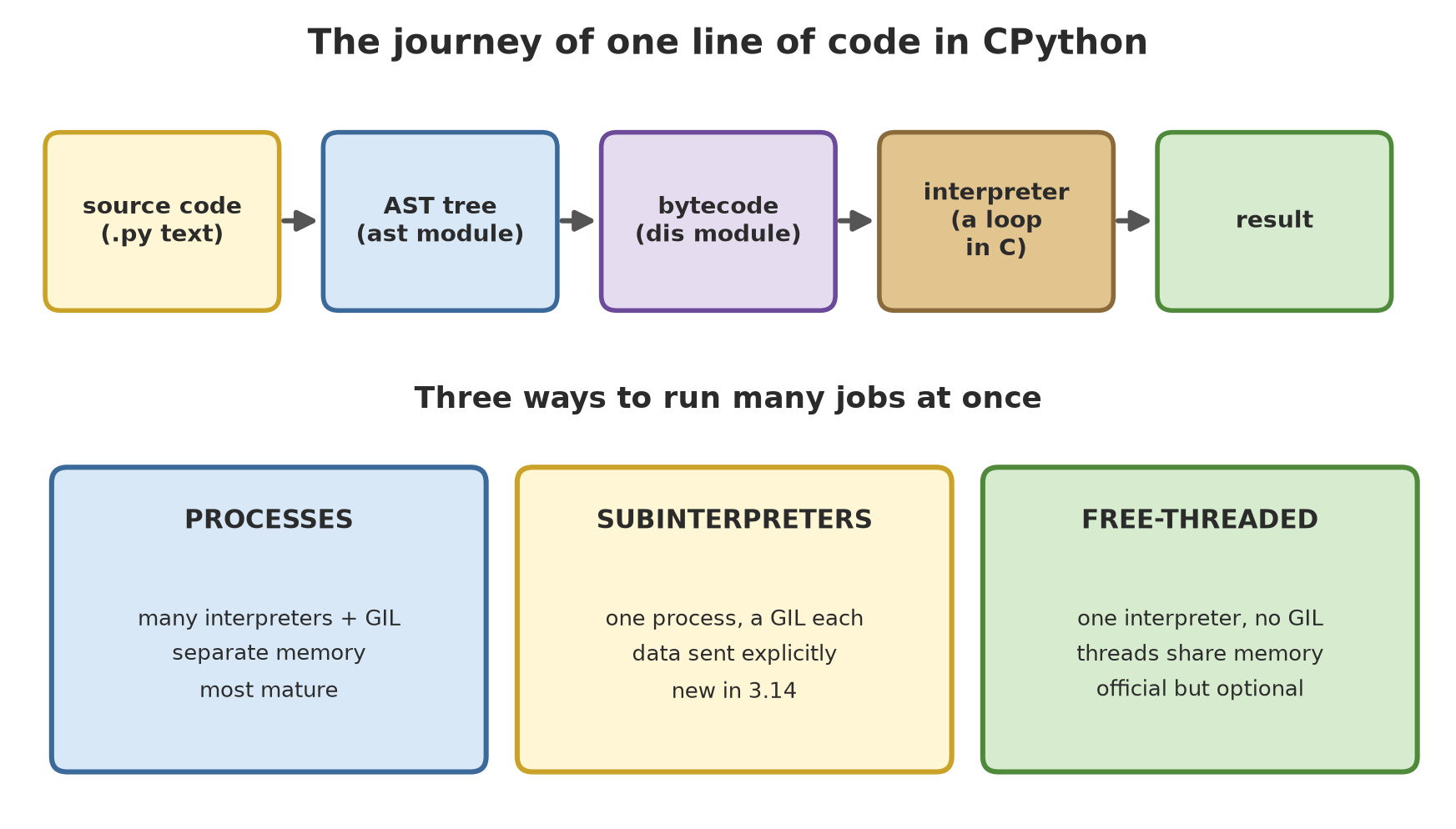
Python does not run your text directly. It turns it into bytecode, a list of small instructions for CPython’s virtual machine, and then a big loop in C carries them out one by one.
05_bytecode_dis.py
# Chapter 65 - Bytecode: the language of Python's virtual machine
import dis


def biomass(count, weight):
    return count * weight / 1000


dis.dis(biomass)
code = biomass.__code__
print("constants:", code.co_consts)
print("variables:", code.co_varnames)


def total(items):
    result = 0
    for x in items:
        result += x
    return result


# Python "learns" from use: after repeated calls, instructions are specialised
for _ in range(200):
    total([1, 2, 3])
print("--- after 200 calls (adaptive=True) ---")
dis.dis(total, adaptive=True)
5 RESUME 0
6 LOAD_FAST_BORROW_LOAD_FAST_BORROW 1 (count, weight)
BINARY_OP 5 (*)
LOAD_CONST 0 (1000)
BINARY_OP 11 (/)
RETURN_VALUE
constants: (1000,)
variables: ('count', 'weight')
--- after 200 calls (adaptive=True) ---
15 RESUME_CHECK 0
16 LOAD_SMALL_INT 0
STORE_FAST 1 (result)
17 LOAD_FAST_BORROW 0 (items)
GET_ITER
L1: FOR_ITER_LIST 11 (to L2)
STORE_FAST 2 (x)
18 LOAD_FAST_BORROW_LOAD_FAST_BORROW 18 (result, x)
BINARY_OP_ADD_INT 13 (+=)
STORE_FAST 1 (result)
JUMP_BACKWARD_NO_JIT 13 (to L1)
17 L2: END_FOR
POP_ITER
19 LOAD_FAST_BORROW 1 (result)
RETURN_VALUEThe formula count * weight / 1000 becomes: load two variables, BINARY_OP multiplication (*, code 5), load the constant 1000, BINARY_OP division, RETURN_VALUE. This is a stack machine: numbers are put on a stack and then the operation takes them.
The second part shows something interesting since Python 3.11: the adaptive interpreter. After total is called 200 times, common instructions are replaced by special versions that know the type: FOR_ITER becomes FOR_ITER_LIST (list iteration) and += becomes BINARY_OP_ADD_INT (add two ints). The dis documentation warns: bytecode is an implementation detail with no guarantee between versions.
The GIL, free-threaded mode, and subinterpreters
The GIL (Global Interpreter Lock) is a global lock: in a normal build, only one thread runs Python bytecode at a time. As a result: threads are still useful for waiting jobs (network, files, sleep), but do not speed up computing jobs.
06_gil_and_threads.py
# Chapter 65 - The GIL: does this Python build have a global lock?
import sys
import sysconfig
import threading
import time

print("free-threaded build :", bool(sysconfig.get_config_var("Py_GIL_DISABLED")))
print("GIL enabled now     :", sys._is_gil_enabled())


# Tasks that WAIT (I/O): threads are still useful with the GIL,
# because while waiting, a thread releases the GIL.
def waiting():
    time.sleep(0.2)


start = time.perf_counter()
workers = [threading.Thread(target=waiting) for _ in range(8)]
for t in workers:
    t.start()
for t in workers:
    t.join()
elapsed = time.perf_counter() - start
print("8 tasks waiting 0.2 s finish in < 1 s (not 1.6 s):", elapsed < 1.0)

# Shared data still needs a lock (Lock), with or without the GIL
total = 0
lock = threading.Lock()


def add(n):
    global total
    for _ in range(n):
        with lock:
            total += 1


workers = [threading.Thread(target=add, args=(20000,)) for _ in range(4)]
for t in workers:
    t.start()
for t in workers:
    t.join()
print("total with Lock     :", total)
free-threaded build : False
GIL enabled now : True
8 tasks waiting 0.2 s finish in < 1 s (not 1.6 s): True
total with Lock : 80000Eight tasks that each wait 0.2 seconds finish far below 1.6 seconds, because waiting threads release the GIL. A Lock is still needed for shared data (total 80,000 = 4 x 20,000).
07_thread_cpu.py
# Chapter 65 - Threads for CPU work: are they really parallel?
import sys
import threading
import time


def compute(n):
    total = 0
    for i in range(n):
        total += i * i
    return total


N, COUNT = 1_500_000, 4


def sequential():
    for _ in range(COUNT):
        compute(N)


def parallel():
    workers = [threading.Thread(target=compute, args=(N,)) for _ in range(COUNT)]
    for t in workers:
        t.start()
    for t in workers:
        t.join()


def best_of(function, repeat=5):
    """Fastest time of several tries: more robust against computer noise."""
    results = []
    for _ in range(repeat):
        start = time.perf_counter()
        function()
        results.append(time.perf_counter() - start)
    return min(results)


speedup = best_of(sequential) / best_of(parallel)
print("GIL enabled                         :", sys._is_gil_enabled())
print("4 threads more than 1.5x faster     :", speedup > 1.5)
GIL enabled : True
4 threads more than 1.5x faster : FalseFor pure computing, four threads are not more than 1.5 times faster in this normal build. Since Python 3.14 there is an official alternative: the free-threaded build without the GIL. According to “What’s New in Python 3.14”, that build is now “officially supported” (PEP 779; phase II: supported but still optional), and the penalty on single-threaded code is estimated at about 5-10%. The author’s computer does not have it by default, so we installed it separately (Python 3.14.6 free-threaded through uv python install 3.14+freethreaded, which does not disturb the main Python) and ran the same script:
08_thread_cpu_free_threaded.py
# Chapter 65 - The same script, run with a free-threaded Python
import os
import subprocess
from pathlib import Path

# The path of YOUR free-threaded interpreter: set it in the environment variable PYTHON_FT.
# Example install that does not disturb your main Python:  uv python install 3.14+freethreaded
interpreter = os.environ.get("PYTHON_FT")
if not interpreter:
    raise SystemExit("set PYTHON_FT to the path of your python 3.14t")

script = Path(__file__).with_name("07_thread_cpu.py")
result = subprocess.run([interpreter, str(script)], capture_output=True, text=True, check=True)
print(result.stdout.strip())
GIL enabled : False
4 threads more than 1.5x faster : TrueThis output was captured once on the author’s computer (@statis; the numbers on your computer differ): the GIL is off (False) and four threads are now more than 1.5 times faster. Remember the documentation’s warning: some libraries with C modules are not ready and turn the GIL back on when imported (the support lists are at py-free-threading.github.io). You can also switch the GIL on or off in that build through PYTHON_GIL or -X gil; we tried PYTHON_GIL=1 and -X gil=1, and both made sys._is_gil_enabled() return True again. The installation way on Windows according to the documentation: py install 3.14t (Python install manager), then py -V:3.14t (this command is not tested by us; we used uv).
The experimental JIT (Just-In-Time compiler, turning hot code into machine code) is included in the official Windows and macOS binaries since 3.14, but is not recommended for production: the documentation says its effect ranges “from 10% slower to 20% faster” depending on the workload, and the free-threaded build does not support the JIT yet.
09_experimental_jit.py
# Chapter 65 - The experimental JIT: present in the build, but off by default
import os
import subprocess
import sys

print("JIT available in this build:", sys._jit.is_available())
print("JIT enabled by default     :", sys._jit.is_enabled())

CODE = """
import sys
def f(n):
    total = 0
    for i in range(n):
        total += i * i
    return total
print(sys._jit.is_enabled(), f(300000))
"""

for value in ("0", "1"):
    environment = dict(os.environ, PYTHON_JIT=value)
    result = subprocess.run([sys.executable, "-c", CODE], env=environment,
                            capture_output=True, text=True, check=True)
    jit_on, total = result.stdout.split()
    print(f"PYTHON_JIT={value}: JIT enabled={jit_on}, computed result={total}")
JIT available in this build: True
JIT enabled by default : False
PYTHON_JIT=0: JIT enabled=False, computed result=8999955000050000
PYTHON_JIT=1: JIT enabled=True, computed result=8999955000050000The JIT is available in the author’s build but off by default; PYTHON_JIT=1 turns it on and the computed result stays the same. We do not show a speed comparison because the result depends on load and machine.
The third route: subinterpreters (PEP 734, the new concurrent.interpreters module in 3.14). One process may hold many separate interpreters; each has its own GIL, so combining threads and subinterpreters gives multi-core parallelism without separate processes.
10_subinterpreters.py
# Chapter 65 - Subinterpreters: many "mini Pythons" in one process
from concurrent import interpreters
from concurrent.futures import InterpreterPoolExecutor

main_value = "a variable owned by the main interpreter"

# 1. A subinterpreter has its own world: global variables are not shared
sub = interpreters.create()
sub.exec("x = 41")
sub.exec("x += 1")
print("x inside the sub     :", sub.call(eval, "x"))
try:
    sub.call(eval, "main_value")
except interpreters.ExecutionFailed as e:
    print("main_value visible from the sub?", False, "-", type(e).__name__)

# 2. Data is sent explicitly, for example through a queue
queue = interpreters.create_queue()
sub.prepare_main(q=queue)
sub.exec("q.put('hello from the sub')")
print("from the queue       :", queue.get())
sub.close()
print("interpreters left    :", len(interpreters.list_all()))


# 3. A worker pool: each worker is a subinterpreter, with no shared GIL
def sum_of_squares(n):
    total = 0
    for i in range(n):
        total += i * i
    return total


with InterpreterPoolExecutor(max_workers=3) as pool:
    print("parallel results     :", list(pool.map(sum_of_squares, [10, 100, 1000])))
x inside the sub : 42
main_value visible from the sub? False - ExecutionFailed
from the queue : hello from the sub
interpreters left : 1
parallel results : [285, 328350, 332833500]The sub has its own world (x is computed inside, the variable main_value is not visible), data is sent explicitly through a queue, and InterpreterPoolExecutor runs a function on several workers. The documentation warns: starting an interpreter is not optimised yet, many PyPI packages do not support it yet, and do not use it as a security boundary.
Three roads to CPU parallelism in Python: processes (multiprocessing; the most mature), subinterpreters (new; 3.14), and threads in the free-threaded build (official but optional). In Chapters 66 and 67 we use other routes that are more practical today: native code and many workers.
Running Project A5: choosing a data structure by memory size
Project A5 must speed up the critical parts. The first step is to measure. How much memory do 50,000 tree records (diameter and height) take in five forms?
11_project_tree_memory.py
# Chapter 65 - Project A5: how much memory for 50,000 tree records?
import tracemalloc
from dataclasses import dataclass

import numpy as np

N = 50_000


@dataclass
class PlainTree:
    diameter_cm: float
    height_m: float


@dataclass(slots=True)
class SlotsTree:
    diameter_cm: float
    height_m: float


def from_dict(i):
    return {"diameter_cm": 20 + i * 0.001, "height_m": 10 + i * 0.0005}


def from_tuple(i):
    return (20 + i * 0.001, 10 + i * 0.0005)


def from_plain(i):
    return PlainTree(20 + i * 0.001, 10 + i * 0.0005)


def from_slots(i):
    return SlotsTree(20 + i * 0.001, 10 + i * 0.0005)


def bytes_per_record(factory):
    tracemalloc.start()
    before = tracemalloc.get_traced_memory()[0]
    collection = [factory(i) for i in range(N)]
    after = tracemalloc.get_traced_memory()[0]
    tracemalloc.stop()
    return round((after - before) / len(collection))


result = {name: bytes_per_record(f) for name, f in
          [("dict", from_dict), ("plain class", from_plain),
           ("tuple", from_tuple), ("slots class", from_slots)]}

# NumPy columns: two float64 arrays, with no Python object per record
tracemalloc.start()
before = tracemalloc.get_traced_memory()[0]
diameter = np.linspace(20, 20 + N * 0.001, N)
height = np.linspace(10, 10 + N * 0.0005, N)
after = tracemalloc.get_traced_memory()[0]
tracemalloc.stop()
result["NumPy array"] = round((after - before) / N)

for name, size in sorted(result.items(), key=lambda kv: -kv[1]):
    print(f"{name:<12} {size:>4} bytes/record  {'#' * (size // 8)}")
print("NumPy array is more than 10x smaller than dict:", result["dict"] / result["NumPy array"] > 10)
dict 241 bytes/record ##############################
plain class 145 bytes/record ##################
tuple 121 bytes/record ###############
slots class 105 bytes/record #############
NumPy array 16 bytes/record ##
NumPy array is more than 10x smaller than dict: TrueOne dict per record takes 241 bytes; a plain class 145; a tuple 121; a class with __slots__ 105 (no dictionary per object); while the NumPy array takes only 16 bytes (two 8-byte floats, with no Python object per record). Most of the bytes per record are wasted on the object header and pointers. That is why libraries such as NumPy, pandas, and Polars are fast and frugal: data is arranged as raw number columns, not millions of objects. In Chapter 66 we take the next step: running computations on those columns with numba, CuPy, and native code.
Exercises
- Change
03_reference_counting.py: add a third object that also holdst(for example a tuple). What is the difference in the count? Prove it. - Make a cycle of three nodes (a points to b, b to c, c to a). Prove with
weakrefthat all three disappear only aftergc.collect(). Then change one pointer into aweakrefand prove the cycle disappears withoutgc.collect(). - With
dis.dis, compare the bytecode of[x * 2 for x in items]with a plainforversion. Which instructions differ? - Challenge: add one more form to project 11:
array.array("d")(two arrays) and a structurednumpy.dtype. Which is the most frugal, and which is easiest to use?
Chapter Summary
- CPython stores everything as objects with a header; names are just labels. Small integers and interned strings are shared; compare with
==, notis. - The reference counter discards an object the moment the count hits zero;
gcsweeps cycles;weakrefpoints without holding. - Code becomes bytecode; the adaptive interpreter swaps instructions for type-specific versions (
dis(adaptive=True)). Bytecode is not a stable interface. - GIL: one thread runs bytecode at a time. Threads help waiting jobs, not computing jobs.
- Python 3.14: the free-threaded build is officially supported but optional; the JIT is experimental and off by default; subinterpreters each have their own GIL.
- Columnar data structures (NumPy) are far more frugal than millions of small objects.
Next, in Chapter 66: we speed up critical parts with numba, Cython, C, and the GPU (CuPy and numba-CUDA), and we are honest about what cannot be tested on this computer.