Chapter 10 — Functions: Write Once, Use Many Times
Series B2 — Python Language Foundations
All scripts for this chapter are in the kode/ch10/ folder. On the web version, you can also download them all at once (zip).
In Chapter 6, you calculated pond biomass. Imagine you have 12 ponds. Copying the formula 12 times invites mistakes, and if the formula needs fixing, you must fix 12 places. The solution: wrap the formula in a function, write it once, call it many times. You have actually been using functions since Chapter 4: print(), input(), len(), and sum() are all functions. Now you make your own.
def: making a function
01_def_basic.py
# Chapter 10 - def: making your own function
def greet_farmer():
    print("Good morning, farmer!")
    print("May today's harvest be plentiful")


greet_farmer()     # calling the function
greet_farmer()     # it can be called many times
Good morning, farmer!
May today's harvest be plentiful
Good morning, farmer!
May today's harvest be plentifuldefmarks the creation of a function, followed by a name and brackets, then a colon.- The body is indented (indentation from Chapter 7).
- A function is only carried out when it is called:
greet_farmer(). Merely making it runs nothing.
Name functions with a verb that explains the job: calculate_biomass, print_summary. Whoever reads your code instantly knows what it does without reading the inside.
Arguments and return
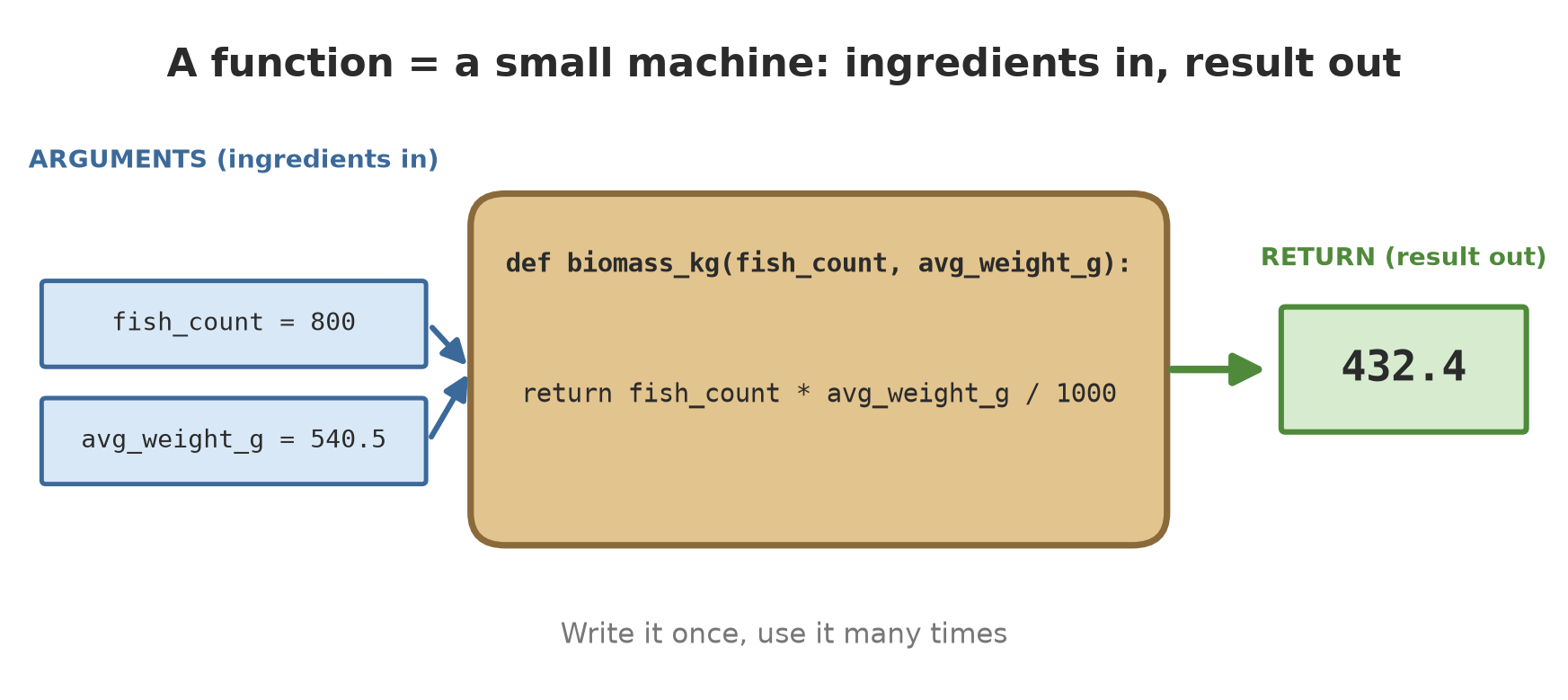
A function becomes useful when it takes ingredients and gives back a result:
02_arguments_return.py
# Chapter 10 - Arguments (ingredients in) and return (result out)
def biomass_kg(fish_count, avg_weight_g):
    return fish_count * avg_weight_g / 1000


total = biomass_kg(800, 540.5)
print(f"Pond A biomass: {total:.1f} kg")

# Arguments may be named to make things clearer
print(biomass_kg(fish_count=1250, avg_weight_g=300))
Pond A biomass: 432.4 kg
375.0- The names inside the brackets (
fish_count,avg_weight_g) are called parameters: the places that receive the ingredients. The values you give when calling (800,540.5) are called arguments. returnsends the result back to the caller. The result can be stored in a variable (total) or used right away.- Arguments may be named (
fish_count=1250) to be clearer, and then their order is free.
Default values
A parameter may be given a default value, used when the caller doesn’t mention it:
03_default_values.py
# Chapter 10 - Default values for arguments
# (the 3% feed figure is a practice number, not advice)
def daily_feed_kg(biomass, percent=3):
    return biomass * percent / 100


print(f"Using the default percent: {daily_feed_kg(432.4):.2f} kg")
print(f"Percent changed to 2.5:    {daily_feed_kg(432.4, percent=2.5):.2f} kg")
Using the default percent: 12.97 kg
Percent changed to 2.5: 10.81 kgThe first call uses the default percent=3. The second replaces it with 2.5. Parameters with default values must be written after parameters without them.
Scope: who can see which variable
A variable made inside a function is local: it lives only while the function runs.
04_scope.py
# Chapter 10 - Scope: a variable inside a function does not change the one outside
water_temp = 28

def check_temp():
    water_temp = 31                  # a NEW variable, alive only inside the function
    print("Inside the function:", water_temp)


check_temp()
print("Outside the function:", water_temp)
Inside the function: 31
Outside the function: 28Inside the function, water_temp = 31 makes a new variable that happens to have the same name. The water_temp outside stays 28. This protects the program: a function can’t accidentally change data outside itself.
Because a local variable “dies” after the function finishes, you can’t use it from outside:
08_local_variable_wrong.py
# Chapter 10 - A mistake: using a local variable from outside the function
def calculate():
    local_result = 10


calculate()
print(local_result)
Traceback (most recent call last):
File "08_local_variable_wrong.py", line 7, in <module>
print(local_result)
^^^^^^^^^^^^
NameError: name 'local_result' is not definedIf you need a result from inside a function, hand it back with return, then catch it outside.
Returning several values
One function can return more than one value at once (really a tuple from Chapter 9), which can be unpacked right away:
05_return_many.py
# Chapter 10 - One function can return several values
def summarise(values):
    return min(values), max(values), sum(values) / len(values)


weight_g = [520, 480, 560, 540]
smallest, largest, average = summarise(weight_g)
print(f"Smallest: {smallest} g")
print(f"Largest: {largest} g")
print(f"Average: {average:.1f} g")
Smallest: 480 g
Largest: 560 g
Average: 525.0 gDocstring and lambda
A docstring is a sentence inside triple quotation marks on the first line of a function. It explains the function’s job, and can be read through __doc__. A lambda is a mini one-line function without a name, often used on the spot, for example as a sorting rule.
06_docstring_lambda.py
# Chapter 10 - Docstring (a function's note) and lambda (a mini function)
def plot_area_m2(length_m, width_m):
    """Calculate the area of a rectangular plot in square metres."""
    return length_m * width_m


print(plot_area_m2.__doc__)
print(plot_area_m2(25, 12))

fish = [("catfish", 520), ("tilapia", 480), ("gourami", 610)]
by_weight = sorted(fish, key=lambda item: item[1])    # sort by weight
print(by_weight)
Calculate the area of a rectangular plot in square metres.
300
[('tilapia', 480), ('catfish', 520), ('gourami', 610)]In sorted(fish, key=lambda item: item[1]), the lambda means “take item number 1 of each pair (the weight) and sort by that”. The result runs from the lowest weight to the highest.
A classic trap: forgetting return
07_forgot_return.py
# Chapter 10 - A trap: a function without return gives None
def total_feed(morning_kg, evening_kg):
    morning_kg + evening_kg    # calculated, but not handed back


result = total_feed(2, 3)
print(result)NoneNo error, yet the result is None (“nothing”). The function calculated morning_kg + evening_kg, then threw it away because there is no return. This is a slippery bug because Python doesn’t complain.
A function without return always gives None. If your function’s result is suddenly None, first check whether you forgot return.
Running Project B2: the field data recorder
This is the peak of Series B2: everything you learned works together. There is a dict holding lists (Chapter 9), two functions (this chapter), a loop (Chapter 8), and an f-string with column formatting (Chapters 5 and 9).
09_recorder_project.py
# Chapter 10 - Running project B2: field data recorder (summary per sector)
def total(numbers):
    """Add up all the numbers in a list."""
    running = 0
    for n in numbers:
        running = running + n
    return running


def average(numbers):
    """Average of a list of numbers (the list must not be empty)."""
    return total(numbers) / len(numbers)


field_data = {
    "Trees (diameter cm)": [32.5, 45.2, 28.0, 51.5],
    "Plantation (kg)": [245.5, 310.0, 198.5, 276.0],
    "Fish (grams)": [520, 480, 560, 540],
    "Cattle (kg)": [350, 412.5, 389.0],
}

for sector, values in field_data.items():
    print(f"{sector:20} total {total(values):8.1f}   average {average(values):7.2f}")
Trees (diameter cm) total 157.2 average 39.30
Plantation (kg) total 1030.0 average 257.50
Fish (grams) total 2100.0 average 525.00
Cattle (kg) total 1151.5 average 383.83Notice that average() calls total(): a function may use another function. Adding a new sector (for example “Eggs (count)”) only needs one more line in field_data, without changing the functions or the loop. That is the power of functions.
Exercises
- Write a function
circle_area_m2(radius_m)that returns the area (use 3.14 for π). Call it for radius 3 and 5. - Write a function
harvest_status(weight_g)that returns"ready"if the weight is ≥ 500 and"not yet"otherwise. Use it inside a loop over the list[480, 520, 505, 495]. - Change
09_recorder_project.py: add the sector “Eggs (count)” with three numbers, and add a functionlargest(numbers)used to print the largest value of each sector. (Don’t usemax(); write the loop yourself.) - Challenge: write a function
safe_average(numbers)that returnsNonewhen the list is empty, so it doesn’t hitZeroDivisionError. Use theiffrom Chapter 7.
Chapter Summary
def name(parameters):makes a function; the body is indented. A function only runs when called.- Arguments = ingredients in;
return= result out. Withoutreturn, the result isNone. - Parameters may have default values.
- Variables inside a function are local and invisible from outside.
- A function can return several values, call other functions, and carry a docstring.
- Lambda = a mini one-line function.
Closing Series B2
Congratulations! You have mastered all the basic ingredients of the Python language: variables and data types, operators, decisions, loops, data structures, and functions. With these you can already write a small field data recorder.
But there is one big shortcoming: the data disappears every time the program closes. All the numbers in field_data must be retyped in the code each time. In Series B3, your program learns to read and save files: modules and libraries (Chapter 11), error handling (Chapter 12), and files and data formats (Chapters 13 and 14).
Next, in Chapter 11: modules and packages, the way to borrow ready-made tools from Python’s warehouse.