Chapter 18 — Testing Basics: Checking Code Automatically with pytest
Series I1 — Tidy and Maintainable Code
All scripts for this chapter are in the kode/ch18/ folder. On the web version, you can also download them all at once (zip).
Imagine you change the biomass formula in the Pond class. Do the pen, the rice field, and the forest plot still give correct numbers? Checking everything by eye after each change is tiring, and something always slips through. The solution: write automatic tests, small pieces of code that call your code and compare the result with the expected answer. Like a fish scale calibrated every morning: set up once, it checks in a blink.
assert: “make sure this is true”
The basis of every test in Python is assert. If the condition is true, the program carries on silently. If false, an AssertionError appears (an error meaning “the statement was not satisfied”).
01_assert_basics.py
# Chapter 18 - assert: "make sure this is true, otherwise stop"
biomass_kg = 800 * 540.5 / 1000

assert biomass_kg > 0
print("first assert passed: biomass", biomass_kg, "kg")

try:
    assert biomass_kg == 400, "biomass should be 400 kg"
except AssertionError as e:
    print("second assert failed:", e)

count = 0
try:
    assert count > 0
except AssertionError:
    print("an assert without a message can fail too")
first assert passed: biomass 432.4 kg
second assert failed: biomass should be 400 kg
an assert without a message can fail tooThe first statement passes without a sound apart from the print after it. In the second, the comma adds a message that appears on failure. The script catches it with try/except (Chapter 12) so the program does not stop.
pytest and the first test
pytest is the most widely used test library among Python programmers. It is already installed in this book’s environment; on your computer, install it with pip install pytest inside a venv (Chapter 17). The rules are simple:
- Test files are named
test_*.py(or*_test.py). - Test functions are named
test_.... - Inside them, write
assert.
(Source: the official pytest documentation, page “Good Integration Practices”, read 2026-10-10.)
02_first_test.py
# Chapter 18 - The first pytest test: a test_*.py file holding test_* functions
from pathlib import Path

from helpers import FOLDER, run_pytest

print(Path(FOLDER / "simple_example" / "test_calc.py").read_text(encoding="utf-8"))
print("--- pytest result ---")
text, code = run_pytest(["-v"], FOLDER / "simple_example")
print(text)
print("exit code:", code)
def biomass_kg(count, weight_g):
return count * weight_g / 1000
def test_simple_biomass():
assert biomass_kg(800, 500) == 400
def test_zero_biomass():
assert biomass_kg(0, 540.5) == 0
--- pytest result ---
============================= test session starts =============================
collecting ... collected 2 items
test_calc.py::test_simple_biomass PASSED [ 50%]
test_calc.py::test_zero_biomass PASSED [100%]
============================== 2 passed ==============================
exit code: 0This script runs pytest through subprocess on the simple_example/ folder. In the output, test_calc.py holds two test functions, both PASSED, and the summary says “2 passed”. Exit code 0 means everything is fine. pytest gives exit code 1 when any test fails, so automatic scripts and CI (Chapter 20) can use it. In this book’s output, the run time in the summary is deliberately removed so the result stays the same every time the book is built.
When a test fails
A test that always passes proves nothing yet; you need to know what the report looks like when it fails. The file failing_example/test_failing.py deliberately holds a wrong expectation (400 kg, while the calculation gives 432.4 kg).
04_failing_test.py
# Chapter 18 - Reading the report of a failed test
from helpers import FOLDER, run_pytest

text, code = run_pytest(["-q"], FOLDER / "failing_example")
print(text)
print("exit code:", code)
F [100%]
================================== FAILURES ===================================
_______________________ test_biomass_wrong_expectation ________________________
def test_biomass_wrong_expectation():
fish = Fish("catfish", 800, 540.5, 7.2)
> assert fish.biomass_kg() == 400.0
E AssertionError: assert 432.4 == 400.0
E + where 432.4 = biomass_kg()
E + where biomass_kg = Fish(species='catfish', count=800, avg_weight_g=540.5, water_ph=7.2).biomass_kg
test_failing.py:6: AssertionError
=========================== short test summary info ===========================
FAILED test_failing.py::test_biomass_wrong_expectation - AssertionError: asse...
1 failed
exit code: 1How to read it from the top:
- The letter
Fmarks one failed test (a passed test is a dot). - The arrow
>points to theassertline that failed. - The
E(error) lines explain: the actual value is 432.4, the expectation 400.0. pytest even breaks down where 432.4 came from (biomass_kg()on thatFishobject). - Last come the
FAILED ...summary and exit code1.
When a test fails, do not change the test straight away to make it pass. Ask first: is the code wrong, or the expectation? In this example the expectation is wrong. Sometimes the code is wrong instead, and that is what tests are for.
Laying out the test folder
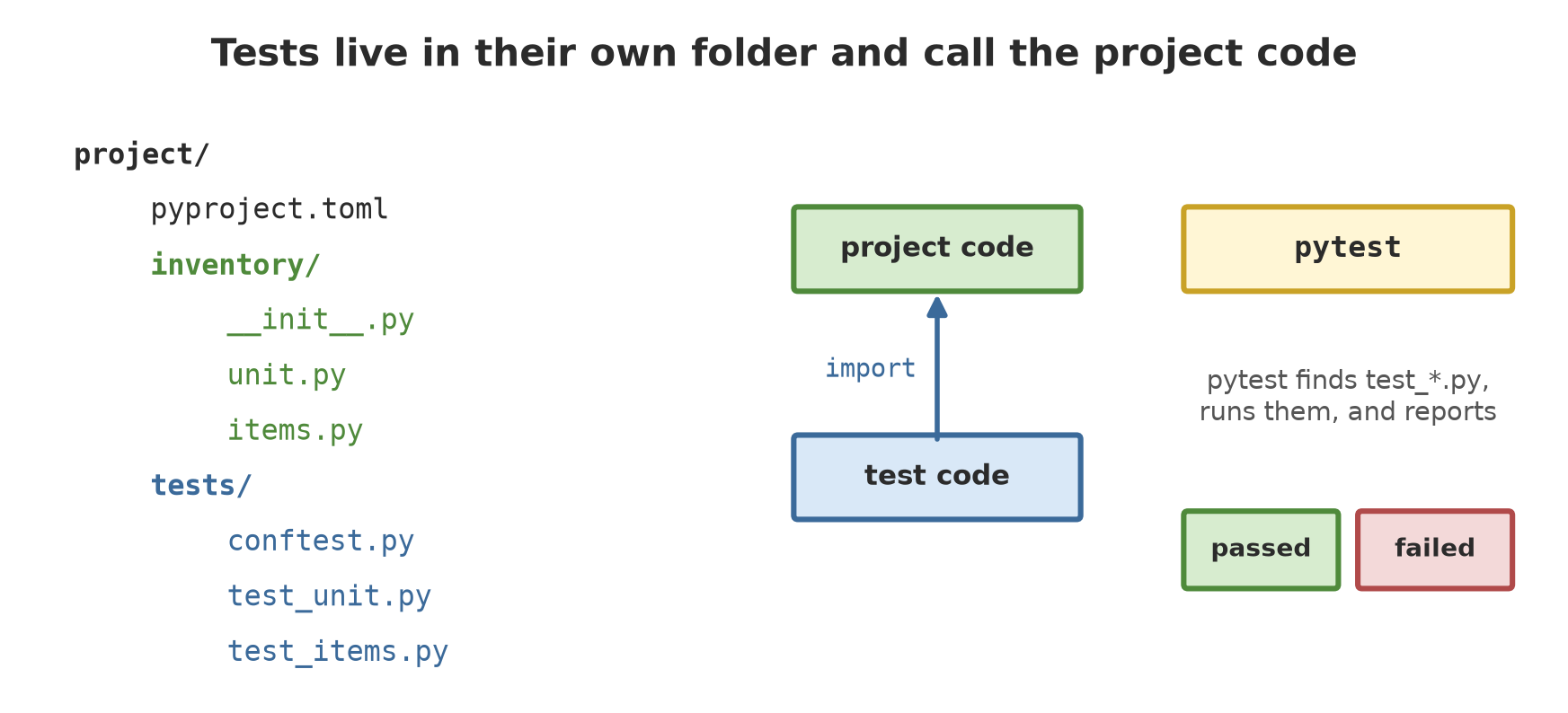
The inventory package from Chapter 16 now lives in the project/ folder. Tests go in a tests/ folder next to the package, not mixed in. pytest recommends this separation (official documentation, 2026-10-10).
project/
  pyproject.toml
  inventory/
    __init__.py   unit.py   items.py   sample.py   report.py
  tests/
    conftest.py
    test_items.py   test_unit.py   test_report.py
The pytest rules are written in pyproject.toml (Chapter 17):
[tool.pytest.ini_options]
testpaths = ["tests"]
pythonpath = ["."]
testpaths tells pytest to look for tests only in tests/. pythonpath = ["."] adds the project folder to the import path, so import inventory works without installing it first.
03_list_tests.py
# Chapter 18 - The tests pytest finds in the project (without running them)
from helpers import FOLDER, run_pytest

text, code = run_pytest(["--collect-only", "-q"], FOLDER / "project")
print(text)
tests/test_items.py::test_fish_biomass
tests/test_items.py::test_tree_category[28.0-small]
tests/test_items.py::test_tree_category[32.5-medium]
tests/test_items.py::test_tree_category[45.2-large]
tests/test_items.py::test_tree_category[40.0-large]
tests/test_items.py::test_negative_fish_count_rejected
tests/test_report.py::test_save_summary
tests/test_unit.py::test_zero_area_rejected
tests/test_unit.py::test_parent_cannot_compute
tests/test_unit.py::test_pond_output
tests/test_unit.py::test_pond_summary
tests/test_unit.py::test_summary_five_units
tests/test_unit.py::test_items_cannot_be_changed_from_outside
13 tests collectedThis is --collect-only mode: pytest only collects the tests without running them. From the three files, 13 tests were found. The test test_tree_category appears four times, tagged [28.0-small] and so on. The next section explains why.
Fixtures, parametrize, and raises
Three of pytest’s most-used tools, all present in our project.
A fixture is a “ready-made ingredient”: a function marked @pytest.fixture that is made fresh and lent to tests by name. Put it in conftest.py so every test file can use it.
conftest.py
"""Shared fixtures: ready-made ingredients for every test file."""

import pytest

from inventory import Fish, Pond
from inventory.sample import make_sample


@pytest.fixture
def sample_units():
    """Five sample units, freshly made for every test."""
    return make_sample()


@pytest.fixture
def pond_a():
    pond = Pond("A", 0.04)
    pond.add(Fish("catfish", 800, 540.5, 7.2))
    return pond
A test simply writes the fixture’s name as a parameter, and pytest fills it in. Every test receives a new object, so tests do not disturb each other.
test_items.py
import pytest

from inventory import Fish, Tree


def test_fish_biomass():
    fish = Fish("catfish", 800, 540.5, 7.2)
    assert fish.biomass_kg() == pytest.approx(432.4)


@pytest.mark.parametrize(
    ("diameter", "expected"),
    [(28.0, "small"), (32.5, "medium"), (45.2, "large"), (40.0, "large")],
)
def test_tree_category(diameter, expected):
    assert Tree("Teak", diameter, 15.0).category() == expected


def test_negative_fish_count_rejected():
    with pytest.raises(ValueError, match="negative"):
Fish("catfish", -1, 500.0, 7.0)@pytest.mark.parametrizeruns one test function for several pairs of data. Four diameter pairs become four tests (that is the[28.0-small]above). The diameter 40.0 is included on purpose to test the boundary: the large category starts exactly at 40.pytest.approx(432.4)compares decimal numbers with a small tolerance, so rounding noise does not fail the test (remember Chapter 6: decimals can be slightly off).pytest.raises(ValueError, match="negative")states: “this code must raise an error”. If it does not, the test fails. This is how to test that the data guard works.
test_unit.py
import pytest

from inventory import Pond, Unit


def test_zero_area_rejected():
    with pytest.raises(ValueError):
        Pond("X", 0)


def test_parent_cannot_compute():
    with pytest.raises(NotImplementedError):
        Unit("Plain", 1.0).output()


def test_pond_output(pond_a):
    assert pond_a.output() == pytest.approx(432.4)


def test_pond_summary(pond_a):
    assert pond_a.summary() == "Pond A: 1 record(s), 432.4 kg biomass"


def test_summary_five_units(sample_units):
    text = [unit.summary() for unit in sample_units]
    assert text[0] == "Forest plot A: 3 record(s), 2.0 healthy trees"
    assert text[2] == "Rice field Lowland: 1 record(s), 1250.0 kg (2500 kg/ha)"
    assert len(text) == 5


def test_items_cannot_be_changed_from_outside(pond_a):
    assert isinstance(pond_a.items, tuple)
    with pytest.raises(AttributeError):
        pond_a.items.append("x")
The test test_summary_five_units uses the sample_units fixture and compares the summary text exactly. There is also test_parent_cannot_compute for the polymorphism behaviour of Chapter 16.
test_report.py
from inventory.report import save_summary


def test_save_summary(tmp_path, sample_units):
    path = tmp_path / "summary.txt"
    count = save_summary(sample_units, path)
    lines = path.read_text(encoding="utf-8").splitlines()
    assert count == 5
    assert lines[3] == "Pond A: 1 record(s), 432.4 kg biomass"
The built-in fixture tmp_path gives a temporary folder that is thrown away after the test, so tests that write files do not litter your computer.
A good test is small (one thing per test), independent (does not rely on other tests), and named for its expectation. test_zero_area_rejected tells you at once what is broken if it fails.
Running some of the tests
In a big project you often want only the tests related to the part you are changing. The -k option selects tests by a piece of the name, and -v (verbose) shows each test.
05_select_tests.py
# Chapter 18 - Running only some tests: -k selects by name
from helpers import FOLDER, run_pytest

text, code = run_pytest(["-v", "-k", "pond"], FOLDER / "project")
print(text)
============================= test session starts =============================
testpaths: tests
collecting ... collected 13 items / 11 deselected / 2 selected
tests/test_unit.py::test_pond_output PASSED [ 50%]
tests/test_unit.py::test_pond_summary PASSED [100%]
====================== 2 passed, 11 deselected =======================Of the 13 tests collected, 11 were set aside (deselected) and only the 2 whose names contain “pond” ran.
The layout pytest suggests for a project that will be installed is the src/ layout: the package in src/inventory/ and tests in tests/, then installed with pip install -e . (“editable”: code changes are read at once without reinstalling). This book uses a flat layout (the package directly in project/) with pythonpath = ["."] because it is simpler for beginners. The pytest documentation also recommends --import-mode=importlib for new projects; that option is not used here.
Running Project I1: tests for the inventory package
Now all project tests run at once. Look back at sample_units from Chapter 16: those five units are now guarded by tests.
06_project_all_tests.py
# Chapter 18 - Running project I1: all tests of the inventory package
from helpers import FOLDER, run_pytest

text, code = run_pytest(["-v"], FOLDER / "project")
print(text)
print("exit code:", code)
============================= test session starts =============================
testpaths: tests
collecting ... collected 13 items
tests/test_items.py::test_fish_biomass PASSED [ 7%]
tests/test_items.py::test_tree_category[28.0-small] PASSED [ 15%]
tests/test_items.py::test_tree_category[32.5-medium] PASSED [ 23%]
tests/test_items.py::test_tree_category[45.2-large] PASSED [ 30%]
tests/test_items.py::test_tree_category[40.0-large] PASSED [ 38%]
tests/test_items.py::test_negative_fish_count_rejected PASSED [ 46%]
tests/test_report.py::test_save_summary PASSED [ 53%]
tests/test_unit.py::test_zero_area_rejected PASSED [ 61%]
tests/test_unit.py::test_parent_cannot_compute PASSED [ 69%]
tests/test_unit.py::test_pond_output PASSED [ 76%]
tests/test_unit.py::test_pond_summary PASSED [ 84%]
tests/test_unit.py::test_summary_five_units PASSED [ 92%]
tests/test_unit.py::test_items_cannot_be_changed_from_outside PASSED [100%]
============================= 13 passed ==============================
exit code: 0All 13 tests pass. From now on, whenever you change the Unit class or its children, run python -m pytest. If any number changes by accident, pytest tells you exactly where. That is what “safe to change” means in the closing of the series.
Exercises
- In
simple_example/test_calc.py, add a third test:biomass_kg(1250, 480)must be600. Run it withpython -m pytestin that folder. - Change the expected number in
failing_example/test_failing.pytopytest.approx(432.4)and run it; make sure the test passes. - Write a test
test_pen_outputfor thePenclass: add threeLivestockrecords (350, 412.5, and 389.0 kg) and check the output is 1151.5. - Challenge: write a parametrized test for
Tree.category()with five diameters, including the boundary 30.0. Then deliberately change>= 30to> 30initems.py, run the tests, see the boundary test fail, and restore the code.
Chapter Summary
- Automatic tests check your code every time they run, so changes do not break things silently.
assertis the basis; filestest_*.pyholding functionstest_*are found automatically by pytest.- A failed test shows
F; the>line points at the assert, theElines give the actual value and the expectation. Exit code 1. - Fixtures (
conftest.py),parametrize,pytest.approx,pytest.raises, andtmp_pathare everyday tools. - Put tests in a
tests/folder next to the package; configure under[tool.pytest.ini_options]inpyproject.toml. - The
inventorypackage now has 13 passing tests.
Next, in Chapter 19: code quality, how to tidy your writing style automatically with ruff, record a program’s progress with logging, and document the project.