Chapter 23 — Introduction to numpy and pandas: Smart Tables for Field Data
Series I2 — Data and the Internet
All scripts for this chapter are in the kode/ch23/ folder. On the web version, you can also download them all at once (zip).
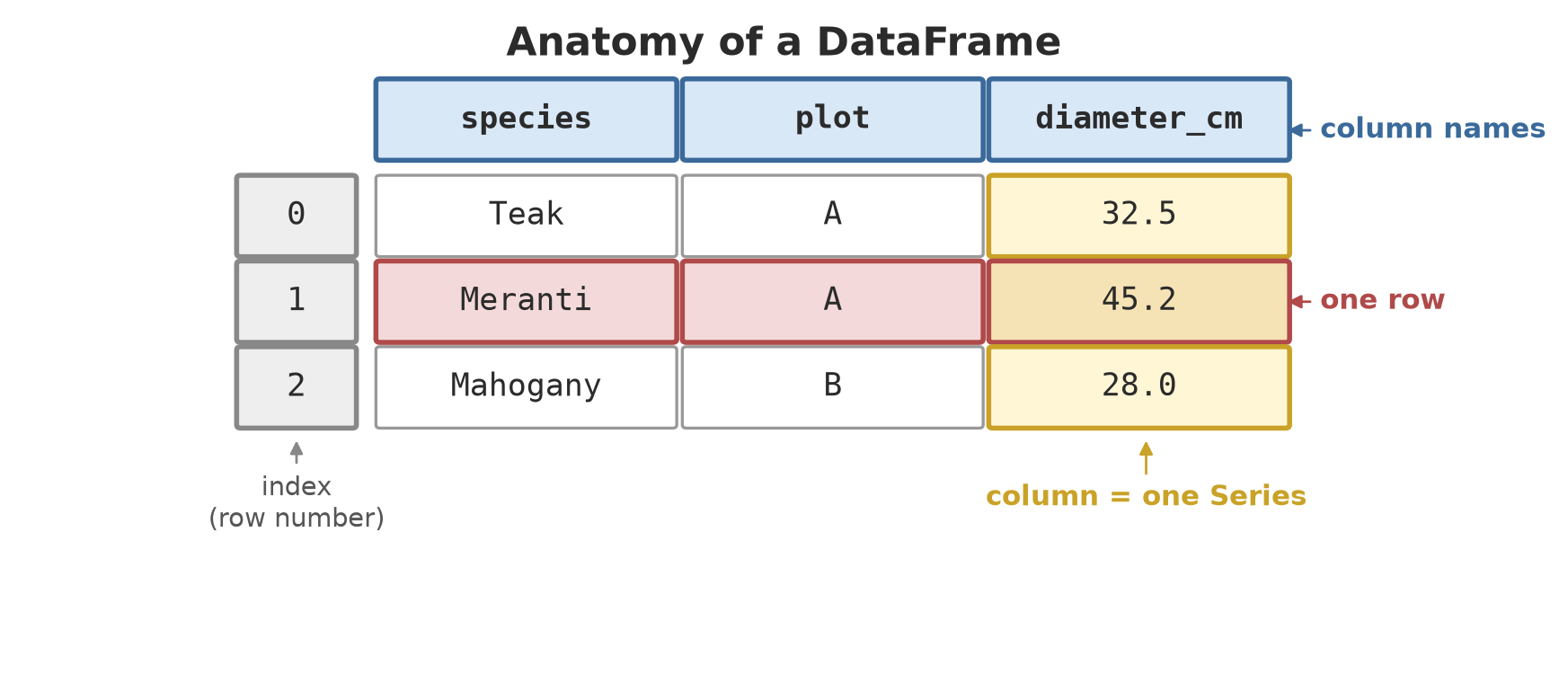
Imagine a field notebook with thousands of rows. Calculating the mean diameter with for is possible, but slow and long. numpy is like a uniform sack: everything inside is one kind (say, decimal numbers), so it can be weighed, multiplied, and summed all at once. pandas is a labelled worksheet (like Excel) built on numpy: every column has a name, every row has a number, and you can filter and summarise it in one or two lines of code. (Installing: pip install numpy pandas; both are already in this project’s environment.)
numpy: arrays
01_array_basics.py
# Chapter 23 - numpy arrays: fast, uniform lists of numbers
import numpy as np

diameter = np.array([32.5, 45.2, 28.0, 19.8, 36.1, 51.5])
print(diameter)
print("type:", diameter.dtype, "| shape:", diameter.shape, "| count:", diameter.size)

print(np.arange(0, 10, 2))               # like range(), but produces an array
print(np.linspace(0, 1, 5))              # 5 evenly spaced numbers between 0 and 1
print(np.zeros((2, 3)))                  # a table of 2 rows x 3 columns filled with zeros

table = np.array([[32.5, 18.0], [45.2, 25.5], [28.0, 15.0]])   # diameter, height
print(table.shape, "->", table.shape[0], "rows,", table.shape[1], "columns")
print(table[1, 0], "|", table[:, 1], "|", table[0])             # [row, column]
[32.5 45.2 28. 19.8 36.1 51.5]
type: float64 | shape: (6,) | count: 6
[0 2 4 6 8]
[0. 0.25 0.5 0.75 1. ]
[[0. 0. 0.]
[0. 0. 0.]]
(3, 2) -> 3 rows, 2 columns
45.2 | [18. 25.5 15. ] | [32.5 18. ]np.array([...])makes an array.dtype: float64means everything inside is a 64-bit decimal;shape: (6,)means one dimension, six elements.np.arangeis likerange(Chapter 8);np.linspace(0, 1, 5)divides 0 to 1 evenly into 5 points;np.zeros((2, 3))makes a table of zeros with 2 rows x 3 columns.- In a two-dimensional array you write
[row, column]:table[1, 0]= 45.2 (row 1, column 0),table[:, 1]= the whole of column 1 (height).
Whole-array operations
02_array_operations.py
# Chapter 23 - Whole-array operations (vectors), logical selection, and axes
import numpy as np

diameter_cm = np.array([32.5, 45.2, 28.0, 19.8, 36.1, 51.5])

radius_m = diameter_cm / 2 / 100         # one formula for ALL elements, no loop
print("radius (m):", radius_m)
area_m2 = 3.14159 * radius_m ** 2
print("cross-section area (m2):", area_m2.round(3))

big = diameter_cm >= 30                  # the result is an array of True/False
print("big?     ", big)
print("the big ones:", diameter_cm[big])  # selecting with a True/False mask
print("mean:", diameter_cm.mean().round(2), "| largest:", diameter_cm.max(), "| standard deviation:",
      diameter_cm.std().round(2))

table = np.array([[32.5, 18.0], [45.2, 25.5], [28.0, 15.0]])
print("mean of each column (axis=0):", table.mean(axis=0))
print("sum of each row     (axis=1):", table.sum(axis=1))
radius (m): [0.1625 0.226 0.14 0.099 0.1805 0.2575]
cross-section area (m2): [0.083 0.16 0.062 0.031 0.102 0.208]
big? [ True True False False True True]
the big ones: [32.5 45.2 36.1 51.5]
mean: 35.52 | largest: 51.5 | standard deviation: 10.51
mean of each column (axis=0): [35.23333333 19.5 ]
sum of each row (axis=1): [50.5 70.7 43. ]There is no for: diameter_cm / 2 / 100 is carried out on all six elements at once (vectorisation). The comparison diameter_cm >= 30 produces an array of True/False, and that array can be used as a mask to select elements (diameter_cm[big]).
axis sets the direction: axis=0 summarises downward per column (mean diameter 35.23 and height 19.5), axis=1 summarises sideways per row (50.5; 70.7; 43.0).
The numpy standard deviation (std()) is 10.51, yet pandas describe() in the DataFrame section below shows 11.51 for the same data. This is not a miscalculation: numpy divides by n (the population) by default, pandas divides by n-1 (a sample). Series I3 explains why; for now, remember that two libraries can have different defaults.
pandas: DataFrame
03_dataframe_basics.py
# Chapter 23 - DataFrame: a table with column names
import pandas as pd

trees = pd.DataFrame({
    "species": ["Teak", "Meranti", "Mahogany", "Sengon", "Teak", "Meranti"],
    "plot": ["A", "A", "B", "C", "B", "C"],
    "diameter_cm": [32.5, 45.2, 28.0, 19.8, 36.1, 51.5],
    "height_m": [18.0, 25.5, 15.0, 12.0, 20.5, 28.0],
    "healthy": [True, False, True, True, False, True],
})
print(trees)
print()
print("shape (rows, columns):", trees.shape)
print(trees.dtypes)
print()
print(trees["diameter_cm"].mean())        # one column = a Series
print(trees.describe().round(2))          # statistical summary of the numeric columns
species plot diameter_cm height_m healthy
0 Teak A 32.5 18.0 True
1 Meranti A 45.2 25.5 False
2 Mahogany B 28.0 15.0 True
3 Sengon C 19.8 12.0 True
4 Teak B 36.1 20.5 False
5 Meranti C 51.5 28.0 True
shape (rows, columns): (6, 5)
species str
plot str
diameter_cm float64
height_m float64
healthy bool
dtype: object
35.516666666666666
diameter_cm height_m
count 6.00 6.00
mean 35.52 19.83
std 11.51 6.12
min 19.80 12.00
25% 29.12 15.75
50% 34.30 19.25
75% 42.92 24.25
max 51.50 28.00The columns of a DataFrame may be of different kinds: text (str), decimal (float64), true/false (bool). A single column, such as trees["diameter_cm"], is called a Series. describe() summarises the numeric columns: the count, mean (35.52), smallest (19.8), quartiles, largest (51.5).
Reading and writing files
04_read_write.py
# Chapter 23 - Writing and reading CSV, Excel, and JSON
from pathlib import Path
import pandas as pd

tmp = Path(__file__).parent / "_tmp"
tmp.mkdir(exist_ok=True)

trees = pd.DataFrame({
    "species": ["Teak", "Meranti", "Mahogany"],
    "diameter_cm": [32.5, 45.2, 28.0],
    "healthy": [True, False, True],
})

trees.to_csv(tmp / "trees.csv", index=False)          # index=False: do not write row numbers
print((tmp / "trees.csv").read_text(encoding="utf-8"))

from_csv = pd.read_csv(tmp / "trees.csv")
print(from_csv.equals(trees), "<- CSV came back identical")

trees.to_excel(tmp / "trees.xlsx", index=False)       # uses the openpyxl library
from_excel = pd.read_excel(tmp / "trees.xlsx")
print(from_excel.equals(trees), "<- Excel came back identical")

trees.to_json(tmp / "trees.json", orient="records", force_ascii=False)
print((tmp / "trees.json").read_text(encoding="utf-8"))
species,diameter_cm,healthy
Teak,32.5,True
Meranti,45.2,False
Mahogany,28.0,True
True <- CSV came back identical
True <- Excel came back identical
[{"species":"Teak","diameter_cm":32.5,"healthy":true},{"species":"Meranti","diameter_cm":45.2,"healthy":false},{"species":"Mahogany","diameter_cm":28.0,"healthy":true}]to_csv/read_csv, to_excel/read_excel (needs openpyxl), and to_json/read_json make exchanging data with other programs as easy as one line. index=False prevents the row numbers from being written as a column. The equals(...) results are True: the data read back is exactly the same as the original.
Selecting and filtering
05_select_and_filter.py
# Chapter 23 - Selecting columns/rows and filtering
import pandas as pd

trees = pd.DataFrame({
    "species": ["Teak", "Meranti", "Mahogany", "Sengon", "Teak", "Meranti"],
    "plot": ["A", "A", "B", "C", "B", "C"],
    "diameter_cm": [32.5, 45.2, 28.0, 19.8, 36.1, 51.5],
    "healthy": [True, False, True, True, False, True],
})

print(trees[["species", "diameter_cm"]].head(2))          # several columns
print(trees.iloc[0])                                       # row number 0 by position
print(trees.loc[2, "species"])                             # row labelled 2, column "species"

big = trees[trees["diameter_cm"] >= 30]                    # filter with a condition
print(big)

sick_big = trees[(trees["diameter_cm"] >= 30) & (~trees["healthy"])]    # & = AND, ~ = NOT
print(sick_big)
print(trees.query("plot == 'A' or species == 'Teak'"))     # another way, reads like a sentence
print(trees.sort_values("diameter_cm", ascending=False).head(3))
species diameter_cm
0 Teak 32.5
1 Meranti 45.2
species Teak
plot A
diameter_cm 32.5
healthy True
Name: 0, dtype: object
Mahogany
species plot diameter_cm healthy
0 Teak A 32.5 True
1 Meranti A 45.2 False
4 Teak B 36.1 False
5 Meranti C 51.5 True
species plot diameter_cm healthy
1 Meranti A 45.2 False
4 Teak B 36.1 False
species plot diameter_cm healthy
0 Teak A 32.5 True
1 Meranti A 45.2 False
4 Teak B 36.1 False
species plot diameter_cm healthy
5 Meranti C 51.5 True
1 Meranti A 45.2 False
4 Teak B 36.1 Falsedf[["a", "b"]]selects columns;ilocselects by position,locby label.df[df["diameter_cm"] >= 30]filters rows with a condition. To combine conditions use&(and),|(or),~(not), with each condition in brackets.query("plot == 'A' or species == 'Teak'")is a way that reads more like a sentence.sort_values(..., ascending=False)sorts from the largest.
Aggregation: summarising per group
06_aggregation.py
# Chapter 23 - Aggregation: groupby, value_counts, pivot_table
import pandas as pd

trees = pd.DataFrame({
    "species": ["Teak", "Meranti", "Mahogany", "Sengon", "Teak", "Meranti"],
    "plot": ["A", "A", "B", "C", "B", "C"],
    "diameter_cm": [32.5, 45.2, 28.0, 19.8, 36.1, 51.5],
    "height_m": [18.0, 25.5, 15.0, 12.0, 20.5, 28.0],
})

print(trees["species"].value_counts())                     # how many trees per species
print(trees.groupby("species")["diameter_cm"].mean().round(2))

summary = trees.groupby("plot").agg(
    count=("species", "count"),
    mean_diameter=("diameter_cm", "mean"),
    max_height=("height_m", "max"),
)
print(summary.round(2))

print(trees.pivot_table(index="plot", columns="species", values="diameter_cm", aggfunc="mean"))
species
Teak 2
Meranti 2
Mahogany 1
Sengon 1
Name: count, dtype: int64
species
Mahogany 28.00
Meranti 48.35
Sengon 19.80
Teak 34.30
Name: diameter_cm, dtype: float64
count mean_diameter max_height
plot
A 2 38.85 25.5
B 2 32.05 20.5
C 2 35.65 28.0
species Mahogany Meranti Sengon Teak
plot
A NaN 45.2 NaN 32.5
B 28.0 NaN NaN 36.1
C NaN 51.5 19.8 NaNgroupby works like sorting sacks by species and then weighing each pile: the split, compute, combine pattern. The mean diameter of Teak is 34.30 (from 32.5 and 36.1), of Meranti 48.35. agg allows several summaries at once with result columns you name yourself. pivot_table makes a cross table of plot x species; cells without data are filled with NaN (“not a number” = empty).
Joining tables and missing data
07_merge_and_missing.py
# Chapter 23 - Joining tables (merge, concat) and missing data (NaN)
import pandas as pd

harvest = pd.DataFrame({"commodity": ["coffee", "rice", "catfish"], "yield_kg": [245.5, 3100.0, 432.4]})
prices = pd.DataFrame({"commodity": ["coffee", "rice", "maize"], "price_per_kg": [58000, 6200, 5100]})

# how="left": every harvest row is kept; rows without a price partner are filled with NaN
joined = harvest.merge(prices, on="commodity", how="left")
print(joined)
print("Rows with empty price:", joined["price_per_kg"].isna().sum())

joined["income"] = joined["yield_kg"] * joined["price_per_kg"]
print(joined)
print(joined.fillna({"price_per_kg": 0, "income": 0}))      # fill the empties with 0
print(joined.dropna())                                       # drop rows that contain empties

extra = pd.DataFrame({"commodity": ["cattle"], "yield_kg": [1151.5]})
print(pd.concat([harvest, extra], ignore_index=True))        # stacking rows downward
commodity yield_kg price_per_kg
0 coffee 245.5 58000.0
1 rice 3100.0 6200.0
2 catfish 432.4 NaN
Rows with empty price: 1
commodity yield_kg price_per_kg income
0 coffee 245.5 58000.0 14239000.0
1 rice 3100.0 6200.0 19220000.0
2 catfish 432.4 NaN NaN
commodity yield_kg price_per_kg income
0 coffee 245.5 58000.0 14239000.0
1 rice 3100.0 6200.0 19220000.0
2 catfish 432.4 0.0 0.0
commodity yield_kg price_per_kg income
0 coffee 245.5 58000.0 14239000.0
1 rice 3100.0 6200.0 19220000.0
commodity yield_kg
0 coffee 245.5
1 rice 3100.0
2 catfish 432.4
3 cattle 1151.5merge joins two tables through a shared column, like JOIN in a database (Chapter 24). With how="left", all rows of harvest are kept; catfish has no price so it is NaN, and its income is empty too. There are three ways to handle empties: leave them, fillna (fill a replacement value), or dropna (drop the row). Choose according to what the data means: filling the catfish price with 0 means “free”, which is not necessarily true.
After a merge, always check isna().sum(). Unpaired rows are almost always a sign of a name that does not match (for example coffee versus Coffee) or of data that simply does not exist yet.
Running Project I2: merging five sectors, weather, and prices
Step 3: ten harvest records from five sectors (forestry, plantation, cropland, fisheries, livestock), the Bogor weather, and the prices are merged into one table. (Fictional data; copied into the script so it stands on its own, with the same shape as the Chapter 21 results.)
08_project_merge.py
# Chapter 23 - Running project I2, step 3: merging five sectors, weather, and prices
import pandas as pd

# Five-sector data (fictional). Copied here so the script stands on its own.
harvest = pd.DataFrame(
    [("2026-01-01", "Forestry", "Plot A", "teak", 1200.0),
     ("2026-01-01", "Plantation", "Block A", "coffee", 245.5),
     ("2026-01-02", "Plantation", "Block B", "cocoa", 198.5),
     ("2026-01-02", "Cropland", "Paddy 1", "rice", 3100.0),
     ("2026-01-03", "Cropland", "Paddy 2", "maize", 1850.0),
     ("2026-01-03", "Fisheries", "Pond A", "catfish", 432.4),
     ("2026-01-04", "Livestock", "Barn 1", "cattle", 1151.5),
     ("2026-01-04", "Plantation", "Block C", "coffee", 310.0),
     ("2026-01-05", "Cropland", "Paddy 1", "rice", 2950.0),
     ("2026-01-05", "Plantation", "Block D", "cocoa", 276.0)],
    columns=["date", "sector", "unit", "commodity", "yield_kg"],
)
# Bogor weather and prices: same shape as the data from the mock server in Chapter 21 (fictional)
weather = pd.DataFrame({
    "date": ["2026-01-01", "2026-01-02", "2026-01-03", "2026-01-04", "2026-01-05"],
    "max_temp": [30.1, 31.4, 29.8, 28.9, 30.6],
    "rain_mm": [12.5, 0.0, 8.2, 25.4, 3.1],
})
prices = pd.DataFrame(
    [(d, c, p) for c, values in {
        "rice": [6200, 6250, 6180, 6300, 6270],
        "maize": [5100, 5150, 5200, 5120, 5180],
        "coffee": [58000, 58500, 59000, 57500, 58200],
        "cocoa": [62000, 61500, 62500, 63000, 62800]}.items()
     for d, p in zip(weather["date"], values)],
    columns=["date", "commodity", "price_per_kg"],
)

merged = (harvest
          .merge(weather, on="date", how="left")
          .merge(prices, on=["date", "commodity"], how="left"))
merged["income_rp"] = merged["yield_kg"] * merged["price_per_kg"]

print(merged.drop(columns=["date"]).to_string(index=False))
print()
print("Rows without a price (forestry, fish, cattle):", int(merged["price_per_kg"].isna().sum()))
per_sector = merged.groupby("sector").agg(yield_kg=("yield_kg", "sum"), income_rp=("income_rp", "sum"))
print(per_sector.round(0))
sector unit commodity yield_kg max_temp rain_mm price_per_kg income_rp
Forestry Plot A teak 1200.0 30.1 12.5 NaN NaN
Plantation Block A coffee 245.5 30.1 12.5 58000.0 14239000.0
Plantation Block B cocoa 198.5 31.4 0.0 61500.0 12207750.0
Cropland Paddy 1 rice 3100.0 31.4 0.0 6250.0 19375000.0
Cropland Paddy 2 maize 1850.0 29.8 8.2 5200.0 9620000.0
Fisheries Pond A catfish 432.4 29.8 8.2 NaN NaN
Livestock Barn 1 cattle 1151.5 28.9 25.4 NaN NaN
Plantation Block C coffee 310.0 28.9 25.4 57500.0 17825000.0
Cropland Paddy 1 rice 2950.0 30.6 3.1 6270.0 18496500.0
Plantation Block D cocoa 276.0 30.6 3.1 62800.0 17332800.0
Rows without a price (forestry, fish, cattle): 3
yield_kg income_rp
sector
Cropland 7900.0 47491500.0
Fisheries 432.0 0.0
Forestry 1200.0 0.0
Livestock 1152.0 0.0
Plantation 1030.0 61604550.0Trace the result:
- Each harvest record receives the temperature and rain of the same day (
mergeondate) and the price of the same commodity and day (mergeon two columns). - 3 rows without a price: teak timber, catfish, cattle, because the price API only holds rice, maize, coffee, cocoa.
income_rpfor those rows isNaN. - Summary per sector: Plantation 1030.0 kg with income Rp 61,604,550; Cropland 7900.0 kg with Rp 47,491,500. Forestry, Fisheries, and Livestock show 0 income only because
sumignoresNaN, not because their value is really zero. Data limits like this must be stated frankly when reporting.
Exercises
- From the array
np.array([480, 500, 510, 520, 530]), compute the mean weight and select those heavier than 505 with a mask. - Make a fish DataFrame with the columns
pond,species,count,avg_weight_g, then compute the biomass of each row (count * avg_weight_g / 1000) as a new column. - In
06_aggregation.py, add an aggregation of the number of trees and the smallest diameter per species. - Challenge: in
08_project_merge.py, compute the mean income per sector only from rows that have a price, and compute what percentage of rows have no price.
Chapter Summary
- numpy array: one kind of content, operations all at once without
for;axis=0per column,axis=1per row. - DataFrame = a labelled table; one column = a Series.
head,describe,dtypes,shapehelp you get to know it. - Read/write:
read_csv,read_excel,to_json, and friends;index=Falseavoids the row-number column. - Filter with conditions (
&,|,~, each in brackets) orquery; sort withsort_values. groupby+aggsummarises per group;mergejoins tables; beware ofNaNafter merging.- Libraries can have different defaults (numpy vs pandas standard deviation).
Next, in Chapter 24: that merged data vanishes when the program is closed. We store it in a database: SQLite, SQLAlchemy, and PostgreSQL.