Chapter 67 — Distributed Systems: Many Workers, One Big Job
Series A5 — Expert Python
All scripts for this chapter are in the kode/ch67/ folder. On the web version, you can also download them all at once (zip).
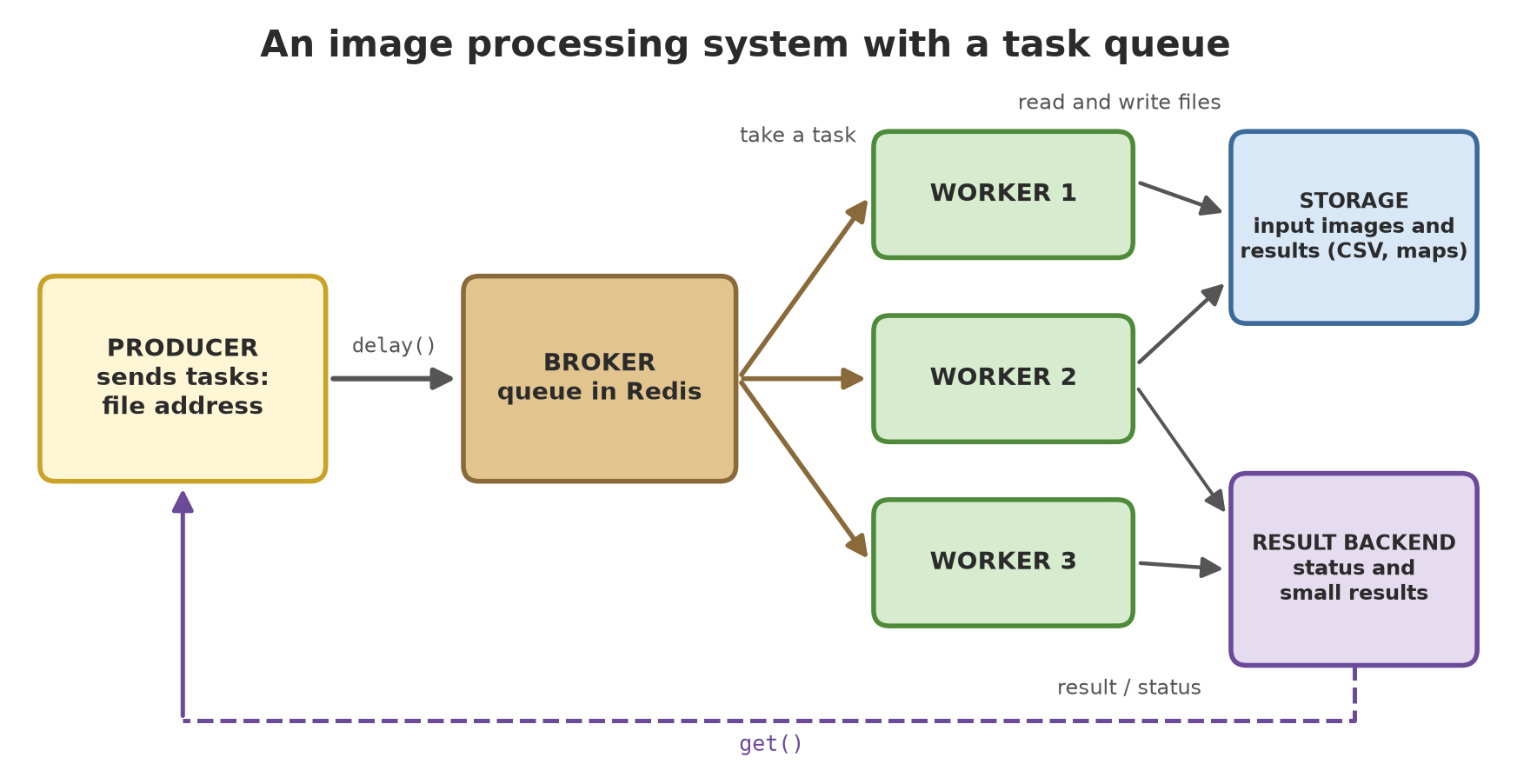
In Chapter 66 you sped up one computer. Now imagine a big plantation that a drone has just flown over: thousands of photos pile up, plus satellite images every week. One person, however fast, will not finish in time. The solution is like a community kitchen at harvest time: there is an order board (the queue), there are many cooks (workers), and any cook who is free takes the next order. If one cook falls sick, the others take over the orders. That is a distributed system: work divided among many executors that coordinate through an intermediary.
Rules of this chapter. To keep the book build fast, our practice material is only 48 fake files (36 drone photos and 12 satellite images, made by a script, with no downloads), not thousands; the idea and the code are the same for thousands. Every script that uses a queue is really run with a temporary Redis 5.0.14 (the directive # @redis), with workers started and stopped by the script itself. Run times are not printed; only stable results are, and the numbers on your computer differ.
Practice material: fake drone photos and satellite images
01_fake_images.py
# Chapter 67 - Practice material: FAKE drone photos and satellite images, and the analysis per file
import shutil
from pathlib import Path

from fake_images import analyse, make_images

folder = Path(__file__).parent / "_tmp" / "images"
shutil.rmtree(folder, ignore_errors=True)

files = make_images(folder, drone_count=36, satellite_count=12)
print("number of files  :", len(files))
print("drone photos     :", sum(f.endswith(".png") for f in files), "(PNG, 256 x 256, three colour bands)")
print("satellite images :", sum(f.endswith(".npz") for f in files), "(NPZ, 256 x 256, red and NIR bands)")

print("\nsample analysis results (vegetation index per file):")
for path in (files[0], files[1], files[2], files[36], files[37], files[38]):
    h = analyse(path)
    print(f"  {h['file']:<20} {h['kind']:<10} plot {h['plot']}  mean={h['mean']:.4f}  green={h['percent_green']:>5.1f}%")

# The result is fixed (fixed random seed): computed twice, the same
print("\ncomputed again, same result:", analyse(files[0]) == analyse(files[0]))
number of files : 48
drone photos : 36 (PNG, 256 x 256, three colour bands)
satellite images : 12 (NPZ, 256 x 256, red and NIR bands)
sample analysis results (vegetation index per file):
drone_A_000.png drone plot A mean=0.4992 green= 49.6%
drone_B_001.png drone plot B mean=0.3550 green= 20.0%
drone_C_002.png drone plot C mean=0.1922 green= 0.0%
satellite_A_000.npz satellite plot A mean=0.4547 green= 83.6%
satellite_B_001.npz satellite plot B mean=0.3172 green= 54.3%
satellite_C_002.npz satellite plot C mean=0.2433 green= 28.9%
computed again, same result: TrueThe module fake_images.py (in the folder and in the zip) makes 36 drone photos (PNG 256 x 256, three bands) and 12 satellite images (two bands: red and NIR). Plot A is made the densest, C the sparsest. The function analyse computes a vegetation index (Excess Green for drone photos, NDVI for satellite images; Chapter 59), then smooths it again and again so that the work is heavy enough (about 0.1 seconds per file), like a real filtering stage. The result is a small dict and is fixed (fixed random seed). Notice the order: drone A is greener than B, B than C, and so on.
The simplest queue: a list in Redis
Redis is a very fast in-memory database with a list type. That is enough for a queue: the producer does LPUSH of a task at one end, the workers do BRPOP (take while waiting) at the other end.
02_redis_queue_basics.py
# Chapter 67 - The simplest task queue: a list in Redis
import json
import multiprocessing as mp
import os

import redis

URL = os.environ["REDIS_URL"]
QUEUE, DONE, RESULTS = "ch67:02:queue", "ch67:02:done", "ch67:02:results"


def client():
    return redis.Redis.from_url(URL, protocol=2, decode_responses=True)   # protocol=2: Redis 5


def worker(name):
    r = client()
    while True:
        _, content = r.brpop(QUEUE)                # waits until a task appears
        task = json.loads(content)
        if task == "STOP":
            return
        r.hset(RESULTS, task["id"], sum(i * i for i in range(task["n"])))
        r.rpush(DONE, name)                        # note who did the work


if __name__ == "__main__":
    r = client()
    r.delete(QUEUE, DONE, RESULTS)
    for i in range(20):                            # the producer: puts in 20 tasks
        r.lpush(QUEUE, json.dumps({"id": i, "n": 1000 + i}))
    print("tasks waiting in the queue:", r.llen(QUEUE))

    processes = [mp.Process(target=worker, args=(f"w{k}",)) for k in range(3)]
    for p in processes:
        p.start()
    while r.llen(DONE) < 20:                       # wait until all are done
        pass
    for _ in processes:
        r.lpush(QUEUE, json.dumps("STOP"))         # one stop sign per worker
    for p in processes:
        p.join()

    results = {int(k): int(v) for k, v in r.hgetall(RESULTS).items()}
    correct = all(results[i] == sum(j * j for j in range(1000 + i)) for i in range(20))
    print("tasks finished            :", len(results), "of 20; all results correct:", correct)
    print("queue now                 :", r.llen(QUEUE))

    # Problem: a task that was taken and whose worker then dies is LOST.
    # The reliable pattern: move the task to a "being processed" list first (BRPOPLPUSH).
    PROCESSING = "ch67:02:processing"
    r.delete(QUEUE, PROCESSING)
    r.lpush(QUEUE, json.dumps({"id": 99, "n": 10}))
    taken = r.brpoplpush(QUEUE, PROCESSING)        # taken, but recorded as being processed
    print("worker died before finishing; queue:", r.llen(QUEUE), "| being processed:", r.llen(PROCESSING))
    while r.rpoplpush(PROCESSING, QUEUE):          # the recoverer: put hanging tasks back
        pass
    print("after recovery; queue:", r.llen(QUEUE), "| being processed:", r.llen(PROCESSING))
    r.delete(QUEUE, PROCESSING, DONE, RESULTS)
tasks waiting in the queue: 20
tasks finished : 20 of 20; all results correct: True
queue now : 0
worker died before finishing; queue: 0 | being processed: 1
after recovery; queue: 1 | being processed: 020 tasks are put in, three worker processes take them, and all 20 results are correct with none done twice (BRPOP gives each task to exactly one worker). After that, a "STOP" sign is sent, one per worker, a common way to stop workers politely.
The last part shows why a ready-made queue is needed: if a worker takes a task and then dies, that task is lost because it has left the queue. The reliable pattern moves the task into a “being processed” list (BRPOPLPUSH); if a worker dies, the hanging task is put back into the queue by a “recoverer”. Celery and RQ apply similar ideas for you.
A note about the equipment: a new redis-py client speaks the RESP3 protocol and sends the HELLO command, which Redis 5 does not know on the author’s computer. That is why the script creates the client with protocol=2. On a newer Redis you do not need protocol=2.
Celery: producer, broker, worker, and result backend
Celery is the best-known task queue framework in Python. Four roles:
- Producer: the code that calls
task.delay(...); it returns at once and does not wait for the work. - Broker: the intermediary that stores task messages (here, Redis).
- Worker: a process that takes messages and runs their functions.
- Result backend: where results are stored so the producer can fetch them (here also Redis).
Two honest notes from the documentation and our experiments. (1) The official Celery FAQ states that Windows is not supported since Celery 4 because of a lack of resources, but that it “may still work” (docs.celeryq.dev, read 2026-10-10). On the author’s computer, the solo pool is proven to work; we did not try the prefork pool (the default). Every solo worker is one Python process with one task at a time, so many workers = many processes, not many threads. (2) For Celery to talk to Redis 5, the helper module redis5_patch.py plants protocol=2 into the redis-py connection pool (Celery makes its own connections, so we cannot pass the protocol=2 argument directly). Before that patch, our worker refused to connect with the message unknown command HELLO.
03_celery_workers.py
# Chapter 67 - Celery: start workers, send tasks, collect results, stop the workers
import os
import shutil
from pathlib import Path

os.environ["QUEUE"] = "ch67_03"                # a queue only for this script (read by celery_tasks)

from fake_images import analyse, make_images
from launcher import start_workers, stop, wait_ready
from celery_tasks import analyse_task, app

folder = Path(__file__).parent / "_tmp" / "images03"
shutil.rmtree(folder, ignore_errors=True)
files = make_images(folder, drone_count=12, satellite_count=6)       # 18 files

processes = start_workers(count=3, queue="ch67_03")                 # three workers = three Python processes
names = []
try:
    names = wait_ready(app, 3)
    print("workers that answered the ping:", len(names))

    # The producer: send tasks. delay() returns at once; the work happens in the workers.
    orders = [analyse_task.delay(f) for f in files]
    print("tasks sent                     :", len(orders))

    results = [o.get(timeout=120) for o in orders]                   # wait and fetch the results
    print("tasks succeeded                :", sum(o.successful() for o in orders))
    print("worker result = local result   :", results[0] == analyse(files[0]))
    print("sample result                  :", results[0])
finally:
    stop(processes, app, names)                                      # the workers are stopped by this script
print("all workers stopped            :", all(p.poll() is not None for p in processes))
workers that answered the ping: 3
tasks sent : 18
tasks succeeded : 18
worker result = local result : True
sample result : {'file': 'drone_A_000.png', 'kind': 'drone', 'plot': 'A', 'mean': 0.4992, 'percent_green': 49.6}
all workers stopped : TrueThe order: the script starts three worker processes through subprocess and waits for them to answer ping; the producer sends 18 tasks with delay(); o.get() waits for each result; the workers’ result is exactly equal to the local result; finally the workers are stopped with the shutdown command aimed only at our workers (the destination parameter; without it, the command reaches all workers on the same Redis). The configuration we use in celery_tasks.py: worker_prefetch_multiplier=1 (one task per worker, so the division is fair) and task_acks_late=True (a task counts as done after it succeeded, not when taken).
Failure is certain
In a distributed system, even the impossible happens: the network drops, a file is corrupt, a worker dies. Good design treats failure as ordinary.
04_retries_and_failures.py
# Chapter 67 - Failure is certain to happen: automatic retries and tasks that keep failing
import os

os.environ["QUEUE"] = "ch67_04"

import redis

from launcher import start_workers, stop, wait_ready
from celery_tasks import URL, always_fails, app, unstable

client = redis.Redis.from_url(URL, protocol=2)
client.delete("ch67:04:attempts_a", "ch67:04:attempts_b")

processes = start_workers(count=1, queue="ch67_04")
names = []
try:
    names = wait_ready(app, 1)

    # 1. Fails twice because the "network dropped", then succeeds. Celery retries by itself
    #    (autoretry_for=ConnectionError, at most 4 retries).
    a = unstable.delay("ch67:04:attempts_a", 2)
    print("1. final status  :", a.get(timeout=60)["attempt"], "attempts -> success;", a.state)

    # 2. Fails again and again: once the retry limit is used up, the task has the status FAILURE
    b = unstable.delay("ch67:04:attempts_b", 99)
    try:
        b.get(timeout=60)
    except ConnectionError as e:
        print("2. keeps failing :", b.state, "-", e)
    print("   attempts recorded:", int(client.get("ch67:04:attempts_b")), "(1 first + 4 retries)")

    # 3. An error that is not a momentary glitch must not be retried blindly: it fails at once
    c = always_fails.delay("drone_C_099.png")
    try:
        c.get(timeout=60)
    except ValueError as e:
        print("3. data error    :", c.state, "-", e)

    # 4. Failures must be recorded so a person can inspect them (like a "dead letter queue")
    for result in (b, c):
        client.rpush("ch67:04:failed", f"{result.id[:8]}:{result.state}")
    print("4. failed tasks recorded for inspection:", client.llen("ch67:04:failed"))
finally:
    stop(processes, app, names)
    client.delete("ch67:04:attempts_a", "ch67:04:attempts_b", "ch67:04:failed")
1. final status : 3 attempts -> success; SUCCESS
2. keeps failing : FAILURE - connection dropped on attempt 5
attempts recorded: 5 (1 first + 4 retries)
3. data error : FAILURE - file drone_C_099.png is corrupt
4. failed tasks recorded for inspection: 2- A momentary glitch: the task fails twice then succeeds on the third attempt, and Celery retried it by itself (
autoretry_forforConnectionError). - Keeps failing: after the retry limit is used up (we set 4), the status becomes
FAILUREafter 5 attempts in total. - A data error (a corrupt file) is useless to retry blindly, so
ValueErroris not in the retry list and fails at once. - Record what failed so a person can inspect it, like a dead letter queue.
The Celery documentation stresses that task functions should be idempotent: if run twice with the same arguments, they must not cause a double effect (for example sending twice, or adding twice to a total). With acks_late, if a worker dies midway, the task may run again. Design tasks so the result is overwritten, not added (write to results/photo_017.json, not append a line at the end of a file).
RQ: a simpler task queue
RQ (Redis Queue) is lighter: only Redis, with no complicated configuration. A task is an ordinary Python function referred to by its name, e.g. "rq_tasks.process".
05_rq.py
# Chapter 67 - RQ: a simpler task queue (Redis only), failed tasks and retries
import os
import shutil
import subprocess
import sys
from pathlib import Path

import redis
from rq import Queue, Retry

import redis5_patch  # noqa: F401
from fake_images import analyse, make_images

URL = os.environ["REDIS_URL"]
connection = redis.Redis.from_url(URL, protocol=2)
queue = Queue("ch67_05", connection=connection)
queue.empty()

folder = Path(__file__).parent / "_tmp" / "images05"
shutil.rmtree(folder, ignore_errors=True)
files = make_images(folder, drone_count=8, satellite_count=4)         # 12 files

# The producer: tasks are written as the text "module.function" so the worker that imports them
jobs = [queue.enqueue("rq_tasks.process", f, retry=Retry(max=2, interval=0)) for f in files]
broken = queue.enqueue("rq_tasks.broken", "drone_X.png", retry=Retry(max=2, interval=0))
print("tasks waiting            :", len(queue), "| status of the first task:", jobs[0].get_status().value)

# Two workers are started (burst mode: they stop by themselves when the queue is empty)
module_folder = Path(__file__).parent
workers = [subprocess.Popen([sys.executable, "rq_tasks.py", "ch67_05"], cwd=module_folder,
                            stdout=subprocess.DEVNULL, stderr=subprocess.DEVNULL) for _ in range(2)]
for w in workers:
    w.wait(timeout=240)
print("workers stopped by themselves:", all(w.poll() == 0 for w in workers))

for j in jobs + [broken]:
    j.refresh()
succeeded = [j for j in jobs if j.get_status().value == "finished"]
print("tasks succeeded          :", len(succeeded), "of", len(jobs))
print("same as the local result :", succeeded[0].return_value() == analyse(files[0]))
print("the broken task has status:", broken.get_status().value)
print("   recorded in the failed registry:", len(queue.failed_job_registry), "task")
print("   cause                  :", broken.latest_result().exc_string.strip().splitlines()[-1])
queue.empty()
for j in jobs + [broken]:
    j.delete()
tasks waiting : 13 | status of the first task: queued
workers stopped by themselves: True
tasks succeeded : 12 of 12
same as the local result : True
the broken task has status: failed
recorded in the failed registry: 1 task
cause : ValueError: file drone_X.png is corruptTwo workers (separate processes) finish 12 tasks and then stop by themselves (burst mode). The task that always fails goes into the failed job registry together with its cause, so it can be inspected and put back in the queue once fixed. A Windows note: according to the RQ documentation, the standard worker uses fork(), which does not exist on Windows; there is the SimpleWorker (runs jobs in the worker process itself, without fork) and, since RQ 2.2.0, the SpawnWorker that uses os.spawn() (python-rq.org/docs/workers, read 2026-10-10). We use the SimpleWorker (installed RQ version 2.12.0) and it runs with Redis 5. The documentation says SimpleWorker is not recommended for production unless you understand its limits (for example, no heartbeats while a job runs); we did not test SpawnWorker.
| Celery | RQ | |
|---|---|---|
| Broker | Redis, RabbitMQ, and others | Redis only |
| Features | periodic schedules, task chains, many pool types, monitoring | simple: queues, retries, failed registry |
| Complexity | higher | lower |
| Windows | not officially supported; solo runs here |
does not use fork: SimpleWorker runs here |
Rule of thumb: start with RQ if your needs are simple and you already have Redis; choose Celery if you need schedules, task chains, or another broker.
Monitoring
A system that is not monitored tells you it is broken through user complaints. Three basics are watched: queue length (growing steadily means too few workers), worker status (alive or not), and failed tasks.
06_monitoring.py
# Chapter 67 - Monitoring: queue length, active workers, and work statistics
import os
import shutil
from pathlib import Path

os.environ["QUEUE"] = "ch67_06"

import redis

from fake_images import make_images
from launcher import start_workers, stop, wait_ready
from celery_tasks import URL, analyse_task, app

folder = Path(__file__).parent / "_tmp" / "images06"
shutil.rmtree(folder, ignore_errors=True)
files = make_images(folder, drone_count=12, satellite_count=4)       # 16 files

client = redis.Redis.from_url(URL, protocol=2)
processes = start_workers(count=2, queue="ch67_06")
names = []
try:
    names = wait_ready(app, 2)
    inspector = app.control.inspect(timeout=2)

    print("tasks registered in the worker:", sorted(t for t in next(iter(inspector.registered().values()))
                                                    if t.startswith("images.")))

    orders = [analyse_task.delay(f) for f in files]
    waiting = client.llen("ch67_06")                                 # a Celery queue = a Redis list of the same name
    print("tasks still waiting           :", waiting > 0)

    for o in orders:
        o.get(timeout=120)
    print("queue after finishing         :", client.llen("ch67_06"))

    statistics = inspector.stats()
    total = sum(s["total"].get("images.analyse", 0) for s in statistics.values())
    print("total tasks carried out       :", total, "(the sum over all workers)")
    print("worker statistics keys        :", sorted(next(iter(statistics.values())))[:6])
finally:
    stop(processes, app, names)
tasks registered in the worker: ['images.always_fails', 'images.analyse', 'images.analyse_timed', 'images.unstable']
tasks still waiting : True
queue after finishing : 0
total tasks carried out : 16 (the sum over all workers)
worker statistics keys : ['broker', 'clock', 'pid', 'pool', 'prefetch_count', 'rusage']A Celery queue in Redis is a Redis list of the same name, so LLEN gives its length (the way the Celery monitoring documentation also recommends for a Redis broker). inspect().registered() shows the tasks the workers recognise, and inspect().stats() gives the count of tasks per worker: the total is 16, exactly the tasks we sent. One important note from the documentation: on the solo pool, a running task blocks waiting control commands, so a busy worker answers ping or inspect slowly (raise the reply timeout). For a web view, Celery has Flower (celery -A proj flower, port 5555; we did not run it for this book).
Designing an image processing service
A set of principles that make a system like the one in the figure above sturdy:
- Send references, not big data. A queue message holds a file address or an ID (
drone_A_000.png), not the picture content. Pictures are kept in shared storage (a network disk or object storage). - Idempotent. One task may run twice without harm; results are written by overwriting.
- Small results in the queue, big results in storage. A compact dict (like our results) may pass through the backend; maps or result images are written to storage and only the address is sent back.
- Reasonable timeouts and retries, plus recording of failed tasks.
- One queue per kind of work: light tasks do not wait behind heavy ones; GPU workers (Chapter 66) serve only the queue that needs a GPU.
- Backpressure: limit the producer’s rate if the queue gets too long.
- Monitoring and alerts: a piling-up queue or many failed tasks must trigger an alarm.
- Versioned tasks and message schemas: old and new workers often live together during a release.
Scalability and cost
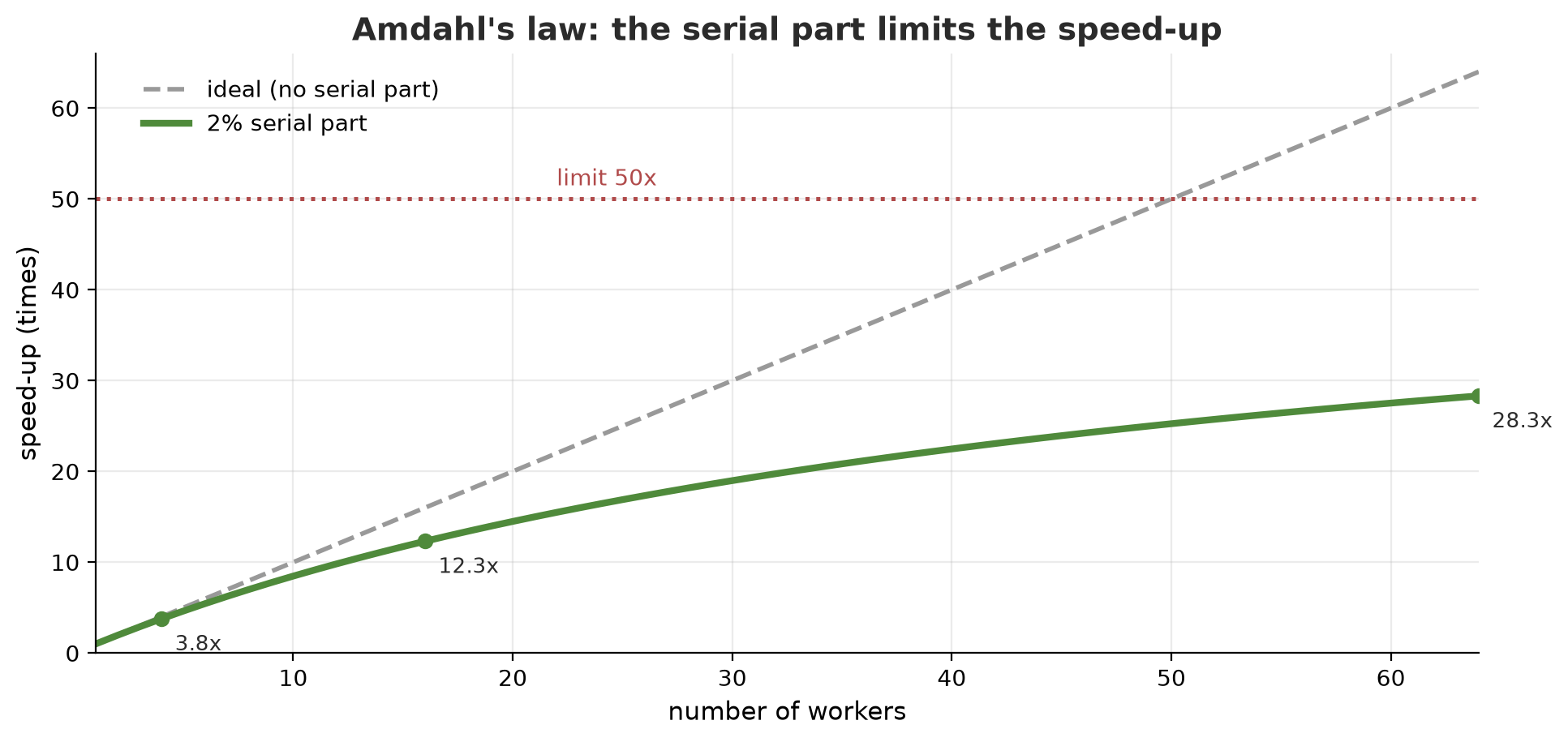
Adding workers does not speed things up without limit. Amdahl’s law says that if part of the work cannot be divided (reading the file list, merging results), the maximum speed-up is limited by that part: with a 2% serial part, the limit is 50 times however many workers there are. The following script calculates with made-up rates (not the price of any provider).
07_cost_and_scale.py
# Chapter 67 - Cost and scalability: arithmetic with MADE-UP rates (not the price of any provider)

# Assumptions (all numbers are examples):
PHOTOS = 100_000               # drone photos + satellite images that must be processed
SECONDS_PER_PHOTO_CPU = 2.0    # one CPU core processes one photo
SECONDS_PER_PHOTO_GPU = 0.1    # one GPU processes one photo (data already on the card)
RATE_CPU_HOUR = 3_000          # Rp per hour for one 4-core machine (made up)
RATE_GPU_HOUR = 9_000          # Rp per hour for one machine with a GPU (made up)
CORES_PER_MACHINE = 4
SERIAL_PART = 0.02             # 2% of the work cannot be divided (reading the list, merging results)


def amdahl_speedup(workers, serial_part):
    """Amdahl's law: the maximum speed-up when part of the work cannot be parallelised."""
    return 1 / (serial_part + (1 - serial_part) / workers)


print(f"{'workers':>7} {'speed-up':>9} {'efficiency':>11}")
for w in (1, 2, 4, 8, 16, 32, 64):
    s = amdahl_speedup(w, SERIAL_PART)
    print(f"{w:>7} {s:>8.1f}x {s / w:>10.0%}")
print("theoretical limit (infinite workers):", round(1 / SERIAL_PART), "x")

print("\nScenarios for", f"{PHOTOS:,}", "photos:")
total_seconds_cpu = PHOTOS * SECONDS_PER_PHOTO_CPU
for machines in (1, 4, 16):
    cores = machines * CORES_PER_MACHINE
    hours = total_seconds_cpu / cores / 3600
    cost = machines * hours * RATE_CPU_HOUR
    print(f"  CPU, {machines:>2} machines ({cores:>2} cores): {hours:6.1f} hours, cost Rp {cost:>9,.0f}")
gpu_hours = PHOTOS * SECONDS_PER_PHOTO_GPU / 3600
print(f"  GPU, 1 machine           : {gpu_hours:6.1f} hours, cost Rp {gpu_hours * RATE_GPU_HOUR:>9,.0f}")

# Lesson: the CPU cost stays nearly the same (same machine-hours), but the waiting time drops
print("\nThe total CPU cost (machine-hours times the rate) is practically the same; what changes is the waiting time.")
workers speed-up efficiency
1 1.0x 100%
2 2.0x 98%
4 3.8x 94%
8 7.0x 88%
16 12.3x 77%
32 19.8x 62%
64 28.3x 44%
theoretical limit (infinite workers): 50 x
Scenarios for 100,000 photos:
CPU, 1 machines ( 4 cores): 13.9 hours, cost Rp 41,667
CPU, 4 machines (16 cores): 3.5 hours, cost Rp 41,667
CPU, 16 machines (64 cores): 0.9 hours, cost Rp 41,667
GPU, 1 machine : 2.8 hours, cost Rp 25,000
The total CPU cost (machine-hours times the rate) is practically the same; what changes is the waiting time.The speed-up table: 4 workers give 3.8 times (94% efficiency), but 64 workers give only 28.3 times (44% efficiency): half the machines “idle” waiting for the serial part. In the scenario of 100,000 photos, the CPU cost is the same (41,667 rupiah) whatever the number of machines, because the total machine-hours are the same; what changes is the waiting time (13.9 hours against 0.9 hours). Note: this calculation assumes 100% can be parallelised; in reality the serial part and queue load add time. A GPU machine at the made-up rate costs more per hour but less in total (25,000 rupiah in 2.8 hours) because the photos are processed much faster; the assumption of 0.1 seconds per photo on the GPU is an example number, not a measurement.
Before buying machines, measure how long one task takes and what part is serial. Tasks that are too small (a few milliseconds) are actually slower when spread out, because the queue cost exceeds the work. Merge small tasks into batches until each task takes about one second.
Running Project A5: drone photos and satellite images with many workers
We bring everything together: 48 files of material, first done by one process (the reference), then by three Celery workers, compared, and summarised per plot into a CSV.
08_project_image_pipeline.py
# Chapter 67 - Project A5: processing 48 drone photos and satellite images with 3 workers, then summarising per plot
import csv
import os
import shutil
import time
from collections import defaultdict
from pathlib import Path

os.environ["QUEUE"] = "ch67_08"

from fake_images import analyse, make_images
from launcher import start_workers, stop, wait_ready
from celery_tasks import analyse_timed, app

work = Path(__file__).parent / "_tmp" / "pipeline"
shutil.rmtree(work, ignore_errors=True)
files = make_images(work / "images", drone_count=36, satellite_count=12)
print("input material:", len(files), "files")

# 1. The reference: one process does everything in sequence
start = time.perf_counter()
serial_results = [analyse(f) for f in files]
serial_time = time.perf_counter() - start

# 2. Distributed: three workers take tasks from the Redis queue
processes = start_workers(count=3, queue="ch67_08")
names = []
try:
    names = wait_ready(app, 3)               # the time to start the workers is not counted
    start = time.perf_counter()
    orders = [analyse_timed.delay(f) for f in files]
    answers = [o.get(timeout=300) for o in orders]
    worker_time = time.perf_counter() - start
    worker_results = [r for r, _ in answers]
    total_work_seconds = sum(d for _, d in answers)       # total working time of all tasks, measured in the workers
finally:
    stop(processes, app, names)

print("results identical to the single process:", worker_results == serial_results)
# Average number of tasks running at the same time = total working time / wall-clock time.
# This measure is robust against a busy computer; ideally it approaches 3.
print("average tasks running at once more than 1.5:", total_work_seconds / worker_time > 1.5)

# 3. Summarise per kind and plot, then save a CSV
groups = defaultdict(list)
for r in worker_results:
    groups[(r["kind"], r["plot"])].append(r)

rows = []
for (kind, plot), items in sorted(groups.items()):
    rows.append({"kind": kind, "plot": plot, "count": len(items),
                 "mean_index": round(sum(i["mean"] for i in items) / len(items), 3),
                 "percent_green": round(sum(i["percent_green"] for i in items) / len(items), 1)})

with open(work / "summary.csv", "w", newline="", encoding="utf-8") as f:
    writer = csv.DictWriter(f, fieldnames=list(rows[0]))
    writer.writeheader()
    writer.writerows(rows)

print(f"\n{'kind':<10} {'plot':<5} {'count':>5} {'mean_index':>11} {'percent_green':>14}")
for r in rows:
    print(f"{r['kind']:<10} {r['plot']:<5} {r['count']:>5} {r['mean_index']:>11.3f} {r['percent_green']:>14.1f}")
print("\nplots from densest to sparsest (drone):",
      [r["plot"] for r in sorted((x for x in rows if x["kind"] == "drone"), key=lambda x: -x["mean_index"])])
input material: 48 files
results identical to the single process: True
average tasks running at once more than 1.5: True
kind plot count mean_index percent_green
drone A 12 0.507 51.4
drone B 12 0.378 26.9
drone C 12 0.216 0.4
satellite A 4 0.428 81.2
satellite B 4 0.316 55.9
satellite C 4 0.254 33.4
plots from densest to sparsest (drone): ['A', 'B', 'C']- The result from three workers is identical to the single-process result (
True): a distributed system must not change the answer. - We chose the speed measure to be robust against a busy computer: not “how many times faster” (which jumps when the computer is busy), but the average number of tasks running at the same time (total working time measured inside the workers divided by wall-clock time). Its value is above 1.5 (ideally near 3), a sign that the work was really divided. The real speed numbers differ on each computer, so they are not printed.
- The table summarises 48 files into six rows: plot A is the densest and C the sparsest, both for drone and satellite, as we made the fake material.
summary.csvis ready to be read by a dashboard (Chapter 43) or GIS (Chapter 38).
For thousands of real images, the change is small: replace make_images with a list of files from storage, raise the number of workers (or move them to several computers with a Redis that all can reach), and heavy per-image work (for example the tree detection model of Chapter 56 on a GPU) gets its own queue.
Exercises
- In
03_celery_workers.py, change the number of workers to 1, then 5. Which output line changes and which stays? Why does the analysis result stay exactly the same however many workers there are? - Add a new Celery task
summarise_plot(plot, results)incelery_tasks.pythat computes the average, and call it from the script. Why is it better for that task to receive small data (a list of results) rather than whole images? - Change
04_retries_and_failures.pyso the maximum number of retries is 2 and write down your prediction of the attempt count before running. - Challenge: make a second queue named
gpu(Chapter 66) and use Celery’stask_routesso a taskanalyse_gpuonly goes into that queue. Explain in a comment why a separate queue matters.
Chapter Summary
- A distributed system divides work among many workers through a queue: producer, broker, worker, result backend.
- A simple queue in Redis (
LPUSH/BRPOP) shows the core; the reliable version moves the task to a “being processed” list. - Celery (many features) and RQ (simple) both run with Redis; on Windows we used the
solopool (Celery) and theSimpleWorker(RQ), and Redis 5 needsprotocol=2. - Failure is ordinary: retry momentary glitches, do not retry data errors, record failed tasks, and make tasks idempotent.
- Monitor queue length, worker status, and failed tasks.
- Amdahl’s law limits the speed-up; CPU cost stays relatively fixed while waiting time falls; tasks that are too small are slower when spread out.
- Send references, not big data, through the queue.
Next, in Chapter 68: the closing of the journey: building a portfolio from all your projects, writing a good README, contributing to open projects, choosing a career path, and learning on.