Chapter 49 — Security: Protecting the Application from Leaks and Common Attacks
Series A1 — Professional Software Engineering
All scripts in this chapter are in the folder kode/ch49/. In the web version, you can also download everything at once (zip).
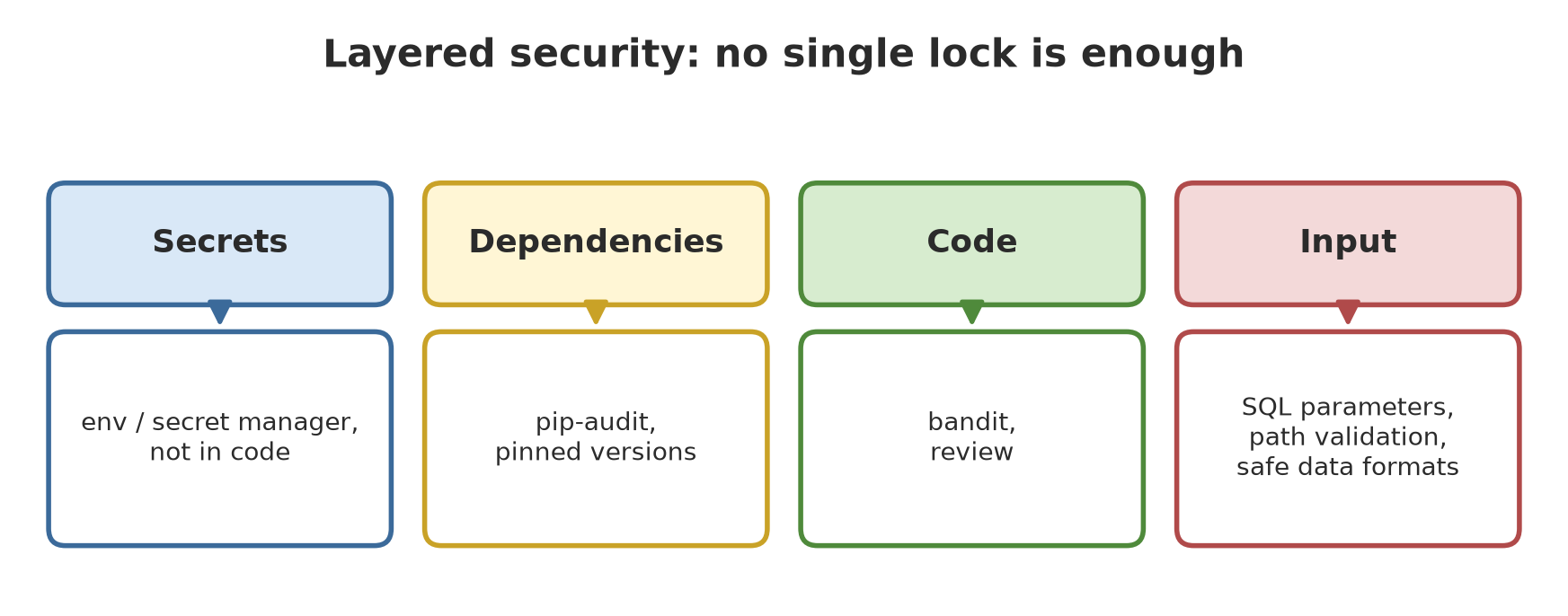
Your application is now on a server. That means it is open to anyone who can reach it, including the mischievous and the malicious. Imagine a warehouse for farm produce: you do not only lock the front door. You also keep the warehouse key in a safe place (not under the doormat), check the sacks coming in, and do not let just anyone carry home the price notes. Security means many small layers, because no single lock is enough.
All “secrets” in this chapter are made-up values (for example [disamarkan]). Never put a real password or key in code, in the manuscript, or in Git. The “attacks” in this chapter only attack made-up data in your own computer’s memory.
Layer 1: secrets
Secrets (passwords, API keys, tokens) written in code get saved in Git, in colleagues’ copies, and wherever the code spreads. If one leaks, changing the code is not enough: you must replace the secret. The right habits:
01_secrets.py
# Chapter 49 - Secrets: never write them in code, read them from the environment, and compare them safely
import hmac
import os
import secrets

# DO NOT do this (a made-up value, only to show the wrong shape):
#   API_KEY = "sk-example-fake-123"
# Do this: read it from an environment variable; if missing, stop with a clear message.
os.environ["APP_API_KEY"] = "[disamarkan]"        # demo only; on a server the system fills it in


def get_secret(name):
    value = os.environ.get(name)
    if not value:
        raise RuntimeError(f"environment variable {name} is not set")
    return value


def mask(text, shown=2):
    """Shows only a little of the start of the text; the rest is stars."""
    return text[:shown] + "*" * max(len(text) - shown, 0)


key = get_secret("APP_API_KEY")
print("key read, length:", len(key), "| safe display:", mask(key))

try:
    get_secret("APP_DOES_NOT_EXIST")
except RuntimeError as error:
    print("clear error:", error)

# Make a strong random token with the secrets module (not random!)
token = secrets.token_urlsafe(32)
print("random token length:", len(token), "characters | are two tokens equal?", token == secrets.token_urlsafe(32))

# Comparing secrets: compare_digest resists timing attacks
print("match:", hmac.compare_digest(key, "[disamarkan]"), "| wrong:", hmac.compare_digest(key, "guess"))
key read, length: 12 | safe display: [d**********
clear error: environment variable APP_DOES_NOT_EXIST is not set
random token length: 43 characters | are two tokens equal? False
match: True | wrong: False- The secret is read from an environment variable, and if it is missing, the program stops with a clear message (instead of silently using a dangerous default).
- When displaying, show very little (
[d**********). The length of the real value may be printed, the content must not. - For tokens, use the
secretsmodule, notrandom(which can be predicted). Two tokens fromsecrets.token_urlsafe(32)almost surely differ (43 characters). - Comparing secrets with
==can leak information through timing differences;hmac.compare_digestresists that.
User passwords: store a hash, not the text
Never store a password as it is. Store a hash (a one-way fingerprint) with a salt (random seasoning per user):
02_passwords.py
# Chapter 49 - Passwords: store a salted HASH, never the original text
import hashlib
import hmac
import os


def make_hash(password):
    salt = os.urandom(16)                              # random "seasoning", different for each user
    result = hashlib.scrypt(password.encode(), salt=salt, n=2**14, r=8, p=1)
    return salt, result


def verify(password, salt, result):
    attempt = hashlib.scrypt(password.encode(), salt=salt, n=2**14, r=8, p=1)
    return hmac.compare_digest(attempt, result)


salt1, hash1 = make_hash("fake-example-password")
salt2, hash2 = make_hash("fake-example-password")

print("salt length:", len(salt1), "bytes | hash length:", len(hash1), "bytes")
print("correct password accepted:", verify("fake-example-password", salt1, hash1))
print("wrong password rejected  :", not verify("guess", salt1, hash1))
print("two users, same password, same hash?", hash1 == hash2)
print("original text stored in the hash?", b"fake" in hash1)
salt length: 16 bytes | hash length: 64 bytes
correct password accepted: True
wrong password rejected : True
two users, same password, same hash? False
original text stored in the hash? FalseTwo users with the same password produce different hashes because their salts differ, so an attacker cannot mark “all those with equal hashes must have the same password”. The original text is not in the hash. The scrypt function in hashlib is deliberately slow and memory-hungry so mass guessing becomes expensive. The parameters n, r, p in the script are only examples; the currently recommended numbers have not been verified by us, so follow up-to-date security guidance and consider a dedicated library for production.
SQL injection
If you glue user input straight into SQL text, users can insert their own commands:
03_sql_injection.py
# Chapter 49 - SQL injection: gluing text into an SQL command is dangerous, parameters are safe
import sqlite3

db = sqlite3.connect(":memory:")
db.execute("CREATE TABLE farmer (name TEXT, plot TEXT, secret TEXT)")
db.executemany("INSERT INTO farmer VALUES (?, ?, ?)", [
    ("Budi", "A", "private-note-1"),
    ("Siti", "B", "private-note-2"),
])

evil_input = "A' OR '1'='1"       # a malicious user types this into the "plot" field


def search_unsafe(plot):
    sql = f"SELECT name, secret FROM farmer WHERE plot = '{plot}'"      # DO NOT do this
    return sql, db.execute(sql).fetchall()


def search_safe(plot):
    sql = "SELECT name, secret FROM farmer WHERE plot = ?"              # do this
    return sql, db.execute(sql, (plot,)).fetchall()


sql, result = search_unsafe(evil_input)
print("UNSAFE SQL   :", sql)
print("UNSAFE result:", result, "<- every row leaked!")

sql, result = search_safe(evil_input)
print("SAFE   SQL   :", sql)
print("SAFE   result:", result, "<- no plot has that name")
print("SAFE, normal plot:", search_safe("A")[1])
UNSAFE SQL : SELECT name, secret FROM farmer WHERE plot = 'A' OR '1'='1'
UNSAFE result: [('Budi', 'private-note-1'), ('Siti', 'private-note-2')] <- every row leaked!
SAFE SQL : SELECT name, secret FROM farmer WHERE plot = ?
SAFE result: [] <- no plot has that name
SAFE, normal plot: [('Budi', 'private-note-1')]The input A' OR '1'='1 turns the command into WHERE plot = 'A' OR '1'='1': the condition is always true, so every row leaks. With parameters (a ? mark and the value sent separately), that malicious input is treated only as the text of a plot name that does not exist, so the result is empty. The rule is absolute: never build SQL with an f-string or + from user input. In Chapter 47, t-strings do the same thing more comfortably.
Path traversal
When a file name comes from a user, ../ can make the program read files outside the intended folder:
04_path_traversal.py
# Chapter 49 - Path traversal: a file name from a user can "climb" out of the folder with ../
from pathlib import Path

root = Path(__file__).parent / "_tmp" / "reports"
root.mkdir(parents=True, exist_ok=True)
(root / "harvest.txt").write_text("harvest of block A: 245.5 kg", encoding="utf-8")
(root.parent / "secret.txt").write_text("THIS IS OUTSIDE THE REPORTS FOLDER", encoding="utf-8")


def read_unsafe(name):
    return (root / name).read_text(encoding="utf-8")                      # DO NOT do this


def read_safe(name):
    path = (root / name).resolve()
    if not path.is_relative_to(root.resolve()):                           # do this
        raise PermissionError(f"path outside the reports folder: {name!r}")
    return path.read_text(encoding="utf-8")


attack = "../secret.txt"
print("UNSAFE:", read_unsafe(attack), "<- leaked!")
try:
    read_safe(attack)
except PermissionError as error:
    print("SAFE rejected:", error)
print("SAFE, normal name:", read_safe("harvest.txt"))
UNSAFE: THIS IS OUTSIDE THE REPORTS FOLDER <- leaked!
SAFE rejected: path outside the reports folder: '../secret.txt'
SAFE, normal name: harvest of block A: 245.5 kgThe unsafe version reads secret.txt located outside the reports folder. The safe version uses resolve() (turns the path into an absolute form without ..), then makes sure the result is still inside the allowed folder with is_relative_to.
Unsafe deserialization
Opening pickle data from a source you do not trust is the same as running that person’s code. The following example is harmless (it only prints text) but proves the point:
05_deserialization.py
# Chapter 49 - Unsafe deserialization: pickle can RUN code when opened; json is only data
import json
import pickle


class Evil:
    """A harmless example: when opened, pickle calls print (a real attacker would call something else)."""

    def __reduce__(self):
        return (print, ("!!! code from pickle data ran during pickle.loads()",))


foreign_data = pickle.dumps(Evil())
print("opening pickle from an untrusted source...")
pickle.loads(foreign_data)                    # DO NOT do this with outside data

foreign_text = '{"block": "A", "yield_kg": 245.5}'
print("opening JSON:", json.loads(foreign_text))

# JSON cannot run code; strange data only becomes an ordinary error
try:
    json.loads("print('x')")
except json.JSONDecodeError as error:
    print("JSON rejects code:", type(error).__name__)
opening pickle from an untrusted source...
!!! code from pickle data ran during pickle.loads()
opening JSON: {'block': 'A', 'yield_kg': 245.5}
JSON rejects code: JSONDecodeErrorThe line !!! code from pickle data ran... appears while opening the pickle: the data carries a command, not just content. JSON is only data; strange text produces an ordinary error. For outside data, use JSON (or another data format that cannot run code), and use pickle only for data you wrote yourself and keep in a trusted place.
bandit: a security scanner for code
bandit reads Python code without running it (static analysis) and flags risky patterns. We scan one unsafe file and one fixed file:
06_bandit.py
# Chapter 49 - bandit: a security scanner for Python code (static analysis, does not run the code)
import json
import subprocess
import sys
from pathlib import Path

tmp = Path(__file__).parent / "_tmp"
tmp.mkdir(exist_ok=True)

unsafe = tmp / "example_unsafe.py"
unsafe.write_text('''import pickle

password = "fake-example-123"


def search(db, plot):
    return db.execute(f"SELECT * FROM tree WHERE plot = '{plot}'").fetchall()


def load(data):
    return pickle.loads(data)
''', encoding="utf-8")

safe = tmp / "example_safe.py"
safe.write_text('''import json
import os


def search(db, plot):
    return db.execute("SELECT * FROM tree WHERE plot = ?", (plot,)).fetchall()


def load(data):
    return json.loads(data)


key = os.environ.get("APP_API_KEY")
''', encoding="utf-8")


def scan(file):
    result = subprocess.run([sys.executable, "-m", "bandit", "-f", "json", "-q", str(file)],
                            capture_output=True, text=True, encoding="utf-8")
    return json.loads(result.stdout)["results"]


for file in (unsafe, safe):
    findings = scan(file)
    print(f"{file.name}: {len(findings)} findings")
    for f in sorted(findings, key=lambda f: f["line_number"]):
        print(f"  line {f['line_number']:2} {f['test_id']} [{f['issue_severity']}/{f['issue_confidence']}] {f['issue_text'][:60]}")
example_unsafe.py: 4 findings
line 1 B403 [LOW/HIGH] Consider possible security implications associated with pick
line 3 B105 [LOW/MEDIUM] Possible hardcoded password: 'fake-example-123'
line 7 B608 [MEDIUM/MEDIUM] Possible SQL injection vector through string-based query con
line 11 B301 [MEDIUM/HIGH] Pickle and modules that wrap it can be unsafe when used to d
example_safe.py: 0 findingsThe four findings on the unsafe file match what we already learned: the pickle import (B403), a hard-coded password (B105), SQL from an f-string (B608), and use of pickle.loads (B301). The fixed file is clean (0 findings). Each finding has a severity (LOW, MEDIUM, HIGH) and a confidence; read both before panicking.
pip-audit: troublesome dependencies
Your code may be safe, but the libraries you use have holes. pip-audit matches your package names and versions against a database of known vulnerabilities. We deliberately choose two old package versions as an example:
07_pip_audit.py
# Chapter 49 - pip-audit: finding vulnerabilities in the packages we use (example: old versions chosen on purpose)
import subprocess
import sys
from pathlib import Path

tmp = Path(__file__).parent / "_tmp"
tmp.mkdir(exist_ok=True)
listing = tmp / "requirements-old.txt"
listing.write_text("requests==2.19.0\npyyaml==5.3\n", encoding="utf-8")   # old versions, for the example

result = subprocess.run(
    [sys.executable, "-m", "pip_audit", "-r", str(listing), "--no-deps", "--disable-pip"],
    capture_output=True, text=True, encoding="utf-8", timeout=100,
)
print(result.stdout.strip())
print("pip-audit exit code:", result.returncode)
Name Version ID Fix Versions
-------- ------- --------------- ------------
requests 2.19.0 PYSEC-2018-28 2.20.0
requests 2.19.0 PYSEC-2018-28 2.20.0
requests 2.19.0 PYSEC-2023-74 2.31.0
requests 2.19.0 PYSEC-2023-74 2.31.0
requests 2.19.0 PYSEC-2026-1873 2.32.0
requests 2.19.0 PYSEC-2026-1872 2.32.4
requests 2.19.0 PYSEC-2026-2275 2.33.0
requests 2.19.0 PYSEC-2026-1873 2.32.0
requests 2.19.0 PYSEC-2026-1872 2.32.4
requests 2.19.0 PYSEC-2026-2275 2.33.0
pyyaml 5.3 PYSEC-2020-96 5.3.1
pyyaml 5.3 PYSEC-2021-142 5.4
pyyaml 5.3 PYSEC-2021-142 5.4
pyyaml 5.3 PYSEC-2020-96 5.3.1
pip-audit exit code: 1This output was captured once on 2026-10-10 (the @statis directive), because pip-audit contacts a database on the internet whose content changes every day; the result on your computer may differ. How to read it: each row holds the package, your version, the vulnerability number (PYSEC-...), and the fix version (Fix Versions). For requests 2.19.0, the latest fix mentioned is in version 2.33.0; for pyyaml 5.3, in 5.4. Some numbers appear twice in the table; we did not investigate why. Exit code 1 means “vulnerabilities exist”, and that is what makes CI fail so you are pushed to update. The real step: raise the version in requirements.txt, run the tests, repeat the audit.
Running Project A1: auditing the project
Now we check our own project code from Chapters 45, 46, and 48: bandit on all three, plus a simple secret scanner. The scanner is tested first with a made-up sample so we are sure it really detects:
08_project_audit.py
# Chapter 49 - Running project A1: security audit of the project code (bandit + secret scanner)
import json
import re
import subprocess
import sys
from pathlib import Path

code = Path(__file__).parent.parent
targets = {
    "package (Ch. 45)": code / "ch45" / "field_package" / "src",
    "architecture (Ch. 46)": code / "ch46" / "field_app",
    "server (Ch. 48)": code / "ch48" / "app",
}

SECRET_PATTERNS = [
    ("hard-coded password/key", re.compile(r"""(?i)(password|passwd|secret|token|api_?key)\s*=\s*["'][^"'\s]{8,}["']""")),
    ("AWS-style access key", re.compile(r"AKIA[0-9A-Z]{16}")),
    ("private key", re.compile(r"-----BEGIN [A-Z ]*PRIVATE KEY-----")),
]


def scan_secrets(text):
    return [name for name, pattern in SECRET_PATTERNS if pattern.search(text)]


# Test the scanner first with a made-up sample (fake values, joined so they do not read as real keys)
sample = 'password = "fake-12345678"\nkey = "AKIA' + 'ABCDEFGHIJKLMNOP"\n'
print("scanner finds in the made-up sample:", scan_secrets(sample))
print()

total_bandit = total_secrets = 0
for name, folder in targets.items():
    result = subprocess.run([sys.executable, "-m", "bandit", "-r", "-f", "json", "-q", str(folder)],
                            capture_output=True, text=True, encoding="utf-8")
    findings = json.loads(result.stdout)["results"]
    secrets_found = [(p.name, kind) for p in sorted(folder.rglob("*.py"))
                     for kind in scan_secrets(p.read_text(encoding="utf-8"))]
    total_bandit += len(findings)
    total_secrets += len(secrets_found)
    print(f"{name:22} bandit: {len(findings)} findings | written secrets: {len(secrets_found)}")
    for t in findings:
        print(f"    -> {t['test_id']} [{t['issue_severity']}] {Path(t['filename']).name} line {t['line_number']}: {t['issue_text'][:55]}")

print()
print("TOTAL bandit findings:", total_bandit, "| TOTAL written secrets:", total_secrets)
scanner finds in the made-up sample: ['hard-coded password/key', 'AWS-style access key']
package (Ch. 45) bandit: 1 findings | written secrets: 0
-> B311 [LOW] cli.py line 9: Standard pseudo-random generators are not suitable for
architecture (Ch. 46) bandit: 0 findings | written secrets: 0
server (Ch. 48) bandit: 1 findings | written secrets: 0
-> B311 [LOW] summary.py line 8: Standard pseudo-random generators are not suitable for
TOTAL bandit findings: 2 | TOTAL written secrets: 0The secret scanner finds both patterns in the made-up sample, and there are no written secrets in the project code. bandit gives two findings, both B311 at LOW severity: the use of the random module in cli.py and summary.py. Is that a problem? No: random here only creates sample data that is predictable with a fixed seed, not tokens or passwords. This is triage: not every finding must be fixed, but every finding must be read and decided on. If random were used for a token, that would be wrong and must be replaced with secrets.
The whole of Series A1 on our project:
| Chapter | Result on the project |
|---|---|
| 44 | timber value summary sped up with per-column data and numpy |
| 45 | packaged, passes twine check, installs in a clean environment |
| 46 | layered (domain, service, adapter, interface), rules checked automatically |
| 47 | written in Python 3.14 style (generics, t-strings for parameterized SQL) |
| 48 | served with a health check, logs, and metrics; Dockerfile and CI as files (not run) |
| 49 | audited: no written secrets, bandit findings triaged |
Exercises
- Add to
01_secrets.pya function that rejects secrets shorter than 12 characters. Test it with a short value. - Change
04_path_traversal.pyto attack with"/etc/passwd"(an absolute path). Doesread_safereject it? Why? (Hint: what does the/operator ofpathlibdo when the right-hand part is an absolute path?) - Add one more unsafe example to
06_bandit.py, for example callingeval()on input, and look at the new finding ID from bandit. - Challenge: write a
pytesttest that makes suresearch_safein script 03 does not leak rows for five different malicious inputs (for example ones containing--,;, and').
Chapter Summary
- Security is layered: secrets, dependencies, code, and input.
- Secrets from the environment, never in code; tokens from
secrets; compare withcompare_digest; passwords stored as salted hashes. - Defend against SQL injection with parameters, path traversal with
resolve()plusis_relative_to, and avoid pickle for outside data. - bandit scans code, pip-audit scans dependencies; read the findings, triage, fix the real ones.
- pip-audit results depend on the date; repeat regularly, ideally in CI.
Closing Series A1
Congratulations! You have finished Series A1: Professional Software Engineering. You can now measure and speed up a program, package it, organize it with patterns and a layered architecture, use modern Python features up to 3.14, take it to a server with Docker and CI/CD (as ready-to-use files), monitor it, and audit it for security.
Your system is ready for production, but its data is still small. Series A2 handles large-scale data: columnar formats, Polars and DuckDB, cloud-native geospatial data, field sensors, and computing for data that does not fit on one computer.
Next, in Chapter 50: modern data engineering, with Parquet, Polars, DuckDB, and neatly organized data pipelines.