Chapter 56 — Computer Vision: Teaching the Computer to See Trees
Series A3 — Machine Learning for Natural Resources
All scripts for this chapter are in the kode/ch56/ folder. On the web version, you can also download them all at once (zip).
A forestry officer who counts trees from an aerial photo does it with eyes and fingers: point, count, record. For hundreds of hectares that takes weeks. Computer vision teaches the computer to do the same thing in seconds. Chapter 55 set up the GPU and PyTorch; now we use them to see.
All images in this chapter are fictitious: the tree crowns are drawn by a script as green circles on a noisy soil background (make_dataset.py). This task is far easier than real drone photos (shadows, mixed tree species, clouds, merged crowns). The high mAP numbers in this chapter are not a promise for real data.
A digital image: a grid of numbers
A color image is a three-dimensional array: height x width x color channels. Each number from 0 to 255 (type uint8) states how bright one channel is. The two most commonly used libraries: Pillow (PIL, channel order RGB) and OpenCV (cv2, order BGR).
01_digital_image.py
# Chapter 56 - Digital image: a grid of numbers. OpenCV (BGR order) vs Pillow (RGB order)
import cv2
import numpy as np
from PIL import Image

from make_dataset import TMP

TMP.mkdir(exist_ok=True)

# A 4 x 4 pixel image, 3 channels: left green (leaf), right brown (soil)
small = np.zeros((4, 4, 3), dtype=np.uint8)
small[:, :2] = (40, 160, 60)         # (R, G, B) green
small[:, 2:] = (130, 90, 50)         # (R, G, B) brown
print("Shape (height, width, channels):", small.shape, "| type:", small.dtype)
print("Top-left pixel  (R,G,B):", small[0, 0].tolist())

# Pillow stores in RGB order; OpenCV assumes the array is in BGR order
Image.fromarray(small).resize((200, 200), Image.NEAREST).save(TMP / "small_pillow.png")
cv2.imwrite(str(TMP / "small_cv_wrong.png"), small)                                # TRAP: colors get swapped
cv2.imwrite(str(TMP / "small_cv_right.png"), cv2.cvtColor(small, cv2.COLOR_RGB2BGR))

read_pillow = np.array(Image.open(TMP / "small_pillow.png").convert("RGB"))
read_cv = cv2.imread(str(TMP / "small_cv_wrong.png"))                              # OpenCV reads it as BGR
print("\nTop-left pixel, Pillow reads (RGB):", read_pillow[0, 0].tolist())
print("Top-left pixel, the 'wrong' file read back by OpenCV (BGR, matches the source array):", read_cv[0, 0].tolist())
print("Pillow opens the 'wrong' file (R,G,B):", np.array(Image.open(TMP / "small_cv_wrong.png").convert("RGB"))[0, 0].tolist(),
      "<- red and blue swapped")

# A simple green index (ExG = 2G - R - B), the start of the "vegetation index" in Chapter 59
r, g, b = (small[..., i].astype(int) for i in range(3))
exg = 2 * g - r - b
print("\nExG green index, leaf column:", exg[0, 0], "| soil column:", exg[0, 3])
Shape (height, width, channels): (4, 4, 3) | type: uint8
Top-left pixel (R,G,B): [40, 160, 60]
Top-left pixel, Pillow reads (RGB): [40, 160, 60]
Top-left pixel, the 'wrong' file read back by OpenCV (BGR, matches the source array): [40, 160, 60]
Pillow opens the 'wrong' file (R,G,B): [60, 160, 40] <- red and blue swapped
ExG green index, leaf column: 220 | soil column: 0The leaf-green pixel is (R=40, G=160, B=60). Look at the last lines: the file written by OpenCV from an RGB array, then opened by Pillow, shows (60, 160, 40): red and blue are swapped. On screen, a green leaf still looks green because green is in the middle, but brown soil turns bluish. Always remember: Pillow is RGB, OpenCV is BGR; convert with cv2.cvtColor(..., cv2.COLOR_RGB2BGR). ExG (2G - R - B) is a simple green index that gives 220 for the leaf and 0 for the soil: the forerunner of NDVI in Chapter 59.
Classification, detection, segmentation
| Task | Question | Output | Forestry example |
|---|---|---|---|
| Classification | “What is this image?” | One label per image | Healthy leaf or spotted (Chapter 55) |
| Object detection | “What is there, and where?” | Box + class + score | Counting and locating tree crowns |
| Segmentation | “Which pixels belong to what?” | A label per pixel | Crown area, boundary of forest and open land |
Detection answers “how many and where”; segmentation answers “how large”. Semantic segmentation marks the class of each pixel; instance segmentation (Mask R-CNN) also tells one tree from another.
Measuring a detector: IoU and mAP
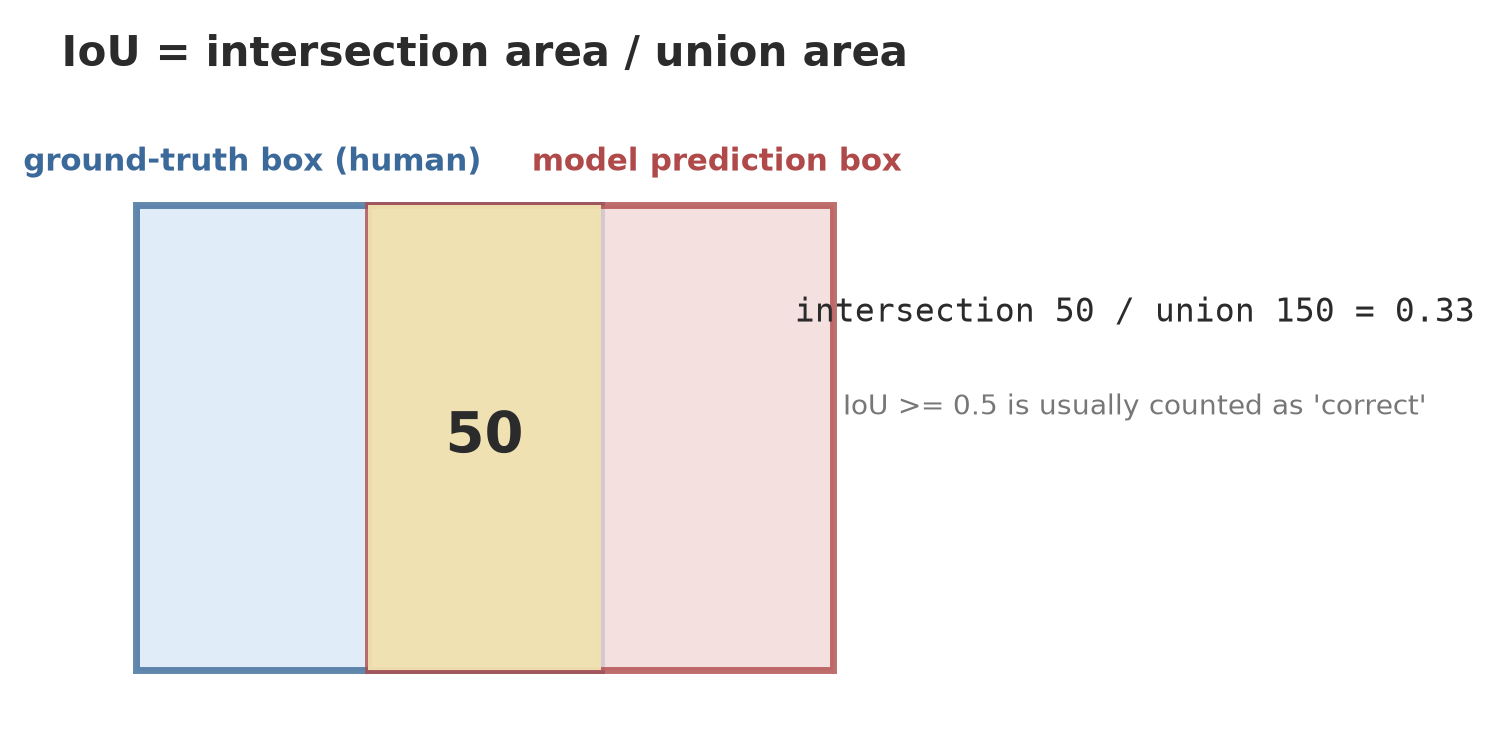
Before training anything, we need a way to judge a box. IoU (Intersection over Union) is the area of the overlap divided by the area of the union of two boxes: 1 means a perfect fit, 0 means they are apart.
02_iou_map.py
# Chapter 56 - Detection metrics: IoU, matching, precision-recall, and AP computed by hand


def iou(a, b):
    """a and b = (x1, y1, x2, y2). IoU = intersection area / union area."""
    ix1, iy1 = max(a[0], b[0]), max(a[1], b[1])
    ix2, iy2 = min(a[2], b[2]), min(a[3], b[3])
    intersection = max(0, ix2 - ix1) * max(0, iy2 - iy1)
    area_a = (a[2] - a[0]) * (a[3] - a[1])
    area_b = (b[2] - b[0]) * (b[3] - b[1])
    return intersection / (area_a + area_b - intersection)


# Two 10 x 10 boxes: overlap 5 x 10 = 50; union = 100 + 100 - 50 = 150; IoU = 1/3
print("IoU of two half-overlapping boxes:", round(iou((0, 0, 10, 10), (5, 0, 15, 10)), 3))
print("IoU of identical boxes           :", iou((0, 0, 10, 10), (0, 0, 10, 10)))
print("IoU of separate boxes            :", iou((0, 0, 10, 10), (20, 20, 30, 30)))

# Ground truth: 4 trees. Model predictions: 5 boxes with confidence scores.
truth = [(0, 0, 10, 10), (20, 0, 30, 10), (40, 0, 50, 10), (60, 0, 70, 10)]
predictions = [  # (box, score)
    ((1, 1, 11, 11), 0.95),      # matches tree 1
    ((21, 0, 31, 10), 0.90),     # matches tree 2
    ((80, 0, 90, 10), 0.80),     # wrong: there is no tree there
    ((41, 1, 51, 11), 0.70),     # matches tree 3
    ((62, 2, 72, 12), 0.40),     # matches tree 4
]
predictions.sort(key=lambda p: -p[1])                        # sort from highest score
used, tp_fp = set(), []
for box, score in predictions:
    best, value = None, 0.0
    for i, g in enumerate(truth):
        v = iou(box, g)
        if i not in used and v > value:
            best, value = i, v
    if best is not None and value >= 0.5:                    # IoU threshold 0.5
        used.add(best)
        tp_fp.append(1)
    else:
        tp_fp.append(0)

print("\nScore order -> correct(1)/wrong(0):", tp_fp)
tp = fp = 0
points = []
for result in tp_fp:
    tp, fp = tp + result, fp + (1 - result)
    points.append((tp / (tp + fp), tp / len(truth)))         # (precision, recall)
for (p, r) in points:
    print(f"  precision = {p:.2f}   recall = {r:.2f}")

# AP = area under the precision-recall curve ("all points" version): make precision non-increasing, then sum
precision = [p for p, _ in points]
recall = [r for _, r in points]
for i in range(len(precision) - 2, -1, -1):
    precision[i] = max(precision[i], precision[i + 1])
ap, prev_r = 0.0, 0.0
for p, r in zip(precision, recall):
    ap += (r - prev_r) * p
    prev_r = r
print("AP at IoU 0.5 (AP50) for this class:", round(ap, 3))
IoU of two half-overlapping boxes: 0.333
IoU of identical boxes : 1.0
IoU of separate boxes : 0.0
Score order -> correct(1)/wrong(0): [1, 1, 0, 1, 0]
precision = 1.00 recall = 0.25
precision = 1.00 recall = 0.50
precision = 0.67 recall = 0.50
precision = 0.75 recall = 0.75
precision = 0.60 recall = 0.75
AP at IoU 0.5 (AP50) for this class: 0.688Let us walk through the result:
- The IoU of the half-overlapping boxes = 0.333, exactly as in the figure. Identical boxes = 1; separate = 0.
- There are 4 real trees and 5 predictions. The predictions are sorted from the highest score. A prediction counts as correct (true positive) if its IoU with a not-yet-taken tree is at least 0.5. The order: correct, correct, wrong (a box on empty ground), correct, wrong (score 0.40; its IoU with the 4th tree is below 0.5 because the box has shifted).
- Each “precision/recall” row is the value after accepting predictions down to that score. Precision = of everything called a tree, how much was right. Recall = of all the trees, how many were caught.
- AP (average precision) is the area under the precision-recall curve: 0.688 for this class. For many classes, the average of all the APs is called mAP.
mAP50uses an IoU threshold of 0.5;mAP50-95averages thresholds from 0.5 to 0.95 (stricter, demanding boxes that really fit). Different libraries use slightly different interpolation, so AP numbers can differ a little between libraries.
Annotation and augmentation
Annotation is the human work of drawing boxes and naming classes on training photos. The result is saved in the format the library asks for. The YOLO format (from the Ultralytics documentation, read 2026-10-10): one .txt file per image, one line per object, class x_center y_center width height, all normalized (divided by the image size, so 0 to 1) and classes start from 0. A data.yaml file points to the training and validation folders and the class names. There are many annotation tools on the internet (for example CVAT and Label Studio); this book does not run or compare them, so check their documentation before choosing.
04_make_dataset.py
# Chapter 56 - YOLO-format detection dataset: images + one label file per image + data.yaml (all made by the script)
from make_dataset import make_dataset

data_yaml = make_dataset()
root = data_yaml.parent
for split in ("train", "val"):
    images = sorted((root / "images" / split).glob("*.png"))
    labels = sorted((root / "labels" / split).glob("*.txt"))
    objects = sum(len(b.read_text().splitlines()) for b in labels)
    print(f"{split:5s}: {len(images)} images, {len(labels)} label files, {objects} crowns")

print("\nContents of data.yaml (path shortened):")
for line in data_yaml.read_text().splitlines():
    print("  " + (line if not line.startswith("path") else "path: .../crown_dataset"))

print("\nFirst five label lines of image val/0000.txt (class center_x center_y width height, all 0..1):")
for line in (root / "labels" / "val" / "0000.txt").read_text().splitlines()[:5]:
    print(" ", line)
train: 200 images, 200 label files, 2716 crowns
val : 40 images, 40 label files, 540 crowns
Contents of data.yaml (path shortened):
path: .../crown_dataset
train: images/train
val: images/val
names:
0: crown
First five label lines of image val/0000.txt (class center_x center_y width height, all 0..1):
0 0.090625 0.462500 0.137500 0.137500
0 0.103125 0.837500 0.062500 0.062500
0 0.396875 0.615625 0.068750 0.068750
0 0.837500 0.156250 0.081250 0.081250
0 0.256250 0.540625 0.100000 0.100000The script makes 200 training images (2,716 crowns) and 40 validation images (540 crowns). The first label line 0 0.090625 0.462500 0.137500 0.137500 means class 0 (crown), center at 9% of the width and 46% of the height, a box 13.75% of the image tall and wide (44 px out of 320).
Augmentation multiplies data by modifying the images you have: flipped, rotated, brightness changed. The trap: the boxes must change too, otherwise the labels point to the wrong place.
03_augmentation.py
# Chapter 56 - Augmentation: multiplying data by flipping and changing brightness; the boxes flip too
import numpy as np

from make_dataset import make_image

rng = np.random.default_rng(1)
image, boxes = make_image(rng)
height, width = image.shape[:2]


def flip_horizontal(image, boxes):
    width = image.shape[1]
    new = [(width - x2, y1, width - x1, y2) for x1, y1, x2, y2 in boxes]    # x is mirrored; y stays
    return image[:, ::-1].copy(), new


def change_brightness(image, factor):
    return np.clip(image.astype(np.float32) * factor, 0, 255).astype(np.uint8)


image2, boxes2 = flip_horizontal(image, boxes)
print("First box, original:", boxes[0])
print("First box, flipped :", boxes2[0])

# Check: the original box center (cx, cy) must now be at (width - cx, cy), and the pixel there is the same
x1, y1, x2, y2 = boxes[0]
cx, cy = (x1 + x2) // 2, (y1 + y2) // 2
print("Original center pixel:", image[cy, cx].tolist())
print("Flipped center pixel :", image2[cy, width - 1 - cx].tolist())
print("Exactly equal:", bool((image[cy, cx] == image2[cy, width - 1 - cx]).all()))

bright = change_brightness(image, 1.3)
print("Mean brightness original -> brighter:", round(float(image.mean()), 1), "->", round(float(bright.mean()), 1))
print("Number of boxes unchanged:", len(boxes) == len(boxes2))
First box, original: (141, 51, 173, 83)
First box, flipped : (147, 51, 179, 83)
Original center pixel: [30, 126, 40]
Flipped center pixel : [30, 126, 40]
Exactly equal: True
Mean brightness original -> brighter: 114.2 -> 148.0
Number of boxes unchanged: TrueAfter flipping, the first box moves from (141, 51, 173, 83) to (147, 51, 179, 83) (x is mirrored, y stays). The check proves it: the pixel at the center of the old box is exactly the same as the pixel at the center of the new box in the flipped image. A brightness of 1.3x raises the mean from 114.2 to 148.0 without changing the boxes. YOLO does its own augmentation while training; this example is to understand the principle.
The detector families: R-CNN, SSD, and YOLO
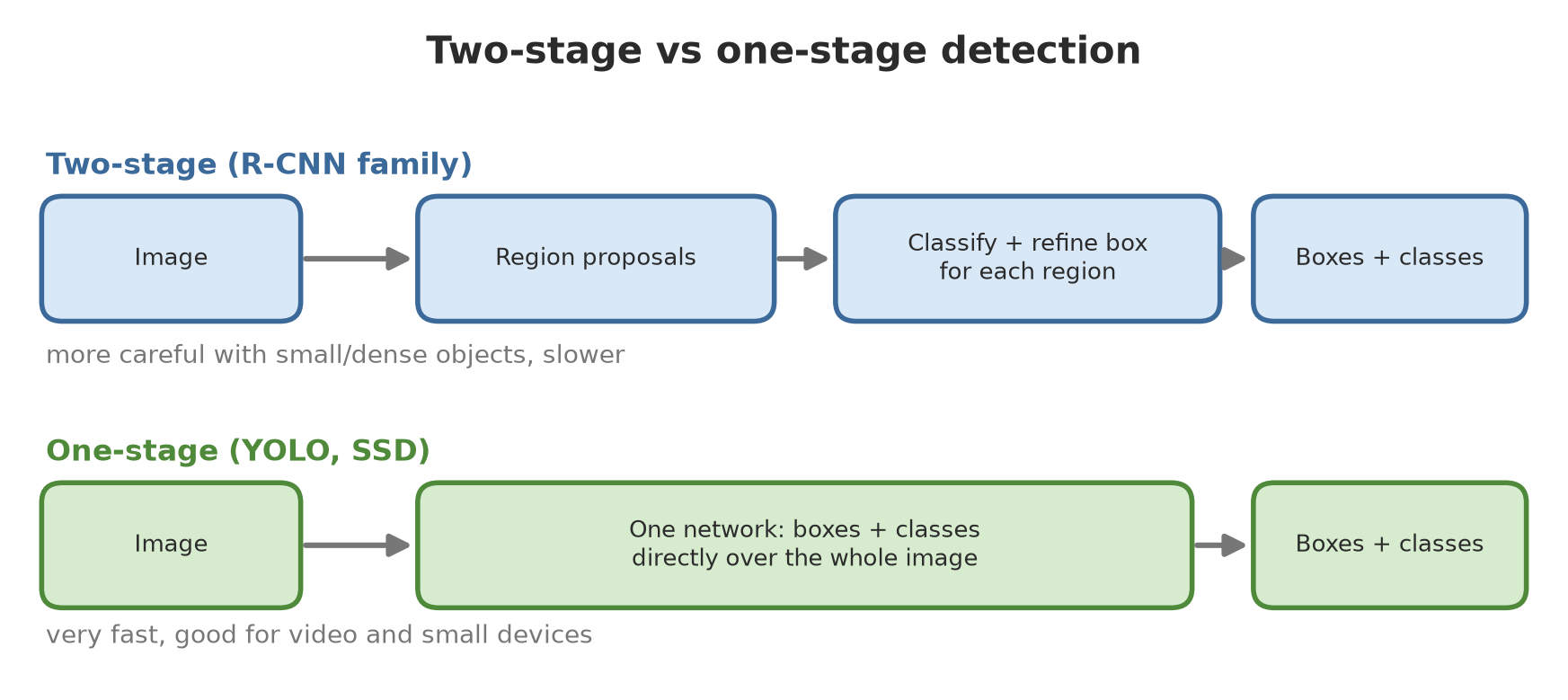
- The R-CNN family (R-CNN, Fast R-CNN, Faster R-CNN, Mask R-CNN): two-stage detectors. Stage one proposes regions that may hold an object (region proposals; in Faster R-CNN a network of its own does this), stage two classifies each region and refines its box. Mask R-CNN adds a branch that draws a mask per object. They tend to be careful, but slower.
- SSD and YOLO: one-stage detectors. A single network guesses the boxes and classes for the whole image in one pass. Very fast, good for video and small devices.
- YOLO versions keep multiplying. The Ultralytics documentation (read 2026-10-10) names YOLO26 as the newest version and recommends it for new projects, with YOLO11 as an established alternative. The
ultralyticslibrary is licensed AGPL-3.0 (from the installed package metadata): for a closed product, check the license terms.
Let us look at the interface of three detectors in torchvision with random weights (no download):
07_rcnn_ssd_torchvision.py
# Chapter 56 - Three detector families in torchvision (random weights, no download): output shape and size
import torch
from torchvision.models.detection import (fasterrcnn_mobilenet_v3_large_320_fpn, maskrcnn_resnet50_fpn,
                                          ssdlite320_mobilenet_v3_large)

torch.manual_seed(0)
models = {
    "Faster R-CNN (two-stage, MobileNetV3)": fasterrcnn_mobilenet_v3_large_320_fpn(
        weights=None, weights_backbone=None, num_classes=2),
    "Mask R-CNN (two-stage + masks, ResNet-50)": maskrcnn_resnet50_fpn(
        weights=None, weights_backbone=None, num_classes=2),
    "SSDlite (one-stage, MobileNetV3)": ssdlite320_mobilenet_v3_large(
        weights=None, weights_backbone=None, num_classes=2),
}
image = [torch.rand(3, 320, 320)]                    # random image: the result is of course meaningless
for name, model in models.items():
    count = sum(p.numel() for p in model.parameters())
    model.eval()
    with torch.no_grad():
        output = model(image)[0]
    print(f"{name}")
    print(f"   parameters: {count / 1e6:.1f} million | output keys: {sorted(output.keys())}")
print("\nBecause the weights are random, the boxes that come out are meaningless; this only shows the shape of the interface.")
Faster R-CNN (two-stage, MobileNetV3)
parameters: 19.0 million | output keys: ['boxes', 'labels', 'scores']
Mask R-CNN (two-stage + masks, ResNet-50)
parameters: 44.0 million | output keys: ['boxes', 'labels', 'masks', 'scores']
SSDlite (one-stage, MobileNetV3)
parameters: 2.2 million | output keys: ['boxes', 'labels', 'scores']
Because the weights are random, the boxes that come out are meaningless; this only shows the shape of the interface.All three return a dictionary of boxes, labels, scores (Mask R-CNN adds masks). Their sizes differ greatly: SSDlite 2.2 million parameters, the MobileNet version of Faster R-CNN 19.0 million, Mask R-CNN ResNet-50 44.0 million. Because the weights are random, the detection results are meaningless; this script only shows the shape. We did not train or compare the accuracy of the three on this fictitious data, so this book does not claim which is more accurate. A general guideline: start with YOLO (fast, easy to train); try two-stage when objects are very small and dense.
Training YOLO on the GPU
We use the pretrained YOLO26 nano weights (yolo26n.pt, 5.3 MB, downloaded automatically from the official Ultralytics release when the script is first run). Starting from pretrained weights (transfer learning) is almost always better than starting from zero, because the model already understands edges and shapes.
05_train_yolo.py
# Chapter 56 - Training YOLO (nano version) on the GPU to detect tree crowns in fictitious images
import logging
import os
import shutil
from pathlib import Path

import torch
from ultralytics import YOLO
from ultralytics.utils import LOGGER

from make_dataset import TMP, make_dataset

LOGGER.setLevel(logging.ERROR)                                # training logs are very long; we only show a summary
data_yaml = make_dataset()                                    # 200 training + 40 validation images, made by the script
weights = TMP / "bobot"
weights.mkdir(parents=True, exist_ok=True)
os.chdir(weights)                                             # pretrained weights (5 MB) are downloaded here if missing
model = YOLO("yolo26n.pt")                                    # pretrained nano model (transfer learning)

runs_dir = TMP / "runs"
shutil.rmtree(runs_dir, ignore_errors=True)
result = model.train(
    data=str(data_yaml), epochs=25, imgsz=320, batch=16,
    device=0 if torch.cuda.is_available() else "cpu",
    workers=0, seed=0, deterministic=True,
    project=str(runs_dir), name="crown", exist_ok=True,
    plots=False, verbose=False, amp=False,
)
metrics = result.results_dict
print("Validation results (data not used for training):")
print("  precision:", round(metrics["metrics/precision(B)"], 2))
print("  recall   :", round(metrics["metrics/recall(B)"], 2))
print("  mAP50    :", round(metrics["metrics/mAP50(B)"], 2))
print("  mAP50-95 :", round(metrics["metrics/mAP50-95(B)"], 2))
print("Best weights saved:", Path(result.save_dir, "weights", "best.pt").exists())
Validation results (data not used for training):
precision: 0.99
recall : 0.97
mAP50 : 0.98
mAP50-95 : 0.93
Best weights saved: True- Training uses the GPU (
device=0), 25 epochs, batch 16, 320 px images. On the author’s computer this takes about two to three minutes. - Precision 0.99 and recall 0.97 are measured on the 40 validation images that were not used for training. mAP50 = 0.98; mAP50-95 = 0.93.
- A score this high is normal for green circles on plain soil. On real drone photos, do not be surprised if mAP50 is only 0.5 to 0.8.
amp=Falseturns off mixed precision. We turned it off to keep the training simple and the result easy to repeat; the benefit of mixed precision was covered in Chapter 55.seed=0anddeterministic=Truemake two runs on the author’s computer give the same numbers; on your computer the numbers may differ slightly.
Inference: using the model on a new image
Inference is using a model that has been trained. The test image is made with a seed different from the training and validation data.
06_yolo_inference.py
# Chapter 56 - Inference: using the trained YOLO model on a new image, then matching against the answer key
import logging

import numpy as np
from ultralytics import YOLO
from ultralytics.utils import LOGGER

from make_dataset import TMP, make_image

LOGGER.setLevel(logging.ERROR)
model = YOLO(TMP / "runs" / "crown" / "weights" / "best.pt")

# A NEW image (a seed different from the training and validation data)
rng = np.random.default_rng(2025)
image, key = make_image(rng)
result = model.predict(image, conf=0.25, imgsz=320, device=0, verbose=False)[0]
boxes = result.boxes.xyxy.cpu().numpy()
scores = result.boxes.conf.cpu().numpy()
print("Actual number of crowns (key):", len(key))
print("Number of crowns detected    :", len(boxes))
print("Highest and lowest score     :", round(float(scores.max()), 2), "and", round(float(scores.min()), 2))


def iou(a, b):
    ix = max(0, min(a[2], b[2]) - max(a[0], b[0]))
    iy = max(0, min(a[3], b[3]) - max(a[1], b[1]))
    intersection = ix * iy
    return intersection / ((a[2] - a[0]) * (a[3] - a[1]) + (b[2] - b[0]) * (b[3] - b[1]) - intersection)


matched = sum(1 for g in key if max(iou(g, k) for k in boxes) >= 0.5)
print("Actual crowns that were caught (IoU >= 0.5):", matched, "of", len(key))
print("Columns of the .boxes result:", [n for n in ("xyxy", "conf", "cls") if hasattr(result.boxes, n)])
Actual number of crowns (key): 18
Number of crowns detected : 20
Highest and lowest score : 0.97 and 0.32
Actual crowns that were caught (IoU >= 0.5): 17 of 18
Columns of the .boxes result: ['xyxy', 'conf', 'cls']There are 18 real crowns; the model detects 20 boxes (scores 0.97 to 0.32) and catches 17 of the 18 crowns with IoU >= 0.5. So there are extra boxes (conf=0.25 is a bit loose) and one tree is missed, probably because of stacked crowns. Raising conf removes extra boxes but adds missed trees: the precision vs recall trade-off.
Segmentation: U-Net
U-Net is a segmentation network shaped like the letter U: the down path shrinks the image to capture context, the up path enlarges it again, and skip connections carry fine detail from the down path to the up path. Its output is one number per pixel. This script builds a mini U-Net itself and trains it on the GPU on 128 x 128 images to mark crown pixels.
08_unet_segmentation.py
# Chapter 56 - Segmentation with a mini U-Net: every PIXEL gets a label (crown or not), on the GPU
import os
os.environ["CUBLAS_WORKSPACE_CONFIG"] = ":4096:8"
import numpy as np
import torch
from torch import nn

from make_dataset import make_image

torch.manual_seed(0)
torch.use_deterministic_algorithms(True)
device = torch.device("cuda" if torch.cuda.is_available() else "cpu")

# Data: fictitious 128 x 128 images and pixel masks (1 = inside a crown circle). Masks are made from box to circle.
rng = np.random.default_rng(5)
images, masks = [], []
yy, xx = np.mgrid[0:128, 0:128]
for _ in range(160):
    c, boxes = make_image(rng, size=128, max_trees=8)
    m = np.zeros((128, 128), dtype=np.float32)
    for x1, y1, x2, y2 in boxes:
        m[((xx - (x1 + x2) / 2) ** 2 + (yy - (y1 + y2) / 2) ** 2) <= ((x2 - x1) / 2) ** 2] = 1
    images.append(c[..., ::-1].transpose(2, 0, 1) / 255.0)
    masks.append(m[None])
X = torch.tensor(np.stack(images), dtype=torch.float32, device=device)
Y = torch.tensor(np.stack(masks), dtype=torch.float32, device=device)


def block(in_ch, out_ch):
    return nn.Sequential(nn.Conv2d(in_ch, out_ch, 3, padding=1), nn.ReLU(), nn.Conv2d(out_ch, out_ch, 3, padding=1), nn.ReLU())


class MiniUNet(nn.Module):
    """Down path (shrinks, captures context), up path (enlarges), and skip connections."""
    def __init__(self):
        super().__init__()
        self.d1, self.d2, self.bottom = block(3, 16), block(16, 32), block(32, 64)
        self.down = nn.MaxPool2d(2)
        self.up2, self.u2 = nn.ConvTranspose2d(64, 32, 2, stride=2), block(64, 32)
        self.up1, self.u1 = nn.ConvTranspose2d(32, 16, 2, stride=2), block(32, 16)
        self.out = nn.Conv2d(16, 1, 1)

    def forward(self, x):
        a = self.d1(x)
        b = self.d2(self.down(a))
        d = self.bottom(self.down(b))
        b = self.u2(torch.cat([self.up2(d), b], dim=1))        # skip connection: merge fine detail
        a = self.u1(torch.cat([self.up1(b), a], dim=1))
        return self.out(a)


model = MiniUNet().to(device)
print("Mini U-Net parameters:", sum(p.numel() for p in model.parameters()))
optimiser = torch.optim.Adam(model.parameters(), lr=0.003)
train, test = slice(0, 128), slice(128, 160)

for epoch in range(1, 31):
    order = torch.randperm(128, device=device)
    for start in range(0, 128, 16):
        idx = order[start:start + 16]
        optimiser.zero_grad()
        loss = nn.functional.binary_cross_entropy_with_logits(model(X[train][idx]), Y[train][idx])
        loss.backward()
        optimiser.step()
    if epoch in (1, 10, 30):
        print(f"epoch {epoch:2d}: loss = {loss.item():.3f}")

model.eval()
with torch.no_grad():
    guess = (torch.sigmoid(model(X[test])) > 0.5).float()
intersection = (guess * Y[test]).sum().item()
union = ((guess + Y[test]) > 0).float().sum().item()
print("Pixel IoU on test data (intersection / union):", round(intersection / union, 2))
Mini U-Net parameters: 117041
epoch 1: loss = 0.624
epoch 10: loss = 0.022
epoch 30: loss = 0.009
Pixel IoU on test data (intersection / union): 0.99The loss falls from 0.624 to 0.009. On the 32 test images, the pixel IoU (intersection/union of the masks) is 0.99. It is easy because the circles are clear; on real images, a U-Net is usually trained with thousands of hand-drawn masks, which are far more expensive than boxes.
Vision Transformer (concept)
The Vision Transformer (ViT) treats an image like a sentence: the image is cut into small pieces (patches), each patch becomes one “word”, and then the transformer architecture (Chapter 61) used by language models processes that sequence.
09_vit_patches.py
# Chapter 56 - Vision Transformer (concept): the image is cut into "words" of 16 x 16 patches
import torch

image = torch.arange(3 * 224 * 224, dtype=torch.float32).reshape(1, 3, 224, 224)   # 224 x 224 image, 3 channels
patch_size = 16
# unfold cuts height and width into non-overlapping 16 x 16 tiles
patches = image.unfold(2, patch_size, patch_size).unfold(3, patch_size, patch_size)
print("Shape after cutting:", tuple(patches.shape), "= (batch, channels, 14 rows, 14 columns, 16, 16)")
sequence = patches.permute(0, 2, 3, 1, 4, 5).reshape(1, 14 * 14, 3 * patch_size * patch_size)
print("Sequence of 'words':", sequence.shape[1], "patches, each a vector of", sequence.shape[2], "numbers")
print("Each patch is then projected to an embedding vector and given a position number, like a word in a sentence.")

# Attention cost: every patch looks at every other patch -> the number of pairs grows quadratically
for n in (196, 784):
    print(f"{n} patches -> {n * n:,} attention pairs per layer")
Shape after cutting: (1, 3, 14, 14, 16, 16) = (batch, channels, 14 rows, 14 columns, 16, 16)
Sequence of 'words': 196 patches, each a vector of 768 numbers
Each patch is then projected to an embedding vector and given a position number, like a word in a sentence.
196 patches -> 38,416 attention pairs per layer
784 patches -> 614,656 attention pairs per layerA 224 x 224 image becomes 196 patches, each with 768 numbers (3 channels x 16 x 16). Because every patch pays attention to all the other patches, the number of pairs grows quadratically: 196 patches give 38,416 pairs, 784 patches give 614,656. That is why high-resolution images are expensive for a ViT. We do not train a ViT in this book; torchvision provides a VisionTransformer class (from the torchvision model list in the documentation, read 2026-10-10).
ONNX export
ONNX is a shared file format for models, so a model can be trained in one library and run elsewhere (for example on an edge device). The Ultralytics documentation (read 2026-10-10) mentions export through model.export(format="onnx"), and that extra packages are installed automatically if missing; our script turns that off with YOLO_AUTOINSTALL=False and the onnx package was installed by hand.
11_export_onnx.py
# Chapter 56 - Export the model to ONNX (interchange format), then check the file
import logging
import os
os.environ["YOLO_AUTOINSTALL"] = "False"                  # do not install packages silently during export

import onnx
from ultralytics import YOLO
from ultralytics.utils import LOGGER

from make_dataset import TMP

LOGGER.setLevel(logging.ERROR)
model = YOLO(TMP / "runs" / "crown" / "weights" / "best.pt")
file = model.export(format="onnx", imgsz=320, simplify=False, verbose=False)
print("ONNX file exists:", os.path.exists(file), "| size (MB, rounded):", round(os.path.getsize(file) / 1e6))

graph = onnx.load(file)
onnx.checker.check_model(graph)                            # raises an error if the structure is broken
inp = graph.graph.input[0]
shape = [d.dim_value for d in inp.type.tensor_type.shape.dim]
print("ONNX structure check: passed")
print("Input:", inp.name, shape)
print("Number of nodes (operations) in the graph:", len(graph.graph.node))
ONNX file exists: True | size (MB, rounded): 10
ONNX structure check: passed
Input: images [1, 3, 320, 320]
Number of nodes (operations) in the graph: 405The ONNX file is about 10 MB, its structure passes onnx.checker, and its input has the shape [1, 3, 320, 320]. Running the exported file with an ONNX runtime was not tried in this book.
Running Project A3: tree detection from a fictitious drone image
A real drone photo can be tens of thousands of pixels across; our model only knows 320 x 320 tiles. The flow: cut into overlapping tiles, detect per tile, shift the boxes to mosaic coordinates, remove duplicate boxes with NMS (non-maximum suppression), then turn pixels into map coordinates.
10_project_tree_detection.py
# Chapter 56 - Project A3: tree detection on a large "drone photo": cut into tiles, merge, add map coordinates
import logging

import geopandas as gpd
import numpy as np
import torch
from shapely.geometry import box
from torchvision.ops import nms
from ultralytics import YOLO
from ultralytics.utils import LOGGER

from make_dataset import TMP, make_image

LOGGER.setLevel(logging.ERROR)
model = YOLO(TMP / "runs" / "crown" / "weights" / "best.pt")

# 1) Fictitious 960 x 960 pixel orthomosaic with dozens of crowns (its own seed, not training data)
rng = np.random.default_rng(772)
mosaic, key = make_image(rng, size=960, max_trees=200)
print("Actual crowns in the mosaic:", len(key))

# 2) The model was trained on 320 x 320 images, so the mosaic is cut into 320 x 320 tiles that overlap by 64 pixels
tile, step = 320, 256
all_boxes, all_scores = [], []
positions = list(range(0, 960 - tile, step)) + [960 - tile]      # the last tile is pushed to the edge so no strip is missed
print("Tile start positions:", positions, "-> number of tiles:", len(positions) ** 2)
for y0 in positions:
    for x0 in positions:
        crop = np.ascontiguousarray(mosaic[y0:y0 + tile, x0:x0 + tile])
        r = model.predict(crop, conf=0.25, imgsz=320, device=0, verbose=False)[0]
        k = r.boxes.xyxy.cpu().numpy() + np.array([x0, y0, x0, y0])         # to mosaic coordinates
        all_boxes.append(k)
        all_scores.append(r.boxes.conf.cpu().numpy())
boxes = np.concatenate(all_boxes)
scores = np.concatenate(all_scores)
print("Raw detections (before merging):", len(boxes))

# 3) NMS: remove duplicate boxes for the same tree in overlapping tiles
keep = nms(torch.tensor(boxes, dtype=torch.float32), torch.tensor(scores, dtype=torch.float32), iou_threshold=0.5).numpy()
boxes = boxes[keep]
print("After NMS:", len(boxes))


def iou(a, b):
    ix = max(0, min(a[2], b[2]) - max(a[0], b[0]))
    iy = max(0, min(a[3], b[3]) - max(a[1], b[1]))
    intersection = ix * iy
    return intersection / ((a[2] - a[0]) * (a[3] - a[1]) + (b[2] - b[0]) * (b[3] - b[1]) - intersection)


tp = sum(1 for k in boxes if max(iou(k, g) for g in key) >= 0.5)
recall = sum(1 for g in key if max(iou(g, k) for k in boxes) >= 0.5)
print(f"Precision = {tp / len(boxes):.2f}   recall = {recall / len(key):.2f}")

# 4) From pixels to a map: 1 pixel = 0.25 m (example number), top-left corner of the mosaic at fictitious UTM coordinates
pixel_size, origin_x, origin_y = 0.25, 500_000.0, 9_200_000.0
polygons = [box(origin_x + x1 * pixel_size, origin_y - y2 * pixel_size,
                origin_x + x2 * pixel_size, origin_y - y1 * pixel_size) for x1, y1, x2, y2 in boxes]
gdf = gpd.GeoDataFrame({"id": range(len(polygons))}, geometry=polygons, crs="EPSG:32748")
gdf["crown_area_m2"] = gdf.area.round(1)
area_ha = (960 * pixel_size) ** 2 / 10_000
print(f"\nMosaic area: {area_ha:.1f} ha | trees detected per ha: {len(gdf) / area_ha:.0f}")
print("Average crown area (m2):", round(gdf["crown_area_m2"].mean(), 1))
gdf.to_file(TMP / "detected_crowns.geojson", driver="GeoJSON")
print("GeoJSON written; number of features:", len(gpd.read_file(TMP / "detected_crowns.geojson")))
Actual crowns in the mosaic: 119
Tile start positions: [0, 256, 512, 640] -> number of tiles: 16
Raw detections (before merging): 245
After NMS: 137
Precision = 0.87 recall = 0.99
Mosaic area: 5.8 ha | trees detected per ha: 24
Average crown area (m2): 73.5
GeoJSON written; number of features: 137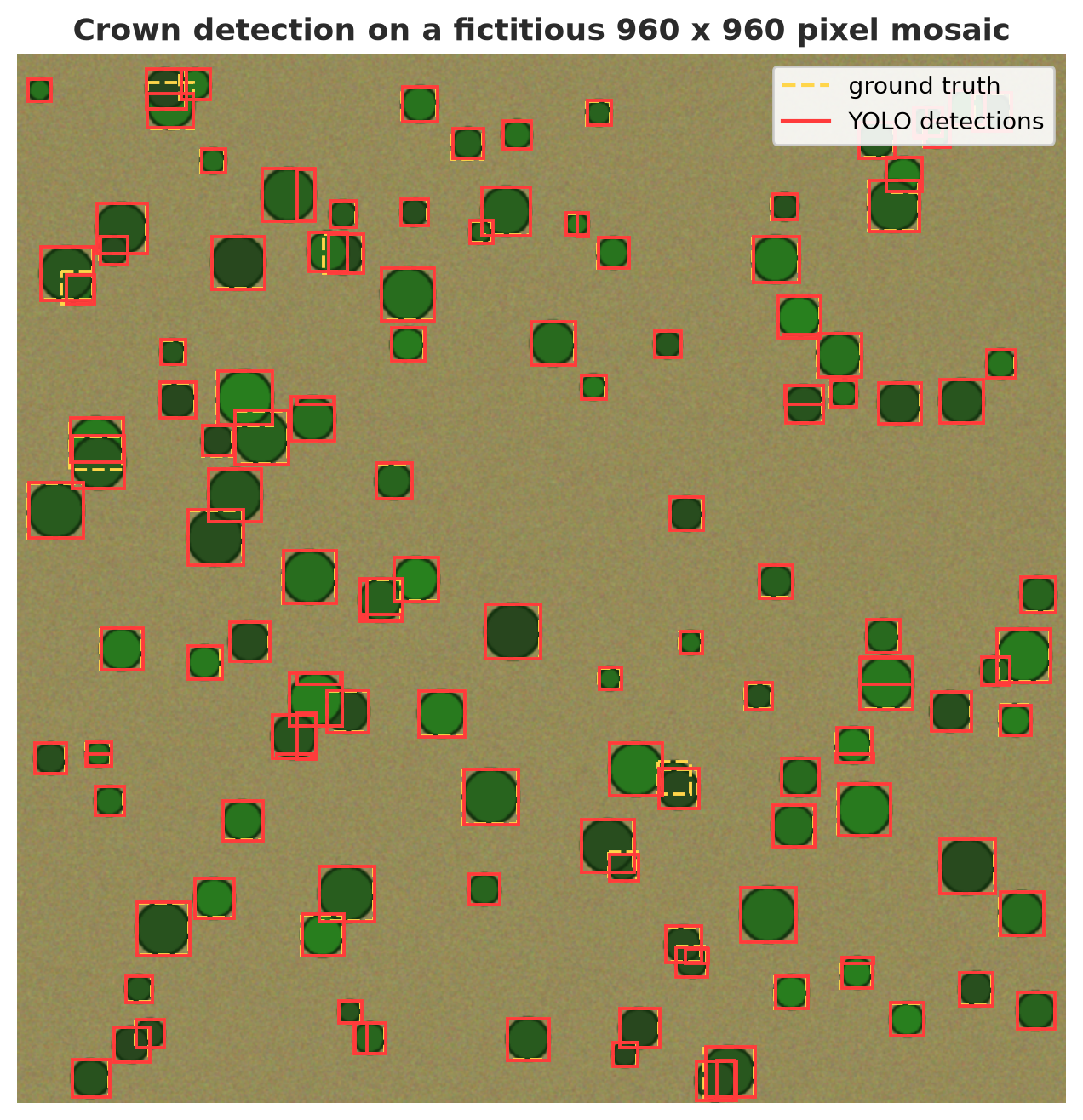
- Key: 119 crowns. Raw detections 245 boxes, after NMS 137. Recall 0.99 (almost every crown caught), but precision 0.87 and the count of 137 exceeds 119: the likely cause is that crowns cut off at a tile edge are recognized as two partial boxes whose IoU is too small for NMS to remove (visible in the figure; the exact cause was not investigated further). Counting trees this way will overestimate by about 15%. Common fixes: drop boxes touching the tile edge, or merge boxes with another rule.
- The
positionsline makes sure the last tile is pushed to the mosaic edge. Our first version forgot this and a 128-pixel strip on the right and bottom was never examined: recall dropped to 0.74 with no error message. Always check that the whole image is covered. - Pixels to a map: with 1 pixel = 0.25 m (an example number) the mosaic covers 5.8 ha, the detected density is 24 trees/ha, and the average crown area is 73.5 m².
geopandaswrites the boxes as GeoJSON polygons in CRSEPSG:32748(UTM zone 48 south, chosen as an example) with a fictitious coordinate origin.
A detector trained on 320 px images with a certain crown size does not automatically work at another resolution, season, or sensor. Always test on a small part of data from the region and time you will use it in, and keep human-validated results as a comparison (see spatial CV in Chapter 54).
The DetecTree library (tree detection from aerial images using pixel classification) is covered in Chapter 59.
Exercises
- In
02_iou_map.py, shift the second prediction box from(21, 0, 31, 10)to(25, 0, 35, 10). What is its IoU? Is it still counted as correct at the 0.5 threshold? - In
06_yolo_inference.py, changeconfto 0.1 and 0.6. Note the number of boxes and the number of crowns caught. - In
10_project_tree_detection.py, changestepto 160 (more overlap). What happens to the raw detection count and the final result? - Challenge: add a rule “drop boxes that touch the tile edge” before NMS (except when that tile edge is the mosaic edge) and see whether the final count gets close to 119.
Chapter Summary
- An image = an array of numbers; Pillow is RGB, OpenCV is BGR.
- Classification (what), detection (what and where), segmentation (which pixels).
- IoU judges one box; AP/mAP judges a detector through precision and recall.
- YOLO (one-stage) is fast and easy to train; the R-CNN family (two-stage) is more careful for small, dense objects.
- Start from pretrained weights; a YOLO dataset = images + normalized labels +
data.yaml. - For large images: cut overlapping tiles, detect, NMS, then georeference. Check coverage and duplicate boxes at tile edges.
Next, in Chapter 57: we move from “seeing” to “choosing”: genetic algorithms, multi-objective optimization, and NSGA-II for planting plans and feed rations.