Chapter 60 — LLM Applications and MLOps: An Assistant That Answers From Your Documents
Series A4 — Generative AI and AI Agents
All scripts in this chapter are in the folder kode/ch60/. In the web version you can also download them all at once (zip).
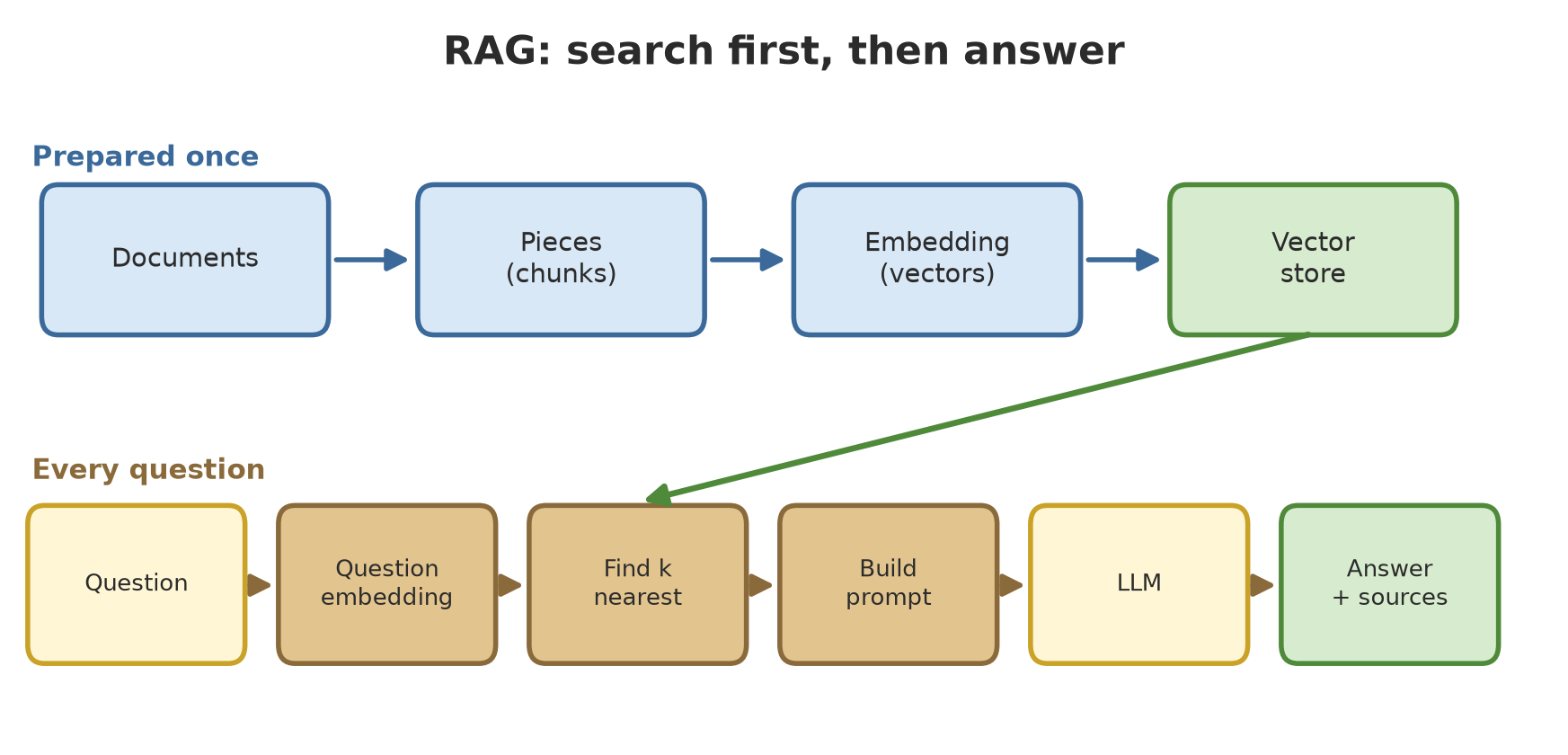
Series A3 taught models to predict: land cover, harvests, leaf disease. Now we move to models you can talk to. Imagine a new foreman asks, “What is the planting distance for teak?” The old foreman does not answer from a hazy memory; he opens the SOP book, finds the page, and reads out the answer. That is RAG: the language model is not asked to remember, it is handed the book to open first.
How this chapter stays honest with you. Real large language models can only be used through a paid account, or run on a powerful computer. This chapter uses no accounts and no API keys. For the parts that can run, we build a mock LLM of our own: a small program that pretends to be a language model with simple rules, so its results are always the same and can be tested. The mock LLM is not a real language model and cannot reason. It is useful for one thing: showing the whole flow of a system (search, build the prompt, answer, evaluate) with real output you can repeat on your own computer.
Using an LLM through an API
Language-model providers usually offer an API (a service door over the internet, see Chapter 21): you send a question over HTTP, and the provider sends back an answer. The code looks like this:
01_call_api.py
# Chapter 60 - Calling a language model over an HTTP API
import os

import httpx

URL = os.environ["LLM_API_URL"]          # service address, from the provider's documentation
KEY = os.environ["LLM_API_KEY"]          # its value is [disamarkan]; never write it in code


def ask_model(question, model="model-name-from-the-provider"):
    body = {
        "model": model,
        "messages": [{"role": "user", "content": question}],
        "max_tokens": 300,
        "temperature": 0.0,
    }
    response = httpx.post(
        URL,
        headers={"Authorization": f"Bearer {KEY}"},
        json=body,
        timeout=30,
    )
    response.raise_for_status()
    return response.json()


# The request and response shapes differ between providers. Read their documentation.
# result = ask_model("What is the planting distance for teak?")
This code was not run when the book was built because it needs an account and an API key owned by the reader, plus a connection to an outside service, so no output is shown.
Note three things:
- The key is read from an environment variable (
os.environ["LLM_API_KEY"]) and is never written in the code. Code stored in Git or sent to others must not carry a key. In this book its value is always[disamarkan](redacted). - The shape of the request body differs between providers (field names, model names, how tokens are counted). The example above is only a skeleton; follow the documentation of the provider you choose.
temperature=0.0asks for the most “certain” answer (less random). We discuss its meaning in Chapter 61.
Using an API means your questions and documents are sent to another party. Before sending office data or personal data, read the provider’s terms and see Chapter 63.
A mock LLM: a fake model you can test
So that we can experiment without an account, we write a MockLLM class (in kode/ch60/helpers/mock_llm.py). It works simply: from the CONTEXT part of the prompt, it picks one sentence that shares the most words with the question, and adds its source number. If nothing is similar enough, it says the answer is not there.
02_mock_llm.py
# Chapter 60 - Mock LLM: a fake language model that can be tested
from helpers.mock_llm import MockLLM

llm = MockLLM()

prompt = """Answer only based on the CONTEXT.
CONTEXT:
[1] Rice is planted at a spacing of 25 x 25 centimeters. Top dressing at 21 days after planting.
QUESTION: When is top dressing of rice applied?"""

print("With context     :", llm.answer(prompt))
print("Repeated         :", llm.answer(prompt) == llm.answer(prompt))

no_answer = prompt.replace("When is top dressing of rice applied?", "What is the price of cocoa today?")
print("Question outside the documents:", llm.answer(no_answer))

print("Without context  :", llm.answer("What is the planting distance for teak?"))
With context : Top dressing at 21 days after planting. [1]
Repeated : True
Question outside the documents: Sorry, the answer is not in the documents provided.
Without context : The best planting distance for teak is 5 x 5 meters.Trace the result:
- With context: the sentence most similar to “when is top dressing of rice applied” is chosen and tagged
[1]. - Repeated:
True. Same input, same answer. That is the condition for testing; real models sometimes answer the same question differently. - A question outside the documents: politely refused, no making things up.
- Without context: the last line imitates a real model’s bad habit. With no book in hand, it confidently answers “5 x 5 meters”, while our document says 3 x 3 meters. This is hallucination (an answer that sounds convincing but has no basis), and RAG exists to reduce this problem. The 5 x 5 figure is the author’s invention for the mock, not a fact about teak.
Preparing documents: chunks
Real documents can be many pages long, while a prompt has a length limit and every token has a price. So documents are cut into small chunks, and only the relevant chunks are sent to the model.
03_chunk_documents.py
# Chapter 60 - Splitting a long document into pieces (chunks)
from helpers.documents import DOCUMENTS


def chunk(text, size, overlap):
    """Cut text every `size` characters; each piece repeats the last `overlap` characters of the previous one."""
    result, start = [], 0
    while start < len(text):
        result.append(text[start:start + size])
        if start + size >= len(text):
            break
        start += size - overlap
    return result


long_text = " ".join(d["text"] for d in DOCUMENTS[:3])
print("Document length:", len(long_text), "characters")

for size, overlap in [(150, 0), (150, 30)]:
    pieces = chunk(long_text, size, overlap)
    print(f"size={size} overlap={overlap} -> {len(pieces)} pieces")

print()
for p in chunk(long_text, 150, 30)[:3]:
    print(repr(p))
Document length: 658 characters
size=150 overlap=0 -> 5 pieces
size=150 overlap=30 -> 6 pieces
'Teak planting is done at the start of the rainy season with a spacing of 3 x 3 meters. Planting holes measure 30 x 30 x 30 centimeters. Replacement of'
'30 centimeters. Replacement of dead seedlings is done no later than 30 days after planting. Tree inventory measures the diameter at breast height, whi'
'diameter at breast height, which is 1.3 meters above the ground. Trees with a diameter below 10 centimeters are not recorded in the stand inventory. E'The combined text of three forestry SOPs is 658 characters long. With size 150 and no overlap there are 5 chunks. With an overlap of 30 characters there are 6, because each chunk repeats the tail of the previous one. Look at the first three chunks: the sentence “Replacement of dead seedlings…” is cut in the middle, but the next chunk repeats its beginning so the meaning is not lost. That is the purpose of overlap.
Choosing the chunk size is an art: too small and the context loses its meaning, too large and the search gets blurry and the cost rises. For tidy SOP documents, cutting per paragraph or per item is usually better than cutting per character. In this chapter’s project every SOP is already a single paragraph, so one SOP = one chunk. The sample documents (12 SOPs for forestry, agriculture, fisheries, livestock) are in kode/ch60/helpers/documents.py. All of them are fictional; the numbers are examples, not technical advice.
Embeddings: turning text into numbers
A computer cannot compare the meaning of sentences directly, but it can compare numbers. An embedding is a way to turn text into a row of numbers (a vector) so that similar texts have vectors that lie close together. “Close” is measured by cosine similarity: the angle between two vectors (1 = same direction, 0 = unrelated).
Real embedding models (for example those used by the sentence-transformers library) understand similarity of meaning, even across languages. But downloading such a model usually takes tens of megabytes or more, while this book’s rules forbid downloading weights of 50 MB or more. As an honestly explained substitute we use TF-IDF from scikit-learn: it only counts words (or letter pieces) that are the same, giving more weight to rarer ones. TF-IDF does not understand meaning; “cow” and “large livestock” are not seen as similar. Even so it is good enough for small document sets and fast to compute, and the whole flow below stays exactly the same if you swap TF-IDF for a real embedding model.
04_tfidf_embedding.py
# Chapter 60 - A simple embedding: TF-IDF and cosine similarity
from helpers.documents import DOCUMENTS
from helpers.retriever import Retriever

retriever = Retriever(DOCUMENTS, kind="char")
print("Matrix shape (documents, dimensions):", retriever.matrix.shape)

question = "What is the planting distance for teak?"
vector = retriever.vector(question)
print("Question vector dimensions:", vector.shape[0])

print("\nThree most similar documents:")
for doc, score in retriever.search(question, k=3):
    print(f"  {score:.3f}  {doc['id']:<10} {doc['text'][:50]}...")
Matrix shape (documents, dimensions): (12, 2206)
Question vector dimensions: 2206
Three most similar documents:
0.428 FOREST-01 Teak planting is done at the start of the rainy se...
0.291 AGRI-01 Rice is planted at a spacing of 25 x 25 centimeter...
0.150 AGRI-03 Planthopper pests are monitored by inspecting rice...The matrix (12, 2206) means 12 documents, each represented by 2,206 numbers (one per 3-5 character letter piece that has ever appeared). The question “What is the planting distance for teak?” is converted the same way and compared. The three nearest documents: the teak planting SOP (0.428), the rice planting SOP (0.291, because both talk about planting spacing), and the planthopper SOP (0.150, weakly related). A big gap between rank 1 and rank 3 is a sign that the search is confident.
We use letter pieces (analyzer="char_wb") so that words with different endings such as “plant”, “planted”, and “planting” stay similar to each other. Compare this with whole words in the evaluation section below.
Vector stores: FAISS and Chroma
For 12 documents, a matrix multiplication is enough. For millions of chunks we need a vector store (vector database) that finds nearest neighbors quickly. Two options that run on your own computer without a server:
- FAISS (
faiss-cpu): a vector search library from Meta. It only handles vectors and their index numbers. - Chroma (
chromadb): a vector database that also keeps the original text and metadata (labels such as sector), and saves to disk.
Both are installed on the author’s computer through alat/pasang.py (faiss-cpu 1.15.1 and chromadb 1.5.9, both available for Python 3.14).
05_faiss_store.py
# Chapter 60 - A local vector store with FAISS
import faiss
import numpy as np

from helpers.documents import DOCUMENTS
from helpers.retriever import Retriever

retriever = Retriever(DOCUMENTS)
vectors = retriever.matrix.astype("float32")
index = faiss.IndexFlatIP(vectors.shape[1])     # IP = inner product (dot product)
index.add(vectors)
print("Number of vectors in the index:", index.ntotal)

q = retriever.vector("What is the good pH range for a tilapia pond?").astype("float32")[None, :]
scores, numbers = index.search(q, 3)
for s, i in zip(scores[0], numbers[0]):
    print(f"  {s:.3f}  {DOCUMENTS[i]['id']}")

from_numpy = [DOCUMENTS[i]["id"] for i in np.argsort(-(vectors @ q[0]), kind="stable")[:3]]
print("Same as the numpy calculation:", from_numpy == [DOCUMENTS[i]["id"] for i in numbers[0]])
Number of vectors in the index: 12
0.398 FISH-02
0.055 FISH-01
0.049 AGRI-03
Same as the numpy calculation: TrueIndexFlatIP searches with the inner product (dot product). Because TF-IDF vectors are already normalized, the dot product equals cosine similarity. The question about tilapia pond pH finds the tilapia water-quality SOP (0.398) far above the second (0.055). The last line proves FAISS agrees with plain numpy; FAISS only pays off on large data.
06_chroma_store.py
# Chapter 60 - A local vector database with Chroma (stored in the _tmp folder)
import shutil
from pathlib import Path

import chromadb

from helpers.documents import DOCUMENTS
from helpers.retriever import Retriever

folder = Path(__file__).parent / "_tmp" / "chroma"
shutil.rmtree(folder, ignore_errors=True)

retriever = Retriever(DOCUMENTS)
client = chromadb.PersistentClient(path=str(folder))
collection = client.create_collection("sop", embedding_function=None, metadata={"hnsw:space": "cosine"})
collection.add(
    ids=[d["id"] for d in DOCUMENTS],
    embeddings=retriever.matrix.tolist(),
    documents=[d["text"] for d in DOCUMENTS],
    metadatas=[{"sector": d["sector"]} for d in DOCUMENTS],
)
print("Number of documents in the collection:", collection.count())

q = retriever.vector("When are broiler chickens harvested?").tolist()
result = collection.query(query_embeddings=[q], n_results=2)
print("Without filter  :", result["ids"][0])

result = collection.query(query_embeddings=[q], n_results=2, where={"sector": "fisheries"})
print("Fisheries filter:", result["ids"][0])
Number of documents in the collection: 12
Without filter : ['LIVE-03', 'FISH-03']
Fisheries filter: ['FISH-03', 'FISH-01']Chroma can filter by metadata. The question “When are broiler chickens harvested?” finds the chicken SOP (LIVE-03) first without a filter. With the filter sector = fisheries, only fisheries documents are searched, so the result is FISH-03 and FISH-01, which are of course not relevant, but that is what a filter means: it limits the search space. This is useful if your assistant serves several units and each unit may only see its own documents.
We pass embedding_function=None so Chroma uses our own TF-IDF vectors. Left at its default, Chroma would download an embedding model, which we do not want here. The database is stored in the folder _tmp/chroma.
Basic RAG: search first, then answer
Now we put everything together. For each question: (1) find the 2 most similar chunks, (2) build a prompt holding the rules, the numbered context, and the question, (3) send it to the LLM (a mock here).
07_basic_rag.py
# Chapter 60 - Basic RAG: search first, then answer
from helpers.documents import DOCUMENTS
from helpers.mock_llm import MockLLM
from helpers.retriever import Retriever, build_prompt

retriever = Retriever(DOCUMENTS)
llm = MockLLM()


def ask(question, k=2):
    pieces = retriever.search(question, k=k)
    prompt = build_prompt(question, pieces)
    return prompt, llm.answer(prompt), [d["id"] for d, _ in pieces]


prompt, answer, sources = ask("What is the planting distance for teak?")
print(prompt)
print("-" * 40)
print("Answer:", answer)
print("Documents found:", sources)

print()
_, answer, _ = ask("What is the market price of cocoa today?")
print("Question outside the documents ->", answer)
print("Without RAG, mock LLM          ->", llm.answer("What is the planting distance for teak?"))
Answer only based on the CONTEXT. If it is not there, say you do not know.
CONTEXT:
[1] Teak planting is done at the start of the rainy season with a spacing of 3 x 3 meters. Planting holes measure 30 x 30 x 30 centimeters. Replacement of dead seedlings is done no later than 30 days after planting.
[2] Rice is planted at a spacing of 25 x 25 centimeters. Basal fertilizer is applied before planting, and top dressing at 21 days after planting. Fertilizer doses in this document are example figures only.
QUESTION: What is the planting distance for teak?
----------------------------------------
Answer: Teak planting is done at the start of the rainy season with a spacing of 3 x 3 meters. [1]
Documents found: ['FOREST-01', 'AGRI-01']
Question outside the documents -> Sorry, the answer is not in the documents provided.
Without RAG, mock LLM -> The best planting distance for teak is 5 x 5 meters.Read the printed prompt: that is what the model actually sees. The first instruction (“answer only based on the CONTEXT”) is a guardrail against making things up. Two chunks were found: the teak SOP [1] and the rice SOP [2] (both about planting spacing). The answer cites [1] and we know its source (FOREST-01); being able to show a source is RAG’s strength compared with a model that answers from memory.
The last two lines show the difference. The question about cocoa prices is not in the documents, and the system refuses. Without RAG, the mock LLM invents “5 x 5 meters” for teak.
Evaluating an LLM system
“It seems good” is not an evaluation. We need a set of test questions with known answers, and then we count. Two stages are judged separately:
- Search: is the right document found? The metrics are hit@1 (the right document is at rank 1), hit@3 (it is in the top three), and MRR (mean reciprocal rank: the average of 1 divided by the rank of the right document; 1.0 = always rank 1).
- Answer: does the citation point to the right document, and is a question outside the documents refused?
08_rag_evaluation.py
# Chapter 60 - Evaluating RAG with metrics you can compute
from helpers.documents import DOCUMENTS, TEST_QUESTIONS
from helpers.mock_llm import MockLLM
from helpers.retriever import Retriever, build_prompt

llm = MockLLM()
answerable = [(q, d) for q, d in TEST_QUESTIONS if d is not None]


def evaluate_search(kind):
    retriever = Retriever(DOCUMENTS, kind=kind)
    hit1 = hit3 = 0
    mrr = 0.0
    wrong = []
    for question, correct in answerable:
        id_order = [d["id"] for d, _ in retriever.search(question, k=3)]
        hit1 += id_order[:1] == [correct]
        if id_order[:1] != [correct]:
            wrong.append(question)
        hit3 += correct in id_order
        if correct in id_order:
            mrr += 1 / (id_order.index(correct) + 1)
    n = len(answerable)
    return hit1 / n, hit3 / n, mrr / n, wrong


print(f"{'vectors':<10} {'hit@1':>6} {'hit@3':>6} {'MRR':>6}")
for kind in ("word", "char"):
    h1, h3, mrr, wrong = evaluate_search(kind)
    print(f"{kind:<10} {h1:>6.2f} {h3:>6.2f} {mrr:>6.2f}")
    for question in wrong:
        print(f"           wrong at rank 1: {question}")

# Answer evaluation: does the [n] citation point to the right document, and is a question
# outside the documents politely refused?
retriever = Retriever(DOCUMENTS)
correct_citation = refused_right = 0
for question, correct in TEST_QUESTIONS:
    pieces = retriever.search(question, k=2)
    answer = llm.answer(build_prompt(question, pieces))
    if correct is None:
        refused_right += answer.startswith("Sorry")
    else:
        number = int(answer.rsplit("[", 1)[1].rstrip("]")) if answer.endswith("]") else 0
        correct_citation += number > 0 and pieces[number - 1][0]["id"] == correct
print()
print(f"Citation points to the right document: {correct_citation} of {len(answerable)}")
print(f"Questions outside the documents refused: {refused_right} of 1")
vectors hit@1 hit@3 MRR
word 0.91 1.00 0.94
wrong at rank 1: How often is the weighing of cattle done?
char 0.91 1.00 0.95
wrong at rank 1: How often is the weighing of cattle done?
Citation points to the right document: 10 of 11
Questions outside the documents refused: 1 of 1We have 11 questions whose answers exist, plus 1 that truly has no answer. The results:
- Whole-word vectors and letter-piece vectors both get 10 of 11 right at rank 1 (hit@1 = 0.91), and both put the right document in the top three every time (hit@3 = 1.00). The one miss is the same for both: “How often is the weighing of cattle done?” The common word “done” appears in other SOPs (“is done every two weeks”), which confuses the scores. MRR differs slightly (0.94 vs 0.95). The lesson: no method always wins, and a generic word can mislead any of them. That is why we measure instead of guessing.
- For answers, the citation is right only 10 of 11 times. That failure is not a search failure: for the weighing question, the right document (
LIVE-01) is found at rank 2, but the mock LLM picks a sentence from the document at rank 1 (“Weight sampling is done every two weeks by weighing 30 fish”) and answers confidently and wrongly. Separating search evaluation from answer evaluation tells you which part to fix. - The question outside the documents is refused (1 of 1).
A small test set (12 questions) is only enough for learning. For a real system, gather dozens to hundreds of real questions from users, and run the evaluation every time you change the chunks, the embedding, or the prompt. It is like unit tests (Chapter 18) for an AI system. With real LLMs, grading answers is harder (answers are free-form sentences), and people sometimes use another LLM as the judge; even that must be checked by humans.
Observability and cost
A running system must be observable: how many calls, how long, how much cost, and why the answer is what it is. The simplest way: wrap every LLM call in a logger that writes one JSON line.
LLM costs are usually computed per token (a small piece of text; we discuss it in Chapter 61), with different prices for input tokens (the prompt) and output tokens (the answer). The script below uses mock prices invented by the author, not any provider’s prices, and a rough token count (words and punctuation). Real tokenizers give different numbers; in a real system use the usage numbers the provider sends.
09_cost_observability.py
# Chapter 60 - Counting tokens, cost (MOCK prices), and logging every call
import json
import re

from helpers.documents import DOCUMENTS
from helpers.mock_llm import MockLLM
from helpers.retriever import Retriever, build_prompt

# Prices made up by the author, NOT any provider's prices (Rupiah per 1 million tokens)
PRICE_IN, PRICE_OUT = 5000, 15000


def count_tokens(text):
    """Rough count: words + punctuation. Real tokenizers differ; use the usage numbers from the provider."""
    return len(re.findall(r"\w+|[^\w\s]", text))


class CallLogger:
    def __init__(self, llm):
        self.llm, self.log = llm, []

    def answer(self, prompt, tag):
        answer = self.llm.answer(prompt)
        t_in, t_out = count_tokens(prompt), count_tokens(answer)
        cost = (t_in * PRICE_IN + t_out * PRICE_OUT) / 1_000_000
        self.log.append({
            "no": len(self.log) + 1, "tag": tag,
            "tokens_in": t_in, "tokens_out": t_out,
            "cost_rp": round(cost, 4),
            "latency_ms_simulated": 200 + 2 * t_in,     # simulated; real latency is measured with a clock
        })
        return answer


retriever = Retriever(DOCUMENTS)
llm = CallLogger(MockLLM())
for tag, question in [("rice", "When is top dressing of rice applied?"),
                      ("catfish", "What is the stocking density of catfish fry?"),
                      ("cattle", "How often is the weighing of cattle done?")]:
    llm.answer(build_prompt(question, retriever.search(question, k=2)), tag)

for row in llm.log:
    print(json.dumps(row, ensure_ascii=False))

total = sum(r["cost_rp"] for r in llm.log)
print(f"\nTotal cost of 3 calls: Rp {total:.4f}")
print(f"Estimate for 10,000 questions per month: Rp {total / 3 * 10000:,.0f}")
{"no": 1, "tag": "rice", "tokens_in": 98, "tokens_out": 19, "cost_rp": 0.775, "latency_ms_simulated": 396}
{"no": 2, "tag": "catfish", "tokens_in": 93, "tokens_out": 24, "cost_rp": 0.825, "latency_ms_simulated": 386}
{"no": 3, "tag": "cattle", "tokens_in": 91, "tokens_out": 15, "cost_rp": 0.68, "latency_ms_simulated": 382}
Total cost of 3 calls: Rp 2.2800
Estimate for 10,000 questions per month: Rp 7,600Each line is one call: number, tag, input and output tokens, cost, and latency. Note that the prompt (91 to 98 tokens) is far bigger than the answer (15 to 24 tokens). In RAG, most of the cost comes from the context you send, not from the answer. So choosing the right number of chunks k directly affects the bill. With the mock prices, three calls cost Rp 2.28; the projection for 10,000 questions per month is Rp 7,600. The latency here is simulated (a simple formula) because the mock LLM is instant; in a real system measure it with a clock, and also log the number of failed calls.
MLOps for LLM applications
MLOps is the habit of keeping an ML/AI system healthy after it is built (Chapter 58 covered it for prediction models). For an LLM application, the checklist is roughly:
| Topic | Question to guard |
|---|---|
| Versions | Which prompt, model, chunk size, and documents were used? Keep them in Git |
| Evaluation | Did the test score drop after a change? |
| Logs | Every call: input, sources, tokens, cost, latency |
| Cost | Is there a daily limit? Is there an alert for spikes? |
| Security | Keys in environment variables; personal data is not sent |
| Updates | New documents enter the index, expired documents are removed |
Serving the assistant as a web service
So that others can use the assistant, wrap it in a web service as in Chapters 36 and 48. We use FastAPI and its TestClient, which tests the app without opening a real network port:
10_serving_api.py
# Chapter 60 - Serving the assistant as a web service (FastAPI), tested without opening a port
from fastapi import FastAPI
from fastapi.testclient import TestClient
from pydantic import BaseModel

from helpers.documents import DOCUMENTS
from helpers.mock_llm import MockLLM
from helpers.retriever import Retriever, build_prompt

app = FastAPI(title="SOP Assistant")
retriever, llm = Retriever(DOCUMENTS), MockLLM()


class Question(BaseModel):
    text: str
    k: int = 2


@app.get("/health")
def health():
    return {"status": "ok", "model": llm.name, "document_count": len(DOCUMENTS)}


@app.post("/ask")
def ask(q: Question):
    pieces = retriever.search(q.text, k=q.k)
    return {
        "answer": llm.answer(build_prompt(q.text, pieces)),
        "sources": [d["id"] for d, _ in pieces],
    }


client = TestClient(app)
print(client.get("/health").json())
r = client.post("/ask", json={"text": "What is the stocking density of catfish fry?"})
print(r.status_code, r.json())
r = client.post("/ask", json={"k": 2})
print(r.status_code, "-> a request without 'text' is rejected automatically by Pydantic")

# To run it for real on your computer (not done here):
#   uvicorn 10_serving_api:app --port 8000
{'status': 'ok', 'model': 'mock-llm-1', 'document_count': 12}
200 {'answer': 'Catfish ponds are stocked with fry 7 to 9 centimeters long at a density of 100 fish per square meter. [1]', 'sources': ['FISH-01', 'LIVE-03']}
422 -> a request without 'text' is rejected automatically by PydanticGET /health (a health check) tells monitoring systems that the service is alive. POST /ask takes a question and returns the answer together with a list of sources. The Pydantic model Question (Chapter 34) validates the input: a request without text is rejected automatically with code 422. Running it for real uses uvicorn, as written in the comment; we do not do that here.
Running Project A4: a document question-answering assistant
Project A4 begins. We assemble an assistant for forestry, agriculture, fisheries, and livestock documents. The addition: the assistant guesses the sector from keywords in the question, then searches Chroma with a filter for that sector (if the sector is unclear, it searches everything).
11_project_assistant.py
# Chapter 60 - Project A4: Q&A assistant for forestry, agriculture, fisheries, livestock documents
import shutil
from pathlib import Path

import chromadb

from helpers.documents import DOCUMENTS
from helpers.mock_llm import MockLLM
from helpers.retriever import Retriever, build_prompt

folder = Path(__file__).parent / "_tmp" / "assistant"
shutil.rmtree(folder, ignore_errors=True)

retriever = Retriever(DOCUMENTS)
collection = chromadb.PersistentClient(path=str(folder)).create_collection(
    "sop", embedding_function=None, metadata={"hnsw:space": "cosine"})
collection.add(ids=[d["id"] for d in DOCUMENTS], embeddings=retriever.matrix.tolist(),
               documents=[d["text"] for d in DOCUMENTS], metadatas=[{"sector": d["sector"]} for d in DOCUMENTS])

SECTOR_WORDS = {
    "forestry": ["teak", "tree", "forest", "diameter"],
    "agriculture": ["rice", "coffee", "planthopper", "fertilizer"],
    "fisheries": ["catfish", "tilapia", "pond", "fish"],
    "livestock": ["cattle", "chicken", "pen", "livestock"],
}


def guess_sector(question):
    lower = question.lower()
    for sector, words in SECTOR_WORDS.items():
        if any(w in lower for w in words):
            return sector
    return None


llm = MockLLM()


def assistant(question):
    sector = guess_sector(question)
    q = retriever.vector(question).tolist()
    result = collection.query(query_embeddings=[q], n_results=2, where={"sector": sector} if sector else None)
    pieces = [({"id": i, "text": text}, 0.0) for i, text in zip(result["ids"][0], result["documents"][0])]
    return sector, llm.answer(build_prompt(question, pieces)), result["ids"][0]


for question in ["What is the planting distance for rice?",
                 "When are tilapia harvested?",
                 "What percent of body weight is forage for cattle?",
                 "How wide is the firebreak?",
                 "Who was the first president?"]:
    sector, answer, sources = assistant(question)
    print(f"Q: {question}\n   sector={sector} sources={sources}\n   A: {answer}\n")
Q: What is the planting distance for rice?
sector=agriculture sources=['AGRI-01', 'AGRI-03']
A: Rice is planted at a spacing of 25 x 25 centimeters. [1]
Q: When are tilapia harvested?
sector=fisheries sources=['FISH-03', 'FISH-02']
A: Fish are harvested when the average weight reaches 500 grams. [1]
Q: What percent of body weight is forage for cattle?
sector=livestock sources=['LIVE-01', 'LIVE-03']
A: Forage is given at about 10 percent of body weight per day, plus concentrate. [1]
Q: How wide is the firebreak?
sector=None sources=['FOREST-03', 'FOREST-02']
A: A firebreak 5 meters wide is maintained around each block. [1]
Q: Who was the first president?
sector=None sources=['FOREST-03', 'AGRI-03']
A: Sorry, the answer is not in the documents provided.Five questions, five kinds of event: three questions with a clear sector are answered from the right document (rice, tilapia, cattle); “How wide is the firebreak?” contains no word from our sector list, so it is searched across all documents and still finds the forest-fire patrol SOP; “Who was the first president?” is off topic and is refused. Note the tilapia question: “When are tilapia harvested?” is answered with the fish harvest SOP (500 grams), not the water-quality SOP; that is the right answer. In later chapters this assistant gains a new ability: Chapter 62 turns it into an agent that calls tools.
Remember the limits: the LLM is a mock, the embedding is TF-IDF, the documents are fictional. For a real system replace those three things (language model, embedding model, official documents), and keep the structure, evaluation, logging, and service.
Exercises
- Change
07_basic_rag.pyto usek=1, thenk=3. Ask “What is the planting distance for teak?”. How do the prompt length and the answer change? - Add two new SOPs (forestry and fisheries) to
helpers/documents.py, then add two test questions for them inTEST_QUESTIONS. Run08_rag_evaluation.py: does hit@1 change? - In
09_cost_observability.py, double the output price. Does the total cost of three calls double? Why not? - Challenge: add a daily cost limit to
11_project_assistant.py: if the total cost (computed as in this chapter) goes over Rp 5, the assistant answers “daily limit reached” without calling the LLM.
Chapter Summary
- An LLM through an API = sending a question over HTTP; the key lives in an environment variable, not in the code. The API code in this chapter is not run.
- A mock LLM (home-made) makes the RAG flow testable without an account; it is not a real language model.
- RAG = find relevant document chunks, put them in the prompt, then answer while citing sources. This reduces hallucination.
- An embedding turns text into a vector; similarity is measured by cosine. TF-IDF is used as an honest substitute; FAISS and Chroma store and search vectors.
- Evaluation separates search (hit@k, MRR) from answers (citation, refusal).
- Tokens and cost: a RAG prompt is usually more expensive than the answer; log every call.
- A web service offers
GET /healthandPOST /askwith Pydantic validation.
Next, in Chapter 61: what actually happens inside a language model: the transformer and attention, tokenization, LoRA on our GPU, and VRAM arithmetic.