Chapter 11 — Modules and Packages: Borrowing Tools from Python’s Warehouse
Series B3 — Small Programs That Are Useful
All scripts for this chapter are in the kode/ch11/ folder. On the web version, you can also download them all at once (zip).
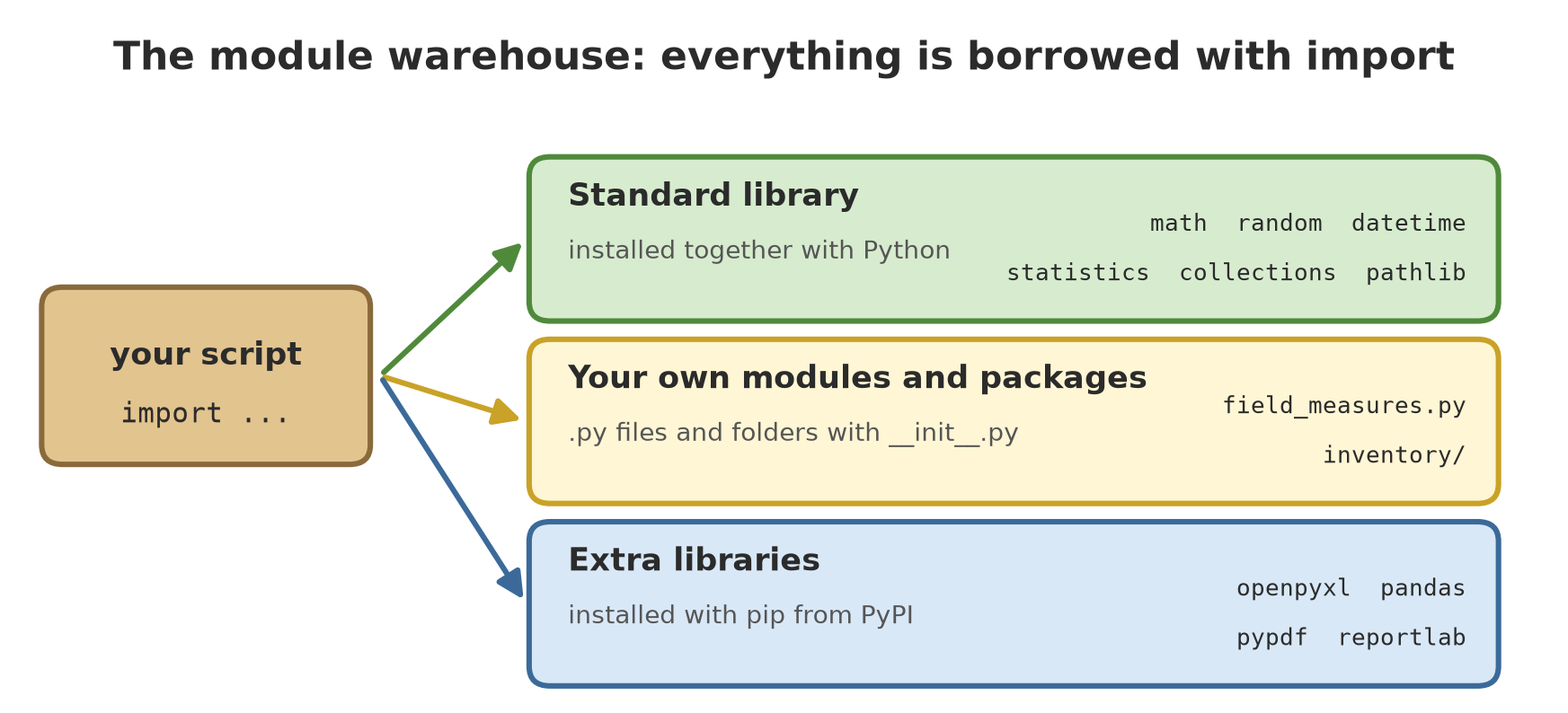
In Chapter 10, you wrote your own functions. But a farmer doesn’t forge a hoe from raw iron every time he wants to dig: he takes it from the tool shed. Python has a big tool shed, and every shelf in it is called a module: a Python file holding ready-made functions and data. The shed that is installed together with Python is called the standard library. You peeked into it in Chapter 4 when you used import; now we walk inside.
Three ways to use import
01_import_basics.py
# Chapter 11 - Three ways to use import
import math                        # way 1: bring the whole module, call with the prefix math.
from math import sqrt              # way 2: take just one tool
import statistics as stat          # way 3: give it a nickname (alias)

print("pi          =", math.pi)
print("sqrt of 144 =", sqrt(144))
print("mean        =", stat.mean([32.5, 45.2, 28.0]))

# Crown area of a tree, a circle with a radius of 3.5 m
area = math.pi * 3.5 ** 2
print(f"Crown area  = {area:.2f} m2")
pi = 3.141592653589793
sqrt of 144 = 12.0
mean = 35.233333333333334
Crown area = 38.48 m2import mathbrings in the whole module; its tools are called with a prefix:math.pi.from math import sqrttakes one tool only, used without a prefix.import statistics as statgives it a nickname (alias) to make it shorter.
The prefix is useful: math.pi tells you at once that pi comes from the math module, not from a variable of your own.
Write all import lines at the very top of the script. A reader instantly knows which tools the program needs.
math and random
02_math_random.py
# Chapter 11 - math and random (with a seed so the result can be repeated)
import math
import random

print(math.ceil(4.2), math.floor(4.8), round(4.5), round(5.5))   # rounding

random.seed(42)                                  # seed: the "random" sequence becomes fixed
chosen_plot = random.choice(["A", "B", "C"])
sample = random.sample(range(1, 101), 5)         # 5 different tree numbers from 1..100
weather = random.randint(24, 33)                 # whole number 24..33
print("Chosen plot :", chosen_plot)
print("Sample trees:", sample)
print("Fake temp   :", weather)

random.seed(42)                                  # same seed -> same result
print("Again       :", random.choice(["A", "B", "C"]), random.sample(range(1, 101), 5))
5 4 4 6
Chosen plot : C
Sample trees: [15, 4, 95, 36, 32]
Fake temp : 27
Again : C [15, 4, 95, 36, 32]The first line holds a surprise: round(4.5) gives 4, but round(5.5) gives 6. Python rounds a number sitting exactly in the middle to the nearest even number, not always up. This rule is called banker’s rounding; just remember not to be surprised when it happens.
The random module produces “random” numbers. With random.seed(42) we set the seed: the starting point of the random sequence. Same seed, same sequence; see the last line, which repeats C [15, 4, 95, 36, 32]. This is how you make fake data that can be repeated exactly. One honest note: the Python documentation only guarantees that the random.random() sequence stays the same for the same seed in future Python versions, while choice and sample may change between versions. So the numbers above will be identical on your computer if the Python version is the same, but do not build a system that depends on them.
Dates with datetime
03_dates.py
# Chapter 11 - datetime: planting date, age, and expected harvest
from datetime import date, timedelta

planted = date(2026, 3, 1)
harvest = planted + timedelta(days=120)      # sample rice: 120 days
age = date(2026, 5, 15) - planted            # difference of two dates = timedelta

print("Planted:", planted)
print("Harvest:", harvest.strftime("%d-%m-%Y"))
print("Age on 15 May 2026:", age.days, "days")
print("From text:", date.fromisoformat("2026-07-01"))

day_names = ["Monday", "Tuesday", "Wednesday", "Thursday", "Friday", "Saturday", "Sunday"]
print("Harvest day falls on:", day_names[harvest.weekday()])
Planted: 2026-03-01
Harvest: 29-06-2026
Age on 15 May 2026: 75 days
From text: 2026-07-01
Harvest day falls on: Mondaydate(2026, 3, 1) makes a date. Adding timedelta(days=120) shifts the date. The difference between two dates is a timedelta, and .days takes its number of days (75 days from 1 March to 15 May). strftime("%d-%m-%Y") controls how the date is displayed. (We deliberately avoid date.today() because its result changes every day.)
statistics and collections
04_statistics.py
# Chapter 11 - statistics: summarising numbers without writing the formulas yourself
import statistics

weight_g = [520, 480, 560, 540, 480, 505]     # sample fish weights (sample numbers)
print("mean     :", round(statistics.mean(weight_g), 2))
print("median   :", statistics.median(weight_g))
print("mode     :", statistics.mode(weight_g))
print("std dev  :", round(statistics.stdev(weight_g), 2))
print("smallest/largest:", min(weight_g), max(weight_g))
mean : 514.17
median : 512.5
mode : 480
std dev : 32.31
smallest/largest: 480 560Those six fish weights give a mean of 514.17 g and a median of 512.5 g (the middle value after sorting). The mode, 480, is the number that appears most often. stdev (standard deviation) measures how spread out the numbers are; the bigger it is, the less uniform the fish.
05_collections.py
# Chapter 11 - collections: Counter and defaultdict
from collections import Counter, defaultdict

species = ["Teak", "Meranti", "Teak", "Mahogany", "Teak", "Meranti"]
count = Counter(species)
print(count)
print("Most common:", count.most_common(1))

per_plot = defaultdict(list)                  # a new key automatically gets an empty list
for plot, diameter in [("A", 32.5), ("B", 28.0), ("A", 45.2), ("B", 51.5)]:
    per_plot[plot].append(diameter)
print(dict(per_plot))
Counter({'Teak': 3, 'Meranti': 2, 'Mahogany': 1})
Most common: [('Teak', 3)]
{'A': [32.5, 45.2], 'B': [28.0, 51.5]}Counter counts how many times each value appears: Teak appears 3 times. defaultdict(list) is a dict that automatically creates an empty list for a new key, so you can append right away without first checking whether the key exists.
itertools and pathlib
06_itertools.py
# Chapter 11 - itertools: combinations and groups
from itertools import combinations, product, groupby

ponds = ["A", "B", "C"]
print("Pond pairs :", list(combinations(ponds, 2)))
print("Pond x feed:", list(product(ponds[:2], ["pellet", "chopped"])))

trees = [("A", "Teak"), ("A", "Meranti"), ("B", "Mahogany"), ("B", "Teak")]
for plot, members in groupby(trees, key=lambda t: t[0]):   # data must already be in order
    print(plot, [species for _, species in members])
Pond pairs : [('A', 'B'), ('A', 'C'), ('B', 'C')]
Pond x feed: [('A', 'pellet'), ('A', 'chopped'), ('B', 'pellet'), ('B', 'chopped')]
A ['Teak', 'Meranti']
B ['Mahogany', 'Teak']combinations makes all pairs, product makes all combinations of two lists, and groupby groups data that is already in order. Note: groupby only joins neighbouring elements, so sort the data first if it isn’t sorted.
07_pathlib_intro.py
# Chapter 11 - pathlib: a file address as an object (does not touch the disk yet)
from pathlib import Path

file = Path("data") / "trees.csv"             # the / sign joins parts of an address
print(file)
print("name       :", file.name)
print("suffix     :", file.suffix)
print("without suffix:", file.stem)
print("folder     :", file.parent)
print("change suffix:", file.with_suffix(".json"))
print("exists on disk?", file.exists())
print("this script is called:", Path(__file__).name)
data\trees.csv
name : trees.csv
suffix : .csv
without suffix: trees
folder : data
change suffix: data\trees.json
exists on disk? False
this script is called: 07_pathlib_intro.pypathlib.Path treats a file address as an object. The / sign joins parts of an address. On a Windows computer the separator is displayed as \; on macOS or Linux it is displayed as /. That is the benefit of Path: you write once, and Python adapts to the system. In Chapter 13 we will use it to read and write real files.
Making your own module
A module is simply a .py file. Our module lives in the module/ subfolder:
# module/field_measures.py (its first two functions)
def basal_area_m2(diameter_cm): ...
def biomass_kg(fish_count, avg_weight_g): ...
The full content is in the file kode/ch11/module/field_measures.py. The following script uses it:
08_own_module.py
# Chapter 11 - Using our own module from the "module" subfolder
import sys
from pathlib import Path

sys.path.insert(0, str(Path(__file__).parent / "module"))   # tell Python where the module lives

import field_measures as measures

print(f"Basal area of 32.5 cm: {measures.basal_area_m2(32.5):.4f} m2")
print(f"Biomass of pond A    : {measures.biomass_kg(800, 540.5):.1f} kg")
print("Name of this module:", measures.__name__)
Basal area of 32.5 cm: 0.0830 m2
Biomass of pond A : 432.4 kg
Name of this module: field_measuresBasal area is the cross-section area of a trunk; for a diameter of 32.5 cm the result is 0.0830 m². Python looks for modules in a number of folders; we add the module/ folder to its list through sys.path.insert. The module name (field_measures) is the file name without .py.
if __name__ == "__main__"
Every module has a built-in variable __name__. When a file is run directly, __name__ holds "__main__". When a file is imported, __name__ holds the module’s name. That way one file can have a “quick test” that runs only when it is run directly:
09_main_or_import.py
# Chapter 11 - if __name__ == "__main__": run directly or imported
import subprocess
import sys
from pathlib import Path

module = Path(__file__).parent / "module"
sys.path.insert(0, str(module))

import name_demo                             # imported: __name__ = the name of the module

print("--- now run directly ---")
result = subprocess.run([sys.executable, str(module / "name_demo.py")],
                        capture_output=True, text=True)
print(result.stdout.strip())

print("--- quick test in module field_measures (run directly) ---")
result = subprocess.run([sys.executable, str(module / "field_measures.py")],
                        capture_output=True, text=True)
print(result.stdout.strip())
Inside name_demo, __name__ = name_demo
--- now run directly ---
Inside name_demo, __name__ = __main__
--- quick test in module field_measures (run directly) ---
Quick test: 0.083 432.4The first line appears when name_demo is imported (the module’s name is name_demo). After that the script runs the same file as a program of its own, and this time __name__ holds __main__. In field_measures.py, the part under if __name__ == "__main__": appears only on the second call; when it is imported in script 08, that quick test does not get in the way.
Code at the outermost level of a module is run when it is imported. So don’t put long commands or print there, except under if __name__ == "__main__":.
Packages: a folder of modules
When modules multiply, gather them in a package: a folder holding a file named __init__.py plus the modules. Our package is called inventory:
inventory/
    __init__.py      <- marks the package; may list the tools it shows off
    core_data.py     <- sample data for five sectors
    calc.py          <- basal_area_m2, biomass_kg
    summarize.py     <- summarize(numbers)
10_small_package.py
# Chapter 11 - A small package: the "inventory" folder holds __init__.py and its modules
import inventory
from inventory import biomass_kg             # available through __init__.py
from inventory.core_data import fish         # take directly from a module inside the package

print("Package contents (__all__):", inventory.__all__)
print("The calc module comes from:", inventory.calc.__name__)

for pond in fish:
    kg = biomass_kg(pond["count"], pond["avg_weight_g"])
    print(f"Pond {pond['pond']}: {kg:.1f} kg")
Package contents (__all__): ['basal_area_m2', 'biomass_kg', 'summarize']
The calc module comes from: inventory.calc
Pond A: 432.4 kg
Pond B: 375.0 kg
Pond C: 288.0 kg__init__.py imports tools from its modules so users only need to write from inventory import biomass_kg. Pond A holds 800 fish of 540.5 g: 432.4 kg, exactly as in Chapter 10. The __all__ variable lists the names the package deliberately shows.
pip: borrowing from outside the warehouse
When the tool you need is not in the standard library, pip installs it from PyPI, the online store of the Python community. Its commands are typed in the terminal, not inside a script. The commands below are only examples and were not run when this book was built, because installing packages changes the reader’s computer:
python -m pip install openpyxl     # installs the Excel library (used in Chapter 15)
python -m pip list                 # shows installed libraries
python -m pip uninstall openpyxl   # removes it
Writing python -m pip (instead of just pip) makes sure the pip you use belongs to the same Python that runs your scripts. If you try to import a library that isn’t installed, this is what happens:
11_module_not_found.py
# Chapter 11 - Pitfall: importing a module that does not exist
import library_does_not_exist

print("this line is never reached")
Traceback (most recent call last):
File "11_module_not_found.py", line 2, in <module>
import library_does_not_exist
ModuleNotFoundError: No module named 'library_does_not_exist'The ModuleNotFoundError message means Python could not find a module with that name: either a typo, or it hasn’t been installed with pip. Full coverage of installing and separate environments (venv) is in Chapter 17.
When you write import x, Python looks for x in order: modules already built in, the folder where the script runs, then other folders on sys.path. Because the script’s folder comes early, you should not name your own files random.py or statistics.py: your module would hide the real one and cause confusing errors.
Running Project B3: summary of five sectors
Welcome to the Series B3 project. In Series B2, the field data lived inside the code. In this series we will save it to files, make it resistant to mistakes, and turn it into reports. Step one: pack our tools into the inventory package (which you have already seen), then use it to summarise four tables of data from five sectors (forest, orchard, field crops, fisheries, livestock). The numbers are fictional.
12_project_summary.py
# Chapter 11 - Running project B3: summary of five sectors using our own package
from inventory import summarize
from inventory.core_data import trees, crops, fish, livestock

sectors = {
    "Forest (diameter cm)": [t["diameter_cm"] for t in trees],
    "Orchard+field (kg)": [c["yield_kg"] for c in crops],
    "Fisheries (g/fish)": [f["avg_weight_g"] for f in fish],
    "Livestock (kg)": [x["weight_kg"] for x in livestock],
}

for name, numbers in sectors.items():
    r = summarize(numbers)
    print(f"{name:22} n={r['count']}  total={r['total']:8.1f}  mean={r['mean']:7.2f}  median={r['median']}")
Forest (diameter cm) n=6 total= 234.0 mean= 39.00 median=38.4
Orchard+field (kg) n=4 total= 1030.0 mean= 257.50 median=260.75
Fisheries (g/fish) n=3 total= 1320.5 mean= 440.17 median=480.0
Livestock (kg) n=4 total= 1190.0 mean= 297.50 median=369.5Read each line like this: the forest sector has 6 trees, a total diameter of 234.0 cm, a mean of 39.00 cm, and a median of 38.4 cm. Orchard and field crops (rice, maize, coffee, cocoa) yield 1030.0 kg. The mean fish weight per pond is 440.17 g, and livestock averages 297.50 kg. Notice how short this script is: all the heavy work is done by the package.
Exercises
- Use
datetime: work out the harvest date for coffee planted on 15 January 2026 and harvested 270 days later, then print it indd-mm-yyyyformat. - With
random.seed(7), choose 3 different pond numbers from 1 to 12 usingrandom.sample. Run it twice and make sure the result is the same. - Add a function
circle_circumference_m(radius_m)tomodule/field_measures.py, then call it from a new script that imports it. - Challenge: add a module
inventory/dates.pywith a functionplanting_date(harvest_date, age_days), export it through__init__.py, then use it to print the planting date of each crop incore_data.cropsif all were harvested on 1 October 2026.
Chapter Summary
- A module = a Python file holding tools; a package = a folder of modules with
__init__.py. - Three forms of import:
import x,from x import y,import x as z. - Useful standard library modules:
math,random(useseed),datetime,statistics,collections,itertools,pathlib. if __name__ == "__main__":separates code that runs only when the file is run directly.python -m pip install <name>installs extra libraries;ModuleNotFoundErrormeans the module was not found.- Project B3 has begun: the
inventorypackage summarises data from five sectors.
Next, in Chapter 12: error handling, how to keep a program from collapsing the moment something goes wrong.