Chapter 22 — Regex and Text Processing: Digging Data out of Messy Writing
Series I2 — Data and the Internet
All scripts for this chapter are in the kode/ch22/ folder. On the web version, you can also download them all at once (zip).
Data from an API (Chapter 21) is usually tidy. Data from humans is not. One field officer types “dia 32,5 cm”, a colleague “diameter=32.5cm”, another “TEAK” in all capitals. Filtering writing like that with if and split quickly turns into a jungle. Regex is like a stencil card for patterns: you punch holes in the card in the shape you are looking for (“two digits, a slash, two digits…”), lay it over the text, and whatever fits the holes is what you take out.
Searching: search, match, findall
The re module comes with Python; nothing to install.
01_search_basics.py
# Chapter 22 - Basics of the re module: search, match, fullmatch, findall
import re

text = "Plot A: diameter 32,5 cm, height 18 m"

print(re.search(r"diameter", text))                 # looks ANYWHERE
print(re.match(r"diameter", text))                  # match: only from the START of the text
print(re.match(r"Plot", text) is not None)
print(re.fullmatch(r"\d+", "2026"), re.fullmatch(r"\d+", "2026 "))

found = re.search(r"\d+,\d+", text)                 # a decimal number with a comma
print(found.group(), "is at position", found.start(), "to", found.end())

print(re.findall(r"\d+", text))                     # all runs of digits
for hit in re.finditer(r"[A-Z]", text):             # every capital letter with its position
    print(hit.group(), hit.start(), end=" | ")
print()
<re.Match object; span=(8, 16), match='diameter'>
None
True
<re.Match object; span=(0, 4), match='2026'> None
32,5 is at position 17 to 21
['32', '5', '18']
P 0 | A 5 | re.searchlooks anywhere; the result is a Match object (with a position such asspan=(8, 16)) orNoneif nothing is found.re.matchonly succeeds if the pattern is at the start of the text, which is whydiametergivesNone.re.fullmatchdemands that the whole text matches:"2026"passes,"2026 "(with a space) fails.findallgives a list of all matches: three runs of digits['32', '5', '18']. Notice:32,5is split into32and5, because the pattern\d+knows nothing about commas.- The
r"..."prefix (raw string) makes backslashes be read as they are. Always use it for patterns.
Ingredients of patterns
| Pattern | Meaning |
|---|---|
\d |
one digit; \w one letter/digit/underscore; \s one space (or tab) |
. |
any one character (except a newline) |
[A-C] |
one character from that set; [^"] = anything except a quote mark |
+ / * / ? |
one or more / zero or more / zero or one |
{4} / {2,3} |
exactly 4 times / 2 to 3 times |
(...) |
group; (?:...) unnumbered group; (?P<name>...) named group |
\| |
or; \b word boundary |
02_common_patterns.py
# Chapter 22 - Common patterns: character classes and repeaters
import re

text = "Plot A: 32,5 cm; Plot B: 45 cm; code JT-0042; Plot C: 28,0 cm"

patterns = {
    r"\d":           "one digit",
    r"\d+":          "one or more digits",
    r"\d+,\d+":      "a number with a comma",
    r"\d+(?:,\d+)?": "a number, the comma part optional",
    r"[A-C]":        "one letter between A and C",
    r"Plot \w":      "the word Plot, a space, one letter/digit",
    r"[A-Z]{2}-\d{4}": "two capital letters, a minus, four digits",
}
for p, meaning in patterns.items():
    print(f"{p:20} {meaning:44} -> {re.findall(p, text)}")
\d one digit -> ['3', '2', '5', '4', '5', '0', '0', '4', '2', '2', '8', '0']
\d+ one or more digits -> ['32', '5', '45', '0042', '28', '0']
\d+,\d+ a number with a comma -> ['32,5', '28,0']
\d+(?:,\d+)? a number, the comma part optional -> ['32,5', '45', '0042', '28,0']
[A-C] one letter between A and C -> ['A', 'B', 'C']
Plot \w the word Plot, a space, one letter/digit -> ['Plot A', 'Plot B', 'Plot C']
[A-Z]{2}-\d{4} two capital letters, a minus, four digits -> ['JT-0042']Trace the lines: \d+(?:,\d+)? captures 32,5 and 45 together because the comma part is made optional (?). The last pattern finds the code JT-0042.
Do not write a long pattern all at once. Write one piece, test it with findall on sample text, then add the next piece. Sites such as regex101.com help you see matches visually.
Groups: taking out the parts
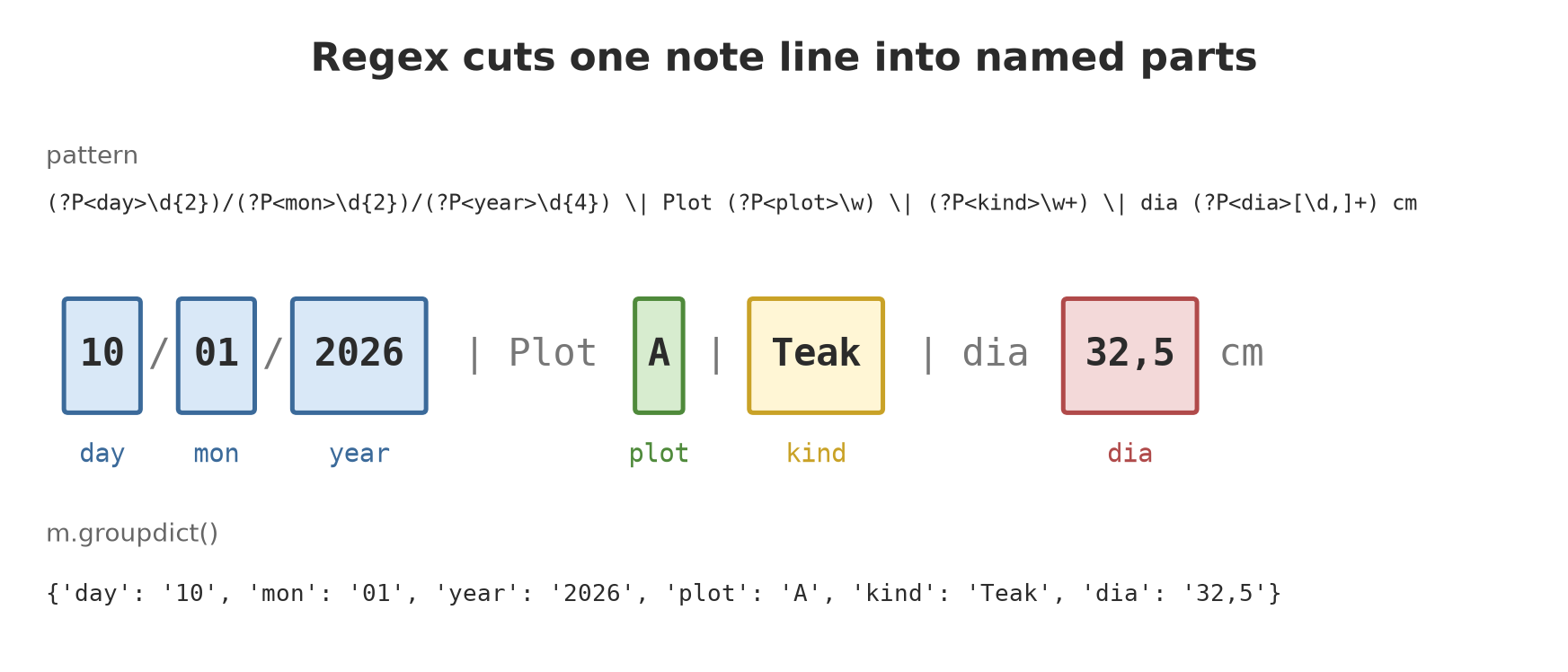
Brackets make a group, a part of the pattern whose result can be taken separately. Named groups (?P<name>) are far easier to read than numbers.
03_groups.py
# Chapter 22 - Groups: picking out the matched parts
import re

line = "10/01/2026 | Plot A | Teak | dia 32,5 cm"

# plain brackets = numbered group
m = re.search(r"(\d{2})/(\d{2})/(\d{4})", line)
print(m.groups())                                   # ('10', '01', '2026')
print("Year:", m.group(3))

# (?P<name>...) = named group: easier to read
pattern = r"(?P<day>\d{2})/(?P<mon>\d{2})/(?P<year>\d{4}) \| Plot (?P<plot>\w) \| (?P<kind>\w+)"
m = re.match(pattern, line)
print(m.groupdict())
print(f"{m['year']}-{m['mon']}-{m['day']}")          # building an ISO date
('10', '01', '2026')
Year: 2026
{'day': '10', 'mon': '01', 'year': '2026', 'plot': 'A', 'kind': 'Teak'}
2026-01-10m.groups() gives a tuple, m.groupdict() gives a dict, and m['year'] takes one group. We rebuild the date 10/01/2026 as 2026-01-10 (ISO format, easy to sort).
Replacing and splitting
04_replace_and_split.py
# Chapter 22 - Replacing (sub) and splitting (split)
import re

text = "dia 32,5 cm; dia 45,2 cm; dia 28 cm"

print(re.sub(r"(\d),(\d)", r"\1.\2", text))          # decimal comma -> dot; \1 \2 = groups 1 and 2
print(re.sub(r"\s+", " ", "Plot    A   Teak"))        # many spaces -> one space
print(re.subn(r"cm", "CM", text))                    # subn also gives the number of replacements


def to_metres(hit):
    """Called for every match; returns the replacement text."""
    cm = float(hit.group(1).replace(",", "."))
    return f"{cm / 100:.3f} m"


print(re.sub(r"(\d+(?:,\d+)?) cm", to_metres, text))
print(re.split(r"\s*[;,|]\s*", "A ; B,C |D"))         # split at any one of the separators
dia 32.5 cm; dia 45.2 cm; dia 28 cm
Plot A Teak
('dia 32,5 CM; dia 45,2 CM; dia 28 CM', 3)
dia 0.325 m; dia 0.452 m; dia 0.280 m
['A', 'B', 'C', 'D']re.sub(pattern, replacement, text)replaces all matches.\1and\2in the replacement refer to groups 1 and 2, so32,5becomes32.5.re.subnalso reports the number of replacements: 3.- The replacement may be a function called for each match: we turn centimetres into metres (
32,5 cmbecomes0.325 m). re.splitcuts at any one of the separators, even with spaces around them.
compile, flags, and VERBOSE
05_compile_flags.py
# Chapter 22 - compile, flags (IGNORECASE) and VERBOSE patterns
import re

# A pattern used repeatedly: compile once, use many times
species_pattern = re.compile(r"\b(teak|meranti|mahogany|sengon)\b", re.IGNORECASE)
print(species_pattern.findall("TEAK healthy, Meranti sick, mahogany, another tree"))

# VERBOSE: spaces and comments inside the pattern are ignored, so long patterns can be explained
date_pattern = re.compile(r"""
    (?P<day>\d{1,2})      # day
    [/-]                  # separator: slash or minus
    (?P<mon>\d{1,2})      # month
    [/-]
    (?P<year>\d{4})       # year
""", re.VERBOSE)
for s in ["10/01/2026", "5-3-2026", "2026-01-10"]:
    m = date_pattern.fullmatch(s)
    print(f"{s:11} ->", m.groupdict() if m else "no match")
['TEAK', 'Meranti', 'mahogany']
10/01/2026 -> {'day': '10', 'mon': '01', 'year': '2026'}
5-3-2026 -> {'day': '5', 'mon': '3', 'year': '2026'}
2026-01-10 -> no matchre.compile prepares a pattern once for repeated use. re.IGNORECASE ignores upper/lower case (which is why TEAK is included). re.VERBOSE allows spaces and comments inside the pattern, so a long pattern can be explained line by line. Notice that 2026-01-10 does not match because our pattern expects the year at the end.
Traps: greedy and forgetting None
06_greedy_and_lazy.py
# Chapter 22 - Trap: greedy and lazy repeaters
import re

text = 'note "healthy" then note "sick" finished'

print(re.findall(r'".*"', text))        # greedy: swallows as much as possible
print(re.findall(r'".*?"', text))       # lazy (?): stops as soon as possible
print(re.findall(r'"([^"]*)"', text))   # another way: "anything except a quote mark"
['"healthy" then note "sick"']
['"healthy"', '"sick"']
['healthy', 'sick']The pattern ".*" is greedy: it swallows as much as it can, from the first quote to the last quote, so two notes merge into one. Adding ? makes it lazy: it stops at the nearest quote. The third way, [^"]*, is often the clearest.
re.search returns None when nothing matches. Calling .group() on None raises an AttributeError. Always check first: if result:.
07_errors_and_none.py
# Chapter 22 - Two classic errors: a broken pattern and forgetting to check for None
import re

try:
    re.compile(r"(\d+")                     # opening bracket without its partner
except re.error as error:
    print("Broken pattern:", error)

result = re.search(r"\d+", "there is no number here")
print("Search result:", result)              # None, not an error

try:
    print(result.group())
except AttributeError as error:
    print("Error:", error)

# The safe way: check first
if result:
    print(result.group())
else:
    print("No number; carrying on safely.")
Broken pattern: missing ), unterminated subpattern at position 0
Search result: None
Error: 'NoneType' object has no attribute 'group'
No number; carrying on safely.A pattern with an unpaired bracket raises re.error at compile time. The wording of the error message can differ between Python versions; what matters is that you know the error lives in the pattern, not in the text.
Running Project I2: cleaning field notes
Step 2: five fictional field notes written in different styles, plus one broken line. One VERBOSE pattern accepts all the styles, then the code tidies up: dates become ISO, plots become capital letters, species get an initial capital, comma numbers become Python decimals, and “healthy/sick” becomes True/False.
08_project_clean.py
# Chapter 22 - Running project I2, step 2: cleaning field notes with regex
import json
import re
from pathlib import Path

notes = [
    "10/01/2026 | Plot A | Teak | dia 32,5 cm | height 18 m | HEALTHY",
    "10/01/2026 | plot a | meranti | diameter=45.2cm | height: 25,5 m | sick",
    "11-01-2026 | Plot B | Mahogany | dia 28 cm | height 15 m | healthy",
    "11/01/2026 | Plot C | sengon | dia  19,8cm | height 12 m | Healthy ",
    "12/01/2026 | Plot B | TEAK | dia 36,1 cm | height 20,5 m | sick",
    "broken: a line without clear data",
]

PATTERN = re.compile(r"""
    (?P<day>\d{1,2})[/-](?P<mon>\d{1,2})[/-](?P<year>\d{4}) \s*\|\s*
    plot\s+(?P<plot>[a-z]) \s*\|\s*
    (?P<species>[a-z]+) \s*\|\s*
    (?:dia|diameter)\s*[=:]?\s*(?P<dia>\d+(?:[.,]\d+)?)\s*cm \s*\|\s*
    height\s*[=:]?\s*(?P<height>\d+(?:[.,]\d+)?)\s*m \s*\|\s*
    (?P<condition>healthy|sick)
""", re.VERBOSE | re.IGNORECASE)


def number(text):
    return float(text.replace(",", "."))


clean, rejected = [], []
for line in notes:
    m = PATTERN.fullmatch(line.strip())
    if m is None:
        rejected.append(line)
        continue
    clean.append({
        "date": f"{m['year']}-{int(m['mon']):02d}-{int(m['day']):02d}",
        "plot": m["plot"].upper(),
        "species": m["species"].capitalize(),
        "diameter_cm": number(m["dia"]),
        "height_m": number(m["height"]),
        "healthy": m["condition"].lower() == "healthy",
    })

for c in clean:
    print(c)
print("Rejected:", rejected)

tmp = Path(__file__).parent / "_tmp"
tmp.mkdir(exist_ok=True)
(tmp / "clean_notes.json").write_text(json.dumps(clean, ensure_ascii=False, indent=1), encoding="utf-8")
print(f"{len(clean)} clean rows, {len(rejected)} rejected")
{'date': '2026-01-10', 'plot': 'A', 'species': 'Teak', 'diameter_cm': 32.5, 'height_m': 18.0, 'healthy': True}
{'date': '2026-01-10', 'plot': 'A', 'species': 'Meranti', 'diameter_cm': 45.2, 'height_m': 25.5, 'healthy': False}
{'date': '2026-01-11', 'plot': 'B', 'species': 'Mahogany', 'diameter_cm': 28.0, 'height_m': 15.0, 'healthy': True}
{'date': '2026-01-11', 'plot': 'C', 'species': 'Sengon', 'diameter_cm': 19.8, 'height_m': 12.0, 'healthy': True}
{'date': '2026-01-12', 'plot': 'B', 'species': 'Teak', 'diameter_cm': 36.1, 'height_m': 20.5, 'healthy': False}
Rejected: ['broken: a line without clear data']
5 clean rows, 1 rejectedOf six lines, 5 are clean and 1 is rejected. Rejecting honestly is better than guessing: rejected lines are recorded so a human can check them. The clean result is saved in _tmp/clean_notes.json, ready to be merged with other data in the next chapter.
Exercises
- Write a pattern that finds every code like
JT-0042in"JT-0042, MR-0107, xx-12". (Only two results.) - With
re.sub, turn"Plot A,Plot B , Plot C"into"Plot A, Plot B, Plot C". - Add a new note line to
08_project_clean.pyin a style not yet covered (e.g.height=14 mwithout spaces). Is it accepted? Change the pattern if needed. - Challenge: extend the pattern so that a temperature such as
temp 27,5 Cat the end of a line becomes an optional group (may be present or not).
Chapter Summary
- Regex = a language for text patterns; the
remodule is built into Python; write patterns asr"...". search(anywhere),match(from the start),fullmatch(the whole text),findall(all).- Groups
(...)and(?P<name>...)take out parts;groupdict()gives a dict. subreplaces (optionally with a function),splitsplits,compileprepares a pattern,VERBOSEmakes patterns readable.- Watch out for greedy repeaters and always check for a
Noneresult. - Dirty data is cleaned with one clear pattern; lines that do not match are rejected and recorded.
Next, in Chapter 23: the data is clean, but tens of thousands of rows do not fit ordinary loops. Meet numpy and pandas.