Chapter 64 — Metaprogramming: Code That Writes and Inspects Code
Series A5 — Expert Python
All scripts for this chapter are in the kode/ch64/ folder. On the web version, you can also download them all at once (zip).
By now you have built a complete system, from the field to AI. Series A5 takes you down to the engine room. Picture a foreman on a farm. An ordinary foreman plants and harvests. An expert foreman also writes planting rules: “every new seedling must be recorded”, “every plot must carry a name board”. That is metaprogramming: code that controls, inspects, or writes other code. You already use it every day: @property, @dataclass, and Pydantic models all live on the techniques in this chapter. All behaviour below was run on Python 3.14.8; the attribute lookup rules were checked against the official guide (docs.python.org, Descriptor HowTo, read 2026-10-10).
Descriptors: a gatekeeper for attributes
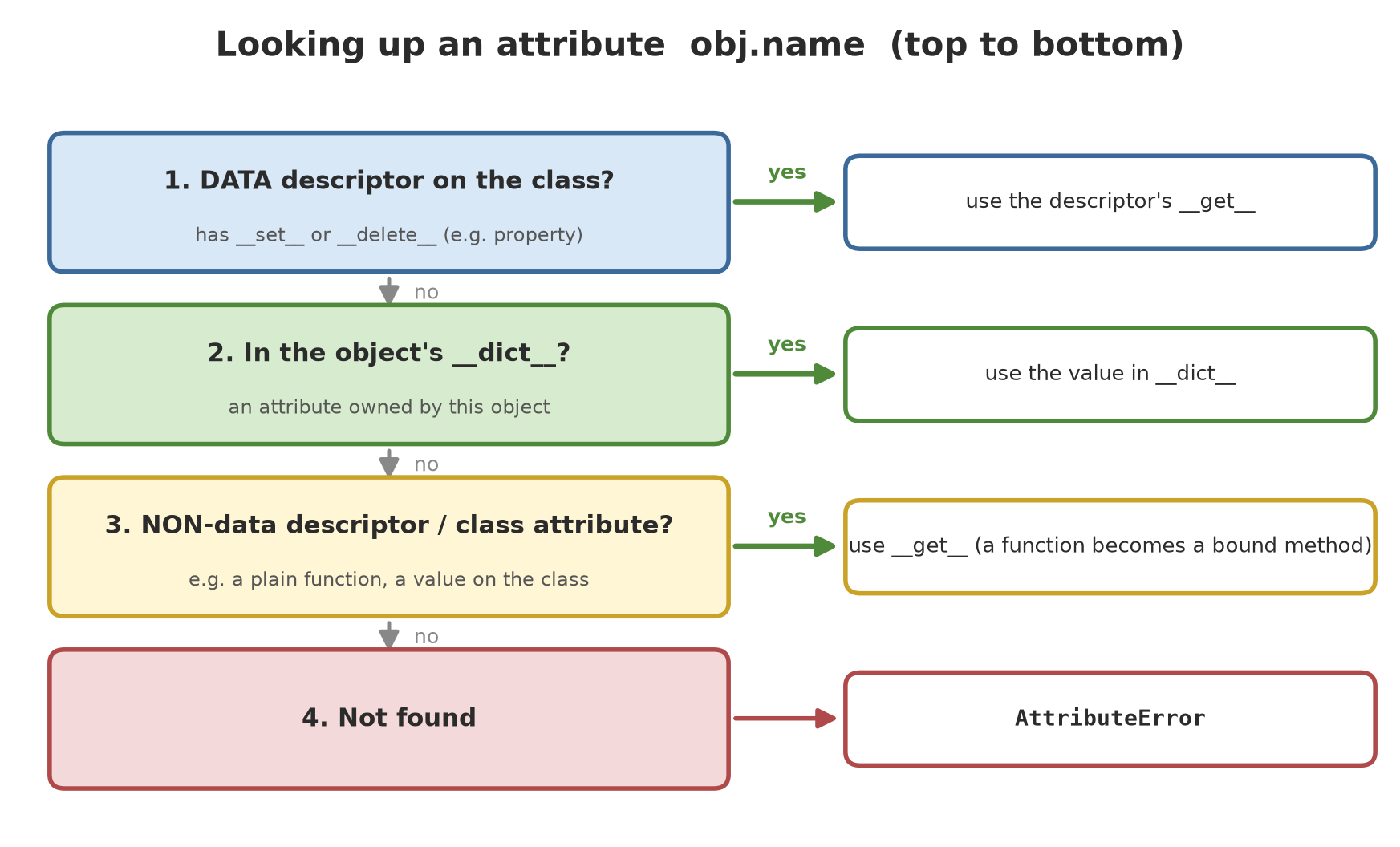
A descriptor is an object that has a __get__, __set__, or __delete__ method. When such an object is placed as an attribute of a class, Python calls its methods every time that attribute is read or assigned. Think of a gatekeeper at a warehouse: everything that goes in or out is checked first.
01_descriptor_basics.py
# Chapter 64 - Descriptors: a gatekeeper for attributes
class Positive:
    """Descriptor: the value must be a number greater than zero."""

    def __set_name__(self, cls, name):
        self.name = "_" + name          # where the value is stored on the object

    def __get__(self, obj, cls=None):
        if obj is None:                 # accessed through the class: Tree.diameter_cm
            return self
        return getattr(obj, self.name)

    def __set__(self, obj, value):
        if not isinstance(value, (int, float)) or value <= 0:
            raise ValueError(f"{self.name[1:]} must be a positive number, not {value!r}")
        setattr(obj, self.name, value)


class Tree:
    diameter_cm = Positive()
    height_m = Positive()

    def __init__(self, species, diameter_cm, height_m):
        self.species = species
        self.diameter_cm = diameter_cm   # triggers Positive.__set__
        self.height_m = height_m


teak = Tree("Teak", 32.5, 18.0)
print(teak.species, teak.diameter_cm, teak.height_m)

try:
    teak.diameter_cm = -5
except ValueError as e:
    print("Rejected:", e)

try:
    Tree("Meranti", 45.2, "height")
except ValueError as e:
    print("Rejected:", e)

print(type(Tree.diameter_cm).__name__)    # through the class, we get the descriptor itself
print(sorted(vars(teak)))                 # data is stored under names starting with _
Teak 32.5 18.0
Rejected: diameter_cm must be a positive number, not -5
Rejected: height_m must be a positive number, not 'height'
Positive
['_diameter_cm', '_height_m', 'species']__set_name__is called once when the class is made and tells the descriptor its attribute name (diameter_cm), so onePositivedescriptor can serve many attributes.__set__checks the value. That is whyteak.diameter_cm = -5is rejected, and also when the initial value comes from__init__.__get__receivesobj=Nonewhen the attribute is accessed through the class (Tree.diameter_cm), so we return the descriptor itself; that is why the second line from the bottom printsPositive.- Data is stored on the object under names starting with
_: the descriptor lives on the class and is shared by all objects, so per-object values must be kept on the object.
Functions and properties are descriptors too
02_functions_are_descriptors.py
# Chapter 64 - Functions and properties are descriptors too
class Pond:
    def __init__(self, fish_count, avg_weight_g):
        self.fish_count = fish_count
        self.avg_weight_g = avg_weight_g

    def biomass_kg(self):
        return self.fish_count * self.avg_weight_g / 1000

    @property
    def stocking_density(self):
        return self.fish_count / 100        # assume the pond is 100 m2


pond = Pond(800, 540.5)

# 1. A function inside a class has __get__: that is what makes a "bound method"
function = Pond.__dict__["biomass_kg"]
print(type(function).__name__, hasattr(function, "__get__"))
bound = function.__get__(pond, Pond)        # exactly what pond.biomass_kg does
print(type(bound).__name__, bound())

# 2. property is a data descriptor (it has __set__ even if you did not fill it in)
print(type(Pond.__dict__["stocking_density"]).__name__, pond.stocking_density)
try:
    pond.stocking_density = 5
except AttributeError as e:
    print("AttributeError:", e)

# 3. Lookup order: a DATA descriptor WINS over the object's __dict__,
#    while a plain function (non-data) LOSES to the object's __dict__.
pond.__dict__["biomass_kg"] = lambda: "from the object's __dict__"
print(pond.biomass_kg())                    # the object's __dict__ beats the function
pond.__dict__["stocking_density"] = 999
print(pond.stocking_density)                # the property still wins
function True
method 432.4
property 8.0
AttributeError: property 'stocking_density' of 'Pond' object has no setter
from the object's __dict__
8.0This is the secret of “bound methods”. A plain function inside a class has __get__; when you write pond.biomass_kg, Python calls function.__get__(pond, Pond) and the result is a method that already “holds” pond as self (the line method 432.4). property turns out to be a full descriptor (it has __set__), so assigning to it raises the same AttributeError as the official message.
From here comes an important order rule: a data descriptor (has __set__) wins over the object’s __dict__; a non-data descriptor (only __get__, like a plain function) loses to the object’s __dict__. The last two output lines prove it: the biomass_kg function can be “overridden” through __dict__, but stocking_density (a property) still wins.
A descriptor must be placed on the class, not on the object. A descriptor put in self.x = Positive() inside __init__ is never called at all.
__init_subclass__: child classes register themselves
Often we want every child class to be registered automatically or checked. People used to use metaclasses for this; since Python 3.6 there is a much simpler way: the __init_subclass__ method on the parent class is called every time a subclass is made.
03_init_subclass.py
# Chapter 64 - __init_subclass__: child classes register themselves
class Saver:
    registry = {}                            # extension -> saver class

    def __init_subclass__(cls, extension=None, **kwargs):
        super().__init_subclass__(**kwargs)
        if extension is None:
            raise TypeError(f"{cls.__name__} must give extension=...")
        cls.extension = extension
        Saver.registry[extension] = cls      # registered automatically when the class is made

    @classmethod
    def for_file(cls, file_name):
        extension = file_name.rsplit(".", 1)[-1]
        return cls.registry[extension]()


class CsvSaver(Saver, extension="csv"):
    def save(self, rows):
        return "\n".join(",".join(str(x) for x in r) for r in rows)


class TsvSaver(Saver, extension="tsv"):
    def save(self, rows):
        return "\n".join("\t".join(str(x) for x in r) for r in rows)


print(sorted(Saver.registry))
data = [("Teak", 32.5), ("Meranti", 45.2)]
print(Saver.for_file("trees.csv").save(data))
print(repr(Saver.for_file("trees.tsv").save(data)))

try:
    class BrokenSaver(Saver):                # forgot to give an extension
        pass
except TypeError as e:
    print("TypeError:", e)
['csv', 'tsv']
Teak,32.5
Meranti,45.2
'Teak\t32.5\nMeranti\t45.2'
TypeError: BrokenSaver must give extension=...Notice class CsvSaver(Saver, extension="csv"): the keyword argument on the class line is passed on to __init_subclass__. As soon as the class is finished, it is already in Saver.registry, without anyone calling a registration function. A class that forgot to give extension is rejected when it is defined, not when it is used. This “self-registering plugin” pattern is common for file formats, sensor types, or report types.
Metaclasses: a factory that makes classes
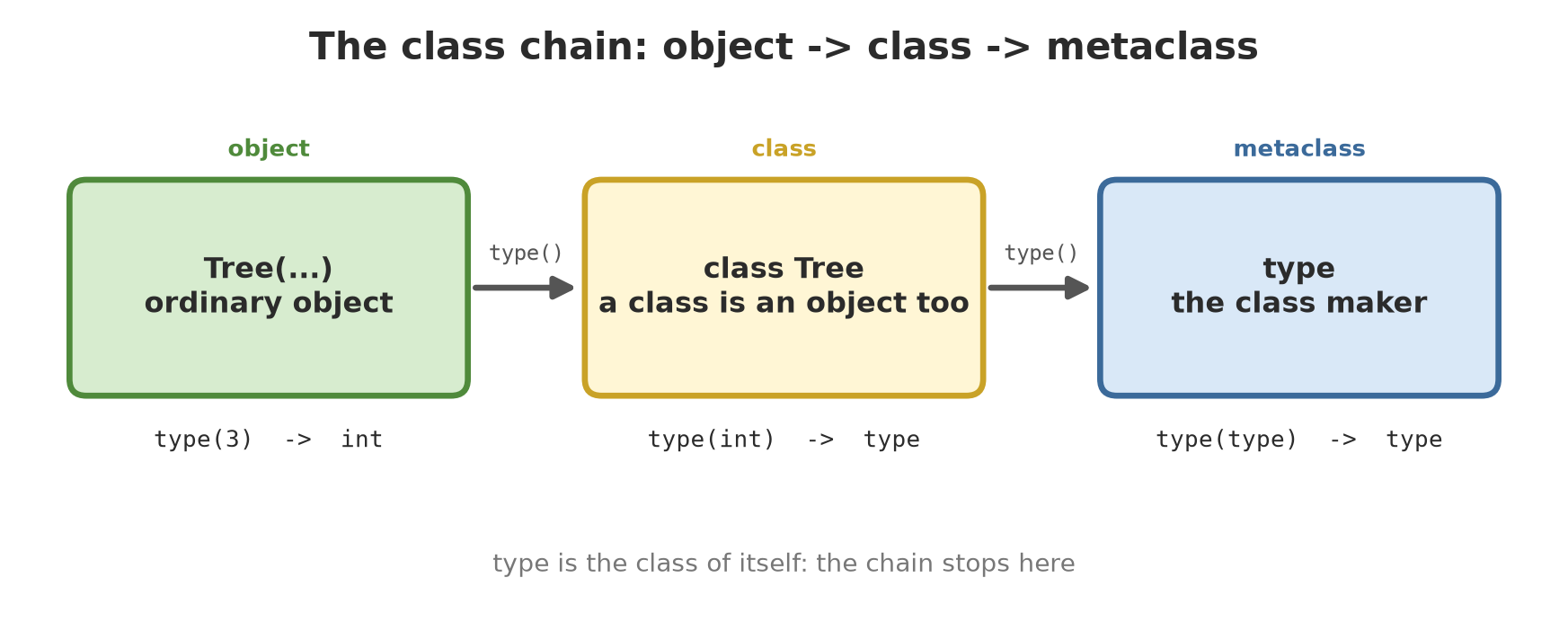
In Python, a class is also an object, and something makes it: type. It is called a metaclass, “the class of a class”.
type.04_metaclass.py
# Chapter 64 - Metaclass: a factory that makes classes
# 1. A class is also an object; its maker is called type
print(type(3).__name__, type(int).__name__, type(type).__name__)

# 2. type(name, bases, contents) makes a class dynamically
Cow = type("Cow", (), {"kind": "cow", "sound": lambda self: "moo"})
print(Cow.__name__, Cow().sound())


# 3. Your own metaclass: controls how ALL its subclasses are made
class RequireDocstring(type):
    def __new__(mcs, name, bases, body):
        for key, value in body.items():
            if callable(value) and not key.startswith("_") and not value.__doc__:
                raise TypeError(f"method {name}.{key} has no docstring yet")
        body["made_by"] = mcs.__name__
        return super().__new__(mcs, name, bases, body)


class Sensor(metaclass=RequireDocstring):
    def read(self):
        """Return one reading."""
        return 27.5


print(Sensor().read(), Sensor.made_by, type(Sensor).__name__)

try:
    class LazySensor(metaclass=RequireDocstring):
        def read(self):
            return 0
except TypeError as e:
    print("TypeError:", e)
int type type
Cow moo
27.5 RequireDocstring RequireDocstring
TypeError: method LazySensor.read has no docstring yet- First line:
type(3)isint,type(int)istype, andtype(type)istypeitself: the chain ends there. type("Cow", (), {...})makes a class while the program runs, without the wordclass.RequireDocstringis a metaclass: its code runs every time a class that uses it is made, and may reject or change the class contents. Here it rejects public methods without a docstring and adds an attributemade_by.
Order of choosing tools: first use a class decorator or __init_subclass__; use a descriptor for per-attribute logic; only then a metaclass, when you must change how the class is made (for example, preparing the namespace before the class body runs). Metaclasses are powerful but make code hard to read and can clash when two libraries use different metaclasses.
Introspection: a program inspects itself
Introspection is a program’s ability to ask about its own structure: names, parameters, documentation, who called it. The inspect module is the toolbox.
05_introspection.py
# Chapter 64 - Introspection: a program inspects itself
import inspect


class Plant:
    """A garden plant with a harvest."""

    def __init__(self, commodity: str, yield_kg: float = 0.0):
        self.commodity = commodity
        self.yield_kg = yield_kg

    def harvest(self, extra_kg: float, *, note: str = "") -> float:
        """Add to the harvest and return the total."""
        self.yield_kg += extra_kg
        return self.yield_kg


# 1. The signature and the annotations
signature = inspect.signature(Plant.harvest)
print(signature)
for name, p in signature.parameters.items():
    print(f"  {name}: kind={p.kind.name}, default={p.default!r}")

# 2. What is inside the class
methods = [n for n, f in inspect.getmembers(Plant, inspect.isfunction)]
print(methods)
print(inspect.getdoc(Plant))

# 3. Source code (only when the file exists)
print(inspect.getsource(Plant.harvest).splitlines()[0].strip())

# 4. Binding arguments by the names read from the signature
bound = inspect.signature(Plant).bind("coffee", yield_kg=12.5)
print(bound.arguments)

# 5. Who is calling me? (the call stack frames)
def who_am_i():
    return inspect.stack()[0].function, inspect.stack()[1].function


def caller():
    return who_am_i()


print(caller())
(self, extra_kg: float, *, note: str = '') -> float
self: kind=POSITIONAL_OR_KEYWORD, default=<class 'inspect._empty'>
extra_kg: kind=POSITIONAL_OR_KEYWORD, default=<class 'inspect._empty'>
note: kind=KEYWORD_ONLY, default=''
['__init__', 'harvest']
A garden plant with a harvest.
def harvest(self, extra_kg: float, *, note: str = "") -> float:
{'commodity': 'coffee', 'yield_kg': 12.5}
('who_am_i', 'caller')inspect.signaturegives the function’s signature:extra_kgcan be given by position or by name, whilenoteafter the*can only be given by name (KEYWORD_ONLY).getmemberswith theisfunctionfilter finds__init__andharvest;getdocreads the class docstring.getsourcereads the source code from the file (it fails for code made withexec).signature(...).bindmatches arguments to parameter names. Libraries such as FastAPI use this technique to translate the content of a web request into function parameters.inspect.stack()walks the call stack:who_am_ifinds out that its caller iscaller.
inspect.stack() is slow because it reads source files for every frame. Use it in debugging helpers, not inside a loop called millions of times.
AST: reading code as a tree
Before running, Python turns the code text into an Abstract Syntax Tree (AST): each operation becomes a node of the tree. The ast module opens that tree for us.
06_ast_reading.py
# Chapter 64 - AST: reading code as a tree
import ast

# 1. One small formula becomes a tree
tree = ast.parse("biomass = count * weight / 1000", mode="exec")
print(ast.dump(tree, indent=2))

# 2. Walking the tree: how many functions and calls are in some code?
code = '''
def compute(a, b):
    return average(a) + average(b)

def average(x):
    return sum(x) / len(x)

print(compute([1, 2], [3, 4]))
'''


class Counter(ast.NodeVisitor):
    def __init__(self):
        self.functions = []
        self.calls = []

    def visit_FunctionDef(self, node):
        self.functions.append(node.name)
        self.generic_visit(node)             # keep walking into the body

    def visit_Call(self, node):
        if isinstance(node.func, ast.Name):
            self.calls.append(node.func.id)
        self.generic_visit(node)


c = Counter()
c.visit(ast.parse(code))
print("functions:", c.functions)
print("calls    :", sorted(c.calls))
Module(
body=[
Assign(
targets=[
Name(id='biomass', ctx=Store())],
value=BinOp(
left=BinOp(
left=Name(id='count', ctx=Load()),
op=Mult(),
right=Name(id='weight', ctx=Load())),
op=Div(),
right=Constant(value=1000)))])
functions: ['compute', 'average']
calls : ['average', 'average', 'compute', 'len', 'print', 'sum']The formula count * weight / 1000 becomes a tree: the root is the division (Div), its left child is the multiplication (Mult), its right child is the constant 1000. That tree shape is what explains why multiplication is done first. NodeVisitor walks the tree and calls visit_<NodeName> for each node; here it finds two functions and six calls (average twice, sum, len, compute, print). Tools such as ruff, pytest (which rewrites assert), and type checkers all work with the AST.
Changing code, and computing formulas safely
07_ast_changing_safely.py
# Chapter 64 - AST: changing code, and computing formulas safely
import ast
import operator

# 1. NodeTransformer: replace every number 1000 (grams to kg) with the name GRAMS_PER_KG
class ReplaceConstant(ast.NodeTransformer):
    def visit_Constant(self, node):
        if node.value == 1000:
            return ast.copy_location(ast.Name(id="GRAMS_PER_KG", ctx=ast.Load()), node)
        return node


tree = ast.parse("biomass = count * weight / 1000", mode="exec")
tree = ast.fix_missing_locations(ReplaceConstant().visit(tree))
print(ast.unparse(tree))

environment = {"count": 800, "weight": 540.5, "GRAMS_PER_KG": 1000}
exec(compile(tree, "<ast>", "exec"), environment)    # safe: we built the code ourselves
print(environment["biomass"])

# 2. Never eval() a formula from a user; use an allow-list of operations
OPERATIONS = {ast.Add: operator.add, ast.Sub: operator.sub,
              ast.Mult: operator.mul, ast.Div: operator.truediv}


def safe_calculate(text, variables):
    def evaluate(n):
        if isinstance(n, ast.Expression):
            return evaluate(n.body)
        if isinstance(n, ast.Constant) and isinstance(n.value, (int, float)):
            return n.value
        if isinstance(n, ast.Name) and n.id in variables:
            return variables[n.id]
        if isinstance(n, ast.BinOp) and type(n.op) in OPERATIONS:
            return OPERATIONS[type(n.op)](evaluate(n.left), evaluate(n.right))
        raise ValueError(f"not allowed: {type(n).__name__}")
    return evaluate(ast.parse(text, mode="eval"))


data = {"count": 800, "weight": 540.5}
print(safe_calculate("count * weight / 1000", data))
for nasty in ["__import__('os').getcwd()", "count ** 99999", "weight.real"]:
    try:
        print(safe_calculate(nasty, data))
    except ValueError as e:
        print("Rejected:", e)
biomass = count * weight / GRAMS_PER_KG
432.4
432.4
Rejected: not allowed: Call
Rejected: not allowed: BinOp
Rejected: not allowed: AttributeThe first part uses a NodeTransformer: a Constant node with value 1000 is replaced by Name("GRAMS_PER_KG"); ast.unparse turns the tree back into text, and compile + exec runs it (result 432.4, same as the original).
The second part matters for security. If users may type a formula (for example on a dashboard), do not use eval(): it runs any code. We read the formula as an AST and allow only nodes from an allow-list: numbers, the variable names we provide, and four arithmetic operations. Function calls (__import__(...)), exponentiation (**, which can eat memory), and attribute access are rejected.
The official ast documentation warns that parsing a very large or complex string can crash the interpreter because of stack limits, and that even ast.literal_eval is “not recommended” for untrusted data (source: docs.python.org/3/library/ast.html, read 2026-10-10). An allow-list alone is not enough if the text can be huge: limit the input length.
Running Project A5: a mini schema framework
In Series A5 our project gets faster, more distributed, and finally summarised as a portfolio. The first step: understand how a validation library such as Pydantic (Chapter 34) works by building your own mini version from everything you just learned. Descriptors (Number, Choice) check each field; __init_subclass__ collects the fields of each model; no metaclass needed.
08_project_schema.py
# Chapter 64 - Project A5: a mini schema framework for field data
class Field:
    """Base descriptor: stores the value and checks it through check()."""

    def __init__(self, required=True):
        self.required = required

    def __set_name__(self, cls, name):
        self.name = name

    def __get__(self, obj, cls=None):
        return self if obj is None else obj.__dict__.get(self.name)

    def __set__(self, obj, value):
        obj.__dict__[self.name] = self.check(value)

    def check(self, value):
        return value


class Number(Field):
    def __init__(self, minimum=None, maximum=None, **kw):
        super().__init__(**kw)
        self.minimum, self.maximum = minimum, maximum

    def check(self, value):
        if isinstance(value, bool) or not isinstance(value, (int, float)):
            raise ValueError(f"{self.name}: must be a number, not {value!r}")
        if self.minimum is not None and value < self.minimum:
            raise ValueError(f"{self.name}: {value} is below {self.minimum}")
        if self.maximum is not None and value > self.maximum:
            raise ValueError(f"{self.name}: {value} is above {self.maximum}")
        return value


class Choice(Field):
    def __init__(self, *choices, **kw):
        super().__init__(**kw)
        self.choices = choices

    def check(self, value):
        if value not in self.choices:
            raise ValueError(f"{self.name}: {value!r} is not one of {list(self.choices)}")
        return value


class Model:
    fields = {}

    def __init_subclass__(cls, **kw):
        super().__init_subclass__(**kw)
        cls.fields = {n: f for n, f in vars(cls).items() if isinstance(f, Field)}

    def __init__(self, **data):
        for name, f in self.fields.items():
            if name in data:
                setattr(self, name, data.pop(name))
            elif f.required:
                raise ValueError(f"{name}: is required")
        if data:
            raise ValueError(f"unknown fields: {sorted(data)}")

    def to_dict(self):
        return {n: getattr(self, n) for n in self.fields}


class Tree(Model):
    species = Choice("Teak", "Meranti", "Mahogany", "Sengon")
    diameter_cm = Number(minimum=1, maximum=300)
    height_m = Number(minimum=0.5, maximum=80, required=False)


print(list(Tree.fields))
print(Tree(species="Teak", diameter_cm=32.5).to_dict())
for broken in [dict(species="Pine", diameter_cm=20), dict(species="Teak", diameter_cm=900),
               dict(species="Teak"), dict(species="Teak", diameter_cm=20, color="green")]:
    try:
        Tree(**broken)
    except ValueError as e:
        print("Rejected:", e)
['species', 'diameter_cm', 'height_m']
{'species': 'Teak', 'diameter_cm': 32.5, 'height_m': None}
Rejected: species: 'Pine' is not one of ['Teak', 'Meranti', 'Mahogany', 'Sengon']
Rejected: diameter_cm: 900 is above 300
Rejected: diameter_cm: is required
Rejected: unknown fields: ['color']Tree holds only three lines of fields, and we get: type and range validation, required vs optional fields (height_m is None when not given), and rejection of unknown fields. The error messages name the field thanks to __set_name__. Pydantic is far more complete (type conversion, JSON, speed), but the basic idea is the same.
Exercises
- Make a descriptor
Text(max_length)that rejects text longer than the limit and trims spaces at the ends. Attach it to the fieldnameof aPlotclass. - Write an
__init_subclass__on aReportclass that rejects subclasses without asummarisemethod. (Hint:hasattr(cls, "summarise").) - With
ast.NodeVisitor, count how many timesprintis called in a.pyfile of your choice, and show the line numbers (node.lineno). - Challenge: add a
Datefield to the project framework that accepts the text"2026-10-10"and stores it as adatetime.date, plus aModel.from_dict(data)method that creates an object from a dictionary.
Chapter Summary
- Descriptors (
__get__/__set__/__set_name__) control attribute access; functions,property, andclassmethodare descriptors. - Data descriptors beat the object’s
__dict__; non-data descriptors lose to it. __init_subclass__runs code whenever a subclass is made; enough for most needs that once used metaclasses.- Metaclasses (
typeand its subclasses) control the making of classes; use them when simpler tools are not enough. inspectreads signatures, members, source, and the call stack.astturns code into a tree that can be read and changed; user formulas are computed with a node allow-list, noteval().
Next, in Chapter 65: we look into the CPython engine room: how objects are stored, what bytecode is, when memory garbage is cleaned, and the fate of the GIL.