Chapter 20 — Git, GitHub, and the Project Workflow: A Time Machine for Your Code
Series I1 — Tidy and Maintainable Code
All scripts for this chapter are in the kode/ch20/ folder. On the web version, you can also download them all at once (zip).
Have you ever saved report_final.docx, then report_final2.docx, then report_final_CORRECT.docx? That is the manual way to track versions, and it gets messy fast. Git is a tool that does it neatly: it records every change as history, so you can see who changed what and when, and go back to an old state if something goes wrong. Picture a garden ledger: every correction is written down with its date, never erased.
Safety rules of this chapter. Every git command in this book runs in a temporary repo in the _tmp/ folder, with settings kept apart from your git configuration. No GitHub repo is created, nothing is pushed, and no account is used. The GitHub part is only explained.
Basic git concepts
| Term | Meaning |
|---|---|
| repo (repository) | a project folder whose history git tracks (it holds a hidden .git folder) |
| commit | one “photo” of the project’s state, with a message about what changed |
staging (git add) |
choosing which changes go into the next commit |
| branch | a separate line of history; the main branch is usually called main |
| merge | joining another branch into the branch that is active |
| remote | a copy of the repo somewhere else, for instance GitHub |
The flow: you change files, choose them with git add, then git commit to save them into history. The command git status tells you where you stand. (Git records the name and email of the commit’s author. On your computer, set them once with git config --global user.name "Your Name" and git config --global user.email "you@example.com". This book’s scripts do not touch those settings: their test identity is set through environment variables.)
01_init_commit.py
# Chapter 20 - git: a new repo, the first file, the first commit (in a temporary repo)
from helpers import git, new_repo, write

repo = new_repo("basic_repo")
write(repo, "harvest.csv", "block,yield_kg\nA,245.5\nB,310.0\n")

print("Initial status:", git("status", "--short", repo=repo)[0])
git("add", "harvest.csv", repo=repo)
print("After add     :", git("status", "--short", repo=repo)[0])
git("commit", "--quiet", "-m", "Record harvest of blocks A and B", repo=repo)
print("After commit  :", repr(git("status", "--short", repo=repo)[0]))

print("--- git log ---")
print(git("log", "--format=%an: %s", repo=repo)[0])
Initial status: ?? harvest.csv
After add : A harvest.csv
After commit : ''
--- git log ---
Test: Record harvest of blocks A and BTrace the three status lines: ?? means the file is not yet tracked, A means it is added (waiting for a commit), and empty text after the commit means no pending changes. The command git log --format=... shows the history: one commit with its message.
Seeing differences and undoing
02_change_and_diff.py
# Chapter 20 - Changing a file, seeing the difference (diff), and undoing changes
from helpers import git, new_repo, write

repo = new_repo("diff_repo")
write(repo, "harvest.csv", "block,yield_kg\nA,245.5\nB,310.0\n")
git("add", ".", repo=repo)
git("commit", "--quiet", "-m", "Record harvest of blocks A and B", repo=repo)

write(repo, "harvest.csv", "block,yield_kg\nA,245.5\nB,312.0\nC,198.5\n")
print("Status:", git("status", "--short", repo=repo)[0])

text, _ = git("diff", repo=repo)
print("--- git diff ---")
print("\n".join(line for line in text.splitlines() if not line.startswith("index ")))

git("commit", "--quiet", "-a", "-m", "Correct block B and add block C", repo=repo)
print("--- history ---")
print(git("log", "--format=%s", repo=repo)[0])

write(repo, "harvest.csv", "typing mistake\n")
git("restore", "harvest.csv", repo=repo)                # throws away uncommitted changes
print("--- after git restore ---")
print((repo / "harvest.csv").read_text(encoding="utf-8"), end="")
Status: M harvest.csv
--- git diff ---
diff --git a/harvest.csv b/harvest.csv
--- a/harvest.csv
+++ b/harvest.csv
@@ -1,3 +1,4 @@
block,yield_kg
A,245.5
-B,310.0
+B,312.0
+C,198.5
--- history ---
Correct block B and add block C
Record harvest of blocks A and B
--- after git restore ---
block,yield_kg
A,245.5
B,312.0
C,198.5M(a space then M) means the file has been modified but not yet added.git diffshows the difference: lines starting with-were removed,+added. HereB,310.0becameB,312.0and the block C line was added. (The technical line starting withindexis left out of the display.)git commit -asaves all changed files that are already tracked, without a separategit add.git restore filethrows away uncommitted changes. The end result: the file returns to the last commit’s contents, so the “typing mistake” is gone. Careful: changes thrown away this way cannot be recovered.
Branch and merge
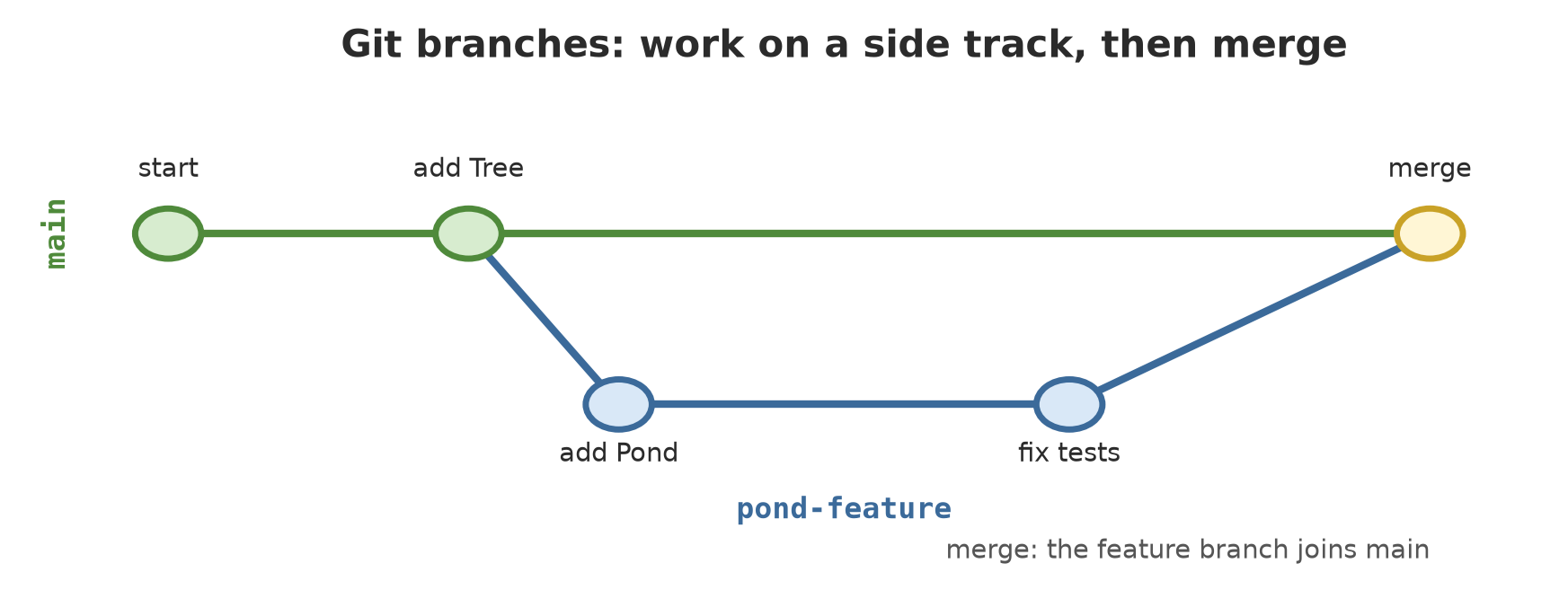
A branch lets you work on a new feature on a side track without disturbing main. If it works, the track is joined. If it fails, just throw it away.
03_branch_merge.py
# Chapter 20 - Branches and merge: work on a side track, then join
from helpers import git, new_repo, tidy, write

repo = new_repo("branch_repo")
write(repo, "units.txt", "forest plot\ngarden\n")
git("add", ".", repo=repo)
git("commit", "--quiet", "-m", "Initial list of units", repo=repo)

git("switch", "--quiet", "-c", "pond-feature", repo=repo)
print("Active branch:", git("branch", "--show-current", repo=repo)[0])
write(repo, "pond.txt", "pond A: 800 fish\n")
git("add", ".", repo=repo)
git("commit", "--quiet", "-m", "Add pond data", repo=repo)

git("switch", "--quiet", "main", repo=repo)
print("On main, does pond.txt exist?", (repo / "pond.txt").exists())

write(repo, "units.txt", "forest plot\ngarden\npen\n")
git("commit", "--quiet", "-a", "-m", "Add pen", repo=repo)

text, _ = git("merge", "--no-edit", "pond-feature", repo=repo)
print("--- git merge ---")
print(text.splitlines()[0])
print("On main, does pond.txt exist?", (repo / "pond.txt").exists())
print("--- git log --graph ---")
print(tidy(git("log", "--graph", "--format=%s", repo=repo)[0]))
Active branch: pond-feature
On main, does pond.txt exist? False
--- git merge ---
Merge made by the 'ort' strategy.
On main, does pond.txt exist? True
--- git log --graph ---
* Merge branch 'pond-feature'
|\
| * Add pond data
* | Add pen
|/
* Initial list of unitsNote the interesting part: before the merge, pond.txt does not exist on main (it lives on the pond-feature branch). After the merge, it does. The git log --graph diagram shows the shape: two tracks (the * on the left and the * on the right) that split from the commit “Initial list of units” and meet at the merge commit. The change on main (“Add pen”) and on the branch (“Add pond data”) touch different files, so git joins them by itself.
Conflict: when two people change the same line
What if both tracks change the same line? Git does not dare to choose; it stops and asks a human to decide. This is called a conflict, and it is not a sign you did wrong but an ordinary thing in teamwork.
04_conflict.py
# Chapter 20 - Merge conflict: two branches change the same line
from helpers import git, new_repo, tidy, write

repo = new_repo("conflict_repo")
write(repo, "pond.txt", "pond A\naverage weight: 500 g\n")
git("add", ".", repo=repo)
git("commit", "--quiet", "-m", "Initial pond data", repo=repo)

git("switch", "--quiet", "-c", "weighing-fix", repo=repo)
write(repo, "pond.txt", "pond A\naverage weight: 540 g\n")
git("commit", "--quiet", "-a", "-m", "Weight from re-weighing: 540 g", repo=repo)

git("switch", "--quiet", "main", repo=repo)
write(repo, "pond.txt", "pond A\naverage weight: 520 g\n")
git("commit", "--quiet", "-a", "-m", "Weight from old notes: 520 g", repo=repo)

text, code = git("merge", "--no-edit", "weighing-fix", repo=repo)
print("--- git merge ---")
print(text)
print("exit code:", code)
print("--- contents of pond.txt during the conflict ---")
print((repo / "pond.txt").read_text(encoding="utf-8"), end="")
print("--- status ---")
print(git("status", "--short", repo=repo)[0])

# Resolution: a human decides which number is right, then removes the markers
write(repo, "pond.txt", "pond A\naverage weight: 540 g\n")
git("add", "pond.txt", repo=repo)
git("commit", "--quiet", "--no-edit", repo=repo)
print("--- after resolving ---")
print(tidy(git("log", "--graph", "--format=%s", repo=repo)[0]))
--- git merge ---
Auto-merging pond.txt
CONFLICT (content): Merge conflict in pond.txt
Automatic merge failed; fix conflicts and then commit the result.
exit code: 1
--- contents of pond.txt during the conflict ---
pond A
<<<<<<< HEAD
average weight: 520 g
=======
average weight: 540 g
>>>>>>> weighing-fix
--- status ---
UU pond.txt
--- after resolving ---
* Merge branch 'weighing-fix'
|\
| * Weight from re-weighing: 540 g
* | Weight from old notes: 520 g
|/
* Initial pond dataHow to read the conflicted file:
<<<<<<< HEADto=======is the version on your current branch (main: 520 g from old notes).=======to>>>>>>> weighing-fixis the version from the branch being merged (540 g from re-weighing).- The status
UUmeans both sides changed this file and it is not yet resolved.
To resolve it: edit the file, remove the three marker lines, choose (or combine) the right content, then git add and git commit. The script picks 540 g because that is the re-weighing result. The decision of which number is right can only be made by a human who knows the reality in the field. The final history shows the merge commit that joins the two.
.gitignore and guarding secrets
Not every file belongs in git: the .venv folder (Chapter 17), temporary files, big downloads, and above all secrets such as passwords and API keys. The list git ignores is written in the .gitignore file. Secrets are best kept in an ignored .env file, or in environment variables, and read by the program through os.environ.
05_gitignore_secrets.py
# Chapter 20 - .gitignore and keeping secrets out of the repo (the key value here is only a stand-in)
from helpers import git, new_repo, write

repo = new_repo("secret_repo")
write(repo, ".env", "API_KEY=[redacted]\n")
write(repo, "app.py", "import os\nkey = os.environ['API_KEY']\n")
write(repo, "_tmp/result.txt", "temporary file\n")

print("--- without .gitignore ---")
print(git("status", "--short", repo=repo)[0])

write(repo, ".gitignore", ".env\n_tmp/\n__pycache__/\n.venv/\n")
print("--- with .gitignore ---")
print(git("status", "--short", repo=repo)[0])
print("Why is .env ignored?", git("check-ignore", "-v", ".env", repo=repo)[0])

git("add", ".", repo=repo)
git("commit", "--quiet", "-m", "Start of project", repo=repo)
print("--- files tracked by git ---")
print(git("ls-files", repo=repo)[0])

print("=== A wrong step: the secret was already committed ===")
repo2 = new_repo("committed_repo")
write(repo2, ".env", "API_KEY=[redacted]\n")
git("add", ".", repo=repo2)
git("commit", "--quiet", "-m", "oops", repo=repo2)
write(repo2, ".gitignore", ".env\n")
git("add", ".gitignore", repo=repo2)
git("commit", "--quiet", "-m", "add .gitignore", repo=repo2)
print("Tracked after .gitignore was added:", git("ls-files", repo=repo2)[0].split())
print("The first commit still contains .env:", ".env" in git("show", "--stat", "--format=", "HEAD~1", repo=repo2)[0])
git("rm", "--cached", "--quiet", ".env", repo=repo2)
git("commit", "--quiet", "-m", "stop tracking .env", repo=repo2)
print("Tracked after git rm --cached:", git("ls-files", repo=repo2)[0].split())
print("But old history still contains it:", ".env" in git("show", "--stat", "--format=", "HEAD~2", repo=repo2)[0])
--- without .gitignore ---
?? .env
?? _tmp/
?? app.py
--- with .gitignore ---
?? .gitignore
?? app.py
Why is .env ignored? .gitignore:1:.env .env
--- files tracked by git ---
.gitignore
app.py
=== A wrong step: the secret was already committed ===
Tracked after .gitignore was added: ['.env', '.gitignore']
The first commit still contains .env: True
Tracked after git rm --cached: ['.gitignore']
But old history still contains it: TruePart one: without .gitignore, git offers .env and _tmp/ for adding (??). With .gitignore, both vanish from the list. git check-ignore -v explains which rule applies: line 1 of .gitignore. Only .gitignore and app.py are tracked.
Part two is the most dangerous trap. If a secret was already committed, adding it to .gitignore is not enough: the file stays tracked (['.env', '.gitignore']). git rm --cached stops the tracking, but the old history still holds its contents (True). Anyone holding a copy of the repo can still read it.
A secret that has ever entered a commit must be treated as leaked, especially if the repo was ever sent to GitHub. The safest step (the author’s advice): revoke and replace the key at the service provider, then clean the history. Prevention is far easier than repair: make .gitignore before the first commit. GitHub’s documentation also describes push protection, a feature that blocks a push when a secret is detected; its availability depends on account and repo settings (read 2026-10-10), so do not make it your only fence.
GitHub: git for working together
GitHub is a website service that keeps git repos on the internet (git and GitHub are two different things: git is the tool, GitHub is one place to keep it). This part is explanation only; nothing is run, because creating a repo and sending code changes data on the internet and needs an account.
- A repo on GitHub is connected to the local repo as a remote (usually called
origin).git pushsends commits there,git pullfetches other people’s changes. - An issue is a note about a task, idea, or bug in a repo. According to the GitHub documentation (read 2026-10-10), issues can carry labels and assignees, and closing keywords in a pull request can close the issue automatically when it is merged.
- A pull request (PR) is a proposal to merge changes into the project. The Files changed tab shows the difference being reviewed, the Conversation tab holds discussion and reviews, and the merge status shows what still blocks it, such as missing approvals.
- Review: a colleague reads your changes in the PR and comments, then you fix them before merging.
07_github_commands.py
# Chapter 20 - Commands to connect a local repo to GitHub (an example only; replace YOUR-NAME with your account name)
import subprocess

commands = [
    ["git", "remote", "add", "origin", "https://github.com/YOUR-NAME/inventory.git"],
    ["git", "push", "-u", "origin", "main"],              # send the main branch to GitHub
    ["git", "switch", "-c", "pond-feature"],              # work on a new branch
    ["git", "push", "-u", "origin", "pond-feature"],      # send the feature branch
    ["gh", "pr", "create", "--fill"],                     # open a pull request (GitHub CLI tool)
]
for c in commands:
    print("$", " ".join(c))
    subprocess.run(c, check=True)
This code was not run when the book was built because creating a repo and pushing code to GitHub needs a GitHub account and changes data on the internet, so no output is shown. The command gh pr create belongs to the GitHub CLI; its existence was checked through gh pr create --help, but it was not run.
The daily workflow
Even a small team can use this habit:
- Fetch the latest version (
git pull). - Make a branch for one job (
git switch -c feature-name). - Change the code, then run
ruff check --fix .,ruff format ., andpython -m pytest(Chapters 18 and 19). pre-commit can do it automatically at commit time. - Commit with a message that explains what and why, not just “fix”.
- Push the branch, open a pull request, ask for review.
- Once approved and all checks are green, merge into
main.
The habit “one branch, one purpose, small commits” keeps conflicts rare and history easy to read.
GitHub Actions: automatic checks on a server
Checks on your own computer can be skipped. GitHub Actions runs automatic checks on GitHub’s servers at every push or pull request. The flow is written in a YAML file in the .github/workflows/ folder (GitHub documentation, read 2026-10-10). Here is an example for our project:
name: Tests

on:
  push:
    branches: [main]
  pull_request:

jobs:
  test:
    runs-on: ubuntu-latest
    steps:
      - name: Check out code
        uses: actions/checkout@v6
      - name: Set up Python
        uses: actions/setup-python@v7
        with:
          python-version: "3.12"
      - name: Install package and tools
        run: python -m pip install -e ".[dev]"
      - name: Check code style
        run: |
          ruff check .
          ruff format --check .
      - name: Run tests
run: python -m pytest -qon:sets the triggers: every push tomainand every pull request.jobs:holds the jobs;runs-on: ubuntu-latestpicks a GitHub machine;steps:are the ordered steps.uses:applies a ready-made action,run:runs a command.- The action version numbers (
@v6,@v7) were taken from the documentation on 2026-10-10 and may change; check the documentation when you use them.
This workflow was not run by GitHub when the book was built (there is no GitHub repo), so it is not proven to work. The author only checked its YAML syntax, which is all that can be proven here:
06_check_yaml.py
# Chapter 20 - Checking the syntax of a GitHub Actions workflow file (YAML syntax only; GitHub did not run it)
from pathlib import Path

import yaml

file = Path(__file__).parent / "example" / ".github" / "workflows" / "test.yml"
workflow = yaml.safe_load(file.read_text(encoding="utf-8"))

print("Workflow name:", workflow["name"])
print("Triggers (on):", sorted(workflow[True]))        # YAML reads the word 'on' as True
for job_name, job in workflow["jobs"].items():
    print(f"Job '{job_name}' runs on {job['runs-on']} with {len(job['steps'])} steps:")
    for step in job["steps"]:
        print("  -", step["name"])
Workflow name: Tests
Triggers (on): ['pull_request', 'push']
Job 'test' runs on ubuntu-latest with 5 steps:
- Check out code
- Set up Python
- Install package and tools
- Check code style
- Run testsThe script uses the PyYAML library (python -m pip install pyyaml). The result shows the file reads correctly: one job holding five steps. A technical note: YAML reads the word on as True, which is why the key is written workflow[True] in the script.
Running Project I1: everything together
This is the summit of the series. The inventory package (classes from Chapter 16, installed in Chapter 17, tested in Chapter 18, tidied in Chapter 19) now lives in a git repo with a healthy workflow: checks, a branch, a merge.
08_final_project.py
# Chapter 20 - Running project I1: classes + tests + ruff + git in one workflow
import re
import shutil
import sys

from helpers import FOLDER, git, new_repo, run, tidy, write

repo = new_repo("project_i1")
shutil.copytree(FOLDER / "final_project", repo, dirs_exist_ok=True,
                ignore=shutil.ignore_patterns("__pycache__"))
write(repo, ".gitignore", ".venv/\n_tmp/\n__pycache__/\n.pytest_cache/\n.ruff_cache/\n.env\n")


def checks():
    """The three checks pre-commit would also run: ruff check, ruff format, pytest."""
    ruff = [sys.executable, "-m", "ruff"]
    a = run([*ruff, "check", "--no-cache", "."], repo)[0].splitlines()[-1]
    b = run([*ruff, "format", "--no-cache", "--check", "."], repo)[0].splitlines()[-1]
    c = run([sys.executable, "-m", "pytest", "-q", "-p", "no:cacheprovider"], repo)[0]
    print("  ruff check :", a)
    print("  ruff format:", b)
    print("  pytest     :", re.sub(r" in \d+\.\d+s", "", c.splitlines()[-1]))


print("1. Checks on main")
checks()
git("add", ".", repo=repo)
git("commit", "--quiet", "-m", "Package inventory: classes, tests, and configuration", repo=repo)

print("2. New branch: a test for RiceField")
git("switch", "--quiet", "-c", "rice-field-test", repo=repo)
write(repo, "tests/test_rice_field.py", '''import pytest

from inventory import Crop, RiceField


def test_rice_field_productivity():
    rice_field = RiceField("Lowland", 0.5)
    rice_field.add(Crop("rice", "1", 110, 1250.0))
    assert rice_field.productivity() == pytest.approx(2500)
''')
checks()
git("add", ".", repo=repo)
git("commit", "--quiet", "-m", "Add rice field productivity test", repo=repo)

print("3. Merge into main")
git("switch", "--quiet", "main", repo=repo)
git("merge", "--quiet", "--no-ff", "-m", "Merge branch rice-field-test", "rice-field-test", repo=repo)
checks()

print("--- history ---")
print(tidy(git("log", "--graph", "--format=%s", repo=repo)[0]))
print("Files tracked by git:", len(git("ls-files", repo=repo)[0].splitlines()))
print("Final status (empty = clean):", repr(git("status", "--short", repo=repo)[0]))
1. Checks on main
ruff check : All checks passed!
ruff format: 9 files already formatted
pytest : 14 passed
2. New branch: a test for RiceField
ruff check : All checks passed!
ruff format: 10 files already formatted
pytest : 15 passed
3. Merge into main
ruff check : All checks passed!
ruff format: 10 files already formatted
pytest : 15 passed
--- history ---
* Merge branch rice-field-test
|\
| * Add rice field productivity test
|/
* Package inventory: classes, tests, and configuration
Files tracked by git: 12
Final status (empty = clean): ''Trace it:
- Step 1: on
main, ruff passes, 9 files are tidy, and 14 tests pass. The first commit. - Step 2: on the branch
rice-field-test, one new test file is added. All checks run before the commit: 10 files tidy and 15 tests pass. - Step 3: merge into
mainwith--no-ff(always make a merge commit so the branch track shows in history), then the checks again: still 15 tests pass. - Git tracks 12 files: 10 package files, one new test file, and
.gitignore. The final status is empty: nothing left behind.
Exercises
- Run
01_init_commit.py, then open the folder_tmp/basic_repoin a terminal and typegit logandgit status. Compare with the book’s output. - Change
03_branch_merge.pyso the second branch adds a filepen.txt. Does the merge still run without conflict? Why? - Add
.idea/and*.logto the.gitignorein05_gitignore_secrets.py, make a filedebug.log, and check withgit check-ignore -v debug.log. - Challenge: change
04_conflict.pyso the conflict is resolved by computing the average of the two numbers (530 g) rather than choosing one. Why can git not make a decision like this by itself?
Chapter Summary
- git records history:
git addchooses,git commitsaves,git statusandgit diffinspect,git restorethrows away uncommitted changes. - A branch = a side track; merge joins it. A conflict appears when the same line is changed; a human decides, then commits.
- .gitignore keeps temporary files and secrets away. A secret that was committed must be treated as leaked.
- GitHub keeps repos on the internet; issues, pull requests, and reviews organise teamwork. This part is only explained, not run.
- GitHub Actions runs automatic checks from a YAML file in
.github/workflows/; the example here only had its syntax checked. - The daily flow: branch, change, ruff, tests, commit, pull request, review, merge.
Closing Series I1
Congratulations! You have finished Series I1 and passed the first gate of the Intermediate level. Your ability has shifted from “writing a program that runs” to “building a project that is maintained”:
- Turning field data into classes:
Unitand its children, with inheritance, polymorphism, anddataclass(Chapter 16). - Giving every project its own environment with venv, pip, uv, and
pyproject.toml(Chapter 17). - Guarding code with pytest tests (Chapter 18) and ruff, pre-commit, and logging (Chapter 19).
- Keeping history and working together with git and the GitHub workflow (Chapter 20).
Your inventory project is now tidy and safe to change. But all its data is still made-up data we typed ourselves. In Series I2, your program starts to fetch and process data from outside: the internet, large files, and databases.
Next, in Chapter 21: working with APIs, how a program asks a service on the internet for data and reads the reply.