Chapter 36 — Web Development: Opening a Data Stall on the Internet
Series I5 — A First Application: Web, Maps, and Dashboards
All scripts for this chapter are in the kode/ch36/ folder. On the web version, you can also download them all at once (zip).
Up to Chapter 35, your programs lived on one computer: your own. Yet data about gardens, ponds, and pens is often needed by other people: an extension officer in the office, a worker in the field, or an app on a phone. The most common way to share is to open a data stall: your program sits and waits for orders (“please give me pond A’s data”), then answers. That is a web server and an API (Application Programming Interface, the “door” other programs use to ask for data).
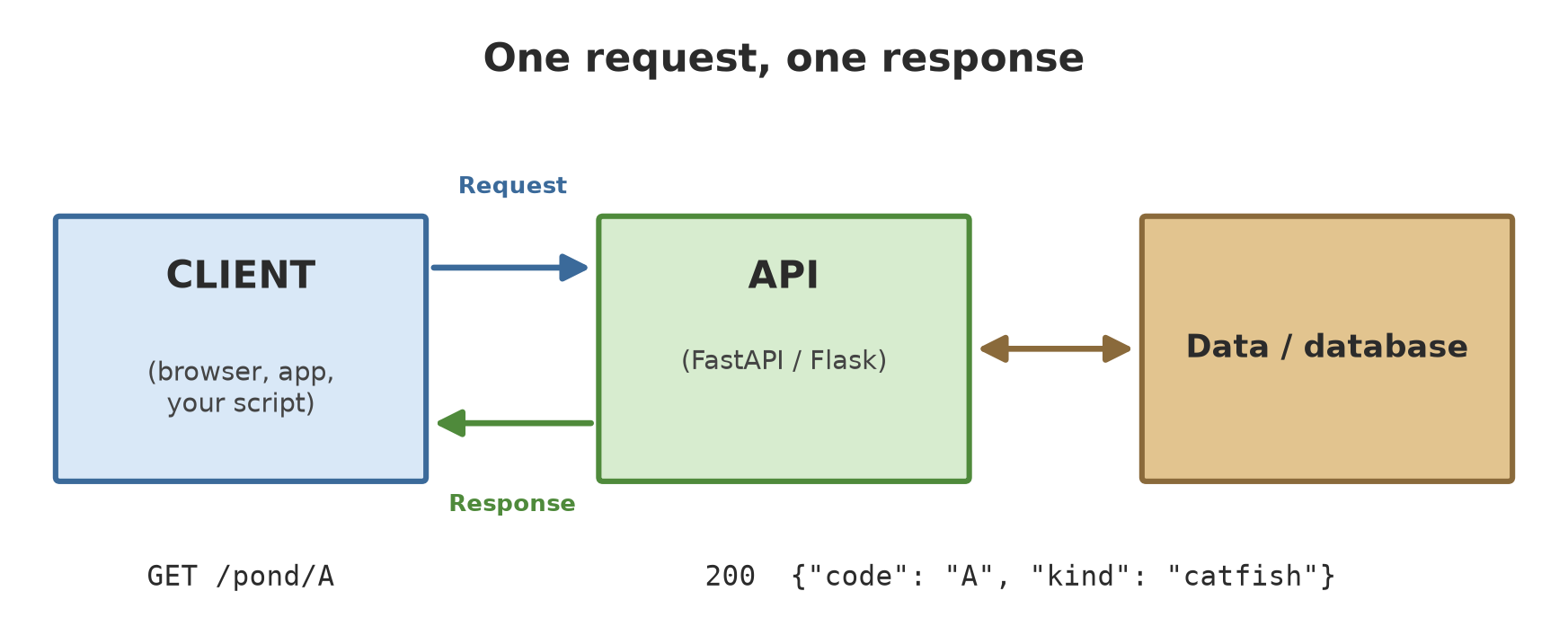
How the web works in one paragraph
Every web interaction is an order and an answer. The client (a browser, an app, or your Python script) sends a request holding a method and an address, for example GET /ponds/A. The server replies with a status code and some content. The content is usually an HTML page or JSON data (text shaped like a dict, Chapter 14).
| Method | Meaning | Example |
|---|---|---|
GET |
Ask for data | See the list of ponds |
POST |
Add new data | Record a new pond |
PUT / PATCH |
Change data | Update the fish count |
DELETE |
Remove data | Delete a pond |
| Status code | Meaning |
|---|---|
200 |
Success |
201 |
Successfully created (after a POST) |
404 |
Not found |
409 |
Conflict (e.g. the code already exists) |
422 |
The input failed validation |
A REST API is just a habit for arranging addresses and methods: the address names a thing (/ponds/A), the method names an action.
The code in this chapter does not start a server to wait forever. We use a test client (a browser look-alike that calls the application directly from inside Python). The results are exactly the same, but fast, safe, and with fixed output. One script (07) starts a real server for a moment in a thread and then stops it.
Flask: the smallest stall
Flask is a light web framework: you start with a few lines and add things as you need them. Each address is connected to a function with the decorator @app.get(...) (from Chapter 31).
01_flask_basics.py
# Chapter 36 - Flask: the smallest web app, tested without starting a server
from flask import Flask, jsonify, request

app = Flask(__name__)


@app.get("/")
def home():
    return "Hello from the farm!"


@app.get("/greet/<name>")                      # the <name> part of the address goes into the function
def greet(name):
    return {"message": f"Good morning, {name}"}   # a dict automatically becomes JSON


@app.get("/search")
def search():
    commodity = request.args.get("commodity", "all")   # ?commodity=coffee
    return jsonify(searched=commodity)


client = app.test_client()                     # a browser look-alike; opens no network port
r = client.get("/")
print(r.status_code, r.content_type, r.get_data(as_text=True))
r = client.get("/greet/Budi")
print(r.status_code, r.content_type, r.get_json())
print(client.get("/search?commodity=coffee").get_json())
r = client.get("/does-not-exist")
print(r.status_code, r.status)
200 text/html; charset=utf-8 Hello from the farm!
200 application/json {'message': 'Good morning, Budi'}
{'searched': 'coffee'}
404 404 NOT FOUND"/"returns text, so the content type istext/html. Returning a dict automatically becomes JSON (application/json).<name>in the address is a path parameter: the valueBudienters the function as the variablename.request.argsreads query parameters, the part after the?in the address.- An address that is not registered gives
404 NOT FOUNDautomatically. app.test_client()is the test client: it calls the app without opening a network port.
A REST API with Flask
Now a stall that can record things: the list of ponds is kept in a dict (in memory, so it vanishes when the program stops; lasting storage comes in later chapters).
02_flask_rest.py
# Chapter 36 - REST API with Flask: a list of ponds (kept in memory)
from flask import Flask, abort, jsonify, request

app = Flask(__name__)
ponds = {"A": {"kind": "catfish", "count": 800}, "B": {"kind": "tilapia", "count": 500}}


@app.get("/ponds")
def list_all():
    return jsonify(ponds)


@app.get("/ponds/<code>")
def one(code):
    if code not in ponds:
        abort(404, description=f"pond {code} does not exist")
    return jsonify(ponds[code])


@app.post("/ponds/<code>")
def add(code):
    body = request.get_json()                   # the request body (JSON)
    ponds[code] = {"kind": body["kind"], "count": body["count"]}
    return jsonify(ponds[code]), 201            # 201 = Created


@app.delete("/ponds/<code>")
def remove(code):
    ponds.pop(code, None)
    return "", 204                              # 204 = success, no content


@app.errorhandler(404)
def not_found(error):
    return jsonify(error=error.description), 404


c = app.test_client()
print("GET    /ponds      ->", c.get("/ponds").status_code, sorted(c.get("/ponds").get_json()))
r = c.post("/ponds/C", json={"kind": "catfish", "count": 650})
print("POST   /ponds/C    ->", r.status_code, r.get_json())
print("GET    /ponds/C    ->", c.get("/ponds/C").get_json())
print("DELETE /ponds/C    ->", c.delete("/ponds/C").status_code)
r = c.get("/ponds/C")
print("GET    /ponds/C    ->", r.status_code, r.get_json())
GET /ponds -> 200 ['A', 'B']
POST /ponds/C -> 201 {'count': 650, 'kind': 'catfish'}
GET /ponds/C -> {'count': 650, 'kind': 'catfish'}
DELETE /ponds/C -> 204
GET /ponds/C -> 404 {'error': 'pond C does not exist'}Walk through the five output lines: the GET list gives 200 with codes A and B; the POST adds pond C and is answered 201; the DELETE is answered 204 (success, no content); the GET for pond C after deletion is answered 404 with the message we wrote through errorhandler. Notice: Flask does not check the content of our POST. If count is missing, our code will stop with a KeyError. We would have to write that checking ourselves. This is where FastAPI shines.
FastAPI: data types that work for you
FastAPI uses type hints (Chapter 33) and Pydantic (Chapter 34) to check data automatically and write its own documentation. Functions can be ordinary (def) or async (Chapter 35).
03_fastapi_basics.py
# Chapter 36 - FastAPI: path parameters and query parameters with data types
from fastapi import FastAPI
from fastapi.testclient import TestClient

app = FastAPI()


@app.get("/")
def home():
    return {"message": "Hello from the farm!"}


@app.get("/ponds/{code}")
def pond(code: str, min_count: int = 0):         # code from the address; min_count from ?min_count=
    return {"code": code, "min_count": min_count}


@app.get("/harvest/{block}")
async def harvest(block: str):                   # async functions are fine (see Chapter 35)
    return {"block": block, "yield_kg": 245.5}


client = TestClient(app)
print(client.get("/").json())
print(client.get("/ponds/A?min_count=500").json())
print(client.get("/harvest/A").json())

# Data types are checked automatically: "many" is not an integer
r = client.get("/ponds/A?min_count=many")
print(r.status_code)
print(r.json()["detail"][0]["msg"])
{'message': 'Hello from the farm!'}
{'code': 'A', 'min_count': 500}
{'block': 'A', 'yield_kg': 245.5}
422
Input should be a valid integer, unable to parse string as an integermin_count: int = 0 means “an integer, default 0”. When we send ?min_count=many, FastAPI rejects it with status 422 and a clear message (Input should be a valid integer...) without a single line of checking written by us.
A request body with a Pydantic model
04_fastapi_pydantic.py
# Chapter 36 - FastAPI + Pydantic: a validated request body
from fastapi import FastAPI, HTTPException
from fastapi.testclient import TestClient
from pydantic import BaseModel, Field

app = FastAPI()


class NewPond(BaseModel):
    kind: str
    count: int = Field(gt=0)
    water_ph: float = Field(ge=0, le=14)


class PondOut(BaseModel):                          # shape of the response
    code: str
    kind: str
    count: int


store: dict[str, NewPond] = {}


@app.post("/ponds/{code}", response_model=PondOut, status_code=201)
def add(code: str, pond: NewPond):
    store[code] = pond
    return {"code": code, **pond.model_dump()}      # water_ph does not come out: filtered by response_model


@app.get("/ponds/{code}", response_model=PondOut)
def read(code: str):
    if code not in store:
        raise HTTPException(status_code=404, detail=f"pond {code} does not exist")
    return {"code": code, **store[code].model_dump()}


c = TestClient(app)
r = c.post("/ponds/A", json={"kind": "catfish", "count": 800, "water_ph": 7.2})
print(r.status_code, r.json())
r = c.post("/ponds/B", json={"kind": "tilapia", "count": -5, "water_ph": 17})
print(r.status_code)
for error in r.json()["detail"]:
    print(" ", error["loc"], "->", error["msg"])
r = c.get("/ponds/Z")
print(r.status_code, r.json())
201 {'code': 'A', 'kind': 'catfish', 'count': 800}
422
['body', 'count'] -> Input should be greater than 0
['body', 'water_ph'] -> Input should be less than or equal to 14
404 {'detail': 'pond Z does not exist'}NewPondis a Pydantic model for incoming data:countmust be greater than 0 andwater_phbetween 0 and 14.PondOutis the shape of the answer.response_modelfilters the answer:water_phdoes not come out in the first output line. This is a safe way to keep internal data from leaking.- For pond B, two rules are broken at once, and FastAPI reports both:
countandwater_ph, with their locations (['body', 'count']). HTTPExceptionturns our problem into the right status code (404).
Documentation that writes itself
05_fastapi_docs.py
# Chapter 36 - FastAPI writes its own documentation (OpenAPI)
from fastapi import FastAPI
from fastapi.testclient import TestClient

app = FastAPI(title="Farm API", version="0.1")


@app.get("/ponds/{code}", summary="Get one pond", tags=["ponds"])
def pond(code: str):
    """Returns the data of one pond by its code."""
    return {"code": code}


@app.get("/harvest", summary="List harvests", tags=["harvest"])
def harvest(block: str | None = None):
    return []


c = TestClient(app)
schema = c.get("/openapi.json").json()
print("title:", schema["info"]["title"], "| version:", schema["info"]["version"])
for address, methods in schema["paths"].items():
    for name, detail in methods.items():
        print(f"{name.upper():4s} {address:15s} {detail['summary']}")
print("page /docs (Swagger UI) exists:", c.get("/docs").status_code == 200)
print("page /redoc exists:", c.get("/redoc").status_code == 200)
title: Farm API | version: 0.1
GET /ponds/{code} Get one pond
GET /harvest List harvests
page /docs (Swagger UI) exists: True
page /redoc exists: TrueFrom the code alone, FastAPI makes the OpenAPI schema (the standard description of an API) at /openapi.json, plus the interactive documentation pages /docs (Swagger UI) and /redoc. An extension officer or a mobile developer can try your API from a browser without reading the code.
To open that documentation on your computer, run a real server in a terminal: uvicorn file_name:app --reload, then open http://127.0.0.1:8000/docs. We do not run it in this chapter because a server waits endlessly; that is a job for your terminal.
A first look at Django
Django is an “everything included” framework (batteries included): user accounts, an admin panel, a database layer (ORM), and HTML templates are all provided. It suits big sites full of pages and data. A real Django project is created with the command django-admin startproject name, which produces several files. We do not run that command here. As an introduction, here is a one-file Django project:
06_django_mini.py
# Chapter 36 - Django: a one-file project (for introduction only)
import django
from django.conf import settings

settings.configure(
    DEBUG=False,
    SECRET_KEY="example-only-not-a-secret",
    ROOT_URLCONF=__name__,                         # the address list lives in this file
    ALLOWED_HOSTS=["testserver"],
)
django.setup()

from django.http import JsonResponse
from django.test import Client
from django.urls import path


def home(request):
    return JsonResponse({"message": "Hello from Django"})


def pond(request, code):
    return JsonResponse({"code": code, "kind": request.GET.get("kind", "?")})


urlpatterns = [path("", home), path("ponds/<str:code>/", pond)]

client = Client()
print(client.get("/").json())
print(client.get("/ponds/A/?kind=catfish").json())
print(client.get("/does-not-exist/").status_code)
{'message': 'Hello from Django'}
{'code': 'A', 'kind': 'catfish'}
404settings.configure(...) replaces the settings.py file; urlpatterns is the address list; Client is Django’s own test client. The SECRET_KEY here is just example text. In a real project, that key must be secret and read from an environment variable (Chapter 34).
| Flask | FastAPI | Django | |
|---|---|---|---|
| Style | Micro, free-form | Modern, type-based | Everything included |
| Data validation | Write it yourself | Automatic (Pydantic) | Forms and models |
| API documentation | An add-on | Automatic | An add-on |
| Good for | Prototypes, small services | APIs for data and models | Full sites with an admin |
We use FastAPI for the running project because our goal is a data API.
A real server, just for a moment
A test client does not travel through the network. To prove that the app can really be called over HTTP, the script below starts uvicorn (the server for FastAPI) in a thread (Chapter 35), calls it with httpx, then stops it.
07_real_server_thread.py
# Chapter 36 - Start a real server (uvicorn) in a thread, call it over the network, then stop it
import socket
import threading
import time

import httpx
import uvicorn
from fastapi import FastAPI

app = FastAPI()


@app.get("/ping")
def ping():
    return {"alive": True}


with socket.socket() as s:                       # ask the system for a free port number
    s.bind(("127.0.0.1", 0))
    port = s.getsockname()[1]

server = uvicorn.Server(uvicorn.Config(app, host="127.0.0.1", port=port, log_level="warning"))
thread = threading.Thread(target=server.run, daemon=True)
thread.start()
while not server.started:                        # wait until it is ready
    time.sleep(0.05)

r = httpx.get(f"http://127.0.0.1:{port}/ping")  # a real HTTP call over the local network
print(r.status_code, r.json())

server.should_exit = True                        # politely ask the server to stop
thread.join(timeout=5)
print("server still alive:", thread.is_alive())
200 {'alive': True}
server still alive: Falseserver.should_exit = True asks the server to stop politely; thread.join() waits until it is done. The final False proves the server is gone. The port is requested from the system (the number 0 means “choose a free one”) so it does not clash with other programs.
A development server (uvicorn without protection, or Flask’s app.run()) is not meant to be opened to the internet. Serving an application safely (HTTPS, many processes, access limits) is covered in the Advanced level.
Running Project I5: a farm unit data API
The start of the web version of the “Information System for Forest, Orchard, Farming, Fisheries, Livestock”: a list of farm units (plots, ponds, pens) that can be viewed, filtered by sector, and added to. Plot areas come from the Chapter 38 numbers (made-up data).
08_project_unit_api.py
# Chapter 36 - Running project I5: API for farm unit data (first version)
from typing import Literal

from fastapi import FastAPI, HTTPException
from fastapi.testclient import TestClient
from pydantic import BaseModel, Field


class Unit(BaseModel):
    sector: Literal["forest", "orchard", "ricefield", "pond", "pen"]
    code: str
    area_ha: float = Field(gt=0)


app = FastAPI(title="Farm Information System")
unit_db: dict[str, Unit] = {
    "H1": Unit(sector="forest", code="H1", area_ha=9.0),
    "S1": Unit(sector="ricefield", code="S1", area_ha=3.0),
    "S2": Unit(sector="ricefield", code="S2", area_ha=2.25),
}


@app.get("/units", response_model=list[Unit])
def list_units(sector: str | None = None):
    return [u for u in unit_db.values() if sector is None or u.sector == sector]


@app.get("/units/{code}", response_model=Unit)
def one(code: str):
    if code not in unit_db:
        raise HTTPException(404, f"unit {code} does not exist")
    return unit_db[code]


@app.post("/units", response_model=Unit, status_code=201)
def add(unit: Unit):
    if unit.code in unit_db:
        raise HTTPException(409, f"unit {unit.code} already exists")        # 409 = conflict
    unit_db[unit.code] = unit
    return unit


c = TestClient(app)
print("ricefield:", [u["code"] for u in c.get("/units", params={"sector": "ricefield"}).json()])
print("add K1:", c.post("/units", json={"sector": "orchard", "code": "K1", "area_ha": 4.0}).status_code)
print("add K1 again:", c.post("/units", json={"sector": "orchard", "code": "K1", "area_ha": 4.0}).status_code)
print("wrong sector:", c.post("/units", json={"sector": "swamp", "code": "E1", "area_ha": 1}).status_code)
print("total area (ha):", sum(u["area_ha"] for u in c.get("/units").json()))
ricefield: ['S1', 'S2']
add K1: 201
add K1 again: 409
wrong sector: 422
total area (ha): 18.25Literal[...] limits the sector to five choices, so the sector swamp is rejected with 422. A code that already exists is rejected with 409. The total area of 18.25 ha is 9.0 + 3.0 + 2.25 (the initial units) + 4.0 (K1, which was added successfully). The data is still in memory; in later chapters this API will read the map data and the dashboard.
Exercises
- In
01_flask_basics.py, add an address/harvest/<block>that returns{"block": ..., "yield_kg": 245.5}. Test it withtest_client. - In
03_fastapi_basics.py, changemin_count: inttofloatand try?min_count=2.5. Then change it back toint: what happens? - In
08_project_unit_api.py, add aDELETE /units/{code}address that answers 204, and 404 if the code does not exist. Test both cases. - Challenge: add a
GET /summaryaddress that returns the total area per sector as a dict, usingdefaultdictordict.get.
Chapter Summary
- The web = a request (method + address) and a response (status code + content, often JSON). REST arranges addresses as things and methods as actions.
- Flask is light and free-form; validation must be written by hand.
- FastAPI checks data types, uses Pydantic, filters answers with
response_model, and writes the/docsdocumentation automatically. - Django is all-in-one, good for complete sites.
- Apps can be tested without a server using test clients (
test_client,TestClient,Client). - A development server is not for opening to the internet.
Next, in Chapter 37: Python running inside the browser, with no server at all.