%%{init: {"flowchart": {"diagramPadding": 40}}}%%
flowchart LR
  A["Sensor<br/>temp, pH, oxygen"] --> B["Device<br/>MicroPython / Raspberry Pi"]
  B --> C["Sender<br/>MQTT or HTTP"]
  C --> D["Broker / server"]
  D --> E["Data warehouse<br/>Parquet (Chapter 50)"]
  E --> F["Dashboard and alerts"]
Chapter 52 — Field Devices, IoT, and Drones: Python Goes Down to the Farm
Series A2 — Large-Scale Data and Advanced Geospatial
All scripts for this chapter are in the kode/ch52/ folder. On the web version, you can also download them all at once (zip). field.py is a helper module used by several scripts.
Until now, the data in this book has come from files or from the internet. Yet the real source of data is in the field: a thermometer in the pond, a moisture gauge in the orchard, a temperature sensor in the barn. IoT (Internet of Things) means small devices in the field that read sensors and send their data.
This chapter is honest about its limits: the hardware is not available on the author’s computer. Code that must run on a microcontroller board is shown and marked as not run. Yet the part that decides most of a system’s quality, the logic, is made device-neutral so it can be tested fully on a PC with a simulated sensor. The threshold numbers in this chapter are example numbers, not farming advice.
Devices: MicroPython and Raspberry Pi
Two families of devices are common:
- Microcontroller boards (for example the ESP32 or Raspberry Pi Pico types): cheap, low power, without a full operating system. They use MicroPython, a trimmed-down Python for small boards.
- Single-board computers (Raspberry Pi): a mini computer with Linux, so ordinary Python runs inside.
The MicroPython code reads a DHT22 temperature-humidity sensor and an analog sensor. According to the MicroPython documentation, dht.DHT22(machine.Pin(...)) is created with a pin number, measure() measures, then temperature() and humidity() read the results; a DHT22 should be measured at most once every two seconds. machine.ADC(pin).read_u16() returns an integer from 0 to 65535.
01_micropython_device.py
# Chapter 52 - MicroPython code for a barn sensor board: a DHT22 and an analog sensor
import time

import dht
import machine

temp_sensor = dht.DHT22(machine.Pin(4))      # the pin number depends on your board and wiring
analog_sensor = machine.ADC(machine.Pin(34))  # the ADC pin also depends on the board

while True:
    temp_sensor.measure()                     # DHT22: at most once every 2 seconds
    temp = temp_sensor.temperature()
    humidity = temp_sensor.humidity()
    raw = analog_sensor.read_u16()            # a number 0-65535
    print(temp, humidity, raw)
    time.sleep(10)
This code was not run when the book was built because the device is not available (this code runs on a MicroPython board, not on a PC), so no output is shown. The pin numbers (4 and 34) are only examples; adjust them to your board and wiring.
On a Raspberry Pi, an analog sensor needs an analog-to-digital converter because the Pi has no analog input. The gpiozero library offers the MCP3008 class (a 10-bit converter with 8 channels) that returns a value scaled from 0 to 1.
02_raspberrypi_device.py
# Chapter 52 - Raspberry Pi: reading an analog sensor through an MCP3008 with the gpiozero library
import time

from gpiozero import MCP3008

channel0 = MCP3008(channel=0)                 # sensor on channel 0 of 8 channels (0-7)

while True:
    value = channel0.value                    # scaled 0 to 1
    print("value:", round(value, 3), "-> voltage:", round(value * 3.3, 2), "V")
    time.sleep(5)
This code was not run when the book was built because the device is not available (it needs a Raspberry Pi with an MCP3008 analog converter attached), so no output is shown.
NoteREMEMBER
Device code should only be “the job of fetching a number”. Do not put important logic (calibration, thresholds, filtering) inside code that can only be tested on the board. Put it in ordinary functions that can be tested on a PC, like the field.py below.
Simulated sensors and device-neutral logic
We make a SimulatedSensor class that has the same interface as a real sensor: a single read() method. That way the logger, sender, and dashboard can be tested without a device. The class makes daily rising-and-falling values (dissolved oxygen highest in the afternoon, lowest before dawn) plus random noise with a fixed seed, and sometimes gets “stuck” (returns None).
Another example of device-neutral logic: two-point calibration of a pH sensor. A pH probe outputs a voltage; with two buffer solutions (pH 7 and pH 4) we get a straight line that turns voltage into pH. The functions u16_to_volt and volt_to_ph can be used exactly the same on the board.
03_simulated_sensor.py
# Chapter 52 - Simulated sensors + device-neutral logic (pH calibration from ADC numbers)
from field import SimulatedSensor, u16_to_volt, volt_to_ph

# Two fictional pond sensors. Dissolved oxygen is highest in the afternoon (peak at 14:00), lowest before dawn.
temp = SimulatedSensor("temp_c", mean=28.5, spread=0.1, daily_amplitude=1.2, seed=1)
oxygen = SimulatedSensor("oxygen_mgl", mean=5.8, spread=0.1, daily_amplitude=1.5, seed=2)

print("Hour  temp_c   oxygen_mgl")
for hour in (2, 8, 14, 20):
    print(f"{hour:3d}   {temp.read(hour):6.2f}   {oxygen.read(hour):6.2f}")

# The same logic runs on a real board: the ADC gives 0-65535, we convert to volts and then to pH.
# Example calibration numbers: the probe reads 2.50 V in a pH 7 solution and 3.00 V in a pH 4 solution.
print()
for raw in (49648, 54613, 59578):
    volt = u16_to_volt(raw)
    print(f"raw={raw}  volt={volt:.3f}  pH={volt_to_ph(volt, 2.50, 3.00):.2f}")
Hour temp_c oxygen_mgl
2 27.40 4.33
8 28.36 5.79
14 29.56 7.29
20 28.55 5.65
raw=49648 volt=2.500 pH=7.00
raw=54613 volt=2.750 pH=5.50
raw=59578 volt=3.000 pH=4.00Temperature rises from 27.40 °C at 2:00 to 29.56 °C at 14:00. Dissolved oxygen falls to 4.33 mg/L towards morning and rises to 7.29 mg/L in the afternoon, a plausible pattern because water plants photosynthesize in the daytime (the numbers are made by the simulation, not measured). The second part: ADC number 49,648 equals 2.500 V and pH 7.00; 54,613 equals 2.750 V and pH 5.50; 59,578 equals 3.000 V and pH 4.00. Those three points lie exactly on the calibration line.
A field logger: resilient to trouble
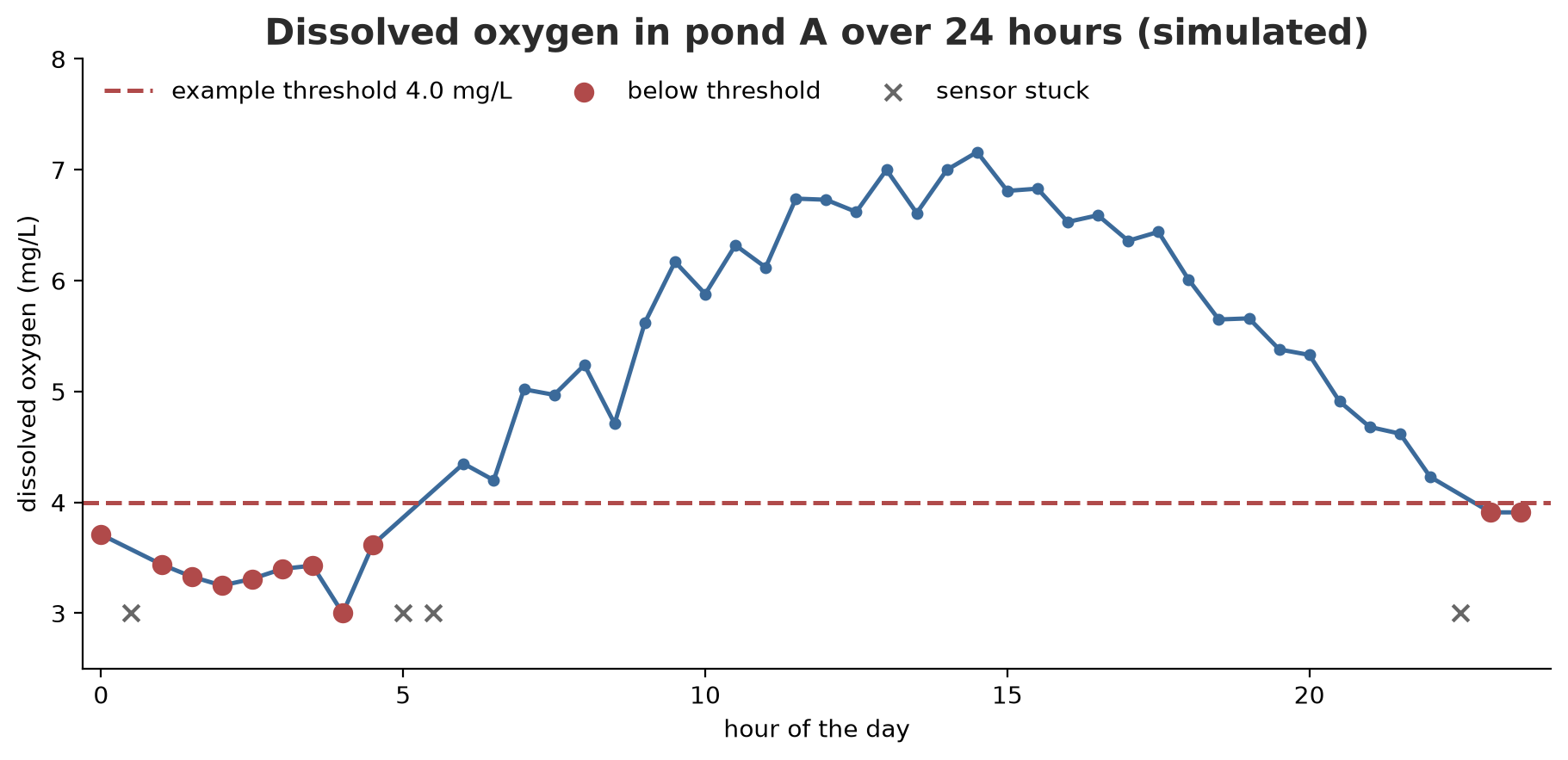
In the field, networks drop and sensors get stuck. A good logger must not lose data and must not invent numbers. The next example uses a buffer: readings are collected in memory and written to the file in groups, which is cheaper than writing one line each time. A stuck reading is stored as an empty cell, and an alarm is recorded when the value is below the threshold.
04_field_logger.py
# Chapter 52 - Field logger: buffer, periodic write to CSV, stuck sensors, alarms
import csv
from pathlib import Path

from field import SimulatedSensor

tmp = Path(__file__).parent / "_tmp"
tmp.mkdir(exist_ok=True)


class FieldLogger:
    def __init__(self, path, columns, buffer_size=6, alarm_limits=None):
        self.path = path
        self.columns = columns
        self.buffer_size = buffer_size
        self.alarm_limits = alarm_limits or {}
        self.buffer = []
        self.alarms = []
        self.stuck = 0
        self.written = 0
        with open(path, "w", newline="", encoding="utf-8") as f:
            csv.writer(f).writerow(["hour", *columns])

    def record(self, hour, values):
        for name, v in values.items():
            if v is None:
                self.stuck += 1                      # keep an empty cell, never invent a number
            elif name in self.alarm_limits and v < self.alarm_limits[name]:
                self.alarms.append((hour, name, v))
        self.buffer.append([hour, *[values[k] if values[k] is not None else "" for k in self.columns]])
        if len(self.buffer) >= self.buffer_size:
            self.flush()

    def flush(self):
        with open(self.path, "a", newline="", encoding="utf-8") as f:
            csv.writer(f).writerows(self.buffer)
        self.written += len(self.buffer)
        self.buffer = []


temp = SimulatedSensor("temp_c", 28.5, 0.2, 1.2, seed=1, stuck_chance=0.1)
oxygen = SimulatedSensor("oxygen_mgl", 5.2, 0.2, 1.8, seed=2, stuck_chance=0.1)

logger = FieldLogger(tmp / "pond_a.csv", ["temp_c", "oxygen_mgl"],
                     buffer_size=6, alarm_limits={"oxygen_mgl": 4.0})    # example limit
for step in range(48):                              # 24 hours, every 30 minutes
    hour = step / 2
    logger.record(hour, {"temp_c": temp.read(hour), "oxygen_mgl": oxygen.read(hour)})
logger.flush()                                       # empty the rest of the buffer before finishing

print("Rows written:", logger.written, "| stuck readings:", logger.stuck)
print("Oxygen alarms < 4.0 mg/L:", len(logger.alarms), "times")
for hour, name, v in logger.alarms[:3]:
    print(f"  hour {hour:4.1f}  {name} = {v}")
print("First 5 lines of the file:")
print("".join((tmp / "pond_a.csv").read_text(encoding="utf-8").splitlines(keepends=True)[:5]), end="")
Rows written: 48 | stuck readings: 10
Oxygen alarms < 4.0 mg/L: 11 times
hour 0.0 oxygen_mgl = 3.71
hour 1.0 oxygen_mgl = 3.44
hour 1.5 oxygen_mgl = 3.33
First 5 lines of the file:
hour,temp_c,oxygen_mgl
0.0,27.66,3.71
0.5,27.11,
1.0,27.06,3.44
1.5,27.4,3.33Over 24 hours (48 readings, every 30 minutes), the logger writes 48 rows, and 10 readings were stuck across the two sensors. The oxygen alarm below 4.0 mg/L (an example threshold) sounds 11 times, mostly before dawn. The first five lines of the file show the row at hour 0.5 where oxygen is empty (stuck sensor), not an invented number.
TipTIP
Always call flush() one last time before the program stops, or the unfilled buffer is lost. On a real device, also write to non-volatile storage periodically so that a power cut does not erase the data.
GPS: reading NMEA sentences
GPS modules usually send text called NMEA 0183: sentences that start with $, contain comma-separated fields, and end with * and two checksum digits. According to the NMEA documentation of the gpsd project, the checksum is the 8-bit XOR of all characters between $ and *, written as two hexadecimal digits. The GGA sentence contains: UTC time, latitude (ddmm.mmm) and hemisphere, longitude (dddmm.mmm) and hemisphere, fix quality, number of satellites, HDOP, and altitude.
05_gps_nmea.py
# Chapter 52 - GPS: reading NMEA 0183 sentences (fictional), checking the checksum, converting to decimal degrees
from functools import reduce


def checksum(body):
    """XOR of all characters between '$' and '*', written as two hexadecimal digits."""
    return f"{reduce(lambda a, b: a ^ ord(b), body, 0):02X}"


def make_sentence(body):
    return f"${body}*{checksum(body)}"


def is_valid(sentence):
    if not sentence.startswith("$") or "*" not in sentence:
        return False
    body, _, tag = sentence[1:].partition("*")
    return checksum(body) == tag.strip().upper()


def to_degrees(value, hemisphere):
    """'0636.000' (degrees+minutes: ddmm.mmm or dddmm.mmm) -> decimal degrees; S and W are negative."""
    dot = value.index(".")
    degrees = int(value[: dot - 2])
    minutes = float(value[dot - 2:])
    result = degrees + minutes / 60
    return -result if hemisphere in ("S", "W") else result


def read_gga(sentence):
    if not is_valid(sentence):
        raise ValueError("wrong checksum, sentence discarded")
    f = sentence[1:].split("*")[0].split(",")
    if not f[0].endswith("GGA"):
        raise ValueError("not a GGA sentence")
    return {
        "utc_time": f"{f[1][0:2]}:{f[1][2:4]}:{f[1][4:6]}",
        "latitude": round(to_degrees(f[2], f[3]), 6),
        "longitude": round(to_degrees(f[4], f[5]), 6),
        "fix_quality": int(f[6]),
        "satellites": int(f[7]),
        "altitude_m": float(f[9]),
    }


# A classic example from many NMEA guides: the checksum must be 47
classic = "$GPGGA,123519,4807.038,N,01131.000,E,1,08,0.9,545.4,M,46.9,M,,*47"
print("Classic example is valid:", is_valid(classic))

# A fictional sentence around Bogor (6 degrees 36 minutes S, 106 degrees 48 minutes E)
gga = make_sentence("GPGGA,031530,0636.000,S,10648.000,E,1,09,0.9,265.4,M,0.0,M,,")
print(gga)
print(read_gga(gga))

# One character damaged by cable noise: the checksum rejects it
broken = gga.replace("0636", "0637", 1)
print("Damaged sentence is valid:", is_valid(broken))
try:
    read_gga(broken)
except ValueError as error:
    print("Rejected:", error)
Classic example is valid: True
$GPGGA,031530,0636.000,S,10648.000,E,1,09,0.9,265.4,M,0.0,M,,*66
{'utc_time': '03:15:30', 'latitude': -6.6, 'longitude': 106.8, 'fix_quality': 1, 'satellites': 9, 'altitude_m': 265.4}
Damaged sentence is valid: False
Rejected: wrong checksum, sentence discarded- The classic example from many NMEA guides passes the checksum check (
True): ourchecksumfunction is correct. - A fictional sentence around Bogor is made with
make_sentence, then read: 03:15:30 UTC, latitude -6.6 (south is negative), longitude 106.8, GPS fix quality 1, 9 satellites, altitude 265.4 m. - One character is changed (
0636becomes0637) to imitate cable noise: the checksum rejects it, and the program drops the sentence. Without the checksum, you might record a tree location that is off by about 1.8 km.
The altitude in GGA is above mean sea level (the geoid), which differs from the ellipsoid height; note this when you later combine GPS with the LiDAR data from Chapter 51.
Sending data: MQTT and HTTP
There are two very common ways:
- MQTT: a lightweight protocol based on publish/subscribe. A device publishes a message to a topic (for example
orchard/blockA/temp) on a broker; other programs subscribe to that topic and receive its messages. The device and the receivers do not know each other. The+sign in a topic means “any single level”. MQTT has three levels of delivery guarantee (QoS 0, 1, and 2). - HTTP: the device calls a server with a
POSTcarrying JSON. Simpler, and suitable if you already have an API (Chapter 36).
For MQTT, we use amqtt, an MQTT broker and client written in pure Python on top of asyncio (Chapter 35). Its documentation states support for MQTT 3.1.1 and Python 3.10 to 3.14 in the 0.12 series. The broker runs on your own computer (127.0.0.1, a free port) for testing only.
06_mqtt_local.py
# Chapter 52 - MQTT: a local pure-Python broker (amqtt) with a publisher and a subscriber
import asyncio
import json
import socket

from amqtt.broker import Broker
from amqtt.client import MQTTClient
from amqtt.mqtt.constants import QOS_1


def free_port():
    with socket.socket() as s:
        s.bind(("127.0.0.1", 0))
        return s.getsockname()[1]


async def main():
    port = free_port()
    config = {
        "listeners": {"default": {"type": "tcp", "bind": f"127.0.0.1:{port}"}},
        "plugins": {                                              # local testing only: no password
            "amqtt.plugins.authentication.AnonymousAuthPlugin": {"allow_anonymous": True},
        },
    }
    broker = Broker(config)
    await broker.start()

    subscriber = MQTTClient(client_id="dashboard")
    await subscriber.connect(f"mqtt://127.0.0.1:{port}/")
    await subscriber.subscribe([("orchard/+/temp", QOS_1)])    # + = one topic level, any content

    publisher = MQTTClient(client_id="orchard-station")
    await publisher.connect(f"mqtt://127.0.0.1:{port}/")
    await publisher.publish("orchard/blockA/temp", json.dumps({"c": 27.4}).encode(), qos=QOS_1)
    await publisher.publish("orchard/blockB/temp", json.dumps({"c": 28.1}).encode(), qos=QOS_1)
    await publisher.publish("pond/A/ph", json.dumps({"ph": 7.1}).encode(), qos=QOS_1)   # does not match

    for _ in range(2):
        message = await asyncio.wait_for(subscriber.deliver_message(), timeout=5)
        print(message.topic, "->", json.loads(message.data.decode()))

    try:
        await asyncio.wait_for(subscriber.deliver_message(), timeout=1)
    except asyncio.TimeoutError:
        print("Message 'pond/A/ph' did not arrive: its topic does not match the subscription")

    await publisher.disconnect()
    await subscriber.disconnect()
    await broker.shutdown()


asyncio.run(main())
orchard/blockA/temp -> {'c': 27.4}
orchard/blockB/temp -> {'c': 28.1}
Message 'pond/A/ph' did not arrive: its topic does not match the subscriptionThe subscriber dashboard subscribes to orchard/+/temp. The publisher sends three messages: two match (orchard/blockA/temp and orchard/blockB/temp) and arrive; the third (pond/A/ph) does not match so it never arrives, and the program prints the explanation after waiting one second.
WarningWARNING
In this example, the broker accepts connections without a password (allow_anonymous) and only listens on 127.0.0.1. That is for local testing only. A real broker must use a username and password plus TLS encryption (Chapter 49).
Now HTTP, with a local test server that rejects the first request on purpose (status 503, “server busy”) so we practice automatic retry. One request carries many readings (a batch): much cheaper than sending them one by one.
07_http_send.py
# Chapter 52 - Sending data over HTTP: a JSON batch, a local test server, retry on failure
import json
import threading
from http.server import BaseHTTPRequestHandler, HTTPServer

import requests

received = []
count = {"requests": 0}


class TestServer(BaseHTTPRequestHandler):
    def log_message(self, *args):
        pass

    def do_POST(self):
        count["requests"] += 1
        length = int(self.headers["Content-Length"])
        body = json.loads(self.rfile.read(length))
        if count["requests"] == 1:                    # the first request is made to fail on purpose
            self.send_response(503)
            self.end_headers()
            return
        received.extend(body["readings"])
        self.send_response(201)
        self.end_headers()


server = HTTPServer(("127.0.0.1", 0), TestServer)
threading.Thread(target=server.serve_forever, daemon=True).start()
address = f"http://127.0.0.1:{server.server_port}/readings"


def send(batch, max_attempts=4):
    """Send one batch; retry if the server is busy (503). No pause, so the example stays quick."""
    for attempt in range(1, max_attempts + 1):
        r = requests.post(address, json=batch, timeout=5)
        if r.status_code == 201:
            return attempt
        print(f"  attempt {attempt}: status {r.status_code}, trying again")
    raise RuntimeError("could not be sent; keep it in the logger and try later")


# One request carries MANY readings (a batch): far cheaper than one by one
batch = {"station": "pond-A", "readings": [
    {"hour": 6.0, "temp_c": 27.5, "ph": 7.1},
    {"hour": 6.5, "temp_c": 27.6, "ph": 7.1},
    {"hour": 7.0, "temp_c": 27.9, "ph": 7.2},
]}
print("Succeeded on attempt ", send(batch), sep="")
server.shutdown()
print("Readings received by the server:", len(received), "| total requests:", count["requests"])
attempt 1: status 503, trying again
Succeeded on attempt 2
Readings received by the server: 3 | total requests: 2The first attempt gets 503; the second succeeds (201). The server receives 3 readings in 2 requests in total. In a real system, add a growing pause between attempts, and if everything fails, keep the data in the logger and send it later.
Drone data and images
Photos from a drone carry EXIF: metadata inside the JPEG file, including camera make, time, focal length, and GPS position. Pillow can write and read EXIF. We make a fictional photo, insert our own EXIF, then read it back and compute the GSD (ground sample distance), the size of one pixel on the ground: flight height x sensor width / (focal length x image width).
08_exif_drone.py
# Chapter 52 - Drone images: writing and reading EXIF (GPS position, flight height) with Pillow
from pathlib import Path

from PIL import ExifTags, Image
from PIL.ExifTags import GPS, IFD

tmp = Path(__file__).parent / "_tmp"
tmp.mkdir(exist_ok=True)


def to_dms(degrees):
    d = int(degrees)
    m = int((degrees - d) * 60)
    s = round(((degrees - d) * 60 - m) * 60, 4)
    return (d, m, s)


def from_dms(dms, reference):
    d, m, s = (float(v) for v in dms)
    value = d + m / 60 + s / 3600
    return -value if reference in ("S", "W") else value


# 1. A fictional 'drone photo': a plain 400x300 picture + EXIF metadata that we write ourselves
photo = Image.new("RGB", (400, 300), (90, 140, 70))
exif = Image.Exif()
exif[ExifTags.Base.Make] = "ExampleDrone"
exif[ExifTags.Base.Model] = "DC-1"
exif[ExifTags.Base.DateTimeOriginal] = "2026:03:01 09:30:15"
exif[ExifTags.Base.FocalLength] = 8.8                     # mm
gps = exif.get_ifd(IFD.GPSInfo)
gps[GPS.GPSLatitudeRef] = "S"
gps[GPS.GPSLatitude] = to_dms(6.6012)
gps[GPS.GPSLongitudeRef] = "E"
gps[GPS.GPSLongitude] = to_dms(106.8034)
gps[GPS.GPSAltitude] = 120.0                               # flight height (m)
photo.save(tmp / "drone_001.jpg", exif=exif)

# 2. Read it back, as you would with hundreds of real drone photos
opened = Image.open(tmp / "drone_001.jpg")
data = opened.getexif()
gps_info = data.get_ifd(IFD.GPSInfo)
latitude = from_dms(gps_info[GPS.GPSLatitude], gps_info[GPS.GPSLatitudeRef])
longitude = from_dms(gps_info[GPS.GPSLongitude], gps_info[GPS.GPSLongitudeRef])
height = float(gps_info[GPS.GPSAltitude])
print("Camera:", data[ExifTags.Base.Make], data[ExifTags.Base.Model])
print("Time  :", data[ExifTags.Base.DateTimeOriginal])
print(f"Position: {latitude:.4f}, {longitude:.4f}  height {height:.0f} m")

# 3. Pixel size on the ground (GSD) = height x sensor width / (focal length x image width)
sensor_width_mm = 13.2          # example number for this fictional camera
focal_mm = float(data[ExifTags.Base.FocalLength])
gsd_cm = height * sensor_width_mm / (focal_mm * opened.width) * 100
print(f"GSD (pixel size on the ground): {gsd_cm:.1f} cm")
print(f"Footprint of one photo: {gsd_cm * opened.width / 100:.0f} m x {gsd_cm * opened.height / 100:.0f} m")
Camera: ExampleDrone DC-1
Time : 2026:03:01 09:30:15
Position: -6.6012, 106.8034 height 120 m
GSD (pixel size on the ground): 45.0 cm
Footprint of one photo: 180 m x 135 mThe position (-6.6012, 106.8034) and flight height of 120 m are read back correctly. Because the photo is only 400 pixels wide, its GSD is 45 cm and one photo covers 180 x 135 m. A real drone shoots thousands of pixels wide, so its GSD is only a few centimeters. The sensor width of 13.2 mm and focal length of 8.8 mm are example numbers for a fictional camera.
From hundreds of drone photos, you can stitch an orthophoto map with photogrammetry software (for example OpenDroneMap), but that is outside this chapter and was not tried here.
Running Project A2: a mini field station
Project A2 has three data sources. Chapter 50 made the Parquet warehouse; Chapter 51 handled images and LiDAR; now we build a mini station that reads orchard, pond, and barn sensors for 24 hours and records the results in one long table.
09_project_station.py
# Chapter 52 - Running project A2: a mini field station (orchard, pond, barn) with simulated sensors
from pathlib import Path

import polars as pl

from field import SimulatedSensor

tmp = Path(__file__).parent / "_tmp"
tmp.mkdir(exist_ok=True)

# One station = several sensors. Means and limits are example numbers, not farming advice.
station = {
    "orchard": {"temp_c": SimulatedSensor("temp_c", 26.0, 0.3, 3.0, seed=11),
                "soil_moisture_pct": SimulatedSensor("soil_moisture_pct", 38.0, 0.8, 0.0, seed=12)},
    "pond": {"temp_c": SimulatedSensor("temp_c", 28.5, 0.1, 1.2, seed=21),
             "ph": SimulatedSensor("ph", 7.2, 0.05, 0.3, seed=22),
             "oxygen_mgl": SimulatedSensor("oxygen_mgl", 5.2, 0.15, 1.8, seed=23, stuck_chance=0.05)},
    "barn": {"temp_c": SimulatedSensor("temp_c", 29.0, 0.3, 2.5, seed=31),
             "humidity_pct": SimulatedSensor("humidity_pct", 72.0, 1.0, -6.0, seed=32)},
}
low_limits = {("pond", "oxygen_mgl"): 4.0}              # example
high_limits = {("barn", "temp_c"): 31.0}                # example

# Every 30 minutes for 24 hours: read all sensors, store in long format
rows = []
for step in range(48):
    hour = step / 2
    for unit, sensors in station.items():
        for quantity, s in sensors.items():
            rows.append((unit, quantity, hour, s.read(hour)))
df = pl.DataFrame(rows, schema=["unit", "quantity", "hour", "value"], orient="row")
df.write_csv(tmp / "station_24h.csv")
print("Readings:", df.height, "| stuck sensors (empty):", df["value"].null_count())

summary = (df.group_by("unit", "quantity", maintain_order=True)
             .agg(pl.col("value").mean().round(2).alias("mean"),
                  pl.col("value").min().alias("min"), pl.col("value").max().alias("max")))
print(summary)

for (unit, quantity), limit in low_limits.items():
    n = df.filter((pl.col("unit") == unit) & (pl.col("quantity") == quantity) & (pl.col("value") < limit)).height
    print(f"Warning {unit}/{quantity} < {limit}: {n} readings")
for (unit, quantity), limit in high_limits.items():
    n = df.filter((pl.col("unit") == unit) & (pl.col("quantity") == quantity) & (pl.col("value") > limit)).height
    print(f"Warning {unit}/{quantity} > {limit}: {n} readings")
Readings: 336 | stuck sensors (empty): 2
shape: (7, 5)
┌─────────┬───────────────────┬───────┬───────┬───────┐
│ unit ┆ quantity ┆ mean ┆ min ┆ max │
│ --- ┆ --- ┆ --- ┆ --- ┆ --- │
│ str ┆ str ┆ f64 ┆ f64 ┆ f64 │
╞═════════╪═══════════════════╪═══════╪═══════╪═══════╡
│ orchard ┆ temp_c ┆ 25.97 ┆ 22.77 ┆ 29.44 │
│ orchard ┆ soil_moisture_pct ┆ 37.92 ┆ 36.55 ┆ 39.26 │
│ pond ┆ temp_c ┆ 28.51 ┆ 27.14 ┆ 29.9 │
│ pond ┆ ph ┆ 7.2 ┆ 6.89 ┆ 7.52 │
│ pond ┆ oxygen_mgl ┆ 5.24 ┆ 3.3 ┆ 7.23 │
│ barn ┆ temp_c ┆ 28.99 ┆ 26.08 ┆ 31.77 │
│ barn ┆ humidity_pct ┆ 72.18 ┆ 65.45 ┆ 79.47 │
└─────────┴───────────────────┴───────┴───────┴───────┘
Warning pond/oxygen_mgl < 4.0: 13 readings
Warning barn/temp_c > 31.0: 9 readingsThere are 336 readings (7 sensors x 48), 2 of them empty because the oxygen sensor was stuck. The summary shows pond averages: temperature 28.51 °C, pH 7.2, oxygen 5.24 mg/L (minimum 3.3). Two example warnings fire: pond oxygen below 4.0 in 13 readings, and barn temperature above 31.0 in 9 readings. The resulting CSV file is ready to enter the Parquet warehouse of Chapter 50.
Exercises
- In
03_simulated_sensor.py, add a barn humidity sensor (mean 72, daily amplitude -6, peak at hour 14) and print its values at 2, 8, 14, and 20 o’clock. - Change
stuck_chancein04_field_logger.pyto 0.3. How many empty cells appear? Does the logger still run to 48 rows? - Make a new GGA sentence with
make_sentence, then read it withread_gga. Make sure its checksum is valid. - Challenge: change
06_mqtt_local.pyto subscribe to+/+/temp(two levels), and also publishpond/A/tempandbarn/K1/temp. Which messages arrive?
Chapter Summary
- An IoT system: sensor, device, sender, broker/server, data warehouse, dashboard.
- MicroPython (microcontroller boards) and Raspberry Pi (a mini computer) read sensors; their code can only be tested on the device, so the logic is separated and tested with a simulated sensor.
- A good logger uses a buffer, stores empty cells for stuck readings, and calls
flush()at the end. - GPS NMEA is validated with the checksum before use.
- MQTT (publish/subscribe, topics,
+) and HTTP (POSTJSON, retry on failure) send data; the test broker is for local use only. - A drone photo’s EXIF holds position and flight height; GSD = height x sensor width / (focal length x image width).
Next, in Chapter 53: data now flows and piles up. When tables and images no longer fit in memory, we learn to split them with Dask.