Chapter 39 — GIS 2: Raster Data: Aerial Photos You Can Calculate With
Series I5 — A First Application: Web, Maps, and Dashboards
All scripts for this chapter are in the kode/ch39/ folder. On the web version, you can also download them all at once (zip).
Chapter 38 drew land with lines. But a satellite photo or drone photo contains no lines: it holds a grid of tiny squares, each with one number. That is a raster. Imagine a chequered cloth laid over your garden; each square is painted the average colour of the ground beneath it. A square is called a pixel.
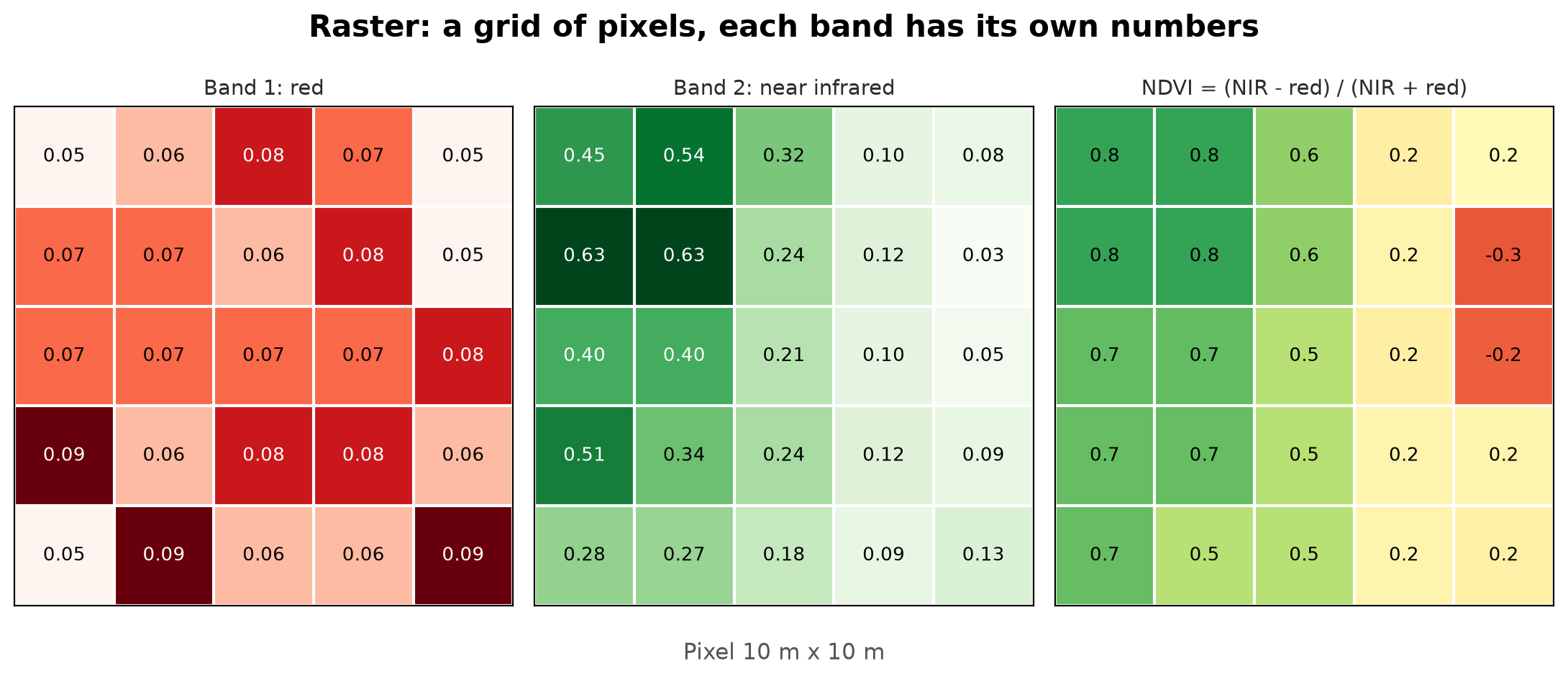
Three key terms:
- Pixel: one square of the grid, with one value per band.
- Resolution: the side length of one pixel on the ground. A 10 m resolution means one pixel represents 10 m by 10 m (100 m²). The smaller the number, the finer the image, and the bigger the file.
- Band: one “layer” of values. An ordinary photo has three bands (red, green, blue). Satellite images have other bands the eye cannot see, such as near infrared (NIR).
Healthy plants reflect a lot of near infrared and absorb a lot of red light. Water hardly reflects any infrared. This difference is used to measure “greenness”.
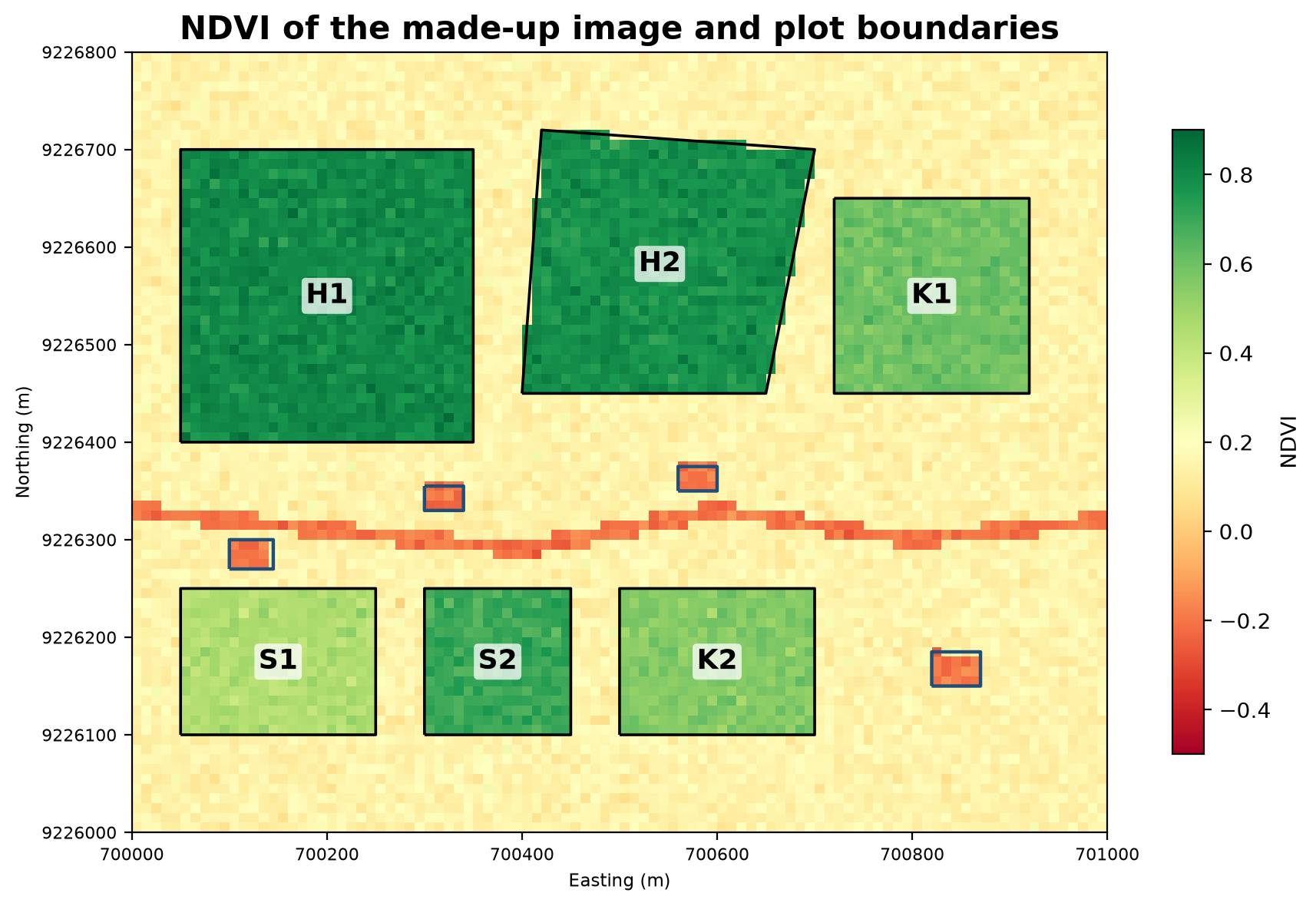
Downloading big images for this book is not allowed, so we make a made-up satellite image with a script: a grid of 100 columns by 80 rows, 10 m pixels, covering the same 1 km × 800 m area as Chapter 38, with two bands (red and NIR) and a little random noise. Each plot is deliberately given a certain greenness.
01_make_synthetic_image.py
# Chapter 39 - Making a made-up satellite image (2 bands: red and near infrared)
from pathlib import Path

import geopandas as gpd
import numpy as np
import rasterio
from rasterio.features import rasterize
from rasterio.transform import from_origin

tmp = Path(__file__).parent / "_tmp"
tmp.mkdir(exist_ok=True)

# A grid of 100 columns x 80 rows, 10 m pixels, top-left corner at (700000, 9226800) UTM 48S
transform = from_origin(700000, 9226800, 10, 10)
shape = (80, 100)

plots = gpd.read_file("data/plot.geojson").to_crs(32748)
ponds = gpd.read_file("data/pond.geojson").to_crs(32748)
rivers = gpd.read_file("data/river.geojson").to_crs(32748)

# A "land cover map": each pixel gets the NDVI value we want it to have
target_ndvi = np.full(shape, 0.15)                  # bare soil
plot_value = {"H1": 0.80, "H2": 0.78, "K1": 0.60, "K2": 0.55, "S1": 0.45, "S2": 0.70}
for _, row in plots.iterrows():
    mask = rasterize([(row.geometry, 1)], out_shape=shape, transform=transform, dtype="uint8")
    target_ndvi[mask == 1] = plot_value[row["code"]]
water = list(ponds.geometry) + list(rivers.buffer(8).geometry)      # ponds and the river body
target_ndvi[rasterize(water, out_shape=shape, transform=transform, dtype="uint8") == 1] = -0.20

# From the target NDVI, build the red and NIR bands (plus a little random noise)
rng = np.random.default_rng(42)
target_ndvi = target_ndvi + rng.normal(0, 0.03, shape)
red = rng.uniform(0.05, 0.09, shape)
nir = red * (1 + target_ndvi) / (1 - target_ndvi)
image = np.stack([red, nir]).astype("float32")

profile = dict(driver="GTiff", height=80, width=100, count=2, dtype="float32",
               crs="EPSG:32748", transform=transform)
with rasterio.open(tmp / "synthetic_image.tif", "w", **profile) as target:
    target.write(image)
    target.set_band_description(1, "red")
    target.set_band_description(2, "nir")
print("saved:", (tmp / "synthetic_image.tif").name, "| shape:", image.shape)

# Proof: identical to the file provided in data/
with rasterio.open("data/synthetic_image.tif") as existing:
    print("identical to data/synthetic_image.tif:", np.array_equal(existing.read(), image))
saved: synthetic_image.tif | shape: (2, 80, 100)
identical to data/synthetic_image.tif: TrueThis script makes the image in _tmp/ and proves it is identical to the provided file data/synthetic_image.tif. The following scripts read the provided file. Two new tools appear here: rasterize turns polygons into pixels, and from_origin(x, y, width, height) sets the grid’s position on earth (top-left corner and pixel size).
Reading rasters with Rasterio
Rasterio reads and writes rasters (using GDAL behind the scenes). Each band is read as a NumPy array (Chapter 23).
02_read_raster.py
# Chapter 39 - Reading a raster: pixels, resolution, bands, and coordinates
import rasterio

with rasterio.open("data/synthetic_image.tif") as image:
    print("size (width x height):", image.width, "x", image.height, "pixels")
    print("number of bands:", image.count, "| descriptions:", image.descriptions)
    print("data type:", image.dtypes[0])
    print("CRS:", image.crs)
    print("resolution (m):", image.res)
    print("bounds (left, bottom, right, top):", tuple(image.bounds))

    red = image.read(1)          # band 1 -> a two-dimensional NumPy array
    nir = image.read(2)
    print("\narray shape:", red.shape, "(rows, columns)")
    print("red: min %.3f max %.3f" % (red.min(), red.max()))
    print("nir: min %.3f max %.3f" % (nir.min(), nir.max()))

    # Pixel (row 10, column 20) -> the map coordinates of its centre, and back
    x, y = image.xy(10, 20)
    print("\ncentre of pixel (10, 20):", x, y)
    print("that coordinate maps back to (row, column):", image.index(x, y))

    # The value at one point, e.g. inside pond A (easting 700122, northing 9226285)
    print("[red, nir] at pond A:", [round(float(v), 3) for v in next(image.sample([(700122, 9226285)]))])
size (width x height): 100 x 80 pixels
number of bands: 2 | descriptions: ('merah', 'nir')
data type: float32
CRS: EPSG:32748
resolution (m): (10.0, 10.0)
bounds (left, bottom, right, top): (700000.0, 9226000.0, 701000.0, 9226800.0)
array shape: (80, 100) (rows, columns)
red: min 0.050 max 0.090
nir: min 0.030 max 1.314
centre of pixel (10, 20): 700205.0 9226695.0
that coordinate maps back to (row, column): (10, 20)
[red, nir] at pond A: [0.057, 0.038]- The image is 100 × 80 pixels, with two bands named
redandnir, typefloat32, CRS EPSG:32748 (metres), resolution 10 m. boundsshows where it lies: from easting 700000 to 701000 and northing 9226000 to 9226800.- The array has shape
(80, 100): rows first, then columns. That is NumPy’s order, the opposite of the (x, y) we usually think of on a map. xy(row, column)turns a pixel number into the coordinates of its centre;index(x, y)reverses it.samplereads the value at one point: inside pond A, red is 0.057 and NIR 0.038. NIR is lower than red, a typical sign of water.
NDVI: measuring greenness
NDVI (Normalized Difference Vegetation Index) = (NIR − Red) ÷ (NIR + Red). The result is between −1 and 1: water is negative, bare soil is around 0.1 to 0.2, and dense plants approach 0.8 and above.
03_ndvi.py
# Chapter 39 - NDVI: the plant greenness index
from pathlib import Path

import numpy as np
import rasterio

tmp = Path(__file__).parent / "_tmp"
tmp.mkdir(exist_ok=True)

with rasterio.open("data/synthetic_image.tif") as image:
    red, nir = image.read(1), image.read(2)
    profile = image.profile

# NDVI = (NIR - Red) / (NIR + Red), a value between -1 and 1
ndvi = (nir - red) / (nir + red)
print("NDVI: min %.2f | mean %.2f | max %.2f" % (ndvi.min(), ndvi.mean(), ndvi.max()))

# Simple classes (the thresholds are only learning examples)
classes = np.digitize(ndvi, [0.0, 0.3, 0.6])          # 0=water, 1=bare, 2=medium, 3=dense
names = ["water", "bare soil", "medium vegetation", "dense vegetation"]
for i, n in enumerate(names):
    count = int((classes == i).sum())
    print(f"{n:18s}: {count:5d} pixels = {count * 100 / 10_000:5.1f} ha")

# Save the NDVI as a one-band GeoTIFF
profile.update(count=1, dtype="float32", nodata=-9999.0)
with rasterio.open(tmp / "ndvi.tif", "w", **profile) as target:
    target.write(ndvi.astype("float32"), 1)
print("saved:", "ndvi.tif")
NDVI: min -0.29 | mean 0.33 | max 0.89
water : 216 pixels = 2.2 ha
bare soil : 4964 pixels = 49.6 ha
medium vegetation : 777 pixels = 7.8 ha
dense vegetation : 2043 pixels = 20.4 ha
saved: ndvi.tifThe mean NDVI of the whole image is 0.33 and the smallest is −0.29 (water). The classes are made with np.digitize; the thresholds 0, 0.3, and 0.6 are only learning examples (real values depend on the sensor and crop). For instance, dense vegetation is 2043 pixels × 100 m² = 20.4 ha. The operation (nir - red) / (nir + red) works on the whole grid at once, with no loop: the power of NumPy. The result is saved as a GeoTIFF (nodata marked −9999).
Clipping an image with a land boundary
Usually we only need the image inside a certain piece of land. rasterio.mask.mask clips it with a polygon.
04_clip_to_boundary.py
# Chapter 39 - Clipping the image with a land boundary
from pathlib import Path

import geopandas as gpd
import numpy as np
import rasterio
from rasterio.mask import mask

tmp = Path(__file__).parent / "_tmp"
tmp.mkdir(exist_ok=True)

plots = gpd.read_file("data/plot.geojson")
with rasterio.open("data/synthetic_image.tif") as image:
    s1 = plots[plots["code"] == "S1"].to_crs(image.crs)        # vector CRS = raster CRS
    clipped, transform = mask(image, s1.geometry, crop=True, nodata=np.nan)
    profile = image.profile

red, nir = clipped
ndvi = (nir - red) / (nir + red)
print("clip shape (band, rows, columns):", clipped.shape)
print("pixels inside S1:", int(np.isfinite(ndvi).sum()))
print("mean NDVI of S1: %.2f" % np.nanmean(ndvi))

profile.update(height=clipped.shape[1], width=clipped.shape[2], transform=transform, nodata=np.nan)
with rasterio.open(tmp / "clip_S1.tif", "w", **profile) as target:
    target.write(clipped)
print("saved:", "clip_S1.tif")
clip shape (band, rows, columns): (2, 17, 21)
pixels inside S1: 300
mean NDVI of S1: 0.45
saved: clip_S1.tifThe clip is 17 rows by 21 columns: a box containing S1 (originally 15 rows × 20 columns of pixels), a bit bigger because the box edges are rounded outward (I did not check the exact cause). What really lies inside the plot: 300 pixels = 3 hectares, equal to the area of S1 in Chapter 38. Its mean NDVI is 0.45. Notice .to_crs(image.crs): the polygon must have the same CRS as the raster. If you forget:
08_wrong_crs_mask.py
# Chapter 39 - Trap: the land boundary has a different CRS from the raster
import geopandas as gpd
import rasterio
from rasterio.mask import mask

plots = gpd.read_file("data/plot.geojson")        # EPSG:4326 (degrees), forgot to_crs!
with rasterio.open("data/synthetic_image.tif") as image:    # raster EPSG:32748 (metres)
    print("raster CRS:", image.crs, "| vector CRS:", plots.crs)
    mask(image, plots.geometry, crop=True)
raster CRS: EPSG:32748 | vector CRS: EPSG:4326
Traceback (most recent call last):
File "<folder-proyek>\.venv\Lib\site-packages\rasterio\mask.py", line 80, in raster_geometry_mask
window = geometry_window(dataset, shapes, pad_x=pad_x, pad_y=pad_y)
File "<folder-proyek>\.venv\Lib\site-packages\rasterio\features.py", line 522, in geometry_window
bounding_window = bounding_window.intersection(raster_window)
File "<folder-proyek>\.venv\Lib\site-packages\rasterio\windows.py", line 787, in intersection
return intersection([self, other])
File "<folder-proyek>\.venv\Lib\site-packages\rasterio\windows.py", line 125, in wrapper
return function(*args[0])
File "<folder-proyek>\.venv\Lib\site-packages\rasterio\windows.py", line 239, in intersection
return functools.reduce(_intersection, windows)
~~~~~~~~~~~~~~~~^^^^^^^^^^^^^^^^^^^^^^^^
File "<folder-proyek>\.venv\Lib\site-packages\rasterio\windows.py", line 257, in _intersection
raise WindowError(f"Intersection is empty {w1} {w2}")
rasterio.errors.WindowError: Intersection is empty Window(col_off=-69990, row_off=922680, width=1, height=1) Window(col_off=0, row_off=0, width=100, height=80)
During handling of the above exception, another exception occurred:
Traceback (most recent call last):
File "08_wrong_crs_mask.py", line 9, in <module>
mask(image, plots.geometry, crop=True)
~~~~^^^^^^^^^^^^^^^^^^^^^^^^^^^^^^^^^^
File "<folder-proyek>\.venv\Lib\site-packages\rasterio\mask.py", line 180, in mask
shape_mask, transform, window = raster_geometry_mask(
~~~~~~~~~~~~~~~~~~~~^
dataset, shapes, all_touched=all_touched, invert=invert, crop=crop,
^^^^^^^^^^^^^^^^^^^^^^^^^^^^^^^^^^^^^^^^^^^^^^^^^^^^^^^^^^^^^^^^^^^
pad=pad, pad_width=pad_width)
^^^^^^^^^^^^^^^^^^^^^^^^^^^^^
File "<folder-proyek>\.venv\Lib\site-packages\rasterio\mask.py", line 86, in raster_geometry_mask
raise ValueError('Input shapes do not overlap raster.')
ValueError: Input shapes do not overlap raster.Rasterio refuses with Input shapes do not overlap raster: degree coordinates (around 106) do not overlap metre coordinates (around 700000). Luckily there is an error here. Even without an error, a result like this should always be suspected.
Reproject and resample
Reproject changes a raster’s CRS; resample changes pixel size. Both force the computer to recalculate pixel values, and there is a choice of method: bilinear (a weighted average of neighbours, good for continuous data like NDVI), average, or nearest (copy the nearest neighbour, a must for class data such as a land-cover map, so no “class 1.5” appears).
05_reproject_resample.py
# Chapter 39 - Reproject (change the CRS) and resample (change the resolution)
import numpy as np
import rasterio
from rasterio.enums import Resampling
from rasterio.warp import calculate_default_transform, reproject

with rasterio.open("data/synthetic_image.tif") as image:
    nir = image.read(2)

    # Reproject: UTM (metres) -> WGS 84 (degrees)
    transform, width, height = calculate_default_transform(
        image.crs, "EPSG:4326", image.width, image.height, *image.bounds)
    result = np.zeros((height, width), dtype="float32")
    reproject(source=nir, destination=result, src_transform=image.transform, src_crs=image.crs,
              dst_transform=transform, dst_crs="EPSG:4326", resampling=Resampling.bilinear)
    print("before:", image.width, "x", image.height, "pixels, unit metres")
    print("after :", width, "x", height, "pixels, pixel size (degrees): %.6f" % transform.a)

    # Resample: read directly at 3x coarser resolution (30 m), values averaged
    coarse = image.read(2, out_shape=(image.height // 3, image.width // 3), resampling=Resampling.average)
    print("\nresolution 10 m :", nir.shape, "pixels")
    print("resolution 30 m :", coarse.shape, "pixels")
    print("mean NIR 10 m vs 30 m: %.4f vs %.4f" % (nir.mean(), coarse.mean()))
before: 100 x 80 pixels, unit metres
after : 100 x 80 pixels, pixel size (degrees): 0.000090
resolution 10 m : (80, 100) pixels
resolution 30 m : (26, 33) pixels
mean NIR 10 m vs 30 m: 0.2249 vs 0.2249After reprojecting to EPSG:4326, the pixel size becomes about 0.00009 degrees (roughly 10 m). Going from 10 m to 30 m resolution gives a grid of 26 × 33 pixels (a third of the size, rounded down). The mean NIR before and after is the same (0.2249): Resampling.average preserves the mean.
Zonal statistics
Zonal statistics summarise raster values inside each zone (polygon): mean, smallest, largest. We make a mask for each polygon with geometry_mask, then calculate with NumPy.
06_zonal_statistics.py
# Chapter 39 - Zonal statistics: summarising raster values inside each polygon
import geopandas as gpd
import rasterio
from rasterio.features import geometry_mask

with rasterio.open("data/synthetic_image.tif") as image:
    red, nir = image.read(1), image.read(2)
    ndvi = (nir - red) / (nir + red)
    plots = gpd.read_file("data/plot.geojson").to_crs(image.crs)
    ponds = gpd.read_file("data/pond.geojson").to_crs(image.crs)

    def zonal(zones):
        result = []
        for _, z in zones.iterrows():
            # invert=True: True INSIDE the polygon, False outside
            inside = geometry_mask([z.geometry], out_shape=ndvi.shape, transform=image.transform, invert=True)
            values = ndvi[inside]
            result.append((z["code"], int(inside.sum()), values.mean(), values.min(), values.max()))
        return result

    print("zone     pixels  NDVI_mean  NDVI_min  NDVI_max")
    for code, n, mean, low, high in zonal(plots):
        print(f"plot {code:>2s}  {n:4d}  {mean:9.2f}  {low:8.2f}  {high:9.2f}")
    for code, n, mean, low, high in zonal(ponds):
        print(f"pond {code:>2s}  {n:4d}  {mean:9.2f}  {low:8.2f}  {high:9.2f}")
zone pixels NDVI_mean NDVI_min NDVI_max
plot H1 900 0.80 0.71 0.89
plot H2 695 0.78 0.67 0.88
plot K1 400 0.60 0.51 0.68
plot K2 300 0.55 0.45 0.63
plot S1 300 0.45 0.36 0.55
plot S2 225 0.70 0.62 0.76
pond A 12 -0.20 -0.24 -0.15
pond B 12 -0.21 -0.25 -0.15
pond C 12 -0.20 -0.25 -0.14
pond D 16 -0.19 -0.26 -0.14Forest H1 and H2 are densely green (0.80 and 0.78), ricefield S1 is lowest (0.45; in this made-up data the value was deliberately set low, as if the rice were young), and all four ponds have negative NDVI (around −0.2): water. The pixel counts also match the areas: H1 900 pixels × 100 m² = 9 ha.
Running Project I5: NDVI per plot
The zonal result goes back into the plot table and gets flagged.
07_project_ndvi_plots.py
# Chapter 39 - Running project I5: NDVI per plot, saved to GeoPackage
from pathlib import Path

import geopandas as gpd
import numpy as np
import rasterio
from rasterio.features import geometry_mask

tmp = Path(__file__).parent / "_tmp"
tmp.mkdir(exist_ok=True)

with rasterio.open("data/synthetic_image.tif") as image:
    red, nir = image.read(1), image.read(2)
    ndvi = (nir - red) / (nir + red)
    plots = gpd.read_file("data/plot.geojson").to_crs(image.crs)
    mean = []
    for geom in plots.geometry:
        # invert=True: True INSIDE the polygon
        inside = geometry_mask([geom], out_shape=ndvi.shape, transform=image.transform, invert=True)
        mean.append(round(float(ndvi[inside].mean()), 2))

plots["ndvi_mean"] = mean
plots["status"] = np.where(plots["ndvi_mean"] < 0.5, "check it", "good")      # threshold 0.5 = example
plots["area_ha"] = (plots.area / 10_000).round(2)
print(plots[["code", "sector", "commodity", "area_ha", "ndvi_mean", "status"]].to_string(index=False))

plots.to_file(tmp / "plots_ndvi.gpkg", layer="plots_ndvi", driver="GPKG")
print("\nsaved: plots_ndvi.gpkg | columns:", list(gpd.read_file(tmp / "plots_ndvi.gpkg").columns))
code sector commodity area_ha ndvi_mean status
H1 forest Teak 9.00 0.80 good
H2 forest Meranti 6.93 0.78 good
K1 orchard coffee 4.00 0.60 good
K2 orchard cocoa 3.00 0.55 good
S1 ricefield rice 3.00 0.45 check it
S2 ricefield rice 2.25 0.70 good
saved: plots_ndvi.gpkg | columns: ['code', 'sector', 'commodity', 'ndvi_mean', 'status', 'area_ha', 'geometry']Only S1 (0.45) has the status “check it” because its NDVI is below the 0.5 threshold, which here is just an example number. The table is saved to a GeoPackage: vector data and raster results finally come together. Remember that this image is made up; with a real image, NDVI should be compared with the planting season and field observation.
Exercises
- In
03_ndvi.py, change the class thresholds to[0.0, 0.2, 0.5]and watch the area of each class change. - In
04_clip_to_boundary.py, clip plotK1(the coffee orchard) and print its mean NDVI. - In
06_zonal_statistics.py, add a standard deviation column (values.std()). Which plot is the most uniform? - Challenge: make a column
pixels_below_0_5for each plot and show its percentage. Compare it with the “check it” status.
Chapter Summary
- A raster = a grid of pixels; resolution = pixel size on the ground; a band = a layer of values.
- Rasterio reads bands as NumPy arrays;
xyandindexmove between pixels and coordinates. - NDVI = (NIR − red) / (NIR + red): water is negative, bare soil low, dense plants high.
maskclips with a polygon of the same CRS;reprojectand resampling recalculate pixels (choose the method to suit the data type).- Zonal statistics summarise a raster per polygon; the result can be joined to a vector table.
Next, in Chapter 40: static and interactive maps, PostGIS, and driving QGIS from Python.