Chapter 66 — Extensions and High Performance: Native Code and the GPU
Series A5 — Expert Python
All scripts for this chapter are in the kode/ch66/ folder. On the web version, you can also download them all at once (zip).
Chapter 44 taught: measure first, then fix the algorithm and vectorise. This chapter is for when all that is not enough, for example computing a vegetation index for millions of pixels of a drone image. Imagine a rice mill. Turning the mill by hand is pure Python. Using a diesel engine is native code. Using a factory with thousands of small machines at once is the GPU. But the cost of starting the machines and carrying the rice to the factory is real, and this chapter is honest about it.
Working rules of this chapter. Run times are not printed in the book because they differ on every computer. Scripts print only stable qualitative comparisons (for example “more than 20x faster: True”) after trying them many times; the numbers on your computer differ. The author’s equipment: Windows 11, an NVIDIA GeForce GTX 1660 SUPER (6 GB, compute capability 7.5), CUDA Toolkit 13.4, and the MSVC compiler (Visual Studio) for C code. Rust is not installed and RAPIDS is not available on plain Windows, so both are marked not run.
numba: one decorator, machine code
numba is a JIT compiler (“just in time”): when a function is called for the first time, it reads the bytecode (Chapter 65), combines it with the argument types, and uses LLVM to produce machine code. According to its documentation, it works best on code that uses NumPy arrays and loops, and the speed-up is “one to two orders of magnitude” where it applies.
01_numba_njit.py
# Chapter 66 - numba: turn a Python function into machine code with one decorator
import time

import numpy as np
from numba import njit


def ndvi_python(red, nir):
    """Vegetation index per pixel, written with ordinary loops."""
    height, width = red.shape
    result = np.empty_like(red)
    for i in range(height):
        for j in range(width):
            result[i, j] = (nir[i, j] - red[i, j]) / (nir[i, j] + red[i, j])
    return result


ndvi_fast = njit(ndvi_python)        # exactly the same, just wrapped by numba

rng = np.random.default_rng(42)
red = rng.uniform(0.05, 0.40, (512, 512)).astype(np.float32)     # fake image
nir = rng.uniform(0.20, 0.60, (512, 512)).astype(np.float32)


def best_of(function, *arguments, repeat=3):
    times = []
    for _ in range(repeat):
        start = time.perf_counter()
        function(*arguments)
        times.append(time.perf_counter() - start)
    return min(times)


ndvi_fast(red, nir)                  # first call: numba COMPILES (do not time this)
print("compiled signatures    :", ndvi_fast.signatures)

slow_result = ndvi_python(red, nir)
fast_result = ndvi_fast(red, nir)
print("results exactly equal  :", np.array_equal(slow_result, fast_result))
print("fake NDVI range        :", round(float(fast_result.min()), 2), "to", round(float(fast_result.max()), 2))

ratio = best_of(ndvi_python, red, nir) / best_of(ndvi_fast, red, nir)
print("numba more than 20x faster than the Python loop:", ratio > 20)
compiled signatures : [(Array(float32, 2, 'C', False, aligned=True), Array(float32, 2, 'C', False, aligned=True))]
results exactly equal : True
fake NDVI range : -0.33 to 0.85
numba more than 20x faster than the Python loop: Truenjit(function)(the same as@njit) does not change the function body. The first call takes time because of compilation; so the warm-up call is made first and is not measured.signaturesshows the result of compiling for the two-dimensionalfloat32type. If you call it with another type, numba compiles a new version.- The result is exactly equal (
array_equal) and, on the author’s computer, far more than 20 times faster than the Python loop. The NDVI range -0.33 to 0.85 is only a consequence of the fake random numbers.
02_numba_parallel_vectorize.py
# Chapter 66 - numba: prange (parallel), vectorize, and its limits
import numpy as np
from numba import njit, prange, vectorize
from numba.core.errors import TypingError


# 1. Parallel on all cores: prange replaces range
@njit(parallel=True)
def total_biomass(count, weight_g):
    total = 0.0
    for i in prange(len(count)):              # iterations are split over several threads
        total += count[i] * weight_g[i] / 1000
    return total


rng = np.random.default_rng(42)
count = rng.integers(100, 1000, 100_000)
weight = rng.uniform(300, 700, 100_000)
print("biomass (numba parallel):", round(total_biomass(count, weight), 2))
print("biomass (NumPy)         :", round(float((count * weight / 1000).sum()), 2))


# 2. vectorize: a scalar function becomes a ufunc that works on whole arrays
@vectorize(["float64(float64, float64)"])
def trunk_volume(diameter_cm, height_m):
    radius_m = diameter_cm / 200
    return 3.14159 * radius_m * radius_m * height_m * 0.6


diameter = np.array([32.5, 45.2, 28.0])
height = np.array([18.0, 24.0, 15.0])
print("volume per tree (m3)    :", trunk_volume(diameter, height).round(3))


# 3. numba does not understand every Python object
@njit
def capital(weight):
    return weight.upper()              # a float has no upper() method


try:
    capital(540.5)
except TypingError as e:
    print("TypingError: attribute 'upper' unknown:", "Unknown attribute 'upper'" in str(e))
biomass (numba parallel): 27486800.86
biomass (NumPy) : 27486800.86
volume per tree (m3) : [0.896 2.311 0.554]
TypingError: attribute 'upper' unknown: Trueprange splits the iterations over several threads; total += inside prange is recognised as a reduction. @vectorize turns a scalar function into a NumPy ufunc. The last part shows the limit: numba understands only part of Python. Calling weight.upper() on a float is rejected with a TypingError, instead of silently running slowly.
numba is most useful for numeric loops over arrays that are hard to vectorise. If your job is already one big NumPy operation (like (nir - red) / (nir + red)), numba only saves the temporary arrays and the gain is small. The documentation stresses: code that numba does not recognise (for example most pandas operations) is not sped up.
Cython: Python with C types
Cython translates a .pyx file (Python with extra C types) into C code, then compiles it into a binary module (.pyd on Windows). Unlike numba, compilation happens once at the start, and the result can be shared as a package.
03_cython.py
# Chapter 66 - Cython: Python with C types, compiled into a .pyd module
import shutil
import sys
import time
from pathlib import Path

import numpy as np

from native_builder import build_extension

work = Path(__file__).parent / "_tmp" / "cython"
shutil.rmtree(work, ignore_errors=True)
work.mkdir(parents=True)

(work / "ndvi_cy.pyx").write_text('''
# cython: boundscheck=False, wraparound=False
def ndvi(float[:, ::1] red, float[:, ::1] nir, float[:, ::1] result):
    cdef int i, j
    for i in range(red.shape[0]):
        for j in range(red.shape[1]):
            result[i, j] = (nir[i, j] - red[i, j]) / (nir[i, j] + red[i, j])
''', encoding="utf-8")

(work / "setup.py").write_text('''
from setuptools import setup, Extension
from Cython.Build import cythonize
setup(ext_modules=cythonize([Extension("ndvi_cy", ["ndvi_cy.pyx"])], language_level=3))
''', encoding="utf-8")

print("compilation succeeded:", build_extension(work))

sys.path.insert(0, str(work))
import ndvi_cy                       # the binary module we just compiled

rng = np.random.default_rng(42)
red = rng.uniform(0.05, 0.40, (512, 512)).astype(np.float32)
nir = rng.uniform(0.20, 0.60, (512, 512)).astype(np.float32)

result = np.empty_like(red)
ndvi_cy.ndvi(red, nir, result)
reference = (nir - red) / (nir + red)           # the NumPy version
print("same as NumPy:", np.allclose(result, reference))


def ndvi_python(red, nir, result):              # the pure Python loop version
    for i in range(red.shape[0]):
        for j in range(red.shape[1]):
            result[i, j] = (nir[i, j] - red[i, j]) / (nir[i, j] + red[i, j])


start = time.perf_counter()
ndvi_python(red, nir, np.empty_like(red))
slow = time.perf_counter() - start
start = time.perf_counter()
ndvi_cy.ndvi(red, nir, result)
fast = time.perf_counter() - start
print("Cython more than 20x faster than pure Python:", slow / fast > 20)
compilation succeeded: True
same as NumPy: True
Cython more than 20x faster than pure Python: TrueThe key is in the .pyx: float[:, ::1] is a typed memoryview (a view of a 2-dimensional float32 array that is contiguous in memory), and cdef int i, j makes counters of C type. The two directives boundscheck=False, wraparound=False switch off index bound checking for speed (careful: a wrong index no longer raises IndexError). The script calls setuptools to compile with MSVC; it needs a C compiler (on Linux: gcc; on macOS: clang).
C extensions: talking directly to the C API
Cython and numba actually write extensions for you. Writing one yourself with CPython’s C API gives full control, at the cost of longer code and greater risk.
04_c_extension.py
# Chapter 66 - A C extension: writing a Python module directly with the C API
import shutil
import sys
from pathlib import Path

from native_builder import build_extension

work = Path(__file__).parent / "_tmp" / "c_extension"
shutil.rmtree(work, ignore_errors=True)
work.mkdir(parents=True)

(work / "forest_c.c").write_text(r'''
#include <Python.h>

static PyObject *sum_of_squares(PyObject *self, PyObject *args) {
    long n;
    if (!PyArg_ParseTuple(args, "l", &n))      /* "l" = one integer */
        return NULL;                           /* Python already filled in the error */
    long long total = 0;
    for (long i = 0; i < n; i++)
        total += (long long)i * i;
    return PyLong_FromLongLong(total);
}

static PyMethodDef methods[] = {
    {"sum_of_squares", sum_of_squares, METH_VARARGS, "Sum of i*i for i from 0 to n-1."},
    {NULL, NULL, 0, NULL}
};

static struct PyModuleDef module = {PyModuleDef_HEAD_INIT, "forest_c", NULL, -1, methods};

PyMODINIT_FUNC PyInit_forest_c(void) { return PyModule_Create(&module); }
''', encoding="utf-8")

(work / "setup.py").write_text('''
from setuptools import setup, Extension
setup(ext_modules=[Extension("forest_c", ["forest_c.c"])])
''', encoding="utf-8")

print("compilation succeeded:", build_extension(work))

sys.path.insert(0, str(work))
import forest_c

print(forest_c.sum_of_squares.__doc__)
print("C result     :", forest_c.sum_of_squares(1000))
print("Python result:", sum(i * i for i in range(1000)))

try:
    forest_c.sum_of_squares("thousand")        # wrong type
except TypeError as e:
    print("TypeError:", e)
compilation succeeded: True
Sum of i*i for i from 0 to n-1.
C result : 332833500
Python result: 332833500
TypeError: 'str' object cannot be interpreted as an integerPyArg_ParseTuple(args, "l", &n) turns a Python argument into a C long; if the type is wrong, it fills in a TypeError and we simply return NULL. That is the message printed on the last line. PyModuleDef and PyInit_forest_c are the entrance of the module. The call forest_c.sum_of_squares(1000) gives 332833500, the same as sum(i * i for ...).
In a C extension, you manage the reference counter (Chapter 65): forgetting Py_DECREF causes a memory leak, and one Py_DECREF too many causes a crash. The example above is safe because it only uses C values and one PyLong_FromLongLong. For serious work, prefer Cython, PyO3, or a library like pybind11.
ctypes and cffi: calling native libraries that already exist
Sometimes you do not need to write an extension; you only need to call a library that already exists (.dll on Windows, .so on Linux). For practice, we write a small C library ourselves:
EXPORT double total_biomass(const double *weight_g, const int *count, int n) {
    double total = 0.0;
    for (int i = 0; i < n; i++)
        total += count[i] * weight_g[i] / 1000.0;
    return total;
}
(Full file: kode/ch66/native/forest.c; EXPORT is __declspec(dllexport) on Windows.) The script builds it into forest.dll, then calls it in two ways.
05_ctypes.py
# Chapter 66 - ctypes: calling functions in a native library (DLL) with no glue code
import ctypes
import shutil
from pathlib import Path

import numpy as np

from native_builder import build_dll

work = Path(__file__).parent / "_tmp" / "ctypes"
shutil.rmtree(work, ignore_errors=True)
work.mkdir(parents=True)
source = shutil.copy(Path(__file__).parent / "native" / "forest.c", work / "forest.c")
dll = build_dll(source, work / "forest.dll")
print("DLL created:", dll.exists())

library = ctypes.CDLL(str(dll))

# 1. You MUST describe argument and result types; ctypes cannot guess them from the DLL
double_array = np.ctypeslib.ndpointer(dtype=np.float64, flags="C_CONTIGUOUS")
int_array = np.ctypeslib.ndpointer(dtype=np.intc, flags="C_CONTIGUOUS")
library.total_biomass.argtypes = [double_array, int_array, ctypes.c_int]
library.total_biomass.restype = ctypes.c_double

weight = np.array([540.5, 480.0, 612.5])
count = np.array([800, 1250, 600], dtype=np.intc)
print("biomass from C    :", round(library.total_biomass(weight, count, len(weight)), 3))
print("biomass from NumPy:", round(float((weight * count).sum() / 1000), 3))

# 2. A byte array (bool) can be sent as a pointer
library.count_healthy.argtypes = [ctypes.c_char_p, ctypes.c_int]
library.count_healthy.restype = ctypes.c_int
healthy = bytes([1, 1, 0, 1, 0, 1, 1])
print("healthy trees     :", library.count_healthy(healthy, len(healthy)))

# 3. ndpointer rejects an array of the wrong type, so the program does not crash
try:
    library.total_biomass(weight.astype(np.float32), count, 3)
except ctypes.ArgumentError:
    print("ArgumentError: a float32 array is rejected before touching the C code")
DLL created: True
biomass from C : 1399.9
biomass from NumPy: 1399.9
healthy trees : 5
ArgumentError: a float32 array is rejected before touching the C codectypes is in the standard library. It cannot read C declarations from a DLL, so you must fill in argtypes and restype. Forgetting restype makes a double result be read as an int and the value is silently wrong (we tried: the result was 2, not 1399.9). np.ctypeslib.ndpointer checks the type and contiguity of the NumPy array, so a wrong float32 array is rejected (ArgumentError) before touching the C code. The biomass 1399.9 kg matches the NumPy computation.
06_cffi.py
# Chapter 66 - cffi: another way to call a C library (ABI mode), just copy the C declarations
import shutil
from pathlib import Path

import numpy as np
from cffi import FFI

from native_builder import build_dll

work = Path(__file__).parent / "_tmp" / "cffi"
shutil.rmtree(work, ignore_errors=True)
work.mkdir(parents=True)
source = shutil.copy(Path(__file__).parent / "native" / "forest.c", work / "forest.c")
dll = build_dll(source, work / "forest.dll")

ffi = FFI()
ffi.cdef("""
    double total_biomass(const double *weight_g, const int *count, int n);
    int count_healthy(const unsigned char *healthy, int n);
""")                                    # declarations copied from the C, not guessed
library = ffi.dlopen(str(dll))

weight = np.array([540.5, 480.0, 612.5])
count = np.array([800, 1250, 600], dtype=np.intc)
total = library.total_biomass(
    ffi.from_buffer("double[]", weight),    # borrows the NumPy array memory, no copy
    ffi.from_buffer("int[]", count),
    len(weight))
print("biomass from C:", round(total, 3))

healthy = np.array([1, 1, 0, 1, 0, 1, 1], dtype=np.uint8)
print("healthy trees :", library.count_healthy(ffi.from_buffer("unsigned char[]", healthy), len(healthy)))

# The types are known from the declaration, so a wrong argument is caught immediately
try:
    library.count_healthy("not a pointer", 3)
except TypeError as e:
    print("TypeError:", str(e).split(",")[0])
biomass from C: 1399.9
healthy trees : 5
TypeError: initializer for ctype 'unsigned char *' must be a bytes or list or tuplecffi (a separate package) uses C declarations that you copy into ffi.cdef. Because the types are known, a wrong argument is caught immediately as a TypeError, and ffi.from_buffer borrows the NumPy array’s memory without copying. For C libraries that have a header file, cffi is convenient because you just copy its declarations.
Rust with PyO3: not run here
Rust is a language that guarantees memory safety at compile time. PyO3 connects Rust with Python, and maturin builds and installs it. The example below follows the official PyO3 guide for version 0.29.3 (pyo3.rs, read 2026-10-10): Rust at least 1.83, Python at least 3.8, and the command maturin develop --release.
07_rust_pyo3.py
# Chapter 66 - Rust with PyO3 and maturin (NOT run when the book was built)
import subprocess
from pathlib import Path

project = Path(__file__).parent / "_tmp" / "forest_rs"
(project / "src").mkdir(parents=True, exist_ok=True)

(project / "Cargo.toml").write_text('''
[package]
name = "forest_rs"
version = "0.1.0"
edition = "2021"

[lib]
name = "forest_rs"                # must equal the module name in lib.rs
crate-type = ["cdylib"]           # a dynamic library that Python can import

[dependencies]
pyo3 = { version = "0.29.3" }
''', encoding="utf-8")

(project / "pyproject.toml").write_text('''
[build-system]
requires = ["maturin>=1.9.4,<2"]
build-backend = "maturin"

[project]
name = "forest_rs"
requires-python = ">=3.9"
''', encoding="utf-8")

(project / "src" / "lib.rs").write_text('''
#[pyo3::pymodule]
mod forest_rs {
    use pyo3::prelude::*;

    /// Sum of i*i for i from 0 to n-1.
    #[pyfunction]
    fn sum_of_squares(n: u64) -> u64 {
        (0..n).map(|i| i * i).sum()
    }
}
''', encoding="utf-8")

# Build and install into the active Python environment (optimised mode)
subprocess.run(["maturin", "develop", "--release"], cwd=project, check=True)

import forest_rs
print(forest_rs.sum_of_squares(1000))     # should be 332833500, the same as the C and Python versions
This code was not run when the book was built because Rust (rustc and cargo) is not installed on the author’s computer (we did not download a Rust toolchain of hundreds of megabytes), so no output is shown. The last comment states the expected result (332833500), not a result we observed. This route is widely used: the WHEEL files of the packages ruff, uv, pydantic_core, and polars_runtime_32 in this book’s environment record Generator: maturin (we checked directly), meaning all of them were built with maturin from Rust code.
GPU computing: thousands of small workers
A GPU (Graphics Processing Unit) has thousands of simple cores that do the same operation on many data items at once. It suits images (every pixel is computed the same way) and matrices; it suits complicated branching logic less. Two terms: host (the CPU and the computer’s memory) and device (the GPU and its VRAM). Data must be moved over PCIe from host to device, and that has a cost.
The packages we installed through alat/pasang.py: cupy-cuda13x 14.2.0 (an official wheel for Python 3.14, about 36 MB) and numba-cuda 0.30.4. The CuPy documentation states support for Python 3.10 to 3.14 and CUDA 12.0 to 13.2, and requires a compatible NVIDIA driver; it is tested on Ubuntu, CentOS, and Windows Server (docs.cupy.dev, read 2026-10-10). On this computer CuPy works with Windows 11 and CUDA Toolkit 13.4; an honest note: the documentation lists NumPy 2.0 to 2.4, while NumPy 2.5.3 is installed, and all scripts below still run.
08_cupy_basics.py
# Chapter 66 - CuPy: NumPy on the GPU
import math

import cupy as cp
import numpy as np

props = cp.cuda.runtime.getDeviceProperties(0)
print("GPU                :", props["name"].decode())
print("compute capability :", f'{props["major"]}.{props["minor"]}')
print("VRAM               :", round(props["totalGlobalMem"] / 2**30, 1), "GiB")

# Fake data in the computer's own memory (CPU / "host")
rng = np.random.default_rng(42)
diameter_cpu = rng.uniform(10, 60, 1_000_000).astype(np.float32)

# 1. CPU -> GPU: a copy over PCIe into the graphics card memory ("device")
diameter_gpu = cp.asarray(diameter_cpu)
print("object type        :", type(diameter_gpu).__module__ + "." + type(diameter_gpu).__name__)

# 2. The same NumPy syntax, but the GPU does the work
basal_area_gpu = math.pi * (diameter_gpu / 200) ** 2        # m2 basal area of each tree
mean_gpu = float(basal_area_gpu.mean())                     # GPU -> CPU: one number

basal_area_cpu = math.pi * (diameter_cpu / 200) ** 2
print("mean (GPU)         :", round(mean_gpu, 5))
print("mean (CPU)         :", round(float(basal_area_cpu.mean()), 5))
print("same result        :", np.allclose(cp.asnumpy(basal_area_gpu), basal_area_cpu, rtol=1e-5))

# 3. Graphics card memory is managed by CuPy's "memory pool"
pool = cp.get_default_memory_pool()
print("memory in use      :", pool.used_bytes() >= 4_000_000 * 2, "(>= two float32 arrays of a million items)")

# 4. Mixing CPU and GPU arrays is not allowed: move data explicitly first
try:
    diameter_gpu + diameter_cpu
except TypeError as e:
    print("TypeError:", e)
GPU : NVIDIA GeForce GTX 1660 SUPER
compute capability : 7.5
VRAM : 6.0 GiB
object type : cupy.ndarray
mean (GPU) : 0.11258
mean (CPU) : 0.11258
same result : True
memory in use : True (>= two float32 arrays of a million items)
TypeError: Unsupported type <class 'numpy.ndarray'>CuPy imitates the NumPy API: cp.asarray moves data to the GPU, the formula is exactly the NumPy formula, and float(...) brings one number back to the CPU. The GPU and CPU results are equal (allclose). Notice the last line: mixing a CPU array and a GPU array in one operation is rejected with a TypeError; you must move explicitly, so the cost of moving is not hidden. The card’s memory is managed by a memory pool: CuPy keeps blocks it has already allocated so that the next allocation is fast.
09_moving_data_cpu_gpu.py
# Chapter 66 - Moving data CPU <-> GPU: when does the GPU really win?
import time

import cupy as cp
import numpy as np


def best_of(function, repeat=5):
    times = []
    for _ in range(repeat):
        start = time.perf_counter()
        function()
        cp.cuda.Stream.null.synchronize()       # wait for the GPU to finish before stopping the clock
        times.append(time.perf_counter() - start)
    return min(times)


rng = np.random.default_rng(42)

# Case 1: a SMALL array (a thousand numbers): the fuss of starting the GPU costs more than the work
small = rng.random(1_000, dtype=np.float32)
small_gpu = cp.asarray(small)
cp.exp(small_gpu)                                # warm-up: the GPU prepares the kernel
cpu = best_of(lambda: np.exp(small))
gpu = best_of(lambda: cp.exp(small_gpu))
print("1. small array, CPU faster than GPU                    :", cpu < gpu)

# Case 2: a BIG array and heavy work (exp), data ALREADY on the GPU
big = rng.random(20_000_000, dtype=np.float32)    # 80 MB
big_gpu = cp.asarray(big)
cp.exp(big_gpu)
cpu = best_of(lambda: np.exp(big), 3)
gpu = best_of(lambda: cp.exp(big_gpu), 3)
print("2. big array, data already on GPU: GPU more than 10x   :", cpu / gpu > 10)

# Case 3: the SAME as case 2, but the data must be sent and the result fetched back
cpu = best_of(lambda: np.exp(big), 3)
gpu = best_of(lambda: cp.asnumpy(cp.exp(cp.asarray(big))), 3)
print("3. big array + send + fetch: GPU more than 2x          :", cpu / gpu > 2)

# Case 4: light work (add 1): the time goes into moving the data
cpu = best_of(lambda: big + 1, 3)
gpu = best_of(lambda: cp.asnumpy(cp.asarray(big) + 1), 3)
print("4. light work + moving data: GPU more than 2x          :", cpu / gpu > 2)
1. small array, CPU faster than GPU : True
2. big array, data already on GPU: GPU more than 10x : True
3. big array + send + fetch: GPU more than 2x : False
4. light work + moving data: GPU more than 2x : FalseThese four cases are the most important lesson of this chapter:
- Small array: the CPU wins; starting a GPU kernel costs more than the work.
- Big array, data already on the GPU, heavy work: the GPU wins by far (more than 10 times).
- The same, but the data must be sent and the result fetched: the GPU’s advantage nearly vanishes (not even 2 times); passing PCIe twice takes almost as long as the computation.
- Light work (add 1): the GPU loses; all the time goes into moving data.
Rule of thumb: the GPU wins when (a) the data is big, (b) the work is heavy per element, and (c) the data stays on the GPU for many steps in a row, not going back and forth to the CPU. That is why AI libraries (Chapter 55) keep the whole model and its layers in VRAM.
numba-CUDA: writing your own kernel
With CuPy you use ready-made operations. When you need special per-pixel logic, you write a kernel: a function run simultaneously by thousands of GPU threads, each thread handling one element.
10_numba_cuda.py
# Chapter 66 - numba-CUDA: writing your own GPU kernel with Python syntax
import warnings

import numpy as np

# TEMPORARY PATCH: the numba-cuda 0.30.4 package still calls np.row_stack, which was
# removed from NumPy 2.5. We provide the name (an alias of np.vstack) before importing.
if not hasattr(np, "row_stack"):
    np.row_stack = np.vstack
warnings.filterwarnings("ignore")        # performance warnings are irrelevant for a small example

from numba import cuda

print("GPU detected :", cuda.is_available())
device = cuda.get_current_device()
print("GPU name     :", device.name)
print("compute cap. :", device.compute_capability)


@cuda.jit
def ndvi_kernel(red, nir, result):
    i, j = cuda.grid(2)                  # the position of this thread in the whole grid
    if i < result.shape[0] and j < result.shape[1]:
        result[i, j] = (nir[i, j] - red[i, j]) / (nir[i, j] + red[i, j])


rng = np.random.default_rng(42)
red = rng.uniform(0.05, 0.40, (1024, 1024)).astype(np.float32)
nir = rng.uniform(0.20, 0.60, (1024, 1024)).astype(np.float32)

d_red = cuda.to_device(red)              # CPU -> GPU
d_nir = cuda.to_device(nir)
d_result = cuda.device_array_like(d_red)

block = (16, 16)                         # 256 threads per block
grid = ((1024 + 15) // 16, (1024 + 15) // 16)
print("blocks       :", grid[0] * grid[1], "x", block[0] * block[1], "threads")

ndvi_kernel[grid, block](d_red, d_nir, d_result)       # launching the kernel
result = d_result.copy_to_host()                        # GPU -> CPU

reference = (nir - red) / (nir + red)
print("same as NumPy:", np.allclose(result, reference, atol=1e-6))
GPU detected : True
GPU name : NVIDIA GeForce GTX 1660 SUPER
compute cap. : ComputeCapability(major=7, minor=5)
blocks : 4096 x 256 threads
same as NumPy: Truecuda.grid(2) gives the position (i, j) of this thread in the whole grid. Threads are grouped into blocks (16 x 16 = 256 threads) and blocks are arranged in a grid (64 x 64 = 4096 blocks), exactly covering the 1024 x 1024 image. The if i < ... and j < ... check protects threads that fall outside the image edge. cuda.to_device and copy_to_host are explicit data moves, just like in CuPy.
Two honest notes about numba-CUDA. (1) The installed numba-cuda 0.30.4 package fails to import with NumPy 2.5 because it still calls np.row_stack (removed from NumPy). The script uses a temporary patch (np.row_stack = np.vstack) before importing; the clean way is to wait for an updated numba-cuda release or to use an older NumPy in a separate environment. (2) The numba-cuda documentation page states that this package is in maintenance mode (only security fixes and critical bug fixes during the CUDA 13 lifetime) and points feature development to another project (source: nvidia.github.io/numba-cuda, read 2026-10-10). For new code, consider CuPy (including RawKernel) or kernels through other frameworks.
GPU profiling: measuring correctly
11_gpu_profiling.py
# Chapter 66 - GPU profiling: measuring the RIGHT time
import time

import cupy as cp
import numpy as np

x = cp.asarray(np.random.default_rng(42).random(20_000_000, dtype=np.float32))
cp.exp(x)                                           # warm-up
cp.cuda.Stream.null.synchronize()

# 1. Kernel launches are ASYNCHRONOUS: Python returns before the GPU is done
start = time.perf_counter()
y = cp.exp(x)
without_sync = time.perf_counter() - start           # only measures "placing the order"
cp.cuda.Stream.null.synchronize()
start = time.perf_counter()
y = cp.exp(x)
cp.cuda.Stream.null.synchronize()                    # wait for the GPU to really finish
with_sync = time.perf_counter() - start
print("without synchronising it looks far faster (wrong measurement):", without_sync * 3 < with_sync)

# 2. The accurate, official way: CUDA events, a clock inside the GPU
begin, end = cp.cuda.Event(), cp.cuda.Event()
begin.record()
y = cp.exp(x)
end.record()
end.synchronize()
milliseconds = cp.cuda.get_elapsed_time(begin, end)
print("CUDA event time is more than 0 ms:", milliseconds > 0)

# 3. Graphics card memory: total, and how much we hold through the CuPy memory pool
free, total = cp.cuda.Device().mem_info
print("total VRAM (GiB)                 :", round(total / 2**30, 1))
print("memory pool holds > 150 MB       :", cp.get_default_memory_pool().total_bytes() > 150e6)

# 4. Giving unused memory back to the graphics card
del x, y
cp.get_default_memory_pool().free_all_blocks()
print("after releasing, memory pool     :", cp.get_default_memory_pool().total_bytes(), "bytes")
without synchronising it looks far faster (wrong measurement): True
CUDA event time is more than 0 ms: True
total VRAM (GiB) : 6.0
memory pool holds > 150 MB : True
after releasing, memory pool : 0 bytesA kernel launch is asynchronous: Python returns after “placing the order”, before the GPU is done. A measurement without synchronize() only measures the time to place the order, and here it looks more than 3 times faster (True): a wrong measurement. The accurate way is a CUDA event (a clock inside the GPU) or synchronising before stopping the clock. The lower part checks the VRAM (6.0 GiB on the author’s card) and releases the memory pool blocks (free_all_blocks, so the pool returns to 0 bytes). For deep profiling (which kernel is slow, memory use, CPU versus GPU), NVIDIA offers Nsight Systems and Nsight Compute; both are installed on the author’s computer (the installation folders exist under C:\Program Files\NVIDIA Corporation), but we did not run them for this book because their output is a graphical interface and differs on every computer.
RAPIDS: pandas and scikit-learn on the GPU
RAPIDS is NVIDIA’s family of libraries: cuDF (pandas-like), cuML (scikit-learn-like), cuGraph, and others. It is useful when your data is already a big table. According to NVIDIA’s installation page (docs.nvidia.com/datascience/install, read 2026-10-10), RAPIDS needs a GPU of compute capability 7.0 or higher (the author’s card at 7.5 qualifies), a recent enough CUDA 12 or 13 driver, and Linux; on Windows only through WSL2 (a single GPU only). Plain Windows installation is not mentioned. Therefore:
12_rapids_cudf.py
# Chapter 66 - RAPIDS cuDF: pandas on the GPU (NOT run when the book was built)
#
# Run on Linux/WSL2 with an NVIDIA GPU (compute capability 7.0 or higher),
# after installing cudf with the install selector at docs.rapids.ai/install.

# Way 1: the same pandas, accelerated without changing the code.
#   python -m cudf.pandas this_script.py      (in Jupyter: %load_ext cudf.pandas)
import pandas as pd

data = pd.DataFrame({
    "species": ["Teak", "Meranti", "Mahogany", "Teak", "Meranti", "Mahogany"] * 1_000_000,
    "diameter_cm": [32.5, 45.2, 28.0, 30.0, 50.0, 26.5] * 1_000_000,
})
print(data.groupby("species")["diameter_cm"].mean())    # done by the GPU; if unsupported, falls back to pandas

# Way 2: use cuDF directly (a pandas-like API)
import cudf

gdf = cudf.DataFrame({"species": ["Teak", "Meranti"], "diameter_cm": [32.5, 45.2]})
print(gdf.groupby("species")["diameter_cm"].mean())
This code was not run when the book was built because RAPIDS is not available on plain Windows, so no output is shown. The interesting feature of cudf.pandas: the same pandas code runs on the GPU when supported, and falls back to pandas (CPU) for operations that are not yet supported (source: cuDF documentation, read 2026-10-10). The name python -m cudf.pandas script.py is the form we inferred from the documentation and we have not tested it.
Running Project A5: the vegetation index four ways
We bring everything together: NDVI for a fake 2048 x 2048 pixel image (4 million pixels), with NumPy, numba, numba-CUDA, and CuPy.
13_project_ndvi_four_ways.py
# Chapter 66 - Project A5: the vegetation index (NDVI) for a 2048 x 2048 image, four ways
import time
import warnings

import numpy as np

if not hasattr(np, "row_stack"):         # temporary numba-cuda patch (see script 10)
    np.row_stack = np.vstack
warnings.filterwarnings("ignore")

import cupy as cp
from numba import cuda, njit

rng = np.random.default_rng(42)
red = rng.uniform(0.05, 0.40, (2048, 2048)).astype(np.float32)     # fake image of 4 million pixels
nir = rng.uniform(0.20, 0.60, (2048, 2048)).astype(np.float32)


def ndvi_numpy(r, n):
    return (n - r) / (n + r)


@njit
def ndvi_numba(r, n):
    result = np.empty_like(r)
    for i in range(r.shape[0]):
        for j in range(r.shape[1]):
            result[i, j] = (n[i, j] - r[i, j]) / (n[i, j] + r[i, j])
    return result


@cuda.jit
def kernel(r, n, result):
    i, j = cuda.grid(2)
    if i < result.shape[0] and j < result.shape[1]:
        result[i, j] = (n[i, j] - r[i, j]) / (n[i, j] + r[i, j])


d_r, d_n = cuda.to_device(red), cuda.to_device(nir)
d_result = cuda.device_array_like(d_r)
grid, block = (128, 128), (16, 16)


def ndvi_numba_cuda():
    kernel[grid, block](d_r, d_n, d_result)
    cuda.synchronize()


c_r, c_n = cp.asarray(red), cp.asarray(nir)


def ndvi_cupy():
    result = (c_n - c_r) / (c_n + c_r)
    cp.cuda.Stream.null.synchronize()
    return result


def best_of(function, repeat=7):
    times = []
    for _ in range(repeat):
        start = time.perf_counter()
        function()
        times.append(time.perf_counter() - start)
    return min(times)


reference = ndvi_numpy(red, nir)
ndvi_numba(red, nir)                     # warm-up: compilation
ndvi_numba_cuda()
print("numba same as NumPy            :", np.allclose(ndvi_numba(red, nir), reference))
print("numba-CUDA same as NumPy       :", np.allclose(d_result.copy_to_host(), reference, atol=1e-6))
print("CuPy same as NumPy             :", np.allclose(ndvi_cupy().get(), reference, atol=1e-6))

t_numpy = best_of(lambda: ndvi_numpy(red, nir))
t_numba = best_of(lambda: ndvi_numba(red, nir))
t_cuda = best_of(ndvi_numba_cuda)
t_cupy = best_of(ndvi_cupy)
print("numba faster than NumPy                  :", t_numba < t_numpy)
print("GPU (data already on the card) 10x NumPy :", min(t_cuda, t_cupy) * 10 < t_numpy)
print("CuPy and numba-CUDA comparable (< 5x gap):", max(t_cuda, t_cupy) < 5 * min(t_cuda, t_cupy))
numba same as NumPy : True
numba-CUDA same as NumPy : True
CuPy same as NumPy : True
numba faster than NumPy : True
GPU (data already on the card) 10x NumPy : True
CuPy and numba-CUDA comparable (< 5x gap): TrueAll four give the same numbers within tolerance. numba beats NumPy (probably because it avoids temporary arrays), and the GPU with the data already on the card beats NumPy by more than 10 times; CuPy and the numba-CUDA kernel are comparable. But remember the lesson of this chapter: those GPU numbers do not yet include the time to send the image to the card and fetch the result. For one image that is read from disk and saved right away, the CPU with numba may be enough. For thousands of images processed in a chain on the GPU, or when many computers work on them together, the GPU and the division of work become useful, and that is the topic of Chapter 67.
| Need | First choice | Note |
|---|---|---|
| Numeric loops over NumPy arrays | numba | easy; compiles at the first call |
| A module shared as a package | Cython or Rust (PyO3) | needs a compiler when building |
| Calling an existing C library | ctypes or cffi | declare types carefully |
| Big arrays/matrices, heavy work | CuPy | keep data on the GPU as long as possible |
| Special per-element logic on the GPU | kernel (numba-CUDA/RawKernel) |
write and measure; mind the maintenance status |
| Big tables | Polars/DuckDB (Chapter 50) or RAPIDS | RAPIDS needs Linux/WSL2 |
Exercises
- Change
01_numba_njit.py: also compute EVI or another index from three bands, and prove the numba result equals NumPy. - In
02_numba_parallel_vectorize.py, replace@njit(parallel=True)with plain@njit. Is the result still the same? Why may a parallel sum of decimal numbers differ in the last digits? - Repeat
09_moving_data_cpu_gpu.pywith arrays of 100,000 and 2,000,000 items. At roughly what size does the GPU start to win in case 2? - Challenge: write a numba-CUDA kernel that computes
basal_area = pi * (diameter / 200) ** 2for one million trees, compare it with CuPy (08_cupy_basics.py), and decide whether the results are equal.
Chapter Summary
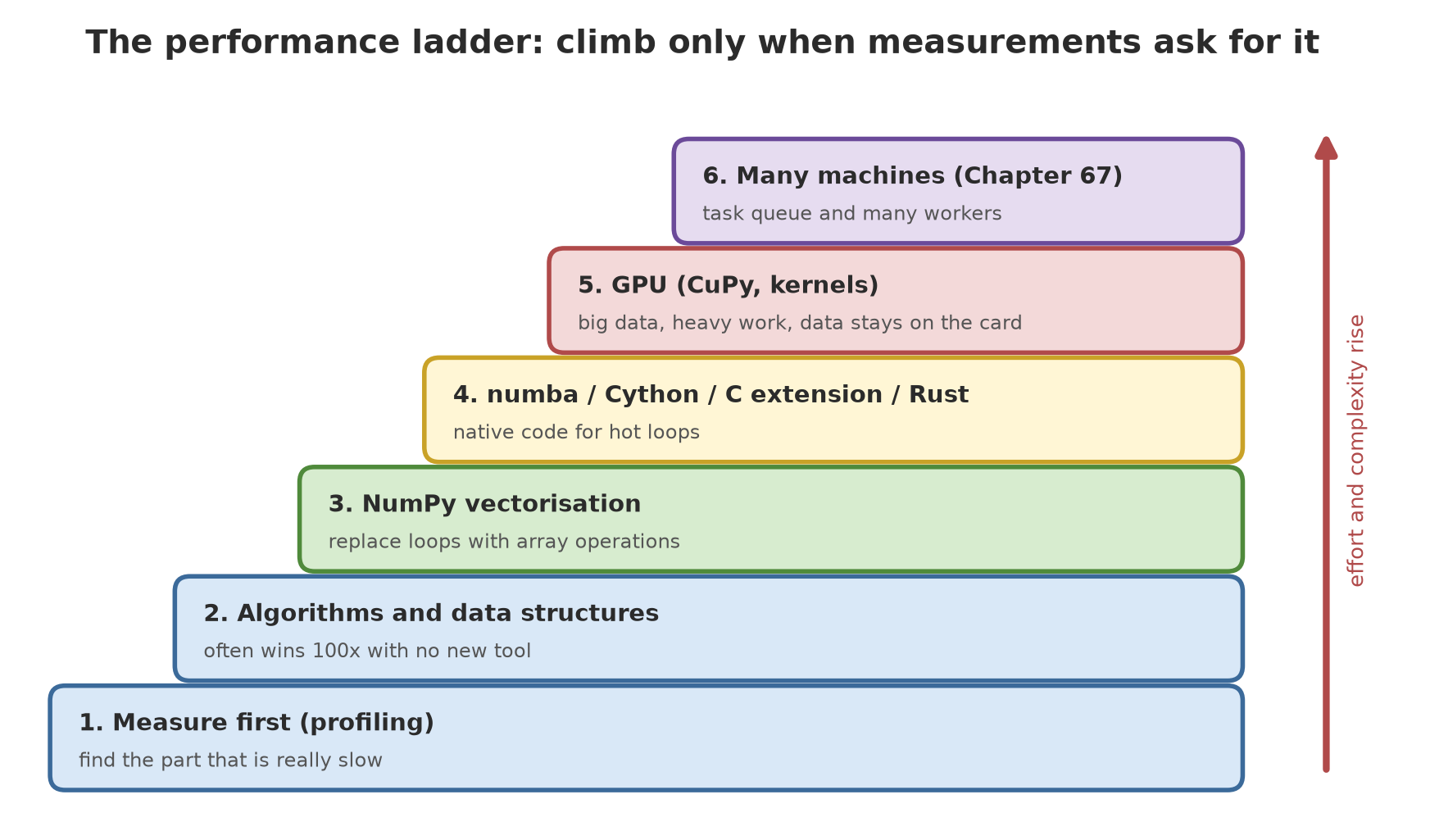
- The ladder: algorithms and vectorisation (Chapter 44), then numba, Cython/C extensions/Rust, then the GPU. Climb only when measurements ask for it.
- numba compiles a function at the first call; measure without the first call. Cython and C extensions are compiled once and need a compiler.
- ctypes and cffi call native libraries; types must be declared carefully.
- Rust (PyO3) is explained from official documentation but not tested here.
- The GPU wins when data is big, work is heavy, and data stays on the card; moving data CPU-GPU is a cost that often erases the gain.
- Measure the GPU with synchronisation or CUDA events; kernel launches are asynchronous.
- numba-CUDA is in maintenance status and needs a patch here; RAPIDS needs Linux/WSL2 and was not tested.
Next, in Chapter 67: one computer is now maximised. Now we divide the work among many workers: task queues with Celery and RQ, retries when things fail, and cost arithmetic, with a case study of thousands of drone photos and satellite images.