Chapter 14 — Data Formats: CSV, JSON, and Be Careful with Pickle
Series B3 — Small Programs That Are Useful
All scripts for this chapter are in the kode/ch14/ folder. On the web version, you can also download them all at once (zip). Result files are written to the _tmp/ subfolder.
In Chapter 13, we saved tree data in a home-made format (A|Teak|32.5) and already suspected the format was fragile. Imagine two officers sending each other notes: if each has their own way of writing, neither can read the other’s notes. So the world agrees on a few standard formats. Turning data in memory into text (or bytes) that can be stored is called serialisation; turning it back is deserialisation. This chapter covers three formats: CSV, JSON, and pickle.
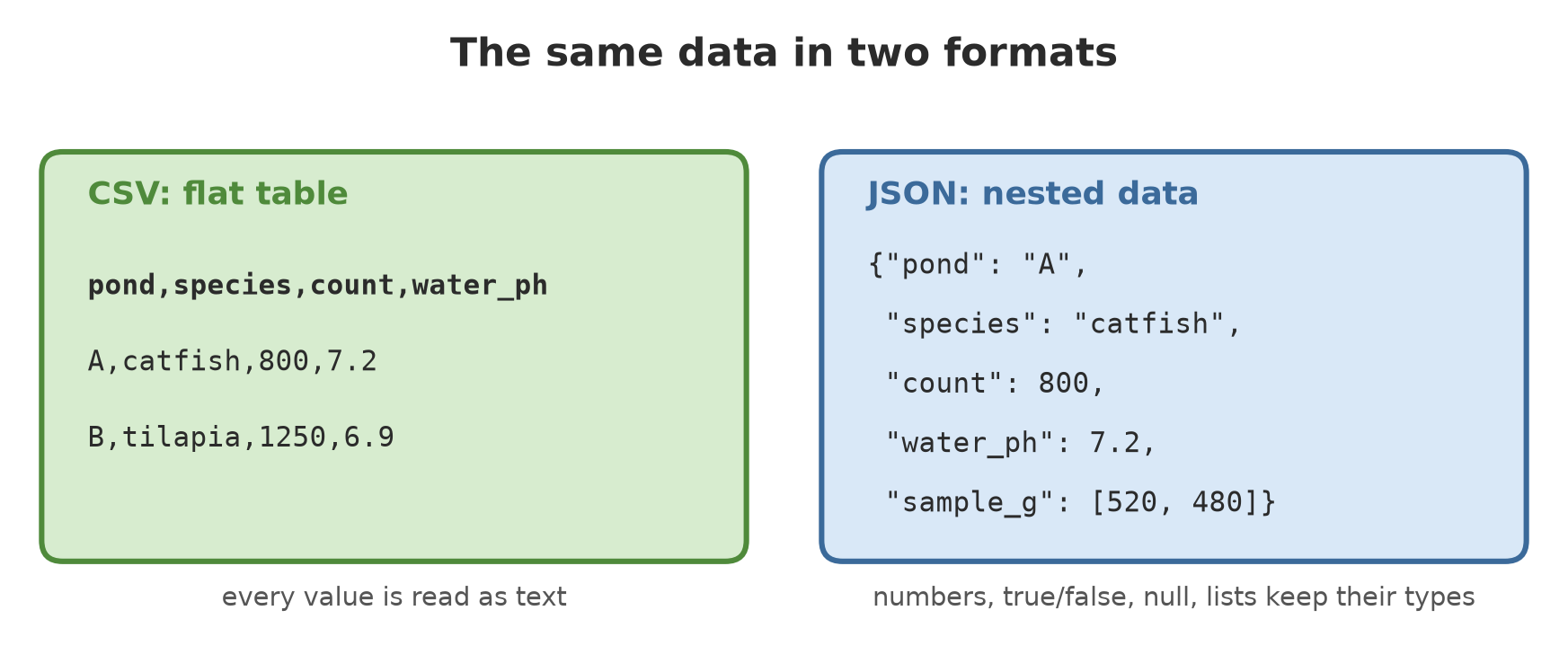
CSV: a table as text
CSV (comma-separated values) is a table where each row is one record and the columns are separated by commas. Excel can open the file. We write the pond data from Chapter 11:
01_csv_write.py
# Chapter 14 - Writing CSV: a table as comma-separated text
import csv
from pathlib import Path

from core_data import fish

tmp = Path(__file__).parent / "_tmp"
tmp.mkdir(exist_ok=True)
file = tmp / "fish.csv"

columns = ["pond", "species", "count", "avg_weight_g", "water_ph"]
with open(file, "w", newline="", encoding="utf-8") as f:       # newline="" is required for csv
    writer = csv.DictWriter(f, fieldnames=columns)
    writer.writeheader()                                       # the column title row
    writer.writerows(fish)                                     # all rows at once

print(file.read_text(encoding="utf-8"))
pond,species,count,avg_weight_g,water_ph
A,catfish,800,540.5,7.2
B,tilapia,1250,300.0,6.9
C,catfish,600,480.0,7.0DictWriterwrites a list of dicts;fieldnamessets the column order.writeheader()writes the title row,writerows()writes all rows.newline=""inopen()is required for thecsvmodule; the Python documentation says a CSV file should be opened withnewline=''so line endings are handled correctly.
This is fictional data (sample numbers).
Reading CSV: everything is text
02_csv_read.py
# Chapter 14 - Reading CSV: every value arrives as TEXT
import csv
from pathlib import Path

tmp = Path(__file__).parent / "_tmp"
tmp.mkdir(exist_ok=True)
file = tmp / "fish_read.csv"
file.write_text("pond,species,count,avg_weight_g\nA,catfish,800,540.5\nB,tilapia,1250,300.0\n",
                encoding="utf-8")

with open(file, newline="", encoding="utf-8") as f:
    rows = list(csv.DictReader(f))           # each row becomes a dict keyed by the column titles

print(rows[0])
print("Type of count:", type(rows[0]["count"]).__name__)
print("Wrong  :", rows[0]["count"] + rows[1]["count"])         # texts joined, not added

for r in rows:                               # convert the types ourselves
    r["count"] = int(r["count"])
    r["avg_weight_g"] = float(r["avg_weight_g"])
print("Right  :", rows[0]["count"] + rows[1]["count"])
{'pond': 'A', 'species': 'catfish', 'count': '800', 'avg_weight_g': '540.5'}
Type of count: str
Wrong : 8001250
Right : 2050DictReader makes a dict per row with keys taken from the title row. Notice: 'count': '800' is wrapped in quotes, meaning text, not a number. The csv documentation states that no automatic type conversion happens. As a result "800" + "1250" gives 8001250 (text joined), not 2050. You must convert the types yourself with int() and float().
The values True and False in CSV are text too. bool("False") gives True (because non-empty text counts as true)! Match the text explicitly, as in the project below.
Why not split(",")
03_comma_inside.py
# Chapter 14 - A comma inside the content: why we use the csv module, not split(",")
import csv
import io

raw = 'plot,note\nA,"near the river, peat soil"\nB,"locals call it the ""sacred forest"""\n'
print("Raw content:")
print(raw)

print("The naive split:")
for line in raw.splitlines()[1:]:
    print("  ", line.split(","))

print("Using csv.reader:")
for row in csv.reader(io.StringIO(raw)):
    print("  ", row)
Raw content:
plot,note
A,"near the river, peat soil"
B,"locals call it the ""sacred forest"""
The naive split:
['A', '"near the river', ' peat soil"']
['B', '"locals call it the ""sacred forest"""']
Using csv.reader:
['plot', 'note']
['A', 'near the river, peat soil']
['B', 'locals call it the "sacred forest"']The note “near the river, peat soil” contains a comma. CSV wraps such content in quote marks, and quote marks inside the content are doubled (""). split(",") is blind to that rule and cuts the note into three wrong pieces; csv.reader handles it correctly. This is the lesson of Chapter 13: a home-made format will collide with cases you didn’t expect, while a standard module has already thought of them.
JSON: nested data
CSV only suits flat tables. For nested data (for example a dict holding a list), use JSON (JavaScript Object Notation), a text format used by almost every internet service.
04_json_basics.py
# Chapter 14 - JSON: nested data as text
import json

pond = {"pond": "A", "species": "catfish", "count": 800, "water_ph": 7.2,
        "active": True, "note": None, "sample_g": [520, 480, 560]}

text = json.dumps(pond)                      # dict -> JSON text
print(text)
print(json.dumps(pond, indent=2, ensure_ascii=False)[:90], "...")

back = json.loads(text)                      # JSON text -> dict
print(back == pond, type(back).__name__)

print(json.dumps({"temp": "28 °C"}))                          # default: special letters are escaped
print(json.dumps({"temp": "28 °C"}, ensure_ascii=False))      # shown as they are
print(json.dumps((1, 2)), json.dumps({1: "a"}))              # tuple becomes list, number key becomes text
{"pond": "A", "species": "catfish", "count": 800, "water_ph": 7.2, "active": true, "note": null, "sample_g": [520, 480, 560]}
{
"pond": "A",
"species": "catfish",
"count": 800,
"water_ph": 7.2,
"active": tr ...
True dict
{"temp": "28 \u00b0C"}
{"temp": "28 °C"}
[1, 2] {"1": "a"}json.dumps()turns a Python object into JSON text (s= string);json.loads()does the reverse.- Type equivalents:
Truebecomestrue,Nonebecomesnull, a dict becomes an object{...}, a list becomes an array[...]. JSON text uses double quote marks. indent=2tidies the layout so humans can read it easily.ensure_ascii=Falseshows°as it is; without it, JSON writes°(still valid, just less pleasant to read).- Two surprises on the last line: the tuple
(1, 2)comes out as a list, and the number key1becomes the text"1". JSON has no tuples, and its keys are always text.
JSON to a file
05_json_file.py
# Chapter 14 - JSON to and from a file, with nested data of five sectors
import json
from pathlib import Path

from core_data import trees, crops, fish, livestock

tmp = Path(__file__).parent / "_tmp"
tmp.mkdir(exist_ok=True)
file = tmp / "inventory.json"

everything = {"trees": trees, "crops": crops, "fish": fish, "livestock": livestock}

with open(file, "w", encoding="utf-8") as f:
    json.dump(everything, f, indent=2, ensure_ascii=False)

with open(file, encoding="utf-8") as f:
    back = json.load(f)

print("Exactly the same?", back == everything)
print("Parts:", list(back))
print("First tree:", back["trees"][0])
print("Type of healthy:", type(back["trees"][2]["healthy"]).__name__)
print("File size:", file.stat().st_size, "bytes")
Exactly the same? True
Parts: ['trees', 'crops', 'fish', 'livestock']
First tree: {'species': 'Teak', 'diameter_cm': 32.5, 'height_m': 18.0, 'healthy': True, 'plot': 'A'}
Type of healthy: bool
File size: 2222 bytesUnlike CSV, JSON gives the types back: healthy returns as a bool, numbers return as int or float, and the whole structure (four tables in one dict) returns exactly the same as the original. (The file size was measured on Windows and may differ slightly on another computer because of line endings.) For saving one complete set of data, JSON is usually more comfortable; for a big table that will be opened in Excel, CSV suits better.
Two JSON problems
06_json_problems.py
# Chapter 14 - Two common JSON problems: broken text and an unknown type
import json
from datetime import date

broken = '{"pond": "A", "count": 800,}'       # extra comma at the end: JSON does not allow it
try:
    json.loads(broken)
except json.JSONDecodeError as e:
    print("Broken JSON:", type(e).__name__, "on line", e.lineno)

record = {"pond": "A", "stocking_date": date(2026, 3, 1)}
try:
    json.dumps(record)
except TypeError as e:
    print("Cannot:", e)

print("With default=str:", json.dumps(record, default=str))
print("Better habit: store the date as ISO text ->", date(2026, 3, 1).isoformat())
Broken JSON: JSONDecodeError on line 1
Cannot: Object of type date is not JSON serializable
With default=str: {"pond": "A", "stocking_date": "2026-03-01"}
Better habit: store the date as ISO text -> 2026-03-01- Broken text: an extra comma at the end causes a
JSONDecodeError. This often happens when JSON is written or edited by hand. The full message names the line and column; we only show the error name and line number because the wording of the message differs between Python versions. - Unknown type: JSON doesn’t know dates, so
json.dumpsraises aTypeError. A quick way out:default=str. A better habit: store dates as ISO text (2026-03-01) and convert back withdate.fromisoformat()(Chapter 11).
Pickle: handy, but dangerous
Pickle stores almost anything from Python (your own objects, functions, sets) as bytes. Handy, but the Python documentation states plainly that the pickle module is not secure and should only be used on data you trust, because maliciously designed pickle data can run any code when opened. Let’s prove it, in a safe way: we make a pickle that only runs print, with no harmful command.
07_pickle_danger.py
# Chapter 14 - pickle: handy for your own data, DANGEROUS for data from strangers
import pickle
import pickletools


class Carrier:
    """An object that deliberately makes the pickle RUN a function when opened."""
    def __reduce__(self):
        # In a real attack this could be a destructive command. Here it is just a print.
        return (print, ("!!! this code ran only because pickle.loads() was called",))


safe = {"pond": "A", "count": 800}
safe_package = pickle.dumps(safe)
print("Own-data pickle opened:", pickle.loads(safe_package))

risky_package = pickle.dumps(Carrier(), protocol=4)    # protocol fixed so the output is the same on every version
print("Before loads: nothing has run yet")
pickle.loads(risky_package)                   # <- this is the danger
print("After loads: the print above was run by pickle, not by us")

print("--- looking inside the pickle WITHOUT opening it (pickletools) ---")
pickletools.dis(risky_package)
Own-data pickle opened: {'pond': 'A', 'count': 800}
Before loads: nothing has run yet
!!! this code ran only because pickle.loads() was called
After loads: the print above was run by pickle, not by us
--- looking inside the pickle WITHOUT opening it (pickletools) ---
0: \x80 PROTO 4
2: \x95 FRAME 85
11: \x8c SHORT_BINUNICODE 'builtins'
21: \x94 MEMOIZE (as 0)
22: \x8c SHORT_BINUNICODE 'print'
29: \x94 MEMOIZE (as 1)
30: \x93 STACK_GLOBAL
31: \x94 MEMOIZE (as 2)
32: \x8c SHORT_BINUNICODE '!!! this code ran only because pickle.loads() was called'
90: \x94 MEMOIZE (as 3)
91: \x85 TUPLE1
92: \x94 MEMOIZE (as 4)
93: R REDUCE
94: \x94 MEMOIZE (as 5)
95: . STOP
highest protocol among opcodes = 4Follow the result:
- A pickle of our own data (the pond dict) opens normally.
- We make a pickle from a
Carrierobject whose__reduce__says “please call this function when the pickle is opened”. - Between our two
printlines, the line!!! this code ran ...appears. We did not call that print;pickle.loads()did. If it had been a command to delete files, the result would be the same: it runs without permission. pickletools.dis()reads the pickle without running it and shows clearly that it callsbuiltins.print(STACK_GLOBALthenREDUCE). The Python documentation also recommendspython -m pickletoolsas a safer way than opening a pickle to inspect it.
Never open (pickle.load or pickle.loads) a pickle file that comes from other people, from the internet, or from email, and never accept one from users of a web application. For outside data, use JSON or CSV. Pickle is only for data that you yourself wrote and keep in a safe place.
Running Project B3: save and load five sectors
The data of the five sectors (forest, orchard, field crops, fisheries, livestock; orchard and field crops share the crops table) is now saved to CSV and JSON. The tools are in the module data_tools.py: save_csv, load_csv (with a schema that names the type converter of each column), save_json, and load_json.
08_project_save.py
# Chapter 14 - Project B3: five sectors saved to CSV and JSON, read back, compared
from pathlib import Path

from data_tools import save_csv, load_csv, save_json, load_json
from core_data import trees, crops, fish, livestock

tmp = Path(__file__).parent / "_tmp"
tmp.mkdir(exist_ok=True)

tables = {"trees": trees, "crops": crops, "fish": fish, "livestock": livestock}
bool_text = lambda s: {"True": True, "False": False}[s]       # KeyError if not True/False
schema = {
    "trees": {"species": str, "diameter_cm": float, "height_m": float, "healthy": bool_text, "plot": str},
    "crops": {"crop": str, "block": str, "age_days": int, "yield_kg": float},
    "fish": {"pond": str, "species": str, "count": int, "avg_weight_g": float, "water_ph": float},
    "livestock": {"pen": str, "species": str, "age_months": int, "weight_kg": float},
}

for name, rows in tables.items():
    save_csv(tmp / f"{name}.csv", rows)
save_json(tmp / "inventory.json", tables)

for name in tables:
    loaded, rejected = load_csv(tmp / f"{name}.csv", schema[name])
    same = loaded == tables[name]
    print(f"{name:10} CSV: {len(loaded)} rows, rejected {rejected}, same as original: {same}")

print("Whole JSON same as original:", load_json(tmp / "inventory.json") == tables)
print("Content of trees.csv (first 3 lines):")
for line in (tmp / "trees.csv").read_text(encoding="utf-8").splitlines()[:3]:
    print(line)
trees CSV: 6 rows, rejected 0, same as original: True
crops CSV: 4 rows, rejected 0, same as original: True
fish CSV: 3 rows, rejected 0, same as original: True
livestock CSV: 4 rows, rejected 0, same as original: True
Whole JSON same as original: True
Content of trees.csv (first 3 lines):
species,diameter_cm,height_m,healthy,plot
Teak,32.5,18.0,True,A
Meranti,45.2,27.5,True,AThe result same as original: True for all four tables proves that data coming back from CSV (after conversion by the schema) is identical to what was saved, including the healthy column that holds a bool. The JSON is identical too. Now test its resilience:
09_project_error_proof.py
# Chapter 14 - Project B3: loading a CSV that field staff have messed up, plus missing or broken files
import logging
import sys
from pathlib import Path

from data_tools import save_csv, load_csv, load_json
from core_data import crops

logging.basicConfig(stream=sys.stdout, level=logging.WARNING, format="%(levelname)s: %(message)s")

tmp = Path(__file__).parent / "_tmp"
tmp.mkdir(exist_ok=True)
file = tmp / "crops_dirty.csv"

save_csv(file, crops)
with open(file, "a", newline="", encoding="utf-8") as f:         # what the field staff did
    f.write("rice,E,hundred,250.0\n")                            # age is not a number
    f.write("maize,F,95\n")                                      # missing column

schema = {"crop": str, "block": str, "age_days": int, "yield_kg": float}
rows, rejected = load_csv(file, schema)
print(f"Accepted {len(rows)} rows, rejected {rejected}")
print("Total valid harvest:", sum(r["yield_kg"] for r in rows), "kg")

print("Missing file:", load_csv(tmp / "does_not_exist.csv", schema))

(tmp / "broken.json").write_text('{"trees": [1, 2,', encoding="utf-8")
print("Broken JSON -> fallback:", load_json(tmp / "broken.json", fallback={}))
WARNING: line 6 in crops_dirty.csv rejected (ValueError)
WARNING: line 7 in crops_dirty.csv rejected (TypeError)
Accepted 4 rows, rejected 2
Total valid harvest: 1030.0 kg
WARNING: file does_not_exist.csv does not exist yet
Missing file: ([], 0)
WARNING: file broken.json is not valid JSON
Broken JSON -> fallback: {}The staff added two broken rows: hundred cannot become an int (ValueError), and a row with a missing column makes DictReader fill in None, which fails to convert (TypeError). Both are rejected with a warning, the four valid rows are still read (total 1030.0 kg, matching Chapter 11). A missing file gives an empty list, and a broken JSON gives the fallback value {}. None of it collapses the program: that is what “resistant to wrong input” means.
Exercises
- Write the
livestockdata tolivestock.csv, read it back withDictReader, and print the totalweight_kg(don’t forget to convert the types). - Save the dict
{"name": "Pond Ø1", "temp": "28 °C"}to JSON with and withoutensure_ascii=False. Compare the file contents. - Change
08_project_save.pyso that the treeheight_mis rounded to a whole number when loaded (change the schema, not the data). - Challenge: write a function
compare_csv_json(name)that loads tablenamefrom CSV and from JSON, then reports whether they are the same. What happens if aTruevalue is stored via CSV without thebool_textconverter?
Chapter Summary
- Serialisation = turning data in memory into text/bytes for storage; deserialisation = the reverse.
- CSV: flat table; open with
newline=""; all values arrive as text, convert the types yourself. - Don’t cut CSV with
split(","); use thecsvmodule. - JSON: nested data; gives back
bool, numbers,None, list, dict; knows no tuples or dates. - Pickle is not secure: opening one can run code. Never open a pickle from a source you don’t trust.
- Project B3: five sectors saved in CSV/JSON and loaded back with a schema, resistant to broken rows, missing files, and broken JSON.
Next, in Chapter 15: office document automation, turning that data into Excel, Word, and PDF reports.