Chapter 16 — OOP: Making Moulds for Field Data
Series I1 — Tidy and Maintainable Code
All scripts for this chapter are in the kode/ch16/ folder. On the web version, you can also download them all at once (zip).
In Series B, your field data lived in dicts and lists, and the calculations in separate functions. That works, but the bigger the program, the harder a simple question gets: which function suits which data? The function biomass_kg only makes sense for ponds, yet nothing stops you from handing it cattle data.
Object-oriented programming (OOP) puts data and the functions that suit it into one package. Think of a cake mould: the class is the mould, an object is a cake cast from it. One mould makes many cakes, and each cake has its own filling.
Class and object
01_tree_class.py
# Chapter 16 - Class and objects: the mould and what it makes
import math


class Tree:
    """A mould for one tree in a plot."""

    def __init__(self, species, diameter_cm, height_m):
        self.species = species
        self.diameter_cm = diameter_cm
        self.height_m = height_m

    def cross_section_cm2(self):
        return math.pi * (self.diameter_cm / 2) ** 2

    def category(self):
        if self.diameter_cm >= 40:
            return "large"
        if self.diameter_cm >= 30:
            return "medium"
        return "small"


teak = Tree("Teak", 32.5, 18.0)
meranti = Tree("Meranti", 45.2, 27.5)

print(teak.species, teak.diameter_cm, teak.category())
print(meranti.species, meranti.diameter_cm, meranti.category())
print(f"Teak cross-section: {teak.cross_section_cm2():.1f} cm2")
print(type(teak))
Teak 32.5 medium
Meranti 45.2 large
Teak cross-section: 829.6 cm2
<class '__main__.Tree'>class Tree:makes the mould. Class names start each word with a capital letter (ForestPlot).__init__is a special method that runs automatically when an object is made. This is where the starting data is set up. (Read “dunder init”: double underscore, two underscores on each side.)selfis the object being worked on.self.species = speciesmeans “keep this value inside this object”.- A function inside a class is called a method.
teak.category()calls the method for the objectteak. Python fills inselfitself. Tree("Teak", 32.5, 18.0)makes one object (also called an instance). The cross-section of 829.6 cm² is calculated from the 32.5 cm diameter.
The result of type(teak) shows that teak really is an object of the class Tree.
Every object has its own data
02_independent_objects.py
# Chapter 16 - Every object has its own data
class Pond:
    unit_kind = "Pond"            # belongs to the class: same for all objects

    def __init__(self, name, fish_count):
        self.name = name          # belongs to the object: differs
        self.fish_count = fish_count

    def stock(self, extra):
        self.fish_count = self.fish_count + extra


pond_a = Pond("A", 800)
pond_b = Pond("B", 500)
pond_a.stock(200)

print(pond_a.name, pond_a.fish_count)
print(pond_b.name, pond_b.fish_count)
print(pond_a.unit_kind, pond_b.unit_kind)
print(isinstance(pond_a, Pond), isinstance(pond_a, str))
A 1000
B 500
Pond Pond
True FalsePond A starts at 800 and gets 200 more fish, making 1000. Pond B is unchanged at 500. Two objects from the same mould do not disturb each other. Note unit_kind too: it is written at class level, so all objects share it.
The most common trap when first writing methods: forgetting self.
03_forgot_self.py
# Chapter 16 - Trap: forgetting self
class Tree:
    def __init__(self, species):
        self.species = species

    def greet():                  # forgot self!
        print("Hello, I am a tree")


teak = Tree("Teak")
teak.greet()
Traceback (most recent call last):
File "03_forgot_self.py", line 11, in <module>
teak.greet()
~~~~~~~~~~^^
TypeError: Tree.greet() takes 0 positional arguments but 1 was givenThe message is confusing: “takes 0 positional arguments but 1 was given”. The argument meant is the object itself, which Python sends automatically. Without self in the parameter list, there is nowhere to receive it.
Inheritance: children receive the parent’s traits
A forest plot, garden, pond, and pen all have a name and an area. Writing that again in every class is wasteful. The solution is inheritance: make a parent class holding what they share, then child classes that inherit from it.
04_inheritance.py
# Chapter 16 - Inheritance: children inherit from the parent
class Unit:
    """Parent: every unit has a name and an area."""

    def __init__(self, name, area_ha):
        self.name = name
        self.area_ha = area_ha

    def info(self):
        return f"{self.name} ({self.area_ha} ha)"


class ForestPlot(Unit):
    def __init__(self, name, area_ha, stand):
        super().__init__(name, area_ha)     # parent's part first
        self.stand = stand                  # then the child's own part


class Garden(Unit):
    pass                                    # adds nothing


plot = ForestPlot("Plot A", 2.5, "Teak")
garden = Garden("Coffee Garden", 1.2)
print(plot.info(), "| stand:", plot.stand)
print(garden.info())
print(isinstance(plot, Unit), issubclass(Garden, Unit), isinstance(garden, ForestPlot))
Plot A (2.5 ha) | stand: Teak
Coffee Garden (1.2 ha)
True True Falseclass ForestPlot(Unit):means “ForestPlotis a child ofUnit”.super().__init__(...)calls the parent’s__init__, so the parent’s part gets done too. The child then adds its own part (stand).Gardenadds nothing, yet still hasname,area_ha, andinfo()fromUnit.isinstance(plot, Unit)isTrue: a forest plot is a unit. The reverse does not hold: a garden is not a forest plot (False).
Polymorphism: one command, many ways
The word sounds scary, but the idea is simple: children may carry out the same command in different ways. You just say summary(), and each unit knows how to work it out.
05_polymorphism.py
# Chapter 16 - Polymorphism: one command, many ways
class Unit:
    def __init__(self, name):
        self.name = name

    def output(self):
        raise NotImplementedError("the child must fill in output()")

    def summary(self):
        return f"{self.name}: {self.output()}"


class Pond(Unit):
    def __init__(self, name, count, weight_g):
        super().__init__(name)
        self.count, self.weight_g = count, weight_g

    def output(self):
        return f"biomass {self.count * self.weight_g / 1000:.1f} kg"


class Pen(Unit):
    def __init__(self, name, cattle_weights_kg):
        super().__init__(name)
        self.cattle_weights_kg = cattle_weights_kg

    def output(self):
        return f"total weight {sum(self.cattle_weights_kg):.1f} kg"


units = [Pond("Pond A", 800, 540.5), Pen("Pen 1", [350, 412.5, 389.0])]
for unit in units:
    print(unit.summary())        # same command, the result adapts

try:
    Unit("Plain").summary()
except NotImplementedError as e:
    print("The parent alone is not enough:", e)
Pond A: biomass 432.4 kg
Pen 1: total weight 1151.5 kg
The parent alone is not enough: the child must fill in output()The for loop calls unit.summary() without caring whether it holds a pond or a pen. The pond sum (800 × 540.5 g = 432.4 kg) and the pen sum (350 + 412.5 + 389.0 = 1151.5 kg) differ, but the caller is the same. The parent Unit hands output() over to the children with raise NotImplementedError: “the child must fill this in”. That is why Unit("Plain") fails with a clear message.
Encapsulation: guarding data
Encapsulation means data is guarded inside the object, and outside access goes through a door with a guard. In Python, a leading underscore (_water_ph) is an agreement: “this is inside business, do not touch it from outside”. The door guard is a property.
06_encapsulation.py
# Chapter 16 - Encapsulation: data is guarded inside the object
class Pond:
    def __init__(self, name, water_ph):
        self.name = name
        self._water_ph = None      # leading _ means: do not touch from outside
        self.water_ph = water_ph   # via the property, so it gets checked

    @property
    def water_ph(self):
        return self._water_ph

    @water_ph.setter
    def water_ph(self, value):
        if not 0 <= value <= 14:
            raise ValueError(f"pH must be 0 to 14, not {value}")
        self._water_ph = value


pond = Pond("A", 7.2)
print("Initial pH:", pond.water_ph)
pond.water_ph = 6.8
print("New pH:", pond.water_ph)

try:
    pond.water_ph = 17
except ValueError as e:
    print("Rejected:", e)
print("pH unchanged:", pond.water_ph)
Initial pH: 7.2
New pH: 6.8
Rejected: pH must be 0 to 14, not 17
pH unchanged: 6.8From outside, pond.water_ph looks like an ordinary variable. But each time the value changes, Python runs the check in the setter. A pH of 17 is rejected with a ValueError, and the old value (6.8) stays safe.
Python does not truly lock data. The _ prefix is only an agreement between programmers. The strength of property is the check: wrong data cannot get in through the official door.
Dunder methods: teaching objects to get along
Methods with double underscores like __init__ are called dunder methods. Python calls them automatically at certain moments. By filling them in, your objects work with print, ==, sorted, and len.
07_dunder.py
# Chapter 16 - Dunder methods: teaching objects to get along with Python
class Tree:
    def __init__(self, species, diameter_cm):
        self.species = species
        self.diameter_cm = diameter_cm

    def __repr__(self):                       # the technical display
        return f"Tree({self.species!r}, {self.diameter_cm})"

    def __str__(self):                        # the display for humans
        return f"{self.species} {self.diameter_cm} cm"

    def __eq__(self, other):
        return (self.species, self.diameter_cm) == (other.species, other.diameter_cm)

    def __lt__(self, other):                  # so it can be sorted
        return self.diameter_cm < other.diameter_cm


class Plot:
    def __init__(self, trees):
        self.trees = list(trees)

    def __len__(self):
        return len(self.trees)


a, b, c = Tree("Teak", 32.5), Tree("Meranti", 45.2), Tree("Mahogany", 28.0)
print(a)
print(repr(a))
print(a == Tree("Teak", 32.5), a == b)
print(sorted([a, b, c]))
print(len(Plot([a, b, c])), "trees")
Teak 32.5 cm
Tree('Teak', 32.5)
True False
[Tree('Mahogany', 28.0), Tree('Teak', 32.5), Tree('Meranti', 45.2)]
3 trees| Method | Called when | Example |
|---|---|---|
__str__ |
print(object) |
display for readers |
__repr__ |
repr(object), display inside a list |
display for programmers |
__eq__ |
a == b |
compares contents, not addresses |
__lt__ |
a < b, sorted(...) |
sorts by diameter |
__len__ |
len(object) |
number of items inside |
The sorted result runs from diameter 28.0 to 32.5 to 45.2 because __lt__ compares diameters.
dataclass: data classes with less typing
A class that only holds data (like Tree) forces us to write __init__, __repr__, and __eq__ again and again. The built-in dataclasses module makes them automatically from a list of typed columns.
08_dataclass.py
# Chapter 16 - dataclass: data classes with less typing
from dataclasses import dataclass, field


@dataclass(order=True)
class Tree:
    species: str
    diameter_cm: float
    healthy: bool = True


@dataclass
class Plot:
    name: str
    trees: list = field(default_factory=list)    # a fresh list for each plot


a = Tree("Teak", 32.5)
b = Tree("Mahogany", 28.0, healthy=False)
print(a)                          # __repr__ made automatically
print(a == Tree("Teak", 32.5))    # __eq__ made automatically
print(b < a)                      # order=True: compared column by column ("Mahogany" comes before "Teak")

plot_a, plot_b = Plot("A"), Plot("B")
plot_a.trees.append(a)
print(len(plot_a.trees), len(plot_b.trees))
Tree(species='Teak', diameter_cm=32.5, healthy=True)
True
True
1 0- Write columns with a type hint (
species: str). Defaults are set with=(healthy: bool = True). @dataclassmakes__init__,__repr__, and__eq__. The optionorder=Trueadds ordering comparisons. “Mahogany” sorts before “Teak” because the first column (species) is compared first, alphabetically.- For a list default, use
field(default_factory=list)so each object gets a new list. The final1 0proves plots A and B do not share one list.
Industry habit is to name classes, functions, and variables in English. In this book the Indonesian edition uses Indonesian names for easy reading, but in a real team, follow your team’s convention.
Running Project I1: field data becomes classes
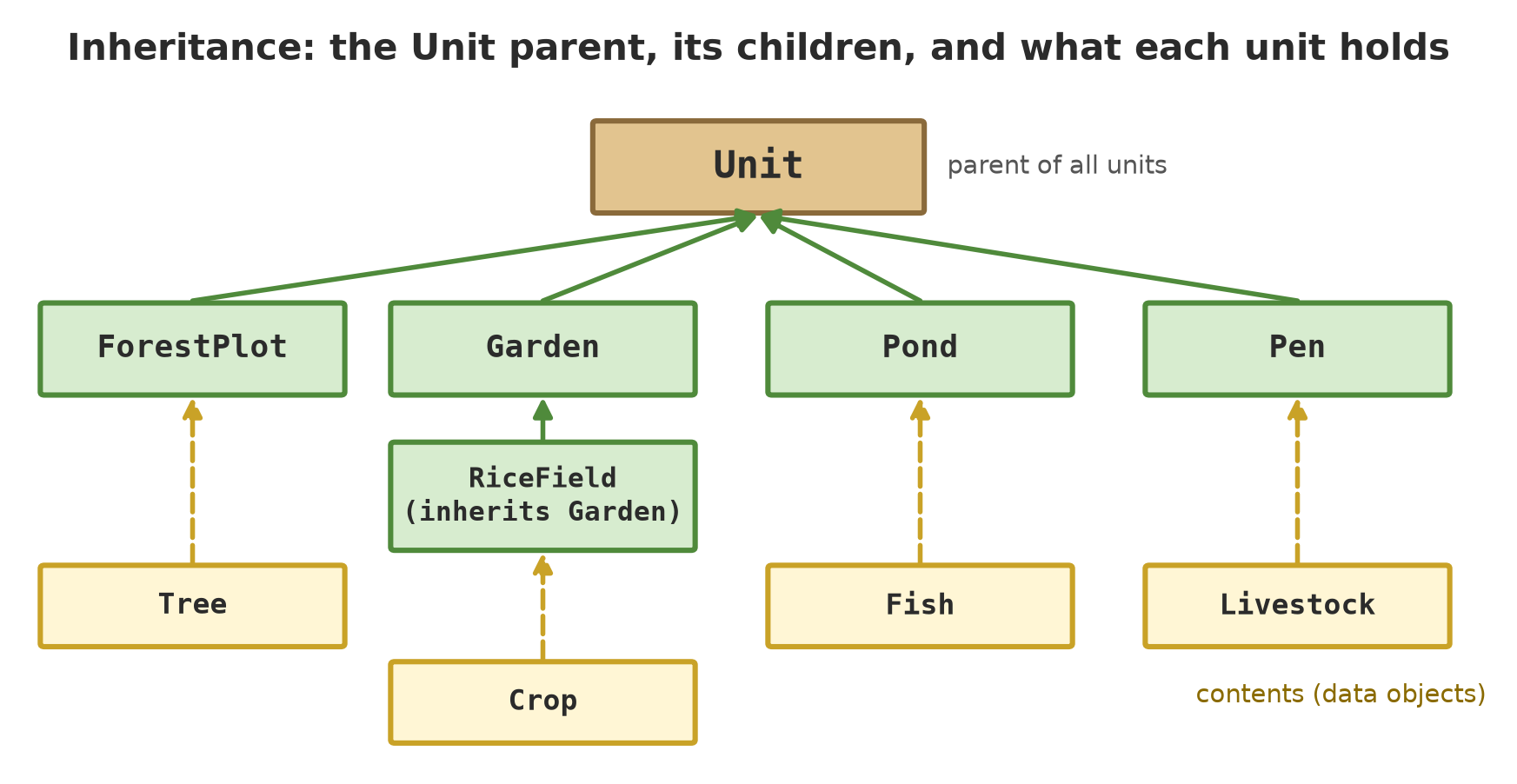
Now all the ingredients work together. Four dataclasses hold data (Tree, Crop, Fish, Livestock), the Unit parent holds what all units share, and five children (ForestPlot, Garden, RiceField, Pond, Pen) fill in output() their own way. RiceField is a child of Garden: a rice field is a garden that is also counted per hectare.
09_unit_project.py
# Chapter 16 - Running project I1: field data becomes classes
from dataclasses import dataclass


@dataclass
class Tree:
    species: str
    diameter_cm: float
    height_m: float
    healthy: bool = True


@dataclass
class Crop:
    commodity: str
    block: str
    age_days: int
    yield_kg: float


@dataclass
class Fish:
    species: str
    count: int
    avg_weight_g: float
    water_ph: float

    def biomass_kg(self):
        return self.count * self.avg_weight_g / 1000


@dataclass
class Livestock:
    species: str
    age_months: int
    weight_kg: float


class Unit:
    """Parent of all land or enterprise units."""

    kind = "Unit"
    measure_unit = ""

    def __init__(self, name, area_ha):
        if area_ha <= 0:
            raise ValueError("area_ha must be greater than 0")
        self.name = name
        self.area_ha = area_ha
        self._items = []

    def add(self, item):
        self._items.append(item)

    @property
    def items(self):
        return tuple(self._items)

    def output(self):
        raise NotImplementedError

    def summary(self):
        return (f"{self.kind} {self.name}: {len(self._items)} record(s), "
                f"{self.output():.1f} {self.measure_unit}")

    def __len__(self):
        return len(self._items)


class ForestPlot(Unit):
    kind, measure_unit = "Forest plot", "healthy trees"

    def output(self):
        return sum(1 for t in self._items if t.healthy)


class Garden(Unit):
    kind, measure_unit = "Garden", "kg"

    def output(self):
        return sum(c.yield_kg for c in self._items)


class RiceField(Garden):                 # a rice field = a garden also counted per hectare
    kind = "Rice field"

    def productivity(self):
        return self.output() / self.area_ha

    def summary(self):
        return super().summary() + f" ({self.productivity():.0f} kg/ha)"


class Pond(Unit):
    kind, measure_unit = "Pond", "kg biomass"

    def output(self):
        return sum(f.biomass_kg() for f in self._items)


class Pen(Unit):
    kind, measure_unit = "Pen", "kg weight"

    def output(self):
        return sum(a.weight_kg for a in self._items)


plot = ForestPlot("A", 2.5)
for t in [Tree("Teak", 32.5, 18.0), Tree("Meranti", 45.2, 27.5),
          Tree("Mahogany", 28.0, 15.0, healthy=False)]:
    plot.add(t)

garden = Garden("Coffee", 1.2)
for block, kg in [("A", 245.5), ("B", 310.0)]:
    garden.add(Crop("coffee", block, 400, kg))

rice_field = RiceField("Lowland", 0.5)
rice_field.add(Crop("rice", "1", 110, 1250.0))

pond = Pond("A", 0.04)
pond.add(Fish("catfish", 800, 540.5, 7.2))

pen = Pen("1", 0.1)
for species, months, kg in [("cattle", 30, 350), ("cattle", 36, 412.5), ("cattle", 33, 389.0)]:
    pen.add(Livestock(species, months, kg))

for unit in [plot, garden, rice_field, pond, pen]:
    print(unit.summary())
Forest plot A: 3 record(s), 2.0 healthy trees
Garden Coffee: 2 record(s), 555.5 kg
Rice field Lowland: 1 record(s), 1250.0 kg (2500 kg/ha)
Pond A: 1 record(s), 432.4 kg biomass
Pen 1: 3 record(s), 1151.5 kg weightTrace the numbers: plot A has 3 trees, 1 unhealthy, so 2 healthy trees. The coffee garden adds 245.5 + 310.0 = 555.5 kg. The rice field’s 1250 kg on 0.5 ha is 2500 kg/ha. The pond’s 432.4 kg and the pen’s 1151.5 kg match the Series B calculations. All figures are fictional.
Note that the list [plot, garden, rice_field, pond, pen] holds five kinds of objects, yet one loop and one summary() command handle them all. Adding a new unit type (say Hatchery) takes just one new child. The next chapters install this project in its own environment, test it, tidy it, and keep it in git.
Exercises
- Add a method
full_info()to the classTreein01_tree_class.pythat returns text like"Teak, 32.5 cm, category medium". - Make your own class
Garden(not a child) withnameand a listharvest_kg, then fill in__len__and__str__. Print one object and calllen()on it. - In
04_inheritance.py, add a classPond(Unit)with an attributewater_ph. Make one object and checkisinstance(pond, Unit). - Challenge: add a class
Pento05_polymorphism.pythat fills inoutput()with the average weight rather than the total. Also add a new classHatchery(Unit); make sure the old loop needs no change.
Chapter Summary
- Class = mould, object = what it casts.
__init__sets the starting data;selfis the object being worked on. - Inheritance:
class Child(Parent);super().__init__(...)calls the parent. - Polymorphism: same command, the result adapts to the kind of object.
- Encapsulation: the
_prefix as an agreement,propertyas a guard that checks. - Dunder methods (
__str__,__repr__,__eq__,__lt__,__len__) make objects comfortable with Python. @dataclassgenerates__init__,__repr__, and__eq__from a list of columns.
Next, in Chapter 17: environments and dependencies, how to give each project its own Python “room” and manage the packages it needs.