%%{init: {"flowchart": {"diagramPadding": 40}}}%%
flowchart LR
A[Multi-band image<br/>GeoTIFF] --> B[Compute indices<br/>NDVI etc.]
B --> C[Build matrix<br/>pixels x features]
D[Training polygons<br/>from the field] --> E[Train<br/>random forest]
C --> E
E --> F[Predict all<br/>pixels]
F --> G[Class GeoTIFF<br/>area per class]
Chapter 59 — ML for Forestry, Agriculture, Fisheries, Livestock, and Natural Resources
Series A3 — Machine Learning for Natural Resources
All scripts for this chapter are in the kode/ch59/ folder. On the web version, you can also download them all at once (zip).
This chapter is the meeting point of everything you learned in Series A3: tree models (Chapter 54), GPUs and neural networks (Chapter 55), object detection (Chapter 56), optimization (Chapter 57), and model explanation (Chapter 58), now put to work in the field. Picture one big map of a regency: forest upstream, rice fields in the middle, fish ponds on the coast, grazing land in the hills. A single toolkit (Python) can serve them all.
NoteREMEMBER
All data in this chapter is fictitious, made by scripts, and all yield, growth, and weight equations are examples for learning, not farming advice. This book contains three kinds of content: what is run (with output), what is an overview (explanation without code), and what is not run (the code is shown but we state frankly why it was not run).
Forestry: from LiDAR points to trees
LiDAR (Light Detection and Ranging) fires laser pulses from an aircraft or drone and records the time they bounce back. The result is a point cloud: millions of (x, y, z) points. Some points bounce off the canopy, some slip through gaps and bounce off the ground. From those points we make three rasters:
- DSM (Digital Surface Model): the height of the topmost surface (the canopy top, or the ground where it is open).
- DTM (Digital Terrain Model): the height of the bare ground.
- CHM (Canopy Height Model) = DSM minus DTM: the tree height above the ground.
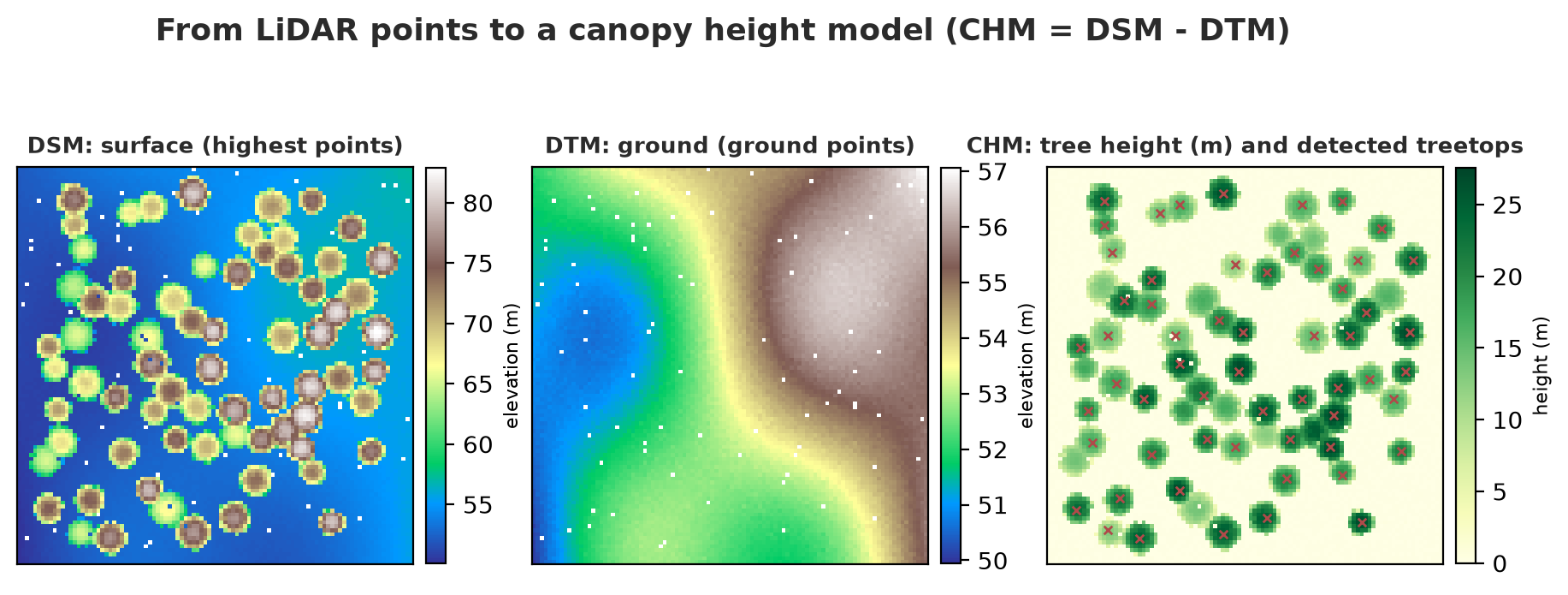
The script makes a fictitious 1-hectare point cloud (sloping ground, 70 dome-shaped trees, point classes following the LAS standard: 2 = ground, 5 = high vegetation), writes it to a LAS file with laspy, reads it back, then processes it. Trees are counted by finding local peaks on the CHM.
01_lidar_chm.py
# Chapter 59 - Fictitious LiDAR -> LAS file -> canopy height model (CHM) -> count trees
from pathlib import Path

import laspy
import numpy as np

from nature_tools import make_lidar, compute_chm, tree_tops

x, y, z, cls, trees = make_lidar()
print("Total points:", len(x), "| ground points:", int((cls == 2).sum()), "| canopy points:", int((cls == 5).sum()))

# Write to LAS format (the point cloud standard), read it back: makes sure the file pipeline is correct
folder = Path(__file__).parent / "_tmp"
folder.mkdir(exist_ok=True)
las = laspy.create(point_format=1, file_version="1.4")
las.header.scales = [0.001, 0.001, 0.001]
las.x, las.y, las.z = x, y, z
las.classification = cls.astype(np.uint8)
las.write(folder / "fictitious_lidar.las")
loaded = laspy.read(folder / "fictitious_lidar.las")
print("LAS read back: number of points =", len(loaded.points), "| unique classes =", sorted(set(np.array(loaded.classification).tolist())))

chm = compute_chm(np.array(loaded.x), np.array(loaded.y), np.array(loaded.z), np.array(loaded.classification))
print("\nCHM:", chm.shape, "1 m cell | maximum height =", round(float(chm.max()), 1), "m")

rows, cols, heights = tree_tops(chm)
print("Actual trees:", len(trees), "| tops detected:", len(rows))

# Match detected tops with the actual trees (distance <= 2 m)
matched, diffs = 0, []
for cx, cy, h, r in trees:
    dist = np.hypot(cols + 0.5 - cx, rows + 0.5 - cy)
    j = dist.argmin()
    if dist[j] <= 2.0:
        matched += 1
        diffs.append(heights[j] - h)
print("Trees found (distance <= 2 m):", matched, "of", len(trees))
print("Height difference CHM - actual: mean", round(float(np.mean(diffs)), 2), "m, standard deviation", round(float(np.std(diffs)), 2), "m")
print("Mean height of detected trees:", round(float(heights.mean()), 1), "m")
Total points: 67500 | ground points: 50000 | canopy points: 17500
LAS read back: number of points = 67500 | unique classes = [2, 5]
CHM: (100, 100) 1 m cell | maximum height = 27.5 m
Actual trees: 70 | tops detected: 57
Trees found (distance <= 2 m): 57 of 70
Height difference CHM - actual: mean 0.1 m, standard deviation 0.12 m
Mean height of detected trees: 21.6 m- There are 67,500 points; 50,000 ground and 17,500 canopy. The LAS file is read back intact: the number of points and the classes are the same.
- Of the 70 actual trees, 57 tops were found (all matching an actual tree within 2 m). Thirteen trees were not found; most likely the shorter trees crowded against a taller neighbor are “hidden” under their neighbor’s crown (we did not check the exact cause one by one). This is a real limitation of the CHM approach: suppressed trees are hard to see from above.
- The heights of the trees that were found are accurate: the mean difference is 0.1 m (standard deviation 0.12 m). Because the fictitious data has little noise, errors in the field will be larger.
- The mean height of the detected trees is 21.6 m.
In Chapter 51 you studied laspy/PDAL in more depth; for real point clouds with billions of points, processing is done tile by tile and with specialized tools.
Biomass and carbon from tree height
Governments and carbon markets want to know how much above-ground biomass (AGB) and carbon is stored. The common approach: compute the biomass of each tree with an allometric equation (an equation linking easily measured tree size to biomass), then add them up.
We use the pantropical equation of Chave et al. (2014), Global Change Biology 20: 3177-3190, “Improved allometric models to estimate the aboveground biomass of tropical trees”:
AGB = 0.0673 x (wood_density x D² x H) ^ 0.976
where D is the diameter at breast height in cm, H is the total height in m, and wood density is in g/cm³. Verification source: the form and coefficient of this equation were read from the documentation of the R package BIOMASS (Equation 4; search.r-project.org/CRAN/refmans/BIOMASS/html/computeAGB.html, read 2026-10-10). The original paper could not be opened from here (the publisher’s page refuses automated access), so the verification uses a secondary source. The BIOMASS documentation states the output in Mg (tons); our sanity check shows that the raw formula gives kilograms (a 30 cm, 20 m tree gives 582 kg, plausible for a tree that size), so the code uses kilograms and divides the result by 1,000 for tons. The height-diameter relation (D = 1.6 x H^1.05), the wood density of 0.6, and the carbon fraction of 0.47 in the script are example values (0.47 is widely known as the IPCC default for dry biomass, but our search today did not manage to confirm it; check the IPCC guidelines and the national guidelines that apply).
02_biomass_carbon.py
# Chapter 59 - Biomass and carbon from the CHM: height -> diameter (EXAMPLE) -> Chave 2014 equation -> carbon
import numpy as np

from nature_tools import agb_chave_kg, make_lidar, compute_chm, tree_tops

# Sanity check of the equation: tree of 30 cm and 20 m with wood density 0.6 g/cm3 (example value)
print("Tree D = 30 cm, H = 20 m  ->  AGB =", round(float(agb_chave_kg(30, 20, 0.6))), "kg per tree")

x, y, z, cls, trees = make_lidar()
chm = compute_chm(x, y, z, cls)
_, _, height = tree_tops(chm)


def diameter_from_height(h):
    """EXAMPLE RELATION (not a research result): D = 1.6 x H^1.05 cm. In the field, measure D and H and fit your own."""
    return 1.6 * h ** 1.05


diameter = diameter_from_height(height)
agb = agb_chave_kg(diameter, height, wood_density=0.6)
CARBON_FRACTION = 0.47                                 # common value for dry biomass (check local guidelines)
carbon = agb * CARBON_FRACTION
co2e = carbon * 44 / 12                                # molecular mass of CO2 (44) compared with C (12)
print(f"\nDetected trees: {len(height)} on 1 ha")
print(f"Above-ground biomass: {agb.sum() / 1000:7.1f} tons/ha")
print(f"Carbon              : {carbon.sum() / 1000:7.1f} tC/ha")
print(f"CO2 equivalent      : {co2e.sum() / 1000:7.1f} tCO2e/ha")

# How sensitive is the result to height error? The equation ~ (H)^0.976 and D also depends on H, so a 10% error in H has a larger effect
for err in (-0.1, 0.1):
    h2 = height * (1 + err)
    a2 = agb_chave_kg(diameter_from_height(h2), h2, 0.6).sum() / 1000
    print(f"Height error {err:+.0%}: biomass {a2:7.1f} tons/ha ({a2 / (agb.sum() / 1000) - 1:+.0%})")
Tree D = 30 cm, H = 20 m -> AGB = 582 kg per tree
Detected trees: 58 on 1 ha
Above-ground biomass: 71.6 tons/ha
Carbon : 33.7 tC/ha
CO2 equivalent : 123.4 tCO2e/ha
Height error -10%: biomass 52.1 tons/ha (-27%)
Height error +10%: biomass 95.6 tons/ha (+33%)- On this fictitious hectare: biomass 71.6 tons/ha, carbon 33.7 tC/ha (biomass x 0.47), equal to 123.4 tCO2e/ha (carbon times 44/12, the ratio of the molecular masses of CO2 and C).
- The tree count is 58 here, slightly different from 57 in the previous script, because script 01 used coordinates rounded to the millimeter through the LAS file and this script uses the original numbers: one peak whose height was nearly tied changed which cell was chosen. Small differences like this are normal and worth knowing about.
- Sensitivity: a height error of only ±10% changes biomass by -27% to +33%, because height enters twice (directly, and through the derived diameter). This is why carbon reports must state the uncertainty and measure diameters in the field for comparison.
WarningWARNING
Do not use the numbers above for carbon claims. The correct allometric equation depends on the forest type and region; researchers recommend building a local height-diameter relation whenever possible. Official carbon accounting follows the standards and guidelines in force (and third-party verification).
Detecting crowns from aerial photos: YOLO and DetecTree
If you only have RGB photos (no LiDAR), Chapter 56 already showed the way: train YOLO with crown boxes and apply it with tiles. An alternative made specifically for trees is the DetecTree library, which classifies the pixels of an aerial image as tree or non-tree. According to its README and documentation (read 2026-10-10): Classifier() with no arguments uses a pretrained model downloaded from the Hugging Face Hub; ClassifierTrainer trains your own from pairs of images and answer images; the library is licensed under GPL-3.0.
09_detectree_notes.py
# Chapter 59 - DetecTree (tree detection from RGB aerial images): example code from the official README
import detectree as dtr

# 1) Using the default pretrained model (downloaded automatically when Classifier() is created without the clf argument)
y_pred = dtr.Classifier().predict_img("orthophoto_tile.tif")        # returns an array of tree / non-tree pixels

# 2) Training your own from pairs of images and answer images (tree pixels = 255, others 0)
selector = dtr.TrainingSelector(img_dir="training_images")           # picks representative training/test tiles
split = selector.train_test_split(method="cluster-II")
classifier = dtr.ClassifierTrainer().train_classifier(split_df=split, response_img_dir="training_answers")
y_pred = dtr.Classifier(clf=classifier).classify_img("orthophoto_tile.tif")
This code was not run when the book was built because DetecTree cannot yet be installed on this book’s Python 3.14 (its dependency pymaxflow has no ready-made package for 3.14; pip fails to resolve the dependencies) and its default model is downloaded from the internet, so no output is shown. The code above is untested, copied from the README. Note that the README itself uses two different method names (predict_img for the default model and classify_img for your own model); check the version you install. We did not find documentation about classify_img on the official documentation pages.
Deforestation and fires: change over time
The simplest way to detect forest loss: compare a vegetation index from two dates. If the NDVI of a pixel drops a lot, the cover has probably been lost. The next step groups neighboring pixels into patches and computes their area. For burn scars, the index usually used is based on a shortwave infrared band (for example NBR), but this script only uses NDVI; other indices and their standard thresholds are not run in this book.
04_deforestation.py
# Chapter 59 - Forest cover change detection: NDVI difference of two dates, then find patches and compute their area (hectares)
import numpy as np
from scipy import ndimage

rng = np.random.default_rng(11)
n = 200                                                  # 200 x 200 pixel raster, 1 pixel = 10 m (like Sentinel-2 resolution), so 4 x 4 km
pixel_ha = 10 * 10 / 10_000                              # 0.01 ha per pixel

ndvi_t1 = np.clip(rng.normal(0.80, 0.04, (n, n)), 0, 1)  # year 1: dense forest
ndvi_t2 = ndvi_t1 + rng.normal(0, 0.10, (n, n))          # year 2: same + fairly large noise (thin clouds, shadows)
truth = np.zeros((n, n), bool)
for (r, c, height, width) in [(30, 40, 20, 25), (100, 120, 35, 30), (160, 50, 12, 15)]:    # 3 clearing plots
    ndvi_t2[r:r + height, c:c + width] -= 0.45
    truth[r:r + height, c:c + width] = True

diff = ndvi_t2 - ndvi_t1
lost = diff < -0.25                                      # NDVI difference threshold (example; in the field, calibrate with reference data)
clean = ndimage.binary_opening(lost, structure=np.ones((3, 3)))                 # remove small noise specks
label, count = ndimage.label(clean)
area = ndimage.sum(clean, label, index=range(1, count + 1)) * pixel_ha
print("Pixels with NDVI drop > 0.25 (raw):", int(lost.sum()))
print("After removing small specks :", int(clean.sum()))
print("Number of clearing patches  :", count)
for i, a in enumerate(sorted(area, reverse=True), 1):
    print(f"  patch {i}: {a:.1f} ha")
print("Actual area (key):", round(truth.sum() * pixel_ha, 1), "ha | detected:", round(clean.sum() * pixel_ha, 1), "ha")
precision = (clean & truth).sum() / clean.sum()
recall = (clean & truth).sum() / truth.sum()
print(f"Precision = {precision:.2f}   recall = {recall:.2f}")
Pixels with NDVI drop > 0.25 (raw): 1916
After removing small specks : 1667
Number of clearing patches : 3
patch 1: 10.1 ha
patch 2: 4.9 ha
patch 3: 1.7 ha
Actual area (key): 17.3 ha | detected: 16.7 ha
Precision = 1.00 recall = 0.96The raster is 200 x 200 pixels (1 pixel = 10 m, like the main bands of Sentinel-2: B2, B3, B4, and B8 have 10 m resolution according to SentiWiki, read 2026-10-10). Three clearing plots totaling 17.3 ha were inserted. Large noise (sd 0.10, think thin clouds and shadows) produces 1,916 pixels that appear to “drop”. Morphological opening (binary_opening) removes small specks, leaving 1,667. Three patches were found (10.1; 4.9; 1.7 ha) with a total area of 16.7 ha, precision 1.00 and recall 0.96. With real data, clouds are the main enemy: cloudy images must be filtered first (cloud mask band).
Agriculture: NDVI and yield prediction
NDVI = (NIR - Red) / (NIR + Red). Healthy plants reflect a lot of near-infrared (NIR) and absorb red, so NDVI is high (close to 0.8). Bare soil is moderate, water is negative.
03_ndvi_yield.py
# Chapter 59 - NDVI from image bands, then predict rice yield from the NDVI time series (fictitious data, example numbers)
import numpy as np
from sklearn.ensemble import RandomForestRegressor
from sklearn.linear_model import LinearRegression
from sklearn.model_selection import GroupKFold, cross_val_score

rng = np.random.default_rng(3)


def ndvi(nir, red):
    return (nir - red) / (nir + red)                   # vegetation index: -1..1, the greener the higher


# One pixel: soil (high red reflectance, low NIR) vs healthy vegetation (low red, high NIR)
print("NDVI soil   :", round(float(ndvi(0.25, 0.20)), 2))
print("NDVI healthy:", round(float(ndvi(0.50, 0.05)), 2))
print("NDVI water  :", round(float(ndvi(0.02, 0.04)), 2))

# 4 rice blocks x 40 plots; 8 dates across the season (day 10, 25, ..., 115)
days = np.arange(10, 120, 15)
rows = []
for block in range(4):
    for _ in range(40):
        peak = rng.uniform(0.55, 0.88)                                # peak greenness of this plot
        rain = rng.normal(900, 120) + block * 40                      # season rainfall (mm), each block slightly different
        curve = 0.2 + (peak - 0.2) * np.exp(-((days - 70) / 28) ** 2) + rng.normal(0, 0.02, len(days))
        yield_kg = 2500 + 6200 * (peak - 0.5) + 2.2 * (rain - 900) + rng.normal(0, 250)          # kg/ha (example)
        rows.append((block, curve, rain, yield_kg))
block = np.array([b[0] for b in rows])
series = np.stack([b[1] for b in rows])
rain = np.array([b[2] for b in rows])
yield_kg = np.array([b[3] for b in rows])

features = np.column_stack([series.max(axis=1), series.sum(axis=1), rain])        # peak NDVI, "area under the curve", rain
print("\nPlots:", len(yield_kg), "| features: peak NDVI, sum of NDVI across the season, rainfall")
for name, model in [("Linear regression", LinearRegression()),
                    ("Random forest    ", RandomForestRegressor(n_estimators=200, random_state=42, n_jobs=1))]:
    r2 = cross_val_score(model, features, yield_kg, groups=block, cv=GroupKFold(n_splits=4), scoring="r2")
    print(f"{name}: R2 per-block validation = {r2.mean():.2f}")
print("Early prediction: use only the first 5 dates (up to day 70):")
early = np.column_stack([series[:, :5].max(axis=1), series[:, :5].sum(axis=1), rain])
r2 = cross_val_score(LinearRegression(), early, yield_kg, groups=block, cv=GroupKFold(n_splits=4), scoring="r2")
print(f"Early linear regression: R2 per-block validation = {r2.mean():.2f}")
NDVI soil : 0.11
NDVI healthy: 0.82
NDVI water : -0.33
Plots: 160 | features: peak NDVI, sum of NDVI across the season, rainfall
Linear regression: R2 per-block validation = 0.83
Random forest : R2 per-block validation = 0.76
Early prediction: use only the first 5 dates (up to day 70):
Early linear regression: R2 per-block validation = 0.83- NDVI of soil is 0.11, of healthy plants 0.82, of water -0.33.
- 160 plots (4 blocks x 40) have an NDVI series of 8 dates (day 10 to 115) and season rainfall. Features: peak NDVI, the sum of NDVI across the season (an approximation of the area under the curve), and rainfall.
- Linear regression reaches an R² of 0.83 in per-block validation (Chapter 54), better than the random forest (0.76). That is no coincidence: we made the yield linear in its features, and a simple model that matches the nature of the data often beats a complex one. Lesson: try the simple model first.
- Early prediction with only the first 5 dates (up to day 70, the peak period) gives the same R² (0.83): proof that the most important information is already there before the season ends, which is useful for early warning of crop failure.
Plant disease detection: the approach you learned in Chapter 55 (a CNN on leaf images, on the GPU) is the basic form. Real models are trained with thousands of labeled photos from farms; we do not run a real leaf disease model in this book because the relevant data and weights must be downloaded and their licenses verified. Precision agriculture (fertilizer and water application per zone) and digital soil mapping (predicting soil properties from covariates such as elevation and image indices, with models like random forest and the spatial validation from Chapter 54) use the same tools; both are an overview here.
From satellite image to land cover map
This is the main pipeline of many natural resource projects:
The script makes a fictitious 4-band image (blue, green, red, NIR) that imitates Sentinel-2 bands B2, B3, B4, B8, writes it as a GeoTIFF with rasterio (complete with CRS and a 10 m pixel size), trains a random forest from 150 pixels per class, predicts the whole raster, writes the result as a new GeoTIFF, and computes the area per class.
05_land_cover_raster_map.py
# Chapter 59 - From a fictitious satellite image to a result map: 4-band GeoTIFF -> random forest -> class GeoTIFF
from pathlib import Path

import numpy as np
import rasterio
from rasterio.transform import from_origin
from sklearn.ensemble import RandomForestClassifier

rng = np.random.default_rng(5)
n = 120                                                      # 120 x 120 pixels, 10 m => 1.44 x 1.44 km
NAMES = ["water", "forest", "rice_field", "settlement"]
# Mean reflectance of each class in 4 bands [blue, green, red, NIR] (example numbers, similar to Sentinel-2 bands B2, B3, B4, B8)
MEANS = np.array([[0.06, 0.05, 0.04, 0.02],
                  [0.03, 0.06, 0.03, 0.40],
                  [0.05, 0.09, 0.06, 0.30],
                  [0.14, 0.16, 0.18, 0.22]])

# Actual class map: diagonal river, forest in the northwest, rice fields in the south, settlement in the northeast
yy, xx = np.mgrid[0:n, 0:n]
truth_map = np.full((n, n), 2)                               # base: rice field
truth_map[(yy < 60) & (xx < 70)] = 1                         # forest
truth_map[(yy < 50) & (xx > 85)] = 3                         # settlement
truth_map[np.abs(yy - xx * 0.8 - 20) < 3] = 0                # river
image = MEANS[truth_map] + rng.normal(0, 0.025, (n, n, 4))

folder = Path(__file__).parent / "_tmp"
folder.mkdir(exist_ok=True)
transform = from_origin(500_000, 9_300_000, 10, 10)          # top-left corner (fictitious UTM), 10 m pixel
profile = dict(driver="GTiff", height=n, width=n, count=4, dtype="float32", crs="EPSG:32748", transform=transform)
with rasterio.open(folder / "fictitious_image.tif", "w", **profile) as dst:
    dst.write(np.moveaxis(image, 2, 0).astype("float32"))

with rasterio.open(folder / "fictitious_image.tif") as src:  # read back: band x height x width
    data = src.read()
    meta = src.meta.copy()
    print("Image:", src.count, "bands,", src.width, "x", src.height, "pixels | CRS:", src.crs, "| pixel size:", src.res[0], "m")
shape = data.shape
nir, red = data[3], data[2]
ndvi = (nir - red) / (nir + red)                             # index as an extra feature
X = np.concatenate([data.reshape(4, -1).T, ndvi.reshape(-1, 1)], axis=1)

# Training samples: 150 pixels per class, taken from "training polygons" (here random from the key map)
train_idx = np.concatenate([rng.choice(np.where(truth_map.ravel() == k)[0], 150, replace=False) for k in range(4)])
model = RandomForestClassifier(n_estimators=100, random_state=42, n_jobs=1).fit(X[train_idx], truth_map.ravel()[train_idx])
prediction = model.predict(X).reshape(n, n)

accuracy = (prediction == truth_map).mean()
print("Accuracy of the whole map (against the key):", round(float(accuracy), 3))
meta.update(count=1, dtype="uint8")
with rasterio.open(folder / "class_map.tif", "w", **meta) as dst:
    dst.write(prediction.astype("uint8"), 1)
with rasterio.open(folder / "class_map.tif") as src:
    classes = src.read(1)
    pixel_ha = src.res[0] * src.res[1] / 10_000
print("Result map written and read back; shape:", classes.shape)
print("\nArea per class (ha): prediction | key")
for k, name in enumerate(NAMES):
    print(f"  {name:11s} {(classes == k).sum() * pixel_ha:7.1f} | {(truth_map == k).sum() * pixel_ha:7.1f}")
Image: 4 bands, 120 x 120 pixels | CRS: EPSG:32748 | pixel size: 10.0 m
Accuracy of the whole map (against the key): 0.985
Result map written and read back; shape: (120, 120)
Area per class (ha): prediction | key
water 7.0 | 7.0
forest 39.4 | 39.1
rice_field 80.5 | 80.9
settlement 17.1 | 17.0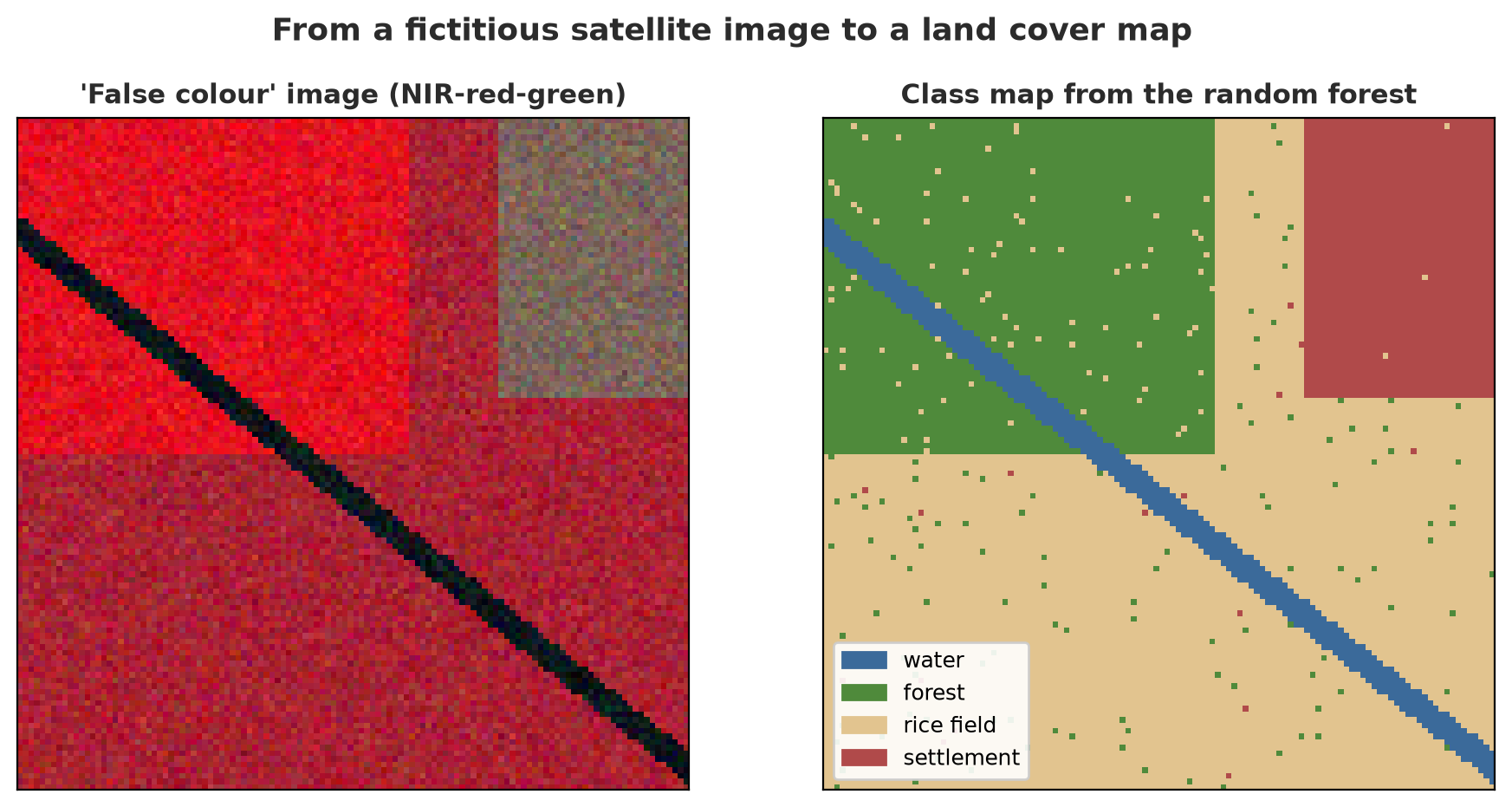
The accuracy is 0.985 against the key map and the area of each class is almost the same as the key (forest 39.4 vs 39.1 ha). The small wrong dots on the map (the “salt and pepper” effect) are a trait of per-pixel classification; in practice, the result is often smoothed with a majority filter or object segmentation. The number is that high because the fictitious classes are very well separated; real imagery is much harder.
TipTIP
For data that does not fit in memory, combine this pipeline with xarray and Dask (Chapters 51 and 53). To fetch Sentinel-2 images directly from a STAC catalog, see Chapter 51.
Google Earth Engine (through the geemap package) provides a satellite archive and cloud computing. The geemap documentation (read 2026-10-10) states that Earth Engine cannot be used until an account registration is approved. For that reason we do not run Earth Engine in this book (it needs an account of your own; we do not create accounts).
Fisheries
Water quality and early warning. Fish in a crowded pond can die within hours if dissolved oxygen (DO) falls. The script uses the daily DO pattern (dropping at night) and two events: the aerator stops, and overfeeding. The early warning compares DO with the normal pattern for the same hour.
07_fish_pond.py
# Chapter 59 - Fish pond: early warning for dissolved oxygen, and a growth curve (fictitious data, example numbers)
import numpy as np
from scipy.optimize import curve_fit

rng = np.random.default_rng(8)

# 1) Dissolved oxygen (DO) sensor every hour for 10 days; the fictitious pond has a daily pattern + two "oxygen shortage" events
hour = np.arange(240)
do = 6.0 + 1.2 * np.sin((hour % 24 - 9) / 24 * 2 * np.pi) + rng.normal(0, 0.15, len(hour))      # mg/L: drops at night
do[130:160] -= np.concatenate([np.linspace(0, 3.2, 10), np.full(14, 3.2), np.linspace(3.2, 0, 6)])   # event 1: aerator failure
do[200:212] -= np.concatenate([np.linspace(0, 2.4, 6), np.full(2, 2.4), np.linspace(2.4, 0, 4)])      # event 2: overfeeding
LIMIT = 4.0                                                  # example warning threshold (mg/L); real thresholds depend on the fish species

low = do < LIMIT
threshold_starts = [int(i) for i in np.where(low & ~np.roll(low, 1))[0]]
print("Measurements:", len(hour), "| hours below threshold", LIMIT, "mg/L:", int(low.sum()))
print("Threshold first crossed at hour:", threshold_starts)

# EARLY warning based on anomalies: compare with the "normal" daily pattern (mean of each hour over the first 5 days, before the events)
normal = do[:120].reshape(5, 24).mean(axis=0)
residual = do - normal[hour % 24]                             # difference from the normal pattern at the same hour of day
anomaly = residual < -1.0                                     # dropped more than 1 mg/L below what is usual for that hour
early_starts = [int(i) for i in np.where(anomaly & ~np.roll(anomaly, 1))[0]]
print("Early warning (anomaly < -1.0 mg/L) starts at hour:", early_starts)
for d in early_starts:
    following = [a for a in threshold_starts if a >= d]
    if following and following[0] - d < 24:
        print(f"  early at hour {d} -> threshold 4.0 crossed at hour {following[0]}: there are {following[0] - d} hours to switch on the aerator")
    else:
        print(f"  early at hour {d} -> threshold 4.0 NOT crossed (lowest DO {do[d:d + 12].min():.1f} mg/L), but already deviating from the normal pattern")

# 2) Growth curve of tilapia weight: from start weight to maximum weight (logistic curve)
age = np.arange(0, 181, 15)                                  # days
true_weight = 800 / (1 + 40 * np.exp(-0.035 * age)) + rng.normal(0, 8, len(age))        # grams (example)


def logistic(t, wmax, k, t0):
    return wmax / (1 + np.exp(-k * (t - t0)))


param, _ = curve_fit(logistic, age, true_weight, p0=[700, 0.03, 100])
print(f"\nFitted logistic curve: maximum weight = {param[0]:.0f} g, rate = {param[1]:.3f}/day, inflection point = day {param[2]:.0f}")
for target in (300, 500):
    day = param[2] - np.log(param[0] / target - 1) / param[1]
    print(f"  weight {target} g reached on day {day:.0f}")
print("  prediction for day 120 :", round(float(logistic(120, *param))), "g")
Measurements: 240 | hours below threshold 4.0 mg/L: 16
Threshold first crossed at hour: [139]
Early warning (anomaly < -1.0 mg/L) starts at hour: [133, 203]
early at hour 133 -> threshold 4.0 crossed at hour 139: there are 6 hours to switch on the aerator
early at hour 203 -> threshold 4.0 NOT crossed (lowest DO 4.4 mg/L), but already deviating from the normal pattern
Fitted logistic curve: maximum weight = 797 g, rate = 0.035/day, inflection point = day 105
weight 300 g reached on day 91
weight 500 g reached on day 120
prediction for day 120 : 499 g- The fixed threshold of 4.0 mg/L is only crossed at hour 139, when the pond is already critical. The anomaly-based early warning sounds at hour 133: 6 hours earlier, enough to switch on the aerator.
- The second event (hour 203): DO only falls to 4.4, never crossing the 4.0 threshold, but it still deviates far from the normal pattern and is flagged. The fixed threshold would miss this event.
- The second part fits a logistic curve to the weight of fictitious tilapia: maximum weight 797 g, inflection point on day 105; a weight of 500 g is reached on day 120. Curves like this are used to schedule harvest and feeding; the numbers are examples.
Other fisheries topics are an overview here: counting and measuring fish from photos or video (the approach is the same as crown detection in Chapter 56, with an underwater camera and the challenges of murky water and overlapping fish), stock estimation from catch data, and satellite sea surface temperature and chlorophyll images to estimate fishing zones. We do not run any of the three.
Livestock
Counting livestock from aerial photos. We use YOLO nano as in Chapter 56, but with a fictitious cattle dataset (ellipses of various colors on pasture, 200 training images and 40 validation images), trained on the GPU.
06_livestock_yolo.py
# Chapter 59 - Counting livestock from fictitious aerial photos with YOLO nano on the GPU
import logging
import os
import shutil

import numpy as np
import torch
from ultralytics import YOLO
from ultralytics.utils import LOGGER

from make_livestock import TMP, make_image, make_dataset

LOGGER.setLevel(logging.ERROR)
data_yaml = make_dataset()
weights = TMP / "bobot"
weights.mkdir(parents=True, exist_ok=True)
os.chdir(weights)                                            # pretrained weights yolo26n.pt (5 MB) are downloaded here if missing
model = YOLO("yolo26n.pt")
runs_dir = TMP / "runs"
shutil.rmtree(runs_dir, ignore_errors=True)
result = model.train(data=str(data_yaml), epochs=25, imgsz=320, batch=16, device=0 if torch.cuda.is_available() else "cpu",
                     workers=0, seed=0, deterministic=True, project=str(runs_dir), name="cattle", exist_ok=True,
                     plots=False, verbose=False, amp=False)
m = result.results_dict
print("Validation: precision", round(m["metrics/precision(B)"], 2), "| recall", round(m["metrics/recall(B)"], 2),
      "| mAP50", round(m["metrics/mAP50(B)"], 2), "| mAP50-95", round(m["metrics/mAP50-95(B)"], 2))

# Counting: 20 new photos (another seed), compare the detected count with the actual count
trained = YOLO(result.save_dir / "weights" / "best.pt")
rng = np.random.default_rng(999)
diffs, true_total, detected_total = [], 0, 0
for _ in range(20):
    image, boxes = make_image(rng)
    r = trained.predict(image, conf=0.25, imgsz=320, device=0 if torch.cuda.is_available() else "cpu", verbose=False)[0]
    diffs.append(len(r.boxes) - len(boxes))
    true_total += len(boxes)
    detected_total += len(r.boxes)
diffs = np.array(diffs)
print(f"\n20 new photos: actual cattle = {true_total}, detected = {detected_total}")
print("Mean absolute error per photo:", round(float(np.abs(diffs).mean()), 2), "head")
print("Photos with the exact count:", int((diffs == 0).sum()), "of 20")

# From count to density: if 1 pixel = 0.1 m, one 320 x 320 pixel photo = 32 x 32 m = 0.1024 ha
area_ha = (320 * 0.1) ** 2 / 10_000
print(f"\nDensity example: {detected_total / 20 / area_ha:.0f} head/ha (mean detected) -- the fictitious pasture is deliberately crowded")
Validation: precision 1.0 | recall 0.99 | mAP50 0.99 | mAP50-95 0.82
20 new photos: actual cattle = 209, detected = 213
Mean absolute error per photo: 0.3 head
Photos with the exact count: 16 of 20
Density example: 104 head/ha (mean detected) -- the fictitious pasture is deliberately crowded- Validation: precision 1.0, recall 0.99, mAP50 0.99, mAP50-95 0.82. mAP50-95 is lower because small cattle (about 20 pixels) make a fitting box hard to get.
- On 20 new photos: 209 actual cattle, 213 detected. The mean absolute error is 0.3 head per photo; 16 of 20 photos are exact. For counting livestock, the count error (bias) matters more than mAP.
- The density of 104 head/ha only shows how to turn a count into a density (1 pixel = 0.1 m); the fictitious pasture is deliberately crowded.
Weight and growth. The Gompertz curve is a classic model of animal growth. In addition, weight can be estimated from the silhouette area in an aerial photo (area is proportional to length squared, weight to length cubed, so weight is proportional to area to the power 1.5).
08_livestock_weight.py
# Chapter 59 - Livestock weight: Gompertz growth curve, and estimating weight from silhouette area in photos (fictitious data)
import numpy as np
from scipy.optimize import curve_fit
from sklearn.linear_model import LinearRegression
from sklearn.model_selection import cross_val_score

rng = np.random.default_rng(4)

# 1) Gompertz curve for cattle: weight = A * exp(-B * exp(-k * age_months))
age = np.arange(0, 37, 3)
weight = 520 * np.exp(-3.2 * np.exp(-0.11 * age)) + rng.normal(0, 5, len(age))             # kg (example)


def gompertz(t, A, B, k):
    return A * np.exp(-B * np.exp(-k * t))


param, _ = curve_fit(gompertz, age, weight, p0=[500, 3, 0.1])
print(f"Gompertz: adult weight A = {param[0]:.0f} kg, B = {param[1]:.2f}, k = {param[2]:.3f}/month")
for u in (12, 24):
    print(f"  age {u} months: {gompertz(u, *param):.0f} kg")
print("  mean daily gain months 12-24:", round(float((gompertz(24, *param) - gompertz(12, *param)) / 365 / 1), 2), "kg/day  (difference per 12 months divided by 365)")

# 2) Weight from images: silhouette area (pixels) from fixed-scale aerial photos. Model: weight ~ area^1.5 (volume ~ length^3, area ~ length^2)
n = 80
area_px = rng.uniform(900, 2200, n)
true_weight = 0.0045 * area_px ** 1.5 + rng.normal(0, 18, n)                                # kg (example)
X = np.log(area_px).reshape(-1, 1)
y = np.log(true_weight)
model = LinearRegression().fit(X, y)
r2 = cross_val_score(LinearRegression(), X, y, cv=5, scoring="r2").mean()
print(f"\nLog-log regression weight ~ area^b: exponent b = {model.coef_[0]:.2f} (theory: 1.5) | cross-validated R2 = {r2:.2f}")
new = np.array([[np.log(1500)]])
print("Estimated weight of a cow with a 1,500-pixel silhouette:", round(float(np.exp(model.predict(new))[0])), "kg")
print("Note: real photos need correction for camera angle and flight height, and a scale for calibration.")
Gompertz: adult weight A = 529 kg, B = 3.12, k = 0.105/month
age 12 months: 220 kg
age 24 months: 413 kg
mean daily gain months 12-24: 0.53 kg/day (difference per 12 months divided by 365)
Log-log regression weight ~ area^b: exponent b = 1.48 (theory: 1.5) | cross-validated R2 = 0.94
Estimated weight of a cow with a 1,500-pixel silhouette: 264 kg
Note: real photos need correction for camera angle and flight height, and a scale for calibration.- The Gompertz curve gives an adult weight of 529 kg, 220 kg at age 12 months and 413 kg at 24 months; a mean gain of 0.53 kg/day in the second year (example numbers).
- The log-log regression gets an exponent of 1.48, close to the theoretical 1.5, a cross-validated R² of 0.94; a 1,500-pixel silhouette is estimated at 264 kg. With real photos you need correction for camera angle and flight height, and calibration with a scale.
Feed rations (optimizing cost vs growth) were already covered with NSGA-II in Chapter 57. Monitoring livestock behavior and health through sensors or cameras, and mapping grazing land with vegetation indices, are an overview; there is no code in this book.
Other natural resources: a roadmap
| Field | Common approach | Status in this book |
|---|---|---|
| Land cover/land use classification | Random forest or CNN on multi-band images | Run (Chapter 54 and this chapter) |
| Species distribution | Models linking species presence points to environmental variables (e.g. MaxEnt, random forest) | Overview, not run |
| Hydrology (watersheds, discharge, floods) | Rainfall-runoff models and discharge prediction from time series; DEM analysis for watersheds | Overview, not run |
| Water quality | Regression from image indices and sensor data; anomaly detection (like DO above) | Anomalies run on the pond; the rest is overview |
| Mining | Land change monitoring with change detection (like deforestation above) | Overview |
| Climate change | Long time series analysis and scenarios; xarray for climate data | Overview (data tools in Chapters 51 and 53) |
This list is not a claim of completeness. For the sectors marked as an overview, there is no code, number, or library that we verified.
Running Project A3: an integrated report per block
To close, the following script combines the pieces of this series into a one-table report for four blocks: a fictitious LiDAR point cloud per block gives the number of trees, height, biomass, and carbon; the example yield equation (from script 03) gives an estimated rice yield.
10_closing_project.py
# Chapter 59 - Series A3 closing project: integrated report per block (trees, biomass, carbon, estimated yield), fictitious data
import numpy as np
import pandas as pd

from nature_tools import agb_chave_kg, make_lidar, compute_chm, tree_tops

rng = np.random.default_rng(2)
rows = []
for block, (n_trees, peak_ndvi, rain) in zip("ABCD", [(70, 0.82, 1000), (55, 0.76, 950), (35, 0.70, 900), (62, 0.80, 1020)]):
    x, y, z, cls, _ = make_lidar(seed=100 + ord(block), n_trees=n_trees)
    chm = compute_chm(x, y, z, cls)
    _, _, h = tree_tops(chm)
    d = 1.6 * h ** 1.05                                              # EXAMPLE height-diameter relation (Chapter 59, script 02)
    agb_ton = agb_chave_kg(d, h, 0.6).sum() / 1000
    yield_kg = 2500 + 6200 * (peak_ndvi - 0.5) + 2.2 * (rain - 900)  # EXAMPLE equation from script 03 (kg/ha)
    rows.append({"block": block, "trees_detected": len(h), "mean_height_m": round(float(h.mean()), 1),
                 "biomass_ton_ha": round(float(agb_ton), 1), "carbon_tC_ha": round(float(agb_ton * 0.47), 1),
                 "rice_yield_kg_ha": round(float(yield_kg))})
table = pd.DataFrame(rows).set_index("block")
print(table.to_string())
print("\nTotal carbon of 4 ha (1 ha blocks each):", round(float(table["carbon_tC_ha"].sum()), 1), "tC")
print("Block with the highest biomass:", table["biomass_ton_ha"].idxmax(), "| lowest:", table["biomass_ton_ha"].idxmin())
trees_detected mean_height_m biomass_ton_ha carbon_tC_ha rice_yield_kg_ha
block
A 57 20.9 66.4 31.2 4704
B 51 21.8 65.4 30.8 4222
C 33 21.3 39.3 18.5 3740
D 52 21.0 61.2 28.7 4624
Total carbon of 4 ha (1 ha blocks each): 109.2 tC
Block with the highest biomass: A | lowest: CBlock A is the richest in biomass (66.4 tons/ha, 31.2 tC/ha), block C the poorest (39.3 tons/ha; only 33 trees detected). The total carbon of the four blocks is 109.2 tC. A table like this is easy to turn into a report, a dashboard, or a map layer.
Exercises
- In
01_lidar_chm.py, changemin_heightintree_topsto 8 m. How many trees are found? Which trees disappear? - In
02_biomass_carbon.py, replace the wood density of 0.6 with 0.4 and 0.8. By what percent does biomass change? (Hint: look at the exponent 0.976.) - In
04_deforestation.py, change the threshold-0.25to-0.10and-0.40. How do precision and recall shift? - Challenge: in
05_land_cover_raster_map.py, add a 3 x 3 majority filter (scipy.ndimage.generic_filterormodal) to the result map and recompute the accuracy. Do the “salt and pepper” dots disappear?
Chapter Summary
- LiDAR: DSM, DTM, CHM = tree height; local peaks on the CHM = trees; suppressed trees are hard to find.
- Biomass and carbon: allometric equation (Chave et al. 2014 read from a secondary source), very sensitive to height error (±10% becomes -27% to +33%).
- Change in NDVI between two dates flags deforestation; an NDVI time series predicts yield, and a simple model that matches the nature of the data can beat a complex one.
- The image to map pipeline: GeoTIFF in, features, random forest, GeoTIFF out, area per class.
- Fisheries: anomaly early warning beats a fixed threshold; livestock: YOLO counts animals, Gompertz and silhouette area estimate weight.
- Many other topics are an overview or not run, and this book says so.
Closing Series A3
Congratulations! You have finished Series A3. In six chapters, you can now:
- train tree-based models and assess them with spatial cross-validation (Chapter 54);
- use PyTorch and the GPU, estimate VRAM, and train a CNN (Chapter 55);
- detect and count objects from aerial photos with YOLO, and measure them with IoU and mAP (Chapter 56);
- choose the best trade-off with NSGA-II and NSGA-III (Chapter 57);
- explain, log, monitor, and document models responsibly (Chapter 58);
- apply it all to forests, farms, ponds, and barns (this chapter).
Models can already predict. Series A4 builds AI you can talk to and that can take action.
Next, in Chapter 60: we enter Series A4 with large language model (LLM) applications through APIs, RAG, embeddings and vector databases, evaluation, cost, and MLOps for LLMs.