Chapter 8 — Loops: Telling a Program to Do the Same Thing Many Times
Series B2 — Python Language Foundations
All scripts for this chapter are in the kode/ch08/ folder. On the web version, you can also download them all at once (zip).
Imagine checking 40 fish ponds. Writing print 40 times is obviously tiring, and if the number of ponds grows to 41, you must edit the code again. This is where loops save you. It is the third ingredient from Chapter 2.
for: for every item in a list
01_for_basic.py
# Chapter 8 - for: repeat for every item in a list
pond_list = ["A", "B", "C"]

for pond in pond_list:
    print(f"Checking Pond {pond}")

print("All ponds have been checked")
Checking Pond A
Checking Pond B
Checking Pond C
All ponds have been checkedRead it like a sentence: “for every pond in pond_list, do the indented part.” On the first round pond holds "A", on the second "B", and so on. The last line is not indented, so it is carried out only once, after all the rounds are finished.
The indentation rule from Chapter 7 applies here too: the indented lines are the body of the loop that gets repeated; a line that isn’t indented is carried out after the loop ends.
range: a run of numbers
If you don’t have a list but want to repeat a certain number of times, use range():
02_range.py
# Chapter 8 - range(): making a run of numbers
for day in range(1, 6):           # 1, 2, 3, 4, 5 (the number 6 is not included)
    print(f"Day {day}")

print(list(range(5)))             # starts from 0
print(list(range(0, 10, 3)))      # jumps by 3
Day 1
Day 2
Day 3
Day 4
Day 5
[0, 1, 2, 3, 4]
[0, 3, 6, 9]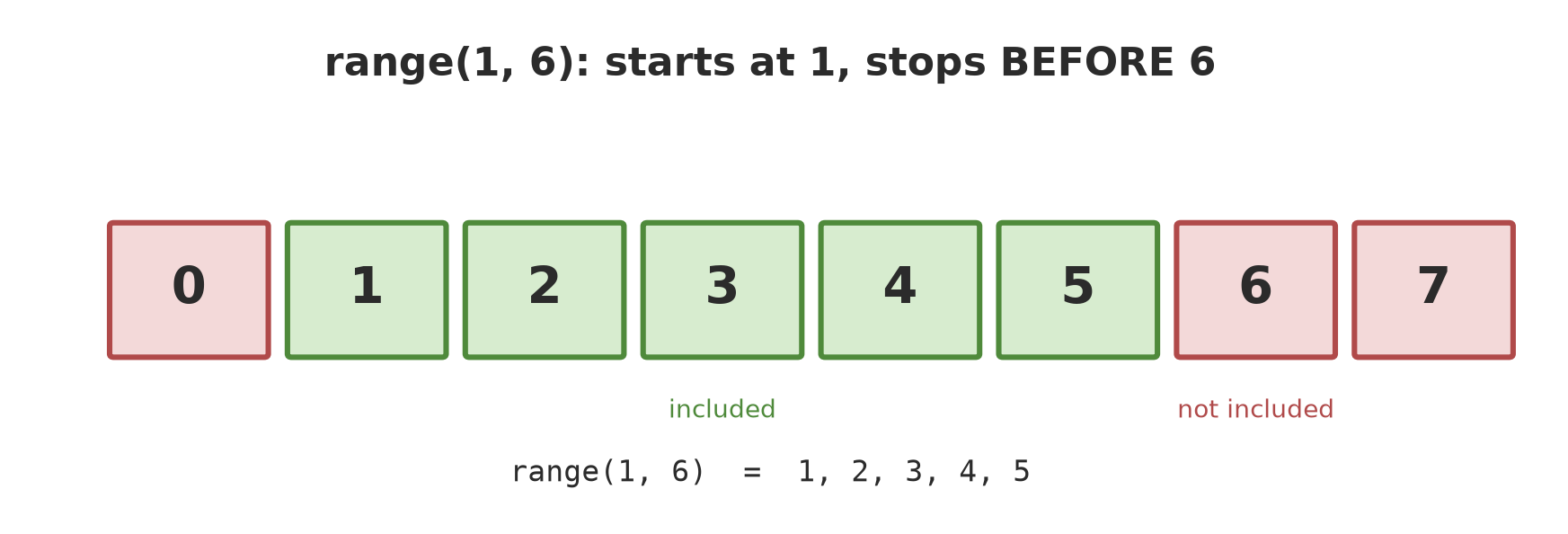
range(1, 6) stops before 6, so it gives 1, 2, 3, 4, 5.range(5)gives 0, 1, 2, 3, 4: it starts from 0 and stops before 5.range(1, 6)gives 1 to 5: the end number is not included.range(0, 10, 3)jumps by 3 each time.list(...)turns that run into a list so it can be printed.
The end number in range() is not included. This is a classic trap: range(1, 6) only reaches 5, not 6. If you need up to 6, write range(1, 7).
The accumulator pattern: adding up with a loop
One of the most useful patterns: prepare a starting variable of 0, then add the list items one by one.
03_summing.py
# Chapter 8 - Adding up with a loop (the "accumulator" pattern)
daily_harvest_kg = [120.5, 98.25, 143.0]

total_kg = 0
for harvest in daily_harvest_kg:
    total_kg = total_kg + harvest

day_count = len(daily_harvest_kg)      # len() = how many items in the list
print(f"Total harvest: {total_kg} kg in {day_count} days")
print(f"Average: {total_kg / day_count:.2f} kg per day")
Total harvest: 361.75 kg in 3 days
Average: 120.58 kg per dayTrace total_kg: it starts at 0, becomes 120.5, then 218.75, then 361.75. len(list) gives how many items are in the list, here 3.
Python actually has sum(daily_harvest_kg) which adds everything in one step (Chapter 9). But the accumulator pattern with a loop is important to understand, because the same skeleton is used to count, find the largest, and filter data.
while: repeat while the condition is true
for suits situations where you know how many times or have the list. while suits situations where you only know when to stop. Remember the feeding flowchart from Chapter 2? Here is its program version:
04_while.py
# Chapter 8 - while: repeat as long as the condition stays true
# (follows the feeding flowchart from Chapter 2)
feed_g = 2000
print(f"First scatter: {feed_g} g")

while feed_g < 2400:                   # the fish are still scrambling
    feed_g = feed_g + 200
    print(f"Add 200 g, total {feed_g} g")

print("The fish have calmed down, done")
First scatter: 2000 g
Add 200 g, total 2200 g
Add 200 g, total 2400 g
The fish have calmed down, doneFirst round: 2000 < 2400, so add 200 to make 2200. Second round: 2200 < 2400, add again to make 2400. Now 2400 < 2400 is false, and the loop stops.
An endless loop. If you forget to change the variable being checked (for example the line feed_g = feed_g + 200 is missing), the condition never becomes false and the program spins forever. Don’t panic: press Ctrl + C in the terminal (Chapter 3) to cancel it.
break and continue
Two helper words to control the rounds:
continue: skip the rest of this round, go straight to the next.break: stop completely, leave the loop.
05_break_continue.py
# Chapter 8 - continue (skip) and break (stop)
scale_readings_g = [480, 0, 510, 530]

for weight in scale_readings_g:
    if weight == 0:
        print("Scale error, skipped")
        continue
    print(f"Weighing {weight} g")
    if weight >= 500:
        print("Found a fish ready to harvest, stopping")
        break
Weighing 480 g
Scale error, skipped
Weighing 510 g
Found a fish ready to harvest, stoppingThe scale reads 0 (an error), so continue skips it. As soon as it finds the 510 g fish that meets the condition, break stops the loop: the number 530 is never checked.
A loop inside a loop
06_nested_loops.py
# Chapter 8 - A loop inside a loop
for block in ["A", "B"]:
    for row in range(1, 3):
        print(f"Block {block}, row {row}")
Block A, row 1
Block A, row 2
Block B, row 1
Block B, row 2For every block, the inner loop runs in full. This pattern is useful for table-shaped data: blocks and rows, ponds and days, plots and months.
A trap: range doesn’t accept decimals
07_range_decimal_wrong.py
# Chapter 8 - A mistake: range() accepts only whole numbers
for i in range(2.5):
    print(i)
Traceback (most recent call last):
File "07_range_decimal_wrong.py", line 2, in <module>
for i in range(2.5):
~~~~~^^^^^
TypeError: 'float' object cannot be interpreted as an integerTypeError means the data type doesn’t fit: range() accepts only whole numbers. If you need decimal steps, use while.
Running Project B2: plantation harvest summary
Now we combine loops, the accumulator, and decisions (Chapter 7) to summarise the harvest of four plantation blocks:
08_harvest_summary.py
# Chapter 8 - Running project B2: plantation harvest summary per block
block_names = ["A", "B", "C", "D"]
harvest_kg = [245.5, 310.0, 198.5, 276.0]

total_kg = 0
best_block = block_names[0]
best_harvest = harvest_kg[0]

for i in range(len(block_names)):
    print(f"Block {block_names[i]}: {harvest_kg[i]} kg")
    total_kg = total_kg + harvest_kg[i]
    if harvest_kg[i] > best_harvest:
        best_harvest = harvest_kg[i]
        best_block = block_names[i]

print(f"Total: {total_kg} kg")
print(f"Average: {total_kg / len(block_names)} kg per block")
print(f"Best block: {best_block} ({best_harvest} kg)")
Block A: 245.5 kg
Block B: 310.0 kg
Block C: 198.5 kg
Block D: 276.0 kg
Total: 1030.0 kg
Average: 257.5 kg per block
Best block: B (310.0 kg)Three things happen in one loop: printing each block, adding to total_kg, and updating the “champion” through an if. After the loop ends, the program prints the total, the average (1030.0 ÷ 4 = 257.5), and the best block.
Exercises
- Print the 7 times table (7 × 1 up to 7 × 10) with
forandrange(). - Given the cow weights
[350, 412.5, 389.0, 401.5], calculate the total and the average with the accumulator pattern. - Change
04_while.pyso it adds 150 g each round, starting from 1800 g, stopping when it reaches or passes 2400 g. How many times does it add, and what is the final total? - Challenge: from the list
[480, 0, 510, 530, 0, 495], count the valid readings (not 0) and the average of the valid weights, usingcontinue.
Chapter Summary
for x in list:repeats for every item;range(a, b)makes a run of numbers and stops beforeb.while condition:repeats while the condition is true; make sure something eventually turns it false.continueskips one round;breakstops the whole loop.- Accumulator pattern: start from 0, then add inside the loop.
- The indented lines are the body of the loop.
- Stuck in an endless loop? Ctrl + C.
Next, in Chapter 9: we have been using lists [...] without much explanation. Now we meet the whole family: list, tuple, dict, and set, containers for tree, fish, and livestock data.