%%{init: {"flowchart": {"diagramPadding": 40}}}%%
flowchart TD
A["20 stations"] --> B["Semaphore: at most 10 at once"]
B --> C["fetch() with @retry (3 times)"]
C -- "success" --> D["Weather data (JSON)"]
C -- "failed 3 times" --> E["None (reported as failed)"]
D --> F["gather: results in order"]
E --> F
Chapter 35 — Async and Concurrency: Doing Many Things at Once
Series I4 — Advanced Python Language
All scripts for this chapter are in the kode/ch35/ folder. On the web version, you can also download them all at once (zip).
Imagine you fetch rainfall data from 20 stations. Each network request needs waiting time, say half a second. Done one by one: 20 x 0.5 = 10 seconds, and almost all of it is spent waiting. Like a farmer watering 20 plots with one hose, waiting for the water to reach each plot before moving to the next. Yet while waiting, his hands could be tending another plot.
That is the heart of this chapter: arranging things so that waiting time is not wasted.
Two kinds of jobs
| Kind | Examples | What holds it back |
|---|---|---|
| I/O-bound (mostly waiting) | download data, read a disk, ask a database | waiting for network or disk |
| CPU-bound (mostly calculating) | simulations, heavy number crunching | processor speed |
The choice of tool depends on this kind. The three main tools:
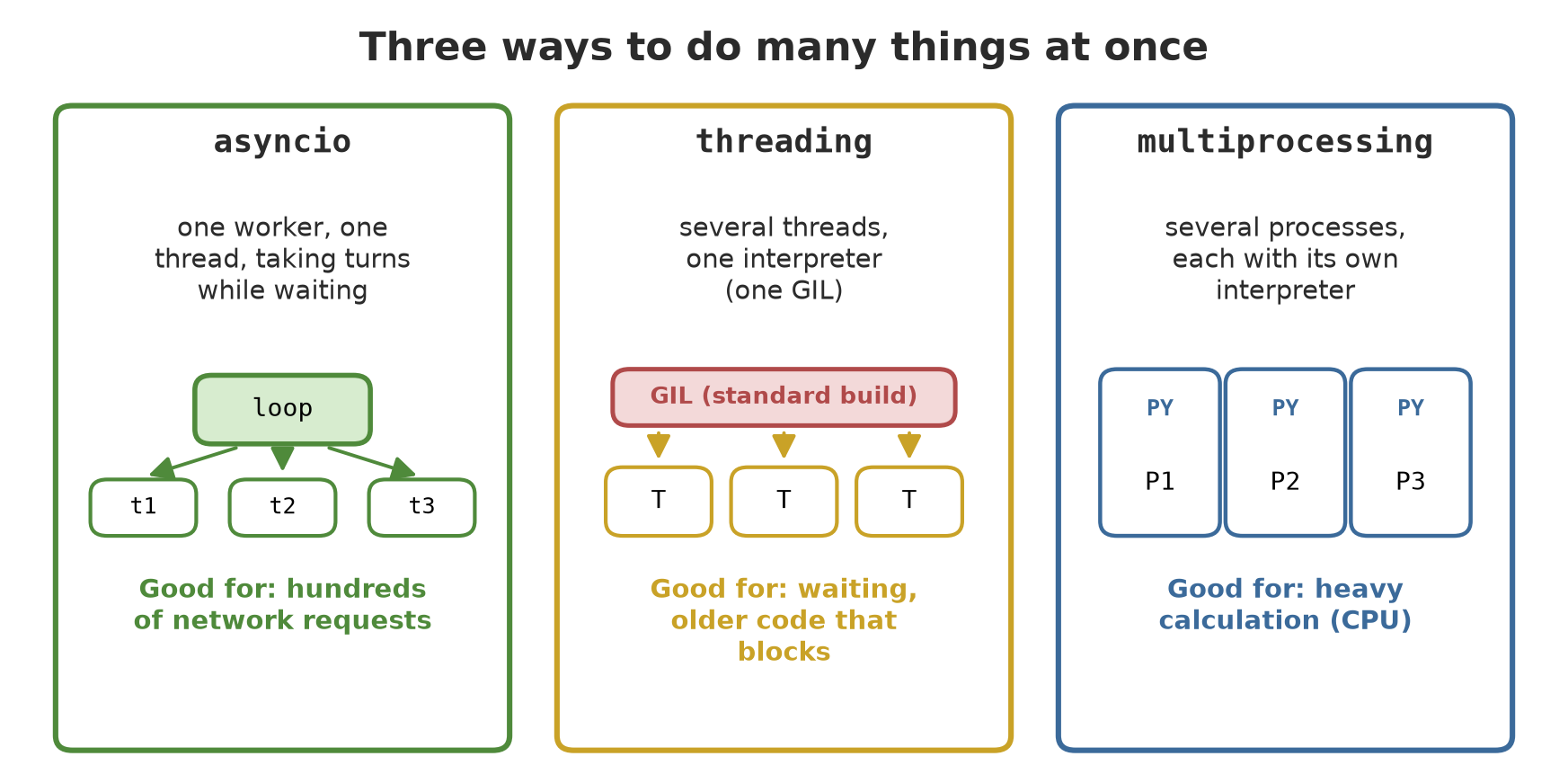
asyncio: one worker who is good at taking turns
An ordinary function runs from start to finish. An async def function (called a coroutine) can pause at an await point and hand the turn to other jobs that are waiting. One worker (one thread, called the event loop) manages the turns.
01_coroutine_basics.py
# Chapter 35 - Async basics: coroutine, await, and asyncio.run
import asyncio


async def measure_ph(pond):
    await asyncio.sleep(0.01)         # waits without blocking other work
    return f"pond {pond} pH = 7.2"


# Calling an async function does NOT run it: it only creates a coroutine object
obj = measure_ph("A")
print(type(obj).__name__)
obj.close()                            # thrown away without running


async def main():
    result = await measure_ph("A")    # await: run it and wait for the result
    print(result)


asyncio.run(main())                    # entry point: starts the event loop
coroutine
pond A pH = 7.2- Calling
measure_ph("A")does not run it; it only creates an object of typecoroutine. (In the script, that object is closed straight away withclose().) Forgettingawaitis a very common beginner mistake, and usually produces only a warning. await measure_ph("A")runs it and waits for the result.asyncio.run(main())is the entry point that switches on the event loop. It is usually called once, at the outermost part of the program.asyncio.sleep(0.01)is a non-blocking wait. Compare with ordinarytime.sleep(), which freezes the whole program.
gather: many waiting jobs together
02_gather_concurrent.py
# Chapter 35 - Many waiting jobs at once with gather
import asyncio

finished = []


async def download(name, seconds):
    await asyncio.sleep(seconds)
    finished.append(name)
    return name, seconds


async def one_after_another():
    for name, seconds in [("S1", 0.06), ("S2", 0.02), ("S3", 0.04)]:
        await download(name, seconds)


async def all_together():
    return await asyncio.gather(download("S1", 0.06), download("S2", 0.02), download("S3", 0.04))


async def main():
    loop = asyncio.get_running_loop()
    t0 = loop.time()
    await one_after_another()
    sequential_time = loop.time() - t0
    print("finishing order (one after another):", finished)

    finished.clear()
    t0 = loop.time()
    results = await all_together()
    concurrent_time = loop.time() - t0
    print("finishing order (together):", finished)
    print("gather results follow the written order:", [n for n, _ in results])
    print("together is faster than 70% of the sequential time:", concurrent_time < 0.7 * sequential_time)


asyncio.run(main())
finishing order (one after another): ['S1', 'S2', 'S3']
finishing order (together): ['S2', 'S3', 'S1']
gather results follow the written order: ['S1', 'S2', 'S3']
together is faster than 70% of the sequential time: TrueThree fake downloads with waiting times of 0.06, 0.02, and 0.04 seconds:
- One after another: finishing in the order they were run: S1, S2, S3.
- Together (
gather): finishing in order of waiting time: S2 (0.02), S3 (0.04), then S1 (0.06). The short one does not have to wait for the long one. - The order of results from
gatherstill follows the written order (S1, S2, S3), whatever the finishing order. This is documented and convenient: result number n always belongs to job number n. - The script does not print raw times (they change on every run), only a comparison: the concurrent time is under 70% of the sequential time (
True). The sequential total is about 0.12 seconds, the concurrent about 0.06 seconds.
TaskGroup, time limits, and a concurrency cap
03_taskgroup_timeout.py
# Chapter 35 - TaskGroup, time limits, and a cap on concurrency (Semaphore)
import asyncio

active = 0
peak = 0


async def work(number, semaphore):
    global active, peak
    async with semaphore:              # at most 2 inside at the same time
        active += 1
        peak = max(peak, active)
        await asyncio.sleep(0.02)
        active -= 1
    return number * 10


async def slow():
    await asyncio.sleep(1)


async def main():
    semaphore = asyncio.Semaphore(2)
    async with asyncio.TaskGroup() as group:
        tasks = [group.create_task(work(i, semaphore)) for i in range(1, 7)]
    print("results:", [t.result() for t in tasks])
    print("most running at the same time:", peak)

    try:
        async with asyncio.timeout(0.05):
            await slow()
    except TimeoutError:
        print("cancelled: time limit exceeded")


asyncio.run(main())
results: [10, 20, 30, 40, 50, 60]
most running at the same time: 2
cancelled: time limit exceededasyncio.TaskGroup(Python 3.11+) starts a group of tasks and waits for all of them when theasync withblock ends. If one task fails, the others are cancelled: safer than a baregather.asyncio.Semaphore(2)lets only two tasks into its inside at once. The proof: of six tasks, the highestpeakrunning together is 2. This matters so a server is not flooded with hundreds of requests at once.asyncio.timeout(0.05)(Python 3.11+) cancels work that exceeds the limit, then raisesTimeoutError. The jobslow(), which needs 1 second, is stopped after 0.05 seconds.
TipTIP
Always give network jobs a time limit (timeout) and a count limit (Semaphore). An outside server may be slow or stuck, and sending 1,000 requests at once can look like an attack.
Threads: for waiting jobs in ordinary code
What if your function is not async (for example an older library that blocks)? Use threads: several lines of work inside one program. The easiest way: ThreadPoolExecutor.
04_threading_io.py
# Chapter 35 - Threads for waiting jobs (I/O) with the standard library
import threading
import time
from concurrent.futures import ThreadPoolExecutor


def read_sensor(name):
    time.sleep(0.05)                   # pretends to wait for network or disk
    return name, len(name) * 1.5


with ThreadPoolExecutor(max_workers=4) as pool:
    results = list(pool.map(read_sensor, ["temp", "ph", "oxygen", "murk"]))
print(results)                         # map keeps the input order

# Data shared between threads must be protected by a Lock
total = 0
lock = threading.Lock()


def add_many():
    global total
    for _ in range(100_000):
        with lock:
            total += 1


threads = [threading.Thread(target=add_many) for _ in range(4)]
for t in threads:
    t.start()
for t in threads:
    t.join()
print("total with Lock:", total)
[('temp', 6.0), ('ph', 3.0), ('oxygen', 9.0), ('murk', 6.0)]
total with Lock: 400000pool.map(...)runsread_sensoron four threads and keeps the result order the same as the input:temp,ph,oxygen,murk. That makes the output stable.- In the lower part, four threads add to
totaltogether. Without protection, two threads can read the old value at the same time and one of the additions is lost (a race condition). With aLock, only one thread enters at a time: the total is exactly 400,000 (4 x 100,000). - To run an ordinary blocking function from inside
asynccode, there isasyncio.to_thread(...)(documented since Python 3.9).
Processes: for calculating jobs
05_multiprocessing_cpu.py
# Chapter 35 - Separate processes for calculating jobs (CPU)
from concurrent.futures import ProcessPoolExecutor


def heavy_sum(n):
    """Pure CPU work: sum of squares 1..n."""
    return sum(i * i for i in range(1, n + 1))


if __name__ == "__main__":             # REQUIRED on Windows: every child process imports this file
    jobs = [200_000, 300_000, 400_000, 500_000]
    with ProcessPoolExecutor(max_workers=4) as pool:
        results = list(pool.map(heavy_sum, jobs))
    for n, r in zip(jobs, results):
        print(n, r)
200000 2666686666700000
300000 9000045000050000
400000 21333413333400000
500000 41666791666750000ProcessPoolExecutor runs the function in separate processes: each process is its own Python program with its own memory. Results are sent back to the main program, and map keeps their order (200,000, 300,000, 400,000, 500,000).
WarningWARNING
On Windows, code that creates new processes must sit under if __name__ == "__main__":. The reason: Windows starts child processes with the spawn method, which launches a fresh interpreter that imports your file from the top. Without that guard, every child process would repeat the process-creating code and raise a RuntimeError. The multiprocessing documentation names spawn as the default method on Windows and macOS, and recommends this guard (“safe importing of main module”). The scripts in this chapter always use it when creating processes. Because functions and data are sent between processes, both must be picklable (serialisable); functions must be defined at the top level of a module, not as lambdas (the author tried a lambda and got a PicklingError).
The GIL: why threads do not always speed things up
Standard Python has a GIL (Global Interpreter Lock), a lock that makes sure only one thread runs Python code at a time within one process. As a result, threads do not speed up CPU work; threads are useful for waiting jobs because while one thread waits, others can run. Let us prove it on this computer:
06_gil_and_cpu.py
# Chapter 35 - GIL: threads do not speed up CPU work (standard build), processes do
import sys
import time
from concurrent.futures import ProcessPoolExecutor, ThreadPoolExecutor


def heavy_sum(n):
    return sum(i * i for i in range(n))


def measure(function):
    t0 = time.perf_counter()
    function()
    return time.perf_counter() - t0


if __name__ == "__main__":
    print("GIL enabled in this Python:", sys._is_gil_enabled())
    load = [5_000_000] * 4

    sequential = measure(lambda: [heavy_sum(n) for n in load])
    with ThreadPoolExecutor(max_workers=4) as pool:
        threaded = measure(lambda: list(pool.map(heavy_sum, load)))
    with ProcessPoolExecutor(max_workers=4) as pool:
        processes = measure(lambda: list(pool.map(heavy_sum, load)))

    print("4 threads speed it up by more than 1.5x:", sequential / threaded > 1.5)
    print("4 processes speed it up by more than 1.3x:", sequential / processes > 1.3)
GIL enabled in this Python: True
4 threads speed it up by more than 1.5x: False
4 processes speed it up by more than 1.3x: Truesys._is_gil_enabled()reports whether the GIL is active in the Python running the script:True.- Four threads do not speed up heavy calculation by more than 1.5 times (
False): the lock makes them take turns. - Four processes speed it up by more than 1.3 times (
True), because each process has its own interpreter and GIL, so they truly run in parallel. - As before, the script prints only comparisons, not seconds. These
True/Falseresults were checked repeatedly on the author’s computer; on yours the exact numbers will differ (for example with fewer processor cores), so the 1.3 threshold may not be reached on a computer with few cores.
The free-threaded mode
Since Python 3.13 there is an optional free-threaded build with the GIL switched off, so threads can run in parallel on many cores. According to the documentation, Python 3.14 declares official support for this mode (the PEP 779 reference in “What’s New”), but it is not the default: it must be chosen when installing or built separately, and not all C libraries are ready for it. How to check: sys._is_gil_enabled() and sysconfig.get_config_var("Py_GIL_DISABLED"). On the author’s computer only the standard build (GIL active) was tested; a free-threaded build was not tested in this chapter.
NoteREMEMBER
A guide to choosing:
| Your problem | Choice | Reason |
|---|---|---|
Hundreds of network requests, library supports async |
asyncio | light, one thread, easy to limit |
| Waiting, but an older library blocks | threads (ThreadPoolExecutor) |
no need to rewrite as async |
| Pure heavy calculation (CPU) | processes (ProcessPoolExecutor) |
gets around the GIL with many interpreters |
| Only a few simple jobs | none of these | ordinary code is easier to maintain |
Running Project I4: downloading lots of weather data with async
The peak of the Series I4 project: fetching data from 20 weather/price stations at once. To keep it safe and stable, the server is fake: built on this computer itself with aiohttp, at the local address 127.0.0.1 on a port chosen by the system. No internet is used. The server imitates a slow network (0.02 seconds) and outages: station S07 fails once (status 503), S13 fails three times.
07_project_async_download.py
# Chapter 35 - Running project I4: downloading many weather records from a FAKE local server
import asyncio
import logging
import sys
from functools import wraps

import aiohttp
from aiohttp import web

logging.basicConfig(stream=sys.stdout, level=logging.WARNING, format="%(levelname)s %(message)s")
log = logging.getLogger("download")

outages = {"S07": 1, "S13": 3}           # fake stations that fail a few times


# ---------- fake server (only on this computer, no internet) ----------
async def serve_data(request):
    station = request.match_info["station"]
    await asyncio.sleep(0.02)             # pretends the network is slow
    if outages.get(station, 0) > 0:
        outages[station] -= 1
        return web.Response(status=503, text="busy")
    number = int(station[1:])
    return web.json_response({"station": station, "rainfall_mm": number * 1.5,
                              "rice_price": 6000 + number * 10})


# ---------- async client with retries (the Chapter 31 decorator, async version) ----------
def retry(maximum=3):
    def decorator(function):
        @wraps(function)
        async def wrapper(session, address, station):
            for attempt in range(1, maximum + 1):
                try:
                    return await function(session, address, station)
                except aiohttp.ClientResponseError as e:
                    log.warning("%s attempt %d: status %d", station, attempt, e.status)
                    if attempt == maximum:
                        raise
                    await asyncio.sleep(0.01)
        return wrapper
    return decorator


@retry(maximum=3)
async def fetch(session, address, station):
    async with session.get(f"{address}/data/{station}") as response:
        response.raise_for_status()
        return await response.json()


async def fetch_all(session, address, stations, limit):
    semaphore = asyncio.Semaphore(limit)

    async def one(station):
        async with semaphore:
            try:
                return await fetch(session, address, station)
            except aiohttp.ClientResponseError:
                return None

    return await asyncio.gather(*(one(s) for s in stations))


async def main():
    app = web.Application()
    app.add_routes([web.get("/data/{station}", serve_data)])
    runner = web.AppRunner(app)
    await runner.setup()
    site = web.TCPSite(runner, "127.0.0.1", 0)        # port 0: the system picks a free port
    await site.start()
    port = site._server.sockets[0].getsockname()[1]
    address = f"http://127.0.0.1:{port}"

    stations = [f"S{n:02d}" for n in range(1, 21)]
    async with aiohttp.ClientSession() as session:
        loop = asyncio.get_running_loop()
        t0 = loop.time()
        results = await fetch_all(session, address, stations, limit=10)
        elapsed = loop.time() - t0

    await runner.cleanup()
    succeeded = [r for r in results if r]
    failed = [s for s, r in zip(stations, results) if r is None]
    print("stations requested:", len(stations), "| succeeded:", len(succeeded), "| failed:", failed)
    average = sum(r["rainfall_mm"] for r in succeeded) / len(succeeded)
    print("average rainfall (mm):", round(average, 2))
    print("highest rice price at station:", max(succeeded, key=lambda r: r["rice_price"])["station"])
    print("faster than one by one (20 x 0.02 s = 0.4 s):", elapsed < 0.3)


if __name__ == "__main__":
    asyncio.run(main())
WARNING S07 attempt 1: status 503
WARNING S13 attempt 1: status 503
WARNING S13 attempt 2: status 503
WARNING S13 attempt 3: status 503
stations requested: 20 | succeeded: 19 | failed: ['S13']
average rainfall (mm): 15.55
highest rice price at station: S20
faster than one by one (20 x 0.02 s = 0.4 s): TrueFollow the result:
- The
retrydecorator from Chapter 31 is used again, now in itsasyncversion (withawait asyncio.sleepfor the pause). This ties Chapters 31 and 35 together. - The warning log shows: S07 failed on attempt 1 and succeeded on attempt 2 (no second warning), while S13 failed on attempts 1, 2, and 3, so it gave up and its result is
None. - The summary: 20 requested, 19 succeeded, failed:
['S13']. Average rainfall is computed only from the successful ones: 15.55 mm (fake numbers: station number n returns n x 1.5). The highest rice price is at station S20. - With
Semaphore(10), twenty requests finish far faster than one by one (20 x 0.02 = 0.4 seconds): the comparison isTrue. The script prints no seconds. - The server and the client run in the same event loop, so the whole experiment fits in one script.
- The server is shut down neatly with
runner.cleanup(); the client session is closed byasync with, an asynchronous context manager (the async relative of Chapter 32).
WarningWARNING
This is a simulation. With a real API, follow the provider’s rate limits and usage rules, and do not hit it with hundreds of requests without permission. The examples in this book contact no outside service.
Exercises
- Change
02_gather_concurrent.py: add a fourth station with a waiting time of 0.01 seconds. Predict the concurrent finishing order first, then run it and compare. - Change
Semaphore(2)in03_taskgroup_timeout.pyto 3. Whatpeakis printed now? Why? - Change
limit=10in07_project_async_download.pytolimit=1. The summary results (succeeded and failed) stay the same; only the last line (the speed comparison) changes. Why? - Challenge: add a third broken station,
S18, tooutageswith value 5 (fails five times), run again, and recompute the average rainfall by hand to check that it matches the output.
Chapter Summary
- Tell waiting (I/O) and calculating (CPU) jobs apart; the choice of tool depends on it.
asyncio:async def+await+asyncio.run;gatherkeeps result order;TaskGroup,timeout, andSemaphoremanage and limit tasks.- Threads (
ThreadPoolExecutor) suit waiting in ordinary code; shared data is protected with aLock. - Processes (
ProcessPoolExecutor) suit calculating; on Windowsif __name__ == "__main__":is required. - The GIL keeps threads from speeding up CPU work in standard Python; the free-threaded build is a separate option.
- Project I4: 20 stations are downloaded at once from a fake server, with retrying and a count limit.
Closing Series I4
Congratulations! You have finished Series I4 and this second volume of the Intermediate level. Look at what your code can do now compared with the start of the series:
- read big files one line at a time without burdening memory (generators, Chapter 30),
- wrap functions with logging and retrying without changing what is inside (decorators, Chapter 31),
- open and close resources with certainty, and write reports safely (context managers, Chapter 32),
- carry type labels and be checked by mypy before running (type hints, Chapter 33),
- reject bad field data with clear messages and read settings safely (Pydantic, Chapter 34),
- download lots of data at once with limits and retrying (async, Chapter 35).
The code is strong. Series I5 turns it into an application that other people can use: web services (Chapter 36), Python in the browser (Chapter 37), maps and spatial data (Chapters 38 to 40), automation and interfaces (Chapters 41 and 42), and dashboards (Chapter 43). The Pydantic and async you just learned will be used right away in FastAPI.
Next, in Chapter 36: web development, namely Flask, FastAPI, an introduction to Django, and REST APIs.