%%{init: {"flowchart": {"diagramPadding": 40}}}%%
flowchart TB
subgraph T1["Basic: Volume 1"]
direction LR
B1["B1<br/>Starting from Zero"] --> B2["B2<br/>Language Foundations"] --> B3["B3<br/>Small Programs"]
end
subgraph T2["Intermediate: Volume 2"]
direction LR
I1["I1<br/>Tidy Code"] --> I2["I2<br/>Data and Internet"] --> I3["I3<br/>Statistics"] --> I4["I4<br/>Advanced Python"] --> I5["I5<br/>Web, Maps, Dashboards"]
end
subgraph T3["Advanced: Volume 3"]
direction LR
A1["A1<br/>Engineering"] --> A2["A2<br/>Big Data"] --> A3["A3<br/>ML"] --> A4["A4<br/>Generative AI"] --> A5["A5<br/>Expert Level"] --> P["Final Project"]
end
T1 --> T2 --> T3
About This Book
Welcome! This book is called Python from Zero to Very Advanced, written by Badar Mubarok Yogaswara. “From zero” is no exaggeration: you do not need to have programmed before. “Very advanced” is no exaggeration either: by the end you will touch the inside of Python, GPUs, generative AI, and distributed systems.
Think of this book as a travel map from a hut at the edge of a garden to a lookout tower above the forest canopy. You do not have to run. Just take one step at a time, one chapter after another.
Who is this book for?
- True beginners: you have never written a single line of code. Chapter 1 starts from the question “what is a computer?”.
- People who work in the field: foresters, extension officers, farmers, fish farmers, livestock keepers, students, or researchers who want to process their own data without waiting for someone else.
- Programmers from other languages who want to move to Python: you may skip ahead (see “How to read” below).
- Data, GIS, and AI professionals who want to tidy up their foundations and see how everything fits together in one project.
What is covered, and what is not
Covered: the basics of the Python language, tidy and tested code, data and the internet, statistics and modelling, web applications, maps (GIS), dashboards, software engineering, big data, machine learning, generative AI and AI agents, up to expert-level Python. All of it is tied together by one running project: the Information System for Forests, Plantations, Agriculture, Fisheries, and Livestock. The examples take turns drawing from those five sectors.
Not covered: this is not a book about forestry, agriculture, fisheries, or livestock. The field numbers and examples are only practice material. Nor is it a complete dictionary of every Python library; we picked the most useful ones and point you to their official documentation.
What we assume about you
We assume only three things: you can use a computer (open files, type, copy), you are curious, and you are willing to try things yourself. Reading about programming is like reading about swimming: useful, but you only really feel it after you get into the water.
How to read what is written in this book
A few writing habits stay the same throughout:
- Code and file names are written in
monospacetype (equal-width letters), for exampleprint()anddata.csv. - Every code example is a script (a program file) with its name above the code block. That name is also the file name in the
kode/folder of your download. - Output is always real. The results printed in the book come from really running that script with Python 3.14.8. We never type or edit results by hand. The example below shows it:
01_python_version.py
# About This Book - Checking which Python version runs the examples
import sys

print("Python version:", sys.version.split()[0])
print("Hello, Land! This is real output, not typed by hand.")
Python version: 3.14.8
Hello, Land! This is real output, not typed by hand.- Ready-to-copy scripts live in the folder
kode/chNN/(for examplekode/ch10/). In the web version, every chapter also has a zip download with all of its scripts. - Technical terms are explained where they first appear, printed in bold.
- Variable names and text in the examples are in English in this edition so they are easy to read. Python’s own error messages are always in English, and the early chapters teach you how to read them.
Icons in this book
Four kinds of boxes appear everywhere. Here is what they really look like:
NoteREMEMBER
Something important to keep in mind. If you only have time to read the boxes, read this kind.
TipTIP
An easier, faster, or tidier way to do something.
WarningWARNING
A trap that often trips up beginners. We show the real error so you can recognise it.
CautionTECHNICAL STUFF (feel free to skip)
A deeper explanation for the curious. Safe to skip; you can carry on without reading it. Click this box’s title to open it.
The series map: 13 series in three levels
The book has 68 chapters. The chapters are grouped into 13 series, and the series into three levels. Each series has prerequisites, one running project, and a “bridge” to the next series.
| Level | Series | Title | Chapters |
|---|---|---|---|
| Basic | B1 | Starting from Zero | 1–4 |
| Basic | B2 | Foundations of the Python Language | 5–10 |
| Basic | B3 | Small Programs That Are Useful | 11–15 |
| Intermediate | I1 | Tidy and Maintainable Code | 16–20 |
| Intermediate | I2 | Data and the Internet | 21–25 |
| Intermediate | I3 | Statistics and Modelling | 26–29 |
| Intermediate | I4 | Advanced Python Language | 30–35 |
| Intermediate | I5 | First Applications: Web, Maps, and Dashboards | 36–43 |
| Advanced | A1 | Professional Software Engineering | 44–49 |
| Advanced | A2 | Large-Scale Data and Advanced Geospatial | 50–53 |
| Advanced | A3 | Machine Learning for Natural Resources | 54–59 |
| Advanced | A4 | Generative AI and AI Agents | 60–63 |
| Advanced | A5 | Expert-Level Python | 64–68 |
After Chapter 68 come the Final Project (Chapter 69), Part Ten (lists of ten), and Appendices A to F (installation, cheat sheets, glossary, answer key, learning-path map, further resources).
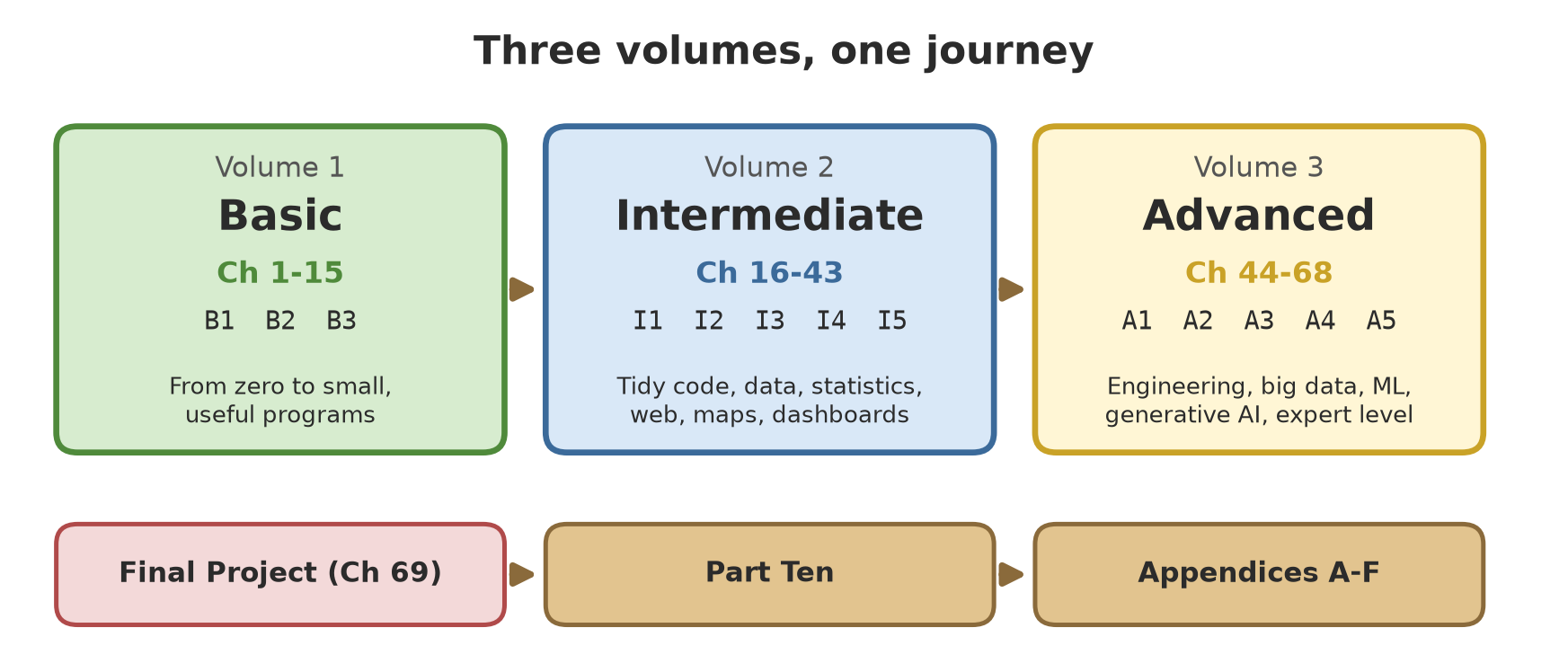
This book is published in three volumes: Volume 1 (Basic) holds Chapters 1–15 and Appendix A (installation), Volume 2 (Intermediate) holds Chapters 16–43, and Volume 3 (Advanced) holds Chapters 44–68, the Final Project, Part Ten, and Appendices A to F. If you hold only one volume, the chapters, project, and appendices missing from it (for example Appendix C, the glossary, and Appendix E, the learning-path map) are in Volume 3.
Splitting into three volumes
A book this thick is easier to hold when split. The author decided (10 October 2026) to divide it into three volumes that follow the three levels:
- Volume 1, Basic: Chapters 1–15 (series B1 to B3).
- Volume 2, Intermediate: Chapters 16–43 (series I1 to I5).
- Volume 3, Advanced: Chapters 44–68 (series A1 to A5).
The Final Project, Part Ten, and the Appendices complete the set.
How to read: in order or by jumping
- Beginners: read in order from Chapter 1. Each chapter continues from the previous one, and the running project grows bit by bit.
- Already programming in another language: start from Series B2 or B3 to get the feel of Python, then jump to the series you need. Check the prerequisites at the start of each series.
- Want a specific topic right away (say maps or AI): use the table above and Appendix E (learning-path map), which lays out paths for beginners, programmers from other languages, GIS, data/AI, and web.
- Stuck in a chapter? Run its example script as it is first, look at the output, and only then change small things. Changing a working example is the fastest way to learn.
Beyond the book
- Web version: readable in a browser, with a copy button on every code block.
- Script downloads: every chapter has a zip with all of its scripts (the link is at the start of the chapter).
- Sample data: small CSV/JSON files are created by the scripts themselves and sit in the
data/folder of the chapter concerned. - Diagrams: provided as images in the book; the appendices mention other forms when they exist.
The Python version used
This book uses Python 3.14.8 as its reference (released 30 September 2026; according to the official release schedule PEP 745, which we read, security support for the 3.14 series lasts until about October 2030). Python 3.15.0 was released only on 9 October 2026; we checked it on the official python.org download page on 10 October 2026. The 3.15 features are covered as a subsection of Chapter 47, and the book’s output still comes from 3.14.8.
TipTIP
You do not have to use 3.14.8. Almost every example runs on Python 3.12 or newer; sections that need a newer feature are marked in their chapter. Check your version with python --version. The latest releases are always listed at python.org/downloads, and version numbers may already have changed by the time you read this.
An honest note: what was tested and what was not
We want you to know exactly how far this book can be trusted:
- Tested: all code was run on Windows 11 with Python 3.14.8, and the output was taken from those runs. Some scripts that do not depend on 3.14-only features were also compared on Python 3.12.
- Not run: when some code was not run when the book was built (for example because it needs the internet, an account, or hardware that was not available), we say so openly in that chapter together with the reason, and no output is shown.
- The author’s equipment differs from yours. The parts that use a GPU, QGIS, PostgreSQL, and Redis were run on the author’s computer (an NVIDIA GPU with 6 GB of VRAM, and isolated local installations). Your computer may differ: library versions, drivers, and the operating system can make results slightly different. If so, read the error message and match it against the relevant chapter.
- Mock data. All field data is fictional data made by scripts. The numbers for trees, harvests, fish, and livestock are only practice material. They are not technical advice (not feed rations, planting schedules, or real prices). For decisions in the field, consult the official technical guidance and qualified experts.
- Links and versions can change. Web pages, library names, and version numbers were checked when the book was written (October 2026). If a link is dead or a version has moved on, search for the source’s name or visit the project’s official site, and check its documentation before following an old command.
Ready?
Grab a cup of coffee (or tea), open Chapter 1, and begin. Mistakes are normal; an error message is not a punishment but a signpost. Happy planting, code by code!