Chapter 44 — Performance: Fast Is Measured, Not Guessed
Series A1 — Professional Software Engineering
All scripts in this chapter are in the folder kode/ch44/. In the web version, you can also download everything at once (zip).
Welcome to the Advanced level! The application from Series I5 already runs. Now it must face the real world: the data grows from hundreds of rows to tens of thousands, and a summary that used to be instant starts to feel slow. Imagine you run a timber warehouse that keeps filling up. Finding one sack of wood by opening every sack is slow. Keeping a notebook with the location of each sack makes searching fast. This chapter teaches you how to find where your program is “opening every sack”, and how to fix it.
The golden rule of performance: measure first, never guess. Even experienced programmers often guess the slow part wrong. Optimizing the wrong part only makes the code more complicated without making it faster.
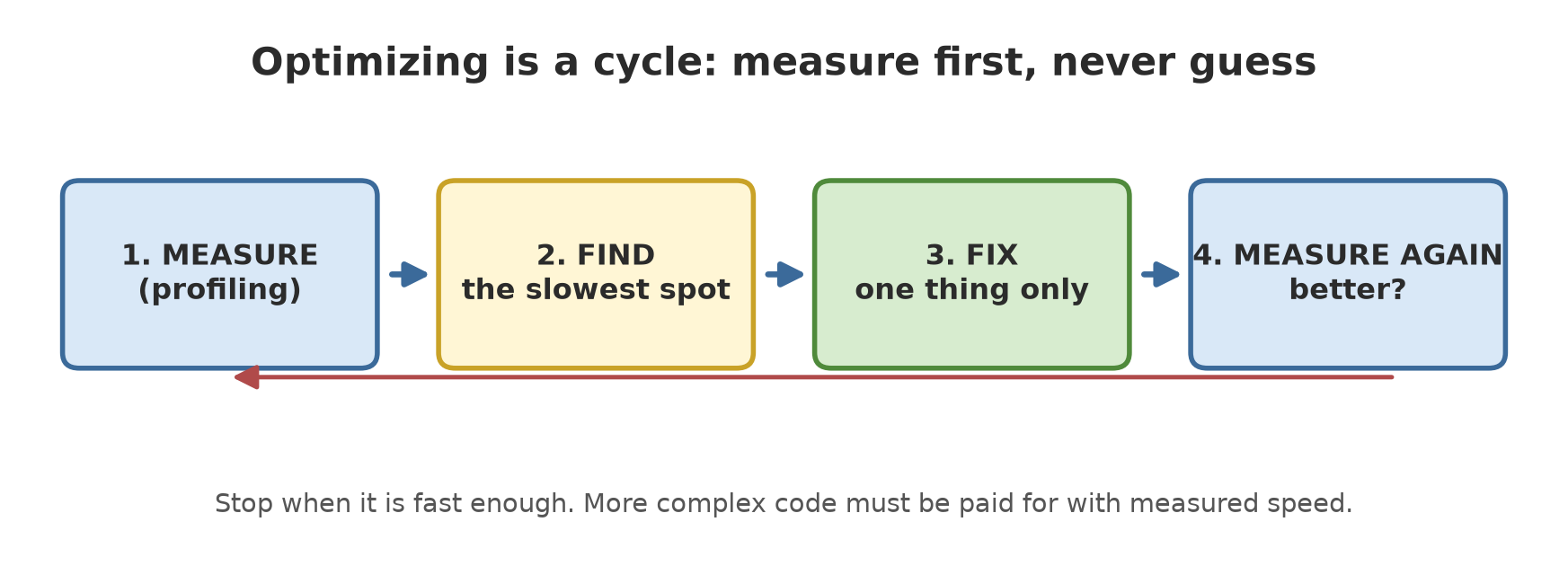
Profiling: finding the slow spot with cProfile
Profiling means measuring which part of a program eats the time. Python ships with a built-in profiler called cProfile. The following script adds up the basal area of trees per plot in a somewhat wasteful way:
01_cprofile.py
# Chapter 44 - cProfile: finding the heaviest function
import cProfile
import pstats
import random


def make_data(n):
    rng = random.Random(42)
    return [(rng.choice("ABC"), rng.uniform(10, 60)) for _ in range(n)]


def basal_area(diameter_cm):
    return 3.14159 * (diameter_cm / 200) ** 2


def total_per_plot(data, plot):
    total = 0.0
    for p, d in data:
        if p == plot:
            total += basal_area(d)
    return total


def summarize(data):
    result = {}
    for plot in "ABC":
        result[plot] = total_per_plot(data, plot)
    return result


data = make_data(3000)
profile = cProfile.Profile()
profile.runcall(summarize, data)
stats = pstats.Stats(profile)

# Timings differ on every computer, so we print only what is stable:
# how many times each function was called, and the order of "cumulative time".
ours = {k: v for k, v in stats.stats.items() if k[0].endswith("01_cprofile.py")}
print("function          number of calls")
for (_, _, name), (_, calls, _, _, _) in sorted(ours.items(), key=lambda kv: kv[0][2]):
    print(f"{name:17} {calls:6}")

ordered = sorted(ours.items(), key=lambda kv: kv[1][3], reverse=True)
print("order from slowest (cumulative):", [k[2] for k, _ in ordered])
function number of calls
basal_area 3000
summarize 1
total_per_plot 3
order from slowest (cumulative): ['summarize', 'total_per_plot', 'basal_area']How to read it:
basal_areawas called 3000 times: once per tree.total_per_plotwas called 3 times (once per plot), andsummarizeonce.- The cumulative-time order (cumulative time = time of that function plus everything it calls) always runs from the outermost wrapper to the innermost function:
summarize, thentotal_per_plot, thenbasal_area.
This script deliberately does not print seconds. Time differs on every computer and on every run, even on the same computer. The stable numbers are the number of calls and the order. Never draw conclusions from a single timing measurement.
So you can see what the full output looks like, the next script captures the real cProfile output once:
07_static_timing.py
# Chapter 44 - Real cProfile output (with timing numbers)
import cProfile
import pstats
import random


def make_data(n):
    rng = random.Random(42)
    return [(rng.choice("ABC"), rng.uniform(10, 60)) for _ in range(n)]


def basal_area(diameter_cm):
    return 3.14159 * (diameter_cm / 200) ** 2


def total_per_plot(data, plot):
    total = 0.0
    for p, d in data:
        if p == plot:
            total += basal_area(d)
    return total


def summarize(data):
    return {plot: total_per_plot(data, plot) for plot in "ABC"}


data = make_data(300_000)
profile = cProfile.Profile()
profile.runcall(summarize, data)
pstats.Stats(profile).strip_dirs().sort_stats("cumulative").print_stats(4)
300005 function calls in 0.217 seconds
Ordered by: cumulative time
ncalls tottime percall cumtime percall filename:lineno(function)
1 0.000 0.000 0.217 0.217 07_static_timing.py:25(summarize)
3 0.133 0.044 0.217 0.072 07_static_timing.py:17(total_per_plot)
300000 0.083 0.000 0.083 0.000 07_static_timing.py:13(basal_area)
1 0.000 0.000 0.000 0.000 {method 'disable' of '_lsprof.Profiler' objects}The output above was captured once on the author’s computer (the @statis directive), because the timing numbers cannot be exactly the same on your computer. The numbers on your computer will differ, but the shape is the same. The important columns: ncalls (number of calls), tottime (time inside that function only), cumtime (cumulative time). The call counts here (300000 for basal_area, 300005 in total) are exactly the same on your computer because they are counted, not measured.
line_profiler: down to the line level
cProfile shows which function is heavy. When a function is long, line_profiler (an extra package: pip install line_profiler) shows which line. You usually use it through the kernprof command, but here we use its Python interface so it runs as an ordinary script:
02_line_profiler.py
# Chapter 44 - line_profiler: counting how many times each line runs
import linecache

from line_profiler import LineProfiler


def summarize(diameters):
    big_count = 0
    total = 0.0
    for d in diameters:
        if d >= 30:
            big_count += 1
        total += d
    return big_count, total / len(diameters)


diameters = [32.5, 45.2, 28.0, 51.5, 29.9, 30.0]

profiler = LineProfiler()
watched = profiler(summarize)
watched(diameters)

stats = profiler.get_stats()
for (filename, first_line, name), rows in stats.timings.items():
    print(f"Function {name}: column 'times' = how many times the line ran")
    for number, times, _time in rows:
        code = linecache.getline(filename, number).strip()
        print(f"  {times:3} times  {code}")
Function summarize: column 'times' = how many times the line ran
1 times big_count = 0
1 times total = 0.0
7 times for d in diameters:
6 times if d >= 30:
4 times big_count += 1
6 times total += d
1 times return big_count, total / len(diameters)Of the seven lines, the for line ran 7 times (6 elements plus one final “nothing left” check), if ran 6 times, and big_count += 1 only 4 times (diameters 32.5, 45.2, 51.5, and 30.0, which are >= 30). In a real program, line_profiler also gives a time column per line; we only show the counts because they are stable.
memory_profiler: measuring memory
Sometimes the problem is not time but memory. memory_profiler measures a function’s memory use. We compare two ways of adding up two million numbers:
03_memory.py
# Chapter 44 - memory_profiler: a list stores everything, a generator yields one at a time
from memory_profiler import memory_usage


def use_list(n):
    numbers = [i * 1.5 for i in range(n)]
    return sum(numbers)


def use_generator(n):
    return sum(i * 1.5 for i in range(n))


# On Windows, memory_usage starts a new process, so it must sit under "if __name__".
if __name__ == "__main__":
    n = 2_000_000
    peak_list = max(memory_usage((use_list, (n,)), interval=0.01))
    peak_gen = max(memory_usage((use_generator, (n,)), interval=0.01))

    print("same result:", use_list(1000) == use_generator(1000))
    print("list peak memory is larger than generator:", peak_list > peak_gen)
    print("the difference is more than 20 MB:", peak_list - peak_gen > 20)
same result: True
list peak memory is larger than generator: True
the difference is more than 20 MB: TrueThe list keeps all numbers in memory at once; a generator (Chapter 30) produces them one at a time and throws each away. The result is the same, but the peak memory is very different. We only print the comparison, not megabyte figures that keep changing.
On Windows, memory_usage starts a new process, so the main code must live under if __name__ == "__main__":. Without it you get a RuntimeError about the “bootstrapping phase”. That is not a package bug; it is a multiprocessing rule on Windows.
The right data structure
Often the biggest optimization is not a clever trick but choosing the right container. Looking for an item in a list means checking from the front one by one. In a set or dict (which use a hash table), Python “jumps” straight to the spot.
04_data_structures.py
# Chapter 44 - The right data structure: list vs set vs dict
import timeit

tree_codes = [f"P{i:05d}" for i in range(20_000)]
as_list = list(tree_codes)
as_set = set(tree_codes)
as_dict = {k: i for i, k in enumerate(tree_codes)}

target = "P19999"  # at the very end: worst case for a list

t_list = min(timeit.repeat(lambda: target in as_list, number=200, repeat=5))
t_set = min(timeit.repeat(lambda: target in as_set, number=200, repeat=5))
t_dict = min(timeit.repeat(lambda: as_dict[target], number=200, repeat=5))

print("same result:", (target in as_list) == (target in as_set) == (target in as_dict))
print("set is more than 100x faster than list:", t_list / t_set > 100)
print("dict is more than 100x faster than list:", t_list / t_dict > 100)
same result: True
set is more than 100x faster than list: True
dict is more than 100x faster than list: TrueWe look for the tree code located at the very end of 20,000 codes, the worst case for a list. Set and dict are more than 100 times faster. Practical lessons:
| Need | Choose | Reason |
|---|---|---|
| Ordered list, often sorted | list |
order is kept |
| Repeated “is it there?” checks | set |
direct lookup |
| Fetch full data from its key | dict |
key points to value |
| Queue with two open ends | collections.deque |
cheap at both ends |
Vectorization: computing at once with numpy
A Python for loop is flexible but slow for millions of numbers, because each round passes through many layers. Vectorization means handing the whole loop to numpy, which runs it in fast C code:
05_vectorization.py
# Chapter 44 - Vectorization with numpy: compute many numbers at once
import timeit

import numpy as np

rng = np.random.default_rng(42)
diameter_cm = rng.uniform(10, 60, size=1_000_000)


def area_with_loop(diameters):
    result = []
    for d in diameters:
        result.append(3.14159 * (d / 200) ** 2)
    return result


def area_vector(diameters):
    return 3.14159 * (diameters / 200) ** 2


sample = diameter_cm[:5]
print("loop  :", [round(float(x), 5) for x in area_with_loop(sample)])
print("vector:", np.round(area_vector(sample), 5).tolist())

t_loop = min(timeit.repeat(lambda: area_with_loop(diameter_cm), number=1, repeat=3))
t_vector = min(timeit.repeat(lambda: area_vector(diameter_cm), number=1, repeat=3))
print("vector is more than 10x faster:", t_loop / t_vector > 10)
loop : [0.18626, 0.08014, 0.22003, 0.15811, 0.01699]
vector: [0.18626, 0.08014, 0.22003, 0.15811, 0.01699]
vector is more than 10x faster: TrueBoth ways give the same result (the five sample numbers are identical), but the vector way is more than 10 times faster for a million diameters. The rule of thumb: if you write a for over a numpy array, there is almost certainly a better way.
Caching: do not compute twice
When the same function is called repeatedly with the same input, store the result. functools.lru_cache does this automatically:
06_cache.py
# Chapter 44 - Caching with functools.lru_cache: hits and misses
from functools import lru_cache

real_calls = 0


@lru_cache(maxsize=None)
def rate_per_species(species):
    global real_calls
    real_calls += 1          # counts the "heavy work" that really ran
    return {"Teak": 120.0, "Meranti": 95.0, "Mahogany": 80.0}.get(species, 50.0)


trees = ["Teak", "Meranti", "Teak", "Mahogany", "Teak", "Meranti", "Sengon", "Teak"]
total = sum(rate_per_species(s) for s in trees)

print("total rate:", total)
print("heavy work really ran:", real_calls, "times out of", len(trees), "calls")
info = rate_per_species.cache_info()
print("hits:", info.hits, "| misses:", info.misses, "| stored:", info.currsize)

rate_per_species.cache_clear()
print("after cache_clear:", rate_per_species.cache_info())
total rate: 800.0
heavy work really ran: 4 times out of 8 calls
hits: 4 | misses: 4 | stored: 4
after cache_clear: CacheInfo(hits=0, misses=0, maxsize=None, currsize=0)There are 8 trees but only 4 different species. The first call for each species is a miss (not yet in the cache, so the heavy work runs): 4 times. The rest are hits (the result is taken from the cache): 4 times. real_calls proves the heavy work really ran only 4 times. The total of 800.0 comes from 4 Teak (120 x 4 = 480), 2 Meranti (95 x 2 = 190), 1 Mahogany (80), and 1 Sengon (default 50): 480 + 190 + 80 + 50 = 800.
lru_cache only suits pure functions: the result depends only on the arguments, and the arguments must be hashable (numbers, text, tuples; not lists). Do not cache a function whose result changes over time (for example, reading today’s price) without a way to clear the cache (cache_clear()).
Running Project A1: speeding up the timber value summary
This is the start of the Series A1 project. Our application computes the timber value per plot and species from 50,000 trees (made-up prices, example numbers only). The slow version stores data per row and scans all trees for every plot and species combination. The fast version stores data per column and computes everything at once:
08_project_speedup.py
# Chapter 44 - Running project A1: timber value per plot and species, slow version then fast version
import cProfile
import pstats
import timeit

import numpy as np

SPECIES = ["Teak", "Meranti", "Mahogany", "Sengon"]
PLOTS = ["A", "B", "C"]
PRICE_M3 = np.array([4_000_000, 2_500_000, 3_000_000, 1_000_000])   # made-up example prices per species


def make_columns(n):
    """Data stored per COLUMN (numpy arrays): a shape that suits computing everything at once."""
    rng = np.random.default_rng(42)
    return {
        "species": rng.integers(0, len(SPECIES), n),
        "plot": rng.integers(0, len(PLOTS), n),
        "diameter_cm": rng.uniform(10, 60, n).round(1),
        "height_m": rng.uniform(5, 25, n).round(1),
    }


# ---- Version 1: slow. Data per ROW (list of dicts), every summary scans everything again ----
def volume_m3(t):
    return 3.14159 * (t["diameter_cm"] / 200) ** 2 * t["height_m"] * 0.5


def value_slow(rows):
    result = {}
    for plot in range(len(PLOTS)):
        for species in range(len(SPECIES)):
            total = 0.0
            for t in rows:
                if t["plot"] == plot and t["species"] == species:
                    total += volume_m3(t) * PRICE_M3[species]
            result[(PLOTS[plot], SPECIES[species])] = float(total)
    return result


# ---- Version 2: fast. Data per column, one computation for all rows ----
def value_fast(columns):
    volume = 3.14159 * (columns["diameter_cm"] / 200) ** 2 * columns["height_m"] * 0.5
    value = volume * PRICE_M3[columns["species"]]
    group = columns["plot"] * len(SPECIES) + columns["species"]
    sums = np.bincount(group, weights=value, minlength=len(PLOTS) * len(SPECIES))
    return {(PLOTS[k // len(SPECIES)], SPECIES[k % len(SPECIES)]): float(sums[k]) for k in range(len(sums))}


columns = make_columns(50_000)
rows = [{k: columns[k][i].item() for k in columns} for i in range(50_000)]   # row version for the slow one

slow = value_slow(rows)
fast = value_fast(columns)
same = all(abs(slow[k] - fast[k]) < 1e-6 * slow[k] for k in slow)
print("both versions give the same result:", same)
print("number of groups (plot x species):", len(fast))
print("slow visits every tree", len(PLOTS) * len(SPECIES), "times; fast only 1 time")

calls = {}
for name, function, data in [("slow", value_slow, rows), ("fast", value_fast, columns)]:
    profile = cProfile.Profile()
    profile.runcall(function, data)
    st = pstats.Stats(profile)
    calls[name] = sum(v[1] for k, v in st.stats.items() if k[2] == "volume_m3")
    print(f"{name} version: calls to volume_m3 = {calls[name]}")

t_slow = min(timeit.repeat(lambda: value_slow(rows), number=1, repeat=3))
t_fast = min(timeit.repeat(lambda: value_fast(columns), number=1, repeat=3))
print("fast version is more than 20x faster:", t_slow / t_fast > 20)
both versions give the same result: True
number of groups (plot x species): 12
slow visits every tree 12 times; fast only 1 time
slow version: calls to volume_m3 = 50000
fast version: calls to volume_m3 = 0
fast version is more than 20x faster: TrueNote the order: first prove the result is the same (without that, “faster” means nothing), then cProfile shows the slow version calls volume_m3 50,000 times and the fast version not at all, then a timing comparison that we state qualitatively (more than 20 times). The “20 times” is a loose threshold; on your computer the real gap may be much bigger or slightly smaller.
We carry this project into the next chapter: code that is already fast should be neatly packaged.
Exercises
- Run
01_cprofile.pywith 6000 trees instead of 3000. Predict first: how many calls ofbasal_area? Compare with the output. - Change
04_data_structures.pyto look for the code"P00000"(the very front). Is the list still much slower? Explain your guess. - Add
@lru_cache(maxsize=2)torate_per_speciesin06_cache.pyand watch howmisseschanges. Why can it increase? - Challenge: change
08_project_speedup.pyto also compute the average diameter per plot and species withnp.bincount(hint: divide the sum of diameters by the number of trees per group), then match it against the slow version.
Chapter Summary
- Measure first, then fix one thing, then measure again. Guessing the slow spot is often wrong.
cProfileshows which function is heavy;line_profilershows the line;memory_profilermeasures memory.- Time is unstable between computers. Rely on call counts and comparisons, not a single number of seconds.
- Pick the right data structure:
setanddictfor lookup,listfor order. - Vectorization with numpy replaces
forover millions of numbers. lru_cachestores the results of pure functions;cache_info()counts hits and misses.
Next, in Chapter 45: packaging, turning a code folder into a neat Python package that others can install.