%%{init: {"flowchart": {"diagramPadding": 40}}}%%
flowchart TD
A(["Start"]) --> B["Ask for fish count and average weight<br/>(input gives text)"]
B --> C["Turn the text into numbers<br/>int() and float()"]
C --> D["Calculate biomass and daily feed"]
D --> E["Compare the weight with 500 g"]
E --> F["Show the results with print()"]
F --> G(["End"])
Chapter 6 — Operators and Input/Output: Calculating, Comparing, and Chatting With Your Program
Series B2 — Python Language Foundations
All scripts for this chapter are in the kode/ch06/ folder. On the web version, you can also download them all at once (zip).
In Chapter 5, your program learned to remember values. Now it learns three new things: to calculate, to compare, and to talk with the user. The tools for the first two are called operators: special signs such as + and >= that tell Python to do something with values.
Calculating like a calculator
Python can do all the basic sums, and the symbols are nearly the same as on a calculator:
| Operator | Meaning | Example | Result |
|---|---|---|---|
+ |
add | 5 + 3 |
8 |
- |
subtract | 5 - 3 |
2 |
* |
multiply (an asterisk, not x) |
5 * 3 |
15 |
/ |
divide | 5 / 2 |
2.5 |
// |
whole-number divide | 5 // 2 |
2 |
% |
remainder | 5 % 2 |
1 |
** |
power | 5 ** 2 |
25 |
Let’s apply them to a fish harvest:
01_arithmetic.py
# Chapter 6 - Arithmetic: calculating the harvest
harvest_morning_kg = 120.5
harvest_evening_kg = 98.25

total_kg = harvest_morning_kg + harvest_evening_kg
difference_kg = harvest_morning_kg - harvest_evening_kg
price_per_kg = 15000
income = total_kg * price_per_kg

print(f"Total harvest: {total_kg} kg")
print(f"Difference morning vs evening: {difference_kg} kg")
print(f"Income: Rp{income:.0f}")

plot_side_m = 12
plot_area_m2 = plot_side_m ** 2   # power of two
print(f"Plot area: {plot_area_m2} m2")
Total harvest: 218.75 kg
Difference morning vs evening: 22.25 kg
Income: Rp3281250
Plot area: 144 m2Notice {income:.0f}: the code :.0f means “show no digits after the point”. Without it, the result appears as 3281250.0.
TipTIP
Use the name plot_area_m2, not area. Putting the unit inside the variable name makes your calculations easy to check: if you accidentally multiply metres by centimetres, the mistake is easy to spot.
Three ways to divide
Division has three forms, and all three are useful in the field. Suppose 1,250 fish are shared equally among 8 ponds:
02_division.py
# Chapter 6 - Three kinds of division: /  //  %
fish_count = 1250
pond_count = 8

print(f"Normal division (/):   {fish_count / pond_count}")
print(f"Whole division (//):   {fish_count // pond_count}")
print(f"Remainder (%):         {fish_count % pond_count}")
Normal division (/): 156.25
Whole division (//): 156
Remainder (%): 2/gives a decimal result (156.25 fish per pond). Good for averages.//gives a whole-number result (156 fish per pond). Good for sharing things that can’t be cut, like fish.%gives the remainder (2 fish left over). Beginners often forget this one, yet it is very useful.
NoteREMEMBER
In Python, / always gives a decimal number (float), even when the result is whole. 10 / 2 gives 5.0, not 5. For a whole result, use //.
One thing you can’t do: divide by zero. See what happens when the number of ponds happens to be 0:
10_divide_by_zero.py
# Chapter 6 - A mistake: dividing by zero
fish_count = 1250
pond_count = 0
print(fish_count / pond_count)
Traceback (most recent call last):
File "10_divide_by_zero.py", line 4, in <module>
print(fish_count / pond_count)
~~~~~~~~~~~^~~~~~~~~~~~
ZeroDivisionError: division by zeroZeroDivisionError means exactly what it says: division by zero. In a real program, Chapter 7 will teach how to check pond_count before dividing.
Comparing values
Comparison operators compare two values and produce True or False. Remember the bool type from Chapter 5? This is where it gets used.
| Operator | Meaning |
|---|---|
== |
equal to |
!= |
not equal to |
> |
greater than |
>= |
greater than or equal to |
< |
less than |
<= |
less than or equal to |
03_comparison.py
# Chapter 6 - Comparison operators: the result is always True or False
weight_g = 520
target_g = 500

print("weight == target :", weight_g == target_g)
print("weight != target :", weight_g != target_g)
print("weight >  target :", weight_g > target_g)
print("weight >= target :", weight_g >= target_g)
print("weight <  target :", weight_g < target_g)
print("weight <= target :", weight_g <= target_g)

# Text can be compared too, and upper/lower case count as different
species = "Catfish"
print('species == "Catfish" :', species == "Catfish")
print('species == "catfish" :', species == "catfish")
weight == target : False
weight != target : True
weight > target : True
weight >= target : True
weight < target : False
weight <= target : False
species == "Catfish" : True
species == "catfish" : FalseTwo important notes from the results above:
- Text can be compared too, and upper and lower case count as different:
"Catfish"is not equal to"catfish". - A comparison result can be stored in a variable, like
ready_to_harvest = weight_g >= 500.
WarningWARNING
This is the most famous trap: = and == are very different. One equals sign means store, two equals signs mean compare. Python helps if you mix them up:
09_wrong_equals.py
# Chapter 6 - A mistake: using = (store) when == (compare) was meant
print(500 = 500)
File "09_wrong_equals.py", line 2
print(500 = 500)
^^^^^
SyntaxError: expression cannot contain assignment, perhaps you meant "=="?The message is clear: “expression cannot contain assignment, perhaps you meant ==?” The number 500 is not a variable, so it can’t be given a value.
Combining conditions: and, or, not
Decisions in the field rarely depend on one condition. Fish are ready to harvest if their weight is enough and they are healthy. A pond needs checking if the fish are still young or not healthy. Python has three logical operators for this:
| Operator | Meaning | Result is True when… |
|---|---|---|
and |
and | both sides are True |
or |
or | at least one side is True |
not |
not | its side is False (flipped) |
04_logic.py
# Chapter 6 - Logical operators: and, or, not
weight_g = 520
healthy = True
age_days = 90

ready_to_harvest = weight_g >= 500 and healthy
needs_checking = age_days < 30 or not healthy

print("Ready to harvest :", ready_to_harvest)
print("Needs checking   :", needs_checking)
print("Not healthy      :", not healthy)
Ready to harvest : True
Needs checking : False
Not healthy : FalseRead ready_to_harvest like an ordinary sentence: “weight at least 500 grams and healthy”. Both conditions hold (520 ≥ 500, and healthy is true), so the result is True. That is why Python was made to look like human language.
The order operators are carried out
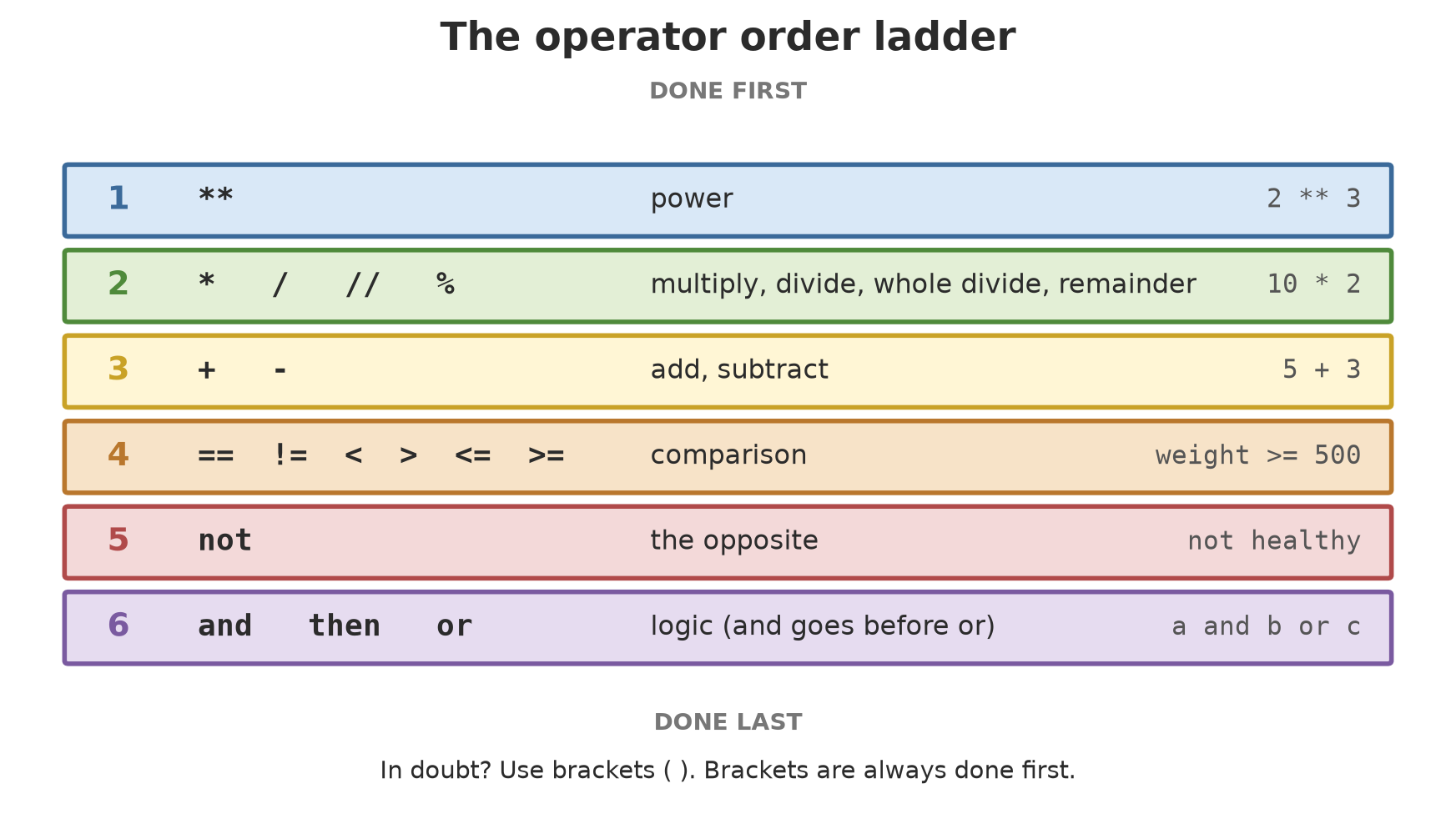
Like in school maths, operators have an order: multiplication is done before addition.
05_operator_order.py
# Chapter 6 - The order operators are carried out (like school maths)
print(2 + 3 * 4)       # multiplication is done first
print((2 + 3) * 4)     # brackets change the order
print(10 - 2 ** 3)     # power comes before subtraction

# Field example: feed cost for 2 ponds, plus an electricity cost
cost = 50000 + 2 * 30000
print(f"Total cost: Rp{cost}")
14
20
2
Total cost: Rp1100002 + 3 * 4 gives 14 (not 20) because 3 * 4 is done first. And 10 - 2 ** 3 gives 2, because the power 2 ** 3 = 8 is done before the subtraction.
TipTIP
No need to memorise the ladder. When in doubt, use brackets. (2 + 3) * 4 clearly wants the addition first, and whoever reads your code three months from now doesn’t have to guess.
The decimal surprise
This is not your fault, and not Python’s fault:
06_decimals.py
# Chapter 6 - A surprise with decimal numbers
print(0.1 + 0.2)
print(0.1 + 0.2 == 0.3)

result = round(0.1 + 0.2, 2)    # round to 2 digits after the point
print(result)
print(result == 0.3)
0.30000000000000004
False
0.3
TrueYes, 0.1 + 0.2 is not exactly 0.3 on a computer. The cure is simple: round first with round(number, decimal_places) before comparing.
CautionTECHNICAL STUFF (feel free to skip)
Computers store numbers in the binary system (1s and 0s). Some decimal fractions that look simple to us, like 0.1, cannot be written exactly in binary, just as 1/3 cannot be written exactly in decimal (0.3333…). The result is a tiny difference. This happens in almost every programming language, not only Python.
Talking with the program: print() and input()
You have used print() since Chapter 4 and input() in Chapter 5. Now let’s look at two useful settings of print(), and at input() more closely.
07_print_input.py
# Chapter 6 - print() and input() in more depth
name = input("Business unit name: ")
location = input("Location: ")
print("Business unit:", name, "in", location)

print("Pond", "A", "active", sep="-")     # sep = separator between values
print("Checking...", end=" ")             # end = what closes the line
print("done")
Business unit name: Mina Tani Pond
Location: Subang
Business unit: Mina Tani Pond in Subang
Pond-A-active
Checking... doneinput("...")shows a question, waits for you to type, then hands back the text you typed.- In
print(),sepsets the separator between values (here a-sign), andendsets what closes the line. Normallyendis a new line, but here we replace it with one space so “Checking…” and “done” appear on the same line.
Running Project B2: the pond calculator
Now let’s combine everything: a program that asks for the number and weight of fish, calculates the biomass and the daily feed need, then decides whether the fish are ready to harvest.
08_pond_calculator.py
# Chapter 6 - Running project B2: pond calculator
# (the 3% and 500 g figures are practice numbers, not farming advice)
fish_count = int(input("Number of fish: "))
avg_weight_g = float(input("Average weight (grams): "))

biomass_kg = fish_count * avg_weight_g / 1000
daily_feed_kg = biomass_kg * 0.03
ready_to_harvest = avg_weight_g >= 500

print(f"Pond biomass   : {biomass_kg:.1f} kg")
print(f"Feed per day   : {daily_feed_kg:.2f} kg")
print(f"Ready to harvest: {ready_to_harvest}")
Number of fish: 800
Average weight (grams): 540.5
Pond biomass : 432.4 kg
Feed per day : 12.97 kg
Ready to harvest: TrueFollow it step by step: 800 fish × 540.5 grams = 432,400 grams = 432.4 kg of biomass. Daily feed at 3% of that is 12.97 kg. And since 540.5 ≥ 500, the pond is ready to harvest.
WarningWARNING
The 3% feed figure and the 500-gram harvest weight are only practice numbers, not farming advice. Real needs depend on the fish species, age, water temperature, and other factors. Ask a fisheries extension officer or an experienced fish farmer.
Exercises
- A farmer harvests 3 plantation blocks: 245.5 kg, 310 kg, and 198.25 kg. Calculate the total harvest and the average per block, then print them with an f-string.
- A barn holds 1,000 eggs to be packed in trays of 30. Using
//and%, work out how many full trays there are and how many eggs are left over. - Change
08_pond_calculator.pyso the feed percentage (3%) is also asked throughinput(). Don’t forget to turn the text into a number and divide by 100. - Challenge: write one expression that is
Truewhen a tree is fit to be felled: diameter at least 40 cm and healthy, or height over 25 m. Test it with several numbers. Be careful with the order ofandandor; use brackets.
Chapter Summary
- Arithmetic:
+ - * / // % **./always gives a decimal;//divides into whole numbers;%gives the remainder. - Comparison:
== != > >= < <=giveTrueorFalse.=stores,==compares. - Logic:
and,or,notcombine conditions. - Operators have an order; when in doubt, use brackets.
- Decimals on a computer can be slightly off; use
round()before comparing. print()hassepandend;input()always gives text, so convert it withint()orfloat().
Next, in Chapter 7: your program can answer True or False. Now we use that answer to make decisions: if the weight is enough, then harvest; otherwise, wait.