Chapter 13 — Files and Basic I/O: Data That Survives Closing the Program
Series B3 — Small Programs That Are Useful
All scripts for this chapter are in the kode/ch13/ folder. On the web version, you can also download them all at once (zip). Scripts that create files write them to a _tmp/ subfolder next to the script, so your folder stays tidy.
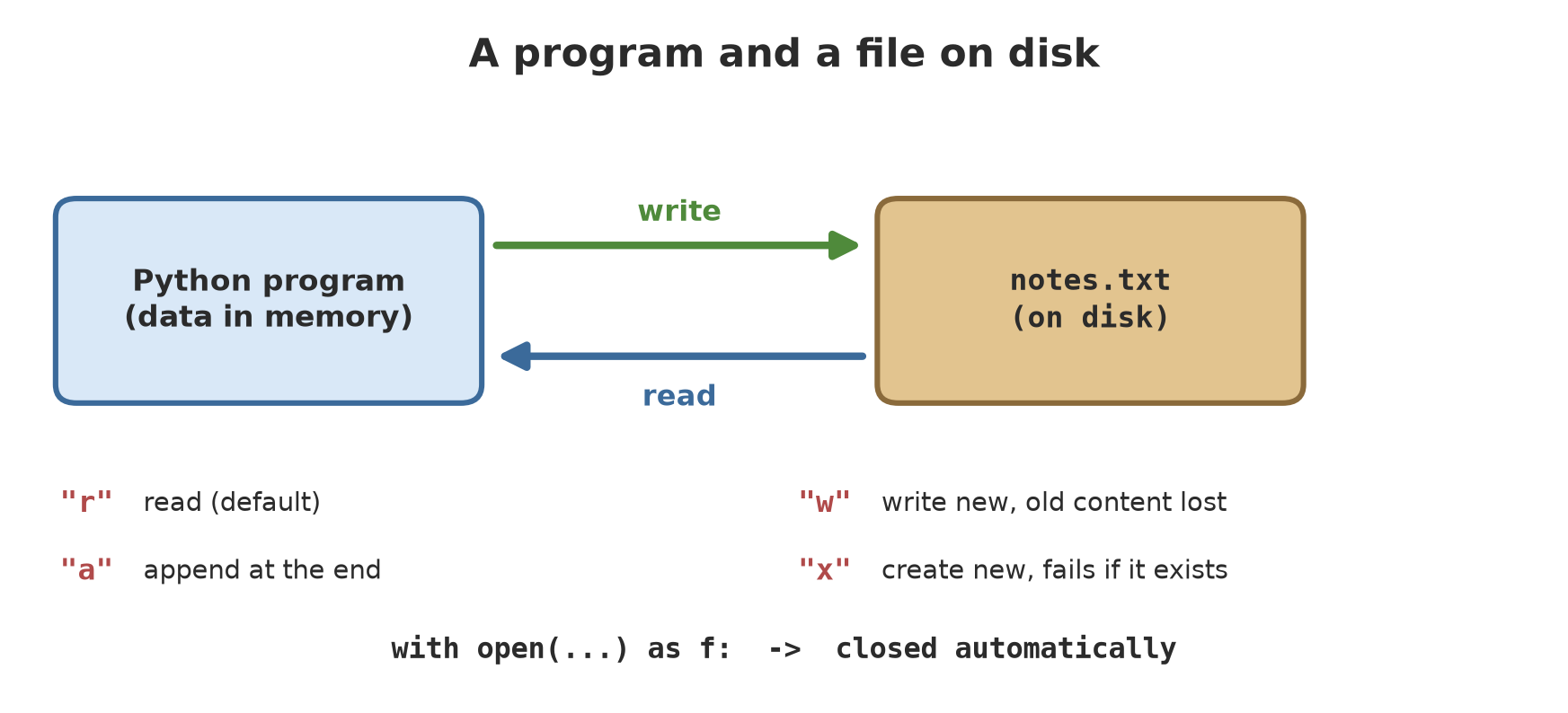
So far, all data has lived in the computer’s memory, like notes on a whiteboard: once the program is closed, the writing is wiped. A good field officer writes in a notebook, which is a file on the disk, still there when the computer is switched off. This chapter teaches your program to write and read that notebook. The common term is I/O (input/output): data comes in from a file, data goes out to a file.
Writing a text file
01_write_text.py
# Chapter 13 - Writing a text file with open() and with
from pathlib import Path

tmp = Path(__file__).parent / "_tmp"
tmp.mkdir(exist_ok=True)
file = tmp / "notes.txt"

with open(file, "w", encoding="utf-8") as f:         # "w" = write (old content is erased)
    f.write("Field notes 1 October\n")
    f.write("Plot A: 12 teak trees\n")
    f.write("Plot B: 9 meranti trees\n")

print("File written:", file.name)
print("Size:", file.stat().st_size, "bytes")
File written: notes.txt
Size: 71 bytesopen(file, "w", encoding="utf-8")opens a file for writing ("w"). If the file already exists, its old content is erased.with ... as f:opens the file and closes it automatically when the block ends. You will see why that matters below.f.write(...)writes text. It does not add a new line by itself, so you write\nat the end of each line.
Why is the size 71 bytes when the letters count only 68? On Windows, every \n is written as two bytes (\r\n), and there are three lines, so 68 + 3 = 71. On macOS or Linux the result is 68. Don’t be surprised if file sizes differ between computers.
Reading a text file
02_read_text.py
# Chapter 13 - Four ways to read a text file
from pathlib import Path

tmp = Path(__file__).parent / "_tmp"
tmp.mkdir(exist_ok=True)
file = tmp / "notes.txt"
file.write_text("Field notes 1 October\nPlot A: 12 teak trees\nPlot B: 9 meranti trees\n",
                encoding="utf-8")

with open(file, "r", encoding="utf-8") as f:
    everything = f.read()                  # 1. the whole content as one text
print(repr(everything))

with open(file, encoding="utf-8") as f:
    print(repr(f.readline()))              # 2. one line (with the \n at the end)

with open(file, encoding="utf-8") as f:
    lines = f.readlines()                  # 3. all lines as a list
print(len(lines), "lines")

with open(file, encoding="utf-8") as f:
    for number, line in enumerate(f, start=1):      # 4. line by line (saves memory)
        print(number, line.rstrip())
'Field notes 1 October\nPlot A: 12 teak trees\nPlot B: 9 meranti trees\n'
'Field notes 1 October\n'
3 lines
1 Field notes 1 October
2 Plot A: 12 teak trees
3 Plot B: 9 meranti treesFour ways to read, from the bluntest to the most economical:
read(): the whole content as one text. Note the\nbetween lines (reprmakes them visible).readline(): one line, with the\nat the end. Call it again and it gives the next line.readlines(): all lines as a list.- A
forloop directly over the file: one line per round, without loading everything into memory. This is the best choice for big files.rstrip()removes the\nat the end, andenumerate(f, start=1)supplies line numbers.
Modes: w, a, x
03_append_mode.py
# Chapter 13 - Mode "w" overwrites, mode "a" appends, mode "x" refuses to overwrite
from pathlib import Path

tmp = Path(__file__).parent / "_tmp"
tmp.mkdir(exist_ok=True)
file = tmp / "harvest_log.txt"

with open(file, "w", encoding="utf-8") as f:
    f.write("Harvest 1: 245.5 kg\n")
with open(file, "a", encoding="utf-8") as f:         # add at the end
    f.write("Harvest 2: 310.0 kg\n")
print(file.read_text(encoding="utf-8"))

with open(file, "w", encoding="utf-8") as f:         # overwrites: old content is gone
    f.write("Harvest 3: 198.5 kg\n")
print(file.read_text(encoding="utf-8"))

try:
    with open(file, "x", encoding="utf-8") as f:     # "x": fails if it already exists
        f.write("never mind")
except FileExistsError:
    print("Mode x refuses: the file already exists")
Harvest 1: 245.5 kg
Harvest 2: 310.0 kg
Harvest 3: 198.5 kg
Mode x refuses: the file already exists| Mode | Meaning |
|---|---|
"r" |
read (the default); error if the file does not exist |
"w" |
write; overwrites the old content |
"a" |
append at the end; old content is safe |
"x" |
create new; fails if the file already exists |
See the result: after mode "a", there are two harvests. After mode "w", harvests 1 and 2 are gone, leaving only harvest 3. Mode "x" protects important files from being overwritten by accident (it raises FileExistsError, which we catch with the try of Chapter 12).
Mode "w" erases old content without asking. If you want to add to a daily log, use "a". Choosing the wrong letter can wipe out days of data.
Why with
04_with_closes.py
# Chapter 13 - Why with: the file is closed automatically, even when an error happens
from pathlib import Path

tmp = Path(__file__).parent / "_tmp"
tmp.mkdir(exist_ok=True)
file = tmp / "example.txt"

f = open(file, "w", encoding="utf-8")        # the old way: you must close it yourself
f.write("hello\n")
print("Before close, closed?", f.closed)
f.close()
print("After close, closed?", f.closed)

try:
    with open(file, "w", encoding="utf-8") as g:
        g.write("hello again\n")
        raise RuntimeError("something went wrong in the middle of writing")
except RuntimeError as e:
    print("Error caught:", e)
print("File still closed neatly?", g.closed)
Before close, closed? False
After close, closed? True
Error caught: something went wrong in the middle of writing
File still closed neatly? TrueAn opened file must be closed so its content is really saved and it doesn’t lock the file for other programs. The old way: open() then f.close() yourself; if an error happens in between, close() may be skipped. With with, closing is guaranteed: in the example, a RuntimeError blows up in the middle of writing, yet g.closed is still True.
Make with open(...) your constant habit. You will almost never need to write close() yourself.
pathlib for files and folders
In Chapter 11 you met Path. Now it works on a real disk:
05_pathlib_files.py
# Chapter 13 - pathlib for real files and folders
from pathlib import Path

tmp = Path(__file__).parent / "_tmp" / "field"
tmp.mkdir(parents=True, exist_ok=True)      # make nested folders; no error if it already exists

for name in ["plot_a.txt", "plot_b.txt", "fish.csv"]:
    (tmp / name).write_text(f"content of {name}\n", encoding="utf-8")

print("Folder exists?", tmp.is_dir())
print("All files    :", sorted(p.name for p in tmp.iterdir()))
print("Only .txt    :", sorted(p.name for p in tmp.glob("*.txt")))
print("Size of plot_a:", (tmp / "plot_a.txt").stat().st_size, "bytes")

old = tmp / "fish.csv"
new = old.rename(tmp / "fish_2026.csv")
print("Renamed to   :", new.name)
new.unlink()                                 # delete one file (in our own _tmp folder)
print("Remaining    :", sorted(p.name for p in tmp.iterdir()))
Folder exists? True
All files : ['fish.csv', 'plot_a.txt', 'plot_b.txt']
Only .txt : ['plot_a.txt', 'plot_b.txt']
Size of plot_a: 23 bytes
Renamed to : fish_2026.csv
Remaining : ['plot_a.txt', 'plot_b.txt']mkdir(parents=True, exist_ok=True)makes nested folders and doesn’t complain if they exist.write_text()andread_text()are shortcuts for writing or reading the whole content of a small file, withoutwith.iterdir()lists a folder’s content;glob("*.txt")picks files matching a pattern. We arrange them withsortedbecause the order from the disk is not guaranteed.rename()changes the name,unlink()deletes one file,stat().st_sizegives the size in bytes.
Use unlink() carefully: a file deleted this way does not go to the recycle bin. In the example, we only delete a file we made ourselves in the _tmp folder.
Encoding: when text turns into strange symbols
A disk stores only bytes (numbers 0 to 255), not letters. Encoding is the rule that translates letters into bytes and back. The most recommended rule is UTF-8, which can write any letter, including °, ±, and non-Latin scripts.
06_correct_encoding.py
# Chapter 13 - Text is stored as bytes; use UTF-8 and write it out explicitly
from pathlib import Path

tmp = Path(__file__).parent / "_tmp"
tmp.mkdir(exist_ok=True)
file = tmp / "temperature.txt"

text = "Water temp 28 °C, Pontianak, result ± 5%"
file.write_text(text, encoding="utf-8")

raw = file.read_bytes()                       # the file content as-is: a row of bytes
print("Number of characters:", len(text))
print("Number of bytes     :", len(raw))
print("Bytes of degree sign:", "°".encode("utf-8"))
print("Read back           :", file.read_text(encoding="utf-8"))
Number of characters: 40
Number of bytes : 42
Bytes of degree sign: b'\xc2\xb0'
Read back : Water temp 28 °C, Pontianak, result ± 5%That text is 37 characters but 39 bytes: the ° and ± symbols each take two bytes in UTF-8 (b'\xc2\xb0' for °). That is why “number of characters” and “number of bytes” can differ.
Now what happens when a file written with one rule is read with another:
07_wrong_encoding.py
# Chapter 13 - The WRONG text rule: written with one rule, read with another
from pathlib import Path

tmp = Path(__file__).parent / "_tmp"
tmp.mkdir(exist_ok=True)
file = tmp / "temperature_utf8.txt"
file.write_text("Water temp 28 °C, result ± 5%", encoding="utf-8")

# cp1252 = the default rule on many Western-language Windows computers
print("Read as cp1252:", file.read_text(encoding="cp1252"))

try:
    file.read_text(encoding="ascii")          # ascii knows only 128 symbols
except UnicodeDecodeError as e:
    print("Read as ascii -> UnicodeDecodeError:", e.reason)

print("Read as utf-8 :", file.read_text(encoding="utf-8"))
Read as cp1252: Water temp 28 °C, result ± 5%
Read as ascii -> UnicodeDecodeError: ordinal not in range(128)
Read as utf-8 : Water temp 28 °C, result ± 5%The results °C and ± are mojibake: two UTF-8 bytes read as two separate letters by the cp1252 rule. With the ascii rule, Python refuses outright with a UnicodeDecodeError. Only reading as UTF-8 returns the original text.
If you don’t state encoding=, Python uses the system default. On this book author’s computer (Windows), the default is cp1252; we checked it directly with locale.getencoding(). As a result, a file written on one computer may be garbled when read on another. Starting with Python 3.15 (released 9 October 2026), UTF-8 is the default: we proved it by opening a file without encoding= in Python 3.15.0, which gave utf-8, and switching it off with PYTHONUTF8=0 brought back cp1252 (see Chapter 47). This book uses Python 3.14, which still follows the system rule, so always write encoding="utf-8", so your code is right on every version and computer.
A file that does not exist
08_file_not_found.py
# Chapter 13 - Pitfall: opening a file that does not exist
with open("tree_data_missing.txt", encoding="utf-8") as f:
    print(f.read())
Traceback (most recent call last):
File "08_file_not_found.py", line 2, in <module>
with open("tree_data_missing.txt", encoding="utf-8") as f:
~~~~^^^^^^^^^^^^^^^^^^^^^^^^^^^^^^^^^^^^^^^^^^^
FileNotFoundError: [Errno 2] No such file or directory: 'tree_data_missing.txt'FileNotFoundError is the most common error in file work: a typo in the name, the wrong folder, or the file simply hasn’t been made. Two polite ways to deal with it:
09_file_not_found_safe.py
# Chapter 13 - Facing a missing file politely
from pathlib import Path


def read_or_fallback(file, fallback="(no data yet)"):
    try:
        return Path(file).read_text(encoding="utf-8")
    except FileNotFoundError:
        print(f"  [info] {Path(file).name} not found, using the fallback")
        return fallback


print(read_or_fallback("tree_data_missing.txt"))

# Second way: check first with exists()
address = Path("tree_data_missing.txt")
if address.exists():
    print(address.read_text(encoding="utf-8"))
else:
    print("exists() check: the file is not there yet, skip")
[info] tree_data_missing.txt not found, using the fallback
(no data yet)
exists() check: the file is not there yet, skipThe first way uses try/except (recommended, because a file can vanish between being “checked” and being “opened”). The second uses exists(): easier to read, but it only checks the state at that moment.
Running Project B3: saving and loading tree data
Now we combine Chapters 12 and 13. The script saves six trees to trees.txt (one tree per line, columns separated by |) and deliberately slips in one broken line. Then the function load_trees reads it back, resistant to mistakes:
10_project_notes.py
# Chapter 13 - Project B3: tree data saved to a text file and read back
from pathlib import Path

tmp = Path(__file__).parent / "_tmp"
tmp.mkdir(exist_ok=True)
file = tmp / "trees.txt"

trees = [
    ("A", "Teak", 32.5), ("A", "Meranti", 45.2), ("B", "Mahogany", 28.0),
    ("B", "Sengon", 51.5), ("C", "Teak", 36.0), ("C", "Meranti", 40.8),
]

# 1. Save: one tree per line, columns separated by the | sign
with open(file, "w", encoding="utf-8") as f:
    for plot, species, diameter in trees:
        f.write(f"{plot}|{species}|{diameter}\n")
    f.write("C|Teak|broken\n")                 # one broken line, inserted on purpose


# 2. Read it back, resistant to mistakes (the lesson of Chapter 12)
def load_trees(address):
    result, rejected = [], 0
    try:
        with open(address, encoding="utf-8") as f:
            for line in f:
                try:
                    plot, species, diameter = line.strip().split("|")
                    result.append((plot, species, float(diameter)))
                except ValueError:
                    rejected += 1
    except FileNotFoundError:
        print("File does not exist yet, starting with empty data")
    return result, rejected


data, rejected = load_trees(file)
print(f"Read {len(data)} trees, {rejected} line rejected")
print("Mean diameter:", round(sum(d for _, _, d in data) / len(data), 2), "cm")
print("First record:", data[0])
print("A file that does not exist:", load_trees(tmp / "missing.txt"))
Read 6 trees, 1 line rejected
Mean diameter: 39.0 cm
First record: ('A', 'Teak', 32.5)
File does not exist yet, starting with empty data
A file that does not exist: ([], 0)Six trees are read, the line C|Teak|broken is rejected (its diameter is not a number), and the mean diameter is 39.0 cm (matching the result of Chapter 11). A file that doesn’t exist gives empty data with a friendly message, not an error. But this home-made | format is fragile: what if a species name contains a |? In Chapter 14 we use standard formats (CSV and JSON) that have already solved that problem.
Exercises
- Write a script that writes the numbers 1 to 10 (one per line) to
numbers.txt, then reads it back and prints the sum. - Run the script from exercise 1 twice with mode
"a"(not"w"). How many lines does the file hold, and why? - Change
07_wrong_encoding.py: write withencoding="utf-16", then read with"utf-8". What happens? Catch the error withtry. - Challenge: write a function
log_harvest(file, date, kg)that appends one linedate|kgto a file (mode"a"), and a functiontotal_harvest(file)that adds up the kg column while skipping broken lines.
Chapter Summary
- A file keeps data on disk; a program reads it (
"r") and writes it ("w","a","x"). - Always
with open(..., encoding="utf-8") as f:: the file closes automatically. - Reading:
read(),readline(),readlines(), and aforloop over the file (memory-friendly). pathlib.Path:mkdir,read_text,write_text,iterdir,glob,rename,unlink,exists.- A wrong encoding gives strange symbols or
UnicodeDecodeError; always writeencoding="utf-8". - A file that doesn’t exist: catch
FileNotFoundError.
Next, in Chapter 14: standard data formats (CSV and JSON) so our data is tidy and readable by other programs.