%%{init: {"flowchart": {"diagramPadding": 40}}}%%
flowchart TD
A["Ch. 21: fetch weather and prices through an API"] --> B["Ch. 22: clean field notes with regex"]
B --> C["Ch. 23: merge five sectors, weather, prices in pandas"]
C --> D["Ch. 24: store in a database (SQLite)"]
D --> E["Ch. 25: read, analyse, and draw"]
Chapter 25 — Data Science and Analysis: From Tables to Pictures and Guesses
Series I2 — Data and the Internet
All scripts for this chapter are in the kode/ch25/ folder. On the web version, you can also download them all at once (zip).
The data came in (Chapter 21), was cleaned (22), arranged (23), and stored (24). Now comes the typical data scientist’s question: “What can we see and guess from this data?” Imagine you are a plantation foreman who has kept two months of rain and coffee harvest notes. A good foreman does four things: inspects (summary numbers), draws (charts), guesses (a model), and tests the guess (is it still right for new data?). This chapter tries all four. All data here is fictional, made with random numbers on a fixed seed (default_rng(42)) so the result is always the same; because of that, the formula that made the data is known and we can check whether the model finds it again.
Advanced pandas: derived columns and categories
01_pandas_advanced.py
# Chapter 25 - Advanced pandas: new columns, categories, and summaries
import numpy as np
import pandas as pd

rng = np.random.default_rng(42)                        # fixed seed: the result is always the same
n = 60
data = pd.DataFrame({
    "date": pd.date_range("2026-01-01", periods=n),
    "rain_mm": rng.gamma(shape=1.2, scale=8.0, size=n).round(1),
})
data["coffee_yield_kg"] = (200 + 1.5 * data["rain_mm"].clip(upper=30) + rng.normal(0, 8, n)).round(1)

# pd.cut: turns numbers into categories using boundaries
data["category"] = pd.cut(data["rain_mm"], bins=[-0.1, 5, 15, 1000], labels=["dry", "moderate", "heavy"])
print(data.head(5))
print(data["category"].value_counts())

summary = data.groupby("category", observed=True)["coffee_yield_kg"].agg(["count", "mean", "max"]).round(1)
print(summary)

data["above_mean"] = data["coffee_yield_kg"] > data["coffee_yield_kg"].mean()   # a True/False column
print("Days above the mean:", int(data["above_mean"].sum()), "out of", n)
print(data.nlargest(3, "coffee_yield_kg")[["date", "rain_mm", "coffee_yield_kg"]])
date rain_mm coffee_yield_kg category
0 2026-01-01 9.5 220.9 moderate
1 2026-01-02 14.2 224.2 moderate
2 2026-01-03 7.9 223.6 moderate
3 2026-01-04 6.8 200.7 moderate
4 2026-01-05 15.8 218.6 heavy
category
moderate 29
dry 24
heavy 7
Name: count, dtype: int64
count mean max
category
dry 24 201.5 221.7
moderate 29 216.5 242.2
heavy 7 227.7 242.3
Days above the mean: 30 out of 60
date rain_mm coffee_yield_kg
57 2026-02-27 27.0 242.3
15 2026-01-16 12.6 242.2
38 2026-02-08 12.7 236.1- A new column is made by assigning the result of a formula:
data["coffee_yield_kg"] = .... pd.cutturns numbers into categories using boundaries: rain 0 to 5 mm = dry, up to 15 = moderate, above = heavy. Of 60 days: 24 dry, 29 moderate, 7 heavy.groupby(...).agg(...)gives the mean coffee yield per category: 201.5 kg (dry), 216.5 kg (moderate), and 227.7 kg (heavy). The rising pattern is clear.nlargest(3, ...)takes the three biggest harvest days;.sum()on aTrue/Falsecolumn counts theTruevalues (30 days above the mean).
Time-ordered data
02_time_series.py
# Chapter 25 - Time-ordered data: date index, resample, rolling
import numpy as np
import pandas as pd

rng = np.random.default_rng(42)
rain = pd.Series(rng.gamma(1.2, 8.0, 28).round(1), index=pd.date_range("2026-01-01", periods=28), name="rain_mm")

print(rain.loc["2026-01-03":"2026-01-05"])              # selecting by a range of dates
weekly = rain.resample("W").sum().round(1)              # total per week (a week ends on Sunday)
print(weekly)

moving = rain.rolling(window=7).mean().round(2)         # mean of the last 7 days
print(moving.iloc[[5, 6, 7, 27]])                       # the first 6 days are still empty (NaN)
print("Change from yesterday, first 3 days:", rain.diff().iloc[1:4].round(1).tolist())
2026-01-03 7.9
2026-01-04 6.8
2026-01-05 15.8
Freq: D, Name: rain_mm, dtype: float64
2026-01-04 38.4
2026-01-11 86.2
2026-01-18 51.3
2026-01-25 64.7
2026-02-01 9.9
Freq: W-SUN, Name: rain_mm, dtype: float64
2026-01-06 NaN
2026-01-07 10.37
2026-01-08 10.46
2026-01-28 8.00
Name: rain_mm, dtype: float64
Change from yesterday, first 3 days: [4.7, -6.3, -1.1]When the index is made of dates, you can slice by a range of dates (loc["2026-01-03":"2026-01-05"]), summarise per period (resample("W") = per week), and compute a moving average (rolling(7).mean()). The first six days are empty (NaN) because there are not yet seven days to average; day 7 (7 January) is 10.37. Notice that the first week (4 days) and the last week (ending 1 February, only 3 days of data) are not full; the last week’s total is small (9.9 mm) because of that. Incomplete periods can mislead.
Advanced numpy
03_numpy_advanced.py
# Chapter 25 - Advanced numpy: statistics, np.where, and broadcasting
import numpy as np

rng = np.random.default_rng(42)
rain = rng.gamma(1.2, 8.0, 30).round(1)
temp = (28 + 0.05 * rain + rng.normal(0, 1, 30)).round(1)

print("percentiles 25/50/75:", np.percentile(rain, [25, 50, 75]).round(2))
print("wettest day: day", int(rain.argmax()) + 1, "with", rain.max(), "mm")
print("rain-temperature correlation:", np.corrcoef(rain, temp)[0, 1].round(3))

label = np.where(rain > 10, "wet", "dry")               # if-else for a whole array
print("number of wet days:", int((label == "wet").sum()), "out of", label.size)

cumulative = np.cumsum(rain)                            # running total
print("cumulative rain on day 30:", cumulative[-1].round(1))

# Broadcasting: a 2-D array minus a 1-D array (per column), with no loop
table = np.column_stack([rain, temp])
z = (table - table.mean(axis=0)) / table.std(axis=0)    # standardising: mean 0, spread 1
print("mean after standardising:", z.mean(axis=0).round(6), "| spread:", z.std(axis=0).round(6))
percentiles 25/50/75: [ 4.05 7.85 12.38]
wettest day: day 11 with 20.6 mm
rain-temperature correlation: 0.233
number of wet days: 12 out of 30
cumulative rain on day 30: 253.2
mean after standardising: [-0. -0.] | spread: [1. 1.]np.percentilegives boundary values: half of the days have rain below 7.85 mm (the median).argmax()gives the position of the largest value (day 11, 20.6 mm); because positions start at 0, we add 1 for the day number.np.corrcoefcomputes the correlation (0.233: weak). Correlation only measures how much two numbers move together; it is not proof of cause and effect. Series I3 covers it in depth.np.where(condition, a, b)is anif-elsefor a whole array. 12 of 30 days are “wet”.- Broadcasting:
table - table.mean(axis=0)subtracts each column’s mean from its own column with no loop. After standardising, the mean becomes 0 and the spread 1 (the-0.is just a tiny negative zero from rounding).
matplotlib: drawing
matplotlib (pip install matplotlib) is the most basic charting library in Python. Two ideas: the figure (the canvas) and the axes (one drawing area on that canvas).
04_matplotlib.py
# Chapter 25 - matplotlib: line and bar charts
from pathlib import Path
import matplotlib
matplotlib.use("Agg")                                   # draw to a file, without a window
import matplotlib.pyplot as plt
import numpy as np

tmp = Path(__file__).parent / "_tmp"
tmp.mkdir(exist_ok=True)

rng = np.random.default_rng(42)
day = np.arange(1, 31)
rain = rng.gamma(1.2, 8.0, 30).round(1)

fig, (top, bottom) = plt.subplots(2, 1, figsize=(8, 6), sharex=True)
top.plot(day, rain, marker="o", color="tab:blue")
top.set_ylabel("Rain (mm)")
top.set_title("Daily rain, January 2026 (fictional data)")
bottom.bar(day, np.cumsum(rain), color="tab:green")
bottom.set_ylabel("Cumulative rain (mm)")
bottom.set_xlabel("Day")
fig.tight_layout()
fig.savefig(tmp / "rain.png", dpi=100)
plt.close(fig)

print("Image saved:", (tmp / "rain.png").exists())
print("Number of axes:", len(fig.axes))
Image saved: True
Number of axes: 2matplotlib.use("Agg") makes matplotlib draw to a file without opening a window (good for automated scripts). The chart is saved in _tmp/rain.png; the script only prints that the file exists and that the figure has 2 axes. The usual forms: plot (line), bar (bars), scatter (dots), then add title, xlabel, ylabel, and savefig.
TipTIP
Every chart should answer one question, and its axes and title should state the units. A chart without units makes readers guess. Also add a “fictional data” note when the data is fictional.
05_scatter_line.py
# Chapter 25 - Scatter plot and trend line
from pathlib import Path
import matplotlib
matplotlib.use("Agg")
import matplotlib.pyplot as plt
import numpy as np

tmp = Path(__file__).parent / "_tmp"
tmp.mkdir(exist_ok=True)

rng = np.random.default_rng(42)
rain = rng.uniform(0, 30, 40)
yield_kg = 200 + 1.5 * rain + rng.normal(0, 8, 40)    # true relationship: +1.5 kg per mm (we know because we made it)

slope, intercept = np.polyfit(rain, yield_kg, deg=1)  # best straight line
print(f"line: yield = {intercept:.1f} + {slope:.2f} x rain")

plt.figure(figsize=(6, 4))
plt.scatter(rain, yield_kg, alpha=0.7)
line_x = np.array([0, 30])
plt.plot(line_x, intercept + slope * line_x, color="tab:red")
plt.xlabel("Rain (mm)")
plt.ylabel("Coffee yield (kg)")
plt.title("Rain and coffee yield (fictional data)")
plt.tight_layout()
plt.savefig(tmp / "scatter.png", dpi=100)
plt.close()
print("Image saved:", (tmp / "scatter.png").exists())
line: yield = 202.6 + 1.34 x rain
Image saved: TrueA scatter plot shows the relationship between two numbers. np.polyfit(..., deg=1) finds the best straight line: yield = 202.6 + 1.34 x rain. The data-making rule was actually 200 + 1.5 x rain. The difference is natural because only 40 points were given noise; the more data, the closer it gets. This is an important lesson: a result from a small sample is only an estimate.
scikit-learn: your first model
scikit-learn (pip install scikit-learn; written sklearn in code) is a classic machine learning library. The process is always similar: split the data into training and test data, train the model (fit), then test it on data it has never seen (predict).
Regression (predicting a number):
06_sklearn_regression.py
# Chapter 25 - scikit-learn: a first regression model (predicting a number)
import numpy as np
from sklearn.linear_model import LinearRegression
from sklearn.metrics import mean_absolute_error, r2_score
from sklearn.model_selection import train_test_split

rng = np.random.default_rng(42)
rain = rng.uniform(0, 30, 80)
yield_kg = 200 + 1.5 * rain + rng.normal(0, 8, 80)

X = rain.reshape(-1, 1)                                 # scikit-learn wants features as a table (rows x columns)
y = yield_kg
X_train, X_test, y_train, y_test = train_test_split(X, y, test_size=0.25, random_state=42)
print("training data:", len(X_train), "| test data:", len(X_test))

model = LinearRegression()
model.fit(X_train, y_train)                             # "learns" from the training data
print(f"model: yield = {model.intercept_:.1f} + {model.coef_[0]:.2f} x rain")

predicted = model.predict(X_test)                       # the exam: data it has never seen
print("R2 on test data:", round(r2_score(y_test, predicted), 3))
print("Mean absolute difference (kg):", round(mean_absolute_error(y_test, predicted), 2))
print("Prediction for 10 mm and 25 mm of rain:", model.predict([[10], [25]]).round(1))
training data: 60 | test data: 20
model: yield = 196.6 + 1.63 x rain
R2 on test data: 0.709
Mean absolute difference (kg): 7.42
Prediction for 10 mm and 25 mm of rain: [212.9 237.4]Of 80 records, 60 were used for training and 20 for the exam. The model found yield = 196.6 + 1.63 x rain. An R2 of 0.709 on the test data means the model explains roughly 71% of the variation in yield; on average it is off by about 7.42 kg. Predictions for 10 mm and 25 mm of rain: 212.9 and 237.4 kg.
NoteREMEMBER
Always test a model on data that was not used for training. A model tested only on its own training data is like a pupil examined with questions whose answers he has already memorised.
Classification (predicting a category), here healthy or sick trees:
07_sklearn_classification.py
# Chapter 25 - scikit-learn: classification (predicting a category) healthy or sick trees
import numpy as np
from sklearn.metrics import accuracy_score
from sklearn.model_selection import train_test_split
from sklearn.tree import DecisionTreeClassifier

rng = np.random.default_rng(42)
n = 120
diameter = rng.uniform(15, 55, n)
height = diameter * 0.55 + rng.normal(0, 2, n)
# a fictional rule used to make the data: slender trees (tall, thin) are sick more often
sick_chance = 1 / (1 + np.exp(-(height / diameter - 0.62) * 25))
sick = rng.uniform(size=n) < sick_chance

X = np.column_stack([diameter, height])
X_train, X_test, y_train, y_test = train_test_split(X, sick, test_size=0.3, random_state=42, stratify=sick)

tree = DecisionTreeClassifier(max_depth=3, random_state=42).fit(X_train, y_train)
print("Training accuracy:", round(accuracy_score(y_train, tree.predict(X_train)), 3))
print("Test accuracy    :", round(accuracy_score(y_test, tree.predict(X_test)), 3))
print("Baseline (always guess 'not sick'):", round(float((~y_test).mean()), 3))
print("Feature importance (diameter, height):", tree.feature_importances_.round(2))
print("Prediction for trees 20 cm/16 m and 40 cm/22 m:", tree.predict([[20, 16], [40, 22]]))
Training accuracy: 0.893
Test accuracy : 0.694
Baseline (always guess 'not sick'): 0.778
Feature importance (diameter, height): [0.42 0.58]
Prediction for trees 20 cm/16 m and 40 cm/22 m: [False True]The result teaches something honest. The training accuracy is 0.893, but the test accuracy is only 0.694, lower than the silly guess “always say not sick” (0.778). The model memorised the training data (overfitting) and is not yet useful on new data. With only 120 trees and a model as free as a decision tree, this is normal. How to improve it (more data, a simpler model, cross-validation, measures other than accuracy) belongs to Series I3 and Series A3. What matters now: always compare a model with a simple baseline.
Jupyter Notebook and Anaconda
Jupyter Notebook is an interactive “notebook”: text cells (Markdown) and code cells take turns, and results (numbers, tables, charts) appear right under the code cell. It is very popular for data exploration because you can try, look, and explain in one place. Its file ends in .ipynb and is really ordinary JSON.
Anaconda is an “all in one” bundle that brings Python, the conda package manager, Jupyter, and many data science libraries (installing it and comparing it with venv are covered in Chapter 17). On the author’s computer, the conda command was not found, so Anaconda was not run in this book. The notebook in this chapter was run with the Jupyter installed in the project environment (pip), which works the same way. You can use either: Anaconda Navigator if you want a point-and-click interface, or pip install jupyterlab and then jupyter lab.
The next script builds a notebook through code (nbformat), runs all its cells (nbconvert), then prints their output, like pressing “Run All”.
08_jupyter_notebook.py
# Chapter 25 - Creating and running a Jupyter Notebook through code
import os
from pathlib import Path
import nbformat
from nbconvert.preprocessors import ExecutePreprocessor

tmp = Path(__file__).parent / "_tmp"
tmp.mkdir(exist_ok=True)

notebook = nbformat.v4.new_notebook()
notebook.cells = [
    nbformat.v4.new_markdown_cell("# Rain notes\nA small notebook: text and code taking turns."),
    nbformat.v4.new_code_cell("import pandas as pd\nrain = pd.Series([12.5, 0.0, 8.2, 25.4, 3.1])\nrain.sum()"),
    nbformat.v4.new_code_cell("print('Mean:', rain.mean())\nrain.describe().round(2)"),
]
nbformat.write(notebook, tmp / "rain_notes.ipynb")

# Running all cells, like pressing "Run All" in Jupyter
# (The kernel's technical warnings on our screen are hidden for a moment: they are about the local connection, not errors.)
saved_stderr = os.dup(2)
os.dup2(os.open(os.devnull, os.O_WRONLY), 2)
try:
    ExecutePreprocessor(timeout=120, kernel_name="python3").preprocess(notebook, {"metadata": {"path": str(tmp)}})
finally:
    os.dup2(saved_stderr, 2)

for number, cell in enumerate(notebook.cells, start=1):
    if cell.cell_type != "code":
        continue
    print(f"--- cell {number} ---")
    for out in cell.outputs:
        if out.output_type == "stream":
            print(out.text.rstrip())
        elif out.output_type == "execute_result":
            print(out.data["text/plain"])
--- cell 2 ---
np.float64(49.199999999999996)
--- cell 3 ---
Mean: 9.84
count 5.00
mean 9.84
std 9.93
min 0.00
25% 3.10
50% 8.20
75% 12.50
max 25.40
dtype: float64Cell 2 sums the rain: np.float64(49.199999999999996). That is the real content of the cell result; computer decimals are not always exact (Chapter 5), and numpy 2 shows the type. Cell 3 prints the mean 9.84 and then the describe() result (the value of a cell’s last expression is displayed automatically, without print). The notebook file that was made is at _tmp/rain_notes.ipynb; open it in JupyterLab to see how it looks.
CautionTECHNICAL STUFF (feel free to skip)
A notebook keeps the state of the kernel (the order cells were run). Cells run out of order can give results that cannot be reproduced from scratch. A good habit: before sharing a notebook, choose “Restart kernel and run all” and make sure every cell still works. For reproducible reports, Chapter 29 covers Quarto and other ways.
Running Project I2: from database to chart
The close of Project I2. The script saves the fictional data into SQLite (a summary of Chapters 21-24), reads it back with one SQL query, analyses it with pandas, and draws two charts.
09_project_closing.py
# Chapter 25 - Running project I2, final step: from database to chart
from pathlib import Path
import matplotlib
matplotlib.use("Agg")
import matplotlib.pyplot as plt
import pandas as pd
from sqlalchemy import create_engine

tmp = Path(__file__).parent / "_tmp"
tmp.mkdir(exist_ok=True)
db_file = tmp / "closing_i2.db"
db_file.unlink(missing_ok=True)
engine = create_engine(f"sqlite:///{db_file.as_posix()}")

# Steps 1-4 (Chapters 21-24) in short: the fictional data is saved in a database
harvest = pd.DataFrame(
    [("2026-01-01", "Forestry", "teak", 1200.0), ("2026-01-01", "Plantation", "coffee", 245.5),
     ("2026-01-02", "Plantation", "cocoa", 198.5), ("2026-01-02", "Cropland", "rice", 3100.0),
     ("2026-01-03", "Cropland", "maize", 1850.0), ("2026-01-03", "Fisheries", "catfish", 432.4),
     ("2026-01-04", "Livestock", "cattle", 1151.5), ("2026-01-04", "Plantation", "coffee", 310.0),
     ("2026-01-05", "Cropland", "rice", 2950.0), ("2026-01-05", "Plantation", "cocoa", 276.0)],
    columns=["date", "sector", "commodity", "yield_kg"])
dates = ["2026-01-01", "2026-01-02", "2026-01-03", "2026-01-04", "2026-01-05"]
weather = pd.DataFrame({"date": dates, "rain_mm": [12.5, 0.0, 8.2, 25.4, 3.1]})
price_lists = {"rice": [6200, 6250, 6180, 6300, 6270], "maize": [5100, 5150, 5200, 5120, 5180],
               "coffee": [58000, 58500, 59000, 57500, 58200], "cocoa": [62000, 61500, 62500, 63000, 62800]}
prices = pd.DataFrame([(d, c, p) for c, v in price_lists.items() for d, p in zip(dates, v)],
                      columns=["date", "commodity", "price_per_kg"])
harvest.to_sql("harvest", engine, index=False)
weather.to_sql("weather", engine, index=False)
prices.to_sql("prices", engine, index=False)

# Step 5 (this chapter): read back from the database, merge, analyse, draw
df = pd.read_sql_query("""
    SELECT h.date, h.sector, h.yield_kg, w.rain_mm, h.yield_kg * p.price_per_kg AS income_rp
    FROM harvest h
    LEFT JOIN weather w ON w.date = h.date
    LEFT JOIN prices p ON p.date = h.date AND p.commodity = h.commodity
""", engine)
engine.dispose()

per_sector = df.groupby("sector")["yield_kg"].sum().sort_values(ascending=False)
per_day = df.groupby("date").agg(yield_kg=("yield_kg", "sum"), rain_mm=("rain_mm", "first"))
print(per_sector)
print(per_day)
print("Correlation of rain and total daily yield (only 5 days, do not trust it):",
      round(per_day["rain_mm"].corr(per_day["yield_kg"]), 2))
print("Recorded income (Rp):", f"{df['income_rp'].sum():,.0f}")

fig, (left, right) = plt.subplots(1, 2, figsize=(10, 4))
per_sector.plot.bar(ax=left, color="tab:green", rot=30)
left.set_title("Yield per sector (kg)")
right.bar(per_day.index.str[-2:], per_day["yield_kg"], color="tab:olive")
right2 = right.twinx()
right2.plot(per_day.index.str[-2:], per_day["rain_mm"], color="tab:blue", marker="o")
right.set_title("Daily yield (bars) and rain (line)")
fig.tight_layout()
fig.savefig(tmp / "project_i2.png", dpi=100)
print("Chart saved:", (tmp / "project_i2.png").exists())
sector
Cropland 7900.0
Forestry 1200.0
Livestock 1151.5
Plantation 1030.0
Fisheries 432.4
Name: yield_kg, dtype: float64
yield_kg rain_mm
date
2026-01-01 1445.5 12.5
2026-01-02 3298.5 0.0
2026-01-03 2282.4 8.2
2026-01-04 1461.5 25.4
2026-01-05 3226.0 3.1
Correlation of rain and total daily yield (only 5 days, do not trust it): -0.87
Recorded income (Rp): 109,096,050
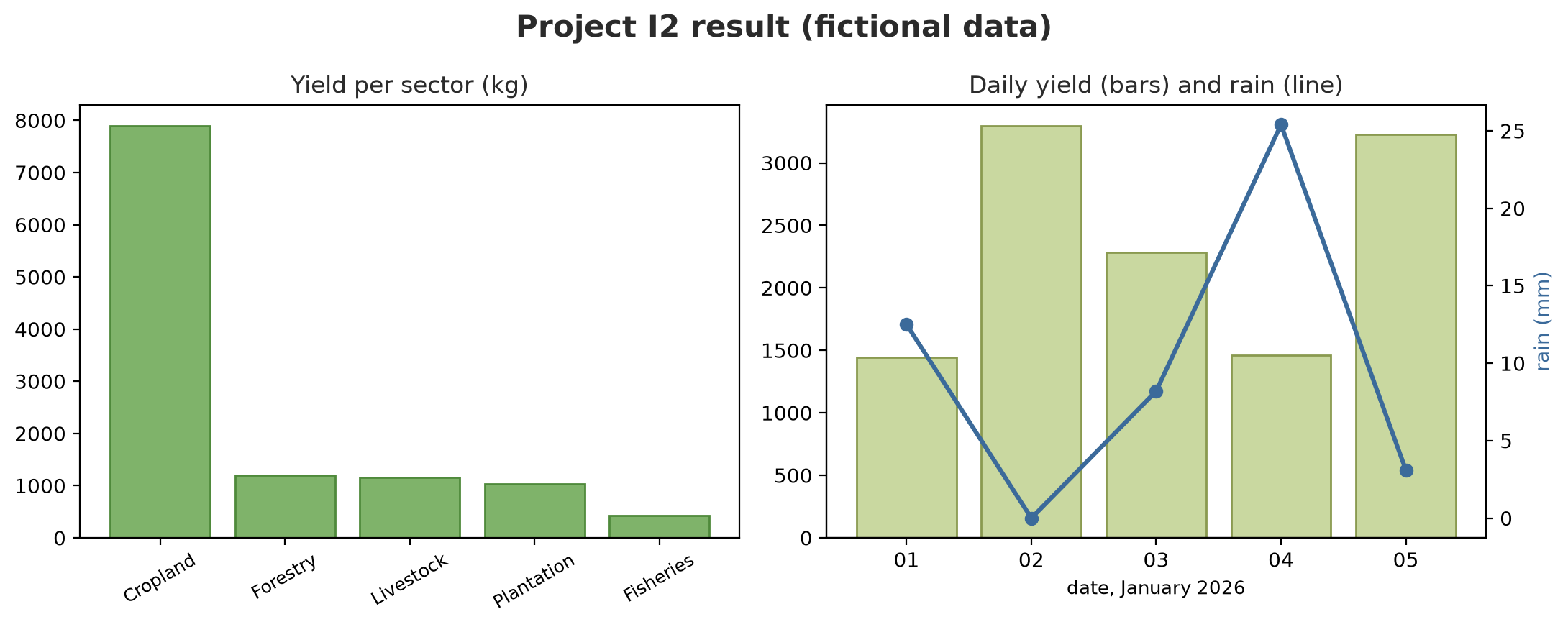
Chart saved: TrueThe result: Cropland is the largest (7900.0 kg), followed by Forestry (1200.0), Livestock (1151.5), Plantation (1030.0), and Fisheries (432.4). The recorded income of Rp 109,096,050 is the sum of Plantation and Cropland only (61,604,550 + 47,491,500), because only they have prices. The correlation between rain and the total daily yield is -0.87, which looks strong, but it comes from only 5 days; it is an interesting coincidence, not proof that rain lowers harvests. Measuring how sure we can be about numbers like that is the job of statistics (Series I3).
Exercises
- In
01_pandas_advanced.py, change the rain category boundaries to 0-10 (dry), 10-20 (moderate), over 20 (heavy). How do the day counts per category change? - In
02_time_series.py, replaceresample("W")withresample("D")and thenrolling(window=3). How does it differ from the 7-day rolling? - In
06_sklearn_regression.py, changetest_sizeto 0.5. Does R2 change? Why? - Challenge: in
07_sklearn_classification.py, changemax_depthto 1, then 6. Compare training and test accuracy. Which model is the most honest?
Chapter Summary
- Advanced pandas: derived columns,
pd.cutfor categories,groupby().agg(), a date index withresampleandrolling. - numpy:
percentile,corrcoef,where,cumsum, and broadcasting without loops. - matplotlib: figure and axes;
plot,bar,scatter; give a title, axes, and units. - scikit-learn: split into training/test data,
fit,predict, R2 or accuracy; compare with a simple baseline. - Results from small samples are only estimates; correlation is not cause and effect.
- Jupyter Notebook combines text, code, and results; Anaconda brings Jupyter and data science libraries (not run here).
Closing Series I2
Congratulations! You have travelled the whole journey of data: fetching data through an API, cleaning it with regex, processing it in numpy and pandas, storing it in a database, and drawing and guessing with matplotlib and scikit-learn. The five sectors, the weather, and the prices now live in one workflow that you can repeat.
But tidy data soon raises a harder question: what does it mean? Is the difference between the average of two plots real or a coincidence? How sure are we that rain affects harvests? Series I3 answers with statistics and modelling.
Next, in Chapter 26: statistics with Python, from means and spread to hypothesis tests and how to interpret a p-value correctly.