%%{init: {"flowchart": {"diagramPadding": 40}}}%%
flowchart TD
A["What type of data?"] --> B["Numbers<br/>(height, weight)"]
A --> C["Categories<br/>(healthy/sick)"]
B --> D{"How many groups?"}
D -- "2" --> E["t-test<br/>(Mann-Whitney if skewed)"]
D -- "3 or more" --> F["ANOVA<br/>(Kruskal-Wallis if skewed)"]
C --> G["Chi-square"]
Chapter 26 — Statistics with Python: From Numbers to Decisions
Series I3 — Statistics and Modelling
All scripts for this chapter are in the kode/ch26/ folder. On the web version, you can also download them all at once (zip).
In Series I2, you fetched, cleaned, and stored data. Tidy data does not yet answer the real question: “Do trees in plot B really grow faster, or is that just chance?” Answering it takes statistics, an honest way of thinking about numbers that wobble. Imagine tasting one spoonful of soup to judge the whole pot: you do not need to finish the pot, as long as you stirred before scooping. That is the heart of this chapter: judging the big from the small, while knowing how confident we are allowed to feel.
NoteREMEMBER
All data in this chapter is made up (fictional), produced by scripts with a fixed seed (default_rng(42)), so the numbers are the same every run. They are not real research results and must not be used as farming advice.
The libraries are the ones introduced in Series I2 (numpy, pandas, matplotlib) plus three new ones: scipy (scipy.stats: distributions and classic tests), statsmodels (models and report-style ANOVA tables), and pingouin (statistical tests with compact result tables, including effect sizes). For plots, we use seaborn.
Descriptive statistics: summarising without deceiving
You measured the diameter growth of 30 trees in plot A (cm per year). Staring at 30 numbers does not help, so we condense them.
01_descriptive.py
# Chapter 26 - Descriptive statistics: summarising tree data
import numpy as np
import pandas as pd

rng = np.random.default_rng(42)
# Made-up (fictional) data: diameter growth (cm per year) of 30 trees in plot A
growth = rng.normal(loc=1.8, scale=0.6, size=30).round(2)
growth[0] = 4.9  # one extraordinarily fast tree (an outlier)

s = pd.Series(growth, name="growth_cm")
print("Number of values :", s.count())
print("Mean             :", round(s.mean(), 3))
print("Median           :", round(s.median(), 3))
print("Standard dev.    :", round(s.std(), 3))
print("Quartile 1 and 3 :", s.quantile(0.25).round(3), s.quantile(0.75).round(3))
print("Min and max      :", s.min(), s.max())
print("Skewness         :", round(s.skew(), 3))

without = s.drop(0)
print("Mean without outlier  :", round(without.mean(), 3))
print("Median without outlier:", round(without.median(), 3))
print()
print(s.describe().round(3))
Number of values : 30
Mean : 1.908
Median : 1.86
Standard dev. : 0.732
Quartile 1 and 3 : 1.552 2.218
Min and max : 0.63 4.9
Skewness : 2.198
Mean without outlier : 1.804
Median without outlier: 1.84
count 30.000
mean 1.908
std 0.732
min 0.630
25% 1.552
50% 1.860
75% 2.218
max 4.900
Name: growth_cm, dtype: float64- Mean = the sum divided by the count. Median = the middle value when sorted. Both are “central numbers”, but they behave differently.
- Standard deviation = a rough measure of how far the data typically spreads from its mean. Quartiles cut the sorted data into four equal-sized parts.
- One “magic” tree worth 4.9 pulls the mean up to 1.908, while without that tree the mean is 1.804. The median barely moves (1.86 becomes 1.84). So when the data has outliers or is skewed (skewness 2.198, far from 0), the median is often more honest than the mean.
describe()gives the five-number summary in one go.
TipTIP
Always plot first, then calculate. One histogram or boxplot reveals outliers and skew that a column of numbers hides. The seaborn section below shows how.
Probability and distributions
A distribution is a “map” of how likely each value is. scipy.stats offers many distributions with uniform methods: cdf (probability below a value), sf (probability above it), pmf (probability of exactly one value, for counts), and ppf (the inverse of cdf: the value for a given probability).
02_distributions.py
# Chapter 26 - Probability and distributions with scipy.stats
from scipy import stats

# Normal: tree diameter averages 30 cm, standard deviation 5 cm
d = stats.norm(loc=30, scale=5)
print("P(diameter < 25)        =", round(d.cdf(25), 4))
print("P(diameter > 40)        =", round(d.sf(40), 4))
print("P(25 < diameter < 35)   =", round(d.cdf(35) - d.cdf(25), 4))
print("90th percentile diameter =", round(d.ppf(0.90), 2))

# Binomial: 20 seeds sown, each sprouts with probability 0.8
b = stats.binom(n=20, p=0.8)
print()
print("Average seeds sprouting =", b.mean())
print("P(exactly 16 sprout)    =", round(b.pmf(16), 4))
print("P(at least 18 sprout)   =", round(b.sf(17), 4))

# Poisson: an average of 3 fallen trees per hectare per season
p = stats.poisson(mu=3)
print()
print("P(no tree falls)        =", round(p.pmf(0), 4))
print("P(more than 5 fall)     =", round(p.sf(5), 4))
P(diameter < 25) = 0.1587
P(diameter > 40) = 0.0228
P(25 < diameter < 35) = 0.6827
90th percentile diameter = 36.41
Average seeds sprouting = 16.0
P(exactly 16 sprout) = 0.2182
P(at least 18 sprout) = 0.2061
P(no tree falls) = 0.0498
P(more than 5 fall) = 0.0839- Normal (bell curve): measurements often look like this. Tree diameter averaging 30 cm with a standard deviation of 5 cm: about 68% of trees (0.6827) lie within one standard deviation of the mean (25 to 35 cm), and only 2.28% exceed 40 cm.
- Binomial: the number of “successes” in several yes/no trials. 20 seeds with a sprouting chance of 0.8 yield 16 seedlings on average; the chance of exactly 16 is only 0.2182, not 1. The chance of at least 18 sprouting is about 21%.
- Poisson: the number of rare events in a region or time span (fallen trees per hectare). With an average of 3, the chance that none falls is only 4.98%.
Sampling and confidence intervals
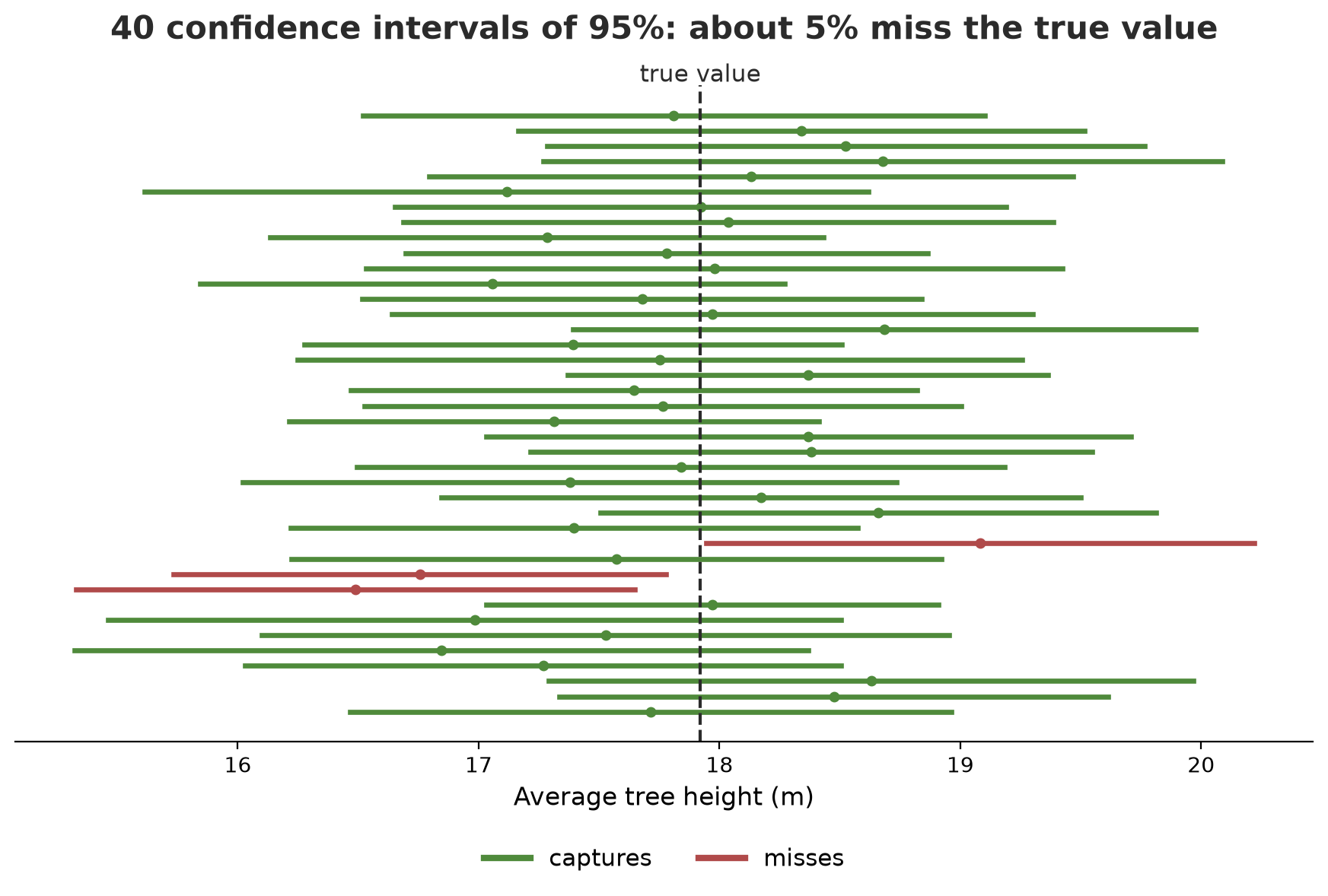
We almost never measure all trees (the population). We take a sample and estimate. An estimate from a sample is bound to miss a little, and the standard error measures how much: the standard deviation divided by the square root of the count. A 95% confidence interval is a range around the estimate made with a recipe that, repeated many times, captures the true value about 95% of the time.
03_sampling_ci.py
# Chapter 26 - Sampling and confidence intervals
import numpy as np
from scipy import stats

rng = np.random.default_rng(42)
# Fictional "population": heights of 5000 trees (m)
population = rng.normal(loc=18.0, scale=4.0, size=5000)
print("Population mean (the true value):", round(population.mean(), 3))

# Draw one random sample of 40 trees
sample = rng.choice(population, size=40, replace=False)
mean = sample.mean()
std_error = stats.sem(sample)  # standard deviation / square root of n
print("Sample mean           :", round(mean, 3))
print("Standard error        :", round(std_error, 3))

# 95% confidence interval using the t distribution
low, high = stats.t.interval(0.95, df=len(sample) - 1, loc=mean, scale=std_error)
print("95% interval          :", round(low, 2), "to", round(high, 2))

# Repeat 1000 times: how often does the interval catch the true value?
caught = 0
for _ in range(1000):
    s = rng.choice(population, size=40, replace=False)
    lo, hi = stats.t.interval(0.95, df=39, loc=s.mean(), scale=stats.sem(s))
    caught += lo <= population.mean() <= hi
print("Intervals that caught the true value:", caught, "out of 1000")
Population mean (the true value): 17.92
Sample mean : 17.714
Standard error : 0.617
95% interval : 16.47 to 18.96
Intervals that caught the true value: 961 out of 1000The true value (population mean) is 17.92 m. Our sample estimates 17.714 with an interval of 16.47 to 18.96, which indeed captures 17.92. Then we repeat 1000 times: 961 intervals capture the true value, close to the promised 95%.
WarningWARNING
A 95% interval does not mean “there is a 95% chance the true value lies inside this interval”. The true value is fixed (not random); what is random is the interval. The correct statement: this recipe captures the true value in 95% of the samples we might draw. More data makes the interval narrower.
Hypothesis tests: two groups
Now the opening question of this chapter. Plots A and B are compared with a hypothesis test:
- Null hypothesis (H0): there is no real difference; the visible gap is just chance.
- Calculate how rare data like this would be if H0 were true. The measure is the p-value.
- If the p-value is small (by habit: below 0.05, the significance level), we reject H0.
04_t_test.py
# Chapter 26 - t-test: does plot A grow differently from plot B?
import numpy as np
import pingouin as pg
from scipy import stats

rng = np.random.default_rng(42)
plot_a = rng.normal(1.8, 0.6, 30).round(2)   # cm per year (fictional)
plot_b = rng.normal(2.2, 0.7, 30).round(2)

print("Mean A:", plot_a.mean().round(3), " Mean B:", plot_b.mean().round(3))

# Welch t-test (does not assume equal variances)
result = stats.ttest_ind(plot_a, plot_b, equal_var=False)
print("t =", round(result.statistic, 3), " p =", round(result.pvalue, 4))

# pingouin gives a full table, including the effect size (Cohen d)
table = pg.ttest(plot_a, plot_b, correction=True)
print(table[["T", "dof", "p_val", "cohen_d", "CI95"]].round(4).to_string())

# Paired test: the same 12 trees measured before and after fertilising
before = rng.normal(1.5, 0.4, 12)
after = before + rng.normal(0.3, 0.25, 12)
paired = stats.ttest_rel(after, before)
print("Paired: t =", round(paired.statistic, 3), " p =", format(paired.pvalue, ".1e"))
Mean A: 1.81 Mean B: 2.28
t = -3.512 p = 0.0009
T dof p_val cohen_d CI95
T_test -3.5121 56.012 0.0009 0.9068 [-0.74, -0.2]
Paired: t = 7.457 p = 1.3e-05- Mean A is 1.81 and B is 2.28. The Welch t-test gives t = -3.512 and p = 0.0009. The minus sign is only because A is subtracted from B. Welch does not assume equal variances in the two plots, so it is the safer first choice.
pingouin.ttestgives the same table plus Cohen d = 0.9068 and a confidence interval for the difference in means (-0.74 to -0.2). The interval does not contain 0, in line with the small p.- The paired test (
ttest_rel) is used when the same trees are measured twice (before and after fertilising). It is more sensitive because it compares each tree with itself.
NoteREMEMBER
A p-value is not the probability that your hypothesis is true. p = 0.0009 means: if there were no real difference, data this extreme would occur only about 9 times in 10,000 draws. It does not say how big the difference is or how important it is. That is the job of an effect size.
An effect size answers “how big”. Cohen d is the difference in means divided by the pooled standard deviation. Cohen’s rough guide: 0.2 small, 0.5 medium, 0.8 large. The 0.9 above counts as large.
Chi-square: two categories
The t-test is for numbers; for counts per category we use chi-square. Is tree species related to healthy/sick?
05_chi_square.py
# Chapter 26 - Chi-square: is tree species related to health?
import pandas as pd
from scipy import stats

# Fictional contingency table (number of trees)
table = pd.DataFrame(
    {"healthy": [42, 35, 28], "sick": [8, 15, 22]},
    index=["Teak", "Meranti", "Mahogany"],
)
print(table)

chi2, p, dof, expected = stats.chi2_contingency(table)
print()
print("chi2 =", round(chi2, 3), " degrees of freedom =", dof, " p =", round(p, 4))
print("Expected values if there were no relationship:")
print(pd.DataFrame(expected, index=table.index, columns=table.columns).round(1))

# Effect size: Cramer V
n = table.values.sum()
v = (chi2 / (n * (min(table.shape) - 1))) ** 0.5
print("Cramer V =", round(v, 3))
healthy sick
Teak 42 8
Meranti 35 15
Mahogany 28 22
chi2 = 9.333 degrees of freedom = 2 p = 0.0094
Expected values if there were no relationship:
healthy sick
Teak 35.0 15.0
Meranti 35.0 15.0
Mahogany 35.0 15.0
Cramer V = 0.249If species and health were unrelated, each species (50 trees each) would be expected to have 35 healthy and 15 sick. What was observed deviates: Teak is healthier (42), Mahogany sicker (22). Chi-square = 9.333 with 2 degrees of freedom gives p = 0.0094. The effect size Cramer V = 0.249, a real relationship but not a very strong one.
ANOVA: three or more groups
Comparing three varieties with three pairwise t-tests raises the risk of error (see the traps below). ANOVA tests all groups at once: “is at least one different?” It assumes each group’s data is roughly normal and the variances are similar, so we first check with the Shapiro and Levene tests.
06_anova_nonparametric.py
# Chapter 26 - ANOVA for three varieties, and a nonparametric backup
import numpy as np
import pandas as pd
import pingouin as pg
from scipy import stats

rng = np.random.default_rng(42)
data = pd.DataFrame({
    "variety": np.repeat(["V1", "V2", "V3"], 25),
    "height_cm": np.concatenate([
        rng.normal(120, 12, 25), rng.normal(128, 12, 25), rng.normal(137, 12, 25)
    ]).round(1),
})
print(data.groupby("variety")["height_cm"].agg(["mean", "std"]).round(2))

groups = [g["height_cm"].values for _, g in data.groupby("variety")]
print()
print("Shapiro (normal?) p per group:", [round(float(stats.shapiro(k).pvalue), 3) for k in groups])
print("Levene (equal variances?) p  :", round(stats.levene(*groups).pvalue, 3))

anova = pg.anova(data=data, dv="height_cm", between="variety", detailed=False)
print()
print("F =", round(anova.loc[0, "F"], 2), " p =", format(anova.loc[0, "p_unc"], ".2e"), " partial eta-squared =", round(anova.loc[0, "np2"], 3))

print()
print(pg.pairwise_tukey(data=data, dv="height_cm", between="variety")[["A", "B", "diff", "p_tukey"]].round(4).to_string())

# Nonparametric backup (does not assume a normal distribution)
print()
print("Kruskal-Wallis p =", format(stats.kruskal(*groups).pvalue, ".2e"))
print("Mann-Whitney V1 vs V3 p =", round(stats.mannwhitneyu(groups[0], groups[2]).pvalue, 5))
mean std
variety
V1 119.58 9.97
V2 130.61 8.32
V3 135.45 9.94
Shapiro (normal?) p per group: [0.572, 0.168, 0.851]
Levene (equal variances?) p : 0.433
F = 18.55 p = 3.17e-07 partial eta-squared = 0.34
A B diff p_tukey
0 V1 V2 -11.036 0.0003
1 V1 V3 -15.872 0.0000
2 V2 V3 -4.836 0.1734
Kruskal-Wallis p = 4.19e-06
Mann-Whitney V1 vs V3 p = 1e-05- Mean height of V1, V2, V3: 119.58, 130.61, 135.45 cm. The Shapiro test (all p above 0.05) and Levene (p = 0.433) show no violation of the assumptions.
- ANOVA: F = 18.55, p = 3.17e-07 (meaning 0.000000317). Partial eta-squared 0.34: about 34% of the variation in height is associated with variety.
- ANOVA only says “something differs”. The Tukey follow-up test shows which: V1-V2 (p = 0.0003) and V1-V3 (0.0000, meaning below 0.00005) differ, while V2-V3 (0.1734) is not yet shown to differ.
- A nonparametric test does not assume a normal distribution; it works on the ranks of the data. Kruskal-Wallis replaces ANOVA, Mann-Whitney replaces the t-test. Here both agree with ANOVA. Use them when data is very skewed, consists of ranks, or the sample is tiny.
Two p-value traps
07_pvalue_traps.py
# Chapter 26 - Two p-value traps: many tests and giant samples
import numpy as np
from scipy import stats

rng = np.random.default_rng(42)

# Trap 1: 20 tests on data from the same population (no real difference)
significant = 0
for i in range(20):
    a = rng.normal(0, 1, 30)
    b = rng.normal(0, 1, 30)
    p = stats.ttest_ind(a, b).pvalue
    if p < 0.05:
        significant += 1
        print(f"  test {i + 1}: p = {p:.4f}  <- 'significant' although there is no difference")
print("'Significant' tests out of 20:", significant)
print("After Bonferroni correction, the threshold becomes", 0.05 / 20)

# Trap 2: a tiny difference, a gigantic sample
a = rng.normal(100.0, 15, 200_000)
b = rng.normal(100.3, 15, 200_000)
result = stats.ttest_ind(a, b)
d = (b.mean() - a.mean()) / 15
print()
print("Mean difference:", round(b.mean() - a.mean(), 3), " p =", format(result.pvalue, ".1e"))
print("Effect size (d) :", round(d, 3), "-> very small, even though p is tiny")
test 15: p = 0.0327 <- 'significant' although there is no difference
'Significant' tests out of 20: 1
After Bonferroni correction, the threshold becomes 0.0025
Mean difference: 0.323 p = 9.7e-12
Effect size (d) : 0.022 -> very small, even though p is tiny- Trap 1, too many tests. We ran 20 tests on data that actually comes from the same population. One test (the 15th, p = 0.0327) looks “significant”. With a threshold of 0.05, about one in 20 tests of no real difference will look significant. If you test many things and report only the “significant” ones, you are harvesting chance. The cure: state hypotheses beforehand, and use a correction such as Bonferroni (threshold divided by the number of tests, here 0.0025).
- Trap 2, a giant sample. With 200,000 values per group, a difference of 0.323 points on a scale with a standard deviation of 15 (d = 0.022) yields p = 9.7e-12. Statistically significant, yet barely meaningful in the real world. Significant does not mean important. Always report the effect size and confidence interval next to the p-value.
Correlation is not causation
Correlation measures how tightly two numbers rise and fall together (from -1 to 1). Pearson is for straight-line relationships; Spearman uses ranks, so it resists outliers.
08_correlation.py
# Chapter 26 - Correlation is not causation: a hidden factor
import numpy as np
import pandas as pd
from scipy import stats
import pingouin as pg

rng = np.random.default_rng(42)
n = 60
rain = rng.normal(200, 50, n)                        # rainfall (mm), the hidden factor
fungus = 0.08 * rain + rng.normal(0, 3, n)           # fungus grows more when it rains
harvest = 0.5 * rain + rng.normal(0, 25, n)          # the harvest also rises with rain
df = pd.DataFrame({"rain_mm": rain, "fungus": fungus, "harvest_kg": harvest})

r, p = stats.pearsonr(df["fungus"], df["harvest_kg"])
print("Correlation fungus vs harvest (Pearson):", round(r, 3), " p =", format(p, ".1e"))
rho, p2 = stats.spearmanr(df["fungus"], df["harvest_kg"])
print("Rank correlation (Spearman)            :", round(rho, 3))

# Partial correlation: remove the influence of rain
partial = pg.partial_corr(data=df, x="fungus", y="harvest_kg", covar="rain_mm")
print()
print("Correlation fungus vs harvest once rain is controlled:")
print(partial[["n", "r", "p_val"]].round(3).to_string())
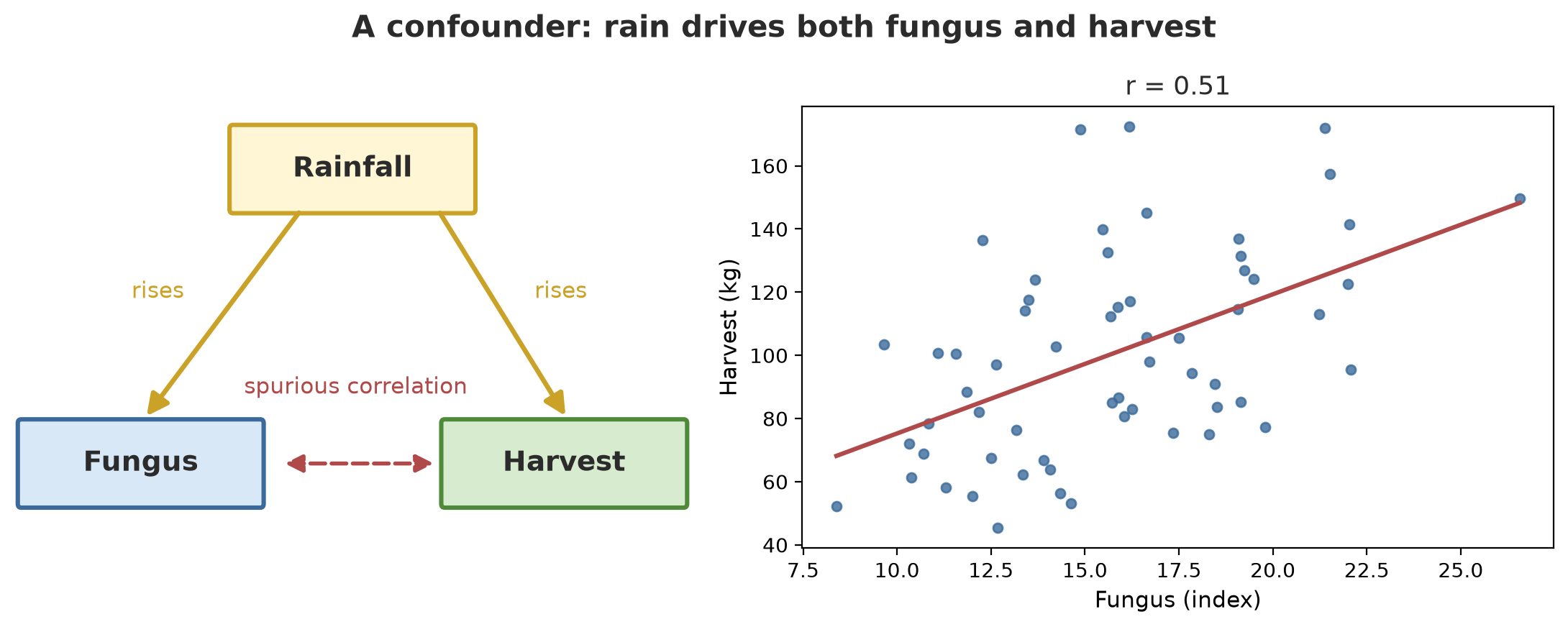
Correlation fungus vs harvest (Pearson): 0.513 p = 2.8e-05
Rank correlation (Spearman) : 0.504
Correlation fungus vs harvest once rain is controlled:
n r p_val
pearson 60 0.057 0.667Fungus and harvest correlate at 0.513 (p = 2.8e-05): the relationship looks strong. Does wiping out fungus lower the harvest? No. In this data, rain raises both (fungus loves damp, crops love water). After controlling for rain with a partial correlation, the fungus-harvest relationship drops to 0.057 with p = 0.667, in other words it vanishes. Rain is here called a confounder.
WarningWARNING
Cause and effect can only be concluded from a controlled experiment (for example plots given treatments at random) or from very careful analysis. Ordinary observational data only shows relationships. Beware of the sentence “X causes Y” built on correlation alone.
Statistical visualisation with seaborn
09_seaborn_visual.py
# Chapter 26 - Statistical visualisation with seaborn
from pathlib import Path

import matplotlib
matplotlib.use("Agg")
import matplotlib.pyplot as plt
import numpy as np
import pandas as pd
import seaborn as sns

rng = np.random.default_rng(42)
data = pd.DataFrame({
    "plot": np.repeat(["A", "B", "C"], 30),
    "growth_cm": np.concatenate([
        rng.normal(1.8, 0.6, 30), rng.normal(2.3, 0.7, 30), rng.normal(2.0, 0.5, 30)
    ]),
})

out = Path(__file__).parent / "_tmp"
out.mkdir(exist_ok=True)

fig, axes = plt.subplots(1, 2, figsize=(9, 3.6))
sns.boxplot(data=data, x="plot", y="growth_cm", ax=axes[0])
sns.stripplot(data=data, x="plot", y="growth_cm", color="black", size=3, ax=axes[0])
sns.histplot(data=data, x="growth_cm", hue="plot", kde=True, ax=axes[1])
fig.tight_layout()
fig.savefig(out / "seaborn_plot.png", dpi=120)
print("Figure saved:", (out / "seaborn_plot.png").name)
print("Size per plot:", data.groupby("plot").size().to_dict())
Figure saved: seaborn_plot.png
Size per plot: {'A': 30, 'B': 30, 'C': 30}The script saves the figure into the _tmp/ folder (not shown in the book). Open and look: the boxplot shows the median, quartiles, and outliers; the dots (stripplot) show the raw data; the histogram with a kde line shows the shape of the spread. Combining the three means a single average rarely fools you.
Running Project I3: growth differences between plots and varieties
The first task of project I3: tree diameter growth (cm per year) in three plots (A, B, C) and two varieties (V1, V2), 20 trees per combination. All numbers are fictional, with differences we plant ourselves (B higher by 0.5; V2 higher by 0.3), so we can check whether the tests find them.
10_project_group_tests.py
# Chapter 26 - Running project I3: growth differences between plots and varieties
import numpy as np
import pandas as pd
import pingouin as pg
import statsmodels.api as sm
import statsmodels.formula.api as smf

rng = np.random.default_rng(42)
plot_effect = {"A": 0.0, "B": 0.5, "C": 0.2}      # fictional
variety_effect = {"V1": 0.0, "V2": 0.3}           # fictional
rows = []
for p, ep in plot_effect.items():
    for v, ev in variety_effect.items():
        for g in rng.normal(1.8 + ep + ev, 0.6, 20):
            rows.append({"plot": p, "variety": v, "growth_cm": round(g, 2)})
trees = pd.DataFrame(rows)

print(trees.pivot_table(index="plot", columns="variety", values="growth_cm", aggfunc="mean").round(2))

model = smf.ols("growth_cm ~ C(plot) + C(variety)", data=trees).fit()
anova = sm.stats.anova_lm(model, typ=2)
print()
print(anova.round(4))

print()
print("Differences between plots (Tukey):")
print(pg.pairwise_tukey(data=trees, dv="growth_cm", between="plot")[["A", "B", "diff", "p_tukey", "hedges"]].round(3).to_string())

v1 = trees.query("variety == 'V1'")["growth_cm"]
v2 = trees.query("variety == 'V2'")["growth_cm"]
test = pg.ttest(v1, v2)
print()
print("V1 vs V2: p =", test["p_val"].round(4).iloc[0], " Cohen d =", test["cohen_d"].round(2).iloc[0], " CI95 of difference =", test["CI95"].iloc[0])
variety V1 V2
plot
A 1.78 2.17
B 2.37 2.54
C 1.79 2.23
sum_sq df F PR(>F)
C(plot) 5.8334 2.0 13.1621 0.0000
C(variety) 3.3534 1.0 15.1327 0.0002
Residual 25.7053 116.0 NaN NaN
Differences between plots (Tukey):
A B diff p_tukey hedges
0 A B -0.485 0.000 -0.984
1 A C -0.037 0.942 -0.069
2 B C 0.448 0.000 0.922
V1 vs V2: p = 0.0006 Cohen d = 0.65 CI95 of difference = [-0.52 -0.15]- The first table shows the mean of each combination. Plot B is highest in both varieties, and V2 is always above V1.
ols("growth_cm ~ C(plot) + C(variety)")builds a model with two factors at once;anova_lmsummarises it. Plot: F = 13.16, variety: F = 15.13, both p below 0.001 (displayed as 0.0000 and 0.0002 because of rounding).- Tukey between plots: A-B differ (difference -0.485; Hedges effect size -0.984), B-C differ, but A-C do not (p = 0.942, difference -0.037). The tests found the differences we planted, and did not invent one for the pair that truly is similar.
- V1 vs V2: p = 0.0006, Cohen d = 0.65 (medium), the difference in means lies in the range -0.52 to -0.15 cm per year.
This project continues in Chapter 27 with regression, and all results go into the Quarto report in Chapter 29.
Exercises
- Change
01_descriptive.py: replace the outlier 4.9 with 9.9. Which shifts more, the mean or the median? Why? - Using the normal distribution in
02_distributions.py, calculate the probability of a tree diameter between 20 and 30 cm, and the diameter that exceeds 95% of trees. - In
03_sampling_ci.py, change the sample size from 40 to 160. How does the width of the 95% interval change? (Hint: the standard error roughly halves.) - Challenge: create data for two plots with exactly the same mean, repeat the t-test 1000 times with different seeds, and count what percentage of tests give p below 0.05. Is it close to 5%? What does it mean?
Chapter Summary
- Descriptive: mean, median, standard deviation, quartiles. Outliers disturb the mean, not the median.
- Distributions in
scipy.stats:cdf,sf,pmf,ppf; normal for measurements, binomial for success/failure, Poisson for rare events. - Confidence interval 95% = a recipe that captures the true value in about 95% of samples; not a probability for one interval.
- Hypothesis tests: t-test (two groups), chi-square (categories), ANOVA (three or more, followed by Tukey), and nonparametric backups.
- A p-value is not the probability the hypothesis is true and does not measure effect size. Beware of many tests and giant samples; always report the effect size.
- Correlation is not causation: look for confounders and control for them.
Next, in Chapter 27: regression, the way to build models that explain and predict: trees, fish, livestock, harvests, and rain.