Chapter 48 — Deployment: Taking the Application to a Server and Keeping It Healthy
Series A1 — Professional Software Engineering
All scripts in this chapter are in the folder kode/ch48/. In the web version, you can also download everything at once (zip).
Your application is already fast, tidy, and layered. But “it works on my computer” does not yet mean it works on a server. Imagine you ship farm produce to the city: you do not ship the farm, you ship packing boxes with harvest, labels, and a controlled temperature. A container is that packing box for an application: it carries the code, Python, and all libraries in one bundle that runs the same everywhere.
Docker is not installed on the author’s computer. Therefore, all Docker commands in this chapter (Dockerfile, Compose, docker build) are shown but not run, and their output is not shown. We checked the files as far as possible without Docker (valid YAML syntax, a readable Dockerfile structure), but they are not proven by building a real image. The parts that do not need Docker (health check, logs, metrics, local server) really were run.
The application we will carry: the health check
Our small FastAPI application (the app/ folder) has three paths: /health (are you alive?), /summary (the timber value calculation), and /metrics (statistics). First we test it without a real server, using TestClient:
01_health_check.py
# Chapter 48 - Health check endpoint: "is the application alive?" (tested without a real server)
import sys
from pathlib import Path

sys.path.insert(0, str(Path(__file__).parent))

from fastapi.testclient import TestClient

from app.application import app

client = TestClient(app)
response = client.get("/health")
print("status code:", response.status_code)
print("body       :", response.json())

response = client.get("/summary", params={"count": 500})
print("summary of 500 trees:", response.json())
{"level": "INFO", "message": "request", "path": "/health", "status": 200}
status code: 200
body : {'status': 'ok', 'environment': 'development'}
{"level": "INFO", "message": "request", "path": "/summary", "status": 200}
summary of 500 trees: {'tree_count': 500, 'value_per_plot': {'A': 369995488, 'B': 408151660, 'C': 376285513}}The lines in JSON format with "path" and "status" are the log the application prints for each request (we discuss it shortly). The /health answer holds {'status': 'ok', ...} with code 200. A health check is the simple question “are you alive?” asked over and over by a load balancer, Docker, or a monitor. If the answer fails, the system can restart the application automatically. We gave /summary 500 trees, and the answer is the value per plot (made-up prices, example numbers).
Configuration through environment variables
The same code must run on a laptop, a test server, and a production server. What differs (database address, API key, mode) should not be written in code but read from environment variables filled in by the place where the application runs:
04_env_configuration.py
# Chapter 48 - Configuration through environment variables: one code base, many environments
import os

# Made-up values for the demo; on a real server the system fills these, they are not written in code
os.environ["APP_ENVIRONMENT"] = "production"
os.environ["APP_API_KEY"] = "[disamarkan]"


def read_configuration():
    return {
        "environment": os.environ.get("APP_ENVIRONMENT", "development"),
        "port": int(os.environ.get("APP_PORT", "8000")),
        "api_key": os.environ.get("APP_API_KEY"),
    }


config = read_configuration()
for key, value in config.items():
    # secrets are never printed in full
    shown = "(filled in, hidden)" if key == "api_key" and value else value
    print(f"{key:11} = {shown}")
environment = production
port = 8000
api_key = (filled in, hidden)The API key value in the script is just the fake [disamarkan], and even then the printed result is hidden. The golden rule: secrets do not go into Git and are not printed. We go deeper in Chapter 49.
Structured logs
Free-text logs (“Harvest recorded in block A!”) are pleasant for humans but hard for machines to search. A structured log writes one JSON line per event, so a search tool can filter “all ERRORs from pond K2”:
02_structured_log.py
# Chapter 48 - Structured log (JSON): one line, one event
import sys
from pathlib import Path

sys.path.insert(0, str(Path(__file__).parent))

from app.jsonlog import setup_log

log = setup_log("demo", with_time=False)   # time is switched off so the book output stays the same
log.info("harvest recorded", extra={"extra_fields": {"block": "A", "yield_kg": 245.5}})
log.warning("pH outside example limits", extra={"extra_fields": {"pond": "K2", "ph": 6.1}})
log.error("sensor not responding", extra={"extra_fields": {"sensor": "S7"}})
{"block": "A", "level": "INFO", "message": "harvest recorded", "yield_kg": 245.5}
{"level": "WARNING", "message": "pH outside example limits", "ph": 6.1, "pond": "K2"}
{"level": "ERROR", "message": "sensor not responding", "sensor": "S7"}Each line has a level (severity: INFO, WARNING, ERROR), a message, and extra fields. In a real script you switch on with_time=True so each line carries the time of the event; in the book we switch it off so the output stays the same on every build.
Metrics
A metric is a number that is counted continuously: number of requests, number of errors, response time. Unlike logs (a story per event), metrics summarize. Our application counts requests per path and status code:
03_metrics.py
# Chapter 48 - Metrics: a request counter that can be read at /metrics
import sys
from pathlib import Path

sys.path.insert(0, str(Path(__file__).parent))

from fastapi.testclient import TestClient

from app.application import app

client = TestClient(app)
for _ in range(3):
    client.get("/health")
client.get("/summary", params={"count": 10})
client.get("/does-not-exist")          # a deliberately wrong path: it will be counted as 404

print("--- content of /metrics ---")
print(client.get("/metrics").text, end="")
{"level": "INFO", "message": "request", "path": "/health", "status": 200}
{"level": "INFO", "message": "request", "path": "/health", "status": 200}
{"level": "INFO", "message": "request", "path": "/health", "status": 200}
{"level": "INFO", "message": "request", "path": "/summary", "status": 200}
{"level": "INFO", "message": "request", "path": "/does-not-exist", "status": 404}
--- content of /metrics ---
{"level": "INFO", "message": "request", "path": "/metrics", "status": 200}
# number of requests per path and status code
requests_total{path="/does-not-exist",code="404"} 1
requests_total{path="/health",code="200"} 3
requests_total{path="/summary",code="200"} 1Three /health requests are recorded as 3, /summary once, and the wrong path /does-not-exist is recorded as code 404. If the share of 404 or 500 responses spikes, that is a signal something is wrong. A text line format like this is easy for monitoring tools to read; industry-standard tools have official libraries for it, which we did not test here.
Docker: Dockerfile and Compose (not run)
An image is a mould of the application with its environment; a container is that mould while it is running. A Dockerfile is the recipe for making an image:
# syntax=docker/dockerfile:1

FROM python:3.14-slim AS builder
WORKDIR /app
RUN python -m venv /venv
ENV PATH="/venv/bin:$PATH"
COPY requirements.txt .
RUN pip install --no-cache-dir -r requirements.txt
COPY app/ ./app/

FROM python:3.14-slim
RUN useradd --create-home appuser
WORKDIR /app
COPY --from=builder /venv /venv
COPY --from=builder /app /app
ENV PATH="/venv/bin:$PATH"
USER appuser
EXPOSE 8000
HEALTHCHECK --interval=30s --timeout=3s CMD python -c "import urllib.request; urllib.request.urlopen('http://localhost:8000/health')"
CMD ["uvicorn", "app.application:app", "--host", "0.0.0.0", "--port", "8000"]
The skeleton follows the official Docker guide for Python (docs.docker.com/guides/python/containerize, read 2026-10-10): a multi-stage build with a virtual environment /venv copied to the final stage, and uvicorn as the start command. The official guide uses special images (dhi.io) that require a login; we use the name python:3.14-slim instead. We have not verified that tag name on Docker Hub; check it before use. Our own additions, untested: a non-root user (USER appuser, so if the application is breached, the attacker does not instantly get full rights) and a HEALTHCHECK that calls /health.
Compose runs one or several containers from a single file:
services:
  monitor:
    build:
      context: .
    ports:
      - "8000:8000"
    environment:
      - APP_ENVIRONMENT=production
    restart: unless-stopped
The build and run commands appear in the following script:
07_docker_commands.py
# Chapter 48 - Building and running a Docker image (commands you run on a computer that has Docker)
import subprocess

# 1. Build the image from the Dockerfile in the deploy/ folder
subprocess.run(["docker", "build", "-t", "field-monitor:0.1.0", "deploy"], check=True)

# 2. Run the container, open port 8000
subprocess.run(["docker", "run", "--rm", "-p", "8000:8000", "field-monitor:0.1.0"], check=True)

# 3. Or through Compose: build and run in one go
# subprocess.run(["docker", "compose", "-f", "deploy/compose.yaml", "up", "--build"], check=True)
This code was not run when the book was built because Docker is not installed on the author’s computer, so no output is shown. The next script records that Docker really is not found (output captured once on the author’s computer, @statis):
06_check_docker.py
# Chapter 48 - Is Docker installed on this computer?
import shutil

path = shutil.which("docker")
print("docker command found:", path is not None)
docker command found: FalseInstead, we check part of the files with Python:
05_check_deploy_files.py
# Chapter 48 - Checking the deploy files (Dockerfile, compose, CI) WITHOUT running Docker
from pathlib import Path

import yaml

deploy = Path(__file__).parent / "deploy"

for name in ["compose.yaml", ".github/workflows/ci.yml"]:
    data = yaml.safe_load((deploy / name).read_text(encoding="utf-8"))
    print(f"{name}: valid YAML, top-level keys = {sorted(map(str, data))}")

ci = yaml.safe_load((deploy / ".github/workflows/ci.yml").read_text(encoding="utf-8"))
print("CI jobs:", list(ci["jobs"]), "| Python matrix:", ci["jobs"]["test"]["strategy"]["matrix"]["python-version"])

commands = [b.split()[0] for b in (deploy / "Dockerfile").read_text(encoding="utf-8").splitlines()
            if b and not b.startswith(("#", " "))]
print("Dockerfile instructions:", commands)
print("build stages (FROM):", commands.count("FROM"), "| uses a non-root user:", "USER" in commands)
compose.yaml: valid YAML, top-level keys = ['services']
.github/workflows/ci.yml: valid YAML, top-level keys = ['True', 'jobs', 'name']
CI jobs: ['test', 'image'] | Python matrix: ['3.12', '3.13', '3.14']
Dockerfile instructions: ['FROM', 'WORKDIR', 'RUN', 'ENV', 'COPY', 'RUN', 'COPY', 'FROM', 'RUN', 'WORKDIR', 'COPY', 'COPY', 'ENV', 'USER', 'EXPOSE', 'HEALTHCHECK', 'CMD']
build stages (FROM): 2 | uses a non-root user: TrueThis result proves the YAML syntax is valid and the Dockerfile structure is readable (two FROM stages, a USER present). It does not prove the image builds. Note one surprise: the key on: in the CI file is read as 'True'. That is because a YAML 1.1 reader treats on as the value true. It is fine, GitHub reads it correctly; but it is an example of why checking real output beats assuming.
CI/CD with GitHub Actions (not run)
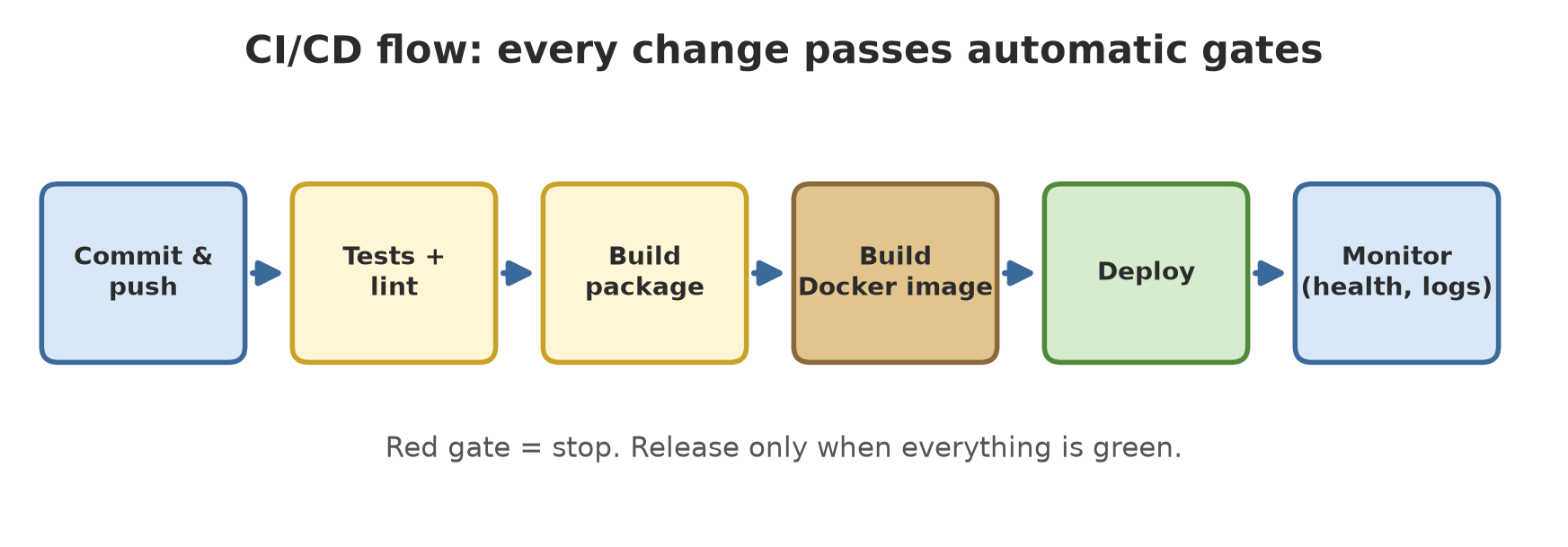
CI (Continuous Integration) means every code change is tested automatically. CD (Continuous Delivery/Deployment) means results that pass are automatically prepared or sent to a server. On GitHub, the flow is written in a YAML file in .github/workflows/. The skeleton below follows GitHub’s official example for testing Python with a version matrix (docs.github.com, read 2026-10-10):
name: CI

on:
  push:
  pull_request:

jobs:
  test:
    runs-on: ubuntu-latest
    strategy:
      matrix:
        python-version: ["3.12", "3.13", "3.14"]
    steps:
      - uses: actions/checkout@v6
      - name: Setup Python
        uses: actions/setup-python@v5
        with:
          python-version: ${{ matrix.python-version }}
      - name: Install dependencies
        run: |
          python -m pip install --upgrade pip
          pip install -r requirements.txt pytest httpx
      - name: Test with pytest
        run: pytest

  image:
    needs: test
    runs-on: ubuntu-latest
    steps:
      - uses: actions/checkout@v6
      - name: Build Docker image
        run: docker build -t field-monitor:${{ github.sha }} .
This file was not run when the book was built because it only runs on GitHub’s servers after you push code there, so no output is shown. The test job runs the tests on three Python versions; the image job only runs if test passes (needs: test), which is the “gate” in the picture above. We did not test its image-building step.
Releases, monitoring, and observability
A release should carry a version number (Chapter 45) and be marked with a Git tag (for example v0.1.0), so you know exactly which code runs on the server. Also prepare a rollback plan: if a new release misbehaves, deploy the previous tag again. Small, frequent releases are safer than giant, rare ones.
Observability is the ability to understand what is happening inside a system from the outside, usually through three sources: logs (a story per event), metrics (summary numbers), and traces (the journey of one request across many services). We built the first two. Traces need extra tools and are not covered.
Running Project A1: a real server, checked like a monitor
Without Docker, we can still demonstrate the most important thing: the application really runs as a server and answers a monitor. The following script starts uvicorn on a free port, waits for /health to answer, then calls another path and shuts the server down:
08_project_local_server.py
# Chapter 48 - Running project A1: start a real server (uvicorn) then check /health like a monitor would
import socket
import subprocess
import sys
import time
from pathlib import Path

import httpx

folder = Path(__file__).parent

with socket.socket() as s:                 # find a free port
    s.bind(("127.0.0.1", 0))
    port = s.getsockname()[1]

server = subprocess.Popen(
    [sys.executable, "-m", "uvicorn", "app.application:app", "--app-dir", str(folder),
     "--host", "127.0.0.1", "--port", str(port), "--log-level", "warning"],
    stdout=subprocess.DEVNULL, stderr=subprocess.DEVNULL,
)
address = f"http://127.0.0.1:{port}"
try:
    ready = False
    for _ in range(50):                    # wait until /health answers
        try:
            if httpx.get(address + "/health", timeout=1).status_code == 200:
                ready = True
                break
        except httpx.TransportError:
            time.sleep(0.2)
    print("server ready to answer /health:", ready)
    print("/health:", httpx.get(address + "/health").json())
    print("/summary:", httpx.get(address + "/summary", params={"count": 200}).json())
    print("/metrics:")
    print(httpx.get(address + "/metrics").text, end="")
finally:
    server.terminate()
    server.wait(timeout=10)
print("server stopped, exit code is not None:", server.returncode is not None)
server ready to answer /health: True
/health: {'status': 'ok', 'environment': 'development'}
/summary: {'tree_count': 200, 'value_per_plot': {'A': 177787270, 'B': 192120459, 'C': 130402814}}
/metrics:
# number of requests per path and status code
requests_total{path="/health",code="200"} 2
requests_total{path="/summary",code="200"} 1
server stopped, exit code is not None: True/health was called twice (once while waiting for the server to be ready, once when printed), so the metrics record 2. Inside Docker the flow is the same; only the server runs inside a container. Project A1 is now complete as files: Dockerfile, Compose, and the CI flow, plus an application proven to run.
Exercises
- Add a path
/versionto the application that returns the version number from the environment variableAPP_VERSION(default"0.1.0"). Test it withTestClient. - Make the log use
warningfor requests with a 404 code (hint: in the middleware, picklog.warningwhenstatus_code >= 400). - Rewrite the
imagejob in CI so it only runs when the branch name ismain(hint:if: github.ref == 'refs/heads/main'; not tested here). - Challenge: create a second metric that counts responses per status class (2xx, 4xx) and show it at
/metrics.
Chapter Summary
- A container packs the application and its environment; a Dockerfile is the image recipe; Compose runs several containers.
- Docker is not installed on the author’s computer, so the Dockerfile, Compose, and CI were not run; we only checked their syntax.
- CI/CD: every change is tested automatically, and only what passes is released.
- A health check, structured logs, and metrics are the monitoring kit; we built and ran all three.
- Configuration and secrets go through environment variables, not code.
- Releases carry version numbers, tags, and a rollback plan.
Next, in Chapter 49: security, protecting the application from leaked secrets, troublesome dependencies, and common attacks.